



JavaScript 教程
第1章 JavaScript 语言概况
1
.1 什么是 JavaScript
9
9
9
JavaScript 是一种基于对象(Object)和事件驱动(Event Driven)并具有安全性能的
脚本语言。
与HTML 超文本标记语言、Java 小程序一起实现在一个Web 页面中链接多个对
象,与Web 客户交互作用。
工作于客户端
1
.2 由来
JavaScript 语言的前身叫作Livescript。自从Sun 公司推出著名的Java 语言之后,
Netscape 公司引进了Sun 公司有关Java 的程序概念,将自己原有的Livescript 重新进行设
计,并改名为JavaScript。
1
.3 基本特点
9
脚本编写语言:像其它脚本语言一样,JavaScript 同样也是一种解释性语言,它提
供了一个易于开发过程。
9
9
9
基于对象的语言
简单性:简化的java 语言;变量类型采用弱类型。
安全性:JavaScript 是一种安全性语言,它不允许访问本地的硬盘,并不能将数
据存入到服务器上,不允许对网络文档进行修改和删除,只能通过浏览器实现信
息浏览或动态交互。
9
动态性:JavaScript 是动态的,采用以事件驱动的方式进行的。所谓事件驱动,
就是指在主页(Home Page)中执行了某种操作所产生的动作,就称为“事件”
(Event)。比如按下鼠标、移动窗口、选择菜单等都可以视为事件。当事件发生后,
可能会引起相应的事件响应。
9
跨平台性:JavaScript 是依赖于浏览器本身,与操作环境无关。
Created by YYM
Page 1 of 123


JavaScript 教程
1.4 JavaScript 和 Java 的区别
Java 是 SUN 公司推出的新一代面向对象的程序设计语言,特别适合于 Internet 应用程
序开发;而JavaScript 是Netscape 公司的产品,其目的是为了扩展Netscape Navigator 功能,
而开发的一种可以嵌入 Web 页面中的基于对象和事件驱动的解释性语言,它的前身是 Live
Script;而Java 的前身是Oak 语言。下面对两种语言间的异同作如下比较:
1
.4.1 基于对象和面向对象
Java 是一种真正的面向对象的语言,即使是开发简单的程序,必须设计对象。
JavaScript 是种脚本语言,它是一种基于对象(Object Based)和事件驱动(Event Driver)
的编程语言。因而它本身提供了非常丰富的内部对象供设计人员使用。
1
.4.2 执行过程不同
Java 的源代码在传递到客户端执行之前,必须经过编译,因而客户端上必须具有相应平
台上的仿真器或解释器,它可以通过编译器或解释器实现独立于某个特定的平台编译代码的
束缚。
JavaScript 是一种解释性编程语言,其源代码在发往客户端执行之前不需经过编译,而
是将文本格式的字符代码发送给客户端由浏览器解释执行。
1
.4.3 强变量和弱变量
Java 采用强类型变量检查,即所有变量在编译之前必须作声明。如:
Integer x;
String y;
x=1234;
x=4321;
其中X=1234 说明是一个整数,Y=4321 说明是一个字符串。
JavaScript 中变量声明,采用其弱类型。即变量在使用前不需作声明,而是解释器在运
行时检查其数据类型,如:
x=1234;
y="4321";
前者说明x 为其数值型变量,而后者说明y 为字符型变量。
1.4.4 嵌入方式不一样
在HTML 文档中,两种编程语言的标识不同,JavaScript 使用<Script>...</Script>来标识,
而Java 使用<applet>...</applet>来标识。
Created by YYM
Page 2 of 123


JavaScript 教程
1.5 JavaScript 程序运行环境
Netscape Navigator x.0 或Internet Explorer x.0。
用于编辑 HTML 文档的字符编辑器(WS、WPS、Notepad、WordPad 等)或 HTML 文档
编辑器。
1
.6 编写第一个 JavaScript 程序
1.6.1 JS 是区分大小写的
函数名称为"myfunvtion"并不和"myFunction"相同,同样一个叫做"myVar"的变量和叫做
"myvar"的也不一样。
就因为JS 区分大小写-所以当你建立或调用变量,对象和函数的时候仔细看看你的大写。
空白
1.6.2 空格的使用
JS 会忽略多余的空白。你可以在你的脚本里加一些空白来增加可读性。下面两行效果
是一样的:
name="Hege"
name = "Hege"
1.6.3 注释
9
你可以使用双斜杠来添加你脚本的注释:
/this is a comment
/
document.write("Hello World!")
9
或者使用/*和*/(这个可以建立多行的注释区):
/
* This is a comment
block. It contains
several lines */
document.write("Hello World!")
1.6.4 第一个JavaScript 程序
下面我们通过一个例子,编写第一个 JavaScript 程序。通过它可说明 JavaScript 的脚本
是怎样被嵌入到HTML 文档中的。
___________________________________________________________________
<
<
html>
head>
Created by YYM
Page 3 of 123


JavaScript 教程
<
Script Language ="JavaScript">
/ JavaScript Appears here.
alert("这是第一个JavaScript 例子!");
/
<
<
<
/Script>
/Head>
/Html>
_
________________________________________________________________
第2章 JavaScript 基本数据结构
2
.1 怎样使用 JS
2.1.1 语法
JavaScript 的脚本包括在HTML 中,它成为HTML 文档的一部分。可以直接将JavaScript
脚本加入文档:
<
Script Language ="JavaScript">
JavaScript 语言代码;
JavaScript 语言代码;
.
...
<
/Script>
z
<Script>...</Script>指明JavaScript 脚本源代码将放入其间。
z 通过属性Language ="JavaScript"说明标识中是使用的何种语言
z 分号作为语句结束符是可选的,当在一行上放置多于一条的表达式时才必须使用分
号分隔。
2.1.2 怎样处理旧的浏览器
不支持JS 的浏览器会把脚本内容显示在页面上,为了防止发生这样的情况,我们使用HTML
注释标签:
<
script type="text/javascript">
!--
<
document.write("Hello World!")
/-->
/script>
/
<
注释尾部的(//)符号是JS 的注释标记,这是为了避免JS 会编译这行。
Created by YYM
Page 4 of 123


JavaScript 教程
2.2 JS 在哪使用
2.2.1 在body 区域
在body 区域中的JS 在页面加载时会被执行
2.2.2 在head 区域
在head 区域中的JS 当被唤醒时才会被执行.
加载时触发:
<
<
<
html>
head>
script>
alert("run when load head");
document.write("head JavaScript code output");
</script>
</head>
<body>
</body>
</html>
当用户触发一个事件后再执行一个脚本。
<
<
<
html>
head>
script type="text/javascript">
function message()
{
alert("This alert box was called with the onload event")
}
<
<
<
<
<
/script>
/head>
body onload="message()">
/body>
/html>
在body 区域中的脚本: 当页面加载到body 区域就执行脚本。当你放置一个body 区域的脚
本它会产生页面内容。
Created by YYM
Page 5 of 123


JavaScript 教程
2
.3 使用外部 JS
多个页面共同使用的JS,可以放入一个外部的文件中,以.js 为后缀保存文件。
外部脚本不用包含<script>标签
要使用外部的脚本,就得在<script>标签中通过"src"属性指向.js 文件:
<
<
<
<
<
<
<
html>
head>
/head>
body>
script src="myjscode.js">
/script>
p>
The actual script is in an external script file called "xxx.js".
<
<
<
/p>
/body>
/html>
myjscode.js 的内容:
document.write("My JavaScript code output");
注意: 记住要正确书写脚本并放置在合理的位置。
第3章 基本数据类型
JavaScript 脚本语言有它自身的基本数据类型、表达式和算术运算符以及程序的基本框
架结构。
3
.1 基本数据类型
四种基本的数据类型:数值(整数和实数)、字符串型(用“”号或‘’括起来的字符或
数值)、布尔型(使True 或False 表示)和空值。
在JavaScript 的基本类型中的数据可以是常量,也可以变量。
JavaScript 采用弱类型的形式,在使用或赋值时确定其数据的类型的。
3
.2 变量
变量的主要作用是存取数据、提供存放信息的容器。
z 变量的命名
A、必须是一个有效的变量,即变量以字母开头,除下划线(-)作为连字符外,变量名称
不能有空格、(+)、(-)、(,)或其它符号。
B、不能使用JavaScript 中的关键字作为变量。
z 变量的类型
Created by YYM
Page 6 of 123


JavaScript 教程
在JavaScript 中,变量可以用命令Va r 作声明:
var mytest;
Var mytest=”This is a book”
在JavaScript 中,变量以可以不作声明,而在使用时再根据数据的类型来确其变量的类型。
如:
x=100
y="125"
xy= True
cost=19.5 等。
其中x 整数,y 为字符串,xy 为布尔型,cost 为实型。
z 变量的声明及其作用域
在JavaScript 中同样有全局变量和局部变量。全局变量是定义在所有函数体之外,其作用范
围是整个函数;而局部变量是定义在函数体之内,只对其该函数是可见的,而对其它函数则
是不可见的。
<
<
<
html>
body>
script type="text/javascript">
var name = "Hege"
document.write(name)
document.write("<h1>"+name+"</h1>")
<
/script>
<
<
<
<
p>This example declares a variable, assigns a value to it, and then displays the variable.</p>
p>Then the variable is displayed one more time, only this time as a heading.</p>
/body>
/html>
第4章 表达式和运算符
4
.1 表达式
表达式是变量、常量、布尔及运算符的集合,因此表达式可以分为算术表述式、字串表达
式、赋值表达式以及布尔表达式等。
4
.2 运算符
运算符完成操作的一系列符号,在JavaScript 中有算术运算符,如+、-、*、/等;有比
较运算符如!=、==等; 有逻辑布尔运算符如!(取反)、|、||; 有字串运算如+ 、 +=等。
在JavaScript 主要有双目运算符和单目运算符。其双目运算符由下列组成:
Created by YYM
Page 7 of 123


JavaScript 教程
操作数1 运算符 操作数2
即由两个操作数和一个运算符组成。如50+40、"This"+"that"等。单目运算符,只需一
个操作数,其运算符可在前或后。
(
1)算术运算符
JavaScript 中的算术运算符有单目运算符和双目运算符。
双目运算符:
(加) 、-(减)、 *(乘)、 /(除)、 %(取模) 、|(按位或)、&(按位与)、<<(左移)、
>(右移)、 >>>(右移,零填充)。
单目运算符:
(取反)、~(取补)、++(递加1)、--(递减1)。
+
>
-
Operator Description
Example
Result
+
Addition
加
x=2
y=2
x+y
4
-
Subtraction
减
x=5
y=2
x-y
3
*
Multiplication
乘
x=5
y=4
x*y
20
/
Division
除
15/5
5/2
3
2.5
%
Modulus (division
remainder)
余数
5%2
10%8
10%2
1
2
0
+
+
Increment
递增
x=5
x++
x=6
-
-
Decrement
递减
x=5
x--
x=4
(
2)比较运算符
比较运算符它的基本操作过程是,首先对它的操作数进行比较,尔后再返回一个 true
或False 值,有8个比较运算符:
(小于)、>(大于)、<=(小于等于)、>=(大于等于)、==(等于)、!=(不等于)。
<
Operator Description
Example
5==8 returns false
=
=
is equal to
等于
===
is equal to (checks for both
value and type)
x=5
y="5"
等于(检查值和类型)*全吻合
才算相等
x==y returns true
x===y returns false
Created by YYM
Page 8 of 123



JavaScript 教程
!
=
is not equal
不等于
5!=8 returns true
5>8 returns false
5<8 returns true
>
<
is greater than
大于
is less than
小于
>
=
is greater than or equal to
大于等于
5>=8 returns false
5<=8 returns true
<=
is less than or equal to
小于等于
(
3)布尔逻辑运算符
在JavaScript 中增加了几个布尔逻辑运算符:
!(取反)、&=(与之后赋值)、 &(逻辑与)、 |=(或之后赋值)、 |(逻辑或)、 ^=(异或
之后赋值)、 ^(逻辑异或)、 ?:(三目操作符)、||(或)、==(等于)、|=(不等于)。
其中三目操作符主要格式如下:
操作数?结果1:结果2
例子
greeting=(visitor=="PRES")?"Dear President ":"Dear "
若操作数的结果为真,则表述式的结果为结果1,否则为结果2。
Operator Description
Example
&
&
and
与
x=6
y=3
(x < 10 && y > 1)
returns true
||
or
或
x=6
y=3
(x==5 || y==5) returns
false
!
not
非
x=6
y=3
!
(x==y) returns true
(
4)赋值运算符
Operator Example
Is The Same As
x=y
=
x=y
+
=
x+=y
x-=y
x=x+y
-=
x=x-y
Created by YYM
Page 9 of 123



JavaScript 教程
*
=
x*=y
x/=y
x=x*y
x=x/y
/=
%=
x%=y
x=x%y
4.2.1 范例
下面是一个跑马灯效果的JavaScript 文档。
Test2_1.html
<
<
<
html>
head>
script Language="JavaScript">
var msg="这是一个跑马灯效果的JavaScript 文档";
var interval = 100;
var spacelen = 120;
var space10=" ";
var seq=0;
function Scroll() {
len = msg.length;
window.status = msg.substring(0, seq+1);
seq++;
if ( seq >= len ) {
seq = spacelen;
window.setTimeout("Scroll2();", interval );
}
else
window.setTimeout("Scroll();", interval );
}
function Scroll2() {
var out="";
for (i=1; i<=spacelen/space10.length; i++) out +=
space10;
out = out + msg;
len=out.length;
window.status=out.substring(seq, len);
seq++;
if ( seq >= len ) { seq = 0; };
window.setTimeout("Scroll2();", interval );
}
Scroll();
<
/script>
body>
<
Created by YYM
Page 10 of 123



JavaScript 教程
<
<
/body>
/html>
4.3 JavaScript 程序构成
4.3.1 if 条件语句
基本格式
if(表述式)
语句段1;
.
.....
else
语句段2;
.
....
它将零和非零的数分别转化成false 和true。
若if 后的语句有多行,则必须使用花括号将其括起来。
例 1
<
html>
body>
<
<
script type="text/javascript">
var d = new Date()
var time = d.getHours()
if (time < 10)
{
document.write("<b>Good morning</b>")
}
<
/script>
<
p>
This example demonstrates the If statement.
<
/p>
<
p>
If the time on your browser is less than 10,
you will get a "Good morning" greeting.
<
/p>
<
<
/body>
/html>
例2:
Created by YYM
Page 11 of 123


JavaScript 教程
<
html>
body>
<
<
script type="text/javascript">
var d = new Date()
var time = d.getHours()
if (time < 10)
{
document.write("<b>Good morning</b>")
}
else
{
document.write("<b>Good day</b>")
}
<
/script>
<
p>
This example demonstrates the If...Else statement.
<
/p>
<
p>
If the time on your browser is less than 10,
you will get a "Good morning" greeting.
Otherwise you will get a "Good day" greeting.
<
/p>
<
<
/body>
/html>
例3:
<
html>
body>
<
<
script type="text/javascript">
var d = new Date()
var time = d.getHours()
if (time<10)
{
document.write("<b>Good morning</b>")
}
else if (time>=10 && time<16)
{
document.write("<b>Good day</b>")
Created by YYM
Page 12 of 123


JavaScript 教程
}
else
{
document.write("<b>Hello World!</b>")
}
<
/script>
<
p>
This example demonstrates the if..else if...else statement.
<
/p>
<
<
/body>
/html>
4.3.2 Switch 语句
语法
switch(n)
{
case 1:
execute code block 1
break
case 2:
execute code block 2
break
default:
code to be executed if n is
different from case 1 and 2
}
它是这样工作的:首先,有唯一的一个表达式 n (大多数为一个变量),它是被赋过值的。 接
下来表达式将与每个 case(事件)进行比较。如果吻合就执行该事件内的代码块。使用 break
来防止代码执行后自动转向下一个事件。
例:
<
<
<
html>
body>
script type="text/javascript">
var d = new Date()
theDay=d.getDay()
switch (theDay)
{
case 5:
document.write("<b>Finally Friday</b>")
break
Created by YYM
Page 13 of 123


JavaScript 教程
case 6:
document.write("<b>Super Saturday</b>")
break
case 0:
document.write("<b>Sleepy Sunday</b>")
break
default:
document.write("<b>I'm really looking forward to this weekend!</b>")
}
<
/script>
<
p>This JavaScript will generate a different greeting based on what day it is. Note that Sunday=0,
Monday=1, Tuesday=2, etc.</p>
<
<
/body>
/html>
4.3.3 循环
¾
¾
在JS 中的循环用来重复执行指定次数的代码或当条件为真时重复执行。
当你写代码的时候会经常要让一段代码一行行的重复执行,要完成这样的任务不需要你
添加重复的代码,我们只要使用循环就行。
在JS 中有两种循环:
4
.3.3.1for -n 次数循环
¾
使用for 循环一般是当你事先知道脚本应该执行几次。
语法
for (var=startvalue;var<=endvalue;var=var+increment)
{
code to be executed
}
例:
<
html>
body>
<
<
script type="text/javascript">
for (i = 0; i <= 5; i++)
{
document.write("The number is " + i)
document.write("<br />")
Created by YYM
Page 14 of 123


JavaScript 教程
}
<
/script>
<
<
<
<
p>Explanation:</p>
p>This for loop starts with i=0.</p>
p>As long as <b>i</b> is less than, or equal to 5, the loop will continue to run.</p>
p><b>i</b> will increase by 1 each time the loop runs.</p>
<
<
/body>
/html>
例2:
<
html>
body>
<
<
script type="text/javascript">
for (i = 1; i <= 6; i++)
{
document.write("<h" + i + ">This is header " + i)
document.write("</h" + i + ">")
}
<
/script>
<
<
/body>
/html>
4
.3.3.2With 语句
with(object){
statement
}
例:
with( document){
write("<a href='index.htm'>");
write("goto");
write("</a>");
}
Created by YYM
Page 15 of 123


JavaScript 教程
4
.3.3.3while - 条件循环
z 当条件持续为真的时候循环执行相同的代码, 这就是while 循环的用途
语法
while (var<=endvalue)
{
code to be executed
}
例:
<
<
html>
body>
<
script type="text/javascript">
i = 0
while (i <= 5)
{
document.write("The number is " + i)
document.write("<br>")
i++
}
<
<
<
<
<
/script>
p>Explanation:</p>
p><b>i</b> equal to 0.</p>
p>While <b>i</b> is less than , or equal to, 5, the loop will continue to run.</p>
p><b>i</b> will increase by 1 each time the loop runs.</p>
<
<
/body>
/html>
4
.3.3.4do...while 循环
z
do...whlie 是另外一种形式的while 循环。条件判断在执行之后
语法
do
{
code to be executed
}
while (var<=endvalue)
Created by YYM
Page 16 of 123


JavaScript 教程
例:
<
<
html>
body>
<
script type="text/javascript">
i = 0
do
{
document.write("The number is " + i)
document.write("<br>")
i++
}
while (i <= 5)
<
<
<
<
<
<
/script>
p>Explanation:</p>
p><b>i</b> equal to 0.</p>
p>The loop will run</p>
p><b>i</b> will increase by 1 each time the loop runs.</p>
p>While <b>i</b> is less than , or equal to, 5, the loop will continue to run.</p>
<
<
/body>
/html>
4.3.4 JavaScript Break 和 Continue
break 和continue 是两个用在内部循环的特殊语句。
4
.3.4.1Break
z
break 命令会离开当前的循环并接着开始执行下面的循环
例子
<
<
<
html>
body>
script type="text/javascript">
var i=0
for (i=0;i<=10;i++)
Created by YYM
Page 17 of 123


JavaScript 教程
{
if (i==3){break}
document.write("The number is " + i)
document.write("<br />")
}
<
<
<
<
/script>
p>Explanation: The loop will break when i=3.</p>
/body>
/html>
Continue
4
.3.4.2continue 命令会跳出当前的循环并继续下面的循环
例:
<
<
<
html>
body>
script type="text/javascript">
var i=0
for (i=0;i<=10;i++)
{
if (i==3){continue}
document.write("The number is " + i)
document.write("<br />")
}
<
/script>
<
p>Explanation: The loop will break the current loop and continue with the next value when
i=3.</p>
<
<
/body>
/html>
4.3.5 JavaScript For...In Statement
z
for...in 声明通过一组元素或对象属性进行循环
z 在for...in 循环躯干部分里的代码针对每个元素/属性执行一次
语法
Created by YYM
Page 18 of 123


JavaScript 教程
for (variable in object)
{
code to be executed
}
z 变量可以是数组或是对象的属性
例
<
<
<
html>
body>
script type="text/javascript">
var x
var mycars = new Array()
mycars[0] = "Saab"
mycars[1] = "Volvo"
mycars[2] = "BMW"
for (x in mycars)
{
document.write(mycars[x] + "<br />")
}
<
<
<
/script>
/body>
/html>
4
.4 函数
函数为一些相对独立的功能代码块,可以被多次调用。
使各部分充分独立,任务单一,程序清晰,易懂、易读、易维护。
函数内的代码只在被事件触发或是被调用的时候才被执行
函数在页面的开始部分定义,在<head>区域。
4.4.1 JavaScript 函数定义
Function 函数名 (参数,变元){
函数体;.
Return 表达式;
}
说明:
当调用函数时,所用变量或字面量均可作为变元传递。
函数由关键字Function 定义。
Created by YYM
Page 19 of 123


JavaScript 教程
函数名:定义自己函数的名字。
参数表,是传递给函数使用或操作的值,其值可以是常量 ,变量或其它表达式。
通过指定函数名(实参)来调用一个函数。
必须使用Return 将值返回。
函数名对大小写是敏感的。
4.4.2 不带参函数
<
<
html>
head>
<
script type="text/javascript">
function myfunction()
{
alert("HELLO")
}
<
/script>
<
/head>
body>
<
<
<
form>
input type="button"
onclick="myfunction()"
value="Call function">
<
/form>
<
p>By pressing the button, a function will be called. The function will alert a message.</p>
<
<
/body>
/html>
4.4.3 带参函数
<
<
<
html>
head>
script type="text/javascript">
function myfunction(txt)
{
alert(txt)
}
<
/script>
Created by YYM
Page 20 of 123


JavaScript 教程
<
/head>
<
<
<
body>
form>
input type="button"
onclick="myfunction('Good Morning!')"
value="In the Morning">
<input type="button"
onclick="myfunction('Good Evening!')"
value="In the Evening">
<
/form>
<
p>
When you click on one of the buttons, a function will be called. The function will alert
the argument that is passed to it.
<
/p>
<
<
/body>
/html>
4.4.4 返回值的函数
<
<
html>
head>
<
script type="text/javascript">
function myFunction()
{
return ("Hello, have a nice day!")
}
<
/script>
<
/head>
body>
<
<
script type="text/javascript">
document.write(myFunction())
<
<
<
/script>
p>The script in the body section calls a function.</p>
p>The function returns a text.</p>
Created by YYM
Page 21 of 123


JavaScript 教程
<
<
/body>
/html>
4.4.5 带参并有返回值的函数
<
<
<
html>
head>
script type="text/javascript">
function product(a,b)
{
return a*b
}
<
<
/script>
/head>
<body>
<
script type="text/javascript">
document.write(product(4,3))
<
<
<
<
<
/script>
p>The script in the body section calls a function with two parameters (4 and 3).</p>
p>The function will return the product of these two parameters.</p>
/body>
/html>
4.4.6 函数中的形式参数:
在函数的定义中,我们看到函数名后有参数表,这些参数变量可能是一个或几个。那么
怎样才能确定参数变量的个数呢?在JavaScript 中可通过arguments .Length 来检查参数的个
数。
例:
<
<
html>
script>
function function_Name(exp1,exp2,exp3,exp4)
{
Number = function_Name.arguments.length;
if (Number==1)
document.write(exp1);
if (Number>1)
Created by YYM
Page 22 of 123


JavaScript 教程
document.write(exp2);
if (Number>2)
document.write(exp3);
if(Number>3)
document.write(exp4);
}
<
<
<
<
<
/script>
body>
input type="button" value="click me" onclick="function_Name('abc')">
/body>
/html>
4
.5 事件驱动
JavaScript 事件驱动中的事件是通过鼠标或热键的动作引发的。它主要有以下几个事件:
4.5.1 单击事件onClick
当用户单击鼠标按钮时,产生 onClick 事件。同时 onClick 指定的事件处理程序或代码
将被调用执行。通常在下列基本对象中产生:
button(按钮对象)
checkbox(复选框)或(检查列表框)
radio (单选钮)
reset buttons(重要按钮)
submit buttons(提交按钮)
例:可通过下列按钮激活change()文件:
<
<
<
Form>
Input type="button" Value=“ ” onClick="change()">
/Form>
在onClick 等号后,可以使用自己编写的函数作为事件处理程序,也可以使用JavaScript
中内部的函数。还可以直接使用JavaScript 的代码等。例:
<
Input type="button" value=" " onclick=alert("这是一个例子");
Created by YYM
Page 23 of 123


JavaScript 教程
4.5.2 onChange 改变事件
当利用text 或texturea 元素输入字符值改变时发该事件,同时当在select 表格项中一个
选项状态改变后也会引发该事件。
例: <Form>
<
<
Input type="text" name="Test" value="Test" onCharge="check(this.value)">
/Form>
4.5.3 选中事件onSelect
当Text 或Textarea 对象中的文字被加亮后,引发该事件。
<
<
<
Form>
Input type="text" name="Test" value="Test" onSelect="check(this.value)">
/Form>
4.5.4 获得焦点事件onFocus
当用户单击Text 或textarea 以及select 对象时,产生该事件。此时该对象成为前台对象。
4.5.5 失去焦点onBlur
当text 对象或textarea 对象以及select 对象不再拥有焦点、而退到后台时,引发该文件,
他与onFocas 事件是一个对应的关系。
4.5.6 载入文件onLoad
Created by YYM
Page 24 of 123


JavaScript 教程
当文档载入时,产生该事件。onLoad 一个作用就是在首次载入一个文档时检测 cookie
的值,并用一个变量为其赋值,使它可以被源代码使用。
4.5.7 卸载文件onUnload
当Web 页面退出时引发onUnload 事件,并可更新Cookie 的状态。
第5章 JS 的内置对象
参考:
http://www.w3schools.com/jsref/
z
JavaScript 可以让你自定义对象和变量类型。
z 对象只是特殊类型的数据。对象有属性和方法
z 属性反映对象的状态信息
例
<
script type="text/javascript">
var txt="Hello World!"
document.write(txt.length)
<
/script>
对象的方法可以执行行为。
script type="text/javascript">
<
var str="Hello world!"
document.write(str.toUpperCase())
<
/script>
5.1 JS 字符串对象
z 字符串对象被用来操作存储的文字片段
1
. 下面的例子使用了长度属性来找出字符串的长度:
var txt="Hello world!"
document.write(txt.length)
2
. 样式化字符串
<
html>
body>
<
<
script type="text/javascript">
Created by YYM
Page 25 of 123



JavaScript 教程
var txt="Hello World!"
document.write("<p>Link: " + txt.link("#abc") + "</p>")
document.write("<p>Big: " + txt.big() + "</p>")
document.write("<p>Small: " + txt.small() + "</p>")
document.write("<p>Lowercase: " + txt.toLowerCase() + "</p>")
document.write("<p>Uppercase: " + txt.toUpperCase() + "</p>")
document.write("<p>Link: " + txt.link("http://www.w3schools.com") + "</p>")
document.write("<p>anchor: " + txt.anchor("abc") + "</p>")
<
/script>
<
<
/body>
/html>
3
. 怎样使用indexOf()方法来返回第一次出现一指定字符串的位置数。
<
html>
body>
<
<
script type="text/javascript">
var str="Hello world!"
document.write(str.indexOf("Hello") + "<br />")
document.write(str.indexOf("World") + "<br />")
document.write(str.indexOf("world"))
<
/script>
<
<
/body>
/html>
4
. 怎样使用 match()方法寻找一指定的字符串值如果找到的话就返回其值(没的有话就返
回NULL)
<
html>
body>
<
<
script type="text/javascript">
var str="Hello world!"
document.write(str.match("world") + "<br />")
document.write(str.match("World") + "<br />")
Created by YYM
Page 26 of 123


JavaScript 教程
document.write(str.match("worlld") + "<br />")
document.write(str.match("world!"))
<
/script>
<
<
/body>
/html>
5
. 怎样使用replace()方法来用一些其他字符替换字符串中的一些字符
<
html>
body>
<
<
script type="text/javascript">
var str="Visit Microsoft!"
document.write(str.replace("Microsoft","W3Schools"))
<
<
<
/script>
/body>
/html>
参见页下附表
第6章 DOM
6
.1 简介
z DOM 是Document Object Model 的缩写,即文档对象模型
z DOM 被分为不同的部分(核心,XML 和HTML)和不同的版本(DOM 1/2/3)
Core DOM - 定义了任意结构文档的标准对象集合
XML DOM -定义了针对XML 文档的标准对象集合
HTML DOM - 定义了针对HTML 文档的标准对象集合
6
.1.1 什么是HTML DOM
z HTML DOM 是针对HTML 的文档对象模型
z HTML DOM 是与语言和平台无关,它可以被任何的程序语言所使用
JAVA,JS,VBS)
z HTML DOM 定义了针对 HTML 的一套标准对象 ,和一个标准的访问并操
作HTML 文档的方法
Created by YYM
Page 27 of 123


JavaScript 教程
z HTML DOM 以树型元素结构来查看HTML 文档。所有元素连同他们的属性
和文字都可以被DOM 树来访问(获取)和操作
z HTML DOM 是一个W3C 的标准
例:
<
<
<
html>
head>
script type="text/javascript">
function ChangeColor()
{
document.body.bgColor="yellow"
}
<
<
/script>
/head>
<
body onclick="ChangeColor()">
Click on this document!
<
/body>
</html>
注:
1
2
3
. document 对象是所有HTML 文档内其他对象的父类
. document.body 对象代表了HTML 文档的<body>元素
. document 对象是body 对象的父类,也可以说body 对象是document 对
象的子类
4. HTML 的document 对象可以有属性(也可以叫为attributes[属性])
5. document.body.bgColor 属性定义了body 对象的背景颜色
6. HTML 文 档 对 象 可 以 对 事 件 做 出 反 应 : 在 上 面 例 子 中 的
onclick="ChangeColor()"属性定义了当用户点击文档后发生(相应的)举
动
Created by YYM
Page 28 of 123


JavaScript 教程
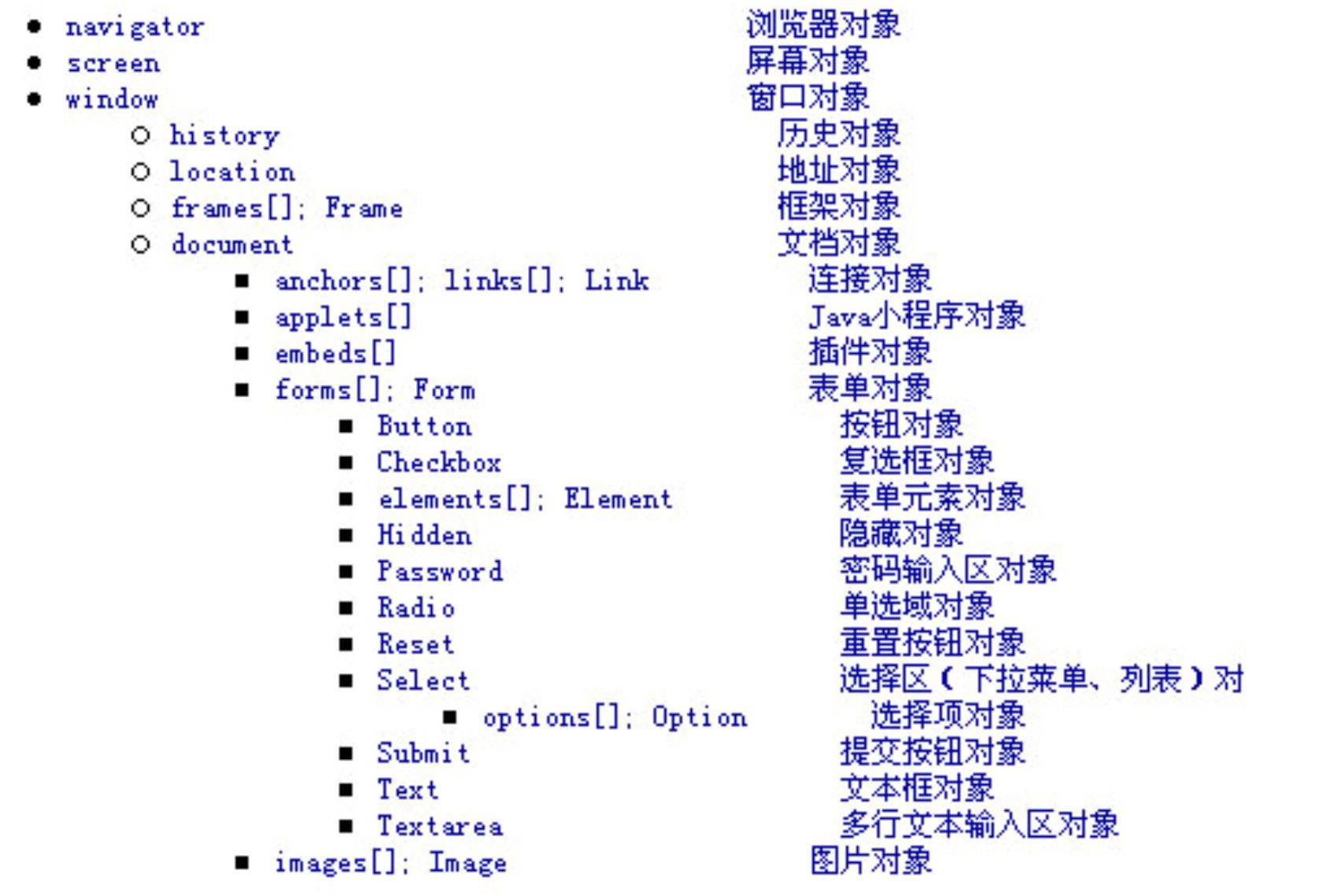
6.1.2 HTML DOM 框架
6
.2 浏览器对象
z navigator 反映了当前浏览器的资料
6.2.1 属性
z appCodeName 返回浏览器代号,一般返回 ‘Mozilla’。
z appName 返回浏览器名。IE 返回 ‘Microsoft Internet Explorer’,NN 返回
Netscape’。
‘
z appVersion 返回浏览器版本。
z platform 返回浏览器的操作平台。
z userAgent 返回以上全部信息。
方法:
z javaEnabled() 当前浏览器是否允许 Java。
Created by YYM
Page 29 of 123


JavaScript 教程
例1:
<
<
<
html>
body>
script type="text/javascript">
var browser=navigator.appName
var b_version=navigator.appVersion
var version=parseFloat(b_version)
document.write("Browser name: "+ browser)
document.write("<br />")
document.write("Browser version: "+ version)
<
<
<
/script>
/body>
/html>
例2:
<
<
<
html>
body>
script type="text/javascript">
document.write("<p>Browser: ")
document.write(navigator.appName + "</p>")
document.write("<p>Browserversion: ")
document.write(navigator.appVersion + "</p>")
document.write("<p>Code: ")
document.write(navigator.appCodeName + "</p>")
document.write("<p>Platform: ")
document.write(navigator.platform + "</p>")
document.write("<p>Cookies enabled: ")
document.write(navigator.cookieEnabled + "</p>")
document.write("<p>Browser's user agent header: ")
document.write(navigator.userAgent + "</p>")
<
<
<
/script>
/body>
/html>
例3:
<
<
html>
body>
<
script type="text/javascript">
var x = navigator
document.write("CodeName=" + x.appCodeName)
Created by YYM
Page 30 of 123


JavaScript 教程
document.write("<br />")
document.write("MinorVersion=" + x.appMinorVersion)
document.write("<br />")
document.write("Name=" + x.appName)
document.write("<br />")
document.write("Version=" + x.appVersion)
document.write("<br />")
document.write("CookieEnabled=" + x.cookieEnabled)
document.write("<br />")
document.write("CPUClass=" + x.cpuClass)
document.write("<br />")
document.write("OnLine=" + x.onLine)
document.write("<br />")
document.write("Platform=" + x.platform)
document.write("<br />")
document.write("UA=" + x.userAgent)
document.write("<br />")
document.write("BrowserLanguage=" + x.browserLanguage)
document.write("<br />")
document.write("SystemLanguage=" + x.systemLanguage)
document.write("<br />")
document.write("UserLanguage=" + x.userLanguage)
<
/script>
<
<
/body>
/html>
例4:
<
<
<
html>
head>
script type="text/javascript">
function detectBrowser()
{
var browser=navigator.appName
var b_version=navigator.appVersion
var version=parseFloat(b_version)
if ((browser=="Netscape"||browser=="Microsoft Internet Explorer") &&
(version>=4))
{
alert("Your browser is good enough!")}
else
{
alert("It's time to upgrade your browser!")}
}
<
<
/script>
/head>
Created by YYM
Page 31 of 123


JavaScript 教程
<
<
body onload="detectBrowser()">
/body>
<
/html>
6
.3 屏幕对象
z screen 反映了当前用户的屏幕设置,只有属性没有方法(注意是屏幕设置,
而不是浏览器)
6.3.1 属性
z width 屏幕的宽度(像素数)。
z height 屏幕的高度。
z availWidth 屏幕的可用宽度(除去了一些不自动隐藏的类似任务栏的东西所
占用的宽度)。
z availHeight 返回屏幕的可用高度。
z colorDepth 返回当前颜色设置所用的位数 - 1:黑白;8:256 色;16:增强
色;24/32:真彩色
例:
<
<
<
html>
body>
script type="text/javascript">
document.write("<p>Available Width: ")
document.write(screen.availWidth + "</p>")
<
<
/script>
/body>
<
/html>
6
.4 窗口对象
z window 是DOM 最顶层对象,描述一个浏览器窗口。
z A Window object is created automatically with every instance of a <body> or
<
frame> tag.
z 引用它的属性和方法时,不需用“window.xxx” ,而直接使用“xxx”。
z navigator 与screen 对象与window 对象是平级的,其余所有对象都是这个对
象的属性,或者是属性的属性。例如,调用一个form,可以写成:
window.document.formName 或
document.formName
Created by YYM
Page 32 of 123


JavaScript 教程
6.4.1 属性
¾
name 窗口的名称,由打开它的连接(<a target=“...”>)或框架页(<frame
name=“...”>)或某调用的 open() 方法决定。
status “状态栏”所显示的内容。
opener 打开本窗口的窗口对象。
self 窗口本身,如:
¾
¾
¾
<
a href="javascript:self.close()">关闭窗口</a>。
¾
¾
¾
¾
¾
¾
parent 窗口所属的框架页对象。
top 占据整个浏览器窗口的最顶端的框架页对象。
history 历史对象
location 地址对象
document 文档对象
event 对象
event 代表事件的状态,例如事件发生的元素、鼠标的位置等等,event 对象
只在事件过程中才有效。
尽管所有事件属性都可通过所有的 event 对象访问,但是在某些事件中某些
属性可能无意义。
<
BODY onmousemove="window.status = 'X=' + window.event.x + ' Y=' +
window.event.y">
注:当属性名拼写错误后,浏览器将其视为新属性,可由javascript 读取或设置。
(此特写不利于检查拼写错误)
6.4.2 方法
6
.4.2.1打开窗口
z open() 打开一个窗口。
语法:
open(<URL 字符串>, <窗口名称字符串>, <参数字符串>);
1
、<URL 字符串>:打开页面URL
2、<窗口名称字符串>:窗口名称(window.name),可使用‘_top’、‘_blank’
等内建名称。
3
、<参数字符串>:窗口样貌。如打开普通窗口则留空。
例:打开一个 400 x 100 的窗口:
•
open('some.html','_blank','width=400,height=100,menubar=no')
z open() 方法返回打开的窗口对象,可以通过这个对象控制窗口。
z 参数说明:
1
2
3
4
. 是否显示工具栏:toolbar[=yes|no]|[=1|0]
. 是否显示地址栏:location[=yes|no]|[=1|0]
. 是否显示前进、后退、刷新按钮:directories[=yes|no]|[=1|0]
. 是否显示状态栏:status[=yes|no]|[=1|0]
Created by YYM
Page 33 of 123


JavaScript 教程
5
6
7
8
. 是否显示菜单栏:menubar[=yes|no]|[=1|0]
. 是否显示滚动条:scrollbars[=yes|no]|[=1|0]
. 用户是否可以改变窗口的大小:resizable[=yes|no]|[=1|0]
. 是 否 在 新 窗 口 中 保 留 浏 览 器 的 浏 览 历 史 纪 录 :
copyhistory[=yes|no]|[=1|0]
9
1
1
1
. 窗口的宽度 (单位为像素):width=pixels
0. 窗口的高度 (单位为像素):height=pixels
1. 顶部离屏幕顶部的像素数: top=pixels
2. 左端像素数: left=pixels
例1:
<
<
<
html>
head>
script type="text/javascript">
var subw;
function open_win()
{
subw=window.open("openertest.html","abc","toolbar=yes,
location=yes,
resizable=no,
directories=no,
status=no,
menubar=yes,
scrollbars=yes,
copyhistory=yes, width=400, height=400")
}
function chSubWindow(){
subw.document.body.bgColor="yellow"
}
<
<
<
<
<
<
<
/script>
/head>
body>
form>
input type="button" value="Open Window" onclick="open_win()">
br>
a href="javascript:void(null)" onclick=" chSubWindow()"> Change Sub Window's
color </a>
<
<
<
/form>
/body>
/html>
例2:openertest.html
<
<
<
html>
head>
script type="text/javascript">
function open_win()
{
window.open("http://www.microsoft.com/")
window.open("http://www.w3schools.com/")
}
Created by YYM
Page 34 of 123


JavaScript 教程
function chOpener(){
opener.document.body.bgColor="yellow"
}
<
<
/script>
/head>
<
<
<
<
body>
form>
input type=button value="Open Windows" onclick="open_win()"><br>
a href="javascript:void(null)" onclick=" chOpener ()"> Change Open Window’s
color </a>
<
<
/form>
/body>
<
/html>
z alert() alert(<字符串>);弹出一个只包含“确定”按钮的对话框,显示<字符
串>的内容,整个文档的读取、Script 的运行都会暂停,直到用户按下“确
定”。
z confirm() confirm(<字符串>);弹出一个包含“确定”和“取消”按钮的对话
框,显示<字符串>的内容。按下“确定”,则返回 true 值,如果按下“取
消”,则返回 false 值。
z prompt() 用法:prompt(<字符串>[, <初始值>]);弹出一个包含“确认”“取
消”和一个文本框的对话框,显示<字符串>的内容,要求用户在文本框输
入一些数据。如果用户按下“确认”,则返回文本框里已有的内容,如果用
户按下“取消”,则返回 null 值。如果指定<初始值>,则文本框里会有默
认值。
6
.4.2.2警示框
z 如果你想保证让用户得到信息就使用警示框
z 当警示框弹出,用户必须按“OK”来继续
语法:
alert("sometext")
例:
<
<
<
html>
head>
script type="text/javascript">
function disp_alert()
{
alert("Hello again! This is how we" + '\n' + "add line breaks to an alert box!")
}
<
<
/script>
/head>
Created by YYM
Page 35 of 123


JavaScript 教程
<
<
<
<
<
<
body>
form>
input type="button" onclick="disp_alert()" value="Display alert box">
/form>
/body>
/html>
6
.4.2.3确认框
z 确认框用来让用户核实或是接受一些信息。
z 当信息框弹出,用户必须按“OK”或者“Cancel”来继续
z 如果用户按"OK"就返回真,按"取消"就返回假
语法:
confirm("sometext")
例:
<
<
<
html>
head>
script type="text/javascript">
function disp_confirm()
{
var name=confirm("Press a button")
if (name==true)
{
document.write("You pressed the OK button!")
}
else
{
document.write("You pressed the Cancel button!")
}
}
<
<
/script>
/head>
<
<
<
<
<
body>
form>
input type="button" onclick="disp_confirm()" value="Display a confirm box">
/form>
/body>
<
/html>
Created by YYM
Page 36 of 123


JavaScript 教程
6
.4.2.4信息框
z 信息框用来让用户在进入页面前输入值。
z 当信息框弹出,用户将在输入值后按“OK”或“Canel”来继续(下面的操作)
z 按“OK”就会返回输入的值,按“取消”就会返回空值
语法:
prompt("sometext","defaultvalue")
例:
<
<
<
html>
head>
script type="text/javascript">
function disp_prompt()
{
var name=prompt("Please enter your name","")
if (name!=null && name!="")
{
document.write("Hello " + name + "! How are you today?")
}
}
<
<
/script>
/head>
<
<
<
<
<
body>
form>
input type="button" onclick="disp_prompt()" value="Display a prompt box">
/form>
/body>
<
/html>
6
.4.2.5其他方法
zclose() 关闭一个已打开的窗口。
zblur() 使窗口变为“非活动窗口”。
zfocus() 使窗口变为“活动窗口”。
zscrollTo() [<窗口对象>.]scrollTo(x, y);使窗口从左上角数起的(x, y)点滚动
到窗口的左上角。
zscrollBy() [<窗口对象>.]scrollBy(deltaX, deltaY);使窗口向右滚动 deltaX
像素,向下滚动 deltaY 像素。如果取负值,则向相反的方向滚动。
zresizeTo()
[<窗口对象>.]resizeTo(width, height);
Created by YYM
Page 37 of 123


JavaScript 教程
使窗口调整到宽 width 像素,高 height 像素。
zresizeBy()
[<窗口对象>.]resizeBy(deltaWidth, deltaHeight);
宽调整 deltaWidth 像素,高调整deltaHeight 像素。
zsetTimeout(expression,time):在一定时间后自动执行 expression 描述的代
码,使用time 设置时间,单位是毫秒,返回是一个定时器对象
zclearTimeout(timer):取消以前的定时设置.
6
.5 框架
z 框架内的网页也是 window 对象
z 每一个 HTML 文件占用一个 window 对象,包括定义框架的网页(“框架网页”)。
z 在 IE 里用“<iframe>”标记在文档中插入的框架也是 window 对象,但是用“包含网
页”的方法(在 HTML 中显示为“<!--webbot bot="include" ...-->”)读取的 HTML 就
不占用独自的 window 对象。
z 每一个框架都是包含它的页的 window 对象,要引用它,可以用以下几种方法之一:
window.frames[x]
window.frames['frameName']
window.frameName
a) x 指的是该 window 对象中指定的第几个框架,与其它数组一样,x 也是从零开
始的。frameName 指的是该框架的名字,跟<frame>里的“name”属性一样。
b) 如果使用 window.frameName 指定的 window 对象又是一个框架网页,那么引用
它的框架的方法:window.frameName.subFrameName。以此类推。
c) 要注意的时,无论在何处,引用“window”对象所返回的,都是“当前”window 对
象。如果要访问其它 window 对象,就要用到 parent 和 top 属性。parent 指的是
“
父级”window 对象,也就是包含当前 window 对象的框架网页;top 指的是窗
口最顶端的 window 对象。
d) 使用框架还要密切留意你的 JavaScript 中定义的全局变量和自定义函数。它们都
有它们的所属——所在的 window 对象。要引用其它框架中的全局变量或自定义
函数,都要用“窗口对象.框架对象[.框架对象…].全局变量或自定义函数”这种很
烦的方法。
以上这个问题在建立连接时经常会被忽略:如果在<head>中定义了一个默认目标窗口
<base target="...">),在<a href="javascript:...">中,要知道输入的 JavaScript 语句是在默认
(
目标窗口中运行的,必要时加一些“parent”“top”属性。
z
frame 帧其实是单独的窗口,它对应于单独的窗口对象,有自己的 location、history 和
document 属性。
在这个 在线示例 中你将会看到一系列的帧,代码如下:
Created by YYM
Page 38 of 123


JavaScript 教程
<
<
<
<
html>
head>
title></title>
/head>
<
<
<
<
<
<
<
<
frameset rows="300,*">
frame name="a" src="example3-2a.html">
frameset cols="33%,33%,33%">
frame name="b" src="example3-2b.html">
frame name="c" src="example3-2c.html">
frame name="d" src="example3-2d.html">
/frameset>
/frameset>
<
/html>
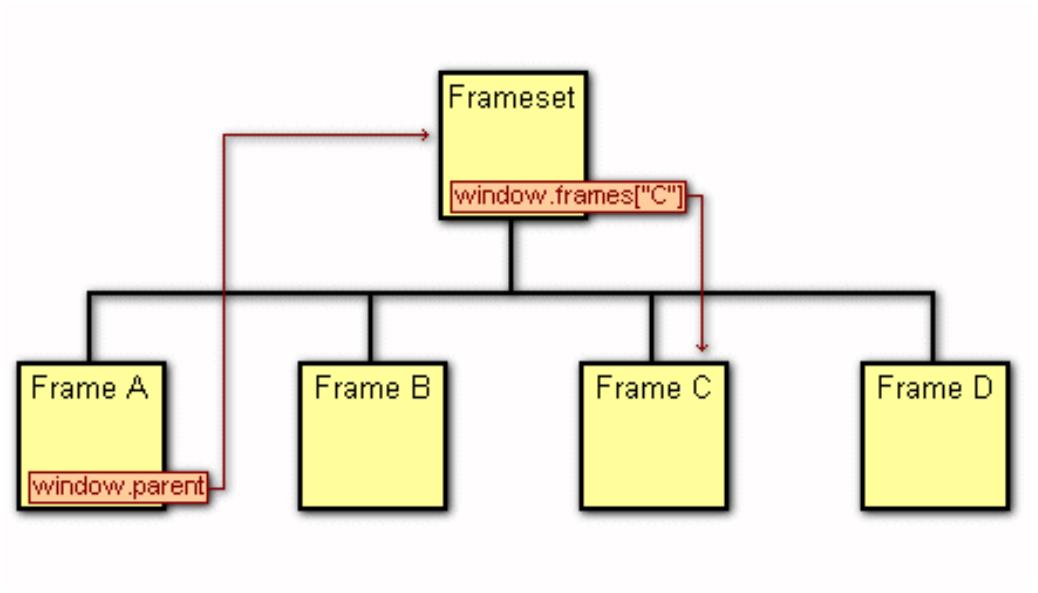
例:帧 a 的页面中 中有一个名为 setFrameColor() 的函数,它的作用是用来改变帧 B、帧 C、
帧 D 的背景色,参数 fname 为目标帧的名字,参数 color 为目的背景颜色:
function setFrameColor(fname, color) {
window.parent.frames[fname].document.bgColor = color;
return false;
}
注解:
通过当前帧 (帧 a) 的 window.parent 属性指定到顶部的帧 (frameset,此帧包含了 A、B、
C、D 四个帧) ,然后通过顶部帧的 frames 数组加上帧的名字 fname 指定目标帧 (帧 B、
C、D),最后通过目标帧的 document.bgColor 属性改变该帧的背景色。
下图很直观地显示了我们上边所讲的帧对象的指定关系:
z 引用别的帧/窗口的变量和函
你不只是可以引用别的帧/窗口的 document、window 对象,而且还可以访问使用别的帧/
Created by YYM
Page 39 of 123


JavaScript 教程
窗口的变量和函数。
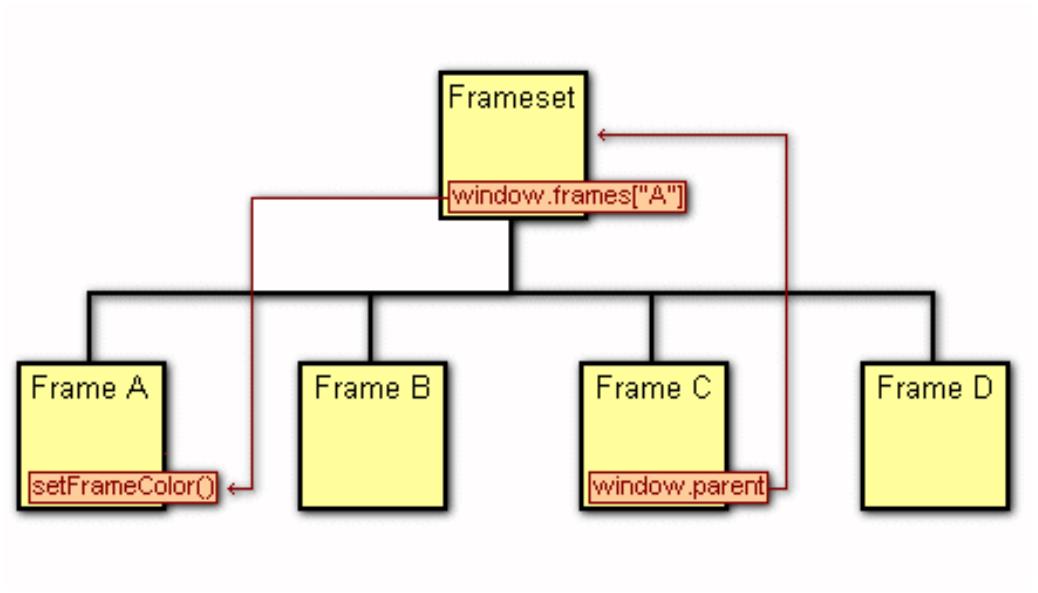
window.parent.frames["A"].setFrameColor(window.name, "#ffffff");
使用 window.parent 指向顶层的帧 (frameset),然后使用 frames["A"] 指向帧 A,然后在后
边加上帧 A 中的函数 setFrameColor(),并且加上两个参数,这样就可以运行帧 A 中的函
数了。
下边是相关的关系图:
6.6 event 对象
¾
¾
事件对象提供关于事件发生的信息
事件对象代表着一个事件的状态,譬如发生事件的元素,键盘按键的状态,鼠标按钮的
状态。
¾
¾
事件对象只有在可以使用事件处理而不是其他代码处理时才会有效。
altKey
检索ALT 键的当前状态
可能的值 true 为关闭
false 为不关闭
button
¾
检索按下的鼠标键
可能的值:
0
1
2
3
4
5
6
7
没按键
按左键
按右键
按左右键
按中间键
按左键和中间键
按右键和中间键
按所有的键
例:
<html>
Created by YYM
Page 40 of 123


JavaScript 教程
<
<
head>
script type="text/javascript">
function whichButton(event)
{
if (event.button==1)
{
alert("You clicked the left mouse button!")
}
else
{
alert("You clicked the right mouse button!")
}
}
<
<
/script>
/head>
<
<
body onmousedown="whichButton(event)">
p>Click in the document. An alert box will alert which mouse button you
clicked.</p>
<
/body>
<
/html>
例2:
<
<
html>
head>
<
script type="text/javascript">
function whichType(event)
{
alert(event.type+" key:"+event.button)
}
function altKeyType(event)
{
var txt
if(event.altKey){
txt="altkey is used"
}
else{
txt="altkey isn't used"
}
alert(txt)
}
<
<
/script>
/head>
Created by YYM
Page 41 of 123


JavaScript 教程
<
<
<
body >
input onselect="altKeyType(event)" value="select me">
input type='button' onmousedown="whichType(event)" value="click me">
p>
<
Click on the document. An alert box will alert which type of event occurred.
<
/p>
<
<
/body>
/html>
z x
检索相对于父要素鼠标水平坐标的整数
z y
检索相对于父要素鼠标垂直坐标的整数
窗口对象
例:
<
<
<
html>
head>
script type="text/javascript">
function show_coords(event)
{
x=event.clientX
y=event.clientY
alert("X coords: " + x + ", Y coords: " + y)
}
<
<
/script>
/head>
<
<
body onmousedown="show_coords(event)">
p>Click in the document. An alert box will alert the x and y coordinates of the
cursor.</p>
<
/body>
<
/html>
例2:
<
<
html>
head>
<
script type="text/javascript">
function coordinates(event)
{
x=event.screenX
Created by YYM
Page 42 of 123


JavaScript 教程
y=event.screenY
alert("X=" + x + " Y=" + y)
}
<
<
<
/script>
/head>
body onmousedown="coordinates(event)">
<
p>
Click somewhere in the document. An alert box will alert the x and y coordinates of
the cursor, relative to the screen.
<
/p>
<
<
/body>
/html>
例3 传递事件
<
<
html>
head>
<
script type="text/javascript">
function whichType(event)
{
alert(event.type)
}
<
<
/script>
/head>
<
<
body onmousedown="whichType(event)">
p>
Click on the document. An alert box will alert which type of event occurred.
<
/p>
<
<
/body>
/html>
6
.7 历史对象
¾
¾
¾
history 指浏览器的浏览历史
是一个可以通过Window 的历史属性来被访问的对象
历史对象包括URLs 组,URLs 是用户在一浏览器窗口内所访问过的URL 地
址
Created by YYM
Page 43 of 123


JavaScript 教程
6
.7.1 属性
.7.2 方法
z length 历史的项数。
6
z back() 后退。
z forward() 前进。
z go() history.go(x);在历史的范围内去到指定的一个地址。如
果 x < 0,则后退 x 个地址,如果 x > 0,则前进 x 个地
址,如果 x == 0,则刷新现在打开的网页。history.go(0) 跟
location.reload() 是等效的。
例:
<
<
<
html>
head>
/head>
<
<
<
<
<
<
body >
input type='button' onclick="alert(history.length)" value="length">
input type='button' onclick="history.back(1)" value="back">
input type='button' onclick="history.forward(1)" value="forward">
input type='button' onclick="history.go(-1)" value="go -1">
input type='button' onclick="history.go(1)" value="go 1">
<
p>
Click on the document. An alert box will alert which type of event occurred.
<
/p>
<
<
/body>
/html>
6
.8 地址对象
z location 是某一个窗口对象所打开的地址。
6.8.1 属性
z protocol 地址协议,取值为 ‘http:’,‘https:’,‘file:’ 等等。
z hostname 地址主机名。
z port 地址的端口号。
Created by YYM
Page 44 of 123


JavaScript 教程
z host 主机名和端口号。
z pathname 路径名,如“http://www.a.com/b/c.html”,则为 'b/c.html'。
z hash 返回“#”以及以后的内容。
z search 返回“?”以及以后的内容。
z href 返回以上全部内容。
6.8.2 方法
z reload() 相当于按浏览器上的“刷新”(IE)或“Reload”(Netscape)键。
z replace() 打开一个 URL,并取代历史对象中当前位置的地址。用这个方法
打开一个 URL 后,按下浏览器的“后退”键将不能返回到刚才的页面。
例:
<
<
<
html>
head>
script type="text/javascript">
function currLocation()
{
alert(window.location)
}
function newLocation()
{
window.location="http://www.w3schools.com"
}
<
<
/script>
/head>
<
<
<
<
body>
input type="button" onclick="currLocation()" value="Show current URL">
input type="button" onclick="newLocation()" value="Change URL">
/body>
<
/html>
6.9 document 对象
z document 描述当前窗口或指定窗口对象的文档。它包含了从<head>到
/body>的内容。
<
6.9.1 document 属性
z lastModified 文档最后修改日期,是一个 Date 对象。
z referrer 如果文档通过点击连接打开,则 referrer 返回原来的 URL。
Created by YYM
Page 45 of 123


JavaScript 教程
z title <title>...</title>定义的文字。
z fgColor <body>的 text 属性所表示的文本颜色。
z bgColor <body>的 bgcolor 属性所表示的背景颜色。
z linkColor <body>的 link 属性所表示的连接颜色。
z alinkColor <body>的 alink 属性所表示的活动连接颜色。
z vlinkColor <body>的 vlink 属性所表示的已访问连接颜色。
例:
ok.htm
<
<
<
<
html>
head>
title>see me!</title>
/head>
<
<
<
<
<
<
<
body >
input type='button' onclick="document.bgColor='blue'" value="set bgcolor">
input type='button' onclick="alert(document.bgColor)" value="see bgcolor">
input type='button' onclick="document.URL='a.html'" value="set URL">
input type='button' onclick="alert(document.URL)" value="URL">
input type='button' onclick="alert(document.referrer)" value="referrer">
input type='button' onclick="alert(document.title)" value="title">
<
p>
Click on the document. An alert box will alert which type of event occurred.
<
<
/p>
iframe src="referrer.htm"></iframe>
<
<
/body>
/html>
referrer.htm
<
<
html>
body>
<
p>The referrer property returns the URL of the document that loaded this
document.</p>
The referrer of this document is:
<
script type="text/javascript">
document.write(document.referrer)
<
/script>
<
<
/body>
/html>
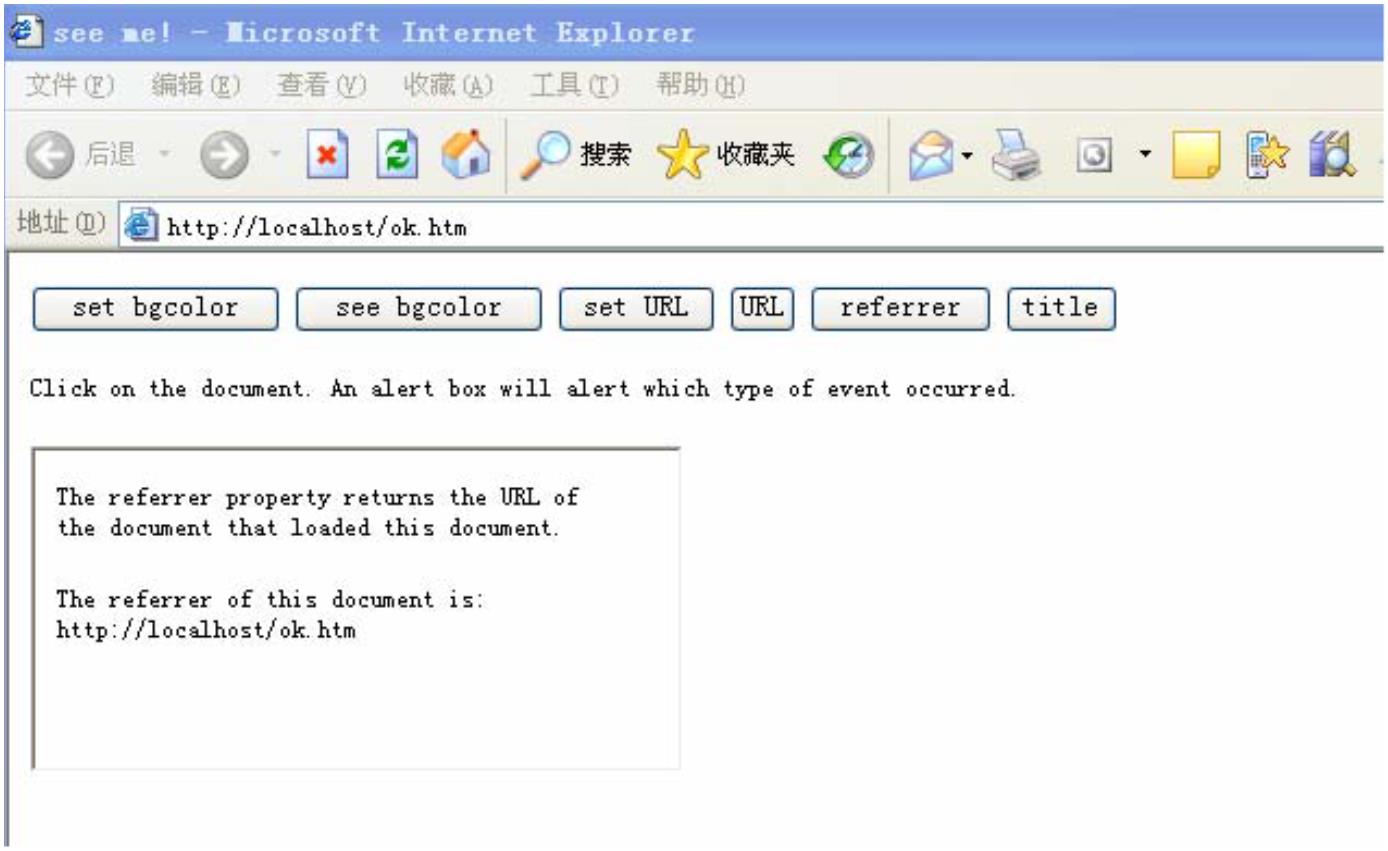
ok.htm 的显示结果:
Created by YYM
Page 46 of 123


JavaScript 教程
6.9.2 document 方法
z getElementById()方法返回第一个使用指定ID 的对象
例:
<
<
<
html>
body>
form id="Form1" name="Form1">
Your name: <input type="text">
<
<
/form>
form id="Form2" name="Form2">
Your car: <input type="text">
<
/form>
<
p>
To access an item in a collection you can either use the number or the name of the
item:
<
/p>
<
script type="text/javascript">
document.write("<p>The first form's name is: " + document.forms[0].name + "</p>")
document.write("<p>The first form's name is:
document.getElementById("Form1").name + "</p>")
"
+
<
/script>
<
/body>
Created by YYM
Page 47 of 123


JavaScript 教程
<
/html>
例2:
<
<
<
html>
head>
script type="text/javascript">
function getElement()
{
var x=document.getElementById("myHeader")
alert("I am a " + x.tagName + " element")
}
<
<
<
<
/script>
/head>
body>
h1 id="myHeader" onclick="getElement()">
Click to see what element I am!</h1>
<
<
/body>
/html>
z 通过指定NAME getElementsByName()方法返回(与NAME 相对应的)对象
集合
<
<
<
html>
head>
script type="text/javascript">
function getElements()
{
var x=document.getElementsByName("myInput")
alert(x.length + " elements!")
}
<
<
<
<
/script>
/head><body>
input name="myInput" type="text" size="20"><br />
input name="myInput" type="text" size="20"><br />
<
<
<
input name="myInput" type="text" size="20"><br />
br />
input type="button" onclick="getElements()"
value="How many elements named 'myInput'?">
/body></html>
<
z open()方法可以打开一个文档进行书写。如果目标文档已经存在那它将会被
清除。
z write(); writeln() 向文档写入数据,所写入的会当成标准文档 HTML 来处
理。writeln() 换行,只是在 HTML 中换行。
z clear() 清空当前文档。(IE 不支持)
Created by YYM
Page 48 of 123


JavaScript 教程
z close() 关闭文档。如果用了 write[ln]() 或 clear() 方法,可以用 close() 方
法来保证所做的更改能够显示出来。如果JavaScript 插在文档中,就不必使
用该方法。
举例
<
<
<
html>
head>
script>
function createNewDoc()
{
var newDoc=document.open("text/html","replace")
var txt="<html><body>Learning about the DOM is FUN!</body></html>"
newDoc.write(txt)
newDoc.close()
}
<
<
<
/script>
/head><body>
input type="button" value="Open and write to a new document"
onclick="createNewDoc()">
<
/body></html>
6.10 document 对象包含若干数组对象
z links[]--链接对象集合,即<a>
z applets[]--Applet 对象集合
z forms[]--表单对象集合,即<form>
z embeds[]--插件对象集合
这些集合包含了页面上全部的同类对象,如果访问其中一个只需要加上索引
即可,如docment.forms[0]
z images 集合将列出在document 里的所有image 对象的参考
举例
<
<
html><body>
img border="0" src="hackanm.gif" width="48" height="48">
<
<
<
br />
img border="0" src="compman.gif" width="107" height="98">
br /><br />
<
script type="text/javascript">
Created by YYM
Page 49 of 123


JavaScript 教程
document.write("This document contains: ")
document.write(document.images.length + " images.")
<
<
/script>
/body></html>
z anchors[]:锚集合列出在document 中所有锚对象的参考。
举例
<html><body>
<
<
<
a name="first">First anchor</a><br />
a name="second">Second anchor</a><br />
a name="third">Third anchor</a><br />
<
<
br />Number of anchors in this document:
script type="text/javascript">
document.write(document.anchors.length)
<
<
/script>
/body></html>
6.11 表单对象
z 表单对象代表一个 HTML 表单。form 对象由网页中的 <FORM></FORM>
标记对创建。
z 表单被用来提示用户输入。输入的数据一般被发送到服务器上做处理
z document.forms[]是一个数组,包含了文档中所有的表单。要引用单个表单,
可以用 document.forms[x]。如果<form>标记中加上“name=”...“”属性,
那么直接用“document.<表单名>”就可以引用了。
z 当前文档的调用方式
document.forms[0]
document.forms["FormName"]
document.forms.FormName
document.FormName
6
.11.1属性:
z name 表单名称,即<form name=“...”>属性。
z action 返回/设定表单提交地址,即action 属性。
z method 返回/设定表单提交方法,即method 属性
z target 返回/设定表单提交后返回的窗口,也就是<form target="...">属性。
z encoding 返回/设定表单提交内容的编码方式,也就是<form enctype="...">属
性。
z length 返回该表单所含元素的数目。
例:
Created by YYM
Page 50 of 123


JavaScript 教程
<
<
<
html>
head>
script type="text/javascript">
function changeAction()
{
var x=document.getElementById("myForm")
alert("Origional action: " + x.action)
x.action="default.asp"
alert("New action: " + x.action)
}
function testElements(){
var els=document.forms[0].elements
alert(els.length)
alert(els[0].type)
alert(els[1].value)
}
<
<
<
/script>
/head><body>
form id="myForm" action="js_examples.asp">
<input type="button" onclick="changeAction()"
value="Change value of action attribute">
<
<
<
<
br>
input type="button" onclick="testElements()" value="testels">
/form>
/body></html>
6
.11.2方法
z reset() 重置表单。这与按下“重置”按钮是一样的。
z submit() 提交表单。这与按下“提交”按钮是一样的
例:
<
<
<
html>
head>
script type="text/javascript">
function formSubmit()
{
document.getElementById("myForm").submit()
}
<
<
<
/script>
/head><body>
form id="myForm" action="js_form_action.asp" method="get">
Firstname: <input type="text" name="firstname" size="20"><br />
Created by YYM
Page 51 of 123


JavaScript 教程
Lastname: <input type="text" name="lastname" size="20"><br />
<
<
br />
input type="button" onclick="formSubmit()" value="Submit">
<
<
/form>
/body></html>
6
.11.3对表单元素的调用
z 以下对象都可以做为表单属性使用,但需要指定名字
1
2
3
4
5
6
7
8
9
1
、文本框对象--<input type="text">
、多行文本输入区对象--<textarea>
、隐藏对象--<input type=”hidden“>
、密码输入区对象--<input type=”password“>
、单选域对象--<input type="radio">
、复选框对象--<input type="checkbox">
、下拉菜单对象--<select>
、选择项对象 --<option>
、重置按钮对象--<input type="reset">
0、按钮对象--<input type="button">
11、提交对象--<input type=“submit”>
z form 里边的元素也是由 <INPUT> 等标记创建的,他们被存放在数组
elements 中。
z input 标签中有name 属性的设定,如<input name=“..”>中name 来访问这些
对象,如果有:
<
form name=“myForm”>
input type=“text” name=“user”/>
/form>
<
<
则访问text 类型的输入框即为document.myForm.user
例:
<
<
<
<
<
html>
head>
title></title>
/head>
body>
<
form name="customerinfo" action="/cgi-bin/customer.cgi" method="post">
Name: <input name="customername" type="text"><br>
Address: <input name="address" type="text"><br>
<
<
input type="submit" value="Update"><input type="reset" value="Clear">
/form>
<
form name="orderdata" action="/cgi-bin/order.cgi" method="post">
Item Number: <input name="itemnumber" type="text"><br>
Created by YYM
Page 52 of 123


JavaScript 教程
Quantity: <input name="quantity" type="text"><br>
<
<
input type="submit" value="Update"><input type="reset" value="Clear">
/form>
<
<
/body>
/html>
要使用名为 'quantity' 的元素,可以使用下边三种方法中的任何一种:
var e = document.forms["orderdata"].elements[1];
var e = document.forms.orderdata.elements["quantity"];
var e = document.orderdata.quantity;
z 每一种元素类型 (type) 都对应每一种不同的对象,这些对象有一些共同的属性和方法,
如:type、name、value 属性和 focus() 方法
例:
document.orderdata.quantity.type
结果将会返回 'text'。
6.12 文本类对象
6
.12.1属性
z name 返回/设定用<input name="...">指定的元素名称。
z value 返回/设定密码输入区当前的值。
z defaultValue 返回用<input value="...">指定的默认值。
6
.12.2方法
z blur() 从对象中移走焦点。
z focus() 让对象获得焦点。
z select() 选中输入区里全部文本。
z 需要注意的是,由于hidden 不可见,因此hidden 对象没有方法。
6
.12.3事件处理器
z onFocus 当输入焦点进入时执行.
z onBlur 当域失去焦点时执行.
z onSelect 当域中有部分文本被选定时执行.
Created by YYM
Page 53 of 123


JavaScript 教程
z onChange 当域失去焦点且域值相对于 onFocus 执行有所改变时
执行.
例:
<
<
<
html>
head>
script type="text/javascript">
function access()
{
document.getElementById('ie').focus()
document.getElementById('myName').accessKey="i"
document.getElementById('myPwd').accessKey="p"
document.getElementById('myCheck').accessKey="c"
document.getElementById('ie').accessKey="e"
document.getElementById('ff').accessKey="f"
document.getElementById('myButton').accessKey="b"
}
<
<
/script>
/head>
<
<
body onload="access()">
form>
Enter your name: <input id="myName" type="text" />
br />
Enter your password: <input id="myPwd" type="password" />
<
<
<
<
br /><br />
input type="checkbox" id="myCheck" /> Remember password
br /><br />
Select your favorite browser:
<
<
br />
input type="radio" name="browser" id="ie" value="Internet Explorer">Internet
Explorer<br />
<
<
<
<
<
input type="radio" name="browser" id="ff" value="Firefox">Firefox
br /><br />
input type="button" value="Click me!" id="myButton" />
br /><br />
/form>
<
<
<
p>(Use Alt + <i>accesskey</i> to give focus to the different form fields.)
/p>
/body>
<
/html>
例:
Created by YYM
Page 54 of 123


JavaScript 教程
<
<
<
html>
head>
script type="text/javascript">
function checkLen(x,y)
{
if (y.length==x.maxLength)
{
var next=x.tabIndex
if (next<document.getElementById("myForm").length)
{
document.getElementById("myForm").elements[next].focus()
}
}
}
<
<
/script>
/head>
<
<
body>
p>This script automatically jumps to the next field when the current field's
maxlength has been reached:</p>
<
<
<
<
<
<
form id="myForm">
input size="3" tabindex="1" maxlength="3" onkeyup="checkLen(this,this.value)">
input size="2" tabindex="2" maxlength="2" onkeyup="checkLen(this,this.value)">
input size="3" tabindex="3" maxlength="3" onkeyup="checkLen(this,this.value)">
/form>
/body>
<
/html>
6.13 按钮类对象
z 包括button、reset、submit
6
6
.13.1属性
z name 返回/设定用<input name="...">指定的元素名称。
z value 返回/设定用<input value="...">指定的元素的值。
.13.2方法
z blur() 从对象中移走焦点。
Created by YYM
Page 55 of 123


JavaScript 教程
z focus() 让对象获得焦点。
z click() 模拟鼠标点击该对象
例:
<
<
<
html>
head>
script type="text/javascript">
function alertId()
{
var txt="Element id: " + document.getElementById("myButton").id
txt=txt + ", element type: " + document.getElementById("myButton").type
txt=txt + ", element value: " + document.getElementById("myButton").value
alert(txt)
document.getElementById("myButton").disabled=true
}
function clickb2()
{
document.forms[0].myButton.click()
}
<
<
/script>
/head>
<
<
<
<
body>
form>
input type="button" value="Click me!" id="myButton" onClick="alertId()" />
input type="button" value="involve 'Click me!' button" id="myButton2"
onClick="clickb2()" />
<
<
<
/form>
/body>
/html>
6.14 单/多选对象
z Radio/checkbox 对象
6
.14.1属性
z name 返回/设定用<input name="...">指定的元素名称。
z value 返回/设定用<input value="...">指定的元素的值。
z checked 返回/设定该单选域对象是否被选中。这是一个布尔值。
z defaultChecked 返回/设定该对象默认是否被选中
Created by YYM
Page 56 of 123


JavaScript 教程
6
.14.2方法
z blur() 从对象中移走焦点。
z focus() 让对象获得焦点。
z click() 模拟鼠标点击该对象
z 注意:调用document.form.radioName 返回的是数组
例:radio
<
<
<
html>
head>
script type="text/javascript">
function check(browser)
{
document.getElementById("answer").value=browser
}
<
<
/script>
/head>
<
<
<
<
body>
p>What's your favorite browser:</p>
form>
input type="radio" name="browser" onclick="check(this.value)" value="Internet
Explorer">Internet Explorer<br />
input type="radio"
value="Firefox">Firefox<br />
input type="radio"
value="Netscape">Netscape<br />
input type="radio"
value="Opera">Opera<br />
br />
Your favorite browser is: <input type="text" id="answer" size="20">
<
name="browser"
name="browser"
name="browser"
onclick="check(this.value)"
onclick="check(this.value)"
onclick="check(this.value)"
<
<
<
<
<
/form>
/body>
<
/html>
例2:checkbox
<
<
<
html>
head>
script type="text/javascript">
function check()
{
document.getElementById("myCheck").checked=true
}
Created by YYM
Page 57 of 123


JavaScript 教程
function uncheck()
{
document.getElementById("myCheck").checked=false
}
<
<
/script>
/head>
<
<
<
<
<
<
<
body>
form>
input type="checkbox" id="myCheck" />
input type="button" onclick="check()" value="Check Checkbox" />
input type="button" onclick="uncheck()" value="Uncheck Checkbox" />
/form>
/body>
<
/html>
例3:
<
<
<
html>
head>
script type="text/javascript">
function createOrder()
{
coffee=document.forms[0].coffee
txt=""
for (i=0;i<coffee.length;++ i)
{
if (coffee[i].checked)
{
txt=txt + coffee[i].value + " "
}
}
document.getElementById("order").value="You ordered a coffee with " + txt
}
<
<
/script>
/head>
<
<
<
<
<
<
<
<
body>
p>How would you like your coffee?</p>
form>
input type="checkbox" name="coffee" value="cream">With cream<br />
input type="checkbox" name="coffee" value="sugar">With sugar<br />
br />
input type="button" onclick="createOrder()" value="Send order">
br /><br />
Created by YYM
Page 58 of 123


JavaScript 教程
<
<
<
input type="text" id="order" size="50">
/form>
/body>
<
/html>
例4:
<
<
<
html>
head>
script type="text/javascript">
function convertToUcase()
{
document.getElementById("fname").value=document.getElementById("fname").valu
e.toUpperCase()
document.getElementById("lname").value=document.getElementById("lname").valu
e.toUpperCase()
}
<
<
/script>
/head>
<
<
body>
form name="form1">
First name: <input type="text" id="fname" size="20" />
br /><br />
Last name: <input type="text" id="lname" size="20" />
br /><br />
Convert to upper case
<
<
<
<
<
input type="checkBox" onclick="if (this.checked) {convertToUcase()}">
/form>
/body>
<
/html>
6.15 select 对象
6
.15.1属性
z name 返回/设定用<input name="...">指定的元素名称。
z length 返回 Select 对象下选项的数目。
z selectedIndex 返回被选中的选项的下标。这个下标就是在 options[] 数组中
该选项的位置。
Created by YYM
Page 59 of 123


JavaScript 教程
6
.15.2方法
z blur() 从对象中移走焦点。
z focus() 让对象获得焦点
z options[] 数组的属性
length; selectedIndex 与所属 Select 对象的同名属性相同。
z 单个 Option 对象的属性
text 返回/指定 Option 对象所显示的文本
value 返回/指定 Option 对象的值,与<options value="...">一致。
index 返回该 Option 对象的下标。对此并没有什么好说,因为要指定特定的
一个 Option 对象,都要先知道该对象的下标。
selected 返回/指定该对象是否被选中。通过指定 true 或者 false,可以动态的
改变选中项。
defaultSelected 返回该对象默认是否被选中。true / false。
例:
<
<
<
html>
head>
script type="text/javascript">
function getOption()
{
var x=document.getElementById("mySelect")
alert(x.options[x.selectedIndex].text)
}
function getOptionvalue()
{
var x=document.getElementById("mySelect")
alert(x.options[x.selectedIndex].value)
}
function getOptionIndex()
{
var x=document.getElementById("mySelect")
alert(x.selectedIndex)
}
function changeText()
{
var x=document.getElementById("mySelect")
x.options[x.selectedIndex].text="Melon"
}
<
<
/script>
/head>
<
body>
Created by YYM
Page 60 of 123


JavaScript 教程
<form>
Select your favorite fruit:
<
select id="mySelect">
<option value="Apple">苹果</option>
<option value="Orange">桔子</option>
<option value="Pineapple">菠萝</option>
<option value="banana">香蕉</option>
<
<
<
<
/select>
br /><br />
input type="button" onclick="getOption()" value="Alert selected fruit">
input type="button" onclick="getOptionvalue()" value="Alert value of selected
fruit">
<
input type="button" onclick="getOptionIndex()" value="Alert index of selected
fruit">
<
input type="button" onclick="changeText()" value="Change text of selected
fruit">
<
<
<
/form>
/body>
/html>
第7章 事件处理
•
•
•
•
事件处理就是当浏览器中发生某类事件时,浏览器将回调用户指定的方法。
事件的类型很多,比如当用户按下一按钮或者点一下鼠标都会触发一个事件
并不是所有DOM 对象都会产生事件,某些事件只发生在特定的对象上
当事件发生后,如果用户希望处理此类事件,就必须为事件指定处理程序。
有三种方法:
7
.1 直接指定:
<
<
标记 ... ... 事件="事件处理程序" [事件="事件处理程序" ...]>
body ... onload="alert('网页读取完成!')" onunload="alert('再见!')">
7
.2 编写特定对象特定事件的 JavaScript :
<
script language="JavaScript" for="对象" event="事件">
.
..
(事件处理程序代码)
..
/script>
.
<
Created by YYM
Page 61 of 123


JavaScript 教程
<
script language="JavaScript" for="window" event="onload">
alert('网页读取完成,请慢慢欣赏!');
<
/script>
7
.3 在 JavaScript 中说明
<
对象>.<事件> = <事件处理程序>;
window.onerror = ignoreError
注:ignoreError 为函数名,一定不能带(),带()表示读取代码时调用ignoreError(),
而我们的目的是触发事件时使用 ignoreError 函数
7
.4 事件类型
•
•
•
onblur 事件-窗口失去焦点时。
应用于:window 对象
onchange 事件-文本输入区内容被更改,焦点从文本输入区移走后。
应用于:Password 对象;Select 对象;Text 对象;Textarea 对象
onclick 事件-对象被单击时,Link 对象 onclick 事件处理程序中返回 false
值能阻止浏览器打开此连接。
应用于:Button 对象;Checkbox 对象;Image 对象;Link 对象;Radio 对象;
Reset 对象;Submit 对象
•
onerror 事件-发生在错误发生的时候。
应用于:window 对象
事件类型
•
onfocus 事件-窗口得到焦点时
应用于:window 对象
•
onload 事件-文档全部下载完毕时。全部下载完毕意味着不但 HTML 文件,
而且包含的图片,插件,控件,小程序等全部内容都下载完毕。写在<body>标
记中。
应用于:window 对象
•
•
•
onmousedown 事件-用户鼠标放在对象上按下鼠标时。
应用于:Button 对象;Link 对象
onmouseout 事件-在鼠标离开对象时。
应用于:Link 对象
onmouseover 事件-鼠标进入对象范围时。
应用于:Link 对象
事件类型
•
•
•
onmouseup 事件-用户把鼠标放在对象上按下后,放开鼠标键时。
应用于:Button 对象;Link 对象
onreset 事件-表单“重置”按钮被单击时。
应用于:Form 对象
onresize 事件-窗口调整大小时。
应用于:window 对象
Created by YYM
Page 62 of 123


JavaScript 教程
•
•
onsubmit 事件-表单“提交”按钮被单击时。
应用于:Form 对象
onunload 事件-用户退出文档时。
应用于:window 对象
第8章 JavaScript Cookies
z cookie 经常用做辨别用户(身份)
z cookie 是保存在用户计算机上的变量。每次相同的计算机请求该页
时,它(计算机)就会发送cookie。通过JS 你可以建立和检索cookie
的值
z 名字cookie - 当一访问者到达你的WEB 页,他或者她必须提交他或
她的名字。名字接着被保存在一个cookie 里.下次相同的访问者来到
这个页面的时候,她或他就会得到一个欢迎的信息,就像“Welcome
John Doe!(欢迎你,约翰.杜!)”
z 密码cookie - 和名字cookie 差不多,cookie 可以帮助用户保存密码
(本人认为这个虽然方便,却十分的不安全)
z 日期cookie - 当访问者第一次来到你的WEB 页,当时的日期被保存
在cookie 里,下次相同的访问者再来的时候,就可以给对方一个信
息,像“你最后一次访问的时间是......”(以上的三者原理都是一样
的,只是应用不同)
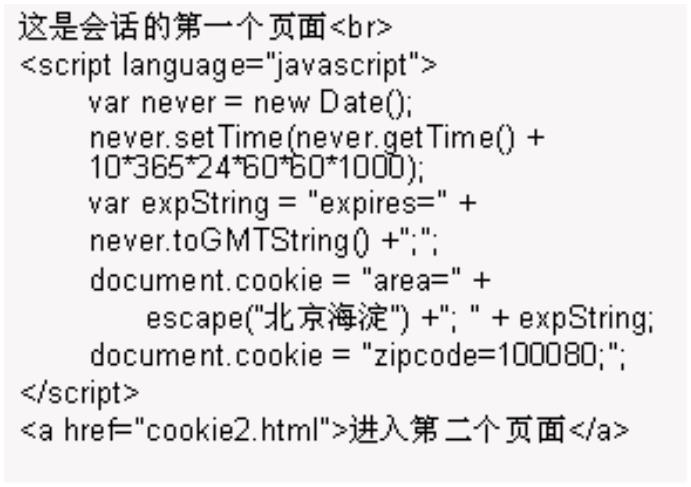
8
.1 建立和保存一个 Cookie
语法:
document.cookie=Cookie_string
Cookie_string:是key-vaue 对
不要在cookie 名或值中使用“;”“,”或者空格,需要保护空格时,需要先用escape 转换
例:
document.cookie= "time=1"
8
.2 多个 cookie
反复使用document.cookie=Cookie_string 设置多组cookie 值
8
.3 读取 cookie
语法:
Cookie_String=document.cookie
读出的cookie 形式如下
Cooliename1=value1; Cooliename2=value2;…
Created by YYM
Page 63 of 123


JavaScript 教程
8
.4 加入终止日期
语法:
document.cookie= "Name=Value;expires=GMT_String"
GMT_String:表示cookie 终止日期的GMT(Greenwich Mean Time 格林尼治标准时间)格
式的字符串;使用Date 对象的toGMTString()方法获得该形式时间
8
.5 指定路径
语法:
document.cookie= "Name=Value;path=Cookie_dir"
例:
document.cookie= "name1=value1;path=/"
document.cookie= "name1=value1;path=/shopping"
8
.6 指定 domain
语法:
document.cookie= "Name=Value;domain=Cookie_domain"
例:
document.cookie= "name1=value1; domain=.domain.com"
8
.7 安全
语法:
document.cookie= "Name=Value;Cookie_Secure"
Cookie_Secure:为boolean 值,真表示,只发往HTTPS 协议连接的浏览器;假表示可以
发给所有的浏览器。
例:
document.cookie= "name1=value1; true"
8
.8 删除 cookie
将cookie 的日期设置为过去的时间,浏览器立刻删除该cookie。
练习
1
. 安装如下代码在用户客户端设置cookie:
Created by YYM
Page 64 of 123


JavaScript 教程
2
. 编写相应的提取cookie 的脚本,显示用户已经设置的cookie
8
.9 实例
在这个例子中我们将建立一个 cookie 并让它保存一位访问者的名字。当访问者
第一次来到这个页面的时候就要求必须添写名字。这个名字就会保存在一个
cookie 中。下次他/她再来的时候就会得到一个欢迎信息。
首先,我们建立一个能保存访问者名字的函数:
function setCookie(c_name,value,expiredays)
{
var exdate=new Date()
exdate.setDate(expiredays)
document.cookie=c_name+ "=" +escape(value)+
((expiredays==null) ? "" : ";expires="+exdate)
}
上面的这个保存名字的cookie 函数中的参数有:value,这个是cookie 的值;c_name
是被保存的名字;expiredays 是cookie 的到期时间(多少天过期)
在上面的函数中我们首先将天数变为有效的日期,然后我们添加 cookie 的过期
天数。之后我们将cookie 的名字,它的值以及过期日期保存在document.cookie 对
象中。
然后,我们建立另外一个函数来检查cookie 是否被设置过了:
function getCookie(c_name)
{
if (document.cookie.length>0)
{
c_start=document.cookie.indexOf(c_name + "=")
if (c_start!=-1)
{
c_start=c_start + c_name.length+1
c_end=document.cookie.indexOf(";",c_start)
if (c_end==-1) c_end=document.cookie.length
return unescape(document.cookie.substring(c_start,c_end))
}
}
Created by YYM
Page 65 of 123


JavaScript 教程
return null
}
上面的函数首先检查了 document.cookie 对象中是否包含 cookie。如果有的话就
检查具体的 cookie 是否存在。如果我们的 cookie 找到的话就返回其值,不然就
返回一个null
最后我们建立一个如果cookie 存在就显示欢迎信息的函数,如果没有设置cookie
的话就要求写如名字:
function checkCookie()
{
username=getCookie('username')
if (username!=null)
{
alert('Welcome again '+username+'!')}
else
{
username=prompt('Please enter your name:',"")
if (username!=null||username!="")
{
setCookie('username',username,365)
}
}
}
现在合起来:
<
<
<
html>
head>
script type="text/javascript">
function getCookie(c_name)
{
if (document.cookie.length>0)
{
c_start=document.cookie.indexOf(c_name + "=")
if (c_start!=-1)
{
c_start=c_start + c_name.length+1
c_end=document.cookie.indexOf(";",c_start)
if (c_end==-1) c_end=document.cookie.length
return unescape(document.cookie.substring(c_start,c_end))
}
}
return null
}
function setCookie(c_name,value,expiredays)
Created by YYM
Page 66 of 123


JavaScript 教程
{
var exdate=new Date()
exdate.setDate(exdate.getDate()+expiredays)
document.cookie=c_name+ "=" +escape(value)+
((expiredays==null) ? "" : "; expires="+exdate)
}
function checkCookie()
{
username=getCookie('username')
if (username!=null)
{
alert('Welcome again '+username+'!')}
else
{
username=prompt('Please enter your name:',"")
if (username!=null && username!="")
{
setCookie('username',username,365)
}
}
}
<
<
<
<
<
<
/script>
/head>
body onLoad="checkCookie()">
/body>
/body>
/html>
8.10 常用 cookie 函数
function setCookie(name,value,expiry,path,domain,secure){
var nameString = name + "=" + value;
var expiryString = (expiry == null) ? "" : " ;expires = "+ expiry.toGMTString();
var pathString = (path == null) ? "" : " ;path = "+ path;
var domainString = (path == null) ? "" : " ;domain = "+ domain;
var secureString = (secure) ?";secure" :"";
document.cookie = nameString + expiryString + pathString + domainString +
secureString;
}
function getCookie (name) {
var CookieFound = false;
var start = 0;
Created by YYM
Page 67 of 123


JavaScript 教程
var end = 0;
var CookieString = document.cookie;
var i = 0;
while (i <= CookieString.length) {
start = i ;
end = start + name.length;
if (CookieString.substring(start, end) == name){
CookieFound = true;
break;
}
i++;
}
if (CookieFound){
start = end + 1;
end = CookieString.indexOf(";",start);
if (end < start)
end = CookieString.length;
return unescape(CookieString.substring(start, end));
}
return "";
}
function deleteCookie(name){
var expires = new Date();
expires.setTime (expires.getTime() - 1);
setCookie( name , "Delete Cookie", expires,null,null,false);
}
第9章 正则表达式
z 正则表达式是一个描述字符模式的对象。
9
.1 规则
z
JavaScript 的 RegExp 对象和 String 对象定义了使用正则表达式来执行强大的模式匹配
和文本检索与替换函数的方法
z 可以使用一个RegExp()构造函数来创建RegExp 对象,也可以将正则表达式直接包含在
一对斜杠(/)之间
var pattern = new RegExp("s$");
Created by YYM
Page 68 of 123


JavaScript 教程
var pattern = /s$/;
z 通过test 方法来校验已知字符串是否符合制度的模式
9
.2 将单独的直接符放进中括号内就可以组合成字符类
z 一个字符类和它所包含的任何一个字符都匹配,所以正则表达式 / [abc] / 和字母 “a” ,
b” , “c” 中的任何一个都匹配
z 定义否定字符尖时,要将一个 ^ 符号作为从左中括号算起的第一个字符
z [...] 位于括号之内的任意字符
“
[
.
^...] 不在括号之中的任意字符
除了换行符之外的任意字符,等价于[^\n]
\
\
\
\
\
\
w 任何单字字符, 等价于[a-zA-Z0-9]
W 任何非单字字符,等价于[^a-zA-Z0-9]
s 任何空白符,等价于[\ t \ n \ r \ f \ v]
S 任何非空白符,等价于[^\ t \ n \ r \ f \ v]
d 任何数字,等价于[0-9]
D 除了数字之外的任何字符,等价于[^0-9]
[\b] 一个退格直接量(特例)
{n, m} 匹配前一项至少n 次,但是不能超过m 次
z
{
{
?
n, } 匹配前一项n 次,或者多次
n} 匹配前一项恰好n 次
匹配前一项0 次或1 次,也就是说前一项是可选的. 等价于 {0, 1}
+
*
匹配前一项1 次或多次,等价于{1,}
匹配前一项0 次或多次.等价于{0,}
z
z
| 选择.匹配的要么是该符号左边的子表达式,要么它右边的子表达式
(...) 分组.将几个项目分为一个单元.这个单元可由 *、+、?和|等符号使用,而且还可以
记住和这个组匹配的字符以供此后引用使用
z
z
\n 和第 n 个分组所匹配的字符相匹配.分组是括号中的子表达式(可能是嵌套的).分组号
是从左到右计数的左括号数
/ab|cd|ef/
/
/
/
\d{3}|[a-z]{4}/
([Jj]ava([Ss]cript)) \sis \s (fun\w*) /
( [' "] ) [^ ' "] * \1/
z
^ 匹配的是字符的开头,在多行检索中,匹配的是一行的开头
匹配的是字符的结尾,在多行检索中,匹配的是一行的结尾
b 匹配的是一个词语的边界.简而言之就是位于字符\w 和 \w 之间的位置(注意:[\b]匹
配的是退格符)
B 匹配的是非词语的边界的字符
$
\
\
例:
html>
head>
script type="text/javascript">
<
<
<
function open_win(contt)
Created by YYM
Page 69 of 123


JavaScript 教程
{
var prophereg=/\d\d\d/
if(prophereg.test(contt.value)){
alert("ok")
}
else{
alert("sorry")
}
}
<
<
/script>
/head>
<
<
<
<
body>
form>
input value="123" name='tst'>
input type=button value="Open Windows" onclick="open_win(document.forms[0].tst)"><br>
<
<
/form>
/body>
<
/html>
附录:
第10章 JS 的内置对象
参考:
http://www.w3schools.com/jsref/
z
JavaScript 可以让你自定义对象和变量类型。
z 对象只是特殊类型的数据。对象有属性和方法
z 属性反映对象的状态信息
例
<
script type="text/javascript">
var txt="Hello World!"
document.write(txt.length)
<
/script>
对象的方法可以执行行为。
Created by YYM
Page 70 of 123



JavaScript 教程
<
script type="text/javascript">
var str="Hello world!"
document.write(str.toUpperCase())
<
/script>
10.1 JS 字符串对象
z 字符串对象被用来操作存储的文字片段
6
. 下面的例子使用了长度属性来找出字符串的长度:
var txt="Hello world!"
document.write(txt.length)
7
. 样式化字符串
<
html>
body>
<
<
script type="text/javascript">
var txt="Hello World!"
document.write("<p>Link: " + txt.link("#abc") + "</p>")
document.write("<p>Big: " + txt.big() + "</p>")
document.write("<p>Small: " + txt.small() + "</p>")
document.write("<p>Bold: " + txt.bold() + "</p>")
document.write("<p>Italic: " + txt.italics() + "</p>")
document.write("<p>Blink: " + txt.blink() + " (does not work in IE)</p>")
document.write("<p>Fixed: " + txt.fixed() + "</p>")
document.write("<p>Strike: " + txt.strike() + "</p>")
document.write("<p>Fontcolor: " + txt.fontcolor("Red") + "</p>")
document.write("<p>Fontsize: " + txt.fontsize(16) + "</p>")
document.write("<p>Lowercase: " + txt.toLowerCase() + "</p>")
document.write("<p>Uppercase: " + txt.toUpperCase() + "</p>")
document.write("<p>Subscript: " + txt.sub() + "</p>")
document.write("<p>Superscript: " + txt.sup() + "</p>")
document.write("<p>Link: " + txt.link("http://www.w3schools.com") + "</p>")
document.write("<p>anchor: " + txt.anchor("abc") + "</p>")
<
/script>
Created by YYM
Page 71 of 123


JavaScript 教程
<
<
/body>
/html>
8
. 怎样使用indexOf()方法来返回第一次出现一指定字符串的位置数。
<
html>
body>
<
<
script type="text/javascript">
var str="Hello world!"
document.write(str.indexOf("Hello") + "<br />")
document.write(str.indexOf("World") + "<br />")
document.write(str.indexOf("world"))
<
/script>
<
<
/body>
/html>
9
. 怎样使用 match()方法寻找一指定的字符串值如果找到的话就返回其值(没的有话就返
回NULL)
<
html>
body>
<
<
script type="text/javascript">
var str="Hello world!"
document.write(str.match("world") + "<br />")
document.write(str.match("World") + "<br />")
document.write(str.match("worlld") + "<br />")
document.write(str.match("world!"))
<
/script>
<
<
/body>
/html>
1
0. 怎样使用replace()方法来用一些其他字符替换字符串中的一些字符
<
html>
body>
<
<
script type="text/javascript">
Created by YYM
Page 72 of 123


JavaScript 教程
var str="Visit Microsoft!"
document.write(str.replace("Microsoft","W3Schools"))
document.write(str.replace(/Visit/,"W3Schools"))
<
<
<
/script>
/body>
/html>
参见页下附表
10.2 JS 时间对象
z 时间对象用来操作日期和时间。
1
0.2.1定义日期
我们通过一个新的关键字来定义一个时间对象。下面的代码行就定义了一个时间对象(称作
myDate):
var myDate=new Date()
z 注意:时间对象将自动把当前的日期和时间作为初始值!
z 日期起始值:1970年1月1日00:00:00。
1
0.2.2获取日期的时间方法
getYear(): 返回年数
getMonth():返回当月号数
getDate(): 返回当日号数
getDay():返回星期几
getHours():返回小时数
getMintes(:返回分钟数
getSeconds():返回秒数
Created by YYM
Page 73 of 123


JavaScript 教程
getTime() : 返回毫秒数
1
0.2.3设置日期和时间:
setYear();设置年
setDate():设置当月号数
setMonth():设置当月份数
setHours():设置小时数
setMintes():设置分钟数
setSeconds():设置秒数
setTime ():设置毫秒数
例:
1
. 在下面的例子中我们设置一个时间对象来指定日期(2010 年一月14 号):
var myDate=new Date()
myDate.setFullYear(2010,0,14)
2
. 下面的例子我们将一时间对象设置为未来的5 天:
var myDate=new Date()
myDate.setDate(myDate.getDate()+5)
注意:如果给一日期增加天改为给月或年增加的话,一些变化会由时间对象自动处理!
3
.
getTime()
用getTime()来计算1970 年到现在之间的时间差距
<
html>
body>
<
<
script type="text/javascript">
var minutes = 1000*60
var hours = minutes*60
var days = hours*24
var years = days*365
var d = new Date()
var t = d.getTime()
var y = t/years
Created by YYM
Page 74 of 123


JavaScript 教程
document.write("It's been: " + y + " years since 1970/01/01!")
<
/script>
<
<
/body>
/html>
4
.
setFullYear()
使用getFullYear()来设置指定的日期
<
html>
body>
<
<
script type="text/javascript">
var d = new Date()
d.setFullYear(1992,10,3)
document.write(d)
<
/script>
<
<
/body>
/html>
5
.
toUTCString()
使用UTCString()来将今天的日期转换成字符串(依据UTC-Universal time coordinated 通用
协调时间)
<
html>
body>
<
<
script type="text/javascript">
var d = new Date()
document.write (d.toUTCString())
<
/script>
<
<
/body>
/html>
6
.
getDay()
使用getDay()和一数组来书写星期几,并不是简单的数字
<
html>
body>
<
Created by YYM
Page 75 of 123


JavaScript 教程
<
script type="text/javascript">
var d=new Date()
var weekday=new Array(7)
weekday[0]="Sunday"
weekday[1]="Monday"
weekday[2]="Tuesday"
weekday[3]="Wednesday"
weekday[4]="Thursday"
weekday[5]="Friday"
weekday[6]="Saturday"
document.write("Today it is " + weekday[d.getDay()])
<
/script>
<
<
/body>
/html>
7
. 比较时间(日期)
时间对象同样使用在比较两个日期(时间)
下面的例子将今天的日期和2010 年1 月14 号作比较:
var myDate=new Date()
myDate.setFullYear(2010,0,14)
var today = new Date()
if (myDate>today)
alert("Today is before 14th January 2010")
else
alert("Today is after 14th January 2010")
8
. 怎样在你的页上显示一个时钟
<
<
<
html>
head>
script type="text/javascript">
function startTime()
{
var today=new Date()
var h=today.getHours()
var m=today.getMinutes()
var s=today.getSeconds()
/
/ add a zero in front of numbers<10
m=checkTime(m)
Created by YYM
Page 76 of 123


JavaScript 教程
s=checkTime(s)
document.getElementById('txt').innerHTML=h+":"+m+":"+s
t=setTimeout('startTime()',500)
}
function checkTime(i)
{
if (i<10)
{
i="0" + i}
return i
}
<
<
/script>
/head>
<
<
<
<
body onload="startTime()">
div id="txt"></div>
/body>
/html>
10.3 JS 数组对象
z 数组对象用来在一单独的变量名称内存储一系列值。
1
0.3.1定义数组
我们通过新的关键字来定义一个数组对象。下面的代码行定义了称为myArry 的数组对象:
var myArray=new Array()
有两种方法来添加数组值(你可以添加你所需要的值并定义你所想要的变量名称)
1
0.3.2方法1:
var mycars=new Array()
mycars[0]="Saab"
mycars[1]="Volvo"
mycars[2]="BMW"
You could also pass an integer argument to control the array's size:
还可以通过引入一个整数来控制数组的大小:
var mycars=new Array(3)
mycars[0]="Saab"
Created by YYM
Page 77 of 123


JavaScript 教程
mycars[1]="Volvo"
mycars[2]="BMW"
1
0.3.3方法2:
var mycars=new Array("Saab","Volvo","BMW")
注意:如果你在数组里指定数字或真/假值那么变量的类型将变为数字型或布尔型替换了字
符串型
1
0.3.4访问数组
z 你可以指示数组的名称和索引数字来从数组中提出一个单独的元素。
z 索引数字从0 开始。
正如下面的代码行:
document.write(mycars[0])
1
0.3.5修改现有的数组值
要修改现有数组的值只需要通过添加指定索引数字里的值
mycars[0]="Opel"
1
. 建立一数组,给它分派值,并输出其值。
<
<
<
html>
body>
script type="text/javascript">
var mycars = new Array()
mycars[0] = "Saab"
mycars[1] = "Volvo"
mycars[2] = "BMW"
for (i=0;i<mycars.length;i++)
{
document.write(mycars[i] + "<br />")
}
</script>
</body>
</html>
2
.
For...In Statement
html>
<
Created by YYM
Page 78 of 123


JavaScript 教程
<body>
<
script type="text/javascript">
var x
var mycars = new Array()
mycars[0] = "Saab"
mycars[1] = "Volvo"
mycars[2] = "BMW"
for (x in mycars)
{
document.write(mycars[x] + "<br />")
}
<
<
<
/script>
/body>
/html>
1
0.3.6怎样使用concat()方法来加入两个数组
<
html>
body>
<
<
script type="text/javascript">
var arr = new Array(3)
arr[0] = "Jani"
arr[1] = "Tove"
arr[2] = "Hege"
var arr2 = new Array(3)
arr2[0] = "John"
arr2[1] = "Andy"
arr2[2] = "Wendy"
document.write(arr.concat(arr2))
<
/script>
<
<
/body>
/html>
Created by YYM
Page 79 of 123


JavaScript 教程
1
0.3.7怎样使用join()方法来将所有的数组元素变为字符串
<
html>
body>
<
<
script type="text/javascript">
var arr = new Array(3)
arr[0] = "Jani"
arr[1] = "Hege"
arr[2] = "Stale"
document.write(arr.join() + "<br />")
document.write(arr.join("."))
<
/script>
<
<
/body>
/html>
1
0.3.8怎样使用sort()方法来排列数组(字母顺序)
<
html>
body>
<
<
script type="text/javascript">
var arr = new Array(6)
arr[0] = "Jani"
arr[1] = "Hege"
arr[2] = "Stale"
arr[3] = "Kai Jim"
arr[4] = "Borge"
arr[5] = "Tove"
document.write(arr + "<br />")
document.write(arr.sort())
<
/script>
<
<
/body>
/html>
Created by YYM
Page 80 of 123


JavaScript 教程
1
0.3.9使用sort()方法来排列数组(数字顺序)
<
html>
body>
<
<
script type="text/javascript">
function sortNumber(a, b)
{
return a - b
}
var arr = new Array(6)
arr[0] = "10"
arr[1] = "5"
arr[2] = "40"
arr[3] = "25"
arr[4] = "1000"
arr[5] = "1"
document.write(arr + "<br />")
document.write(arr.sort(sortNumber))
<
/script>
<
<
/body>
/html>
10.4 JS 布尔对象
z 布尔对象用来把一个非布尔型的值转换为布尔值(真或假)
定义了一个名为myBoolean 的布尔对象:
var myBoolean=new Boolean()
z 注意:如果布尔对象没有初始值或是0,-0,null,"",false,无定义的,或NaN,对象就设置为假.
不然它就是真(哪怕是字符串值为"false")
下面所有的代码建立的布尔对象的值都为false(假):
var myBoolean=new Boolean()
var myBoolean=new Boolean(0)
var myBoolean=new Boolean(null)
var myBoolean=new Boolean("")
var myBoolean=new Boolean(false)
Created by YYM
Page 81 of 123


JavaScript 教程
var myBoolean=new Boolean(NaN)
下面的就全为true(真):
var myBoolean=new Boolean(true)
var myBoolean=new Boolean("true")
var myBoolean=new Boolean("false")
var myBoolean=new Boolean("Richard")
例:
<
html>
body>
<
<
script type="text/javascript">
var b1=new Boolean( 0)
var b2=new Boolean(1)
var b3=new Boolean("")
var b4=new Boolean(null)
var b5=new Boolean(NaN)
var b6=new Boolean("false")
document.write("0 is boolean "+ b1 +"<br />")
document.write("1 is boolean "+ b2 +"<br />")
document.write("An empty string is boolean "+ b3 + "<br />")
document.write("null is boolean "+ b4+ "<br />")
document.write("NaN is boolean "+ b5 +"<br />")
document.write("The string 'false' is boolean "+ b6 +"<br />")
<
/script>
<
<
/body>
/html>
10.5 JS 数学对象
z 数学对象允许你来执行一般数学上的任务(一些数学上的运算)
1
0.5.1主要属性
math 中提供了6个属性,它们是数学中经常用到的常数E、以10为底的自然对数L
N10、以2为底的自然对数 LN2、3.14159 的 PI、1/2 的平方根 SQRT1-2,2 的平方根为
SQRT2。
Math.E
Math.PI
Math.SQRT2
Created by YYM
Page 82 of 123


JavaScript 教程
Math.SQRT1_2
Math.LN2
Math.LN10
Math.LOG2E
Math.LOG10E
1
0.5.2主要方法
绝对值:abs()
正弦余弦值:sin(),cos()
反正弦反余弦 :asin(), acos()
正切反正切:tan(),atan()
四舍五入:round()
平方根:sqrt()
基于几方次的值:Pow(base,exponent)
例1:
<
html>
body>
<
<
script type="text/javascript">
document.write(Math.round(0.60) + "<br />")
document.write(Math.round(0.50) + "<br />")
document.write(Math.round(0.49) + "<br />")
document.write(Math.round(-4.40) + "<br />")
document.write(Math.round(-4.60))
<
/script>
<
<
/body>
/html>
例2:
<
html>
body>
<
Created by YYM
Page 83 of 123


JavaScript 教程
<
script type="text/javascript">
document.write(Math.random())
<
/script>
<
<
/body>
/html>
例3:
<
html>
body>
<
<
script type="text/javascript">
document.write(Math.max(5,7) + "<br />")
document.write(Math.max(-3,5) + "<br />")
document.write(Math.max(-3,-5) + "<br />")
document.write(Math.max(7.25,7.30))
<
/script>
<
<
/body>
/html>
例4:
<
html>
body>
<
<
script type="text/javascript">
document.write(Math.min(5,7) + "<br />")
document.write(Math.min(-3,5) + "<br />")
document.write(Math.min(-3,-5) + "<br />")
document.write(Math.min(7.25,7.30))
<
/script>
<
<
/body>
/html>
Created by YYM
Page 84 of 123


JavaScript 教程
第11章 JavaScript 中的系统函数
JavaScript 中的系统函数又称内部方法。它提供了与任何对象无关的系统函数,使用这
些函数不需创建任何实例,可直接用。
11.1 返回字符串表达式中的值:
方法名:eval(字串表达式),例:
test=eval("8+9+5/2");
1
1
1
1.2 返回字符串 ASCI 码:
方法名:unEscape (string)
1.3 返回字符的编码:
方法名:escape(character)
1.4 返回实数:
parseFloat(floustring);
11.5 返回不同进制的数:
parseInt(numbestring ,rad.X)
其中radix 是数的进制,numbs 字符串数
例:
Created by YYM
Page 85 of 123


JavaScript 教程
<
<
<
html>
body>
script type="text/javascript">
document.writeln (eval("8+9+5/2")+ "<br />")
var test1="Visit W3Schools!"
test1=escape(test1)
document.write (test1 + "<br />")
test1=unescape(test1)
document.write(test1 + "<br />")
document.writeln(parseFloat("56.1441 is a float")+ "<br />")
document.writeln(parseInt(56 ,8)+ "<br />")
<
<
<
/script>
/body>
/html>
第12章 错误处理
12.1 JS Try...Catch
z 使用try...catch 声明让你能够测试出错误的代码
有两种办法来捕捉错误:
1
2
. 通过使用try...catch
. 使用onerror 事件
语法
try
{
/
/Run some code here
}
catch(identifier)
{
/
/Handle exceptions here
}
z 注意下try...catch 是小写,大写的话会出错!
例子1
下面例子中假设当你按下按钮脚本就显示"Welcome guest!"。然而message()函数中有拼写错
误。alert() 被错写成 adddlert()。JS 错误出现了:
<
html>
Created by YYM
Page 86 of 123


JavaScript 教程
<
<
head>
script type="text/javascript">
function message()
{
adddlert("Welcome guest!")
}
<
<
/script>
/head>
<body>
<
input type="button" value="View message" onclick="message()" />
<
<
/body>
/html>
下面的例子就给上面的"Welcome guest!" 例子加入了 try...catch 声明。这会出现错误时就会
显示自定义的错误信息来公司用户发生了什么事:
<
<
<
html>
head>
script type="text/javascript">
var txt=""
function message()
{
try
{
adddlert("Welcome guest!")
}
catch(err)
{
txt="There was an error on this page.\n\n"
txt+="Error description: " + err.description + "\n\n"
txt+="Click OK to continue.\n\n"
alert(txt)
}
}
<
<
/script>
/head>
<
<
<
body>
input type="button" value="View message" onclick="message()" />
/body>
Created by YYM
Page 87 of 123


JavaScript 教程
<
/html>
例2:
错误出现后弹出的信息确认框提示用户按OK 就继续浏览该页,按取消就返回首页:
<
<
<
html>
head>
script type="text/javascript">
var txt=""
function message()
{
try
{
adddlert("Welcome guest!")
}
catch(err)
{
txt="There was an error on this page.\n\n"
txt+="Click OK to continue viewing this page,\n"
txt+="or Cancel to return to the home page.\n\n"
if(!confirm(txt))
{
document.location.href="http://www.w3schools.com/"
}
}
}
<
<
/script>
/head>
<
<
<
body>
input type="button" value="View message" onclick="message()" />
/body>
<
/html>
12.2 JS throw
z
throw 可以让你声明异常
z 如果你把 throw 声明和 try...catch 声明组合起来使用,你可以控制程序流程并引出精确
的错误信息
语法
Created by YYM
Page 88 of 123


JavaScript 教程
throw(exception)
z 例外可以是串,整数,布尔或是对象。
z 注意throw 是要小写的,不然会出错
例子1
<
<
<
html>
body>
script type="text/javascript">
var x=prompt("Enter a number between 0 and 10:","")
try
{
if(x>10)
throw "Err1"
else if(x<0)
throw "Err2"
else if(isNaN(x))
throw "Err3"
}
catch(er)
{
if(er=="Err1")
alert("Error! The value is too high")
if(er == "Err2")
alert("Error! The value is too low")
if(er == "Err3")
alert("Error! The value is not a number")
}
<
<
<
/script>
/body>
/html>
12.3 JS onerror
z 使用onerror 事件是捕捉web 页错误的比较老的标准方法。
z
The onerror Event:不论什么时候只要脚本出现错误onerror 事件就会被激活
z 要使用onerror 事件,你必须建立一个函数来处理错误。msg(错误信息),url(出错页
的url)和line(发生错误的位置)
Syntax 语法
onerror=handleErrfunction handleErr(msg,url,l)
{
/
/Handle the error here
return true or false
}
Created by YYM
Page 89 of 123


JavaScript 教程
z 返回值决定是否在浏览器上显示标准的错误信息。如果你返回 false,浏览器显示在 JS
控制台中的错误信息。如果你返回true,浏览器不显示错误信息。
举例
<
<
<
html>
head>
script type="text/javascript">
onerror=handleErr
var txt=""
function handleErr(msg,url,l)
{
txt="There was an error on this page.\n\n"
txt+="Error: " + msg + "\n"
txt+="URL: " + url + "\n"
txt+="Line: " + l + "\n\n"
txt+="Click OK to continue.\n\n"
alert(txt)
return true
}
function message()
{
adddlert("Welcome guest!")
}
<
<
/script>
/head>
<
<
<
body>
input type="button" value="View message" onclick="message()" />
/body>
<
/html>
第13章 创建自己的对象
z 我们可以建立属于自己的对象。
z 对于组织信息来讲对象是非常有用的
z 对象是特殊的数据,有着相关的一系列属性和方法。
Created by YYM
Page 90 of 123


JavaScript 教程
13.1 属性
关联一个对象的属性语法为:
objName.propName
你可以通过赋值来给对象添加属性。假设personObj 已经存在 - 你可以给对象添加姓和名以
及下面的年纪和眼睛颜色:
personObj.firstname="John"
personObj.lastname="Doe"
personObj.age=30
personObj.eyecolor="blue"
document.write(personObj.firstname)
上面的代码就会输出:
John
13.2 方法
一个对象还可以包括方法
你可以用下面的语法来调用一个方法:
objName.methodName()
方法所需要的参数写在括号之间
为personObj 对象调用一个sleep()方法
personObj.sleep()
13.3 建立你自己的对象
建立新的对象有两种不同的方法
z 直接建立
下面的代码可以直接建立一个对象并给它加上四个属性:
personObj=new Object()
personObj.firstname="John"
personObj.lastname="Doe"
personObj.age=50
personObj.eyecolor="blue"
给对象建立一个方法也十分的简单。下面的代码就加了一个eat()方法
personObj.eat=eat
例:
<
html>
body>
<
Created by YYM
Page 91 of 123


JavaScript 教程
<
script type="text/javascript">
personObj=new Object()
personObj.firstname="John"
personObj.lastname="Doe"
personObj.age=50
personObj.eyecolor="blue"
personObj.eat=eat
function eat(){
alert("eat")
}
document.write(personObj.firstname + " is " + personObj.age + " years old.")
<
<
<
<
/script>
input type="button" onclick="personObj.eat()" value="Try eat">
/body>
/html>
z 建立一个对象模块
模块定义对象的构架
function person(firstname,lastname,age,eyecolor)
{
this.firstname=firstname
this.lastname=lastname
this.age=age
this.eyecolor=eyecolor
}
注意模块只是一个函数,函数里面你需要给this.propertyName 分配东西。所有都是"this"的原
因是你接下来会一下子有不止一个person(是哪个person 你必须清楚)。
一旦你有了模块,你就可以这样直接建立新的对象了:
myFather=new person("John","Doe",50,"blue")
myMother=new person("Sally","Rally",48,"green")
你也可以加一些方法给person 对象,这也可以在模块里完成:
function person(firstname,lastname,age,eyecolor)
{
this.firstname=firstname
this.lastname=lastname
this.age=age
this.eyecolor=eyecolor
Created by YYM
Page 92 of 123


JavaScript 教程
this.newlastname=newlastname
}
注意,这个方法只是对象的附加函数,接下来我们将必须写入newlastname()函数
function newlastname(new_lastname)
{
this.lastname=new_lastname
}
newlastname()函数定义了person 的新last name 并分配给了person。使用"this"的话JS 会明白
你在描述哪个person。所以现在你可以写:myMother.newlastname("Doe")
例:
<
<
<
html>
body>
script type="text/javascript">
function person(firstname,lastname,age,eyecolor)
{
this.firstname=firstname
this.lastname=lastname
this.age=age
this.eyecolor=eyecolor
this.eat=eat
}
function eat(){
alert("eat")
}
myFather=new person("John","Doe",50,"blue")
document.write(myFather.firstname + " is " + myFather.age + " years old.")
myFather.eat()
<
<
<
/script>
/body>
/html>
对象查阅表:
String Object Methods
FF: Firefox, N: Netscape, IE: Internet Explorer
Method
Description
FF N IE
Creates an HTML anchor
Displays a string in a big font
1
1
2
2
3
3
Created by YYM
Page 93 of 123




JavaScript 教程
Displays a blinking string
1
1
1
1
1
1
1
1
1
2
2
2
4
4
2
2
2
4
2
Displays a string in bold
3
3
4
4
3
3
3
4
3
Returns the character at a specified position
Returns the Unicode of the character at a specified position
Joins two or more strings
Displays a string as teletype text
Displays a string in a specified color
Displays a string in a specified size
Takes the specified Unicode values and returns a string
Returns the position of the first occurrence of a specified string 1
value in a string
Displays a string in italic
1
2
2
3
3
Returns the position of the last occurrence of a specified string 1
value, searching backwards from the specified position in a
string
Displays a string as a hyperlink
1
1
1
2
4
4
3
4
4
Searches for a specified value in a string
Replaces some characters with some other characters in a
string
Searches a string for a specified value
1
1
4
4
4
4
Extracts a part of a string and returns the extracted part in a
new string
Displays a string in a small font
Splits a string into an array of strings
Displays a string with a strikethrough
Displays a string as subscript
1
1
1
1
1
2
4
2
2
4
3
4
3
3
4
Extracts a specified number of characters in a string, from a
start index
Extracts the characters in a string between two specified indices1
2
2
2
2
4
2
3
3
3
3
-
Displays a string as superscript
1
1
1
1
1
Displays a string in lowercase letters
Displays a string in uppercase letters
Represents the source code of an object
Returns the primitive value of a String object
4
String Object Properties
Property
Description
FF N IE
A reference to the function that created the object
Returns the number of characters in a string
1
1
4
2
4
3
Created by YYM
Page 94 of 123






JavaScript 教程
Allows you to add properties and methods to the object
1
2
4
Date Object Methods
FF: Firefox, N: Netscape, IE: Internet Explorer
Method
Description
FF N IE
Returns today's date and time
Returns the day of the month from a Date object (from
1
1
2
2
3
3
1
-31)
Returns the day of the week from a Date object (from 0-6) 1
Returns the month from a Date object (from 0-11)
2
2
4
2
3
3
4
3
1
Returns the year, as a four-digit number, from a Date object 1
Returns the year, as a two-digit or a four-digit number, from 1
a Date object. Use getFullYear() instead !!
Returns the hour of a Date object (from 0-23)
Returns the minutes of a Date object (from 0-59)
Returns the seconds of a Date object (from 0-59)
Returns the milliseconds of a Date object (from 0-999)
1
1
1
1
2
2
2
4
2
3
3
3
4
3
Returns the number of milliseconds since midnight Jan 1, 1
970
1
Returns the difference in minutes between local time and
Greenwich Mean Time (GMT)
1
2
4
4
4
4
4
4
4
4
2
2
3
4
4
4
4
4
4
4
4
3
3
Returns the day of the month from a Date object according1
to universal time (from 1-31)
Returns the day of the week from a Date object according to1
universal time (from 0-6)
Returns the month from a Date object according to
universal time (from 0-11)
1
Returns the four-digit year from a Date object according to1
universal time
Returns the hour of a Date object according to universal
time (from 0-23)
1
Returns the minutes of a Date object according to universal1
time (from 0-59)
Returns the seconds of a Date object according to universal1
time (from 0-59)
Returns the milliseconds of a Date object according to
universal time (from 0-999)
1
Takes a date string and returns the number of milliseconds1
since midnight of January 1, 1970
Sets the day of the month in a Date object (from 1-31)
1
Created by YYM
Page 95 of 123





JavaScript 教程
Sets the month in a Date object (from 0-11)
Sets the year in a Date object (four digits)
1
1
1
2
4
2
3
4
3
Sets the year in the Date object (two or four digits). Use
setFullYear() instead !!
Sets the hour in a Date object (from 0-23)
Set the minutes in a Date object (from 0-59)
Sets the seconds in a Date object (from 0-59)
Sets the milliseconds in a Date object (from 0-999)
1
1
1
1
1
2
2
2
4
2
3
3
3
4
3
Calculates a date and time by adding or subtracting a
specified number of milliseconds to/from midnight January
1, 1970
Sets the day of the month in a Date object according to
universal time (from 1-31)
1
4
4
4
4
4
4
4
4
4
4
4
4
4
4
Sets the month in a Date object according to universal time 1
(from 0-11)
Sets the year in a Date object according to universal time 1
(four digits)
Sets the hour in a Date object according to universal time 1
(from 0-23)
Set the minutes in a Date object according to universal time 1
(from 0-59)
Set the seconds in a Date object according to universal time 1
(from 0-59)
Sets the milliseconds in a Date object according to universal1
time (from 0-999)
Represents the source code of an object
Converts a Date object to a string
1
1
4
2
2
-
4
3
Converts a Date object, according to Greenwich time, to a 1
string. Use toUTCString() instead !!
Converts a Date object, according to universal time, to a
string
1
4
4
Converts a Date object, according to local time, to a string 1
2
2
3
3
Takes a date and returns the number of milliseconds since 1
midnight of January 1, 1970 according to universal time
Returns the primitive value of a Date object
1
2
4
Date Object Properties
Property
Description
FF N IE
A reference to the function that created the object
1
1
4
3
4
4
Allows you to add properties and methods to the object
Created by YYM
Page 96 of 123






JavaScript 教程
Array Object Methods
FF: Firefox, N: Netscape, IE: Internet Explorer
Method
Description
FF N IE
Joins two or more arrays and returns the result
1
4
3
4
4
Puts all the elements of an array into a string. The elements are 1
separated by a specified delimiter
Removes and returns the last element of an array
1
4
4
5.5
5.5
Adds one or more elements to the end of an array and returns the 1
new length
Reverses the order of the elements in an array
Removes and returns the first element of an array
Returns selected elements from an existing array
Sorts the elements of an array
1
1
1
1
1
1
1
1
3
4
4
3
4
4
3
4
4
5.5
4
4
Removes and adds new elements to an array
Represents the source code of an object
5.5
-
Converts an array to a string and returns the result
4
Adds one or more elements to the beginning of an array and
returns the new length
6
Returns the primitive value of an Array object
1
2
4
Array Object Properties
Property
index
Description
FF N IE
A reference to the function that created the object
1
1
1
1
1
2
3
3
2
2
4
4
4
4
4
input
Sets or returns the number of elements in an array
Allows you to add properties and methods to the object
Boolean Object Methods
FF: Firefox, N: Netscape, IE: Internet Explorer
Method
Description
FF N IE
Represents the source code of an object
Converts a Boolean value to a string and returns the result
Returns the primitive value of a Boolean object
1
1
1
4
4
4
-
4
4
Created by YYM
Page 97 of 123





JavaScript 教程
Boolean Object Properties
Property
Description
FF N IE
A reference to the function that created the object
Allows you to add properties and methods to the object
1
1
2
2
4
4
Math Object Methods
FF: Firefox, N: Netscape, IE: Internet Explorer
Method
Description
FF N IE
1 2 3
1 2 3
1 2 3
Returns the absolute value of a number
Returns the arccosine of a number
Returns the arcsine of a number
Returns the arctangent of x as a numeric value between -PI/2 and 1 2 3
PI/2 radians
Returns the angle theta of an (x,y) point as a numeric value between1 2 3
-PI and PI radians
Returns the value of a number rounded upwards to the nearest
integer
1 2 3
Returns the cosine of a number
Returns the value of Ex
1 2 3
1 2 3
Returns the value of a number rounded downwards to the nearest 1 2 3
integer
Returns the natural logarithm (base E) of a number
Returns the number with the highest value of x and y
Returns the number with the lowest value of x and y
Returns the value of x to the power of y
Returns a random number between 0 and 1
Rounds a number to the nearest integer
Returns the sine of a number
1 2 3
1 2 3
1 2 3
1 2 3
1 2 3
1 2 3
1 2 3
1 2 3
1 2 3
1 4 -
1 2 4
Returns the square root of a number
Returns the tangent of an angle
Represents the source code of an object
Returns the primitive value of a Math object
Math Object Properties
Property
Description
FF NIE
Created by YYM
Page 98 of 123








JavaScript 教程
E
A reference to the function that created the object
Returns Euler's constant (approx. 2.718)
1 2 4
1 2 3
1 2 3
1 2 3
1 2 3
1 2 3
1 2 3
1 2 4
1 2 3
1 2 3
LN2
Returns the natural logarithm of 2 (approx. 0.693)
Returns the natural logarithm of 10 (approx. 2.302)
Returns the base-2 logarithm of E (approx. 1.442)
Returns the base-10 logarithm of E (approx. 0.434)
Returns PI (approx. 3.14159)
LN10
LOG2E
LOG10E
PI
SQRT1_2
SQRT2
Allows you to add properties and methods to the object
Returns the square root of 1/2 (approx. 0.707)
Returns the square root of 2 (approx. 1.414)
Function Methods
FF: Firefox, N: Netscape, IE: Internet Explorer
Function
Description
FF N IE
Decodes an encoded URI
Decodes an encoded URI component
Encodes a string as a URI
Encodes a string as a URI component
Encodes a string
1
1
1
1
1
1
4
4
4
4
-
5.5
5.5
5.5
5.5
3
Evaluates a string and executes it as if it was script
code
2
3
Checks if a value is a finite number
1
1
1
1
1
1
1
4
2
4
3
Checks if a value is not a number
Converts an object's value to a number
Parses a string and returns a floating point number
Parses a string and returns an integer
Converts an object's value to a string
Decodes a string encoded by escape()
2
2
3
3
-
3
Function Properties
Property
Description
FF N IE
A numeric value that represents positive or negative 1
infinity
4
4
Indicates that a value is "Not a Number"
1
4
4
4
Indicates that a variable has not been assigned a value 1
5.5
Created by YYM
Page 99 of 123




JavaScript 教程
JavaScript Event Reference
Event Handlers
New to HTML 4.0 was the ability to let HTML events trigger actions in the browser, like starting a
JavaScript when a user clicks on an HTML element. Below is a list of the attributes that can be
inserted into HTML tags to define event actions.
FF: Firefox, N: Netscape, IE: Internet Explorer
Attribute
The event occurs when...
Loading of an image is interrupted
An element loses focus
FF N IE
1
1
1
1
1
1
1
1
1
1
1
1
1
1
1
1
1
1
1
1
1
3
2
2
2
4
3
2
4
4
4
2
4
6
4
2
4
3
4
2
2
2
4
3
3
3
4
4
3
3
3
3
3
4
3
4
3
4
4
4
3
3
3
The content of a field changes
Mouse clicks an object
Mouse double-clicks an object
An error occurs when loading a document or an image
An element gets focus
A keyboard key is pressed
A keyboard key is pressed or held down
A keyboard key is released
A page or an image is finished loading
A mouse button is pressed
The mouse is moved
The mouse is moved off an element
The mouse is moved over an element
A mouse button is released
The reset button is clicked
A window or frame is resized
Text is selected
The submit button is clicked
The user exits the page
13.3.1 Navigator Object Collections
Collection
Description
IE
F
N
W3C
plugins[]
Returns a reference to all embedded objects in the 4
document
1
3
Created by YYM
Page 100 of 123





JavaScript 教程
13.3.2 Navigator Object Properties
Property
Description
IE
3
F
N
W3C
Returns the code name of the browser
Returns the minor version of the browser
Returns the name of the browser
Returns the platform and version of the browser
Returns the current browser language
1
2
4
3
1
1
2
2
3
4
Returns a Boolean value that specifies whether 4
cookies are enabled in the browser
1
6
Returns the CPU class of the browser's system
4
Returns a Boolean value that specifies whether the 4
system is in offline mode
Returns the operating system platform
4
4
1
1
4
2
Returns the default language used by the OS
Returns the value of the user-agent header sent by3
the client to the server
Returns the OS' natural language setting
4
13.3.3 Navigator Object Methods
Method
Description
IE
F
N
W3C
javaEnabled()
A Boolean value that specifies whether the browser4
has Java enabled
1
3
taintEnabled()
A Boolean value that specifies whether the browser4
has data tainting enabled
1
3
13.3.4 Screen Object Properties
Property
Description
IE
F
N
W3C
Returns the height of the display screen -4
excluding the Windows Taskbar
1
4
Returns the width of the display screen -4
excluding the Windows Taskbar
1
1
4
4
Sets or returns the bit depth of the color palette4
in the off-screen bitmap buffer
Returns the bit depth of the color palette on the 4
destination device or buffer
Returns the number of horizontal dots per inch of6
Created by YYM
Page 101 of 123



JavaScript 教程
the display screen
Returns the number of vertical dots per inch of6
the display screen
Returns whether the user has enabled font 4
smoothing in the display control panel
The height of the display screen
4
1
4
Returns the normal number of horizontal dots 6
per inch of the display screen
Returns the normal number of vertical dots per 6
inch of the display screen
Returns the color resolution (in bits per pixel) of
the display screen
1
1
4
4
Sets or returns the update interval for the screen 4
Returns width of the display screen
4
对象描述
Object
Description
Represents an HTML a element (a hyperlink)
Represents an HTML applet element. The
applet element is used to place executable
content on a page
Represents an area of an image-map. An
image-map is an image with clickable regions
Represents an HTML base element
Represents an HTML basefont element
Represents the body of the document (the
HTML body)
Represents a push button on an HTML form.
For each instance of an HTML <input
type="button"> tag on an HTML form, a
Button object is created
Represents a checkbox on an HTML form. For
each instance of an HTML <input
type="checkbox"> tag on an HTML form, a
Checkbox object is created
Used to access all elements in a page
Represents the state of an event, such as the
element in which the event occurred, the state
Created by YYM
Page 102 of 123




JavaScript 教程
of the keyboard keys, the location of the
mouse, and the state of the mouse buttons
For each instance of an HTML <input
type="file"> tag on a form, a FileUpload object
is created
Forms are used to prompt users for input.
Represents an HTML form element
Represents an HTML frame
Represents an HTML frameset
Represents a hidden field on an HTML form. For
each instance of an HTML <input
type="hidden"> tag on a form, a Hidden object
is created
A predefined object which can be accessed
through the history property of the Window
object. This object consists of an array of URLs.
These URLs are all the URLs the user has
visited within a browser window
Represents an HTML inline-frame
Represents an HTML img element
Represents an HTML link element. The link
element can only be used within the <head>
tag
Contains information about the current URL
Represents an HTML meta element
Contains information about the client browser
Represents an option in a selection list on an
HTML form. For each instance of an HTML
<
option> tag in a selection list on a form, an
Option object is created
Represents a password field on an HTML form.
For each instance of an HTML <input
type="password"> tag on a form, a Password
object is created
Represents radio buttons on an HTML form. For
each instance of an HTML <input
type="radio"> tag on a form, a Radio object is
created
Represents a reset button on an HTML form.
For each instance of an HTML <input
type="reset"> tag on a form, a Reset object is
Created by YYM
Page 103 of 123


JavaScript 教程
created
Automatically created by the JavaScript
runtime engine and it contains information
about the client's display screen
Represents a selection list on an HTML form.
For each instance of an HTML <select> tag on
a form, a Select object is created
Represents an individual style statement. This
object can be accessed from the document or
from the elements to which that style is applied
Represents a submit button on an HTML form.
For each instance of an HTML <input
type="submit"> tag on a form, a Submit
object is created
Represents an HTML table element
Represents an HTML td element
Represents an HTML th element
Represents an HTML tr element
Represents a text field on an HTML form. For
each instance of an HTML <input type="text">
tag on a form, a Text object is created
Represents an HTML textarea element
Corresponds to the browser window. A Window
object is created automatically with every
instance of a <body> or <frameset> tag
Window Object Collections
Collection
frames[]
Description
Returns all named frames in the 3 1 2
window
IE F N W3C
Window Object Objects
Object
Description
IE F N W3C
clientInformation
Contains information about the
browser
4
clipboardData
5
This object can be used to access 3
all elements in a page
Created by YYM
Page 104 of 123




JavaScript 教程
event
external
Represents the state of an event 4
4
Contains the URLs the user has
visited within a browser window
3
Contains the current URL of the 3
window
Contains information about the
client browser
3
Contains information about the
client's display screen
4
Window Object Properties
Property
Description
IE F N W3C
closed
Returns a Boolean value that
specifies whether the referenced
window has been closed
4 1 3
defaultStatus
Sets or returns the default text in 3 1 2
the statusbar of the windows (will
be displayed when the page loads)
Returns all variables passed into 4
the modal dialog window
Sets or returns the height of the 4
modal dialog window
Sets or returns the left coordinates4
of the modal dialog window
dialogArguments
dialogHeight
dialogLeft
dialogTop
Sets or returns the top coordinates4
of the modal dialog window
dialogWidth
frameElement
Sets or returns the width of the 4
modal dialog window
Returns the frame/iframe object 5
that is hosting the window in the
parent document
length
name
Sets or returns the number of
frames in the window
Sets or returns the name of the 3 1 2
window
4 1 6
offscreenBuffering Sets or returns a Boolean value 4
that specifies whether the window
is drawn offscreen before being
visible to the user
opener
Sets or returns a reference to the 4 1 3
Created by YYM
Page 105 of 123




JavaScript 教程
window that created the window
Returns the parent window
parent
3 1 2
returnValue
Sets or returns the value returned4
from the modal dialog window
screenLeft
screenTop
Returns the x-coordinate of the
upper left corner of the browser -
relative to the upper left corner of
the screen
Returns the y-coordinate of the
top corner of the browser - relative
to the top corner of the screen
5
5
Returns a reference to the current 3 1 2
window
Sets or returns the text in the
statusbar of the window
Returns the topmost ancestor
window
3 1 2
3 1 2
Window Object Methods
Method
Description
IEF N W3C
Displays an alert box with 3 1 2
a specified message and
an OK button
attachEvent("event",pointer)
blur()
5
Removes focus from the 4 1 3
current window
clearInterval(ID)
clearTimeout(ID)
Cancels a timeout that is 4 1 4
set with the setInterval()
method
Cancels a timeout that is 3 1 2
set with the setTimeout()
method
close()
Closes the current window 3 1 2
Displays a dialog box with 3 1 2
a specified message and
an OK and a Cancel button
Creates a pop-up window 5
execScript("code", "lang") Executes a specified
script. The arguments can
4
take the following values:
Created by YYM
Page 106 of 123





JavaScript 教程
codeRequired. The code
to be executed
lang Required. JScript |
VBScript | JavaScript
focus()
Sets focus on the current 4 1 3
window
moveBy(x,y)
Moves the window a
specified number of pixels
in relation to its current
co-ordinates
4 1 4
moveTo(x,y)
Moves the window's left 4 1 4
and top edge to the
specified co-ordinates
Loads the specified URL 3
into the window
navigate("URL")
Opens a new browser
window
3
Prints the contents of the 5 1 4
current window
scroll()
Displays a dialog box that 3 1 2
prompts the user for input
Resizes the window by the 4
specified pixels
Resizes the window to the 4 1.5
specified width and height
Deprecated. Use
scrollTo() instead
4
setActive()
Scrolls the content by the 4 1 4
specified number of pixels
Scrolls the content to the 4 1 4
specified coordinates
5
setInterval(code, millisec[, Calls a function / evaluate 4 1 4
"
lang"])
an expression every time
a specified interval (in
milliseconds) has been
reached. The arguments
can take the following
values:
code Required. A
pointer to a
Created by YYM
Page 107 of 123




JavaScript 教程
function or the
code to be
executed
millisecRequired. The
number of
milliseconds
lang
Optional. JScript |
VBScript |
JavaScript
Calls a function or
3 1 2
evaluates an expression
after a specified number of
milliseconds
showHelp("URL"[,
contextID])
Displays a Help file (must 4
be of type .htm or .chm).
When using this method, a
second Help box appears
when pressing F1 or when
clicking Help on the menu
bar. To prevent the
default Help box from
appearing set returnValue
to false. The arguments
can take the following
values:
URL
Required. The
URL of a Help
file
contextIDOptional. A
string or
integer that
specifies a
context
identifier in the
Help file
showModalDialog("URL"[,
args, "list"])
Loads a URL in a modal
dialog box. A modal dialog
box retains focus while
open. The user CANNOT
switch windows until the
dialog box is closed. The
arguments can take the
4
Created by YYM
Page 108 of 123




JavaScript 教程
following values:
URL" - Required. The URL
"
of the document to
display.
args - Optional. The
arguments to use when
displaying the URL. Use
this parameter to pass a
value of any type,
including an array of
values. The dialog box can
extract the values from
the dialogArguments
property of the window
object.
"
list" - Optional. Specifies
the window ornaments for
the dialog box, using one
or more of the following
semicolon-delimited
values:
dialogHeight : the height*
number
of the
dialog
window
dialogLeft :
number
the left
position of
the dialog
window
the top
position of
the dialog
window
dialogTop :
number
dialogWidth : the width*
number
of the
dialog
window
center : yes | whether to
no | 1 | 0 | on center the
|
off
dialog
Created by YYM
Page 109 of 123


JavaScript 教程
window
within the
desktop.
Default is
yes
dialogHide : whether
yes | no | 1 | 0 the dialog
|
on | off
window is
hidden
when
printing.
Only
available
when a
dialog box
is opened
from a
trusted
application.
Default is
no
edge : sunkenthe edge
|
raised
style of the
dialog
window.
Default is
raised
help : yes | nowhether
1 | 0 | on | the dialog
|
off
window
displays
the Help
icon.
Default is
yes
resizable :
whether
yes | no | 1 | 0 the dialog
|
on | off
window is
resizable.
Default is
no
scroll : yes | whether
no | 1 | 0 | on the dialog
Created by YYM
Page 110 of 123



JavaScript 教程
|
off
window
displays
scrollbars.
Default is
yes
status : yes | whether
no | 1 | 0 | on the dialog
|
off
window
displays a
status bar.
Default is
yes for
untrusted
dialog
windows
and no for
trusted
dialog
windows
unadorned : whether
yes | no | 1 | 0 the dialog
|
on | off
window
displays
the border
window
chrome.
Only
available
when a
dialog
window is
opened
from a
trusted
application.
Default is
no
showModelessDialog("URL"[,Loads a URL in a modeless 5
args, "list"])
dialog box. The modeless
dialog box displays even
when the user switches
focus to another window
(useful for menus and
Help systems). The
Created by YYM
Page 111 of 123



JavaScript 教程
arguments can take the
following values:
"URL" - Required. The URL
of the document to
display.
args - Optional. The
arguments to use when
displaying the URL. Use
this parameter to pass a
value of any type,
including an array of
values. The dialog box can
extract the values from
the dialogArguments
property of the window
object.
"
list" - Optional. Specifies
the window ornaments for
the dialog box, using one
or more of the following
semicolon-delimited
values:
dialogHeight : the height*
number
of the
dialog
window
dialogLeft :
number
the left
position of
the dialog
window
the top
position of
the dialog
window
dialogTop :
number
dialogWidth : the width*
number
of the
dialog
window
center : yes | whether to
no | 1 | 0 | on center the
Created by YYM
Page 112 of 123


JavaScript 教程
|
off
dialog
window
within the
desktop.
Default is
yes
dialogHide : whether
yes | no | 1 | 0 the dialog
|
on | off
window is
hidden
when
printing.
Only
available
when a
dialog box
is opened
from a
trusted
application.
Default is
no
edge : sunkenthe edge
|
raised
style of the
dialog
window.
Default is
raised
help : yes | nowhether
1 | 0 | on | the dialog
|
off
window
displays
the Help
icon.
Default is
yes
resizable :
whether
yes | no | 1 | 0 the dialog
|
on | off
window is
resizable.
Default is
no
scroll : yes | whether
Created by YYM
Page 113 of 123



JavaScript 教程
no | 1 | 0 | on the dialog
|
off
window
displays
scrollbars.
Default is
yes
status : yes | whether
no | 1 | 0 | on the dialog
|
off
window
displays a
status bar.
Default is
yes for
untrusted
dialog
windows
and no for
trusted
dialog
windows
unadorned : whether
yes | no | 1 | 0 the dialog
|
on | off
window
displays
the border
window
chrome.
Only
available
when a
dialog
window is
opened
from a
trusted
application.
Default is
no
*
The default unit of measure for dialogHeight and dialogWidth in IE4
is em; in IE5 it is px. Other values to use: cm, mm, in, pt, pc, or ex.
For consistent results, use px! Note: The min. dialogHeight you can
specify is 100px.
Created by YYM
Page 114 of 123



JavaScript 教程
Window Object Events
Syntax: window.event_name="someJavaScriptCode"
Event
Description
IE F N W3C
onBlur
Executes some code when a Blur
event occurs
1 3
onError
onFocus
onLoad
Executes some code when an
Error event occurs
Executes some code when a Focus
event occurs
Executes some code when an Load
event occurs
Executes some code when a
Resize event occurs
1 3
1 3
1 2
1 4
1 2
onResize
onUnload
Executes some code when an
Unload event occurs
1
3.3.5 Event Collections
Collection
Description
IE
F
N
W3C
bookmarks[]
Returns a collection of bookmarks connected to
the rows affected by the events
boundElements[]
Returns a collection of all elements on a page
which are bound to a data test
Event Properties
Property
Description
IE
F
N
W3C
Abstract
Returns the Abstract content in an Advanced
Stream Redirector (ASX) file
6
altKey
altLeft
Sets or returns a Boolean value that indicates the 4
state of the ALT key
Returns a Boolean value that indicates the state 5
of the left ALT key
banner
button
Returns the Banner content in an ASX file
6
Sets or returns the mouse button pressed by the 4
user
•
•
•
0 - Default. No button pressed
1 - Left button pressed
2 - Right button pressed
Created by YYM
Page 115 of 123


JavaScript 教程
•
•
•
3 - Left and right buttons pressed
4 - Middle button pressed
5 - Left and middle buttons
pressed
•
•
6 - Right and middle buttons
pressed
7 - All three buttons are pressed
cancelBubble
clientX
Sets or returns a Boolean value that indicates
whether or not the current event should bubble
up the hierarchy of event handlers
4
4
4
5
Sets or returns the x-coordinate of the mouse
pointer - relative to the screen, excluding
decorations and scroll bars
clientY
Sets or returns the y-coordinate of the mouse
pointer - relative to the screen, excluding
decorations and scroll bars
contentOverflow
ctrlKey
Sets or returns a Boolean value that indicates the 4
state of the CTRL key
ctrlLeft
Sets or returns a Boolean value that indicates the 5
state of the left CTRL key
dataFld
Sets or returns the data column affected by the 5
oncellchange event
fromElement
Sets or returns the object from which activation 4
or the mouse pointer is exiting during the event
keyCode
MoreInfo
nextPage
Sets or returns the UNICODE of the key pressed 4
Returns the MoreInfo content in an ASX file
6
5
Returns the position of the next page within a
print template
offsetX
Sets or returns the x-coordinate of the mouse
pointer relative to the object firing the event
4
4
offsetY
Sets or returns the y-coordinate of the mouse
pointer relative to the object firing the event
propertyName
Sets or returns the name of the property that has 5
changed on the object
qualifier
reason
5
Sets or returns the result of a data transfer for a4
data source
•
•
0 - Successfully
1 - Aborted
Created by YYM
Page 116 of 123



JavaScript 教程
•
2 - Error
recordset
repeat
Sets or returns a reference to the default record 4
set in a data source
Returns a Boolean value that indicates whether 5
the ONKEYDOWN event is being repeated
returnValue
saveType
Sets or returns the return value from an event 4
Returns the clipboard type when
ONCONTENTSAVE fires
5
4
4
screenX
screenY
shiftKey
shiftLeft
Sets or returns the x-coordinate of the mouse
pointer - relative to the screen
Sets or returns the y-coordinate of the mouse
pointer - relative to the screen
Returns a Boolean value that indicates the state 4
of the SHIFT key
Returns a Boolean value that indicates the state 5
of the left SHIFT key
srcElement
srcFilter
Sets or returns the object that fired the event
4
4
Sets or returns the filter object that fired the
ONFILTERCHANGE event
srcUrn
Sets or returns the Universal Resource Name
(URN) of the behavior that fired the event
5
toElement
Sets or returns a reference to the object toward 4
which the user is moving the mouse pointer
type
Sets or returns the event name
4
5
userName
wheelDelta
Returns the distance and the direction the wheel 5
button has rolled
x
y
Sets or returns the x-coordinate (in px) of the
mouse pointer - relative to a relatively positioned
parent element
4
Sets or returns the y-coordinate (in px) of the
mouse pointer - relative to a relatively positioned
parent element
4
History Object Properties
Property
Description
Returns the number of elements 3 1 2
in the history list
IE F N W3C
length
History Object Methods
Method
Description
IE F N W3C
Created by YYM
Page 117 of 123







JavaScript 教程
back()
Loads the previous URL in the 3 1 2
history list (same as clicking
the Back button and to
history.go(-1))
forward()
Loads the next URL in the
history list (same as clicking
the Forward button and to
history.go(1))
3 1 2
go(number|"URL") Loads a specified URL from the 3 1 2
history list
Location Object Properties
Property
Description
IE F N W3C
Sets or returns the part of the href 3 1 2
property that follows the hash
sign (#)
host
Sets or returns the hostname and 3 1 2
port number of the location or
URL
hostname
Sets or returns the hostname of 3 1 2
the location or URL
href
Sets or returns the entire URL 3 1 2
pathname
Sets or returns the file name or 3 1 2
path specified by the location
object
port
Sets or returns the port number 3 1 2
associated with the URL
protocol
search
Sets or returns the protocol part 3 1 2
of the URL
Sets or returns the part of the href 3 1 2
property that follows the question
mark (?)
Location Object Methods
Method
Description
Loads a new document
Reloads the current document 4 1 2
IE F N W3C
assign("URL")
4 1 2
replace("URL") Replaces the current document 4 1 3
with the one specified
Document Object Collections
Created by YYM
Page 118 of 123



JavaScript 教程
Collection
Description
IE
F
N
W3C
Returns a reference to all Anchor objects in the 3
document
1
2
Yes
applets[]
Returns a reference to all Applet objects in the 4
document
1
3
Yes
attributes[]
childNodes[]
embeds[]
-
1
1
1
6
6
3
No
No
No
5
Returns a reference to all embedded objects in 4
the document
links[]
Returns a reference to all Form objects in the
document
3
1
1
1
2
3
2
Yes
Yes
Yes
Returns a reference to all Image objects in the 4
document
Returns a reference to all Link objects in the
document
3
plugins[]
-
1
1
6
6
No
No
stylesheets[]
5
Document Object Properties
Property
Description
IE
F
N
W3C
alinkColor
Sets or returns the color of the active links in the 3
1
2
D
document
bgColor
Sets or returns the background-color of the
document
3
1
1
1
1
2
6
2
6
D
body
Specifies the beginning and end of the document5
body
Yes
Yes
No
cookie
Sets or returns all cookies associated with the
document
3
documentElement
Returns a reference to the root node of the
document
5
Returns the document server's domain name
Sets or returns the text-color of the document
4
3
1
1
1
3
2
2
Yes
D
fgColor
lastModified
Returns the date and time the document was last 3
modified
No
linkColor
Sets or returns the color of the links in the
document
3
1
1
2
2
D
Returns the URL of the document that loaded the 3
current document
Yes
Returns the title of the document
3
4
1
1
1
2
3
2
Yes
Yes
D
Returns the URL of the current document
vlinkColor
Sets or returns the color of the visited links in the 3
Created by YYM
Page 119 of 123




JavaScript 教程
document
Document Object Methods
Method
clear()
Description
IE F N W3C
Clears all elements in the document
-
1
1
2
2
No
Closes the output stream and displays the sent 3
data
Yes
createAttribute("name")
createElement("tag")
createTextNode("txt")
focus()
Creates an attribute with a specified name
Creates an element
6
5
5
5
1
1
1
1
1
6
6
6
6
6
No
Yes
Yes
No
Creates a text string
Gives the document focus
Returns a reference to the first object with the 5
specified ID
Yes
Returns a collection of objects with the specified5
NAME
1
1
6
6
Yes
No
getElementsByTagName("tag")Returns a collection of objects with the specified5
TAGNAME
Opens a document for writing
3
3
3
1
1
1
2
2
2
Yes
Yes
Yes
Writes a text string to a document
writeln("str")
Writes a text string followed by a new line
character to a document opened by open()
Document Object Events
Syntax: document.event_name="someJavaScriptCode"
Event
Description
IE
F
1
1
N
W3C
onClick
Executes some code when a Click event occurs 5
6
6
onDblClick
Executes some code when a Doubleclick event
occurs
5
onFocus
Executes some code when a Focus event occurs 5
1
1
6
6
onKeyDown
Executes some code when a Keydown event
occurs
5
onKeyPress
Executes some code when a Keypress event
occurs
5
1
6
onKeyUp
Executes some code when a Keyup event occurs 5
1
1
6
6
onMouseDown
Executes some code when a Mousedown event 5
occurs
onMouseMove
onMouseOut
Created by YYM
Executes some code when a Mousemove event 5
occurs
1
1
6
6
Executes some code when a Mouseout event
5
Page 120 of 123





JavaScript 教程
occurs
onMouseOver
onMouseUp
onResize
Executes some code when a Mouseover event
occurs
5
5
1
1
1
6
6
6
Executes some code when a Mouseup event
occurs
Executes some code when a Resize event occurs 5
Text Object Properties
Property
Description
IE F N W3C
Yes
accept
Sets or returns a list of content -
types, which the server
processing this form will handle
correctly
accessKey Sets or returns the keyboard key 4 - - Yes
to access the text field
align
Sets or returns the alignment of -
the text field according to the
surrounding text
Yes
alt
Sets or returns an alternate text -
to display if the browser does not
support text fields
Yes
defaultValue Sets or returns the initial value of 3 1 2 Yes
the text field
disabled
form
id
Sets or returns whether or not the 5 1 6 Yes
text field should be disabled
Returns a reference to the text 3 1 2 Yes
field's parent form
Sets or returns the id of the text 4 1
field (In IE 4 this property is
read-only)
No
Sets or returns the maximum
number of characters in the text
field
4 1 6 Yes
name
readOnly
size
Sets or returns the name of the 3 1 2 Yes
text field
Sets or returns whether or not the 4 1 6 Yes
text field should be read-only
Sets or returns the size of the text 3 1 6 Yes
field
Sets or returns the tab order for 4
the text field
Yes
Created by YYM
Page 121 of 123


JavaScript 教程
type
Returns the type of the form
element. For a text object it will
always be "text"
3 1 3 Yes
Sets or returns the value of the 3 1 2 Yes
value attribute of the text field
Text Object Methods
Method
blur()
Description
IE F N W3C
Removes focus from the text field 4 1 2 Yes
click()
Simulates a mouse-click in the 4
No
text field
Sets focus on the text field
3 1 2 Yes
Selects the content of the text 4 1 2 Yes
field
Text Object Events
Syntax: object.event_name="someJavaScriptCode"
Event
onBlur
Description
IE F N W3C
Executes some code when the 4 1 2
text field loses focus
onChange
onClick
Executes some code when the 3 1 2
text field loses focus and its value
has altered
Executes some code when the 4
user clicks the left mouse button
in the text field
onFocus
Executes some code when the 3 1 2
text field gets focus
onKeyDown Executes some code when a key 4 1 4
is pressed in the text field
onKeyPress
Executes some code when an
alphanumeric key is pressed in
the text field
4 1 4
onKeyUp
onSelect
Executes some code when a key 4 1 4
is released in the text field
Executes some code when the 3 1 2
current selection is changed in the
text field
onSelectStart Executes some code when some 4
Created by YYM
Page 122 of 123






JavaScript 教程
text in the text field is selected
Created by YYM
Page 123 of 123



