



之前的文章里,我写到了关于怎么获取sse中的流,但是缺少逐句展示的效果,这次来补齐。
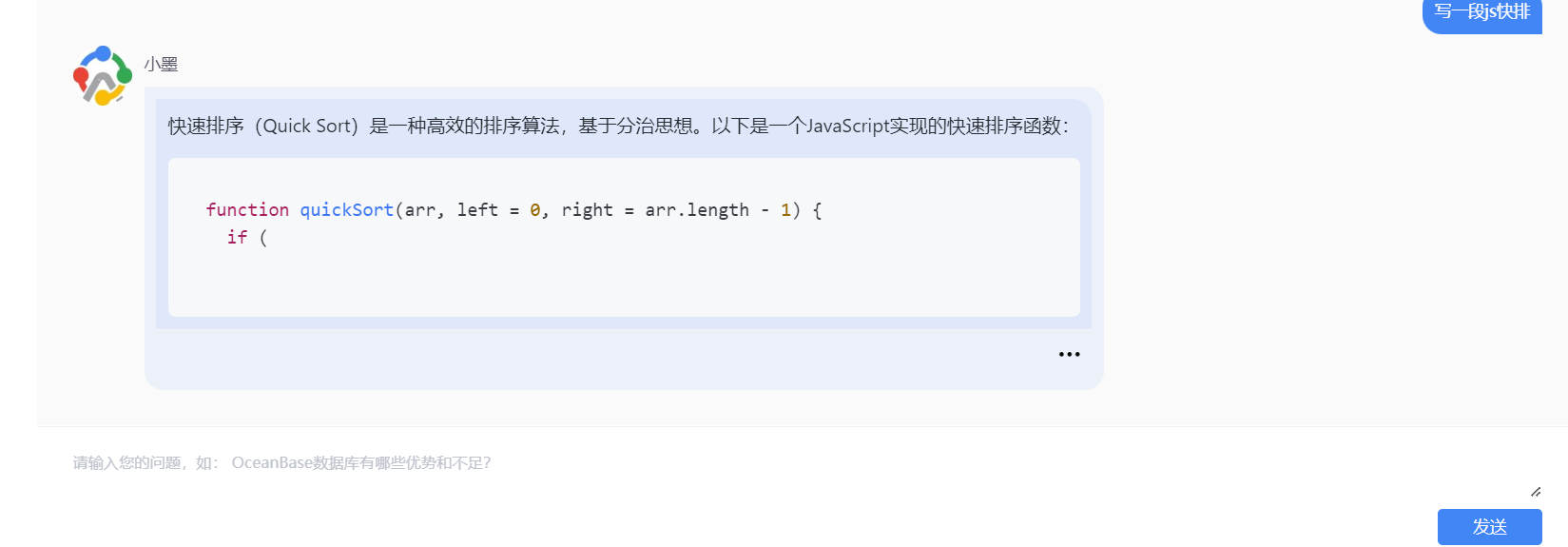
比如这种,实现难点在于,当返回的markdown语法,不是完整的语句时,展示的代码块会错乱。
实现代码
app.vue
<template>
  <div>
    <input type="text" v-model="prompt">
    <button @click="fetchStream">第三方请求流数据</button>
    <hr>
    <p v-if="!streamContent && !loading">请开始您的提问</p>
    <div v-for="(block, index) in contentBlocks" :key="index">
      <div v-if="block.type === 'html'" v-html="block.html"></div>
      <CodeBlock
          v-else-if="block.type === 'code'"
          :code="block.code"
          :language="block.language"
      />
    </div>
    <p v-if="loading">加载中...</p>
  </div>
</template>
<script setup lang="ts">
import {ref, computed} from "vue";
import {marked} from 'marked';
import CodeBlock from "./components/CodeBlock.vue";

const loading = ref(false);
const prompt = ref('写一段js快排')
const streamContent = ref('');


// 渲染markdown内容
const contentBlocks = computed(() => {
  const renderer = new marked.Renderer();
  let blockIndex = 0; // 用于跟踪代码块的索引
  const blocks = []; // 存储所有块的数组

  renderer.code = (code, lang) => {
    const index = blockIndex++; // 获取当前代码块的索引
    // 将代码块信息存储到 blocks 数组中
    blocks.push({
      type: 'code',
      code: code,
      language: lang,
      index: index, // 存储索引,用于后续替换
    });
    // 返回一个特殊的占位符,包含当前代码块的索引
    return `<!--codeblock-${index}-->`;
  };

  // 使用自定义的 renderer 解析 Markdown
  const html = marked(streamContent.value, {renderer});
  let codeBlockRegex = /<!--codeblock-(\d+)-->/;

  // 将解析后的 HTML 分割成块,并存储到 blocks 数组中
  const list = html.split(/(<!--codeblock-\d+-->)/).map((part, index) => {
    if (codeBlockRegex.test(part)) {
      let match = part.match(codeBlockRegex);
      return blocks[match?.[1]];
    } else {
      return {
        type: 'html',
        html: part,
        index: index, // 存储索引,用于后续替换
      };
    }
  });
  return list;
});

document.cookie = `token=Bearer%20eyJhbGciOiJIUzUxMiJ9.eyJzdWIiOiIxMTExNCIsImV4cCI6MTcxNjAxNzg1NSwiYml6VHlwZSI6Im1vZGIiLCJyb2xlTmFtZSI6IlJPTEVfbXZwIiwicGVybWlzc2lvbnMiOlsidmlkZW8iLCJjb21wYW55Il19.bQJ9WaT0BuczcW_8HRJoEUpyy_fM42wMoUd8amqOpmgo_PQ5sQoolGtvZIhwBe_W_BbGge5SmHhB677Wf0oH7w; userID=111xxx`

async function fetchStream() {

  if (loading.value) return;
  loading.value = true;

  streamContent.value = '';
  const url = "http://rexxxx";
  const data = {
    select_param: "",
    chat_mode: "chat_normal",
    model_name: "qwen_proxyllm",
    user_input: prompt.value || '你好',
    conv_uid: "xxxx",
  };

  try {
    const response = await fetch(url, {
      method: 'POST',
      headers: {
        'Content-Type': 'application/json'
      },
      body: JSON.stringify(data)
    });

    const reader = response.body.getReader();
    const decoder = new TextDecoder();

    while (true) {
      const {done, value} = await reader.read();
      if (done) break;
      const textChunk = decoder.decode(value, {stream: true});
      // 找到最后一个"data:"的位置 并从那里开始截取到字符串结束
      const lastIndex = textChunk.lastIndexOf('data:');
      if (lastIndex !== -1) {
        // 避免重复数据
        const text = textChunk.substring(lastIndex + 'data:'.length).replace(/\\n/g, '\n');

        // 判断text的长度是否小于streamContent.value的长度 如果小于则不更新 避免数据错乱导致页面闪动
        if (text.length >= streamContent.value.length) {
          console.log(text, "------------------text")
          streamContent.value = text;
        }
      }
    }
  } catch (error) {
    console.error('请求失败', error);
  } finally {
    loading.value = false;
  }
}
</script>
CodeBlock.vue
<template>
  <div class="code-enhance light">
    <div class="code-enhance-header">
      <span class="code-enhance-title">{{ language }}</span>
      <span class="code-enhance-copy" @click="copyCode">
        <span>复制</span>
      </span>
    </div>
    <pre
        class="code-enhance-content"
    ><code :class="['language-' + language]" v-html="highlightedCode"></code></pre>
  </div>
</template>
<script setup lang="ts">
import {ref, watchEffect} from 'vue';
import hljs from 'highlight.js';

// 定义props
const props = defineProps<{
  code: string;
  language?: string;
}>();

const highlightedCode = ref('');

// 使用watchEffect来处理代码高亮
watchEffect(() => {
  const validLanguage = hljs.getLanguage(props.language);
  if (validLanguage) {
    highlightedCode.value = hljs.highlight(props.code, {language: props.language}).value;
  } else {
    highlightedCode.value = hljs.highlightAuto(props.code).value;
  }
});

// 定义方法
const copyCode = () => {
  console.log(props.code);
};
</script>
<style scoped lang="scss">
.code-enhance {
  width: 100%;
  display: flex;
  flex-direction: column;
  border-radius: 7px;
  overflow: hidden;

  .code-enhance-content {
    width: 100%;
    overflow: auto;
    padding: 10px;
    background-color: #ececee;
    border-radius: 0 0 6px 6px;

    code {
      display: block;
      overflow: auto;
      padding: 10px;
    }

    pre code.hljs {
      display: block;
      overflow-x: auto;
      white-space: pre; // 保持空白符的处理
      padding: 0;
    }
  }

  .code-enhance-header {
    height: 32px;
    box-sizing: border-box;
    padding: 0 16px;
    font-size: 12px;
    display: flex;
    justify-content: space-between;
    align-items: center;
    gap: 8px;

    .code-enhance-title {
      -webkit-user-select: none;
      user-select: none;
    }

    .code-enhance-copy {
      display: inline-flex;
      cursor: pointer;
      align-items: center;
      gap: 6px;
      font-size: 12px;
      word-spacing: -4px;
    }
  }

  &.light {
    .code-enhance-header {
      background: #e2e6ea;
      color: #333;
    }

    .hljs {
      color: #24292e;
      background: none;
    }

    pre code.hljs {
      display: block;
      overflow-x: auto;
      padding: 0;
    }
  }
}
</style>
package.json
{
  "name": "stream-vue-demo",
  "private": true,
  "version": "0.0.0",
  "type": "module",
  "scripts": {
    "dev": "vite",
    "build": "vite build",
    "preview": "vite preview"
  },
  "dependencies": {
    "github-markdown-css": "^5.5.1",
    "highlight.js": "^11.9.0",
    "marked": "^4.0.0",
    "sass": "^1.76.0",
    "vue": "^3.4.21"
  },
  "devDependencies": {
    "@types/marked": "^4.0.0",
    "@vitejs/plugin-vue": "^5.0.4",
    "vite": "^5.2.0"
  }
}
实现思路
这段代码是一个使用Vue.js框架的单文件组件(.vue文件),它由三个主要部分组成:<template>、<script>和<style>。下面我将逐句解释这段代码的意思。
template部分:
<div>
  <input type="text" v-model="prompt">
  <button @click="fetchStream">第三方请求流数据</button>
  <hr>
  <p v-if="!streamContent && !loading">请开始您的提问</p>
  <div v-for="(block, index) in contentBlocks" :key="index">
    <div v-if="block.type === 'html'" v-html="block.html"></div>
    <CodeBlock
        v-else-if="block.type === 'code'"
        :code="block.code"
        :language="block.language"
    />
  </div>
  <p v-if="loading">加载中...</p>
</div>
<input type="text" v-model="prompt">:一个文本输入框,其值与变量prompt双向绑定。<button @click="fetchStream">第三方请求流数据</button>:一个按钮,点击时会触发fetchStream方法。<hr>:水平分割线。<p v-if="!streamContent && !loading">请开始您的提问</p>:当没有流内容且不在加载状态时,显示提示信息“请开始您的提问”。<div v-for="(block, index) in contentBlocks" :key="index">:遍历contentBlocks数组,为每个块创建一个div元素,并使用index作为唯一键。<div v-if="block.type === 'html'" v-html="block.html"></div>:如果块的类型是html,则使用v-html指令将其内容渲染为HTML。<CodeBlock v-else-if="block.type === 'code'" :code="block.code" :language="block.language"/>:如果块的类型是code,则使用自定义组件CodeBlock来渲染代码块,传递code和language作为属性。<p v-if="loading">加载中...</p>:如果处于加载状态,显示“加载中…”。
script setup lang="ts"部分:
这部分使用了TypeScript语言。
- 引入Vue的
ref和computed函数,以及marked库和CodeBlock组件。 - 定义了一些响应式变量:
loading、prompt和streamContent。 - 定义了
contentBlocks计算属性,用于解析Markdown内容并创建一个内容块数组。 - 设置了一个cookie,其中包含了一个模拟的token和userID。
- 定义了
fetchStream异步函数,用于发送POST请求到一个URL,并处理流式响应数据。
CodeBlock.vue部分:
这是一个子组件,用于渲染代码块并提供复制功能。
<template>部分定义了组件的HTML结构,包括代码标题、复制按钮和代码内容。<script setup lang="ts">部分定义了组件的逻辑,包括接收code和language属性,使用highlight.js库对代码进行高亮处理,并定义了复制代码的方法。<style scoped lang="scss">部分定义了组件的样式,使用了SCSS语法,并且是作用域限定的,只影响当前组件。
整体来看,这个Vue组件是一个简单的Markdown编辑器,它可以接收用户输入的Markdown文本,发送到服务器获取解析后的流数据,并将Markdown解析为HTML和代码块来展示。同时,它还包含了一个子组件CodeBlock用于渲染和复制代码块。
最后修改时间:2024-05-13 16:31:07
「喜欢这篇文章,您的关注和赞赏是给作者最好的鼓励」
关注作者
【版权声明】本文为墨天轮用户原创内容,转载时必须标注文章的来源(墨天轮),文章链接,文章作者等基本信息,否则作者和墨天轮有权追究责任。如果您发现墨天轮中有涉嫌抄袭或者侵权的内容,欢迎发送邮件至:contact@modb.pro进行举报,并提供相关证据,一经查实,墨天轮将立刻删除相关内容。
