



MySQL Shell介绍
MySQL Shell是MySQL Server 的高级客户端和代码编辑器,使用它可以对MySQL进行管理和操作。它支持多种语言,包括SQL,JavaScript和Python,并且支持编写脚本。
MySQL Shell提供以下功能:
支持的语言
MySQL Shell处理用JavaScript,Python和SQL编写的代码。根据当前处于活动状态的语言,将任何执行的代码作为这些语言之一进行处理。还有一些特定的MySQL Shell命令,前缀为\,使您能够配置MySQL Shell,而与当前选择的语言无关。
交互式代码执行
MySQL Shell提供了一个交互式的代码执行模式,你在MySQL Shell提示符下输入代码,每个输入的语句都会被处理,处理结果会显示在屏幕上。如果使用的终端支持Unicode文本输入,则支持Unicode文本输入。支持彩色终端。可以使用命令编写多行代码,使MySQL Shell能够缓存多行,然后将它们作为单个语句执行。
批处理代码执行
除了交互执行代码外,MySQL Shell还可以从不同来源获取代码并进行处理。这种以非交互方式处理代码的方法称为批处理执行。
支持的API
MySQL Shell包括用JavaScript和Python实现的api,您可以使用它们来开发与MySQL交互的代码。
AdminAPI允许你管理MySQL实例,使用它们来创建InnoDB Cluster, InnoDB ClusterSet和InnoDB ReplicaSet部署,并集成MySQL Router。
X协议支持
MySQL Shell为所有支持X协议的MySQL产品提供集成的命令行客户端。MySQL Shell的开发特性是为使用X协议的会话而设计的。MySQL Shell也可以使用经典的MySQL协议连接不支持X协议的MySQL服务器。对于使用经典MySQL协议创建的会话,X DevAPI的最小特性集是可用的。
MySQL Shell包括以下使用MySQL的实用程序:
一个升级检查器实用程序:用于验证MySQL服务器实例是否准备好升级。使用util.checkForServerUpgrade()访问升级检查器。
一个JSON导入实用程序:用于将JSON文档导入MySQL服务器集合或表。使用util.importJSON()访问导入实用程序。
一个并行表导入实用程序:拆分单个数据文件,并使用多个线程将数据块加载到MySQL表中。
使用MySQL Shell,DBA管理MySQL数据库将变得更加便捷高效。接下来让我们一起开启MySQL Shell畅游之旅吧!
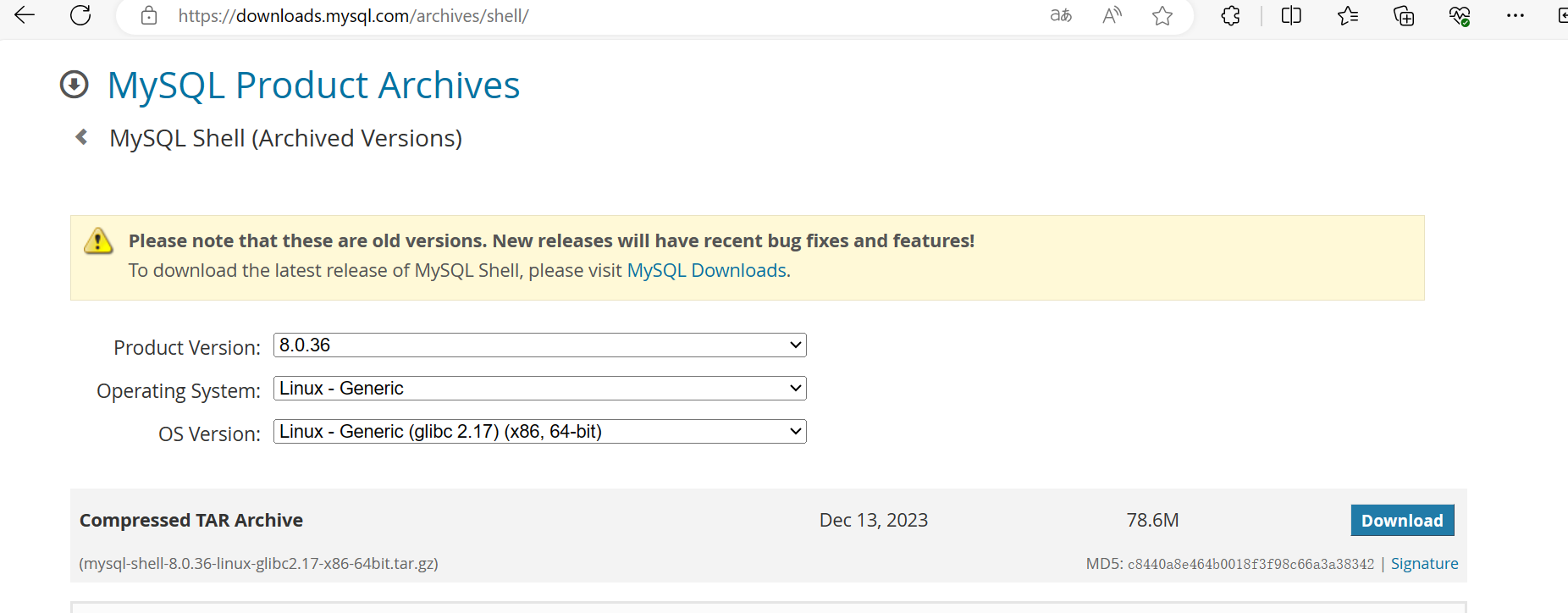
下载
下载地址:https://downloads.mysql.com/archives/shell/
软件名称:mysql-shell-8.0.36-linux-glibc2.17-x86-64bit.tar.gz
上传到服务器位置:/data/soft/
安装
创建MySQL Shell安装目录
[root@node1 soft]# mkdir -p /data/mysqlshell/
安装MySQL Shell
[root@node1 ~]# cd /data/soft
[root@node1 soft]# tar -zxvf mysql-shell-8.0.36-linux-glibc2.17-x86-64bit.tar.gz -C /data/mysqlshell
[root@node1 soft]# cd /data/mysqlshell/
[root@node1 mysqlshell]# ls
mysql-shell-8.0.36-linux-glibc2.17-x86-64bit
[root@node1 mysqlshell]# mv mysql-shell-8.0.36-linux-glibc2.17-x86-64bit/ mysqlsh
MySQL Shell使用
连接数据库
只要mysql命令改成mysqlsh就可以,如下:
[root@node1 ~]# mysqlsh -uroot -p'root'
MySQL Shell 8.0.36

Copyright (c) 2016, 2023, Oracle and/or its affiliates.
Oracle is a registered trademark of Oracle Corporation and/or its affiliates.
Other names may be trademarks of their respective owners.

Type '\help' or '\?' for help; '\quit' to exit.
WARNING: Using a password on the command line interface can be insecure.
Creating a Classic session to 'root@/data%2Fdata%2Fmysql.sock'
Fetching schema names for auto-completion... Press ^C to stop.
Your MySQL connection id is 26
Server version: 8.0.33 MySQL Community Server - GPL
No default schema selected; type \use <schema> to set one.
 MySQL  localhost  JS >
或者使用 \connect root@localhost:3306 连接数据库,如下:
[root@node1 ~]# mysqlsh
MySQL Shell 8.0.38

Copyright (c) 2016, 2024, Oracle and/or its affiliates.
Oracle is a registered trademark of Oracle Corporation and/or its affiliates.
Other names may be trademarks of their respective owners.

Type '\help' or '\?' for help; '\quit' to exit.
 MySQL  JS > \connect root@localhost:3306
Creating a session to 'root@localhost:3306'
Please provide the password for 'root@localhost:3306': ********
Save password for 'root@localhost:3306'? [Y]es/[N]o/Ne[v]er (default No):
Fetching schema names for auto-completion... Press ^C to stop.
Your MySQL connection id is 53
Server version: 8.0.39 MySQL Community Server - GPL
No default schema selected; type \use <schema> to set one.
 MySQL  localhost:3306 ssl  JS >
常用命令
\                   在SQL模式下,开始多行模式
\connect    (\c)    连接到MySQL服务器
\disconnect         断开MySQL服务器连接
\edit       (\e)    启动系统编辑器编辑执行的命令
\exit               退出MySQL Shell。和\quit相同
\G                  发送命令到mysql服务器,垂直显示结果
\g                  发送命令到mysql服务器
\help       (\?,\h) 打印有关MySQL Shell的帮助
\history            查看和编辑命令行历史
\js                 切换到JavaScript处理模式
\nopager            禁用当前的pager
\nowarnings (\w)    在每条语句后不显示警告
\option             允许使用可用的shell选项
\pager      (\P)    设置当前的pager
\py                 切换到Python处理模式
\quit       (\q)    退出MySQL Shell
\reconnect          重新连接到MySQL服务器
\rehash             刷新autocompletion缓存
\show               使用提供的选项和参数运行指定的报告
\source     (\.)    装载和执行来自于文件的脚本
\sql                执行SQL语句或者将执行模式切换为SQL(当没有SQL语句的时候)
\status     (\s)    打印当前的MySQL Shell状态
\system     (\!)    执行系统shell命令
\use        (\u)    设置活动的schema
\warnings   (\W)    在每条语句后显示警告
\watch              使用提供的选项和参数循环运行指定的报告
三种功能模式切换
切换到SQL模式
\sql
切换到JavaScript模式
\js
切换到Python模式
\py
获取状态信息
 MySQL  localhost  JS > \status
MySQL Shell version 8.0.36

Connection Id:                37
Current schema:
Current user:                 root@localhost
SSL:                          Not in use.
Using delimiter:              ;
Server version:               8.0.33 MySQL Community Server - GPL
Protocol version:             Classic 10
Client library:               8.0.36
Connection:                   Localhost via UNIX socket
Unix socket:                  /data/data/mysql.sock
Server characterset:          utf8mb4
Schema characterset:          utf8mb4
Client characterset:          utf8mb4
Conn. characterset:           utf8mb4
Result characterset:          utf8mb4
Compression:                  Disabled
Uptime:                       7 days 4 hours 24 min 4.0000 sec

Threads: 3  Questions: 437  Slow queries: 4  Opens: 489  Flush tables: 3  Open tables: 418  Queries per second avg: 0.000
 MySQL  localhost  JS >
命令自动补齐
 MySQL  localhost  SQL > de
DEALLOCATE PREPARE  DELETE              DELIMITER           DESC                DESCRIBE
 MySQL  localhost  SQL > de
执行历史命令
MySQL  localhost  JS >\history
    1  \?
    2  \history
    3  \status
执行linux命令
 MySQL  localhost  JS > \system pwd
/data/mysqlshell/mysqlsh/share/mysqlsh/prompt
 MySQL  localhost  JS > \system ls -l
total 48
-rw-r--r-- 1 7161 31415 1248 Dec 14 01:28 prompt_16.json
-rw-r--r-- 1 7161 31415 2463 Dec 14 01:28 prompt_256inv.json
-rw-r--r-- 1 7161 31415 2795 Dec 14 01:28 prompt_256.json
-rw-r--r-- 1 7161 31415 2949 Dec 14 01:28 prompt_256pl+aw.json
-rw-r--r-- 1 7161 31415 2864 Dec 14 01:28 prompt_256pl.json
-rw-r--r-- 1 7161 31415  183 Dec 14 01:28 prompt_classic.json
-rw-r--r-- 1 7161 31415 2830 Dec 14 01:28 prompt_dbl_256.json
-rw-r--r-- 1 7161 31415 3020 Dec 14 01:28 prompt_dbl_256pl+aw.json
-rw-r--r-- 1 7161 31415 2935 Dec 14 01:28 prompt_dbl_256pl.json
-rw-r--r-- 1 7161 31415 1559 Dec 14 01:28 prompt_nocolor.json
-rw-r--r-- 1 7161 31415 6735 Dec 14 01:28 README.prompt
SQL命令四种输出格式
MySQL Shell支持以表格、制表符、JSON或垂直格式输出结果。
--制表符格式
[root@node1 prompt]# mysqlsh  -uroot -p'root'  --sql -e"select * from testdb.testtab"
WARNING: Using a password on the command line interface can be insecure.
id
1
2
也可以通过设置shell.options.set('resultFormat','tabbed')使用制表符格式。
 MySQL  localhost  JS > shell.options.set('resultFormat','tabbed')
 MySQL  localhost  JS > \sql select * from testdb.testtab;\sql select * from testdb.testtab;
id
1
2
2 rows in set (0.0115 sec)

--表格格式
[root@node1 prompt]# mysqlsh  -uroot -p'root'  --sql -e"select * from testdb.testtab" --table
WARNING: Using a password on the command line interface can be insecure.
+----+
| id |
+----+
|  1 |
|  2 |
+----+
也可以通过设置shell.options.set('resultFormat','table')使用表格格式。
 MySQL  localhost  JS > shell.options.set('resultFormat','table')
 MySQL  localhost  JS > \sql select * from testdb.testtab;
+----+
| id |
+----+
|  1 |
|  2 |
+----+
2 rows in set (0.0004 sec)
--垂直格式
[root@node1 prompt]# mysqlsh  -uroot -p'root'  --sql -e"select * from testdb.testtab" --vertical
WARNING: Using a password on the command line interface can be insecure.
*************************** 1. row ***************************
id: 1
*************************** 2. row ***************************
id: 2
也可以通过设置shell.options.set('resultFormat','vertical')使用垂直格式。

--json格式
[root@node1 prompt]# mysqlsh  -uroot -p'root'  --sql -e"select * from testdb.testtab" --json
{
    "warning": "Using a password on the command line interface can be insecure.\n"
}
{
    "hasData": true,
    "rows": [
        {
            "id": 1
        },
        {
            "id": 2
        }
    ],
    "executionTime": "0.0013 sec",
    "affectedRowCount": 0,
    "affectedItemsCount": 0,
    "warningCount": 0,
    "warningsCount": 0,
    "warnings": [],
    "info": "",
    "autoIncrementValue": 0
}
也可以通过shell.options.set('resultFormat','json')使用JSON格式。
备份实例
MySQL Shell备份是支持 JavaScript 和 Python 两种脚本语言,支持并行,默认支持压缩,备份恢复速度快,可选择可过滤备份。需要注意的是,不支持5.7以下的版本。
[root@node1 data]# mysqlsh -h192.168.100.10 -utest -p'test' -P3306 -- util dump-instance /data/backup  --threads=2
WARNING: Using a password on the command line interface can be insecure.
Acquiring global read lock
Global read lock acquired
Initializing - done
1 out of 5 schemas will be dumped and within them 1 table, 0 views.
4 out of 7 users will be dumped.
Gathering information - done
All transactions have been started
Locking instance for backup
Global read lock has been released
Writing global DDL files
Writing users DDL
Running data dump using 2 threads.
NOTE: Progress information uses estimated values and may not be accurate.
Writing schema metadata - done
Writing DDL - done
Writing table metadata - done
Starting data dump
100% (2 rows / ~2 rows), 0.00 rows/s, 0.00 B/s uncompressed, 0.00 B/s compressed
Dump duration: 00:00:00s
Total duration: 00:00:00s
Schemas dumped: 1
Tables dumped: 1
Uncompressed data size: 8 bytes
Compressed data size: 17 bytes
Compression ratio: 0.5
Rows written: 2
Bytes written: 17 bytes
Average uncompressed throughput: 8.00 B/s
Average compressed throughput: 17.00 B/s
数据库升级检查
直到MySQL Shell 8.0.20,用于运行升级检查工具的用户帐户必须具有所有权限。从MySQL Shell 8.0.21开始,用户帐户需要RELOAD, PROCESS和SELECT权限。
 MySQL  localhost  JS > util.checkForServerUpgrade();
The MySQL server at /data%2Fdata%2Fmysql.sock, version 8.0.33 - MySQL Community
Server - GPL, will now be checked for compatibility issues for upgrade to MySQL
8.0.36...

1) Issues reported by 'check table x for upgrade' command
  No issues found

Errors:   0
Warnings: 0
Notices:  0

No known compatibility errors or issues were found.
 MySQL  localhost  JS >
管理MGR
验证MySQL InnoDB集群的实例
 MySQL  localhost:33060+ ssl  JS > dba.checkInstanceConfiguration()
Validating local MySQL instance listening at port 3306 for use in an InnoDB cluster...

This instance reports its own address as 192.168.100.10:3306

Checking whether existing tables comply with Group Replication requirements...
No incompatible tables detected

Checking instance configuration...
Instance configuration is compatible with InnoDB cluster

The instance '192.168.100.10:3306' is valid to be used in an InnoDB cluster.

{
    "status": "ok"
}
连接到主节点
 MySQL  localhost:33060+ ssl  JS > shell.connect("root@192.168.100.11:3306");
Creating a session to 'root@192.168.100.11:3306'
Please provide the password for 'root@192.168.100.11:3306': ****
Save password for 'root@192.168.100.11:3306'? [Y]es/[N]o/Ne[v]er (default No):
Fetching schema names for auto-completion... Press ^C to stop.
Closing old connection...
Your MySQL connection id is 76
Server version: 8.0.35 MySQL Community Server - GPL
No default schema selected; type \use <schema> to set one.
<ClassicSession:root@192.168.100.11:3306>
创建集群
 MySQL  192.168.100.11:3306 ssl  JS > var c = dba.createCluster('clusterTest')
A new InnoDB Cluster will be created on instance '192.168.100.11:3306'.

You are connected to an instance that belongs to an unmanaged replication group.
Do you want to setup an InnoDB Cluster based on this replication group? [Y/n]: Y
Creating InnoDB Cluster 'clusterTest' on '192.168.100.11:3306'...

Adding Seed Instance...
Adding Instance '192.168.100.11:3306'...
Adding Instance '192.168.100.12:3306'...
Adding Instance '192.168.100.10:3306'...
Resetting distributed recovery credentials across the cluster...
Cluster successfully created based on existing replication group.
配置实例
 MySQL  192.168.100.12:3306 ssl  JS > dba.configureInstance()
The instance '192.168.100.12:3306' belongs to an InnoDB Cluster.
Configuring MySQL instance at 192.168.100.12:3306 for use in an InnoDB cluster...

This instance reports its own address as 192.168.100.12:3306

applierWorkerThreads will be set to the default value of 4.

NOTE: Some configuration options need to be fixed:
+----------------------------------------+---------------+----------------+----------------------------+
| Variable                               | Current Value | Required Value | Note                       |
+----------------------------------------+---------------+----------------+----------------------------+
| binlog_transaction_dependency_tracking | COMMIT_ORDER  | WRITESET       | Update the server variable |
+----------------------------------------+---------------+----------------+----------------------------+

Do you want to perform the required configuration changes? [y/n]: y
Configuring instance...

WARNING: '@@binlog_transaction_dependency_tracking' is deprecated and will be removed in a future release. (Code 1287).
The instance '192.168.100.12:3306' was configured to be used in an InnoDB cluster.
获取集群实例
 MySQL  192.168.100.11:3306 ssl  JS > var c=dba.getCluster();
<Cluster:clusterTest>
查看集群状态
 MySQL  192.168.100.11:3306 ssl  JS > c.status();
{
    "clusterName": "clusterTest",
    "defaultReplicaSet": {
        "name": "default",
        "primary": "192.168.100.11:3306",
        "ssl": "DISABLED",
        "status": "OK",
        "statusText": "Cluster is ONLINE and can tolerate up to ONE failure.",
        "topology": {
            "192.168.100.10:3306": {
                "address": "192.168.100.10:3306",
                "memberRole": "SECONDARY",
                "mode": "R/O",
                "readReplicas": {},
                "replicationLag": "applier_queue_applied",
                "role": "HA",
                "status": "ONLINE",
                "version": "8.0.35"
            },
            "192.168.100.11:3306": {
                "address": "192.168.100.11:3306",
                "memberRole": "PRIMARY",
                "mode": "R/W",
                "readReplicas": {},
                "replicationLag": "applier_queue_applied",
                "role": "HA",
                "status": "ONLINE",
                "version": "8.0.35"
            },
            "192.168.100.12:3306": {
                "address": "192.168.100.12:3306",
                "memberRole": "SECONDARY",
                "mode": "R/O",
                "readReplicas": {},
                "replicationLag": "applier_queue_applied",
                "role": "HA",
                "status": "ONLINE",
                "version": "8.0.35"
            }
        },
        "topologyMode": "Single-Primary"
    },
    "groupInformationSourceMember": "192.168.100.11:3306"
}
 MySQL  192.168.100.11:3306 ssl  JS >
指定新的主节点
MySQL  192.168.100.11:3306 ssl  JS >c.setPrimaryInstance('root@192.168.100.10:3306')
Setting instance '192.168.100.10:3306' as the primary instance of cluster 'clusterTest'...

Instance '192.168.100.12:3306' remains SECONDARY.
Instance '192.168.100.11:3306' was switched from PRIMARY to SECONDARY.
Instance '192.168.100.10:3306' was switched from SECONDARY to PRIMARY.

The instance '192.168.100.10:3306' was successfully elected as primary.
参考文档
https://dev.mysql.com/doc/mysql-shell/8.0/en/
总结
本文章主要向大家介绍MySQL Shell的基本知识点和用法,MySQL Shell还有很多功能,需要我们在工作中不断地去探索~~~
