



Table of Contents
本章内容概要
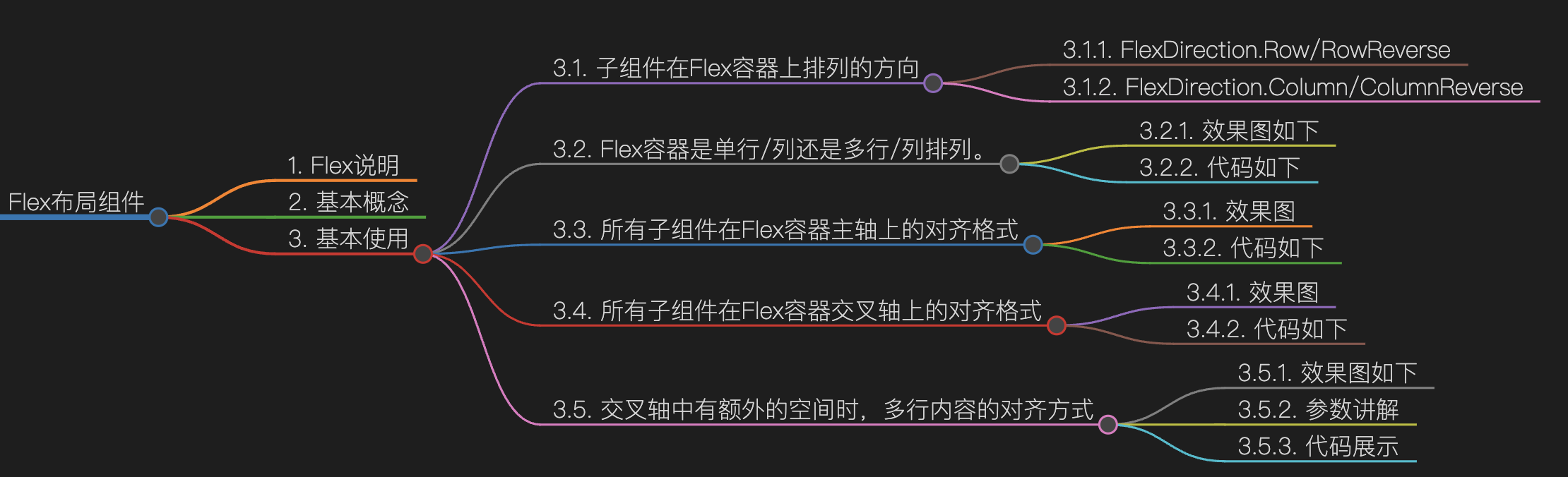
Flex说明
以弹性方式布局子组件的容器组件。
基本概念
- 主轴:Flex组件布局方向的轴线,子元素默认沿着主轴排列。主轴开始的位置称为主轴起始点,结束位置称为主轴结束点。
- 交叉轴:垂直于主轴方向的轴线。交叉轴开始的位置称为交叉轴起始点,结束位置称为交叉轴结束点。
基本使用
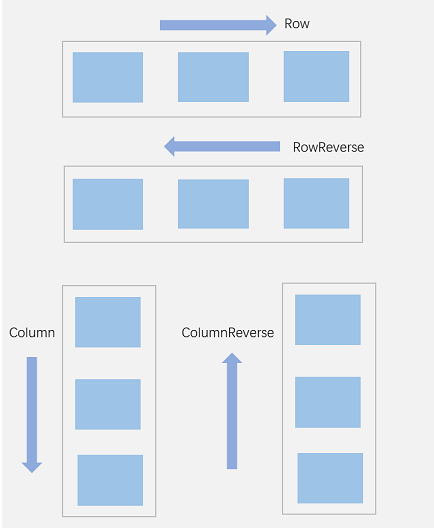
子组件在Flex容器上排列的方向
| 名称 | 描述 |
|---|---|
| Row | 主轴与行方向一致作为布局模式。 |
| RowReverse | 与Row方向相反方向进行布局。 |
| Column | 主轴与列方向一致作为布局模式。 |
| ColumnReverse | 与Column相反方向进行布局。 |
FlexDirection�.Row/RowReverse
效果如下
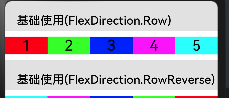
代码如下
this.HeaderCon('基础使用(FlexDirection.Row)')
Flex({ direction: FlexDirection.Row }) { // 子组件在容器主轴上行布局
	Text('1').width('20%').height(30).backgroundColor('#f00').fontSize(25).textAlign(TextAlign.Center)
	Text('2').width('20%').height(30).backgroundColor('#0f0').fontSize(25).textAlign(TextAlign.Center)
	Text('3').width('20%').height(30).backgroundColor('#00f').fontSize(25).textAlign(TextAlign.Center)
	Text('4').width('20%').height(30).backgroundColor('#f0f').fontSize(25).textAlign(TextAlign.Center)
	Text('5').width('20%').height(30).backgroundColor('#0ff').fontSize(25).textAlign(TextAlign.Center)
}
this.HeaderCon('基础使用(FlexDirection.RowReverse)')
Flex({ direction: FlexDirection.RowReverse }) { // 子组件在容器主轴上行布局
	Text('1').width('20%').height(30).backgroundColor('#f00').fontSize(25).textAlign(TextAlign.Center)
	Text('2').width('20%').height(30).backgroundColor('#0f0').fontSize(25).textAlign(TextAlign.Center)
	Text('3').width('20%').height(30).backgroundColor('#00f').fontSize(25).textAlign(TextAlign.Center)
	Text('4').width('20%').height(30).backgroundColor('#f0f').fontSize(25).textAlign(TextAlign.Center)
	Text('5').width('20%').height(30).backgroundColor('#0ff').fontSize(25).textAlign(TextAlign.Center)
}
�
FlexDirection�.Column/ColumnReverse
效果如下
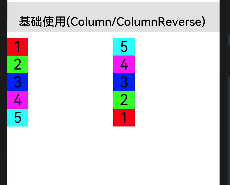
代码如下
this.HeaderCon('基础使用(Column/ColumnReverse)')
Row(){
	Flex({ direction: FlexDirection.Column }) { // 子组件在容器主轴上行布局
		Text('1').width('20%').height(30).backgroundColor('#f00').fontSize(25).textAlign(TextAlign.Center)
		Text('2').width('20%').height(30).backgroundColor('#0f0').fontSize(25).textAlign(TextAlign.Center)
		Text('3').width('20%').height(30).backgroundColor('#00f').fontSize(25).textAlign(TextAlign.Center)
		Text('4').width('20%').height(30).backgroundColor('#f0f').fontSize(25).textAlign(TextAlign.Center)
		Text('5').width('20%').height(30).backgroundColor('#0ff').fontSize(25).textAlign(TextAlign.Center)
	}.width('50%')

	Flex({ direction: FlexDirection.ColumnReverse }) { // 子组件在容器主轴上行布局
		Text('1').width('20%').height(30).backgroundColor('#f00').fontSize(25).textAlign(TextAlign.Center)
		Text('2').width('20%').height(30).backgroundColor('#0f0').fontSize(25).textAlign(TextAlign.Center)
		Text('3').width('20%').height(30).backgroundColor('#00f').fontSize(25).textAlign(TextAlign.Center)
		Text('4').width('20%').height(30).backgroundColor('#f0f').fontSize(25).textAlign(TextAlign.Center)
		Text('5').width('20%').height(30).backgroundColor('#0ff').fontSize(25).textAlign(TextAlign.Center)
	}.width('50%')
}.justifyContent(FlexAlign.SpaceBetween)
�
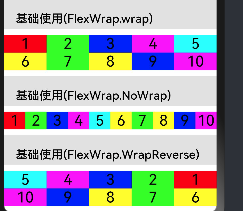
Flex容器是单行/列还是多行/列排列。
| 名称 | 描述 |
|---|---|
| NoWrap | Flex容器的元素单行/列布局,子项不允许超出容器。 |
| Wrap | Flex容器的元素多行/列排布,子项允许超出容器。 |
| WrapReverse | Flex容器的元素反向多行/列排布,子项允许超出容器。 |
效果图如下
代码如下
this.HeaderCon('基础使用(FlexWrap.wrap)')

Flex({ wrap:FlexWrap.Wrap }) { // 子组件在容器主轴上行布局
	Text('1').width('20%').height(30).backgroundColor('#f00').fontSize(25).textAlign(TextAlign.Center)
	Text('2').width('20%').height(30).backgroundColor('#0f0').fontSize(25).textAlign(TextAlign.Center)
	Text('3').width('20%').height(30).backgroundColor('#00f').fontSize(25).textAlign(TextAlign.Center)
	Text('4').width('20%').height(30).backgroundColor('#f0f').fontSize(25).textAlign(TextAlign.Center)
	Text('5').width('20%').height(30).backgroundColor('#0ff').fontSize(25).textAlign(TextAlign.Center)
	Text('6').width('20%').height(30).backgroundColor('#ff0').fontSize(25).textAlign(TextAlign.Center)
	Text('7').width('20%').height(30).backgroundColor('#0f0').fontSize(25).textAlign(TextAlign.Center)
	Text('8').width('20%').height(30).backgroundColor('#ff0').fontSize(25).textAlign(TextAlign.Center)
	Text('9').width('20%').height(30).backgroundColor('#00f').fontSize(25).textAlign(TextAlign.Center)
	Text('10').width('20%').height(30).backgroundColor('#f0f').fontSize(25).textAlign(TextAlign.Center)


}

this.HeaderCon('基础使用(FlexWrap.NoWrap)')

Flex({ wrap:FlexWrap.NoWrap }) { // 子组件在容器主轴上行布局
	Text('1').width('20%').height(30).backgroundColor('#f00').fontSize(25).textAlign(TextAlign.Center)
	Text('2').width('20%').height(30).backgroundColor('#0f0').fontSize(25).textAlign(TextAlign.Center)
	Text('3').width('20%').height(30).backgroundColor('#00f').fontSize(25).textAlign(TextAlign.Center)
	Text('4').width('20%').height(30).backgroundColor('#f0f').fontSize(25).textAlign(TextAlign.Center)
	Text('5').width('20%').height(30).backgroundColor('#0ff').fontSize(25).textAlign(TextAlign.Center)
	Text('6').width('20%').height(30).backgroundColor('#ff0').fontSize(25).textAlign(TextAlign.Center)
	Text('7').width('20%').height(30).backgroundColor('#0f0').fontSize(25).textAlign(TextAlign.Center)
	Text('8').width('20%').height(30).backgroundColor('#ff0').fontSize(25).textAlign(TextAlign.Center)
	Text('9').width('20%').height(30).backgroundColor('#00f').fontSize(25).textAlign(TextAlign.Center)
	Text('10').width('20%').height(30).backgroundColor('#f0f').fontSize(25).textAlign(TextAlign.Center)


}

this.HeaderCon('基础使用(FlexWrap.WrapReverse)')

Flex({ wrap:FlexWrap.WrapReverse }) { // 子组件在容器主轴上行布局
	Text('1').width('20%').height(30).backgroundColor('#f00').fontSize(25).textAlign(TextAlign.Center)
	Text('2').width('20%').height(30).backgroundColor('#0f0').fontSize(25).textAlign(TextAlign.Center)
	Text('3').width('20%').height(30).backgroundColor('#00f').fontSize(25).textAlign(TextAlign.Center)
	Text('4').width('20%').height(30).backgroundColor('#f0f').fontSize(25).textAlign(TextAlign.Center)
	Text('5').width('20%').height(30).backgroundColor('#0ff').fontSize(25).textAlign(TextAlign.Center)
	Text('6').width('20%').height(30).backgroundColor('#ff0').fontSize(25).textAlign(TextAlign.Center)
	Text('7').width('20%').height(30).backgroundColor('#0f0').fontSize(25).textAlign(TextAlign.Center)
	Text('8').width('20%').height(30).backgroundColor('#ff0').fontSize(25).textAlign(TextAlign.Center)
	Text('9').width('20%').height(30).backgroundColor('#00f').fontSize(25).textAlign(TextAlign.Center)
	Text('10').width('20%').height(30).backgroundColor('#f0f').fontSize(25).textAlign(TextAlign.Center)
}
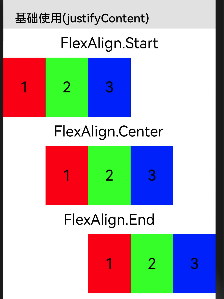
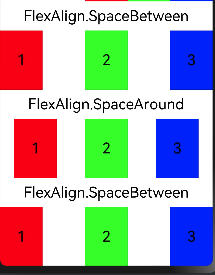
所有子组件在Flex容器主轴上的对齐格式
| 名称 | 描述 |
|---|---|
| Start | 元素在主轴方向首端对齐,第一个元素与行首对齐,同时后续的元素与前一个对齐。 |
| Center | 元素在主轴方向中心对齐,第一个元素与行首的距离与最后一个元素与行尾距离相同。 |
| End | 元素在主轴方向尾部对齐,最后一个元素与行尾对齐,其他元素与后一个对齐。 |
| SpaceBetween | Flex主轴方向均匀分配弹性元素,相邻元素之间距离相同。第一个元素与行首对齐,最后一个元素与行尾对齐。 |
| SpaceAround | Flex主轴方向均匀分配弹性元素,相邻元素之间距离相同。第一个元素到行首的距离和最后一个元素到行尾的距离是相邻元素之间距离的一半。 |
| SpaceEvenly | Flex主轴方向均匀分配弹性元素,相邻元素之间的距离、第一个元素与行首的间距、最后一个元素到行尾的间距都完全一样。 |
效果图
 |
 |
|---|
代码如下
this.HeaderCon('基础使用(justifyContent)')
Text('FlexAlign.Start').fontSize(25)
Flex({justifyContent:FlexAlign.Start}){
	Text('1').width('20%').height(100).backgroundColor('#f00').fontSize(25).textAlign(TextAlign.Center)
	Text('2').width('20%').height(100).backgroundColor('#0f0').fontSize(25).textAlign(TextAlign.Center)
	Text('3').width('20%').height(30).backgroundColor('#00f').fontSize(25).textAlign(TextAlign.Center)

}
Text('FlexAlign.Center').fontSize(25)

Flex({justifyContent:FlexAlign.Center}){
	Text('1').width('20%').height(100).backgroundColor('#f00').fontSize(25).textAlign(TextAlign.Center)
	Text('2').width('20%').height(100).backgroundColor('#0f0').fontSize(25).textAlign(TextAlign.Center)
	Text('3').width('20%').height(30).backgroundColor('#00f').fontSize(25).textAlign(TextAlign.Center)

}
Text('FlexAlign.End').fontSize(25)

Flex({justifyContent:FlexAlign.End}){
	Text('1').width('20%').height(100).backgroundColor('#f00').fontSize(25).textAlign(TextAlign.Center)
	Text('2').width('20%').height(100).backgroundColor('#0f0').fontSize(25).textAlign(TextAlign.Center)
	Text('3').width('20%').height(30).backgroundColor('#00f').fontSize(25).textAlign(TextAlign.Center)

}
Text('FlexAlign.SpaceBetween').fontSize(25)

Flex({justifyContent:FlexAlign.SpaceBetween}){
	Text('1').width('20%').height(100).backgroundColor('#f00').fontSize(25).textAlign(TextAlign.Center)
	Text('2').width('20%').height(100).backgroundColor('#0f0').fontSize(25).textAlign(TextAlign.Center)
	Text('3').width('20%').height(30).backgroundColor('#00f').fontSize(25).textAlign(TextAlign.Center)

}
Text('FlexAlign.SpaceAround').fontSize(25)

Flex({justifyContent:FlexAlign.SpaceAround}){
	Text('1').width('20%').height(100).backgroundColor('#f00').fontSize(25).textAlign(TextAlign.Center)
	Text('2').width('20%').height(100).backgroundColor('#0f0').fontSize(25).textAlign(TextAlign.Center)
	Text('3').width('20%').height(30).backgroundColor('#00f').fontSize(25).textAlign(TextAlign.Center)

}
Text('FlexAlign.SpaceBetween').fontSize(25)

Flex({justifyContent:FlexAlign.SpaceBetween}){
	Text('1').width('20%').height(100).backgroundColor('#f00').fontSize(25).textAlign(TextAlign.Center)
	Text('2').width('20%').height(100).backgroundColor('#0f0').fontSize(25).textAlign(TextAlign.Center)
	Text('3').width('20%').height(30).backgroundColor('#00f').fontSize(25).textAlign(TextAlign.Center)

}
�
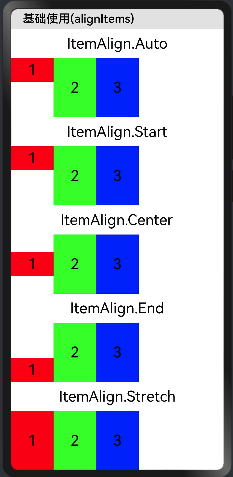
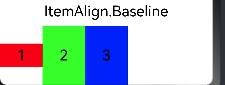
所有子组件在Flex容器交叉轴上的对齐格式
| 名称 | 描述 |
|---|---|
| Auto | 使用Flex容器中默认配置。 |
| Start | 元素在Flex容器中,交叉轴方向首部对齐。 |
| Center | 元素在Flex容器中,交叉轴方向居中对齐。 |
| End | 元素在Flex容器中,交叉轴方向底部对齐。 |
| Stretch | 元素在Flex容器中,交叉轴方向拉伸填充。容器为Flex且设置Wrap为FlexWrap.Wrap或FlexWrap.WrapReverse时,元素拉伸到与当前行/列交叉轴长度最长的元素尺寸。其余情况在元素未设置尺寸时,拉伸到容器尺寸。 |
效果图
代码如下
this.HeaderCon('基础使用(alignItems)')
Text('ItemAlign.Auto').fontSize(25)

Flex({alignItems:ItemAlign.Auto}){
	Text('1').width('20%').height(40).backgroundColor('#f00').fontSize(25).textAlign(TextAlign.Center)
	Text('2').width('20%').height(100).backgroundColor('#0f0').fontSize(25).textAlign(TextAlign.Center)
	Text('3').width('20%').height(100).backgroundColor('#00f').fontSize(25).textAlign(TextAlign.Center)

}

Text('ItemAlign.Start').fontSize(25)

Flex({alignItems:ItemAlign.Start}){
	Text('1').width('20%').height(40).backgroundColor('#f00').fontSize(25).textAlign(TextAlign.Center)
	Text('2').width('20%').height(100).backgroundColor('#0f0').fontSize(25).textAlign(TextAlign.Center)
	Text('3').width('20%').height(100).backgroundColor('#00f').fontSize(25).textAlign(TextAlign.Center)

}

Text('ItemAlign.Center').fontSize(25)

Flex({alignItems:ItemAlign.Center}){
	Text('1').width('20%').height(40).backgroundColor('#f00').fontSize(25).textAlign(TextAlign.Center)
	Text('2').width('20%').height(100).backgroundColor('#0f0').fontSize(25).textAlign(TextAlign.Center)
	Text('3').width('20%').height(100).backgroundColor('#00f').fontSize(25).textAlign(TextAlign.Center)

}

Text('ItemAlign.End').fontSize(25)

Flex({alignItems:ItemAlign.End}){
	Text('1').width('20%').height(40).backgroundColor('#f00').fontSize(25).textAlign(TextAlign.Center)
	Text('2').width('20%').height(100).backgroundColor('#0f0').fontSize(25).textAlign(TextAlign.Center)
	Text('3').width('20%').height(100).backgroundColor('#00f').fontSize(25).textAlign(TextAlign.Center)

}

Text('ItemAlign.Stretch').fontSize(25)

Flex({alignItems:ItemAlign.Stretch}){
	Text('1').width('20%').height(40).backgroundColor('#f00').fontSize(25).textAlign(TextAlign.Center)
	Text('2').width('20%').height(100).backgroundColor('#0f0').fontSize(25).textAlign(TextAlign.Center)
	Text('3').width('20%').height(100).backgroundColor('#00f').fontSize(25).textAlign(TextAlign.Center)

}.width('100%')

Text('ItemAlign.Baseline').fontSize(25)

Flex({alignItems:ItemAlign.Baseline}){
	Text('1').width('20%').height(40).backgroundColor('#f00').fontSize(25).textAlign(TextAlign.Center)
	Text('2').width('20%').height(100).backgroundColor('#0f0').fontSize(25).textAlign(TextAlign.Center)
	Text('3').width('20%').height(100).backgroundColor('#00f').fontSize(25).textAlign(TextAlign.Center)

}.width('100%')
交叉轴中有额外的空间时,多行内容的对齐方式
注意: 仅在wrap为Wrap或WrapReverse下生效。
效果图如下
| FlexAlign.Start� | 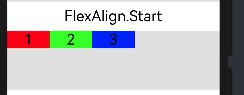 |
|---|---|
| FlexAlign.Center� | 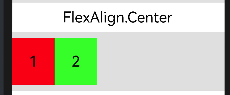 |
| FlexAlign.End� | 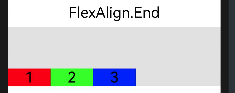 |
| FlexAlign.SpaceBetween� | 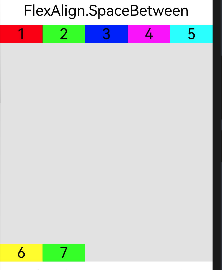 |
| FlexAlign.SpaceAround� | 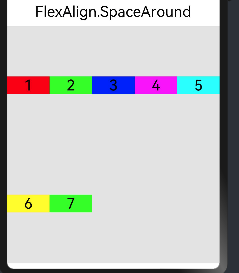 |
| FlexAlign.SpaceEvenly� | 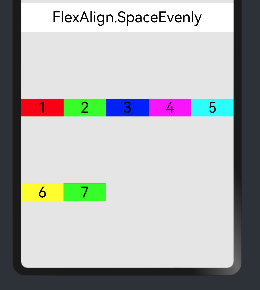 |
参数讲解
| 名称 | 描述 |
|---|---|
| Start | 元素在主轴方向首端对齐,第一个元素与行首对齐,同时后续的元素与前一个对齐。 |
| Center | 元素在主轴方向中心对齐,第一个元素与行首的距离与最后一个元素与行尾距离相同。 |
| End | 元素在主轴方向尾部对齐,最后一个元素与行尾对齐,其他元素与后一个对齐。 |
| SpaceBetween | Flex主轴方向均匀分配弹性元素,相邻元素之间距离相同。第一个元素与行首对齐,最后一个元素与行尾对齐。 |
| SpaceAround | Flex主轴方向均匀分配弹性元素,相邻元素之间距离相同。第一个元素到行首的距离和最后一个元素到行尾的距离是相邻元素之间距离的一半。 |
| SpaceEvenly | Flex主轴方向均匀分配弹性元素,相邻元素之间的距离、第一个元素与行首的间距、最后一个元素到行尾的间距都完全一样。 |
代码展示
this.HeaderCon('基础使用(alignContent)')

Text('FlexAlign.Start').fontSize(25)

Flex({alignContent:FlexAlign.Start, wrap:FlexWrap.Wrap}){
	Text('1').width('20%').height(30).backgroundColor('#f00').fontSize(25).textAlign(TextAlign.Center)
	Text('2').width('20%').height(30).backgroundColor('#0f0').fontSize(25).textAlign(TextAlign.Center)
	Text('3').width('20%').height(30).backgroundColor('#00f').fontSize(25).textAlign(TextAlign.Center)

}.height(100).backgroundColor('#e4e4e4')

Text('FlexAlign.Center').fontSize(25)

Flex({alignContent:FlexAlign.Center, wrap:FlexWrap.Wrap}){
	Text('1').width('20%').height(80).backgroundColor('#f00').fontSize(25).textAlign(TextAlign.Center)
	Text('2').width('20%').height(30).backgroundColor('#0f0').fontSize(25).textAlign(TextAlign.Center)

}.height(100).backgroundColor('#e3e3e3')


Text('FlexAlign.End').fontSize(25)

Flex({alignContent:FlexAlign.End, wrap:FlexWrap.Wrap}){
	Text('1').width('20%').height(30).backgroundColor('#f00').fontSize(25).textAlign(TextAlign.Center)
	Text('2').width('20%').height(30).backgroundColor('#0f0').fontSize(25).textAlign(TextAlign.Center)
	Text('3').width('20%').height(30).backgroundColor('#00f').fontSize(25).textAlign(TextAlign.Center)

}.height(100).backgroundColor('#e5e5e5')

Text('FlexAlign.SpaceBetween').fontSize(25)

Flex({alignContent:FlexAlign.SpaceBetween, wrap:FlexWrap.Wrap}){
	Text('1').width('20%').height(30).backgroundColor('#f00').fontSize(25).textAlign(TextAlign.Center)
	Text('2').width('20%').height(30).backgroundColor('#0f0').fontSize(25).textAlign(TextAlign.Center)
	Text('3').width('20%').height(30).backgroundColor('#00f').fontSize(25).textAlign(TextAlign.Center)
	Text('4').width('20%').height(30).backgroundColor('#f0f').fontSize(25).textAlign(TextAlign.Center)
	Text('5').width('20%').height(30).backgroundColor('#0ff').fontSize(25).textAlign(TextAlign.Center)
	Text('6').width('20%').height(30).backgroundColor('#ff0').fontSize(25).textAlign(TextAlign.Center)
	Text('7').width('20%').height(30).backgroundColor('#0f0').fontSize(25).textAlign(TextAlign.Center)

}.height(400).backgroundColor('#e6e6e6')


Text('FlexAlign.SpaceAround').fontSize(25)

Flex({alignContent:FlexAlign.SpaceAround, wrap:FlexWrap.Wrap}){
	Text('1').width('20%').height(30).backgroundColor('#f00').fontSize(25).textAlign(TextAlign.Center)
	Text('2').width('20%').height(30).backgroundColor('#0f0').fontSize(25).textAlign(TextAlign.Center)
	Text('3').width('20%').height(30).backgroundColor('#00f').fontSize(25).textAlign(TextAlign.Center)
	Text('4').width('20%').height(30).backgroundColor('#f0f').fontSize(25).textAlign(TextAlign.Center)
	Text('5').width('20%').height(30).backgroundColor('#0ff').fontSize(25).textAlign(TextAlign.Center)
	Text('6').width('20%').height(30).backgroundColor('#ff0').fontSize(25).textAlign(TextAlign.Center)
	Text('7').width('20%').height(30).backgroundColor('#0f0').fontSize(25).textAlign(TextAlign.Center)

}.height(400).backgroundColor('#e7e7e7')


Text('FlexAlign.SpaceEvenly').fontSize(25)

Flex({alignContent:FlexAlign.SpaceEvenly, wrap:FlexWrap.Wrap}){
	Text('1').width('20%').height(30).backgroundColor('#f00').fontSize(25).textAlign(TextAlign.Center)
	Text('2').width('20%').height(30).backgroundColor('#0f0').fontSize(25).textAlign(TextAlign.Center)
	Text('3').width('20%').height(30).backgroundColor('#00f').fontSize(25).textAlign(TextAlign.Center)
	Text('4').width('20%').height(30).backgroundColor('#f0f').fontSize(25).textAlign(TextAlign.Center)
	Text('5').width('20%').height(30).backgroundColor('#0ff').fontSize(25).textAlign(TextAlign.Center)
	Text('6').width('20%').height(30).backgroundColor('#ff0').fontSize(25).textAlign(TextAlign.Center)
	Text('7').width('20%').height(30).backgroundColor('#0f0').fontSize(25).textAlign(TextAlign.Center)

}.height(400).backgroundColor('#e8e8e8')
�
「喜欢这篇文章,您的关注和赞赏是给作者最好的鼓励」
关注作者
【版权声明】本文为墨天轮用户原创内容,转载时必须标注文章的来源(墨天轮),文章链接,文章作者等基本信息,否则作者和墨天轮有权追究责任。如果您发现墨天轮中有涉嫌抄袭或者侵权的内容,欢迎发送邮件至:contact@modb.pro进行举报,并提供相关证据,一经查实,墨天轮将立刻删除相关内容。
