



1.故障现象
Oracle Database for Windows x64 is supported on the following operating system versions:
- Windows 8.1 x64 - Pro and Enterprise editions
- Windows 10 x64 - Pro, Enterprise, and Education editions
- Windows 11 x64 - Pro, Enterprise, and Education editions
- Windows Server 2012 R2 x64 - Standard, Datacenter, Essentials, and Foundation editions
- Windows Server 2016 x64 - Standard, Datacenter, and Essentials editions
- Windows Server 2019 x64 - Standard, Datacenter, and Essentials editions
- Windows Server 2022 x64 - Standard, Datacenter, and Essentials editions
Note:
Windows 11 x64 - Pro, Enterprise, and Education editions and Windows Server 2022 x64 - Standard, Datacenter, and Essentials editions are supported starting with Oracle Database 19c Release Update (19.13) or later
服务器(Windows Server 2012)上安装 Oracle 19c 时遇到问题。解压后的数据库文件,用管理员用户启动 CMD 窗口进行安装,但随后卡在菜单上。
2.问题分析
点安装的时候,logs保存其路径为 C:\Program Files\Oracle\Inventory\logs;
然后查看C:\Program Files\Oracle\Inventory\logs\InstallActions2022-01-26_05-29-29PM 中的log日志,会有这个问题:Checking whether the IP address of the localhost could be determined…
3.解决方法
step 1.删除C:\Users\ 用户名\AppData\Local\Temp”下文件,其中AppDate为隐藏文件,其中在删除时可能会提示有服务正在调用文件,任务管理器中的服务里停掉 OracleRemExecServiceV2 服务。
step 2.用管理员运行CMD,切换到ORACLE安装目录的文件下,运行命令
setup.exe -ignorePrereq -J"-Doracle.install.db.validate.supportedOSCheck=false"
step 3.安装执行到 “先决条件检查” 一直无响应
setup.exe -debug
查看输入:
....

[Worker 0] [ 2019-05-31 15:46:16.561 KST ] [nativesystem.WindowsNative.Native] Trying to open a named pipe
[Worker 0] [ 2019-05-31 15:46:16.561 KST ] [nativesystem.WindowsNative.Native] About to open pipe
[Worker 0] [ 2019-05-31 15:46:16.561 KST ] [nativesystem.WindowsNative.Native] calling create file for pipe \\.\pipe\srvmremotexecpipev2
[Worker 0] [ 2019-05-31 15:46:18.670 KST ] [nativesystem.WindowsNative.Native] Local pipe failed (53), retry using local pipe notation
[Worker 0] [ 2019-05-31 15:46:18.670 KST ] [nativesystem.WindowsNative.Native] calling create file for pipe \\.\pipe\srvmremotexecpipev2
[Worker 0] [ 2019-05-31 15:46:18.670 KST ] [nativesystem.WindowsNative.Native] Created handle to Pipe

[Worker 0] [ 2019-05-31 15:46:18.670 KST ] [nativesystem.WindowsNative.Native] Pipe has connected, set the handle state
[Worker 0] [ 2019-05-31 15:46:18.670 KST ] [nativesystem.WindowsNative.Native] Fill up the request message
[Worker 0] [ 2019-05-31 15:46:18.670 KST ] [nativesystem.WindowsNative.Native] Finish filling up the request message
[Worker 0] [ 2019-05-31 15:46:18.670 KST ] [nativesystem.WindowsNative.Native] Sending a message to the pipe server. Total bytes to write=18528
[Worker 0] [ 2019-05-31 15:46:18.670 KST ] [nativesystem.WindowsNative.Native] After call to WriteFile. totalWritten=18528, cbWritten=18528
[Worker 0] [ 2019-05-31 15:46:18.670 KST ] [nativesystem.WindowsNative.Native] Reading from the pipe
[Worker 0] [ 2019-05-31 15:46:18.670 KST ] [nativesystem.WindowsNative.Native] Reading from the pipe
[Worker 0] [ 2019-05-31 15:46:18.670 KST ] [nativesystem.WindowsNative.Native] Reading from the pipe
[Worker 0] [ 2019-05-31 15:46:18.670 KST ] [nativesystem.WindowsNative.Native] Reading from the pipe
[Worker 0] [ 2019-05-31 15:46:18.670 KST ] [nativesystem.WindowsNative.Native] Reading from the pipe
[Worker 0] [ 2019-05-31 15:46:18.670 KST ] [nativesystem.WindowsNative.Native] Reading from the pipe
[Worker 0] [ 2019-05-31 15:46:18.670 KST ] [nativesystem.WindowsNative.Native] Reading from the pipe
[Worker 0] [ 2019-05-31 15:46:18.670 KST ] [nativesystem.WindowsNative.Native] Reading from the pipe
[Worker 0] [ 2019-05-31 15:46:18.670 KST ] [nativesystem.WindowsNative.Native] Reading from the pipe
[Worker 0] [ 2019-05-31 15:46:18.670 KST ] [nativesystem.WindowsNative.Native] Reading from the pipe
[Worker 0] [ 2019-05-31 15:46:18.670 KST ] [nativesystem.WindowsNative.Native] Reading from the pipe
[Worker 0] [ 2019-05-31 15:46:18.670 KST ] [nativesystem.WindowsNative.Native] Reading from the pipe
可能原因是网卡为禁用 IPV6。
4.解决过程
step 1.禁用网卡使用IPV6 or 禁用全部网卡重启Windows操作系统,然后在虚拟机控制台里打开windows机器,安装完毕后,再启用网卡。
step 2.检查 Server 和 WorkStation ,重启该服务
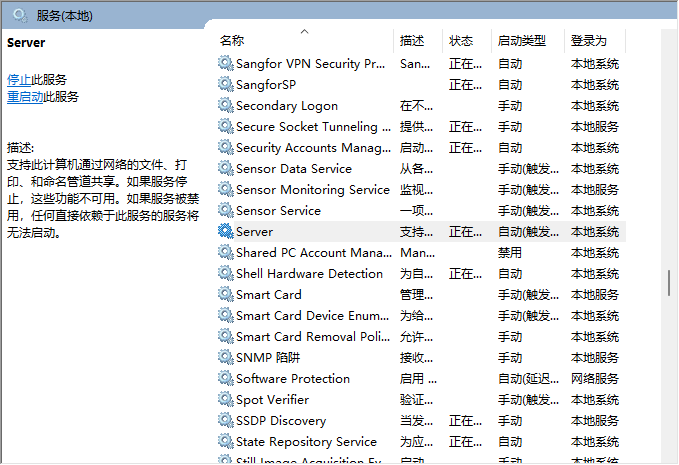
step 3.必须在“以太网”属性中检查网络组件“Microsoft网络客户端”和“Microsoft网络文件和打印机共享”
5.参考文档
Install Oracle Client 18c /19c GUI hang at “[nativesystem.WindowsNative.Native] Reading from the pipe” messges. (Doc ID 2550706.1)
OUI May Hang on Windows Platform And “Reading from the pipe” Messages Are Repeatedly Output to installActions<TIMESTAMP>.out (Doc ID 2892311.1)
