



1、dumping
1.1、dumping的部署
我采用的是tiup在线部署,只需要执行下面命令即可完成部署:
tiup install dumpling
1.2、使用dumping导出MySQL数据
指定导出一个库的命令:
tiup dumpling -u root -p 密码 -P 3306 -h 192.168.51.212 --filetype sql -B ods_customs -o /opt/mysql_dump -r 200000 -F256MiB
导出的文件如下:
[root@localhost ~]# ll //opt/mysql_dump
总用量 832
drwxr-xr-x 2 tidb tidb    146 5月  17 15:17 documents
-rw-r--r-- 1 root root    142 5月  16 17:32 metadata
-rw-r--r-- 1 root root    568 5月  16 17:32 ods_customs.customs_declaration.0000000000000.sql
-rw-r--r-- 1 root root   6241 5月  16 17:32 ods_customs.customs_declaration-schema.sql
-rw-r--r-- 1 root root 816498 5月  16 17:32 ods_customs.documents.0000000000000.sql
-rw-r--r-- 1 root root   2139 5月  16 17:32 ods_customs.documents-schema.sql
-rw-r--r-- 1 root root   6751 5月  16 17:32 ods_customs.extend-schema.sql
-rw-r--r-- 1 root root    194 5月  16 17:32 ods_customs-schema-create.sql
-rw-r--r-- 1 root root      0 5月  16 17:24 ods_customs.sql
指定导出一个表的命令:
tiup dumpling -u root -p 密码 -P 3306 -h 192.168.51.212 --filetype sql -T ods_customs.documents -o /opt/mysql_dump/documents -r 200000 -F256MiB
导出的文件如下:
[root@localhost ~]# ll /opt/mysql_dump/documents
总用量 812
-rw-r–r-- 1 root root 142 5月 17 15:17 metadata
-rw-r–r-- 1 root root 816498 5月 17 15:17 ods_customs.documents.0000000000000.sql
-rw-r–r-- 1 root root 2139 5月 17 15:17 ods_customs.documents-schema.sql
-rw-r–r-- 1 root root 194 5月 17 15:17 ods_customs-schema-create.sql
2、tidb-lightning
2.1、tidb-lightning的部署
采用tiup在线部署,执行命令:
tiup install tidb-lightning
查看是否安装成功
[root@localhost ~]# tiup list --installed
Available components:
Name            Owner    Description
----            -----    -----------
br              pingcap  TiDB/TiKV cluster backup restore tool.
cdc             pingcap  CDC is a change data capture tool for TiDB
cluster         pingcap  Deploy a TiDB cluster for production
ctl             pingcap  TiDB controller suite
dm              pingcap  Data Migration Platform manager
dmctl           pingcap  dmctl component of Data Migration Platform.
dumpling        pingcap  Dumpling is a CLI tool that helps you dump MySQL/TiDB data.
tidb-lightning  pingcap  TiDB Lightning is a tool used for fast full import of large amounts of data into a TiDB cluster
已经安装成功,下面就可以开始使用
2.2、使用tidb-lightning导入数据
我们可以使用tidb-lightning导入dumping导出的MySQL库的数据到tidb里面。首先需要写一个配置文件,内容如下:
[root@localhost ~]# cat tidb-lightning.toml
[lightning]
# 日志
level = "info"
file = "tidb-lightning.log"
[tikv-importer]
# 选择使用的local后端
backend = "local"
# 设置排序的键值对的临时存放地址,目标路径需要是一个空目录
sorted-kv-dir = "/tmp"

[mydumper]
# 源数据目录
data-source-dir = "/opt/mysql_dump/documents"

[tidb]
# 目标集群的信息
host = "192.168.51.50"
port = 4000
user = "你的账号"
password = "你的密码"
# 表架构信息从TiDB的“状态端口”获取。status-port = 10080
#  集群pd 的地址
pd-addr = "192.168.51.50:2379"
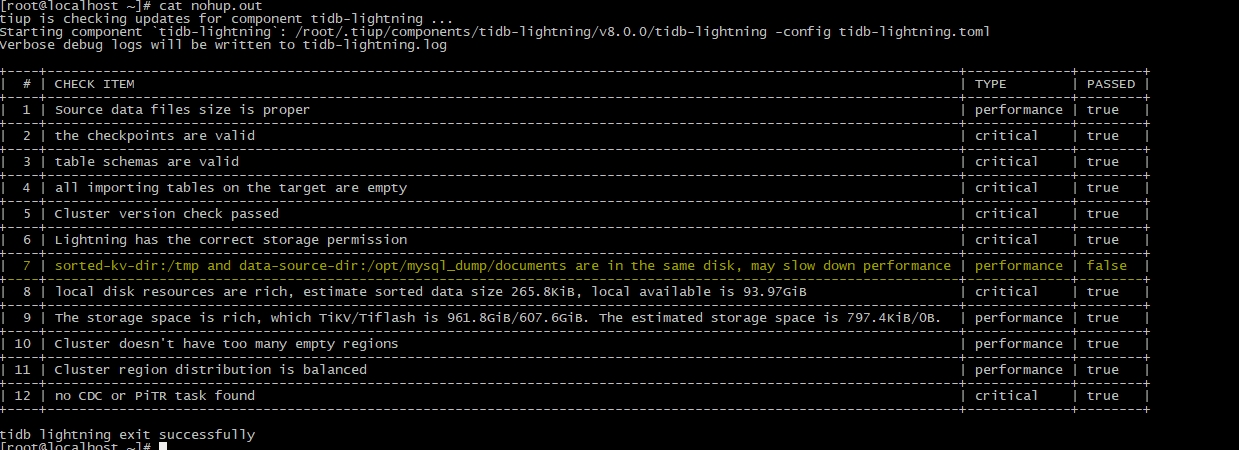
结合上文和文件中的注释就知道,配置了即将导入的数据所在的目录为/opt/mysql_dump/documents,也就是刚刚dumping所导出的目录。导出信息会被记录到日志文件tidb-lightning.log中。配置编辑编辑完成,保存后,可以执行命令启动导入数据。导入之前,确认目标表没有数据,如下图:

确认目标表为空后,执行导入数据命令:
[root@localhost ~]# nohup tiup tidb-lightning -config tidb-lightning.toml > nohup.out &
[1] 61949
[root@localhost ~]# nohup: 忽略输入重定向错误到标准输出端
如上命令执行完毕,再次查看目标表,确认有数据:
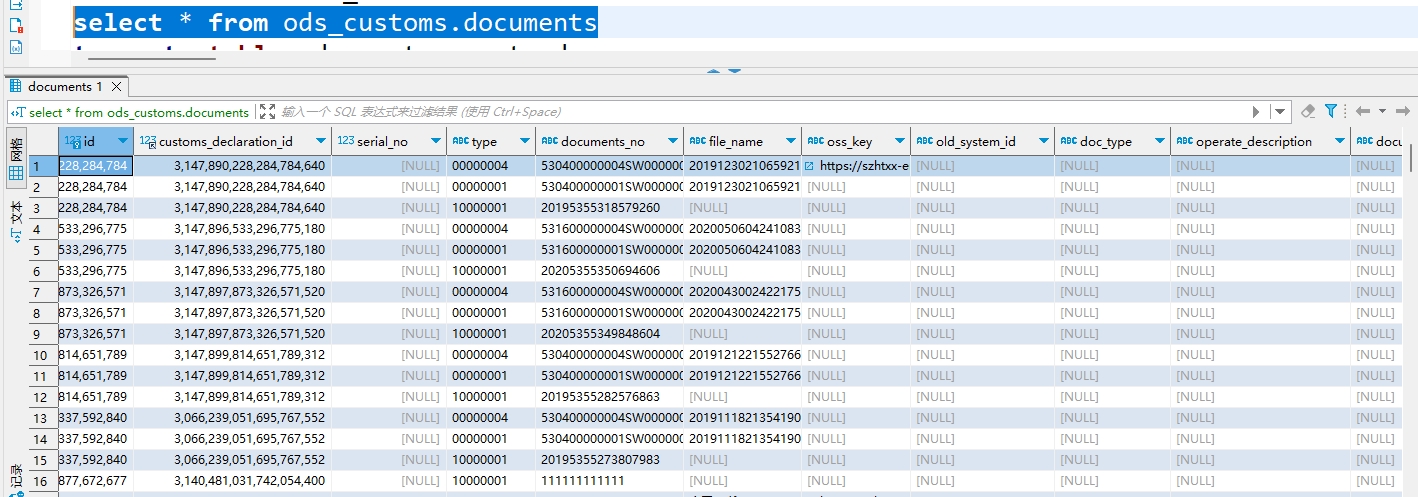
输出的日志信息如下:
「喜欢这篇文章,您的关注和赞赏是给作者最好的鼓励」
关注作者
【版权声明】本文为墨天轮用户原创内容,转载时必须标注文章的来源(墨天轮),文章链接,文章作者等基本信息,否则作者和墨天轮有权追究责任。如果您发现墨天轮中有涉嫌抄袭或者侵权的内容,欢迎发送邮件至:contact@modb.pro进行举报,并提供相关证据,一经查实,墨天轮将立刻删除相关内容。
