



本文介绍在 CentOS 7 环境下使用 Ambari2.5 (HDP2.6) 搭建大数据环境。
推荐使用如下脚本将 Ambari/HDP 相关软件包下到本地后配置 yum 源安装,在线安装速度太慢会经常遇到包找不到情况。
1 | nohup wget -c http://public-repo-1.hortonworks.com/ambari/centos7/2.x/updates/2.6.2.2/ambari.repo \ |
CentOS 准备
安装CentOS 7
安装时设置静态IP
关闭Kdump
关闭Selinux
使用基础服务进行安装
安装相关软件包
挂载系统镜像
1 | mkdir /media/CentOS |
编辑 /etc/yum.repos.d/CentOS-Media.repo
启用本地存储库,修改 enabled
为 1
。
1 |
|
安装前设置
SSH免密码登录
使用root账号登录 Ambari Server 主机并生成SSH私钥:
1 | ssh-keygen |
添加`authorized_keys文件:
1 | cd ~/.ssh |
修改 ~/.ssh
目录 和 ~/.ssh/authorized_keys
文件系统权限(注意:~/.ssh/authorized_keys
文件权限必需为600,不然免密码登录将失效):
1 | chmod 700 ~/.ssh |
将 authorized_keys
文件其复制到所有 Ambari Agent 主机(注意:有可能需要在Agent主机上创建.ssh
目录):
1 | scp ~/.ssh/authorized_keys root@<remote.target.host>:~/.ssh/ |
(请将 <remote.target.host>
替换为集群中每台 Ambari Agent 主机地址)
验证每台主机免密码登录是否成功
1 | ssh root@<remote.target.host> |
设置 NTP
1 | yum install -y ntp |
关闭系统防火墙
1 | systemctl disable firewalld |
SELinux、PackageKit、umask
编辑 /etc/sysconfig/selinux
,设置SELINUX=disabled
。
1 | echo umask 0022 >> /etc/profile |
编辑 /etc/yum/pluginconf.d/refresh-packagekit.conf
1 | enabled=0 |
设置网络(DNS和NSCD)
所有节点都要设置。ambari在安装时需要配置全域名,所以需要检查DNS。为了减轻DNS的负担, 建议在节点里用 Name Service Caching Daemon (NSCD)
vim /etc/hosts
1 | 192.168.124.151 ambari001 |
vim /etc/sysconfig/network
1 | NETWORKING=yes |
设置静态IP地址
编辑文件:/etc/sysconfig/network-scripts/ifcfg-eth0
1 | TYPE="Ethernet" |
设置静态路由
编辑文件:/etc/resolv.conf
1 | nameserver 61.128.128.68 |
关闭 python 的https verify
在需要安装Ambari的所有节点编辑文件:/etc/python/cert-verification.cfg
1 | [https] |
本地 ambari/hdp
yum源设置
将 ambari.repo
和 hdp.repo
文件入到 /etc/yum.repo.d/
目录,并将 192.168.32.101
地址替换成你实际的
本地 yum 服务地址。
我们可以使用 Nginx 来搭建 yum 服务,只需要注意相映路径即可。
安装nginx
1 | $ vim /etc/yum.repos.d/nginx.repo |
ambari.repo
1 | #VERSION_NUMBER=2.6.2.2-1 |
hdp.repo
1 | #VERSION_NUMBER=2.6.5.0-292 |
hdp-gpl.gpl.repo
1 | #VERSION_NUMBER=2.6.5.0-292 |
安装独立PostgreSQL数据库(可选)
1 | rpm -ivh https://download.postgresql.org/pub/repos/yum/9.6/redhat/rhel-7-x86_64/pgdg-centos96-9.6-3.noarch.rpm |
选择:Enter advanced database configuration ,并选择 [4] - PostgreSQL
。
设置默认schema
1 | set search_path to "$user",ambari; |
安装/设置 ambari-server
为了一些不必要的麻烦,推荐关闭 selinux
Install
1 | yum install ambari-server |
配置 ambari-server
1 | ambari-server setup --java-home=/usr/local/java --jdbc-db=postgres --jdbc-driver=/opt/Software/postgresql-42.2.2.jar --enable-lzo-under-gpl-license |
使用 -j
选项指定 JAVA_HOME 目录,这里推荐使用 Oracle JDK 1.8,并配置 Java Cryptography Extension (JCE) 。若不指定 -j
选项,ambari-server 将自动下载配置了JCE的Oracle JDK 1.8版本。
一切使用默认配置即可,当看到以下输出就代表 Ambari Server 配置成功:
1 | ........... |
安装/配置/部署集群
启动Ambari-server
1 | ambari-server start |
打开浏览器登录网址:[http://ambari001:8080](http://ambari001:8080)
(请使用你自己安装的 Ambari Server地址)。
使用默认用户名/密码 admin/admin
登录,之后你可以修改它。
登录后首先创建我们的第一个大数据集群,点击 Launch Install Wizard 按钮创建集群。
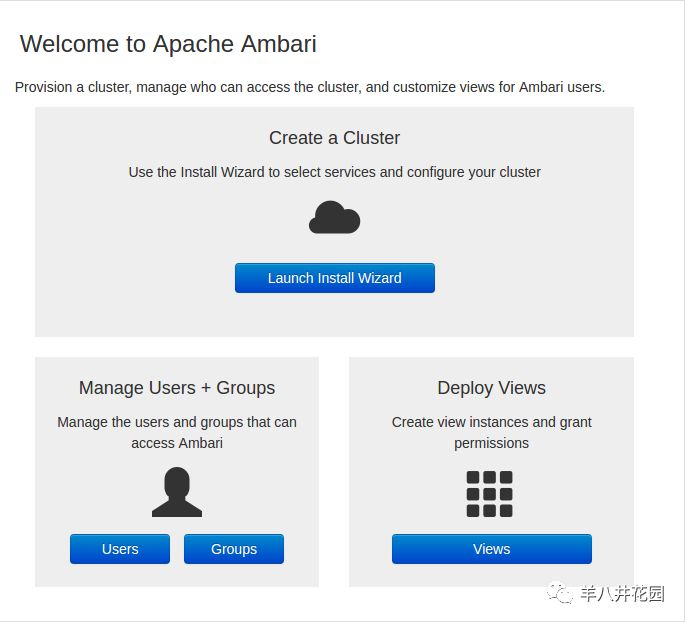
创建集群
首先我们将需要给集群取一个名字,接下来将选择 HDP 的版本,这里我们选择 2.6 版本。
我们将使用本地源来安装 HDP ,按图设置本地源地址:
HDP-2.6:
http://ambarihost/HDP/centos7/2.6.5.0-292HDP-UTILS-1.1.0.22:
http://ambarihost/HDP-UTILS/centos7/1.1.0.22HDP-GPL:
http://ambarihost/HDP-GPL/centos7/2.6.5.0-292
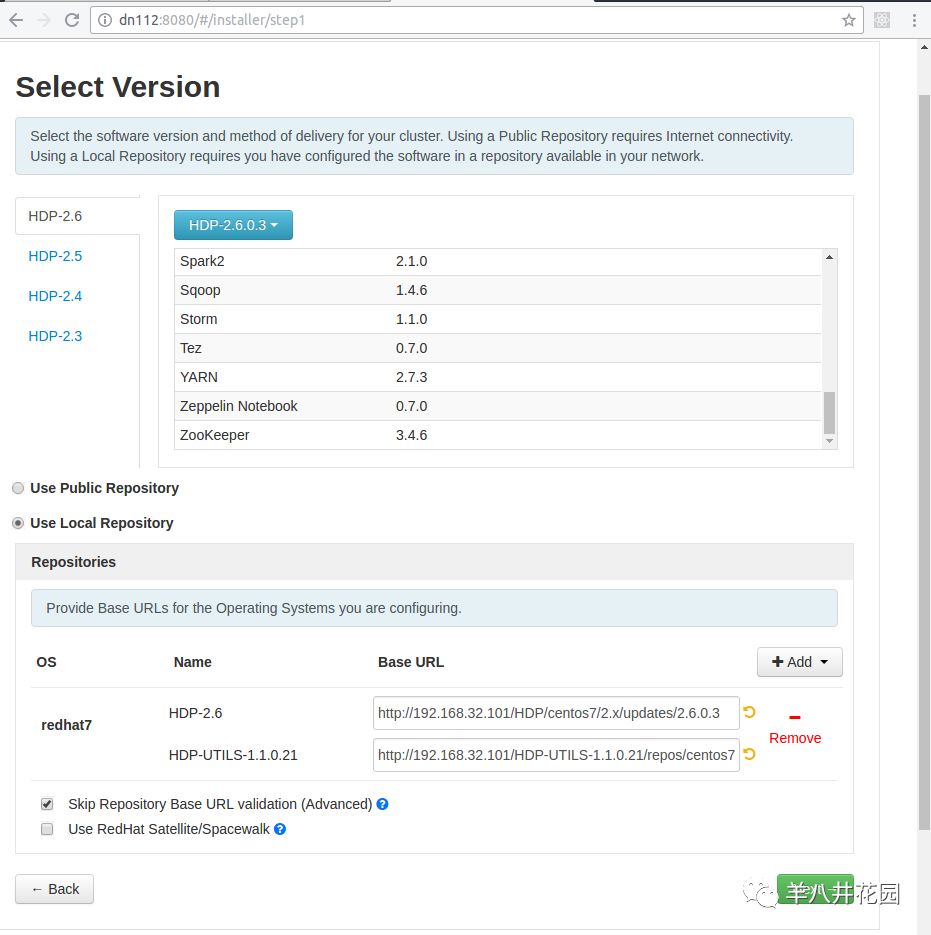
选择版本并配置HDP
创建hive、oozie需要使用的数据库
1 | su - postgres |
