



点击上方


扫描下方二维码或添加作者微信,回复“加群”即可开启你的数据库和IT学习之旅。加入我们,你将获得不仅仅是知识,多位业内数据库ACE大佬镇场+免费GPT4资源+Oracle MOS免费查询,很多志同道合的小伙伴,欢迎加群一起探讨、一起学习、一起进步!


1.现有环境:
①数据库版本:oracle 11gR2 11.2.0.4;
②系统版本 Centos7;
③两个节点分别为ograc1 和 ograc2 (hostname与SID同名),RAC名称为ograc
④sys密码为 oracle
2.故障模拟:
我们遇到了一个问题,ograc2节点的磁盘突然出现了故障。需要注意的是,这块磁盘是我们用来安装和存放grid+oracle软件的u01目录。系统盘并未受到此次磁盘故障的影响。我们只更换了这块出现故障的磁盘,并成功地重新挂载了u01目录。
另一方面,ograc1节点的运行情况是正常的,没有发生任何故障或问题。
因ograc2节点的u01文件夹为新建文件夹,所以需要再次创建oracle及grid安装文件目录并赋权
mkdir -p u01/app/grid
mkdir -p /u01/app/11.2.0/grid
mkdir -p /u01/app/oraInventory
mkdir -p /u01/app/oracle/product/11.2.0/dbhome_1
chown -R oracle:oinstall /u01/app/oracle
chown -R grid:oinstall /u01/app/grid
chown -R grid:oinstall /u01/app/oraInventory
chown -R grid:oinstall /u01/app/11.2.0/grid
chown -R root:oinstall /u01/software
chmod -R 775 /u01
3.修复过程
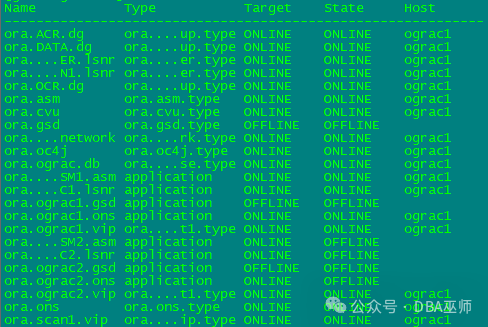
①在ograc1 节点下检查grid集群状态
[grid@ograc1 ~]$ crs_stat -t
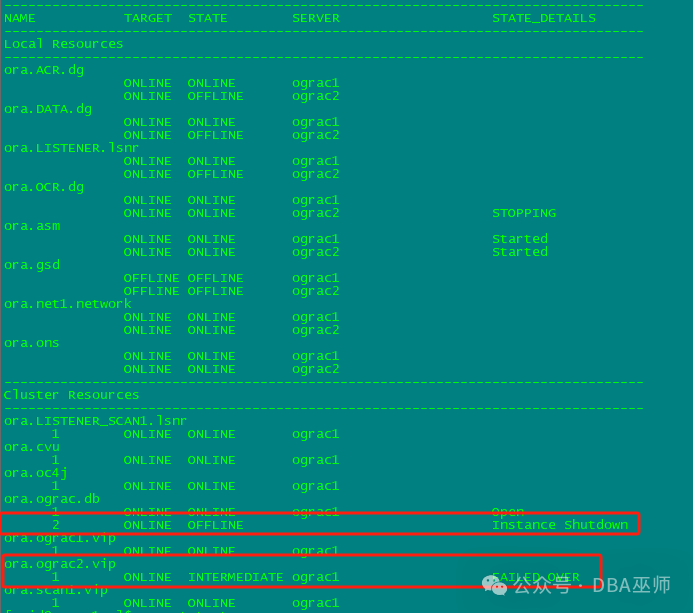
[grid@ograc1 ~]$ crsctl stat res -t
在oracle用户下查看一下数据库情况
[oracle@ograc1 ~]$ srvctl config database -d ograc
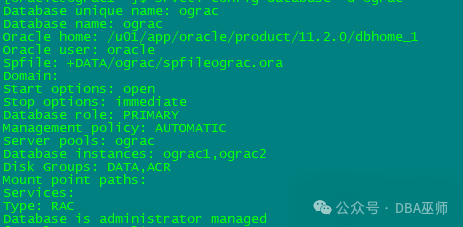
确认一下数据库总共有两个节点,ograc1和ograc2,但根据之前的检查结果确定ograc2实例down掉
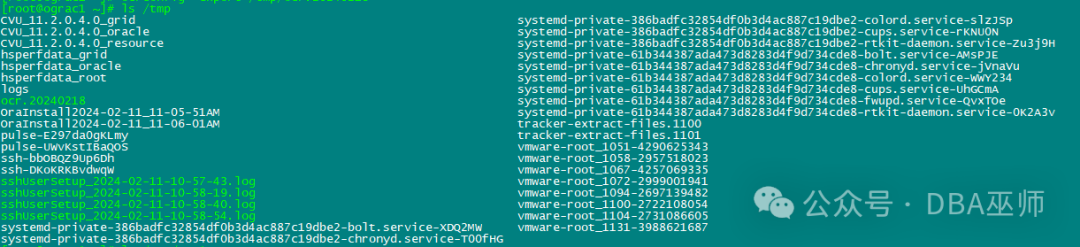
②此时确定ograc2节点掉线,迅速备份OCR
[root@ograc1 ~]# ocrconfig -export /tmp/ocr.20240218
③备份安装列表
[root@ograc1 ~]# cat /etc/oraInst.loc

[root@ograc1 ~]# cd /u01/app/oraInventory
[root@ograc1 oraInventory]# ll

[root@ograc1 oraInventory]# cd ContentsXML/

[root@ograc1 ContentsXML]# cp /u01/app/oraInventory/ContentsXML/inventory.xml /tmp/inventory.xml.bak

④ 开始修复
dbca 静默方式删除ograc2实例 (ograc1节点执行)
[oracle@ograc1 ~]$ dbca -silent -deleteInstance -nodeList ograc2 -gdbName ograc -instanceName ograc2 -sysDBAUserName sys -sysDBAPassword oracle
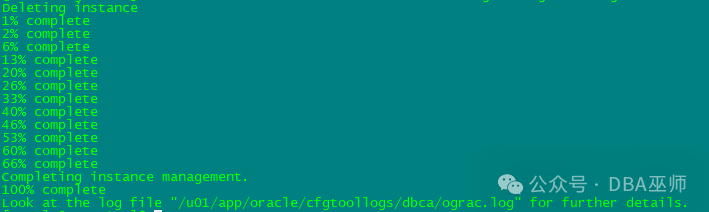
查看ograc.log
[oracle@ograc1 ~]$ cat /u01/app/oracle/cfgtoollogs/dbca/ograc.log
The user "oracle" does not have user equivalence setup on nodes "[ograc2]". Please set up the user equivalence before proceeding.
PRKC-1030 : Error checking accessibility for node ograc2, PRKC-1037 : Error removing files listed in ograc2 from node ssh: connect to host ograc2 port 22: No route to host
The Database Configuration Assistant will delete the Oracle instance and its associated OFA directory structure. All information about this instance will be deleted.
Do you want to proceed?
Deleting instance
Node ograc2 is not accessible. DBCA may not be able to remove all files for the instance. Do you want to continue to delete instance ograc2 on this node?
DBCA_PROGRESS : 1%
Unable to copy the file "ograc2:/etc/oratab" to "/tmp/oratab.ograc2".
DBCA_PROGRESS : 2%
DBCA_PROGRESS : 6%
DBCA_PROGRESS : 13%
DBCA_PROGRESS : 20%
DBCA_PROGRESS : 26%
DBCA_PROGRESS : 33%
DBCA_PROGRESS : 40%
DBCA_PROGRESS : 46%
DBCA_PROGRESS : 53%
DBCA_PROGRESS : 60%
DBCA_PROGRESS : 66%
Completing instance management.
DBCA_PROGRESS : 100%
·---- ----- ----- ----- ----- ----- ----- ----- ----- ----- ----- ----- ---- ----- ----- ----- ----- ----- ----- ----- ----- ----- ----- -----
删除失效的rac节点
su - grid
[grid@ograc1 utl]$ cd /u01/app/11.2.0/grid/crs/utl
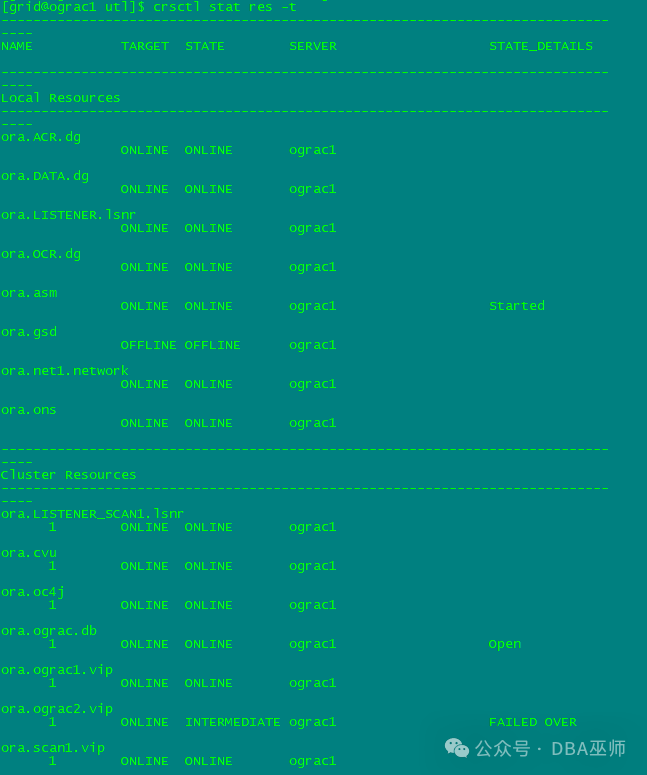
[grid@ograc1 utl]$ ./rootdeletenode.sh ograc2
执行后检查 crsctl stat res -t
·---- ----- ----- ----- ----- ----- ----- ----- ----- ----- ----- ----- ---- ----- ----- ----- ----- ----- ----- ----- ----- ----- ----- -----
更新正常节点的安装列表,把节点信息更新为正常节点(ograc1)
su - oracle
[oracle@ograc1 ~]$ cd $ORACLE_HOME/oui/bin
[oracle@ograc1 bin]$ pwd
/u01/app/oracle/product/11.2.0/dbhome_1/oui/bin
[oracle@ograc1 bin]$ ./runInstaller -updateNodeList ORACLE_HOME=/u01/app/oracle/product/11.2.0/dbhome_1 "CLUSTER_NODES={ograc1}"
Starting Oracle Universal Installer...
Checking swap space: must be greater than 500 MB. Actual 10239 MB Passed
The inventory pointer is located at /etc/oraInst.loc
The inventory is located at /u01/app/oraInventory
'UpdateNodeList' was successful.
su -grid
[grid@ograc1 grid]$ cd $ORACLE_HOME/oui/bin
[grid@ograc1 bin]$ pwd
/u01/app/11.2.0/grid/oui/bin
[grid@ograc1 bin]$ ./runInstaller -updateNodeList ORACLE_HOME=/u01/app/11.2.0/grid "CLUSTER_NODES={ograc1}" CRS=TRUE
Starting Oracle Universal Installer...
Checking swap space: must be greater than 500 MB. Actual 10239 MB Passed
The inventory pointer is located at /etc/oraInst.loc
The inventory is located at /u01/app/oraInventory
'UpdateNodeList' was successful.
·---- ----- ----- ----- ----- ----- ----- ----- ----- ----- ----- ----- ---- ----- ----- ----- ----- ----- ----- ----- ----- ----- ----- -----
清理异常节点的CRS资源
su - root
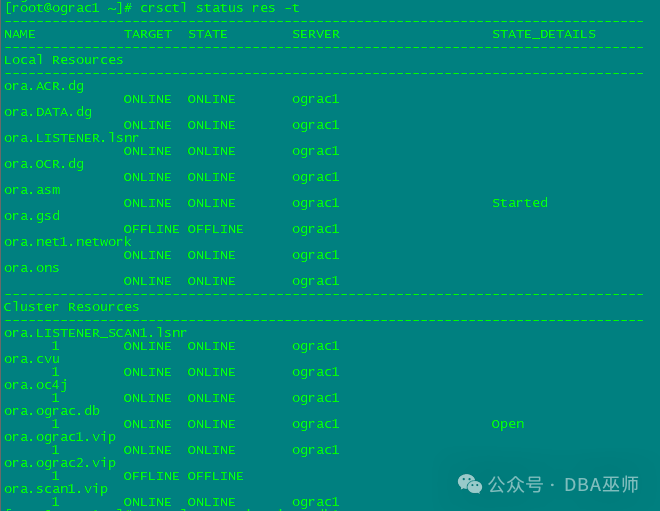
[root@ograc1 ~]# srvctl stop vip -i ograc2
PRCC-1016 : ograc2-vip was already stopped
PRCR-1005 : Resource ora.ograc2.vip is already stopped
[root@ograc1 ~]# srvctl remove vip -i ograc2 -f
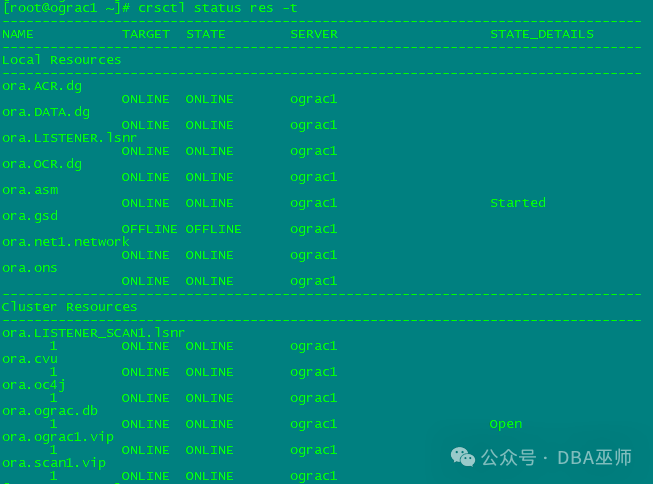
[root@ograc1 ~]# crsctl delete node -n ograc2
CRS-4661: Node ograc2 successfully deleted.
su - grid
[grid@ograc1 ~]$ cluvfy stage -post nodedel -n ograc2
Performing post-checks for node removal
Checking CRS integrity...
Clusterware version consistency passed
CRS integrity check passed
Node removal check passed
Post-check for node removal was successful.
[grid@ograc1 ~]$ cluvfy stage -post hwos -n ograc2
Performing post-checks for hardware and operating system setup
Checking node reachability...
Node reachability check passed from node "ograc1"
Checking user equivalence...
User equivalence check passed for user "grid"
Checking node connectivity...
Checking hosts config file...
Verification of the hosts config file successful
Check: Node connectivity for interface "ens33"
Node connectivity passed for interface "ens33"
TCP connectivity check passed for subnet "10.0.50.0"
Check: Node connectivity for interface "ens37"
Node connectivity passed for interface "ens37"
ERROR:
PRVF-7617 : Node connectivity between "ograc1 : 10.0.50.211" and "ograc2 : 192.168.144.212" failed
TCP connectivity check failed for subnet "192.168.144.0"
Node connectivity check failed
Checking multicast communication...
Checking subnet "10.0.50.0" for multicast communication with multicast group "230.0.1.0"...
Check of subnet "10.0.50.0" for multicast communication with multicast group "230.0.1.0" passed.
Checking subnet "192.168.144.0" for multicast communication with multicast group "230.0.1.0"...
Check of subnet "192.168.144.0" for multicast communication with multicast group "230.0.1.0" passed.
Check of multicast communication passed.
Check for multiple users with UID value 0 passed
Time zone consistency check passed
Checking shared storage accessibility...
Disk Sharing Nodes (1 in count)
------------------------------------ ------------------------
/dev/sdd ograc2
Disk Sharing Nodes (1 in count)
------------------------------------ ------------------------
/dev/sdc ograc2
Disk Sharing Nodes (1 in count)
------------------------------------ ------------------------
/dev/sda ograc2
Disk Sharing Nodes (1 in count)
------------------------------------ ------------------------
/dev/sdb ograc2
Disk Sharing Nodes (1 in count)
------------------------------------ ------------------------
/dev/sde ograc2
Disk Sharing Nodes (1 in count)
------------------------------------ ------------------------
/dev/sdh ograc2
Disk Sharing Nodes (1 in count)
------------------------------------ ------------------------
/dev/sdg ograc2
Disk Sharing Nodes (1 in count)
------------------------------------ ------------------------
/dev/sdf ograc2
Shared storage check was successful on nodes "ograc2"
Checking integrity of name service switch configuration file "/etc/nsswitch.conf" ...
Check for integrity of name service switch configuration file "/etc/nsswitch.conf" passed
Post-check for hardware and operating system setup was unsuccessful on all the nodes.
·---- ----- ----- ----- ----- ----- ----- ----- ----- ----- ----- ----- ---- ----- ----- ----- ----- ----- ----- ----- ----- ----- ----- -----
至此,异常节点(ograc2)已经被移除,现在RAC集群只有ograc1节点在工作,之后开启新节点添加工作
开启修复前应再次检查,并与现节点比较
①网络联通性(包括ip、priv-ip 以及v-ip的互ping,ssh互信);
②各类安装/依赖包的检查;
③安装目录的完整性与权限;
④各项系统参数的设置;
⑤ASM磁盘挂载检查
·---- ----- ----- ----- ----- ----- ----- ----- ----- ----- ----- ----- ---- ----- ----- ----- ----- ----- ----- ----- ----- ----- ----- -----
修复GRID
su - grid
[grid@ograc1 ~]$ cd $ORACLE_HOME
[grid@ograc1 grid]$ export IGNORE_PREADDNODE_CHECKS=Y
[grid@ograc1 grid]$ cd oui/bin
[grid@ograc1 bin]$ pwd
/u01/app/11.2.0/grid/oui/bin
[grid@ograc1 bin]$ ./addNode.sh -silent -ignorePrereq "CLUSTER_NEW_NODES={ograc2}" "CLUSTER_NEW_VIRTUAL_HOSTNAMES={ograc2-vip}" "CLUSTER_NEW_PRIVATE_NODE_NAMES={ograc2-priv}"
Starting Oracle Universal Installer...
Checking swap space: must be greater than 500 MB. Actual 10239 MB Passed
Oracle Universal Installer, Version 11.2.0.4.0 Production
Copyright (C) 1999, 2013, Oracle. All rights reserved.
Performing tests to see whether nodes ograc2 are available
............................................................... 100% Done.
.
·----------------------------------------------------------------------------
Cluster Node Addition Summary
Global Settings
Source: /u01/app/11.2.0/grid
New Nodes
Space Requirements
New Nodes
ograc2
/u01: Required 5.54GB : Available 27.19GB
Installed Products
Product Names
Oracle Grid Infrastructure 11g 11.2.0.4.0
Java Development Kit 1.5.0.51.10
Installer SDK Component 11.2.0.4.0
Oracle One-Off Patch Installer 11.2.0.3.4
Oracle Universal Installer 11.2.0.4.0
Oracle RAC Required Support Files-HAS 11.2.0.4.0
Oracle USM Deconfiguration 11.2.0.4.0
Oracle Configuration Manager Deconfiguration 10.3.1.0.0
Enterprise Manager Common Core Files 10.2.0.4.5
Oracle DBCA Deconfiguration 11.2.0.4.0
Oracle RAC Deconfiguration 11.2.0.4.0
Oracle Quality of Service Management (Server) 11.2.0.4.0
Installation Plugin Files 11.2.0.4.0
Universal Storage Manager Files 11.2.0.4.0
Oracle Text Required Support Files 11.2.0.4.0
Automatic Storage Management Assistant 11.2.0.4.0
Oracle Database 11g Multimedia Files 11.2.0.4.0
Oracle Multimedia Java Advanced Imaging 11.2.0.4.0
Oracle Globalization Support 11.2.0.4.0
Oracle Multimedia Locator RDBMS Files 11.2.0.4.0
Oracle Core Required Support Files 11.2.0.4.0
Bali Share 1.1.18.0.0
Oracle Database Deconfiguration 11.2.0.4.0
Oracle Quality of Service Management (Client) 11.2.0.4.0
Expat libraries 2.0.1.0.1
Oracle Containers for Java 11.2.0.4.0
Perl Modules 5.10.0.0.1
Secure Socket Layer 11.2.0.4.0
Oracle JDBC/OCI Instant Client 11.2.0.4.0
Oracle Multimedia Client Option 11.2.0.4.0
LDAP Required Support Files 11.2.0.4.0
Character Set Migration Utility 11.2.0.4.0
Perl Interpreter 5.10.0.0.2
PL/SQL Embedded Gateway 11.2.0.4.0
OLAP SQL Scripts 11.2.0.4.0
Database SQL Scripts 11.2.0.4.0
Oracle Extended Windowing Toolkit 3.4.47.0.0
SSL Required Support Files for InstantClient 11.2.0.4.0
SQL*Plus Files for Instant Client 11.2.0.4.0
Oracle Net Required Support Files 11.2.0.4.0
Oracle Database User Interface 2.2.13.0.0
RDBMS Required Support Files for Instant Client 11.2.0.4.0
RDBMS Required Support Files Runtime 11.2.0.4.0
XML Parser for Java 11.2.0.4.0
Oracle Security Developer Tools 11.2.0.4.0
Oracle Wallet Manager 11.2.0.4.0
Enterprise Manager plugin Common Files 11.2.0.4.0
Platform Required Support Files 11.2.0.4.0
Oracle JFC Extended Windowing Toolkit 4.2.36.0.0
RDBMS Required Support Files 11.2.0.4.0
Oracle Ice Browser 5.2.3.6.0
Oracle Help For Java 4.2.9.0.0
Enterprise Manager Common Files 10.2.0.4.5
Deinstallation Tool 11.2.0.4.0
Oracle Java Client 11.2.0.4.0
Cluster Verification Utility Files 11.2.0.4.0
Oracle Notification Service (eONS) 11.2.0.4.0
Oracle LDAP administration 11.2.0.4.0
Cluster Verification Utility Common Files 11.2.0.4.0
Oracle Clusterware RDBMS Files 11.2.0.4.0
Oracle Locale Builder 11.2.0.4.0
Oracle Globalization Support 11.2.0.4.0
Buildtools Common Files 11.2.0.4.0
HAS Common Files 11.2.0.4.0
SQL*Plus Required Support Files 11.2.0.4.0
XDK Required Support Files 11.2.0.4.0
Agent Required Support Files 10.2.0.4.5
Parser Generator Required Support Files 11.2.0.4.0
Precompiler Required Support Files 11.2.0.4.0
Installation Common Files 11.2.0.4.0
Required Support Files 11.2.0.4.0
Oracle JDBC/THIN Interfaces 11.2.0.4.0
Oracle Multimedia Locator 11.2.0.4.0
Oracle Multimedia 11.2.0.4.0
Assistant Common Files 11.2.0.4.0
Oracle Net 11.2.0.4.0
PL/SQL 11.2.0.4.0
HAS Files for DB 11.2.0.4.0
Oracle Recovery Manager 11.2.0.4.0
Oracle Database Utilities 11.2.0.4.0
Oracle Notification Service 11.2.0.3.0
SQL*Plus 11.2.0.4.0
Oracle Netca Client 11.2.0.4.0
Oracle Advanced Security 11.2.0.4.0
Oracle JVM 11.2.0.4.0
Oracle Internet Directory Client 11.2.0.4.0
Oracle Net Listener 11.2.0.4.0
Cluster Ready Services Files 11.2.0.4.0
Oracle Database 11g 11.2.0.4.0
·----------------------------------------------------------------------------
Instantiating scripts for add node (Monday, February 19, 2024 10:57:13 AM CST)
. 1% Done.
Instantiation of add node scripts complete
Copying to remote nodes (Monday, February 19, 2024 10:57:15 AM CST)
............................................................................................... 96% Done.
Home copied to new nodes
Saving inventory on nodes (Monday, February 19, 2024 10:59:42 AM CST)
. 100% Done.
Save inventory complete
WARNING:
The following configuration scripts need to be executed as the "root" user in each new cluster node. Each script in the list below is followed by a list of nodes.
/u01/app/11.2.0/grid/root.sh #On nodes ograc2
To execute the configuration scripts:
1. Open a terminal window
2. Log in as "root"
3. Run the scripts in each cluster node
The Cluster Node Addition of /u01/app/11.2.0/grid was successful.
Please check '/tmp/silentInstall.log' for more details.
在ograc2节点,以root用户执行 root.sh
[root@ograc2 ~]# cd /u01/app/11.2.0/grid/
[root@ograc2 grid]# ./root.sh
Performing root user operation for Oracle 11g
The following environment variables are set as:
ORACLE_OWNER= grid
ORACLE_HOME= /u01/app/11.2.0/grid
Enter the full pathname of the local bin directory: [/usr/local/bin]:
The contents of "dbhome" have not changed. No need to overwrite.
The contents of "oraenv" have not changed. No need to overwrite.
The contents of "coraenv" have not changed. No need to overwrite.
Entries will be added to the /etc/oratab file as needed by
Database Configuration Assistant when a database is created
Finished running generic part of root script.
Now product-specific root actions will be performed.
Using configuration parameter file: /u01/app/11.2.0/grid/crs/install/crsconfig_params
Creating trace directory
User ignored Prerequisites during installation
Installing Trace File Analyzer
OLR initialization - successful
Adding Clusterware entries to oracle-ohasd.service
CRS-4402: The CSS daemon was started in exclusive mode but found an active CSS daemon on node ograc1, number 1, and is terminating
An active cluster was found during exclusive startup, restarting to join the cluster
clscfg: EXISTING configuration version 5 detected.
clscfg: version 5 is 11g Release 2.
Successfully accumulated necessary OCR keys.
Creating OCR keys for user 'root', privgrp 'root'..
Operation successful.
Configure Oracle Grid Infrastructure for a Cluster ... succeeded
·---- ----- ----- ----- ----- ----- ----- ----- ----- ----- ----- ----- ---- ----- ----- ----- ----- ----- ----- ----- ----- ----- ----- -----
修复ORACLE软件
su - oracle
[oracle@ograc1 dbhome_1]$ cd $ORACLE_HOME/oui/bin
[oracle@ograc1 bin]$ ./addNode.sh -silent "CLUSTER_NEW_NODES={ograc2}"
Performing pre-checks for node addition
Checking node reachability...
Node reachability check passed from node "ograc1"
Checking user equivalence...
User equivalence check passed for user "oracle"
WARNING:
Node "ograc2" already appears to be part of cluster
Pre-check for node addition was successful.
Starting Oracle Universal Installer...
Checking swap space: must be greater than 500 MB. Actual 10239 MB Passed
Oracle Universal Installer, Version 11.2.0.4.0 Production
Copyright (C) 1999, 2013, Oracle. All rights reserved.
Performing tests to see whether nodes ograc2 are available
............................................................... 100% Done.
.
·----------------------------------------------------------------------------
Cluster Node Addition Summary
Global Settings
Source: /u01/app/oracle/product/11.2.0/dbhome_1
New Nodes
Space Requirements
New Nodes
ograc2
/u01: Required 4.40GB : Available 22.58GB
Installed Products
Product Names
Oracle Database 11g 11.2.0.4.0
Java Development Kit 1.5.0.51.10
Installer SDK Component 11.2.0.4.0
Oracle One-Off Patch Installer 11.2.0.3.4
Oracle Universal Installer 11.2.0.4.0
Oracle USM Deconfiguration 11.2.0.4.0
Oracle Configuration Manager Deconfiguration 10.3.1.0.0
Oracle DBCA Deconfiguration 11.2.0.4.0
Oracle RAC Deconfiguration 11.2.0.4.0
Oracle Database Deconfiguration 11.2.0.4.0
Oracle Configuration Manager Client 10.3.2.1.0
Oracle Configuration Manager 10.3.8.1.0
Oracle ODBC Driverfor Instant Client 11.2.0.4.0
LDAP Required Support Files 11.2.0.4.0
SSL Required Support Files for InstantClient 11.2.0.4.0
Bali Share 1.1.18.0.0
Oracle Extended Windowing Toolkit 3.4.47.0.0
Oracle JFC Extended Windowing Toolkit 4.2.36.0.0
Oracle Real Application Testing 11.2.0.4.0
Oracle Database Vault J2EE Application 11.2.0.4.0
Oracle Label Security 11.2.0.4.0
Oracle Data Mining RDBMS Files 11.2.0.4.0
Oracle OLAP RDBMS Files 11.2.0.4.0
Oracle OLAP API 11.2.0.4.0
Platform Required Support Files 11.2.0.4.0
Oracle Database Vault option 11.2.0.4.0
Oracle RAC Required Support Files-HAS 11.2.0.4.0
SQL*Plus Required Support Files 11.2.0.4.0
Oracle Display Fonts 9.0.2.0.0
Oracle Ice Browser 5.2.3.6.0
Oracle JDBC Server Support Package 11.2.0.4.0
Oracle SQL Developer 11.2.0.4.0
Oracle Application Express 11.2.0.4.0
XDK Required Support Files 11.2.0.4.0
RDBMS Required Support Files for Instant Client 11.2.0.4.0
SQLJ Runtime 11.2.0.4.0
Database Workspace Manager 11.2.0.4.0
RDBMS Required Support Files Runtime 11.2.0.4.0
Oracle Globalization Support 11.2.0.4.0
Exadata Storage Server 11.2.0.1.0
Provisioning Advisor Framework 10.2.0.4.3
Enterprise Manager Database Plugin -- Repository Support 11.2.0.4.0
Enterprise Manager Repository Core Files 10.2.0.4.5
Enterprise Manager Database Plugin -- Agent Support 11.2.0.4.0
Enterprise Manager Grid Control Core Files 10.2.0.4.5
Enterprise Manager Common Core Files 10.2.0.4.5
Enterprise Manager Agent Core Files 10.2.0.4.5
RDBMS Required Support Files 11.2.0.4.0
regexp 2.1.9.0.0
Agent Required Support Files 10.2.0.4.5
Oracle 11g Warehouse Builder Required Files 11.2.0.4.0
Oracle Notification Service (eONS) 11.2.0.4.0
Oracle Text Required Support Files 11.2.0.4.0
Parser Generator Required Support Files 11.2.0.4.0
Oracle Database 11g Multimedia Files 11.2.0.4.0
Oracle Multimedia Java Advanced Imaging 11.2.0.4.0
Oracle Multimedia Annotator 11.2.0.4.0
Oracle JDBC/OCI Instant Client 11.2.0.4.0
Oracle Multimedia Locator RDBMS Files 11.2.0.4.0
Precompiler Required Support Files 11.2.0.4.0
Oracle Core Required Support Files 11.2.0.4.0
Sample Schema Data 11.2.0.4.0
Oracle Starter Database 11.2.0.4.0
Oracle Message Gateway Common Files 11.2.0.4.0
Oracle XML Query 11.2.0.4.0
XML Parser for Oracle JVM 11.2.0.4.0
Oracle Help For Java 4.2.9.0.0
Installation Plugin Files 11.2.0.4.0
Enterprise Manager Common Files 10.2.0.4.5
Expat libraries 2.0.1.0.1
Deinstallation Tool 11.2.0.4.0
Oracle Quality of Service Management (Client) 11.2.0.4.0
Perl Modules 5.10.0.0.1
JAccelerator (COMPANION) 11.2.0.4.0
Oracle Containers for Java 11.2.0.4.0
Perl Interpreter 5.10.0.0.2
Oracle Net Required Support Files 11.2.0.4.0
Secure Socket Layer 11.2.0.4.0
Oracle Universal Connection Pool 11.2.0.4.0
Oracle JDBC/THIN Interfaces 11.2.0.4.0
Oracle Multimedia Client Option 11.2.0.4.0
Oracle Java Client 11.2.0.4.0
Character Set Migration Utility 11.2.0.4.0
Oracle Code Editor 1.2.1.0.0I
PL/SQL Embedded Gateway 11.2.0.4.0
OLAP SQL Scripts 11.2.0.4.0
Database SQL Scripts 11.2.0.4.0
Oracle Locale Builder 11.2.0.4.0
Oracle Globalization Support 11.2.0.4.0
SQL*Plus Files for Instant Client 11.2.0.4.0
Required Support Files 11.2.0.4.0
Oracle Database User Interface 2.2.13.0.0
Oracle ODBC Driver 11.2.0.4.0
Oracle Notification Service 11.2.0.3.0
XML Parser for Java 11.2.0.4.0
Oracle Security Developer Tools 11.2.0.4.0
Oracle Wallet Manager 11.2.0.4.0
Cluster Verification Utility Common Files 11.2.0.4.0
Oracle Clusterware RDBMS Files 11.2.0.4.0
Oracle UIX 2.2.24.6.0
Enterprise Manager plugin Common Files 11.2.0.4.0
HAS Common Files 11.2.0.4.0
Precompiler Common Files 11.2.0.4.0
Installation Common Files 11.2.0.4.0
Oracle Help for the Web 2.0.14.0.0
Oracle LDAP administration 11.2.0.4.0
Buildtools Common Files 11.2.0.4.0
Assistant Common Files 11.2.0.4.0
Oracle Recovery Manager 11.2.0.4.0
PL/SQL 11.2.0.4.0
Generic Connectivity Common Files 11.2.0.4.0
Oracle Database Gateway for ODBC 11.2.0.4.0
Oracle Programmer 11.2.0.4.0
Oracle Database Utilities 11.2.0.4.0
Enterprise Manager Agent 10.2.0.4.5
SQL*Plus 11.2.0.4.0
Oracle Netca Client 11.2.0.4.0
Oracle Multimedia Locator 11.2.0.4.0
Oracle Call Interface (OCI) 11.2.0.4.0
Oracle Multimedia 11.2.0.4.0
Oracle Net 11.2.0.4.0
Oracle XML Development Kit 11.2.0.4.0
Oracle Internet Directory Client 11.2.0.4.0
Database Configuration and Upgrade Assistants 11.2.0.4.0
Oracle JVM 11.2.0.4.0
Oracle Advanced Security 11.2.0.4.0
Oracle Net Listener 11.2.0.4.0
Oracle Enterprise Manager Console DB 11.2.0.4.0
HAS Files for DB 11.2.0.4.0
Oracle Text 11.2.0.4.0
Oracle Net Services 11.2.0.4.0
Oracle Database 11g 11.2.0.4.0
Oracle OLAP 11.2.0.4.0
Oracle Spatial 11.2.0.4.0
Oracle Partitioning 11.2.0.4.0
Enterprise Edition Options 11.2.0.4.0
·----------------------------------------------------------------------------
Instantiating scripts for add node (Monday, February 19, 2024 11:29:34 AM CST)
. 1% Done.
Instantiation of add node scripts complete
Copying to remote nodes (Monday, February 19, 2024 11:29:37 AM CST)
............................................................................................... 96% Done.
Home copied to new nodes
Saving inventory on nodes (Monday, February 19, 2024 11:35:55 AM CST)
. 100% Done.
Save inventory complete
WARNING:
The following configuration scripts need to be executed as the "root" user in each new cluster node. Each script in the list below is followed by a list of nodes.
/u01/app/oracle/product/11.2.0/dbhome_1/root.sh #On nodes ograc2
To execute the configuration scripts:
1. Open a terminal window
2. Log in as "root"
3. Run the scripts in each cluster node
The Cluster Node Addition of /u01/app/oracle/product/11.2.0/dbhome_1 was successful.
Please check '/tmp/silentInstall.log' for more details.
在ograc2节点,以root用户执行 root.sh
[root@ograc2 oraInventory]# cd /u01/app/oracle/product/11.2.0/dbhome_1/
[root@ograc2 dbhome_1]# ./root.sh
Performing root user operation for Oracle 11g
The following environment variables are set as:
ORACLE_OWNER= oracle
ORACLE_HOME= /u01/app/oracle/product/11.2.0/dbhome_1
Enter the full pathname of the local bin directory: [/usr/local/bin]:
The contents of "dbhome" have not changed. No need to overwrite.
The contents of "oraenv" have not changed. No need to overwrite.
The contents of "coraenv" have not changed. No need to overwrite.
Entries will be added to the /etc/oratab file as needed by
Database Configuration Assistant when a database is created
Finished running generic part of root script.
Now product-specific root actions will be performed.
Finished product-specific root actions.
·---- ----- ----- ----- ----- ----- ----- ----- ----- ----- ----- ----- ---- ----- ----- ----- ----- ----- ----- ----- ----- ----- ----- -----
使用DBCA 添加实例 (正常节点操作)
su - oracle
[oracle@ograc1 dbhome_1]# dbca -silent -addInstance -nodeList ograc2 -gdbName ograc -instanceName ograc2 -sysDBAUserName sys -sysDBAPassword oracle
Adding instance
1% complete
2% complete
6% complete
13% complete
20% complete
26% complete
33% complete
40% complete
46% complete
53% complete
66% complete
Completing instance management.
76% complete
100% complete
Look at the log file "/u01/app/oracle/cfgtoollogs/dbca/ograc/ograc.log" for further details.
·---- ----- ----- ----- ----- ----- ----- ----- ----- ----- ----- ----- ---- ----- ----- ----- ----- ----- ----- ----- ----- ----- ----- -----
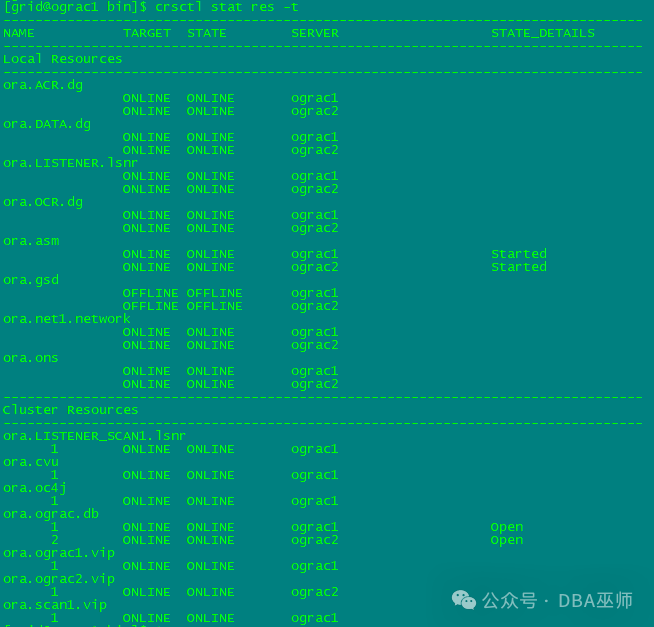
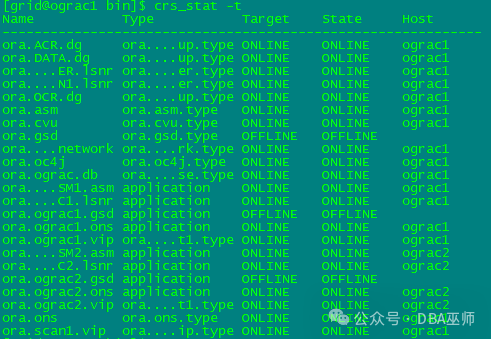
至此,RAC修复完成
查看CRS资源
[grid@ograc1 bin]$ crsctl stat res -t
[grid@ograc1 bin]$ crs_stat -t

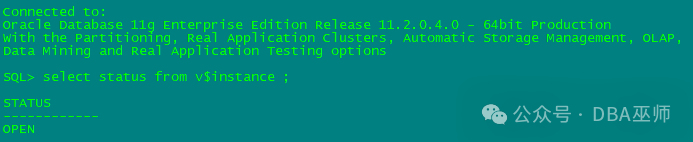
[oracle@ograc1 bin]$ srvctl status database -d ograc
Instance ograc1 is running on node ograc1
Instance ograc2 is running on node ograc2
[oracle@ograc1 bin]$ lsnrctl status
LSNRCTL for Linux: Version 11.2.0.4.0 - Production on 19-FEB-2024 11:51:56
Copyright (c) 1991, 2013, Oracle. All rights reserved.
Connecting to (ADDRESS=(PROTOCOL=tcp)(HOST=)(PORT=1521))
STATUS of the LISTENER
·-----------------------
Alias LISTENER
Version TNSLSNR for Linux: Version 11.2.0.4.0 - Production
Start Date 18-FEB-2024 17:19:02
Uptime 0 days 18 hr. 32 min. 53 sec
Trace Level off
Security ON: Local OS Authentication
SNMP OFF
Listener Parameter File /u01/app/11.2.0/grid/network/admin/listener.ora
Listener Log File /u01/app/grid/diag/tnslsnr/ograc1/listener/alert/log.xml
Listening Endpoints Summary...
(DESCRIPTION=(ADDRESS=(PROTOCOL=ipc)(KEY=LISTENER)))
(DESCRIPTION=(ADDRESS=(PROTOCOL=tcp)(HOST=10.0.50.211)(PORT=1521)))
(DESCRIPTION=(ADDRESS=(PROTOCOL=tcp)(HOST=10.0.50.213)(PORT=1521)))
Services Summary...
Service "+ASM" has 1 instance(s).
Instance "+ASM1", status READY, has 1 handler(s) for this service...
Service "ograc" has 1 instance(s).
Instance "ograc1", status READY, has 1 handler(s) for this service...
Service "ogracXDB" has 1 instance(s).
Instance "ograc1", status READY, has 1 handler(s) for this service...
The command completed successfully
·-- --- --- --- --- --- --- ---
[oracle@ograc2 ~]$ lsnrctl status
LSNRCTL for Linux: Version 11.2.0.4.0 - Production on 19-FEB-2024 11:53:49
Copyright (c) 1991, 2013, Oracle. All rights reserved.
Connecting to (ADDRESS=(PROTOCOL=tcp)(HOST=)(PORT=1521))
STATUS of the LISTENER
·-----------------------
Alias LISTENER
Version TNSLSNR for Linux: Version 11.2.0.4.0 - Production
Start Date 19-FEB-2024 11:08:03
Uptime 0 days 0 hr. 45 min. 45 sec
Trace Level off
Security ON: Local OS Authentication
SNMP OFF
Listener Parameter File /u01/app/11.2.0/grid/network/admin/listener.ora
Listener Log File /u01/app/grid/diag/tnslsnr/ograc2/listener/alert/log.xml
Listening Endpoints Summary...
(DESCRIPTION=(ADDRESS=(PROTOCOL=ipc)(KEY=LISTENER)))
(DESCRIPTION=(ADDRESS=(PROTOCOL=tcp)(HOST=10.0.50.212)(PORT=1521)))
(DESCRIPTION=(ADDRESS=(PROTOCOL=tcp)(HOST=10.0.50.214)(PORT=1521)))
Services Summary...
Service "+ASM" has 1 instance(s).
Instance "+ASM2", status READY, has 1 handler(s) for this service...
Service "ograc" has 1 instance(s).
Instance "ograc2", status READY, has 1 handler(s) for this service...
Service "ogracXDB" has 1 instance(s).
Instance "ograc2", status READY, has 1 handler(s) for this service...
The command completed successfully
往期推荐
我的职业转型之路:从DBA到PM
Oracle应急使用指南
Oracle的SQL调化健康检查脚本介绍
中外数据库的差异究竟在什么地方
摆脱Oracle 错误码困扰,免费公益查询MOS
