




关于 IoTDB
IoTDB (Internet of Things Database) 是一款针对时序数据设计的集成数据管理引擎,可以为用户提供特定的数据采集、存储和分析服务。 IoTDB 以其轻量级的结构、高性能和易用的特性,以及与Hadoop和Spark生态的深度融合,满足了物联网工业领域海量数据存储、高速数据输入和复杂数据分析的需求。
IoTDB 是清华大学大数据系统软件团队研发的时序数据库,2014年项目启动,2018年11月捐赠给Apache软件基金会, IoTDB 正式进入 Apache 孵化器,成为中国高校首个进入 Apache 孵化器的项目。经过孵化后于2020年9月正式成为Apache顶级项目。
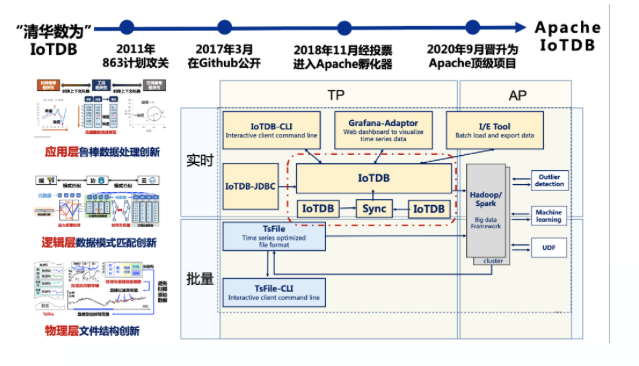
IoTDB 具备以下特点:
- 端边云协同:采用轻量化架构,支持端边云一体化的物联网时序数据收集、存储、管理与分析。
- 工业级稳定:设计用于工业环境,保证数据的稳定性和可靠性。
- 高性能:支持高通量读写,支持数百万低功耗智能联网设备的高速写访问和TB级数据的秒级查询。
- 高压缩比:采用自研的紧致列式存储文件格式TsFile,有效减少存储空间的需求。
- 多协议兼容:支持多种数据采集协议,方便不同设备和系统的数据接入。
- 产学研结合:拥有30余项时序数据管理领域发明专利,在数据库顶级学会发表10余篇论文。
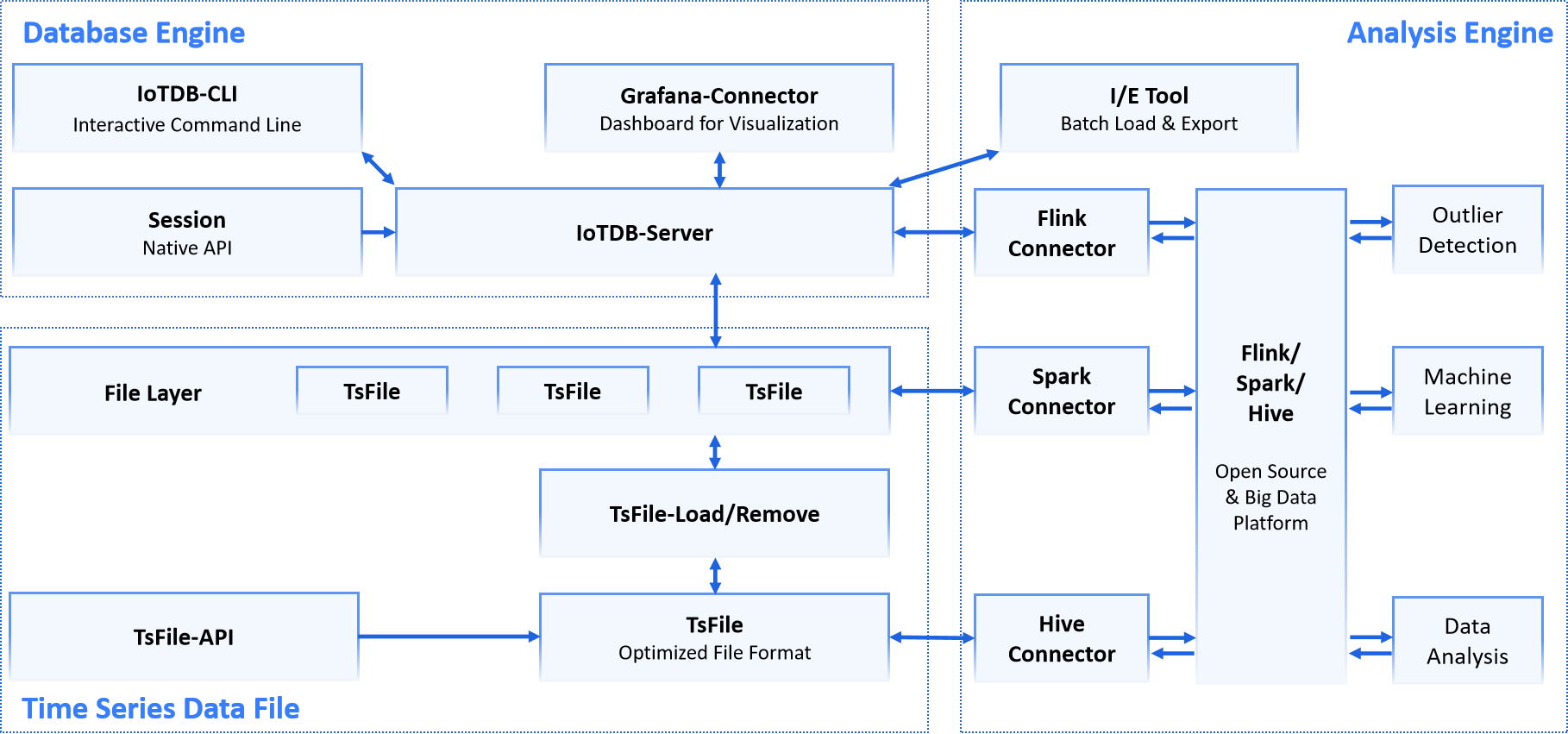
IoTDB套件可以提供数据采集、数据写入、数据存储、数据查询、数据可视化、数据分析等一系列实际场景中的功能。
下图展示了IoTDB套件的整体架构。
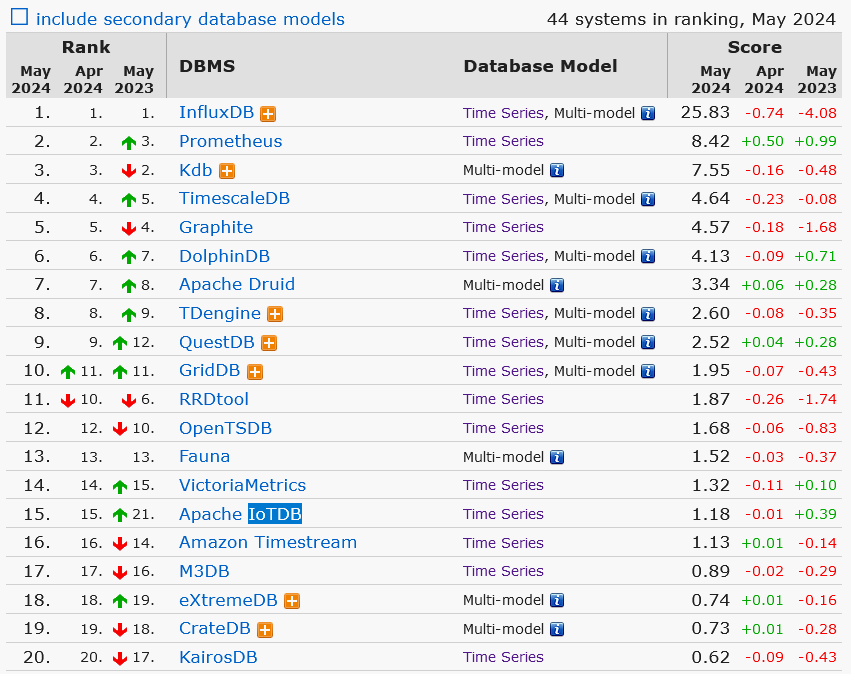
IoTDB 在2024年5月DB-Engines时序数据库榜单中排名第15位。
安装 IoTDB
OS 设定
- 本文使用的测试环境为 CentOS 操作系统。
[shawnyan@centos7 14]$ hostnamectl
   Static hostname: centos7.shawnyan.cn
...
    Virtualization: vmware
  Operating System: CentOS Linux 7 (Core)
       CPE OS Name: cpe:/o:centos:centos:7
            Kernel: Linux 3.10.0-1160.118.1.el7.x86_64
      Architecture: x86-64
- 需要准备 Java 1.8 及以上环境,这里使用的是 Java 22.
[iotdb@centos7 ~]$ java -version
java version "22.0.1" 2024-04-16
Java(TM) SE Runtime Environment (build 22.0.1+8-16)
Java HotSpot(TM) 64-Bit Server VM (build 22.0.1+8-16, mixed mode, sharing)
- 需将 somaxconn 设置为 65535,以避免系统高负载时出现“连接重置”错误。
sudo sysctl -w net.core.somaxconn=65535
检查:
[iotdb@centos7 ~]$ sysctl -n net.core.somaxconn
65535
准备安装包
- 从官网下载安装包。
官网地址:
https://iotdb.apache.org/Download/
安装包下载链接:
https://dlcdn.apache.org/iotdb/1.3.1/apache-iotdb-1.3.1-all-bin.zip
-
将安装包上传到服务器指定目录。
-
解压安装包。
[iotdb@centos7 ~]$ ls
apache-iotdb-1.3.1-all-bin  apache-iotdb-1.3.1-all-bin.zip
启动 IoTDB
IoTDB 是基于分布式系统的数据库。可以先启动独立模式(即 1 个 ConfigNode 和 1 个 DataNode)。
可以通过 sbin 文件夹下的 start-standalone.sh 脚本启动 IoTDB 独立模式。
./apache-iotdb-1.3.1-all-bin/sbin/start-standalone.sh
查看日志信息,可以看到数据库已经顺利启动。
[iotdb@centos7 logs]$ more log_confignode_all.log
2024-05-31 19:24:51,118 [main] INFO  o.a.i.c.c.ConfigNodeDescriptor:107 - Start to read config file file:./apache-iotdb-1.3.1-all-bin/sbin/../sbin/../conf/iotdb-common.properties
2024-05-31 19:24:51,122 [main] INFO  o.a.i.c.c.ConfigNodeDescriptor:129 - start reading ConfigNode conf file: file:./apache-iotdb-1.3.1-all-bin/sbin/../sbin/../conf/iotdb-confignode.properties
2024-05-31 19:24:51,694 [main] INFO  o.a.i.c.s.ConfigNode:106 - IoTDB-ConfigNode environment variables:
        CONFIGNODE_HOME=./apache-iotdb-1.3.1-all-bin/sbin/../sbin/..;
        CONFIGNODE_CONF=./apache-iotdb-1.3.1-all-bin/sbin/../sbin/../conf;
2024-05-31 19:24:51,694 [main] INFO  o.a.i.c.s.ConfigNode:110 - IoTDB-ConfigNode default charset is: UTF-8
2024-05-31 19:24:51,696 [main] INFO  o.a.i.c.s.ConfigNodeCommandLine:68 - Running mode -s
2024-05-31 19:24:51,697 [main] INFO  o.a.i.c.s.ConfigNodeCommandLine:72 - Starting IoTDB 1.3.1 (Build: 214695d)
2024-05-31 19:24:51,700 [main] INFO  o.a.i.c.c.ConfigNodeStartupCheck:65 - configNode port check successful.
2024-05-31 19:24:51,701 [main] INFO  o.a.i.c.s.StartupChecks:59 - Start JMX locally.
2024-05-31 19:24:51,702 [main] INFO  o.a.i.c.s.StartupChecks:45 - JDK version is 22.
2024-05-31 19:24:51,700 [main] INFO  o.a.i.c.c.ConfigNodeStartupCheck:65 - configNode port check successful.
2024-05-31 19:24:51,716 [main] INFO  o.a.i.c.s.RegisterManager:54 - The JMX ServerService service is started successfully, which takes 0 ms.
...
2024-05-31 19:24:58,371 [main] INFO  o.a.i.c.s.m.MetricService:102 - MetricService start successfully.
2024-05-31 19:24:58,372 [main] INFO  o.a.i.c.s.RegisterManager:54 - The Metrics ServerService service is started successfully, which takes 45 ms.
2024-05-31 19:24:58,664 [main] INFO  o.a.i.c.s.ThriftService:136 - IoTDB: start Config Node service successfully, listening on ip 127.0.0.1 port 10710
2024-05-31 19:24:58,664 [main] INFO  o.a.i.c.s.RegisterManager:54 - The Config Node service service is started successfully, which takes 168 ms.
2024-05-31 19:24:58,693 [main] INFO  o.a.i.c.s.ConfigNode:193 - IoTDB-ConfigNode has successfully started and joined the cluster: defaultCluster.
连接 IoTDB
这里介绍三种连接到 IoTDB 的方法。
通过 IoTDB cli 客户端连接到 IoTDB
二进制安装包中自带了客户端,可以连接到使用它连接到 IoTDB 数据库。
[iotdb@centos7 ~]$ ./apache-iotdb-1.3.1-all-bin/sbin/start-cli.sh
---------------------
Starting IoTDB Cli
---------------------
 _____       _________  ______   ______
|_   _|     |  _   _  ||_   _ `.|_   _ \
  | |   .--.|_/ | | \_|  | | `. \ | |_) |
  | | / .'`\ \  | |      | |  | | |  __'.
 _| |_| \__. | _| |_    _| |_.' /_| |__) |
|_____|'.__.' |_____|  |______.'|_______/  version 1.3.1 (Build: 214695d)


Successfully login at 127.0.0.1:6667
IoTDB>
成功登入。
这里做几个简单验证。
查看版本信息。
IoTDB> show version
+-------+---------+
|Version|BuildInfo|
+-------+---------+
|  1.3.1|  214695d|
+-------+---------+
Total line number = 1
It costs 0.004s
创建数据库并查看。
IoTDB> create database root.iotdb
Msg: The statement is executed successfully.
IoTDB> show databases
+----------+----+-----------------------+---------------------+---------------------+
|  Database| TTL|SchemaReplicationFactor|DataReplicationFactor|TimePartitionInterval|
+----------+----+-----------------------+---------------------+---------------------+
|root.iotdb|null|                      1|                    1|            604800000|
+----------+----+-----------------------+---------------------+---------------------+
Total line number = 1
It costs 0.185s
在iotdb数据库下创建新的时间序列。
IoTDB> create timeseries root.iotdb.s1.status with datatype=boolean;
Msg: The statement is executed successfully.
IoTDB> create timeseries root.iotdb.s1.power with datatype=double;
Msg: The statement is executed successfully.
查看所有或某个时序信息。
IoTDB> show timeseries;
+--------------------+-----+----------+--------+--------+-----------+----+----------+--------+------------------+--------+
|          Timeseries|Alias|  Database|DataType|Encoding|Compression|Tags|Attributes|Deadband|DeadbandParameters|ViewType|
+--------------------+-----+----------+--------+--------+-----------+----+----------+--------+------------------+--------+
| root.iotdb.s1.power| null|root.iotdb|  DOUBLE| GORILLA|        LZ4|null|      null|    null|              null|    BASE|
|root.iotdb.s1.status| null|root.iotdb| BOOLEAN|     RLE|        LZ4|null|      null|    null|              null|    BASE|
+--------------------+-----+----------+--------+--------+-----------+----+----------+--------+------------------+--------+
Total line number = 2
It costs 0.021s
IoTDB> show timeseries root.iotdb.s1.power;
+-------------------+-----+----------+--------+--------+-----------+----+----------+--------+------------------+--------+
|         Timeseries|Alias|  Database|DataType|Encoding|Compression|Tags|Attributes|Deadband|DeadbandParameters|ViewType|
+-------------------+-----+----------+--------+--------+-----------+----+----------+--------+------------------+--------+
|root.iotdb.s1.power| null|root.iotdb|  DOUBLE| GORILLA|        LZ4|null|      null|    null|              null|    BASE|
+-------------------+-----+----------+--------+--------+-----------+----+----------+--------+------------------+--------+
Total line number = 1
It costs 0.009s
关于IoTDB数据操作部分后面再继续讲解,这里先介绍另外两种连接方式。
通过 DBeaver 图形化工具连接到 IoTDB
DBeaver 是一款开源的通用数据库管理工具和 SQL 客户端,它适用于开发人员、数据库管理员、分析师和所有需要与数据库打交道的用户。
DBeaver 支持各种类型的数据库,包括关系型数据库(如MySQL、PostgreSQL、Oracle、SQLite、TiDB等)和一些 NoSQL 数据库(如MongoDB、Redis等)。DBeaver 提供了一个直观且易于使用的用户界面,包括元数据编辑器、SQL 查询构建器、数据编辑器等。用户可以轻松地浏览数据库对象,编辑数据,执行 SQL 查询,以及管理数据库。
DBeaver 有社区版和企业版两个版本,社区版完全免费,而企业版提供了额外的商业支持和一些高级功能。
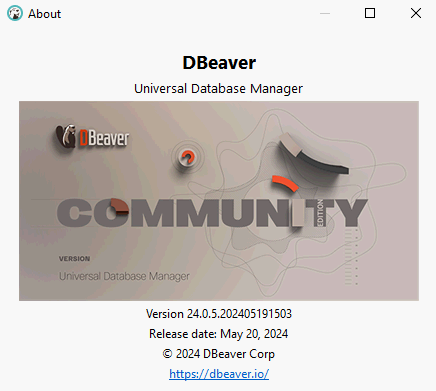
本文示例中使用的是 DBeaver 社区版 v24.0.5
由于 DBeaver 尚不支持 IoTDB,所以需要手动加载驱动。
- 从官网下载驱动包,并加载到 DBeaver。
iotdb-jdbc-1.3.1-jar-with-dependencies.jar 2024-04-19 08:40 21081271
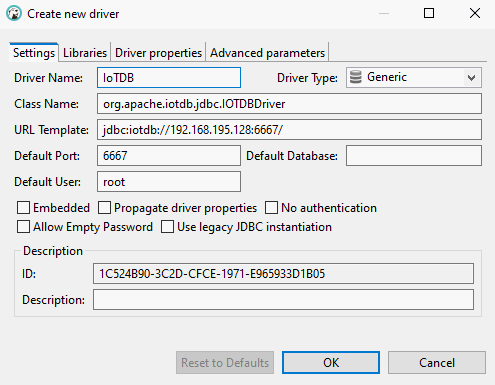
- 创建一个新的驱动,填写设定信息,Class Name填写为
org.apache.iotdb.jdbc.IOTDBDriver
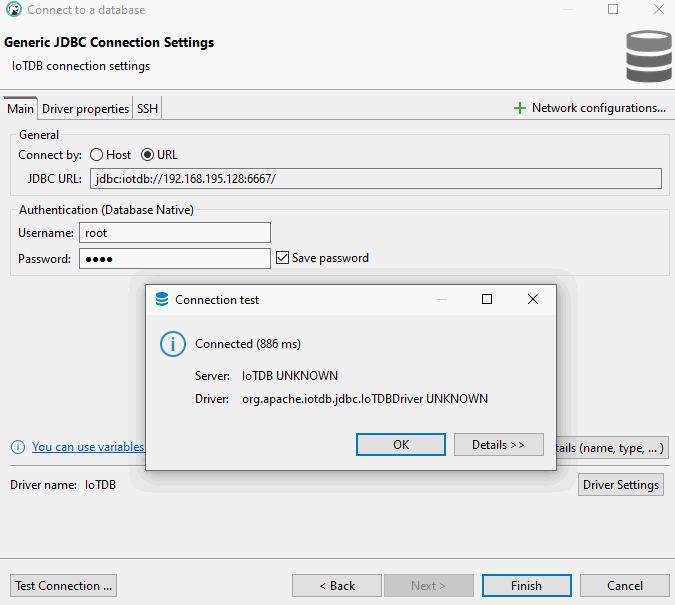
- 填写连接信息,初始用户名、密码为:
root/root,验证连接,如下图所示,连接成功。
通过 PyCharm 图形化工具连接到 IoTDB
PyCharm 是由 JetBrains 公司开发的一款流行的 Python 集成开发环境(IDE)。它提供了一整套工具,以支持 Python 开发者在编码、分析、测试和调试过程中的各种需求。PyCharm 拥有强大的功能和友好的用户界面。PyCharm 提供了数据库工具,可以连接数据库、执行 SQL 语句、浏览数据等。
这里,我们通过 PyCharm 的 DB Browser 连接到 IoTDB。
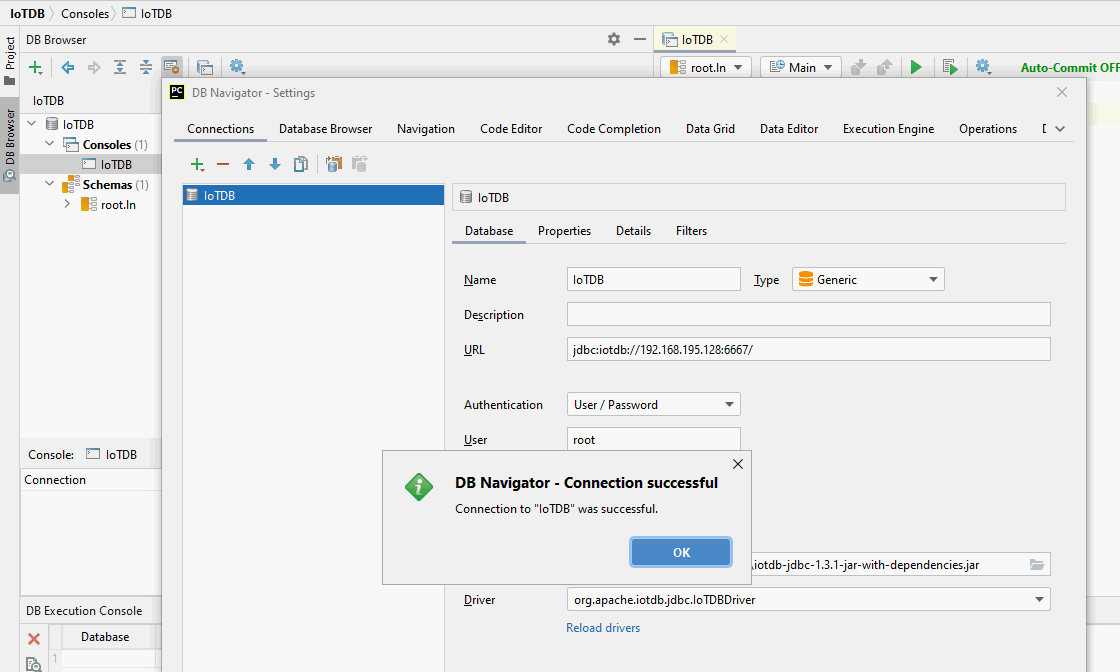
与上一步类似,创建一个新的连接,Type 选择 Generic。
选择驱动的路径,PyCharm会自动加载。
填写URL: jdbc:iotdb://xxx:6667/ 和用户、密码后,测试连接。
如下图,可以看到连接成功。
IoTDB 的基本用法
创建时序
前面提到了如何创建时序,完整的语法支持创建时序时指定数据类型、编码和压缩算法,例如:
IoTDB> create timeseries root.iotdb.s1.power1 with datatype=float, encoding=rle, compression=zstd;
Msg: The statement is executed successfully.
IoTDB> show timeseries root.iotdb.s1.power1
+--------------------+-----+----------+--------+--------+-----------+----+----------+--------+------------------+--------+
|          Timeseries|Alias|  Database|DataType|Encoding|Compression|Tags|Attributes|Deadband|DeadbandParameters|ViewType|
+--------------------+-----+----------+--------+--------+-----------+----+----------+--------+------------------+--------+
|root.iotdb.s1.power1| null|root.iotdb|   FLOAT|     RLE|       ZSTD|null|      null|    null|              null|    BASE|
+--------------------+-----+----------+--------+--------+-----------+----+----------+--------+------------------+--------+
Total line number = 1
It costs 0.010s
IoTDB 支持以下数据类型:
- BOOLEAN (布尔值)
- INT32 (整数)
- INT64 (长整数)
- FLOAT (单精度浮点数)
- DOUBLE (双精度浮点数)
- TEXT (字符串)
IoTDB 的数据类型与其支持的编码之间的对应关系,参照下表。
| 数据类型 | 编码 |
|---|---|
| BOOLEAN | PLAIN, RLE |
| INT32 | PLAIN, RLE, TS_2DIFF, GORILLA, ZIGZAG, CHIMP, SPRINTZ, RLBE |
| INT64 | PLAIN, RLE, TS_2DIFF, GORILLA, ZIGZAG, CHIMP, SPRINTZ, RLBE |
| FLOAT | PLAIN, RLE, TS_2DIFF, GORILLA, CHIMP, SPRINTZ, RLBE |
| DOUBLE | PLAIN, RLE, TS_2DIFF, GORILLA, CHIMP, SPRINTZ, RLBE |
| TEXT | PLAIN, DICTIONARY |
IoTDB 允许在创建时间序列时指定列的压缩方法,支持的压缩算法如下:
- UNCOMPRESSED
- SNAPPY
- LZ4
- GZIP
- ZSTD
- LZMA2
插入时序数据
使用INSERT命令来插入时间序列数据,举例如下:
IoTDB> insert into root.iotdb.s1(power1) values(0.1);
Msg: The statement is executed successfully.
查看数据示例:
IoTDB> select power1 from root.iotdb.s1;
+-----------------------------+--------------------+
|                         Time|root.iotdb.s1.power1|
+-----------------------------+--------------------+
|2024-05-31T19:58:13.216+08:00|                 0.1|
|2024-05-31T19:59:44.102+08:00|                 0.2|
+-----------------------------+--------------------+
Total line number = 2
It costs 0.011s
IoTDB 新特性
1. 支持新命令 SHOW REGIONS 和指定某个 DB
IoTDB> SHOW REGIONS;
+--------+------------+-------+----------+-------------+-----------+----------+----------+-------+---------------+------+-----------------------+
|RegionId|        Type| Status|  Database|SeriesSlotNum|TimeSlotNum|DataNodeId|RpcAddress|RpcPort|InternalAddress|  Role|             CreateTime|
+--------+------------+-------+----------+-------------+-----------+----------+----------+-------+---------------+------+-----------------------+
|       2|SchemaRegion|Running|root.iotdb|            1|          0|         1|   0.0.0.0|   6667|      127.0.0.1|Leader|2024-05-31T19:22:22.352|
|       3|  DataRegion|Running|root.iotdb|            1|          1|         1|   0.0.0.0|   6667|      127.0.0.1|Leader|2024-05-31T19:58:13.904|
+--------+------------+-------+----------+-------------+-----------+----------+----------+-------+---------------+------+-----------------------+
Total line number = 2
It costs 0.058s

IoTDB> SHOW REGIONS of database root.iotdb;
+--------+------------+-------+----------+-------------+-----------+----------+----------+-------+---------------+------+-----------------------+
|RegionId|        Type| Status|  Database|SeriesSlotNum|TimeSlotNum|DataNodeId|RpcAddress|RpcPort|InternalAddress|  Role|             CreateTime|
+--------+------------+-------+----------+-------------+-----------+----------+----------+-------+---------------+------+-----------------------+
|       2|SchemaRegion|Running|root.iotdb|            1|          0|         1|   0.0.0.0|   6667|      127.0.0.1|Leader|2024-05-31T19:22:22.352|
|       3|  DataRegion|Running|root.iotdb|            1|          1|         1|   0.0.0.0|   6667|      127.0.0.1|Leader|2024-05-31T19:58:13.904|
+--------+------------+-------+----------+-------------+-----------+----------+----------+-------+---------------+------+-----------------------+
Total line number = 2
It costs 0.010s
2. 聚合查询时支持 GROUP BY VARIATION 和 GROUP BY CONDITION 语法
IoTDB> SELECT avg(power1) FROM root.iotdb.s1
> GROUP BY variation(power1, 2);
+-----------------------------+-------------------------+
|                         Time|avg(root.iotdb.s1.power1)|
+-----------------------------+-------------------------+
|2024-05-31T19:58:13.216+08:00|      0.30000000447034836|
+-----------------------------+-------------------------+
Total line number = 1
It costs 0.010s
3. 支持容器部署
IoTDB 新版本支持 Docker 容器化部署
$ podman search iotdb
NAME                                  DESCRIPTION
docker.io/apache/iotdb                An IoT native database with high performance...
docker.io/apache/iotdb-web-workbench  IOTDB Web Workbench
4. 支持一键收集实例信息
[iotdb@centos7 tools]$ ./collect-info.sh
---------------------
Start collecting info
---------------------
  adding: ../iotdb-info/ (stored 0%)
  adding: ../iotdb-info/logs/ (stored 0%)
  adding: ../iotdb-info/logs/log_confignode_all.log (deflated 85%)
...
  adding: ../iotdb-info/collection.txt (deflated 76%)
  adding: ../iotdb-info/conf/ (stored 0%)
...
  adding: ../iotdb-info/conf/iotdb-common.properties (deflated 73%)
Program execution completed, file name is collection-20240531192556.zip
收集信息示例:
[iotdb@centos7 iotdb-info]$ cat collection.txt | grep ==
===================== System Info =====================
===================== JDK Version=====================
=================== Activation Info====================
===================== TsFile Info=====================
=================== show version ====================
=================== show cluster details ====================
=================== show regions ====================
=================== show databases ====================
=================== count devices ====================
=================== count timeseries ====================
5. 新增修复 tsfile 数据命令
IoTDB> start repair data;
Msg: The statement is executed successfully.
IoTDB> start repair data on local;
Msg: The statement is executed successfully.
IoTDB> start repair data on cluster;
Msg: The statement is executed successfully.
由于篇幅原因,IoTDB 的新特性先介绍到这里,更多信息请参阅发版说明。
总结
IoTDB 是一款分布式时序数据库,适用于车联网、智能运维、智慧工厂、状态监测和边缘计算等多种场景。
原创文字,IoTDB 社区可进行使用与传播
🌻 往期精彩 ▼
[Oracle]
- Oracle 数据库全面升级为 23ai
- python-oracledb 已率先支持 Oracle 23ai
- 一文带你了解 Oracle 23ai 新特性 Vector 的基础用法
- SOP for Oracle 23ai:Python 连接 Oracle 的两种方法
[MySQL]
[TiDB]
- 星辰考古:TiDB v1.0 再回首
- TiDB x KubeBlocks 集成案例
- TiDB v7.5.0 LTS 升级必读 | 新特性补充说明
- 理想中的开源社区是怎么样的?来自 TiDB 社区运营表妹的浅认识
[PG]
- 哈喽,国产数据库!Halo DB!
- 即将告别PG 12,建议升级到PG 16.3版本
- PG Style! 盘点几个常用的 Postgres 环境变量
- 后 EL 7 时代,PG 16 如何在 CentOS 7 上运行
– / END / –
如果这篇文章为你带来了灵感或启发,就请帮忙点『赞』or『在看』or『转发』吧,感谢!(๑˃̵ᴗ˂̵)
