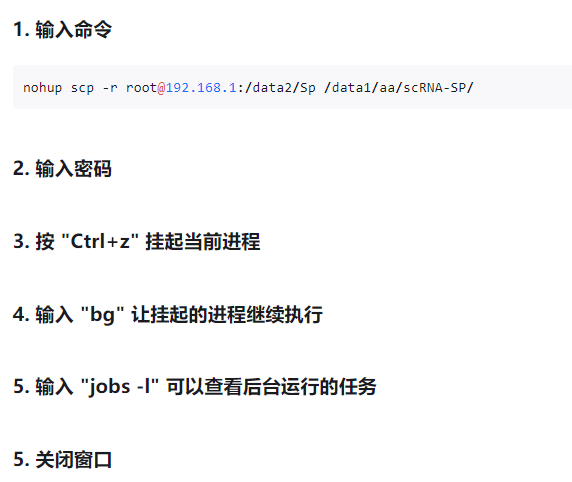
通过scp传输大文件到远程,避免中断问题,采用后台方式执行:
oracle@testdb:/home/oracle>nohup scp /data2/expdir/79_full.dmp 192.168.1.49:/ora19c/dmp/
Nohup:忽略输入,并将输出附加到`nohup.out‘
oracle@192.168.1.49's password:
^Coracle@testdb:/home/oracle>nohup scp /data2/expdir/79_full.dmp 192.168.1.49:/ora19c/dmp/
Nohup:忽略输入,并将输出附加到`nohup.out‘
oracle@192.168.1.49's password:
^Z
[1]+  停止                  nohup scp /data2/expdir/79_full.dmp 192.168.1.49:/ora19c/dmp/
oracle@testdb:/home/oracle>bg
[1]+ nohup scp /data2/expdir/79_full.dmp 192.168.1.49:/ora19c/dmp/ &
oracle@testdb:/home/oracle>jobs -l
[1]+236961正在运行的nohup scp/data2/expdir/79_full.dmp 192.168.1.49:/ora19c/dmp/&。
Oracle@testdb:/home/oracle>exit。
注销
[root@testdb ~]# ps -ef|grep scp
oracle   236961      1 10 15:53 pts/3    00:00:03 scp /data2/expdir/79_full.dmp 192.168.1.49:/ora19c/dmp/
oracle   236962 236961 74 15:53 pts/3    00:00:28 /usr/bin/ssh -x -oForwardAgent=no -oPermitLocalCommand=no -oClearAllForwardings=yes -- 192.168.1.49 scp -t /ora19c/dmp/
root     236979 236816  0 15:53 pts/3    00:00:00 grep --color=auto scp
[root@testdb ~]# jobs -l
[1]+236961正在运行的nohup scp/data2/expdir/79_full.dmp 192.168.1.49:/ora19c/dmp/&。
[root@testdb ~]# exit
登出
Connection to 192.168.1.79 closed.
登录远程192.168.1.49检查是否还在运行:文件在增长说明正常。
oracle@testdb2:/home/oracle>cd /ora19c/dmp
oracle@testdb2:/ora19c/dmp>ls -lt
total 10066944
-rw-r-----. 1 oracle oinstall 8801173504 Jun 5 15:54 79_full.dmp
oracle@testdb2:/ora19c/dmp>ls -lt
total 10066944
-rw-r-----. 1 oracle oinstall 9026715648 Jun 5 15:54 79_full.dmp
oracle@testdb2:/ora19c/dmp>ls -lt
total 10066944
-rw-r-----. 1 oracle oinstall 9134866432 Jun 5 15:54 79_full.dmp
oracle@testdb2:/ora19c/dmp>ls -lt
total 10066944
-rw-r-----. 1 oracle oinstall 9201352704 Jun 5 15:54 79_full.dmp
oracle@testdb2:/ora19c/dmp>ls -lt
total 10066944
-rw-r-----. 1 oracle oinstall 9284468736 Jun 5 15:54 79_full.dmp
oracle@testdb2:/ora19c/dmp>ls -lt
total 10066944
-rw-r-----. 1 oracle oinstall 9353707520 Jun 5 15:54 79_full.dmp
相关参考: