



一、监听介绍
1、默认创建监听名为listener
在创建Oracle数据库期间,Oracle Net Configuration Assistant创建名为listener的本地监听器。
--监听器通过称为动态服务注册的功能进行数据库服务的注册
--监听器监听以下TCP/IP协议地址:ADDRESS= (protocol=TCP) (host=host_ name) (port=1521) )
--无需任何配置,即可通过监听立即访问数据库实例
--lsnrctl status listener或lsnrctl status
2、配置动态服务注册
(1)默认情况下,Oracle数据库实例配置为使用动态服务注册(服务注册),将可用服务自动提供给监听器。
--LREG进程轮询监听器以查看它们是否正在运行,如果是,则进行注册数据库服务信息。
(2)默认情况下,动态服务注册将所有PDB服务注册到同一个监听器。
--如果停止该监听器,则停止对所有PDB服务的访问。
(3)配置动态服务注册的一般步骤:
--确保INSTANCE NAME、 LOCAL LISTENER、 REMOTE LISTENER和SERVICE NAMES初始化参数被正确的配置。
--在服务器端tnsnames.ora文件中配置协议地址(服务端)。
(4)使用ALTER SYSTEM REGISTER命令立即启动服务注册
3、配置静态服务注册
(1)静态服务注册是配置监听器以获取其服务的方法
--手动获取信息
--您可以为特定的PDB创建监听器。
--某些服务(如外部服务)可能需要静态服务注册
--过程和异构服务(用于非Oracle系统) 。
(2)监听器不知道静态注册的服务
--对于静态注册,监听器不知道其数据库服务是否存在与否。
--它只知道它支持他们。
--监听器控件实用工具显示服务状态为未知。
(3)配置静态服务注册的一般步骤:
在listener.ora中,定义一个监听器及其协议地址。
在listener.ora中,还创建一个sid_ list_ <listener name>节,该节列出监听器的数据库服务。
二、更改默认监听端口(标准端口1521)的方法
1、只是静态注册方式修改端口
只修改listener.ora文件
2、如果需要动态注册且进行端口修改
LREG可以监听到
(1)先修改listener.ora
(2)修改LOCAL_LISTENER、REMOTE_LISTENER和SERVICE_NAMES
(3)修改服务端的tnsnames.ora
三、创建CDB的动态监听步骤(更改默认端口为其他端口)
1、查看几个配置
SERVICE_NAMES、LOCAL_LISTENER、REMOTE_LISTENER
(1)INSTANCE_NAME-实例名
SQL> show parameter instance_name;
NAME TYPE VALUE
------------------------------------ --------------------------------- ------------------------------
instance_name string ocporcl
(2)SERVICE_NAMES-服务名
SQL> show parameter SERVICE_NAMES
NAME                 TYPE               VALUE
--------------  ------------------   -------------
service_names         string           ocporcl
(3)local_listener-监听名(默认1521端口下,此处为空)
SQL> show parameter local_listener
NAME                  TYPE          VALUE
----------------   ------------  ---------------
local_listener        string
(4)remote_listener-远程监听名(默认1521端口下,此处为空)
SQL> show parameter remote_listener
NAME                  TYPE            VALUE
----------------  ---------------- -----------------
remote_listener       string
2、配置上述服务端口为1621(或者直接在listener.ora增加,查看五的案例)
(1)netca配置增加端口1621(原监听服务名称listener可以改,也可以不改)
如果不改,就把原来listener配置覆盖了。
如果改了,就多了一个监听名称(原来的1521被保留,但1621注册成功后,1521的所有服务不可访问,因为默认的local_listener已经被修改,如果要想让1521继续被使用,可以同样在local_listener中增加1521的监听并在tnsnames.ora增加1521的信监听信息)
--netca运行
--修改listener name:listener_1621
--端口处选择(use another port number):1621
--创建完成可以在listener.ora看到如下配置
   LISTENER_1621 =
     (DESCRIPTION_LIST =
      (DESCRIPTION =
        (ADDRESS = (PROTOCOL = TCP)(HOST = ocp196)(PORT = 1621))
        (ADDRESS = (PROTOCOL = IPC)(KEY = EXTPROC1621))
      )
    )
(2)查看新监听名称状态:
[oracle@ocp196 db_1]$ lsnrctl status listener_1621
LSNRCTL for Linux: Version 19.0.0.0.0 - Production on 13-JUN-2022 09:20:10
Copyright (c) 1991, 2019, Oracle. All rights reserved.

Connecting to (DESCRIPTION=(ADDRESS=(PROTOCOL=TCP)(HOST=ocp196)(PORT=1621)))
STATUS of the LISTENER
------------------------
Alias LISTENER_1621
Version TNSLSNR for Linux: Version 19.0.0.0.0 - Production
Start Date 13-JUN-2022 09:19:55
Uptime 0 days 0 hr. 0 min. 15 sec
Trace Level off
Security ON: Local OS Authentication
SNMP OFF
Listener Parameter File /oracle/app/oracle/product/19.3.0/db_1/network/admin/listener.ora
Listener Log File /oracle/app/oracle/diag/tnslsnr/ocp196/listener_1621/alert/log.xml
Listening Endpoints Summary...
(DESCRIPTION=(ADDRESS=(PROTOCOL=tcp)(HOST=ocp196)(PORT=1621)))
(DESCRIPTION=(ADDRESS=(PROTOCOL=ipc)(KEY=EXTPROC1621)))
The listener supports no services
The command completed successfully
(3)配置tnsnames.ora
注意:这里的LISTENER_OCPORCL_1621要和parameter中的local_listener一致
LISTENER_OCPORCL_1621=(ADDRESS = ( PROTOCOL = TCP) (HOST = ocp196) (PORT = 1621) )
(4)配置参数
SQL> alter system set local_listener='LISTENER_OCPORCL_1621';
(5)查看1621的监听服务,已经启动
[oracle@ocp196:/oracle/app/oracle/product/19.3.0/db_1/network/admin]$lsnrctl status listener_1621

LSNRCTL for Linux: Version 19.0.0.0.0 - Production on 13-JUN-2022 09:33:45

Copyright (c) 1991, 2019, Oracle. All rights reserved.
Connecting to (DESCRIPTION=(ADDRESS=(PROTOCOL=TCP)(HOST=ocp196)(PORT=1621)))
STATUS of the LISTENER
------------------------
Alias LISTENER_1621
Version TNSLSNR for Linux: Version 19.0.0.0.0 - Production
Start Date 13-JUN-2022 09:19:55
Uptime 0 days 0 hr. 13 min. 49 sec
Trace Level off
Security ON: Local OS Authentication
SNMP OFF
Listener Parameter File /oracle/app/oracle/product/19.3.0/db_1/network/admin/listener.ora
Listener Log File /oracle/app/oracle/diag/tnslsnr/ocp196/listener_1621/alert/log.xml
Listening Endpoints Summary...
(DESCRIPTION=(ADDRESS=(PROTOCOL=tcp)(HOST=ocp196)(PORT=1621)))
(DESCRIPTION=(ADDRESS=(PROTOCOL=ipc)(KEY=EXTPROC1621)))
Services Summary...
Service "e127f8f5013f4058e055c72f45483eb2" has 1 instance(s).
Instance "ocporcl", status READY, has 1 handler(s) for this service...
Service "e13d476b05d865efe055c72f45483eb2" has 1 instance(s).
Instance "ocporcl", status READY, has 1 handler(s) for this service...
Service "e13d476b05da65efe055c72f45483eb2" has 1 instance(s).
Instance "ocporcl", status READY, has 1 handler(s) for this service...
Service "e13d476b05dc65efe055c72f45483eb2" has 1 instance(s).
Instance "ocporcl", status READY, has 1 handler(s) for this service...
Service "ocporcl" has 1 instance(s).
Instance "ocporcl", status READY, has 1 handler(s) for this service...
Service "ocporclXDB" has 1 instance(s).
Instance "ocporcl", status READY, has 1 handler(s) for this service...
Service "orclpdb1" has 1 instance(s).
Instance "ocporcl", status READY, has 1 handler(s) for this service...
Service "orclpdb2" has 1 instance(s).
Instance "ocporcl", status READY, has 1 handler(s) for this service...
Service "orclpdb3" has 1 instance(s).
Instance "ocporcl", status READY, has 1 handler(s) for this service...
The command completed successfully
(6)但1521的监听服务已停止
[oracle@ocp196:/oracle/app/oracle/product/19.3.0/db_1/network/admin]$lsnrctl status
LSNRCTL for Linux: Version 19.0.0.0.0 - Production on 13-JUN-2022 09:34:14

Copyright (c) 1991, 2019, Oracle. All rights reserved.

Connecting to (ADDRESS=(PROTOCOL=tcp)(HOST=)(PORT=1521))
STATUS of the LISTENER
------------------------
Alias LISTENER
Version TNSLSNR for Linux: Version 19.0.0.0.0 - Production
Start Date 12-JUN-2022 20:53:51
Uptime 0 days 12 hr. 40 min. 24 sec
Trace Level off
Security ON: Local OS Authentication
SNMP OFF
Listener Log File /oracle/app/oracle/diag/tnslsnr/ocp196/listener/alert/log.xml
Listening Endpoints Summary...
(DESCRIPTION=(ADDRESS=(PROTOCOL=tcp)(HOST=ocp196)(PORT=1521)))
The listener supports no services
The command completed successfully
四、创建第二个动态监听(listener_1721)
1、netca创建监听listener_1721(或者直接在listener.ora增加,查看五的案例)
--netca运行
--修改listener name:listener_1721
--端口处选择(use another port number):1721
--配置完成后,listener.ora中有如下配置:
  LISTENER_1621 =
    (DESCRIPTION_LIST =
      (DESCRIPTION =
        (ADDRESS = (PROTOCOL = TCP)(HOST = ocp196)(PORT = 1621))
        (ADDRESS = (PROTOCOL = IPC)(KEY = EXTPROC1621))
      )
    )
  LISTENER_1721 =
    (DESCRIPTION_LIST =
      (DESCRIPTION =
       (ADDRESS = (PROTOCOL = TCP)(HOST = ocp196)(PORT = 1721))
      )
    )
2、配置服务端的tnsnames.ora
注意:这里的LISTENER_OCPORCL_1721要和parameter中的local_listener一致
LISTENER_OCPORCL_1721=(ADDRESS = ( PROTOCOL = TCP) (HOST = ocp196) (PORT = 1721) )
3、配置local_listener参数为2个。
SQL> alter system set local_listener='LISTENER_OCPORCL_1621','LISTENER_OCPORCL_1721';
4、查看配置
SQL> show parameter local_listener

NAME                 TYPE                        VALUE
-----------      -----------------  ----------------------------------------------
local_listener      string            LISTENER_OCPORCL_1621, LISTENER_OCPORCL_1721
5、查看两个监听
(1)LISTENER_1721监听状态
[oracle@ocp196:/oracle/app/oracle/product/19.3.0/db_1/network/admin]$lsnrctl status LISTENEr_1721
LSNRCTL for Linux: Version 19.0.0.0.0 - Production on 13-JUN-2022 10:09:26

Copyright (c) 1991, 2019, Oracle. All rights reserved.

Connecting to (DESCRIPTION=(ADDRESS=(PROTOCOL=TCP)(HOST=ocp196)(PORT=1721)))
STATUS of the LISTENER
------------------------
Alias LISTENER_1721
Version TNSLSNR for Linux: Version 19.0.0.0.0 - Production
Start Date 13-JUN-2022 09:53:42
Uptime 0 days 0 hr. 15 min. 45 sec
Trace Level off
Security ON: Local OS Authentication
SNMP OFF
Listener Parameter File /oracle/app/oracle/product/19.3.0/db_1/network/admin/listener.ora
Listener Log File /oracle/app/oracle/diag/tnslsnr/ocp196/listener_1721/alert/log.xml
Listening Endpoints Summary...
(DESCRIPTION=(ADDRESS=(PROTOCOL=tcp)(HOST=ocp196)(PORT=1721)))
Services Summary...
Service "e127f8f5013f4058e055c72f45483eb2" has 1 instance(s).
Instance "ocporcl", status READY, has 1 handler(s) for this service...
Service "e13d476b05d865efe055c72f45483eb2" has 1 instance(s).
Instance "ocporcl", status READY, has 1 handler(s) for this service...
Service "e13d476b05da65efe055c72f45483eb2" has 1 instance(s).
Instance "ocporcl", status READY, has 1 handler(s) for this service...
Service "e13d476b05dc65efe055c72f45483eb2" has 1 instance(s).
Instance "ocporcl", status READY, has 1 handler(s) for this service...
Service "ocporcl" has 1 instance(s).
Instance "ocporcl", status READY, has 1 handler(s) for this service...
Service "ocporclXDB" has 1 instance(s).
Instance "ocporcl", status READY, has 1 handler(s) for this service...
Service "orclpdb1" has 1 instance(s).
Instance "ocporcl", status READY, has 1 handler(s) for this service...
Service "orclpdb2" has 1 instance(s).
Instance "ocporcl", status READY, has 1 handler(s) for this service...
Service "orclpdb3" has 1 instance(s).
Instance "ocporcl", status READY, has 1 handler(s) for this service...
The command completed successfully
(2)LISTENER_1621监听状态
[oracle@ocp196:/oracle/app/oracle/product/19.3.0/db_1/network/admin]$lsnrctl status LISTENEr_1621

LSNRCTL for Linux: Version 19.0.0.0.0 - Production on 13-JUN-2022 10:09:29

Copyright (c) 1991, 2019, Oracle. All rights reserved.

Connecting to (DESCRIPTION=(ADDRESS=(PROTOCOL=TCP)(HOST=ocp196)(PORT=1621)))
STATUS of the LISTENER
------------------------
Alias LISTENER_1621
Version TNSLSNR for Linux: Version 19.0.0.0.0 - Production
Start Date 13-JUN-2022 09:19:55
Uptime 0 days 0 hr. 49 min. 34 sec
Trace Level off
Security ON: Local OS Authentication
SNMP OFF
Listener Parameter File /oracle/app/oracle/product/19.3.0/db_1/network/admin/listener.ora
Listener Log File /oracle/app/oracle/diag/tnslsnr/ocp196/listener_1621/alert/log.xml
Listening Endpoints Summary...
(DESCRIPTION=(ADDRESS=(PROTOCOL=tcp)(HOST=ocp196)(PORT=1621)))
(DESCRIPTION=(ADDRESS=(PROTOCOL=ipc)(KEY=EXTPROC1621)))
Services Summary...
Service "e127f8f5013f4058e055c72f45483eb2" has 1 instance(s).
Instance "ocporcl", status READY, has 1 handler(s) for this service...
Service "e13d476b05d865efe055c72f45483eb2" has 1 instance(s).
Instance "ocporcl", status READY, has 1 handler(s) for this service...
Service "e13d476b05da65efe055c72f45483eb2" has 1 instance(s).
Instance "ocporcl", status READY, has 1 handler(s) for this service...
Service "e13d476b05dc65efe055c72f45483eb2" has 1 instance(s).
Instance "ocporcl", status READY, has 1 handler(s) for this service...
Service "ocporcl" has 1 instance(s).
Instance "ocporcl", status READY, has 1 handler(s) for this service...
Service "ocporclXDB" has 1 instance(s).
Instance "ocporcl", status READY, has 1 handler(s) for this service...
Service "orclpdb1" has 1 instance(s).
Instance "ocporcl", status READY, has 1 handler(s) for this service...
Service "orclpdb2" has 1 instance(s).
Instance "ocporcl", status READY, has 1 handler(s) for this service...
Service "orclpdb3" has 1 instance(s).
Instance "ocporcl", status READY, has 1 handler(s) for this service...
The command completed successfully
6、测试两个服务
[oracle@ocp196:~]$sqlplus sys/oracle@192.168.20.196:1621/ocporcl as sysdba
[oracle@ocp196:~]$sqlplus sys/oracle@192.168.20.196:1721/ocporcl as sysdba
五、创建静态监听(将静态监听放在1621下)
1、配置listener.ora文件(增加SID_LIST_LISTENER_1621)
其中SID_LIST_LISTENER_1621中的红色部分一定要和监听名称一致;
配置时:
CDB一定要配置服务名称为CDB的名称,sid名称时也是cdb的实例名。
PDB一定要配置服务名称为pdb的名称,但是sid名称时cdb的实例名,否则连接失败。
SID_LIST_LISTENER_1621=
(SID_LIST=
 (SID_DESC=
    (GLOBAL_DBNAME=ocporcl)
    (SID_NAME=ocporcl)
    (ORACLE_HOME=/oracle/app/oracle/product/19.3.0/db_1)
  )
  (SID_DESC=
    (GLOBAL_DBNAME=orclpdb2)
    (SID_NAME=ocporcl)
    (ORACLE_HOME=/oracle/app/oracle/product/19.3.0/db_1)
  )
)
2、重启1621的监听服务
[oracle@ocp196:/oracle/app/oracle/product/19.3.0/db_1/network/admin]$lsnrctl stop listener_1621
[oracle@ocp196:/oracle/app/oracle/product/19.3.0/db_1/network/admin]$lsnrctl start listener_1621
3、查看启动后的状态(动态注册启动前)

4、登录测试(在动态监听启动前测试)
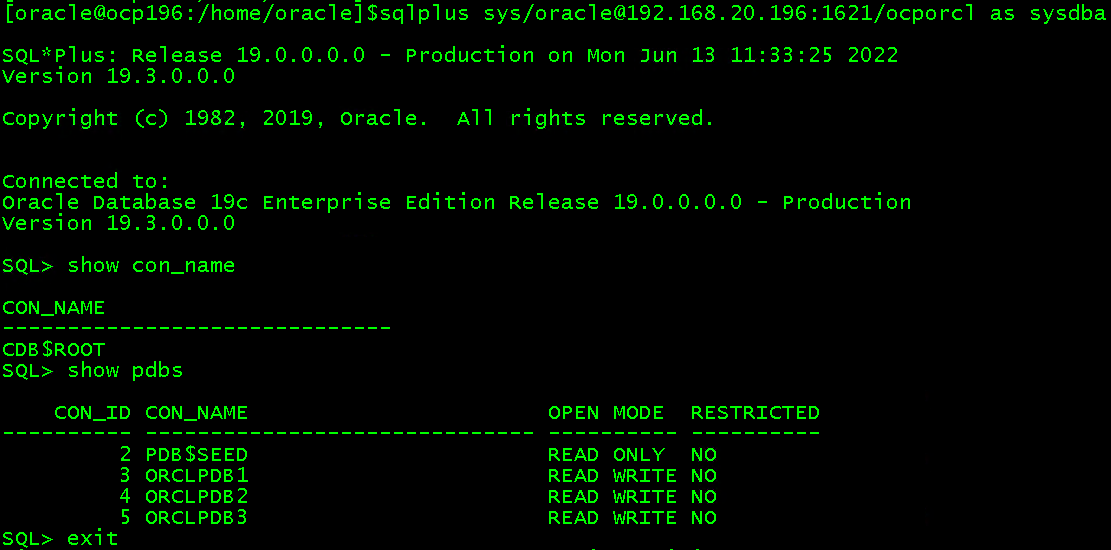
(1)cdb连接测试
[oracle@ocp196:/home/oracle]$sqlplus sys/oracle@192.168.20.196:1621/ocporcl as sysdba
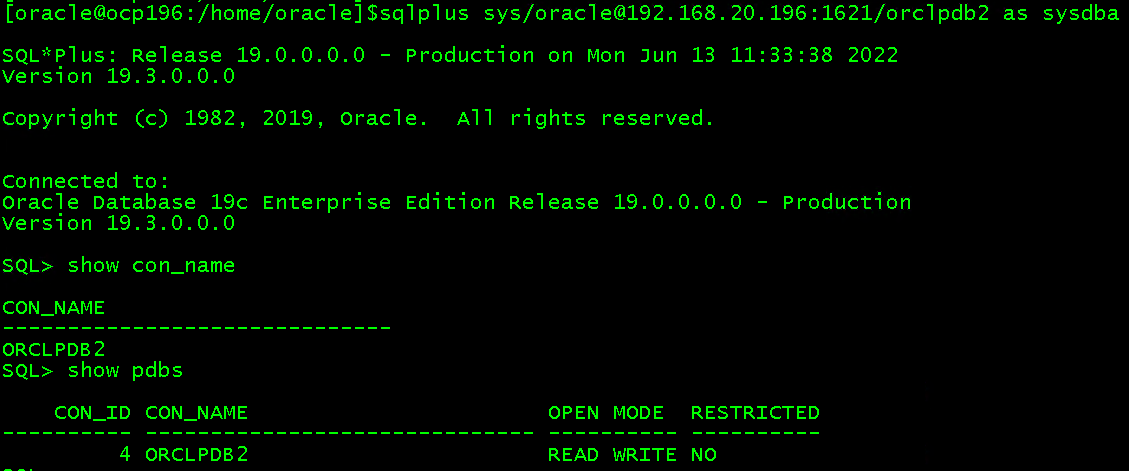
(2)pdb连接测试
[oracle@ocp196:/home/oracle]$sqlplus sys/oracle@192.168.20.196:1621/orclpdb2 as sysdba
六、如果想让监听为1521的继续使用,可以如下操作
1、查看当前监听服务,有3个
1521,1621,1721
[oracle@ocp196:/oracle/app/oracle/product/19.3.0/db_1/network/admin]$ps -ef|grep tns
root 93 2 0 Jun11 ? 00:00:00 [netns]
oracle 3051 1 0 11:33 ? 00:00:00 /oracle/app/oracle/product/19.3.0/db_1/bin/tnslsnr listener_1621 -inherit
oracle 10199 1 0 Jun12 ? 00:00:00 /oracle/app/oracle/product/19.3.0/db_1/bin/tnslsnr LISTENER -inherit
oracle 28661 1 0 09:53 ? 00:00:00 /oracle/app/oracle/product/19.3.0/db_1/bin/tnslsnr LISTENER_1721 -inherit
2、配置tnsnames.ora
增加1521的
LISTENER_OCPORCL_1521=(ADDRESS =(PROTOCOL = TCP)(HOST = ocp196)(PORT = 1521))
3、设置local_listener
SQL> alter system set local_listener='LISTENER_OCPORCL_1621','LISTENER_OCPORCL_1721','LISTENER_OCPORCL_1521';
4、重启监听即可(或者不重启也可以)
[oracle@ocp196:/oracle/app/oracle/product/19.3.0/db_1/network/admin]$lsnrctl status

LSNRCTL for Linux: Version 19.0.0.0.0 - Production on 13-JUN-2022 15:35:59

Copyright (c) 1991, 2019, Oracle. All rights reserved.

Connecting to (ADDRESS=(PROTOCOL=tcp)(HOST=)(PORT=1521))
STATUS of the LISTENER
------------------------
Alias LISTENER
Version TNSLSNR for Linux: Version 19.0.0.0.0 - Production
Start Date 12-JUN-2022 20:53:51
Uptime 0 days 18 hr. 42 min. 9 sec
Trace Level off
Security ON: Local OS Authentication
SNMP OFF
Listener Log File /oracle/app/oracle/diag/tnslsnr/ocp196/listener/alert/log.xml
Listening Endpoints Summary...
(DESCRIPTION=(ADDRESS=(PROTOCOL=tcp)(HOST=ocp196)(PORT=1521)))
Services Summary...
Service "e127f8f5013f4058e055c72f45483eb2" has 1 instance(s).
Instance "ocporcl", status READY, has 2 handler(s) for this service...
Service "e13d476b05d865efe055c72f45483eb2" has 1 instance(s).
Instance "ocporcl", status READY, has 2 handler(s) for this service...
Service "e13d476b05da65efe055c72f45483eb2" has 1 instance(s).
Instance "ocporcl", status READY, has 2 handler(s) for this service...
Service "e13d476b05dc65efe055c72f45483eb2" has 1 instance(s).
Instance "ocporcl", status READY, has 2 handler(s) for this service...
Service "ocporcl" has 1 instance(s).
Instance "ocporcl", status READY, has 2 handler(s) for this service...
Service "orclpdb1" has 1 instance(s).
Instance "ocporcl", status READY, has 2 handler(s) for this service...
Service "orclpdb2" has 1 instance(s).
Instance "ocporcl", status READY, has 2 handler(s) for this service...
Service "orclpdb3" has 1 instance(s).
Instance "ocporcl", status READY, has 2 handler(s) for this service...
The command completed successfully
七、总结:
1、在CDB下的1521监听,默认是不生成有listener.ora文件的
2、标准端口的动态注册:
默认的1521端口在listener.ora注册,是动态注册;
它是标准动态注册端口,在local_listener参数中不需要特殊注明这个端口对应的tnsnames.ora值。
3、非标准端口的动态注册:
在listener.ora修改1521端口为其他端口(如1621);
同时配置LOCAL_LISTENER、REMOTE_LISTENER和SERVICE_NAMES,以及tnsnames.ora,则是非标准端口的动态注册。
4、非标准端口的静态注册(在listener.ora配置)
SID_LIST_LISTENER_1621=
(SID_LIST=
 (SID_DESC=
  (GLOBAL_DBNAME=orclpdb2)
  (SID_NAME=ocporcl)
  (ORACLE_HOME=/oracle/app/oracle/product/19.3.0/db_1)
 )
)
