



一、ClickHouse介绍
ClickHouse是一种开源的、高性能的列式数据库管理系统(DBMS),由俄罗斯的Yandex公司开发。它专注于实时大数据分析,并能够快速处理海量数据,适用于需要高性能、低延迟的数据查询和分析场景。以下是ClickHouse的一些主要特点和优势:
- 列式存储:ClickHouse使用列式存储方式,数据按列存储,而不是按行存储。这意味着在查询时,只需要读取所需的列数据,而不是整行数据,从而减少了I/O操作和内存占用,提高查询性能。
- 分布式架构:ClickHouse支持分布式架构,可以在多个节点上并行处理数据,实现水平扩展。这使得它能够处理大规模数据,适用于数据仓库和实时分析等场景。
- 高性能:ClickHouse具有出色的查询性能和低延迟,可以在秒级甚至毫秒级内快速返回查询结果。它支持多种数据压缩和查询优化技术,提升查询效率。
- 实时分析:ClickHouse适用于实时数据分析场景,能够处理大量的原始数据,进行快速的实时分析和查询,帮助用户从海量数据中提取有价值的信息。
- SQL兼容:ClickHouse提供了丰富的SQL接口,用户可以使用SQL语句进行数据查询和分析。同时,它还提供了多种编程语言的客户端库和驱动程序,方便用户进行集成和开发。
- 可扩展性:ClickHouse支持分布式架构,可以通过添加节点来扩展系统的处理能力。同时,它还支持数据分片、数据复制等特性,提高了系统的可用性和容错性。
- 在应用场景方面,ClickHouse广泛适用于数据分析、数据挖掘、实时监控等场景。例如,在电商领域,ClickHouse可以用于分析用户行为、销售数据等;在金融领域,它可以用于实时监控交易数据、风险分析等。
官网地址:https://clickhouse.tech/
二、ClickHouse安装
2.1、系统要求
ClickHouse可以在任何具有x86_64,AArch64或PowerPC64LE CPU架构的Linux,FreeBSD或Mac OS X上运行。
官方预构建的二进制文件通常针对x86_64进行编译,并利用SSE 4.2指令集,因此,除非另有说明,支持它的CPU使用将成为额外的系统需求。
检查当前CPU是否支持SSE 4.2指令集
# grep -q sse4_2 /proc/cpuinfo && echo "SSE 4.2 supported" || echo "SSE 4.2 not supported"
要在不支持SSE 4.2或AArch64,PowerPC64LE架构的处理器上运行ClickHouse,您应该通过适当的配置调整从源代码构建ClickHouse。
2.2、安装前准备
2.2.1、关闭防火墙
# systemctl disable firewalld.service
# systemctl stop firewalld.service
# systemctl status firewalld
2.2.2、关闭透明大页THP
# cat >> /etc/systemd/system/disable-thp.service <<EOF
[Unit]
Description=Disable Transparent Huge Pages (THP)
[Service]
Type=simple
ExecStart=/bin/sh -c "echo 'never' > /sys/kernel/mm/transparent_hugepage/enabled && echo 'never' > /sys/kernel/mm/transparent_hugepage/defrag"
[Install]
WantedBy=multi-user.target
EOF
--启动服务
# systemctl daemon-reload
# systemctl start disable-thp
# systemctl enable disable-thp

--查看THP状态
# cat /sys/kernel/mm/transparent_hugepage/enabled
always madvise [never]
# cat /sys/kernel/mm/transparent_hugepage/defrag
always madvise [never]
2.2.3、关闭selinux
# setenforce 0
# sed -i 's/^SELINUX=enforcing/SELINUX=disabled/g' /etc/selinux/config
2.2.4、配置优先使用主机内存
# echo 'vm.swappiness = 1' >> /etc/sysctl.conf
# sysctl -p /etc/sysctl.conf
2.2.5、修改/etc/hosts
# cat >> /etc/hosts << EOF
192.168.100.10 node1
EOF
2.2.6、设置资源限制
# cat >>  /etc/security/limits.d/20-nproc.conf <<EOF
#added by clickhouse
clickhouse      soft    nofile  1048576
clickhouse      hard    nofile  1048576
clickhouse      soft    nproc   131072
clickhouse      hard    nproc   131072
EOF
2.3、使用yum在线安装
2.3.1、安装ClickHouse
# yum install -y yum-utils
# yum-config-manager --add-repo https://packages.clickhouse.com/rpm/clickhouse.repo
# yum install -y clickhouse-server clickhouse-client
2.3.2、 启动ClickHouse server
# systemctl enable clickhouse-server
# systemctl start clickhouse-server
2.3.3、查看ClickHouse server状态
# systemctl status clickhouse-server

[root@node1 bin]# systemctl status clickhouse-server.service
● clickhouse-server.service - ClickHouse Server (analytic DBMS for big data)
   Loaded: loaded (/usr/lib/systemd/system/clickhouse-server.service; enabled; vendor preset: disabled)
   Active: active (running) since Mon 2024-06-10 19:40:16 CST; 39s ago
 Main PID: 3683 (clickhouse-serv)
    Tasks: 667
   CGroup: /system.slice/clickhouse-server.service
           ├─3680 clickhouse-watchdog --config=/etc/clickhouse-server/config.xml --pid-file=/run/clickhouse-server/clickhouse-server.pid
           └─3683 /usr/bin/clickhouse-server --config=/etc/clickhouse-server/config.xml --pid-file=/run/clickhouse-server/clickhouse-server.pid

Jun 10 19:40:14 node1 systemd[1]: Starting ClickHouse Server (analytic DBMS for big data)...
Jun 10 19:40:14 node1 clickhouse-server[3680]: Processing configuration file '/etc/clickhouse-server/config.xml'.
Jun 10 19:40:14 node1 clickhouse-server[3680]: Logging trace to /var/log/clickhouse-server/clickhouse-server.log
Jun 10 19:40:14 node1 clickhouse-server[3680]: Logging errors to /var/log/clickhouse-server/clickhouse-server.err.log
Jun 10 19:40:14 node1 systemd[1]: clickhouse-server.service: Supervising process 3683 which is not our child. We'll most likely not notice when it exits.
Jun 10 19:40:16 node1 systemd[1]: Started ClickHouse Server (analytic DBMS for big data).
2.3.4、客户端登录
# clickhouse-client # or "clickhouse-client --password" if you set up a password.
2.4、使用离线rpm包安装
2.4.1、下载离线rpm包
下载地址1:https://packages.clickhouse.com/rpm/stable/
下载地址2:https://github.com/ClickHouse/ClickHouse/releases
下载这几个文件:
clickhouse-client-24.3.3.102.x86_64.rpm  --ClickHouse数据库的客户端软件包,用于连接到 ClickHouse 数据库。
clickhouse-common-static-24.3.3.102.x86_64.rpm --ClickHouse数据库的公共静态库和二进制文件。
clickhouse-common-static-dbg-24.3.3.102.x86_64.rpm --ClickHouse数据库的调试版本的静态库软件包和二进制文件。
clickhouse-server-24.3.3.102.x86_64.rpm  --为默认服务器配置创建符号链接 clickhouse-server 并安装,用于部署和运行 ClickHouse 数据库。
2.4.2、安装ClickHouse
# rpm -ivh clickhouse-common-static-24.3.3.102.x86_64.rpm
说明:这一步会在/usr/bin目录下创建clickhouse、clickhouse-library-bridge、clickhouse-odbc-bridge、clickhouse-extract-from-config(指向clickhouse文件)

# rpm -ivh clickhouse-common-static-dbg-24.3.3.102.x86_64.rpm

# rpm -ivh clickhouse-server-24.3.3.102.x86_64.rpm
说明:这一步会创建符号链接,创建clickhouse用户,组,配置目录,配置文件,数据目录,日志目录、服务等,详情可参考安装日志。

# rpm -ivh clickhouse-client-24.3.3.102.x86_64.rpm
安装日志如下:
[root@node1 opt]# rpm -ivh clickhouse-common-static-24.3.3.102.x86_64.rpm
Preparing...                          ################################# [100%]
Updating / installing...
   1:clickhouse-common-static-0:24.3.3################################# [100%]
[root@node1 opt]# rpm -ivh clickhouse-common-static-dbg-24.3.3.102.x86_64.rpm
Preparing...                          ################################# [100%]
Updating / installing...
   1:clickhouse-common-static-dbg-0:24################################# [100%]
[root@node1 opt]# rpm -ivh clickhouse-server-24.3.3.102.x86_64.rpm
Preparing...                          ################################# [100%]
Updating / installing...
   1:clickhouse-server-0:24.3.3.102-1 ################################# [100%]
ClickHouse binary is already located at /usr/bin/clickhouse
Symlink /usr/bin/clickhouse-server already exists but it points to /clickhouse. Will replace the old symlink to /usr/bin/clickhouse.
Creating symlink /usr/bin/clickhouse-server to /usr/bin/clickhouse.
Creating symlink /usr/bin/clickhouse-client to /usr/bin/clickhouse.
Creating symlink /usr/bin/clickhouse-local to /usr/bin/clickhouse.
Creating symlink /usr/bin/clickhouse-benchmark to /usr/bin/clickhouse.
Creating symlink /usr/bin/clickhouse-obfuscator to /usr/bin/clickhouse.
Creating symlink /usr/bin/clickhouse-git-import to /usr/bin/clickhouse.
Creating symlink /usr/bin/clickhouse-compressor to /usr/bin/clickhouse.
Creating symlink /usr/bin/clickhouse-format to /usr/bin/clickhouse.
Symlink /usr/bin/clickhouse-extract-from-config already exists but it points to /clickhouse. Will replace the old symlink to /usr/bin/clickhouse.
Creating symlink /usr/bin/clickhouse-extract-from-config to /usr/bin/clickhouse.
Symlink /usr/bin/clickhouse-keeper already exists but it points to /clickhouse. Will replace the old symlink to /usr/bin/clickhouse.
Creating symlink /usr/bin/clickhouse-keeper to /usr/bin/clickhouse.
Symlink /usr/bin/clickhouse-keeper-converter already exists but it points to /clickhouse. Will replace the old symlink to /usr/bin/clickhouse.
Creating symlink /usr/bin/clickhouse-keeper-converter to /usr/bin/clickhouse.
Creating symlink /usr/bin/clickhouse-disks to /usr/bin/clickhouse.
Creating symlink /usr/bin/ch to /usr/bin/clickhouse.
Creating symlink /usr/bin/chl to /usr/bin/clickhouse.
Creating symlink /usr/bin/chc to /usr/bin/clickhouse.
Creating clickhouse group if it does not exist.
 groupadd -r clickhouse
Creating clickhouse user if it does not exist.
 useradd -r --shell /bin/false --home-dir /nonexistent -g clickhouse clickhouse
Will set ulimits for clickhouse user in /etc/security/limits.d/clickhouse.conf.
Creating config directory /etc/clickhouse-server/config.d that is used for tweaks of main server configuration.
Creating config directory /etc/clickhouse-server/users.d that is used for tweaks of users configuration.
Config file /etc/clickhouse-server/config.xml already exists, will keep it and extract path info from it.
/etc/clickhouse-server/config.xml has /var/lib/clickhouse/ as data path.
/etc/clickhouse-server/config.xml has /var/log/clickhouse-server/ as log path.
Users config file /etc/clickhouse-server/users.xml already exists, will keep it and extract users info from it.
Creating log directory /var/log/clickhouse-server/.
Creating data directory /var/lib/clickhouse/.
Creating pid directory /var/run/clickhouse-server.
 chown -R clickhouse:clickhouse '/var/log/clickhouse-server/'
 chown -R clickhouse:clickhouse '/var/run/clickhouse-server'
 chown  clickhouse:clickhouse '/var/lib/clickhouse/'
 groupadd -r clickhouse-bridge
 useradd -r --shell /bin/false --home-dir /nonexistent -g clickhouse-bridge clickhouse-bridge
 chown -R clickhouse-bridge:clickhouse-bridge '/usr/bin/clickhouse-odbc-bridge'
 chown -R clickhouse-bridge:clickhouse-bridge '/usr/bin/clickhouse-library-bridge'
Enter password for the default user:
Password for the default user is saved in file /etc/clickhouse-server/users.d/default-password.xml.
Setting capabilities for clickhouse binary. This is optional.
Cannot set 'net_admin' or 'ipc_lock' or 'sys_nice' or 'net_bind_service' capability for clickhouse binary. This is optional. Taskstats accounting will be disabled. To enable taskstats accounting you may add the required capability later manually.
 chown -R clickhouse:clickhouse '/etc/clickhouse-server'

ClickHouse has been successfully installed.

Start clickhouse-server with:
 sudo clickhouse start

Start clickhouse-client with:
 clickhouse-client --password

Created symlink from /etc/systemd/system/multi-user.target.wants/clickhouse-server.service to /usr/lib/systemd/system/clickhouse-server.service.
[root@node1 opt]# rpm -ivh clickhouse-client-24.3.3.102.x86_64.rpm
Preparing...                          ################################# [100%]
Updating / installing...
   1:clickhouse-client-0:24.3.3.102-1 [root@node1 opt]# ################(102%)
2.4.3、启动ClickHouse server
# systemctl start clickhouse-server
2.5、使用二进制包安装
2.5.1、下载二进制安装包
下载地址1:https://packages.clickhouse.com/tgz/stable/
下载地址2:https://github.com/ClickHouse/ClickHouse/releases
下载这几个文件:
clickhouse-common-static-24.3.3.102-amd64.tgz
clickhouse-server-24.3.3.102-amd64.tgz
clickhouse-client-24.3.3.102-amd64.tgz
clickhouse-common-static-dbg-24.3.3.102-amd64.tgz
2.5.2、解压二进制安装包
# tar -zxvf clickhouse-client-24.3.3.102-amd64.tgz  -C /opt/clickhouse
# tar -zxvf clickhouse-common-static-24.3.3.102-amd64.tgz -C /opt/clickhouse
# tar -zxvf clickhouse-server-24.3.3.102-amd64.tgz -C /opt/clickhouse
# tar -zxvf clickhouse-common-static-dbg-24.3.3.102-amd64.tgz  -C /opt/clickhouse

解压后的目录结构如下:
[root@node1 clickhouse]# ll /opt/clickhouse
total 0
drwxr-xr-x 5 root root 43 May  1 02:43 clickhouse-client-24.3.3.102
drwxr-xr-x 4 root root 32 May  1 02:44 clickhouse-common-static-24.3.3.102
drwxr-xr-x 4 root root 32 May  1 02:44 clickhouse-common-static-dbg-24.3.3.102
drwxr-xr-x 6 root root 54 May  1 02:44 clickhouse-server-24.3.3.102
2.5.3、创建clickhouse数据目录和日志目录
# mkdir -p /apps/clickhouse/data
# mkdir -p /apps/clickhouse/log
2.5.4、安装ClickHouse
# /opt/clickhouse/clickhouse-common-static-24.3.3.102/install/doinst.sh
# /opt/clickhouse/clickhouse-common-static-dbg-24.3.3.102/install/doinst.sh
# /opt/clickhouse/clickhouse-server-24.3.3.102/install/doinst.sh
# /opt/clickhouse/clickhouse-client-24.3.3.102/install/doinst.sh
安装日志如下:
[root@node1 clickhouse]# /opt/clickhouse/clickhouse-common-static-24.3.3.102/install/doinst.sh
[root@node1 clickhouse]# /opt/clickhouse/clickhouse-common-static-dbg-24.3.3.102/install/doinst.sh
[root@node1 clickhouse]# /opt/clickhouse/clickhouse-server-24.3.3.102/install/doinst.sh
ClickHouse binary is already located at /usr/bin/clickhouse
Symlink /usr/bin/clickhouse-server already exists but it points to /opt/clickhouse/clickhouse. Will replace the old symlink to /usr/bin/clickhouse.
Creating symlink /usr/bin/clickhouse-server to /usr/bin/clickhouse.
Creating symlink /usr/bin/clickhouse-client to /usr/bin/clickhouse.
Creating symlink /usr/bin/clickhouse-local to /usr/bin/clickhouse.
Creating symlink /usr/bin/clickhouse-benchmark to /usr/bin/clickhouse.
Creating symlink /usr/bin/clickhouse-obfuscator to /usr/bin/clickhouse.
Creating symlink /usr/bin/clickhouse-git-import to /usr/bin/clickhouse.
Creating symlink /usr/bin/clickhouse-compressor to /usr/bin/clickhouse.
Creating symlink /usr/bin/clickhouse-format to /usr/bin/clickhouse.
Symlink /usr/bin/clickhouse-extract-from-config already exists but it points to /opt/clickhouse/clickhouse. Will replace the old symlink to /usr/bin/clickhouse.
Creating symlink /usr/bin/clickhouse-extract-from-config to /usr/bin/clickhouse.
Symlink /usr/bin/clickhouse-keeper already exists but it points to /opt/clickhouse/clickhouse. Will replace the old symlink to /usr/bin/clickhouse.
Creating symlink /usr/bin/clickhouse-keeper to /usr/bin/clickhouse.
Symlink /usr/bin/clickhouse-keeper-converter already exists but it points to /opt/clickhouse/clickhouse. Will replace the old symlink to /usr/bin/clickhouse.
Creating symlink /usr/bin/clickhouse-keeper-converter to /usr/bin/clickhouse.
Creating symlink /usr/bin/clickhouse-disks to /usr/bin/clickhouse.
Creating symlink /usr/bin/ch to /usr/bin/clickhouse.
Creating symlink /usr/bin/chl to /usr/bin/clickhouse.
Creating symlink /usr/bin/chc to /usr/bin/clickhouse.
Creating clickhouse group if it does not exist.
 groupadd -r clickhouse
Creating clickhouse user if it does not exist.
 useradd -r --shell /bin/false --home-dir /nonexistent -g clickhouse clickhouse
Will set ulimits for clickhouse user in /etc/security/limits.d/clickhouse.conf.
Creating config directory /etc/clickhouse-server/config.d that is used for tweaks of main server configuration.
Creating config directory /etc/clickhouse-server/users.d that is used for tweaks of users configuration.
Config file /etc/clickhouse-server/config.xml already exists, will keep it and extract path info from it.
/etc/clickhouse-server/config.xml has /var/lib/clickhouse/ as data path.
/etc/clickhouse-server/config.xml has /var/log/clickhouse-server/ as log path.
Users config file /etc/clickhouse-server/users.xml already exists, will keep it and extract users info from it.
Creating log directory /var/log/clickhouse-server/.
Creating data directory /var/lib/clickhouse/.
Creating pid directory /var/run/clickhouse-server.
 chown -R clickhouse:clickhouse '/var/log/clickhouse-server/'
 chown -R clickhouse:clickhouse '/var/run/clickhouse-server'
 chown  clickhouse:clickhouse '/var/lib/clickhouse/'
 groupadd -r clickhouse-bridge
 useradd -r --shell /bin/false --home-dir /nonexistent -g clickhouse-bridge clickhouse-bridge
 chown -R clickhouse-bridge:clickhouse-bridge '/usr/bin/clickhouse-odbc-bridge'
 chown -R clickhouse-bridge:clickhouse-bridge '/usr/bin/clickhouse-library-bridge'
Enter password for the default user:
Password for the default user is an empty string. See /etc/clickhouse-server/users.xml and /etc/clickhouse-server/users.d to change it.
Setting capabilities for clickhouse binary. This is optional.
Cannot set 'net_admin' or 'ipc_lock' or 'sys_nice' or 'net_bind_service' capability for clickhouse binary. This is optional. Taskstats accounting will be disabled. To enable taskstats accounting you may add the required capability later manually.
 chown -R clickhouse:clickhouse '/etc/clickhouse-server'

ClickHouse has been successfully installed.

Start clickhouse-server with:
 sudo clickhouse start

Start clickhouse-client with:
 clickhouse-client

Created symlink from /etc/systemd/system/multi-user.target.wants/clickhouse-server.service to /usr/lib/systemd/system/clickhouse-server.service.
[root@node1 clickhouse]# /opt/clickhouse/clickhouse-client-24.3.3.102/install/doinst.sh
2.5.5、修改日志目录
# sed -i "s#<log>/var/log/clickhouse-server/clickhouse-server.log</log>#<log>/apps/clickhouse/log/clickhouse-server.log</log>#g" /etc/clickhouse-server/config.xml
# sed -i "s#<errorlog>/var/log/clickhouse-server/clickhouse-server.err.log</errorlog>#<errorlog>/apps/clickhouse/log/clickhouse-server.err.log</errorlog>#g" /etc/clickhouse-server/config.xml
2.5.6、修改数据目录
# sed -i "s#<path>/var/lib/clickhouse/</path>#<path>/apps/clickhouse/data/</path>#g" /etc/clickhouse-server/config.xml
2.5.7、修改default用户密码
# sed -i "s#<password></password>#<password>clickhouse</password>#g" /etc/clickhouse-server/users.xml
2.5.8、启动ClickHouse server
# systemctl start clickhouse-server
2.5.8、查看ClickHouse server状态
# systemctl status clickhouse-server

[root@node1 log]# systemctl status clickhouse-server
● clickhouse-server.service - ClickHouse Server (analytic DBMS for big data)
   Loaded: loaded (/usr/lib/systemd/system/clickhouse-server.service; enabled; vendor preset: disabled)
   Active: active (running) since Mon 2024-06-10 23:27:15 CST; 2s ago
 Main PID: 5413 (clickhouse-serv)
    Tasks: 666
   CGroup: /system.slice/clickhouse-server.service
           ├─5412 clickhouse-watchdog --config=/etc/clickhouse-server/config.xml --pid-file=/run/clickhouse-server/clickhouse-server.pid
           └─5413 /usr/bin/clickhouse-server --config=/etc/clickhouse-server/config.xml --pid-file=/run/clickhouse-server/clickhouse-server.pid

Jun 10 23:27:12 node1 systemd[1]: Starting ClickHouse Server (analytic DBMS for big data)...
Jun 10 23:27:12 node1 clickhouse-server[5412]: Processing configuration file '/etc/clickhouse-server/config.xml'.
Jun 10 23:27:12 node1 clickhouse-server[5412]: Logging trace to /apps/clickhouse/log/clickhouse-server.log
Jun 10 23:27:12 node1 clickhouse-server[5412]: Logging errors to /apps/clickhouse/log/clickhouse-server.err.log
Jun 10 23:27:12 node1 systemd[1]: clickhouse-server.service: Supervising process 5413 which is not our child. We'll most likely not notice when it exits.
Jun 10 23:27:15 node1 systemd[1]: Started ClickHouse Server (analytic DBMS for big data).
可以看到,我们修改的日志位置已经生效:
Jun 10 23:27:12 node1 clickhouse-server[5412]: Logging trace to /apps/clickhouse/log/clickhouse-server.log
Jun 10 23:27:12 node1 clickhouse-server[5412]: Logging errors to /apps/clickhouse/log/clickhouse-server.err.log
三、连接ClickHouse server
3.1、通过clickhouse-client连接
# clickhouse-client --password
[root@node1 log]# clickhouse-client --password
ClickHouse client version 24.3.3.102 (official build).
Password for user (default):
Connecting to localhost:9000 as user default.
Connected to ClickHouse server version 24.3.3.

Warnings:
 * Maximum number of threads is lower than 30000. There could be problems with handling a lot of simultaneous queries.

node1 :) select version();

SELECT version()

Query id: 2ed80838-5eb8-45ae-a480-6dc0d1d85bed

   ┌─version()──┐
1. │ 24.3.3.102 │
   └────────────┘

1 row in set. Elapsed: 0.008 sec.
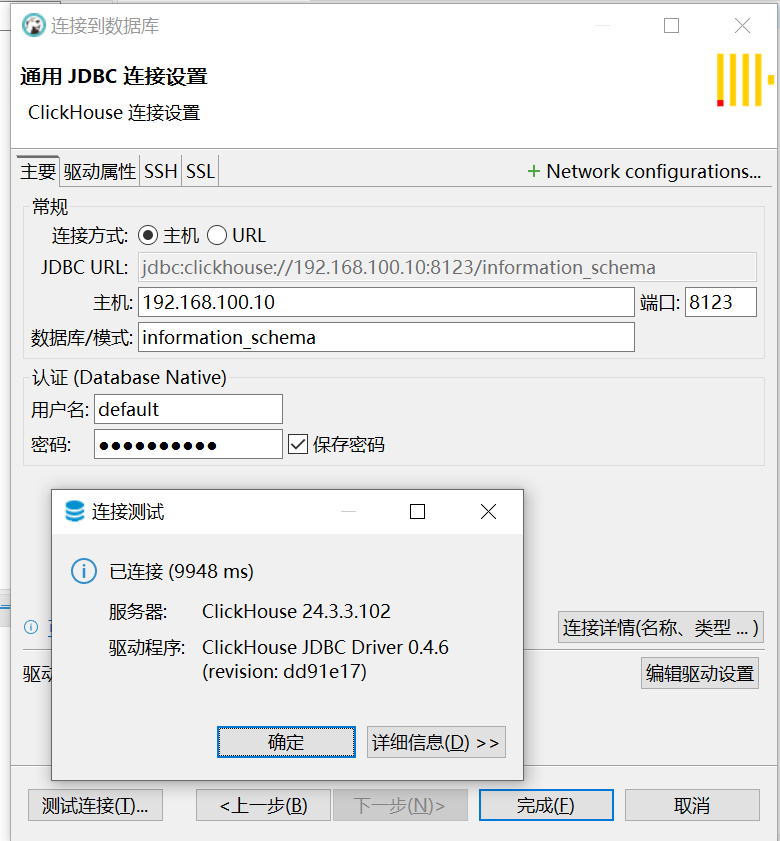
3.2、通过dbeaver连接
四、错误、警告处理
1、二进制安装后服务无法启动,
Jun 10 23:26:42 node1 systemd[1]: clickhouse-server.service: main process exited, code=exited, status=233/RUNTIME_DIRECTORY
Jun 10 23:26:42 node1 systemd[1]: Failed to start ClickHouse Server (analytic DBMS for big data).
Jun 10 23:26:42 node1 systemd[1]: Unit clickhouse-server.service entered failed state.
Jun 10 23:26:42 node1 systemd[1]: clickhouse-server.service failed.
解决办法:缺少目录的读写权限,执行chown -R clickhouse:clickhouse /apps即可
2、Linux threads max count is too low. Check /proc/sys/kernel/threads-max
# cat >> /etc/sysctl.conf <<EOF
kernel.threads-max =131072 # 或根据实际情况调整
EOF
# sysctl -p

# systemctl daemon-reload
# systemctl restart clickhouse-server
3、Maximum number of threads is lower than 30000. There could be problems with handling a lot of simultaneous queries.
# cat >> /lib/systemd/system/clickhouse-server.service <<EOF
LimitNPROC=64000
EOF

# systemctl daemon-reload
# systemctl restart clickhouse-server

到目前为止还是没有解决这个警告,有解决方案了再及时更新!
五、参考文档
https://github.com/ClickHouse/ClickHouse/issues/39260
https://clickhouse.com/docs/zh/getting-started/install#%E7%B3%BB%E7%BB%9F%E8%A6%81%E6%B1%82%E2%80%8B
