



点击蓝字 关注我们

Flink写入
演示视频
1
概述
Apache Flink 是一个强大的框架和分布式处理引擎,专注于进行有状态计算,适用于处理无边界和有边界的数据流。Flink 能够在各种常见集群环境中高效运行,并以内存速度执行计算,支持处理任意规模的数据。
2
应用场景
事件驱动型应用
事件驱动型应用通常具备状态,并且它们从一个或多个事件流中提取数据,根据到达的事件触发计算、状态更新或执行其他外部动作。典型的事件驱动型应用包括反欺诈系统、异常检测、基于规则的报警系统和业务流程监控。
数据分析应用
数据分析任务的主要目标是从原始数据中提取有价值的信息和指标。Flink 支持流式和批量分析应用,适用于各种场景,例如电信网络质量监控、移动应用中的产品更新和实验评估分析、消费者技术领域的实时数据即席分析以及大规模图分析。
数据管道应用
提取 - 转换 - 加载(ETL)是在不同存储系统之间进行数据转换和迁移的常见方法。数据管道和 ETL 作业有相似之处,都可以进行数据转换和处理,然后将数据从一个存储系统移动到另一个存储系统。不同之处在于数据管道以持续流模式运行,而不是周期性触发。典型的数据管道应用包括电子商务中的实时查询索引构建和持续 ETL。
本篇文档将介绍两种示例,一种是实现将存量数据写入到 MatrixOne,另一种是使用计算引擎 Flink 将流式数据写入到 MatrixOne 数据库。
3
前期准备
硬件环境
本次实践对于机器的硬件要求如下:
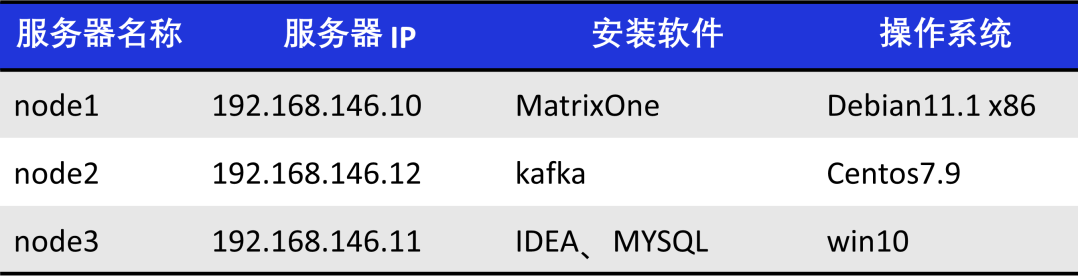
软件环境
本次实践需要安装部署以下软件环境:
已完成单机部署 MatrixOne。
下载安装 lntelliJ IDEA(2022.2.1 or later version)。
根据你的系统环境选择 JDK 8+ version 版本进行下载安装。
下载并安装 Kafka,推荐版本为 2.13 - 3.5.0。
下载并安装 Flink,推荐版本为 1.17.0。
下载并安装 MySQL,推荐版本为 8.0.33。
4
示例一
从 MySQL 迁移数据至 MatrixOne
步骤一:初始化项目
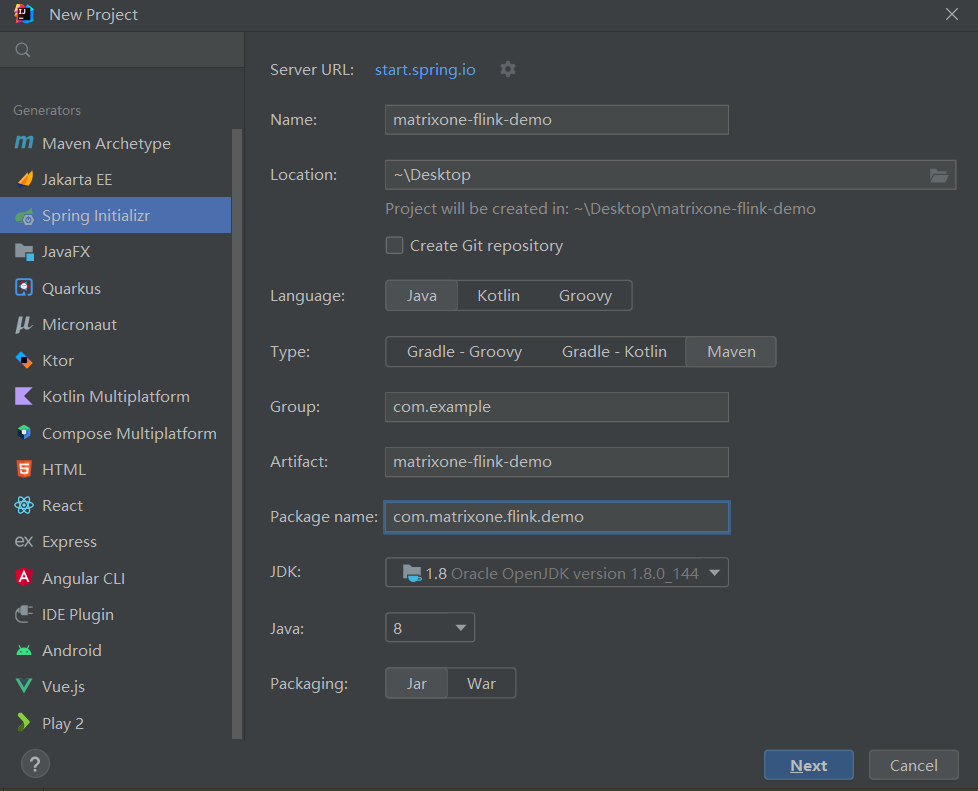
1. 启动 IDEA,点击 File > New > Project,选择 Spring Initializer,并填写以下配置参数:
Name:mo-spark-demo
Location:~\Desktop
Language:Java
Type:Maven
Group:com.example
Artiface:matrixone-flink-demo
Package name:com.matrixone.flink.demo
JDK 1.8
2. 添加项目依赖,在项目根目录下的 pom.xml 内容编辑如下:
<?xml version="1.0" encoding="UTF-8"?><project xmlns="http://maven.apache.org/POM/4.0.0"xmlns:xsi="http://www.w3.org/2001/XMLSchema-instance"xsi:schemaLocation="http://maven.apache.org/POM/4.0.0 http://maven.apache.org/xsd/maven-4.0.0.xsd"><modelVersion>4.0.0</modelVersion><groupId>com.matrixone.flink</groupId><artifactId>matrixone-flink-demo</artifactId><version>1.0-SNAPSHOT</version><properties><scala.binary.version>2.12</scala.binary.version><java.version>1.8</java.version><flink.version>1.17.0</flink.version><scope.mode>compile</scope.mode></properties><dependencies><!-- Flink Dependency --><dependency><groupId>org.apache.flink</groupId><artifactId>flink-connector-hive_2.12</artifactId><version>${flink.version}</version></dependency><dependency><groupId>org.apache.flink</groupId><artifactId>flink-java</artifactId><version>${flink.version}</version></dependency><dependency><groupId>org.apache.flink</groupId><artifactId>flink-streaming-java</artifactId><version>${flink.version}</version></dependency><dependency><groupId>org.apache.flink</groupId><artifactId>flink-clients</artifactId><version>${flink.version}</version></dependency><dependency><groupId>org.apache.flink</groupId><artifactId>flink-table-api-java-bridge</artifactId><version>${flink.version}</version></dependency><dependency><groupId>org.apache.flink</groupId><artifactId>flink-table-planner_2.12</artifactId><version>${flink.version}</version></dependency><!-- JDBC相关依赖包 --><dependency><groupId>org.apache.flink</groupId><artifactId>flink-connector-jdbc</artifactId><version>1.15.4</version></dependency><dependency><groupId>mysql</groupId><artifactId>mysql-connector-java</artifactId><version>8.0.33</version></dependency><!-- Kafka相关依赖 --><dependency><groupId>org.apache.kafka</groupId><artifactId>kafka_2.13</artifactId><version>3.5.0</version></dependency><dependency><groupId>org.apache.flink</groupId><artifactId>flink-connector-kafka</artifactId><version>3.0.0-1.17</version></dependency><!-- JSON --><dependency><groupId>com.alibaba.fastjson2</groupId><artifactId>fastjson2</artifactId><version>2.0.34</version></dependency></dependencies><build><plugins><plugin><groupId>org.apache.maven.plugins</groupId><artifactId>maven-compiler-plugin</artifactId><version>3.8.0</version><configuration><source>${java.version}</source><target>${java.version}</target><encoding>UTF-8</encoding></configuration></plugin><plugin><artifactId>maven-assembly-plugin</artifactId><version>2.6</version><configuration><descriptorRefs><descriptor>jar-with-dependencies</descriptor></descriptorRefs></configuration><executions><execution><id>make-assembly</id><phase>package</phase><goals><goal>single</goal></goals></execution></executions></plugin></plugins></build></project>
步骤二:读取 MatrixOne 数据
使用 MySQL 客户端连接 MatrixOne 后,创建演示所需的数据库以及数据表。
1. 在 MatrixOne 中创建数据库、数据表,并导入数据:
CREATE DATABASE test;USE test;CREATE TABLE `person` (`id` INT DEFAULT NULL, `name` VARCHAR(255) DEFAULT NULL, `birthday` DATE DEFAULT NULL);INSERT INTO test.person (id, name, birthday) VALUES(1, 'zhangsan', '2023-07-09'),(2, 'lisi', '2023-07-08'),(3, 'wangwu', '2023-07-12');
2. 在 IDEA 中创建 MoRead.java 类,以使用 Flink 读取 MatrixOne 数据:
package com.matrixone.flink.demo;import org.apache.flink.api.common.functions.MapFunction;import org.apache.flink.api.common.typeinfo.BasicTypeInfo;import org.apache.flink.api.java.ExecutionEnvironment;import org.apache.flink.api.java.operators.DataSource;import org.apache.flink.api.java.operators.MapOperator;import org.apache.flink.api.java.typeutils.RowTypeInfo;import org.apache.flink.connector.jdbc.JdbcInputFormat;import org.apache.flink.types.Row;import java.text.SimpleDateFormat;/*** @author MatrixOne* @description*/public class MoRead {private static String srcHost = "192.168.146.10";private static Integer srcPort = 6001;private static String srcUserName = "root";private static String srcPassword = "111";private static String srcDataBase = "test";public static void main(String[] args) throws Exception {ExecutionEnvironment environment = ExecutionEnvironment.getExecutionEnvironment();// 设置并行度environment.setParallelism(1);SimpleDateFormat sdf = new SimpleDateFormat("yyyy-MM-dd");// 设置查询的字段类型RowTypeInfo rowTypeInfo = new RowTypeInfo(new BasicTypeInfo[]{BasicTypeInfo.INT_TYPE_INFO,BasicTypeInfo.STRING_TYPE_INFO,BasicTypeInfo.DATE_TYPE_INFO},new String[]{"id","name","birthday"});DataSource<Row> dataSource = environment.createInput(JdbcInputFormat.buildJdbcInputFormat().setDrivername("com.mysql.cj.jdbc.Driver").setDBUrl("jdbc:mysql://" + srcHost + ":" + srcPort + "/" + srcDataBase).setUsername(srcUserName).setPassword(srcPassword).setQuery("select * from person").setRowTypeInfo(rowTypeInfo).finish());// 将 Wed Jul 12 00:00:00 CST 2023 日期格式转换为 2023-07-12MapOperator<Row, Row> mapOperator = dataSource.map((MapFunction<Row, Row>) row -> {row.setField("birthday", sdf.format(row.getField("birthday")));return row;});mapOperator.print();}}
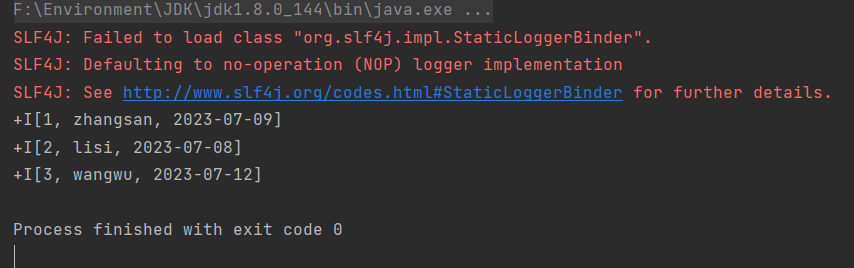
3. 在 IDEA 中运行 MoRead.Main(),执行结果如下:
步骤三:将 MySQL 数据写入 MatrixOne
现在可以开始使用 Flink 将 MySQL 数据迁移到 MatrixOne。
1. 准备 MySQL 数据:
在 node3 上,使用 Mysql 客户端连接本地 Mysql,创建所需数据库、数据表、并插入数据:
mysql -h127.0.0.1 -P3306 -uroot -prootmysql> CREATE DATABASE motest;mysql> USE motest;mysql> CREATE TABLE `person` (`id` int DEFAULT NULL, `name` varchar(255) DEFAULT NULL, `birthday` date DEFAULT NULL);mysql> INSERT INTO motest.person (id, name, birthday) VALUES(2, 'lisi', '2023-07-09'),(3, 'wangwu', '2023-07-13'),(4, 'zhaoliu', '2023-08-08');
2. 清空 MatrixOne 表数据:
在 node3 上,使用 MySQL 客户端连接 node1 的 MatrixOne。由于本示例继续使用前面读取 MatrixOne 数据的示例中的 test 数据库,因此我们需要首先清空 person 表的数据。
-- 在 node3 上,使用 Mysql 客户端连接 node1 的 MatrixOnemysql -h192.168.146.10 -P6001 -uroot -p111mysql> TRUNCATE TABLE test.person;
3. 在 IDEA 中编写代码:
创建 Person.java 和 Mysql2Mo.java 类,使用 Flink 读取 MySQL 数据,执行简单的 ETL 操作(将 Row 转换为 Person 对象),最终将数据写入 MatrixOne 中。
package com.matrixone.flink.demo.entity;import java.util.Date;public class Person {private int id;private String name;private Date birthday;public int getId() {return id;}public void setId(int id) {this.id = id;}public String getName() {return name;}public void setName(String name) {this.name = name;}public Date getBirthday() {return birthday;}public void setBirthday(Date birthday) {this.birthday = birthday;}}
package com.matrixone.flink.demo;import com.matrixone.flink.demo.entity.Person;import org.apache.flink.api.common.functions.MapFunction;import org.apache.flink.api.common.typeinfo.BasicTypeInfo;import org.apache.flink.api.java.typeutils.RowTypeInfo;import org.apache.flink.connector.jdbc.*;import org.apache.flink.streaming.api.datastream.DataStreamSink;import org.apache.flink.streaming.api.datastream.DataStreamSource;import org.apache.flink.streaming.api.datastream.SingleOutputStreamOperator;import org.apache.flink.streaming.api.environment.StreamExecutionEnvironment;import org.apache.flink.types.Row;import java.sql.Date;/*** @author MatrixOne* @description*/public class Mysql2Mo {private static String srcHost = "127.0.0.1";private static Integer srcPort = 3306;private static String srcUserName = "root";private static String srcPassword = "root";private static String srcDataBase = "motest";private static String destHost = "192.168.146.10";private static Integer destPort = 6001;private static String destUserName = "root";private static String destPassword = "111";private static String destDataBase = "test";private static String destTable = "person";public static void main(String[] args) throws Exception {StreamExecutionEnvironment environment = StreamExecutionEnvironment.getExecutionEnvironment();//设置并行度environment.setParallelism(1);//设置查询的字段类型RowTypeInfo rowTypeInfo = new RowTypeInfo(new BasicTypeInfo[]{BasicTypeInfo.INT_TYPE_INFO,BasicTypeInfo.STRING_TYPE_INFO,BasicTypeInfo.DATE_TYPE_INFO},new String[]{"id","name","birthday"});//添加 srouceDataStreamSource<Row> dataSource = environment.createInput(JdbcInputFormat.buildJdbcInputFormat().setDrivername("com.mysql.cj.jdbc.Driver").setDBUrl("jdbc:mysql://" + srcHost + ":" + srcPort + "/" + srcDataBase).setUsername(srcUserName).setPassword(srcPassword).setQuery("select * from person").setRowTypeInfo(rowTypeInfo).finish());//进行 ETLSingleOutputStreamOperator<Person> mapOperator = dataSource.map((MapFunction<Row, Person>) row -> {Person person = new Person();person.setId((Integer) row.getField("id"));person.setName((String) row.getField("name"));person.setBirthday((java.util.Date)row.getField("birthday"));return person;});//设置 matrixone sink 信息mapOperator.addSink(JdbcSink.sink("insert into " + destTable + " values(?,?,?)",(ps, t) -> {ps.setInt(1, t.getId());ps.setString(2, t.getName());ps.setDate(3, new Date(t.getBirthday().getTime()));},new JdbcConnectionOptions.JdbcConnectionOptionsBuilder().withDriverName("com.mysql.cj.jdbc.Driver").withUrl("jdbc:mysql://" + destHost + ":" + destPort + "/" + destDataBase).withUsername(destUserName).withPassword(destPassword).build()));environment.execute();}}
步骤四:查看执行结果
在 MatrixOne 中执行如下 SQL 查看执行结果:
mysql> select * from test.person;+------+---------+------------+| id | name | birthday |+------+---------+------------+| 2 | lisi | 2023-07-09 || 3 | wangwu | 2023-07-13 || 4 | zhaoliu | 2023-08-08 |+------+---------+------------+3 rows in set (0.01 sec)
5
示例二
将 Kafka 数据写入 MatrixOne
步骤一:启动 Kafka 服务
Kafka 集群协调和元数据管理可以通过 KRaft 或 ZooKeeper 来实现。在这里,我们将使用 Kafka 3.5.0 版本,无需依赖独立的 ZooKeeper 软件,而是使用 Kafka 自带的 KRaft 来进行元数据管理。请按照以下步骤配置配置文件,该文件位于 Kafka 软件根目录下的 config/kraft/server.properties。
配置文件内容如下:
# Licensed to the Apache Software Foundation (ASF) under one or more# contributor license agreements. See the NOTICE file distributed with# this work for additional information regarding copyright ownership.# The ASF licenses this file to You under the Apache License, Version 2.0# (the "License"); you may not use this file except in compliance with# the License. You may obtain a copy of the License at## http://www.apache.org/licenses/LICENSE-2.0## Unless required by applicable law or agreed to in writing, software# distributed under the License is distributed on an "AS IS" BASIS,# WITHOUT WARRANTIES OR CONDITIONS OF ANY KIND, either express or implied.# See the License for the specific language governing permissions and# limitations under the License.## This configuration file is intended for use in KRaft mode, where# Apache ZooKeeper is not present. See config/kraft/README.md for details.############################## Server Basics ############################## The role of this server. Setting this puts us in KRaft modeprocess.roles=broker,controller# The node id associated with this instance's rolesnode.id=1# The connect string for the controller quorumcontroller.quorum.voters=1@192.168.146.12:9093############################# Socket Server Settings ############################## The address the socket server listens on.# Combined nodes (i.e. those with `process.roles=broker,controller`) must list the controller listener here at a minimum.# If the broker listener is not defined, the default listener will use a host name that is equal to the value of java.net.InetAddress.getCanonicalHostName(),# with PLAINTEXT listener name, and port 9092.# FORMAT:# listeners = listener_name://host_name:port# EXAMPLE:# listeners = PLAINTEXT://your.host.name:9092#listeners=PLAINTEXT://:9092,CONTROLLER://:9093listeners=PLAINTEXT://192.168.146.12:9092,CONTROLLER://192.168.146.12:9093# Name of listener used for communication between brokers.inter.broker.listener.name=PLAINTEXT# Listener name, hostname and port the broker will advertise to clients.# If not set, it uses the value for "listeners".#advertised.listeners=PLAINTEXT://localhost:9092# A comma-separated list of the names of the listeners used by the controller.# If no explicit mapping set in `listener.security.protocol.map`, default will be using PLAINTEXT protocol# This is required if running in KRaft mode.controller.listener.names=CONTROLLER# Maps listener names to security protocols, the default is for them to be the same. See the config documentation for more detailslistener.security.protocol.map=CONTROLLER:PLAINTEXT,PLAINTEXT:PLAINTEXT,SSL:SSL,SASL_PLAINTEXT:SASL_PLAINTEXT,SASL_SSL:SASL_SSL# The number of threads that the server uses for receiving requests from the network and sending responses to the networknum.network.threads=3# The number of threads that the server uses for processing requests, which may include disk I/Onum.io.threads=8# The send buffer (SO_SNDBUF) used by the socket serversocket.send.buffer.bytes=102400# The receive buffer (SO_RCVBUF) used by the socket serversocket.receive.buffer.bytes=102400# The maximum size of a request that the socket server will accept (protection against OOM)socket.request.max.bytes=104857600############################# Log Basics ############################## A comma separated list of directories under which to store log fileslog.dirs=/home/software/kafka_2.13-3.5.0/kraft-combined-logs# The default number of log partitions per topic. More partitions allow greater# parallelism for consumption, but this will also result in more files across# the brokers.num.partitions=1# The number of threads per data directory to be used for log recovery at startup and flushing at shutdown.# This value is recommended to be increased for installations with data dirs located in RAID array.num.recovery.threads.per.data.dir=1############################# Internal Topic Settings ############################## The replication factor for the group metadata internal topics "__consumer_offsets" and "__transaction_state"# For anything other than development testing, a value greater than 1 is recommended to ensure availability such as 3.offsets.topic.replication.factor=1transaction.state.log.replication.factor=1transaction.state.log.min.isr=1############################# Log Flush Policy ############################## Messages are immediately written to the filesystem but by default we only fsync() to sync# the OS cache lazily. The following configurations control the flush of data to disk.# There are a few important trade-offs here:# 1. Durability: Unflushed data may be lost if you are not using replication.# 2. Latency: Very large flush intervals may lead to latency spikes when the flush does occur as there will be a lot of data to flush.# 3. Throughput: The flush is generally the most expensive operation, and a small flush interval may lead to excessive seeks.# The settings below allow one to configure the flush policy to flush data after a period of time or# every N messages (or both). This can be done globally and overridden on a per-topic basis.# The number of messages to accept before forcing a flush of data to disk#log.flush.interval.messages=10000# The maximum amount of time a message can sit in a log before we force a flush#log.flush.interval.ms=1000############################# Log Retention Policy ############################## The following configurations control the disposal of log segments. The policy can# be set to delete segments after a period of time, or after a given size has accumulated.# A segment will be deleted whenever *either* of these criteria are met. Deletion always happens# from the end of the log.# The minimum age of a log file to be eligible for deletion due to agelog.retention.hours=72# A size-based retention policy for logs. Segments are pruned from the log unless the remaining# segments drop below log.retention.bytes. Functions independently of log.retention.hours.#log.retention.bytes=1073741824# The maximum size of a log segment file. When this size is reached a new log segment will be created.log.segment.bytes=1073741824# The interval at which log segments are checked to see if they can be deleted according# to the retention policieslog.retention.check.interval.ms=300000
文件配置完成后,执行如下命令,启动 Kafka 服务:
#生成集群ID$ KAFKA_CLUSTER_ID="$(bin/kafka-storage.sh random-uuid)"#设置日志目录格式$ bin/kafka-storage.sh format -t $KAFKA_CLUSTER_ID -c config/kraft/server.properties#启动Kafka服务$ bin/kafka-server-start.sh config/kraft/server.properties
步骤二:创建 Kafka 主题
为了使 Flink 能够从中读取数据并写入到 MatrixOne,我们需要首先创建一个名为 "matrixone" 的 Kafka 主题。在下面的命令中,使用 --bootstrap-server 参数指定 Kafka 服务的监听地址为 192.168.146.12:9092:
$ bin/kafka-topics.sh --create --topic matrixone --bootstrap-server 192.168.146.12:9092
步骤三:读取 MatrixOne 数据
在连接到 MatrixOne 数据库之后,需要执行以下操作以创建所需的数据库和数据表:
1. 在 MatrixOne 中创建数据库和数据表,并导入数据:
CREATE TABLE `users` (`id` INT DEFAULT NULL,`name` VARCHAR(255) DEFAULT NULL,`age` INT DEFAULT NULL)
2. 在 IDEA 集成开发环境中编写代码:
在 IDEA 中,创建两个类:User.java 和 Kafka2Mo.java。这些类用于使用 Flink 从 Kafka 读取数据,并将数据写入 MatrixOne 数据库中。
package com.matrixone.flink.demo.entity;public class User {private int id;private String name;private int age;public int getId() {return id;}public void setId(int id) {this.id = id;}public String getName() {return name;}public void setName(String name) {this.name = name;}public int getAge() {return age;}public void setAge(int age) {this.age = age;}}
package com.matrixone.flink.demo;import com.alibaba.fastjson2.JSON;import com.matrixone.flink.demo.entity.User;import org.apache.flink.api.common.eventtime.WatermarkStrategy;import org.apache.flink.api.common.serialization.AbstractDeserializationSchema;import org.apache.flink.connector.jdbc.JdbcExecutionOptions;import org.apache.flink.connector.jdbc.JdbcSink;import org.apache.flink.connector.jdbc.JdbcStatementBuilder;import org.apache.flink.connector.jdbc.internal.options.JdbcConnectorOptions;import org.apache.flink.connector.kafka.source.KafkaSource;import org.apache.flink.connector.kafka.source.enumerator.initializer.OffsetsInitializer;import org.apache.flink.streaming.api.datastream.DataStreamSource;import org.apache.flink.streaming.api.environment.StreamExecutionEnvironment;import org.apache.kafka.clients.consumer.OffsetResetStrategy;import java.nio.charset.StandardCharsets;/*** @author MatrixOne* @desc*/public class Kafka2Mo {private static String srcServer = "192.168.146.12:9092";private static String srcTopic = "matrixone";private static String consumerGroup = "matrixone_group";private static String destHost = "192.168.146.10";private static Integer destPort = 6001;private static String destUserName = "root";private static String destPassword = "111";private static String destDataBase = "test";public static void main(String[] args) throws Exception {//初始化环境StreamExecutionEnvironment env = StreamExecutionEnvironment.getExecutionEnvironment();//设置并行度env.setParallelism(1);//设置 kafka source 信息KafkaSource<User> source = KafkaSource.<User>builder()//Kafka 服务.setBootstrapServers(srcServer)//消息主题.setTopics(srcTopic)//消费组.setGroupId(consumerGroup)//偏移量 当没有提交偏移量则从最开始开始消费.setStartingOffsets(OffsetsInitializer.committedOffsets(OffsetResetStrategy.LATEST))//自定义解析消息内容.setValueOnlyDeserializer(new AbstractDeserializationSchema<User>() {@Overridepublic User deserialize(byte[] message) {return JSON.parseObject(new String(message, StandardCharsets.UTF_8), User.class);}}).build();DataStreamSource<User> kafkaSource = env.fromSource(source, WatermarkStrategy.noWatermarks(), "kafka_maxtixone");//kafkaSource.print();//设置 matrixone sink 信息kafkaSource.addSink(JdbcSink.sink("insert into users (id,name,age) values(?,?,?)",(JdbcStatementBuilder<User>) (preparedStatement, user) -> {preparedStatement.setInt(1, user.getId());preparedStatement.setString(2, user.getName());preparedStatement.setInt(3, user.getAge());},JdbcExecutionOptions.builder()//默认值 5000.withBatchSize(1000)//默认值为 0.withBatchIntervalMs(200)//最大尝试次数.withMaxRetries(5).build(),JdbcConnectorOptions.builder().setDBUrl("jdbc:mysql://"+destHost+":"+destPort+"/"+destDataBase).setUsername(destUserName).setPassword(destPassword).setDriverName("com.mysql.cj.jdbc.Driver").build()));env.execute();}}
代码编写完成后,你可以运行 Flink 任务,即在 IDEA 中选择 Kafka2Mo.java 文件,然后执行 Kafka2Mo.Main()。
步骤四:生成数据
使用 Kafka 提供的命令行生产者工具,您可以向 Kafka 的 "matrixone" 主题中添加数据。在下面的命令中,使用 --topic 参数指定要添加到的主题,而 --bootstrap-server 参数指定了 Kafka 服务的监听地址。
bin/kafka-console-producer.sh --topic matrixone --bootstrap-server 192.168.146.12:9092
执行上述命令后,您将在控制台上等待输入消息内容。只需直接输入消息值 (value),每行表示一条消息(以换行符分隔),如下所示:
{"id": 10, "name": "xiaowang", "age": 22}{"id": 20, "name": "xiaozhang", "age": 24}{"id": 30, "name": "xiaogao", "age": 18}{"id": 40, "name": "xiaowu", "age": 20}{"id": 50, "name": "xiaoli", "age": 42}

步骤五:查看执行结果
在 MatrixOne 中执行如下 SQL 查询结果:
mysql> select * from test.users;+------+-----------+------+| id | name | age |+------+-----------+------+| 10 | xiaowang | 22 || 20 | xiaozhang | 24 || 30 | xiaogao | 18 || 40 | xiaowu | 20 || 50 | xiaoli | 42 |+------+-----------+------+5 rows in set (0.01 sec)

关于MatrixOne
MatrixOne 是一款基于云原生技术,可同时在公有云和私有云部署的多模数据库。该产品使用存算分离、读写分离、冷热分离的原创技术架构,能够在一套存储和计算系统下同时支持事务、分析、流、时序和向量等多种负载,并能够实时、按需的隔离或共享存储和计算资源。 云原生数据库MatrixOne能够帮助用户大幅简化日益复杂的IT架构,提供极简、极灵活、高性价比和高性能的数据服务。
MatrixOne企业版和MatrixOne云服务自发布以来,已经在互联网、金融、能源、制造、教育、医疗等多个行业得到应用。得益于其独特的架构设计,用户可以降低多达70%的硬件和运维成本,增加3-5倍的开发效率,同时更加灵活的响应市场需求变化和更加高效的抓住创新机会。在相同硬件投入时,MatrixOne可获得数倍以上的性能提升。
MatrixOne秉持开源开放、生态共建的理念,核心代码全部开源,全面兼容MySQL协议,并与合作伙伴打造了多个端到端解决方案,大幅降低用户的迁移

欢迎体验试用,如有问题请与小助手联系~


扫码加入MatrixOne技术交流群
(如二维码过期,请添加小助手微信: MatrixOrigin001)
关键词:MatrixOrigin

知乎 | CSDN | 墨天轮 | OSCHINA | SF | InfoQ | SF | Bilibili
