



Flink为了解决读取系统配置文件问题了,
提供了一个工具类 ParameterTool
。我们来简单认识下它,并实现一个带区分环境的参数解析工具类。
1. ParameterTool 使用
ParameterTool 提供了很多静态方法可以解析系统启动和配置文件等参数。首先简单看看 代码示例:ParameterToolUtils
public class ParameterToolUtils {
    public static ParameterTool createParameterTool(String[] args) throws IOException {
        //-D 参数覆盖 args参数 覆盖 配置文件参数
        ParameterTool parameterTool = ParameterTool.fromPropertiesFile(Thread.currentThread().getContextClassLoader().getResourceAsStream("application.properties"))
                .mergeWith(ParameterTool.fromArgs(args))
                .mergeWith(ParameterTool.fromSystemProperties());
        return parameterTool;
    }

    public static void main(String[] args) {
        try {
            ParameterTool parameterTool = ParameterToolUtils.createParameterTool(args);
            System.out.println("贫贱之交不可忘,糟糠之妻不下堂");
        } catch (IOException e) {
            e.printStackTrace();
        }
    }
}
1.1 配置文件解析 fromPropertiesFile
它提供了3个重载方法,上代码示例就是用的文件流方式( InputStream
)读取
//文件路径
public static ParameterTool fromPropertiesFile(String path) throws IOException...
//文件对象
public static ParameterTool fromPropertiesFile(File file) throws IOException...
//输入流
public static ParameterTool fromPropertiesFile(InputStream inputStream) throws IOException
1.2 启动参数解析 fromArgs
它主要解析程序启动参数
public static ParameterTool fromArgs(String[] args)...
Flink自己定义了一套自己的解析规则:
Key解析
org.apache.flink.api.java.Utils#getKeyFromArgs
org.apache.flink.api.java.utils.ParameterTool#fromArgs
使用方法: -
或者 --
开头 空格分隔
如:-userName Tom --age 18
结果就是userName=Tom age=18
1.3 系统环境变量参数解析 fromSystemProperties
它主要解析系统环境变量参数包括程序-D启动的变量
public static ParameterTool fromSystemProperties()...
内部调用的是 Java内部提供的环境变量获取api: System.getProperties()
1.4 合并环境变量 mergeWith
如果A.mergeWith(B) A里面user=tom, B里面user=jac 那么B的user会覆盖A的user 最终结果user=jac
public ParameterTool mergeWith(ParameterTool other) ...
通过该方法可以实现参数优先级, 如简单实例中 系统环境变量参数 > 启动参数 > 大于配置文件参数
2. 实现带环境选择的工具类 ParameterToolEnvironmentUtils
2.1 定义优先级
系统环境变量参数 > 启动参数 > 大于配置文件参数
2.2 定义环境文件基本模板
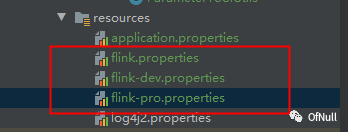
flink.properties
该文件必须有 内部可以定义环境参数 env.active=env
env.active=pro
flink-{env}.properties
按照自己环境名称定义 {env}
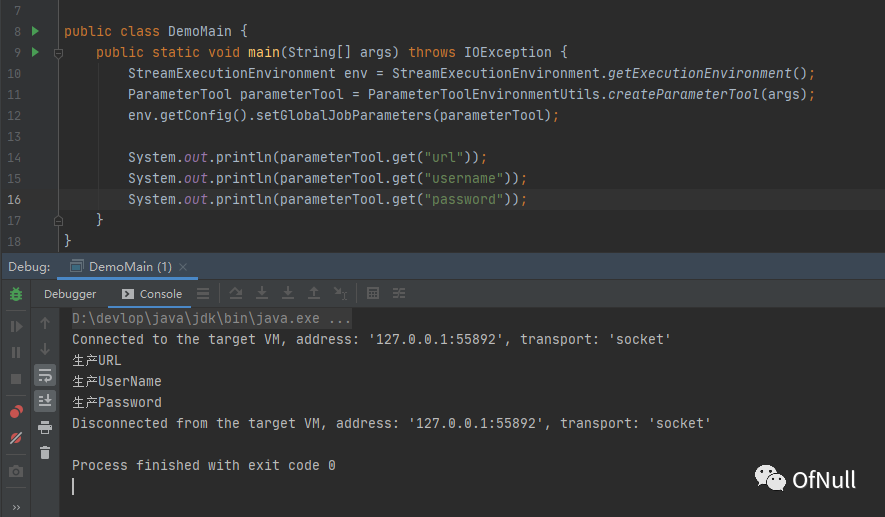
url=生产URL
username=生产UserName
password=生产Password
3.3 编写工具类
/**
 * 带环境的 配置读取工具类
 */
public class ParameterToolEnvironmentUtils {
    public static final String defaultConfigFileName = "flink.properties";
    public static final String environmentFileNameTemplate = "flink-%s.properties";
    public static final String ENV_ACTIVE = "env.active";


    public static ParameterTool createParameterTool(String[] args) throws IOException {
        //系统环境参数 -Dyy=xx
        ParameterTool systemProperties = ParameterTool.fromSystemProperties();
        //运行参数 main参数  flink自己数据需要 - 或者 -- 开头做key 例如 -name tom or --name tom
        ParameterTool fromArgs = ParameterTool.fromArgs(args);
        //默认配置文件
        ParameterTool defaultPropertiesFile = ParameterTool.fromPropertiesFile(Thread.currentThread().getContextClassLoader().getResourceAsStream(defaultConfigFileName));
        //按照优先级获取有效环境值
        String envActiveValue = getEnvActiveValue(systemProperties, fromArgs, defaultPropertiesFile);
        String currentEnvFileName = String.format(environmentFileNameTemplate, envActiveValue);
        //读取合并环境参数
        ParameterTool currentEnvPropertiesFile = ParameterTool.fromPropertiesFile(Thread.currentThread().getContextClassLoader().getResourceAsStream(currentEnvFileName));
        ParameterTool parameterTool = currentEnvPropertiesFile.mergeWith(defaultPropertiesFile).mergeWith(fromArgs).mergeWith(systemProperties);
        return parameterTool;
    }

    /**
     * 按照优先级获取有效环境值
     *
     * @return
     */
    public static String getEnvActiveValue(ParameterTool systemProperties, ParameterTool fromArgs, ParameterTool defaultPropertiesFile) {
        //选择参数环境
        String env;
        if (systemProperties.has(ENV_ACTIVE)) {
            env = systemProperties.get(ENV_ACTIVE);
        } else if (fromArgs.has(ENV_ACTIVE)) {
            env = fromArgs.get(ENV_ACTIVE);
        } else if (defaultPropertiesFile.has(ENV_ACTIVE)) {
            env = defaultPropertiesFile.get(ENV_ACTIVE);
        } else {
            //如果没有配置抛出异常
            throw new IllegalArgumentException(String.format("%s does not exist!Please set up the environment. for example:flink.properties Add configuration env.active = dev", ENV_ACTIVE));
        }
        return env;
    }

    public static void main(String[] args) {
        try {
            ParameterTool parameterTool = ParameterToolEnvironmentUtils.createParameterTool(args);
            System.out.println("贫贱之交不可忘,糟糠之妻不下堂");
        } catch (IOException e) {
            e.printStackTrace();
        }
    }
}
3.4 运行结果
文章转载自OfNull,如果涉嫌侵权,请发送邮件至:contact@modb.pro进行举报,并提供相关证据,一经查实,墨天轮将立刻删除相关内容。
