



zw 开源量化团队 QQ 群:533233771
作者:ZW=智王+字王 2016.02.01
摘自:《zw 量化实盘·开源课件》系列
更多量化资料,请浏览 zw 网站:http://ziwang.comQQ 群:124134140 (zw 量化&大数据)
1
前言.................................................................................................................................................................................... 5

INTRO 简介......................................................................................................................................................................... 6
TUTORIAL 教程................................................................................................................................................................... 7
编程文档.......................................................................................................................................................................... 27
bar –k 线数据包,价格数据 ........................................................................................................................................... 28
barfeed,k 线数据........................................................................................................................................................... 34
CSV 数据文件................................................................................................................................................................... 35
Yahoo! Finance 雅虎金融................................................................................................................................................. 36
Google Finance 谷歌金融 ................................................................................................................................................ 37
Quandl 数据 ..................................................................................................................................................................... 37
NinjaTrader 数据 (忍者交易员)...................................................................................................................................... 38
过滤示例 .......................................................................................................................................................................... 39
Moving Averages 移动平均线 ......................................................................................................................................... 41
动量指标过滤 .................................................................................................................................................................. 42
其他技术指标 .................................................................................................................................................................. 44
2
基础模块 .......................................................................................................................................................................... 49

Backtesting 回溯模块 ..................................................................................................................................................... 54
Position 价位 .................................................................................................................................................................... 66
strategyanalyzer 策略分析 .............................................................................................................................................. 68
Returns 收益率策略......................................................................................................................................................... 68
Sharpe Ratio 夏普比率..................................................................................................................................................... 68
DrawDown 减少策略....................................................................................................................................................... 69
Trades 交易模块 .............................................................................................................................................................. 69
策略示例 .......................................................................................................................................................................... 70
Subplot 子图..................................................................................................................................................................... 73
TOOLS 工具 ...................................................................................................................................................................... 77
EVENT PROFILER 事件嗅探器 ........................................................................................................................................... 80
XIGNITE 数据公司 ............................................................................................................................................................ 84
3
XIGNITE_EXAMPLE ..................................................................................................................................................................... 85

BITCOIN 比特币................................................................................................................................................................ 88
TWITTER 推特................................................................................................................................................................. 100
TALIB 金融算法库集成................................................................................................................................................... 105
量化投资课程 1.............................................................................................................................................................. 116
量化交易·策略示例........................................................................................................................................................ 120
vwap 动量策略 .............................................................................................................................................................. 121
sma 简单交叉线策略 .................................................................................................................................................... 124
market_timing 市场时机策略 ....................................................................................................................................... 126
金矿策略 ........................................................................................................................................................................ 130
bbands 布林带策略 ....................................................................................................................................................... 133
rsi2 策略 ......................................................................................................................................................................... 135
quandl 策略.................................................................................................................................................................... 140
4

文档网站:http://gbeced.github.io/pyalgotrade/
PyAlgoTrade,中文意思是,python 算法交易,以下简称 PAT。
选择 PAT,作为 zw 量化培训的教材蓝本,是基于以下几个理由:
PAT 目前是一套相对完整、成熟,python 量化交易系统
水准很高,回溯系统与 zipline 一个级别
内置 TALIB 支持
虽然不支持 GPU 超算,但是内置了多节点 PC 集群的并行运算加速模式
最总要的是,支持单机离线版本。
目前,成熟的 python 量化解决方案并不多,除了 PAT 外,基本上就只有 quantopian,以及更为激进,号称无需
编程 Rizm 平台。
quantopian 的 zipline,虽然也是非常优秀量化分析算法,但是,采用的云端模式。
国内的优矿等,基本都是参考 quantopian 的云端模式
量化交易,最核心的交易策略,先天就是“闭源”(anti-open)的,许多策略,甚至是一次性。
因此,采用离线模式,是 zwQuant 最首先的考虑之一。
本文的翻译,因为时间关系,非常匆忙满,个别数据 API 章节,因为国内用户关系不大,甚至没有翻译。
请大家体谅。
5

pyAlgoTrade,是一个事件驱动的算法交易 Python 模块库,包括以下功能:
回溯测试,CSV 文件的历史数据。
模拟交易(Paper trading),参见:Xignite 教程和参考;Bitstamp 教程。
Bitstamp 比特币网站在线实盘交易。
易于使用多台计算机优化策略。
pyAlgoTrade 使用 Python2.7 开发,支持 Python3.5。
pyAlgoTrade 使用了以下 py 模块库:
numpy、scipy、pytz(时区设置)、Matplotlib、
ws4py(支持 Bitstamp)、tornado(支持 Bitstamp)
tweepy(支持推特)。
安装
你可以使用 PIP,进行安装:
pip install pyalgotrade
6

本教程,教你如何使用 PyAlgoTrade。
快速了解,股票交易策略回溯测试 backtest。
例如,你有一个股票投资想法(策略),你想使用历史数据,评估这个策略
PyAlgoTrade 让你,用最小的代价,完成这个目的。
pyalgotrade 包括以下模块:
Strategies 策略,采用的交易逻辑,以及,交易时机(什么时候买,什么时候卖),等等。
Feeds 数据源,交易数据 API。例如,你可以使用 CSV 文件,作为数据源。
Brokers 交易模块,负责执行订单。
DataSeries 数据序列,用于管理抽象的时间序列数据
Technicals 技术,这是一组过滤器,让你筛选数据 dataseries,进行计算。例如 SMA(简单移动平均)、
RSI(相对强弱指标),这些滤波器建模为 dataseries 装饰。
Optimizer 优化器,允许你测试、使用不同的电脑配置,以及多台电脑集群,便于扩展。
说到这一切,首先我们需要测试我们的策略是一些数据。
让我们使用 2000 年,Oracle 甲骨文的股票数据进行测试。
我们使用下面的命令,下载 Oracle 甲骨文的股票数据:
python -c "from pyalgotrade.tools import yahoofinance; yahoofinance.download_daily_bars('orcl', 2000, 'orcl-
2000.csv')"
pyalgotrade.tools 模块,从雅虎财经 API,下载 CSV 格式的数据。
csv 文件看起来应该像这样:
Date,Open,High,Low,Close,Volume,Adj Close
2000-12-29,30.87,31.31,28.69,29.06,31655500,28.35
2000-12-28,30.56,31.12,30.37,31.06,25055600,30.30
2000-12-27,30.37,31.06,29.37,30.69,26441700,29.94
.. .
2000-01-04,115.50,118.62,105.00,107.69,116850000,26.26
2000-01-03,124.62,125.19,111.62,118.12,98122000,28.81
让我们先从一个简单的策略开始。
第一步,只是打印收盘价看看:
7
from pyalgotrade import strategy

from pyalgotrade.barfeed import yahoofeed
【类定义】
MyStrategy(strategy.BacktestingStrategy):
def __init__(self, feed, instrument):
strategy.BacktestingStrategy.__init__(self, feed)
self.__instrument = instrument
def onBars(self, bars):
bar = bars[self.__instrument]
self.info(bar.getClose())
# Load the yahoo feed from the CSV file
feed = yahoofeed.Feed()
feed.addBarsFromCSV("orcl", "orcl-2000.csv")
# Evaluate the strategy with the feed's bars.
myStrategy = MyStrategy(feed, "orcl")
myStrategy.run()
以上代码,主要做了三件事::
定义了一个新策略(方法):onBars ,这是在 feed 数据源中,模块 bar 中要调用的子程序。
加载 feed 数据源:从 CSV 文件。
使用 feed 数据源,测试模块 bar 中,用户定义的策略:onBars
如果你成功运行这个脚本,你应该看到:收盘价格为:
2000-01-03 00:00:00 strategy [INFO] 118.12
2000-01-04 00:00:00 strategy [INFO] 107.69
2000-01-05 00:00:00 strategy [INFO] 102.0
.
.
.
2000-12-27 00:00:00 strategy [INFO] 30.69
2000-12-28 00:00:00 strategy [INFO] 31.06
2000-12-29 00:00:00 strategy [INFO] 29.06
让我们继续,这次的策略是:打印收盘价的 SMA(简单移动平均线)。
具体使用的代码技术细则,如下:
8
from pyalgotrade import strategy

from pyalgotrade.barfeed import yahoofeed
from pyalgotrade.technical import ma
【类定义】
MyStrategy(strategy.BacktestingStrategy):
def __init__(self, feed, instrument):
strategy.BacktestingStrategy.__init__(self, feed)
# We want a 15 period SMA over the closing prices.
self.__sma = ma.SMA(feed[instrument].getCloseDataSeries(), 15)
self.__instrument = instrument
def onBars(self, bars):
bar = bars[self.__instrument]
self.info("%s %s" % (bar.getClose(), self.__sma[-1]))
# Load the yahoo feed from the CSV file
feed = yahoofeed.Feed()
feed.addBarsFromCSV("orcl", "orcl-2000.csv")
# Evaluate the strategy with the feed's bars.
myStrategy = MyStrategy(feed, "orcl")
myStrategy.run()
这段代码,与前面的例子非常类似,除了:
使用收盘价数据序列(data series)前,使用了一个 SMA 过滤器,对数据进行初始化。
输出结果:是收盘价的 SMA 值。
如果你运行这个脚本,你应该可以看到,收盘价和相应的 SMA 值。
在这种案例当中,前 14 个 SMA 值是空的,因为我们需要:至少 15 个数据,来计算 SMA 值:
9
2000-01-03 00:00:00 strategy [INFO] 118.12 None

2000-01-04 00:00:00 strategy [INFO] 107.69 None
2000-01-05 00:00:00 strategy [INFO] 102.0 None
2000-01-06 00:00:00 strategy [INFO] 96.0 None
2000-01-07 00:00:00 strategy [INFO] 103.37 None
2000-01-10 00:00:00 strategy [INFO] 115.75 None
2000-01-11 00:00:00 strategy [INFO] 112.37 None
2000-01-12 00:00:00 strategy [INFO] 105.62 None
2000-01-13 00:00:00 strategy [INFO] 105.06 None
2000-01-14 00:00:00 strategy [INFO] 106.81 None
2000-01-18 00:00:00 strategy [INFO] 111.25 None
2000-01-19 00:00:00 strategy [INFO] 57.13 None
2000-01-20 00:00:00 strategy [INFO] 59.25 None
2000-01-21 00:00:00 strategy [INFO] 59.69 None
2000-01-24 00:00:00 strategy [INFO] 54.19 94.2866666667
2000-01-25 00:00:00 strategy [INFO] 56.44 90.1746666667
.
.
.
2000-12-27 00:00:00 strategy [INFO] 30.69 29.9866666667
2000-12-28 00:00:00 strategy [INFO] 31.06 30.0446666667
2000-12-29 00:00:00 strategy [INFO] 29.06 30.0946666667
当程序,无法在给定的时间内完成计算是,返回值都是:None。
一个重要的技术是,数据合并,因为这些数据,采用的都是 DataSeries 数据表格模式。
例如,简单的方法,就可以同时计算:收盘价的 SMA 值,和 RSI 值。
10
from pyalgotrade import strategy

from pyalgotrade.barfeed import yahoofeed
from pyalgotrade.technical import ma
from pyalgotrade.technical import rsi
【类定义】
MyStrategy(strategy.BacktestingStrategy):
def __init__(self, feed, instrument):
strategy.BacktestingStrategy.__init__(self, feed)
self.__rsi = rsi.RSI(feed[instrument].getCloseDataSeries(), 14)
self.__sma = ma.SMA(self.__rsi, 15)
self.__instrument = instrument
def onBars(self, bars):
bar = bars[self.__instrument]
self.info("%s %s %s" % (bar.getClose(), self.__rsi[-1], self.__sma[-1]))
# Load the yahoo feed from the CSV file
feed = yahoofeed.Feed()
feed.addBarsFromCSV("orcl", "orcl-2000.csv")
# Evaluate the strategy with the feed's bars.
myStrategy = MyStrategy(feed, "orcl")
myStrategy.run()
如果你运行这个脚本,应该在屏幕上看到一堆的数值:
前 14 个 RSI 值是空的:None,因为至少需要,15 个数值,来计算 RSI 值。
前 28 个 SMA 值是空的:None,因为前 14 个 RSI 值空的:None。
11
2000-01-03 00:00:00 strategy [INFO] 118.12 None None

2000-01-04 00:00:00 strategy [INFO] 107.69 None None
2000-01-05 00:00:00 strategy [INFO] 102.0 None None
2000-01-06 00:00:00 strategy [INFO] 96.0 None None
2000-01-07 00:00:00 strategy [INFO] 103.37 None None
2000-01-10 00:00:00 strategy [INFO] 115.75 None None
2000-01-11 00:00:00 strategy [INFO] 112.37 None None
2000-01-12 00:00:00 strategy [INFO] 105.62 None None
2000-01-13 00:00:00 strategy [INFO] 105.06 None None
2000-01-14 00:00:00 strategy [INFO] 106.81 None None
2000-01-18 00:00:00 strategy [INFO] 111.25 None None
2000-01-19 00:00:00 strategy [INFO] 57.13 None None
2000-01-20 00:00:00 strategy [INFO] 59.25 None None
2000-01-21 00:00:00 strategy [INFO] 59.69 None None
2000-01-24 00:00:00 strategy [INFO] 54.19 23.5673530141 None
2000-01-25 00:00:00 strategy [INFO] 56.44 25.0687519877 None
2000-01-26 00:00:00 strategy [INFO] 55.06 24.7476577095 None
2000-01-27 00:00:00 strategy [INFO] 51.81 23.9690136517 None
2000-01-28 00:00:00 strategy [INFO] 47.38 22.9108539956 None
2000-01-31 00:00:00 strategy [INFO] 49.95 24.980004823 None
2000-02-01 00:00:00 strategy [INFO] 54.0 28.2484181864 None
2000-02-02 00:00:00 strategy [INFO] 54.31 28.505177315 None
2000-02-03 00:00:00 strategy [INFO] 56.69 30.5596770599 None
2000-02-04 00:00:00 strategy [INFO] 57.81 31.5564353751 None
2000-02-07 00:00:00 strategy [INFO] 59.94 33.5111056589 None
2000-02-08 00:00:00 strategy [INFO] 59.56 33.3282358994 None
2000-02-09 00:00:00 strategy [INFO] 59.94 33.7177605915 None
2000-02-10 00:00:00 strategy [INFO] 62.31 36.2205441255 None
2000-02-11 00:00:00 strategy [INFO] 59.69 34.6623493641 29.0368892505
2000-02-14 00:00:00 strategy [INFO] 62.19 37.4284445543 29.9609620198
.
.
.
2000-12-27 00:00:00 strategy [INFO] 30.69 51.3196802735 49.8506368511
2000-12-28 00:00:00 strategy [INFO] 31.06 52.1646203455 49.997518354
2000-12-29 00:00:00 strategy [INFO] 29.06 47.3776678335 50.0790646925
Trading 交易
-------
12

这一次,我们用一个简单的策略,模拟一次实际的交易。
策略很简单:
如果调整收盘价,高于 SMA(15),输入多头位置(下单买进)。
如果调整收盘价,低于 SMA(15),退出多头位置(空头,下单卖出)。
13
from pyalgotrade import strategy

from pyalgotrade.barfeed import yahoofeed
from pyalgotrade.technical import ma
【类定义】
MyStrategy(strategy.BacktestingStrategy):
def __init__(self, feed, instrument, smaPeriod):
strategy.BacktestingStrategy.__init__(self, feed, 1000)
self.__position = None
self.__instrument = instrument
# We'll use adjusted close values instead of regular close values.
self.setUseAdjustedValues(True)
self.__sma = ma.SMA(feed[instrument].getPriceDataSeries(), smaPeriod)
def onEnterOk(self, position):
execInfo = position.getEntryOrder().getExecutionInfo()
self.info("BUY at $%.2f" % (execInfo.getPrice()))
def onEnterCanceled(self, position):
self.__position = None
def onExitOk(self, position):
execInfo = position.getExitOrder().getExecutionInfo()
self.info("SELL at $%.2f" % (execInfo.getPrice()))
self.__position = None
def onExitCanceled(self, position):
# If the exit was canceled, re-submit it.
self.__position.exitMarket()
def onBars(self, bars):
# Wait for enough bars to be available to calculate a SMA.
if self.__sma[-1] is None:
return
bar = bars[self.__instrument]
# If a position was not opened, check if we should enter a long position.
if self.__position is None:
if bar.getPrice() > self.__sma[-1]:
# Enter a buy market order for 10 shares. The order is good till canceled.
self.__position = self.enterLong(self.__instrument, 10, True)
# Check if we have to exit the position.
elif bar.getPrice() < self.__sma[-1] and not self.__position.exitActive():
self.__position.exitMarket()
def run_strategy(smaPeriod):
# Load the yahoo feed from the CSV file
feed = yahoofeed.Feed()
feed.addBarsFromCSV("orcl", "orcl-2000.csv")

15
2000-01-26 00:00:00 strategy [INFO] BUY at $27.26

2000-01-28 00:00:00 strategy [INFO] SELL at $24.74
2000-02-03 00:00:00 strategy [INFO] BUY at $26.60
2000-02-22 00:00:00 strategy [INFO] SELL at $28.40
2000-02-23 00:00:00 strategy [INFO] BUY at $28.91
2000-03-31 00:00:00 strategy [INFO] SELL at $38.51
2000-04-07 00:00:00 strategy [INFO] BUY at $40.19
2000-04-12 00:00:00 strategy [INFO] SELL at $37.44
2000-04-19 00:00:00 strategy [INFO] BUY at $37.76
2000-04-20 00:00:00 strategy [INFO] SELL at $35.45
2000-04-28 00:00:00 strategy [INFO] BUY at $37.70
2000-05-05 00:00:00 strategy [INFO] SELL at $35.54
2000-05-08 00:00:00 strategy [INFO] BUY at $36.17
2000-05-09 00:00:00 strategy [INFO] SELL at $35.39
2000-05-16 00:00:00 strategy [INFO] BUY at $37.28
2000-05-19 00:00:00 strategy [INFO] SELL at $34.58
2000-05-31 00:00:00 strategy [INFO] BUY at $35.18
2000-06-23 00:00:00 strategy [INFO] SELL at $38.81
2000-06-27 00:00:00 strategy [INFO] BUY at $39.56
2000-06-28 00:00:00 strategy [INFO] SELL at $39.42
2000-06-29 00:00:00 strategy [INFO] BUY at $39.41
2000-06-30 00:00:00 strategy [INFO] SELL at $38.60
2000-07-03 00:00:00 strategy [INFO] BUY at $38.96
2000-07-05 00:00:00 strategy [INFO] SELL at $36.89
2000-07-21 00:00:00 strategy [INFO] BUY at $37.19
2000-07-24 00:00:00 strategy [INFO] SELL at $37.04
2000-07-26 00:00:00 strategy [INFO] BUY at $35.93
2000-07-28 00:00:00 strategy [INFO] SELL at $36.08
2000-08-01 00:00:00 strategy [INFO] BUY at $36.11
2000-08-02 00:00:00 strategy [INFO] SELL at $35.06
2000-08-04 00:00:00 strategy [INFO] BUY at $37.61
2000-09-11 00:00:00 strategy [INFO] SELL at $41.34
2000-09-29 00:00:00 strategy [INFO] BUY at $39.07
2000-10-02 00:00:00 strategy [INFO] SELL at $38.30
2000-10-20 00:00:00 strategy [INFO] BUY at $34.71
2000-10-31 00:00:00 strategy [INFO] SELL at $31.34
2000-11-20 00:00:00 strategy [INFO] BUY at $23.35
2000-11-21 00:00:00 strategy [INFO] SELL at $23.83
2000-12-01 00:00:00 strategy [INFO] BUY at $25.33
2000-12-21 00:00:00 strategy [INFO] SELL at $26.72
2000-12-22 00:00:00 strategy [INFO] BUY at $29.17
Final portfolio value: $979.44
16
如果我们使用 30 天 SMA(简单移动平均线),而不是 15 天 SMA,作为策略,结果会不会更好?

我们测试一下:
for i in range(10, 30):
run_strategy(i)
运行结果发现,我们使用 20 天 SMA(20)策略,获益最大:
Final portfolio value: $1075.38
(最终投资组合价值:$1075.38)
如果我们只有一组有限的参数值,这个模式不错。
但如果我们必须采用多个策略和参数,这样操作,运算难度,会随着策略变大,变得更加复杂。
Optimizing 优化
采用 optimizer 优化模块,想法很简单:
有一个服务器负责:
提供 Bar 模块,运行策略。
提供参数,运行策略。
从每次交易订单,记录策略的运行结果。
支持多个工作站(worker),同时运行。
通过服务器,运行代 bar 模块策略,以及调整参数。
为了说明这一点,我们假设,将使用一个被称为 RSI2 的策略:
( http://stockcharts.com/school/doku.php?id=chart_school:trading_strategies:rsi2 )
RSI2 策略,需要以下参数:
识别 SMA(简单移动平均线)趋势,称之为:entrySMA,范围在:150 和 250 之间。
一小段 SMA 出口点,称之为:exitSMA,范围在:5 和 15 之间。
一个 RSI 空头/多头位置,称之为:rsiPeriod,范围在:2 和 10 之间。
RSI 多头超卖阈值,称之为:overSoldThreshold,范围在:5 到 25 之间。
RSI 空头超买阈值,称之为:overBoughtThreshold,范围在:75 和 95 之间。
如果大家的数学好,这其中有:4409559 种不同的组合。(440w)
这个策略,测试其中一组参数,花了我 0.16 秒,如果测试所有的组合的,大约需要 8.5 天,以便找到最佳的参
数设置。
这是一段很长的时间,但是,如果能找到十台 8 核电脑,来做这项工作,总时间将大约是:2.5 小时。
长话短说, 我们需要并行运算,作为解决方案。
先下载 3 年道琼斯工业平均指数,日线数据。
17
python -c "from pyalgotrade.tools import yahoofinance; yahoofinance.download_daily_bars('dia', 2009, 'dia-2009.csv')"

python -c "from pyalgotrade.tools import yahoofinance; yahoofinance.download_daily_bars('dia', 2010, 'dia-2010.csv')"
python -c "from pyalgotrade.tools import yahoofinance; yahoofinance.download_daily_bars('dia', 2011, 'dia-2011.csv')"
把以下代码,保存为 rsi2.py:
18
from pyalgotrade import strategy

from pyalgotrade.technical import ma
from pyalgotrade.technical import rsi
from pyalgotrade.technical import cross
【类定义】
RSI2(strategy.BacktestingStrategy):
def __init__(self, feed, instrument, entrySMA, exitSMA, rsiPeriod, overBoughtThreshold, overSoldThreshold):
strategy.BacktestingStrategy.__init__(self, feed)
self.__instrument = instrument
# We'll use adjusted close values, if available, instead of regular close values.
if feed.barsHaveAdjClose():
self.setUseAdjustedValues(True)
self.__priceDS = feed[instrument].getPriceDataSeries()
self.__entrySMA = ma.SMA(self.__priceDS, entrySMA)
self.__exitSMA = ma.SMA(self.__priceDS, exitSMA)
self.__rsi = rsi.RSI(self.__priceDS, rsiPeriod)
self.__overBoughtThreshold = overBoughtThreshold
self.__overSoldThreshold = overSoldThreshold
self.__longPos = None
self.__shortPos = None
def getEntrySMA(self):
return self.__entrySMA
def getExitSMA(self):
return self.__exitSMA
def getRSI(self):
return self.__rsi
def onEnterCanceled(self, position):
if self.__longPos == position:
self.__longPos = None
elif self.__shortPos == position:
self.__shortPos = None
else:
assert(False)
def onExitOk(self, position):
if self.__longPos == position:
self.__longPos = None
elif self.__shortPos == position:
self.__shortPos = None
else:
assert(False)
def onExitCanceled(self, position):
# If the exit was canceled, re-submit it.
position.exitMarket()

文件吗:tutorial-optimizer-server.py
import itertools
from pyalgotrade.barfeed import yahoofeed
from pyalgotrade.optimizer import server
def parameters_generator():
instrument = ["dia"]
entrySMA = range(150, 251)
exitSMA = range(5, 16)
rsiPeriod = range(2, 11)
overBoughtThreshold = range(75, 96)
overSoldThreshold = range(5, 26)
return itertools.product(instrument, entrySMA, exitSMA, rsiPeriod, overBoughtThreshold, overSoldThreshold)
# The if __name__ == '__main__' part is necessary if running on Windows.
if __name__ == '__main__':
# Load the feed from the CSV files.
feed = yahoofeed.Feed()
feed.addBarsFromCSV("dia", "dia-2009.csv")
feed.addBarsFromCSV("dia", "dia-2010.csv")
feed.addBarsFromCSV("dia", "dia-2011.csv")
# Run the server.
server.serve(feed, parameters_generator(), "localhost", 5000)
以上服务器用户代码,主要做以下 3 件事:
根据策略,定义一个函数发生器,以使用不同的参数。
加载已经下载的 CSV 文件,作为 feed 数据源。
运行服务器,等待接收在端口 5000 上的连接数据。
以下工作站(worker)脚本。(文件名: tutorial-optimizer-worker.py)
使用 pyalgotrade.optimizer.worker 优化模块,并行测试运行策略,由服务器统一提供的测试数据:
20
from pyalgotrade.optimizer import worker

import rsi2
# The if __name__ == '__main__' part is necessary if running on Windows.
if __name__ == '__main__':
worker.run(rsi2.RSI2, "localhost", 5000, workerName="localworker")
当您运行服务器和客户端,你会在服务器控制台,看到这样以下信息:
2014-05-03 15:04:01,083 server [INFO] Loading bars
2014-05-03 15:04:01,348 server [INFO] Waiting for workers
2014-05-03 15:04:58,277 server [INFO] Partial result 1242173.28754 with parameters: ('dia', 150, 5, 2, 91, 19) from
localworker
2014-05-03 15:04:58,566 server [INFO] Partial result 1203266.33502 with parameters: ('dia', 150, 5, 2, 81, 19) from
localworker
2014-05-03 15:05:50,965 server [INFO] Partial result 1220763.1579 with parameters: ('dia', 150, 5, 3, 83, 24) from
localworker
2014-05-03 15:05:51,325 server [INFO] Partial result 1221627.50793 with parameters: ('dia', 150, 5, 3, 80, 24) from
localworker
.
.
同时,在工作站控制台,看到以下信息:
2014-05-03 15:02:25,360 localworker [INFO] Running strategy with parameters ('dia', 150, 5, 2, 84, 15)
2014-05-03 15:02:25,377 localworker [INFO] Running strategy with parameters ('dia', 150, 5, 2, 94, 5)
2014-05-03 15:02:25,661 localworker [INFO] Result 1090481.06342
2014-05-03 15:02:25,661 localworker [INFO] Result 1031470.23717
2014-05-03 15:02:25,662 localworker [INFO] Running strategy with parameters ('dia', 150, 5, 2, 93, 25)
2014-05-03 15:02:25,665 localworker [INFO] Running strategy with parameters ('dia', 150, 5, 2, 84, 14)
2014-05-03 15:02:25,995 localworker [INFO] Result 1135558.55667
2014-05-03 15:02:25,996 localworker [INFO] Running strategy with parameters ('dia', 150, 5, 2, 93, 24)
2014-05-03 15:02:26,006 localworker [INFO] Result 1083987.18174
2014-05-03 15:02:26,007 localworker [INFO] Running strategy with parameters ('dia', 150, 5, 2, 84, 13)
2014-05-03 15:02:26,256 localworker [INFO] Result 1093736.17175
2014-05-03 15:02:26,257 localworker [INFO] Running strategy with parameters ('dia', 150, 5, 2, 84, 12)
2014-05-03 15:02:26,280 localworker [INFO] Result 1135558.55667
.
.
请注意,应该只有一个服务器运行,以及多个工作站。
如果,你只是在自己的 PC 个人电脑,运行并行策略,你可以使用 pyalgotrade.optimizer.local 模块。
代码如下:
21

from pyalgotrade.optimizer import local
from pyalgotrade.barfeed import yahoofeed
import rsi2
def parameters_generator():
instrument = ["dia"]
entrySMA = range(150, 251)
exitSMA = range(5, 16)
rsiPeriod = range(2, 11)
overBoughtThreshold = range(75, 96)
overSoldThreshold = range(5, 26)
return itertools.product(instrument, entrySMA, exitSMA, rsiPeriod, overBoughtThreshold, overSoldThreshold)
# The if __name__ == '__main__' part is necessary if running on Windows.
if __name__ == '__main__':
# Load the feed from the CSV files.
feed = yahoofeed.Feed()
feed.addBarsFromCSV("dia", "dia-2009.csv")
feed.addBarsFromCSV("dia", "dia-2010.csv")
feed.addBarsFromCSV("dia", "dia-2011.csv")
local.run(rsi2.RSI2, feed, parameters_generator())
这段代码,主要做 3 件事:
根据策略,定义一个函数发生器,以使用不同的参数。
加载已经下载的 CSV 文件,作为 feed 数据源。
使用 pyalgotrade.optimizer.local 模块,并行运行策略,以找到最佳结果。
当您运行这个代码,您应当会看到,类似下面的信息:
22
2014-05-03 15:08:06,587 server [INFO] Loading bars

2014-05-03 15:08:06,910 server [INFO] Waiting for workers
2014-05-03 15:08:58,347 server [INFO] Partial result 1242173.28754 with parameters: ('dia', 150, 5, 2, 91, 19) from
worker-95583
2014-05-03 15:08:58,967 server [INFO] Partial result 1203266.33502 with parameters: ('dia', 150, 5, 2, 81, 19) from
worker-95584
2014-05-03 15:09:52,097 server [INFO] Partial result 1220763.1579 with parameters: ('dia', 150, 5, 3, 83, 24) from
worker-95584
2014-05-03 15:09:52,921 server [INFO] Partial result 1221627.50793 with parameters: ('dia', 150, 5, 3, 80, 24) from
worker-95583
2014-05-03 15:10:40,826 server [INFO] Partial result 1142162.23912 with parameters: ('dia', 150, 5, 4, 76, 17) from
worker-95584
2014-05-03 15:10:41,318 server [INFO] Partial result 1107487.03214 with parameters: ('dia', 150, 5, 4, 83, 17) from
worker-95583
.
根据运算结果记录,最佳值是:2314.40 美元
采用以下参数组合:
entrySMA:154
exitSMA:5
rsiPeriod:2
overBoughtThreshold:91
overSoldThreshold:18
Plotting 绘图
PyAlgoTrade 的设计,使得策略绘图,很容易操作:
保存以下代码:(文件名:sma_crossover.py)
23
from pyalgotrade import strategy

from pyalgotrade.technical import ma
from pyalgotrade.technical import cross
【类定义】
SMACrossOver(strategy.BacktestingStrategy):
def __init__(self, feed, instrument, smaPeriod):
strategy.BacktestingStrategy.__init__(self, feed)
self.__instrument = instrument
self.__position = None
# We'll use adjusted close values instead of regular close values.
self.setUseAdjustedValues(True)
self.__prices = feed[instrument].getPriceDataSeries()
self.__sma = ma.SMA(self.__prices, smaPeriod)
def getSMA(self):
return self.__sma
def onEnterCanceled(self, position):
self.__position = None
def onExitOk(self, position):
self.__position = None
def onExitCanceled(self, position):
# If the exit was canceled, re-submit it.
self.__position.exitMarket()
def onBars(self, bars):
# If a position was not opened, check if we should enter a long position.
if self.__position is None:
if cross.cross_above(self.__prices, self.__sma) > 0:
shares = int(self.getBroker().getCash() * 0.9 / bars[self.__instrument].getPrice())
# Enter a buy market order. The order is good till canceled.
self.__position = self.enterLong(self.__instrument, shares, True)
# Check if we have to exit the position.
elif not self.__position.exitActive() and cross.cross_below(self.__prices, self.__sma) > 0:
self.__position.exitMarket()
以下代码,保存到另一个文件:(tutorial-5.py)
24
from pyalgotrade import plotter

from pyalgotrade.barfeed import yahoofeed
from pyalgotrade.stratanalyzer import returns
import sma_crossover
# Load the yahoo feed from the CSV file
feed = yahoofeed.Feed()
feed.addBarsFromCSV("orcl", "orcl-2000.csv")
# Evaluate the strategy with the feed's bars.
myStrategy = sma_crossover.SMACrossOver(feed, "orcl", 20)
# Attach a returns analyzers to the strategy.
returnsAnalyzer = returns.Returns()
myStrategy.attachAnalyzer(returnsAnalyzer)
# Attach the plotter to the strategy.
plt = plotter.StrategyPlotter(myStrategy)
# Include the SMA in the instrument's subplot to get it displayed along with the closing prices.
plt.getInstrumentSubplot("orcl").addDataSeries("SMA", myStrategy.getSMA())
# Plot the simple returns on each bar.
plt.getOrCreateSubplot("returns").addDataSeries("Simple returns", returnsAnalyzer.getReturns())
# Run the strategy.
myStrategy.run()
myStrategy.info("Final portfolio value: $%.2f" % myStrategy.getResult())
# Plot the strategy.
plt.plot()
以上代码,主要做 3 件事:
从 CSV 文件加载数据源。
利用数据源,StrategyPlotter 策略绘图模块,运行 bar 策略
绘制策略运行图表。
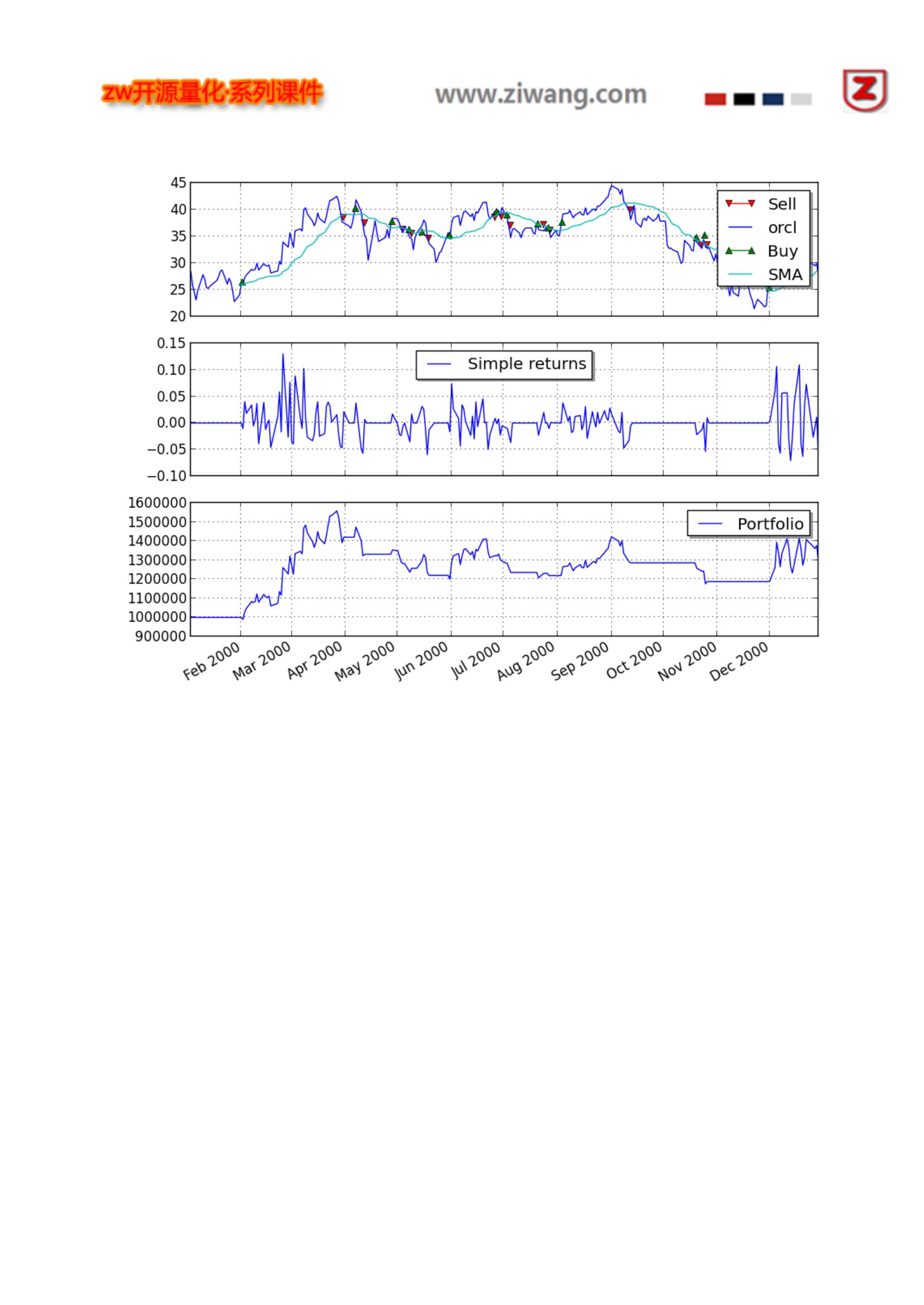
运行结果如下:
25
建议大家下载 PyAlgoTrade: http://gbeced.github.io/pyalgotrade/downloads/index.html
开始编写自己的交易策略。
你还可以,找到在网站,找到更多演示例子。
26

Documentation for the code
==========================
Contents:
.. toctree::
:maxdepth: 2
bar
dataseries
feed
barfeed
technical
broker
strategy
stratanalyzer
plotter
optimizer
marketsession
Documentation for the code
==========================
Contents:
.. toctree::
:maxdepth: 2
bar
dataseries
feed
barfeed
technical
broker
strategy
stratanalyzer
plotter
optimizer
marketsession
bar,k 线数据包
27

【类定义】
pyalgotrade.bar.Frequency(k 线频率)
基类 Bases: object
类似枚举 Enum 的 bar 的频率值,有效值是:
Frequency.TRADE::按单计算的交易频率
Frequency.SECOND:一秒内的交易频率
Frequency.MINUTE:一分钟的交易频率
Frequency.HOUR:一小时的交易频率
Frequency.DAY:一天的交易频率
Frequency.WEEK:一周的交易频率
Frequency.MONTH: The bar summarizes the trading activity during 1 month.
【类定义】
pyalgotrade.bar.Bar
基类 Bases: object
Bar,k 线数据包,是一个指定时期的有效交易数据总集。
【注意】
这是一个基础类定义,不要直接使用
__metaclass__:ABCMeta 的别名。
getDateTime(),返回值:日期
getOpen(adjusted=False),返回值:开盘价
getHigh(adjusted=False),返回值:最高价
getLow(adjusted=False),返回值:最低价
getClose(adjusted=False),返回值:收盘价
getVolume(),返回值:成交量 volume.
getAdjClose(),返回值:调整收盘价 getFrequency(),bar 的时间长度.
getTypicalPrice(),返回值:典型价格 typical price.
getPrice(),返回值:收盘价或者调整收盘价
【类定义】
pyalgotrade.bar.Bars(barDict)
基类 Bases: object
一组 Bar 对象.
28

barDict (map.) –Bar 对象的数据 map 映像.
【注意】
所有的 bars 必须使用同样的时间
__getitem__(instrument),返回值:给定参数的 Bar 值,如果为空,会抛出异常。
__contains__(instrument),返回值:True,如果给定参数的 bar 数据集有效.
getInstruments(),返回值:参数符号
getDateTime(),返回值:bar,k 线数据的时间
getBar(instrument),返回值:给定参数的 Bar 值,如果为空,返回值是:None
dataseries 数据序列
dataseries – 基础数据类型。
======================================
数据序列(Data series),用于管理:抽象的时间序列数据。
【类定义】
pyalgotrade.dataseries.DataSeries
基类 Bases: object,数据序列基础类。
【注意】
这是一个基础类定义,不要直接使用
__getitem__(key),返回值:key 对应的值,如果返回值无效,会引发错误:IndexError;如果分会会长类型不对,
会引发错误:TypeError。
__len__(),返回值:对数据序列中的元素的个数。
__metaclass__:ABCMeta 的别名。
getDateTimes(),返回值:一个和数值对应的时间列。
【类定义】
pyalgotrade.dataseries.SequenceDataSeries(maxLen=1024)
基类 Bases: pyalgotrade.dataseries.DataSeries
DataSeries 是保存在内存中的数据序列。
【参数】
maxLen (int.) ,数值的最大数量。 当数据序列长度已满,再添加新数值,一个相应数据包从队列头被丢弃。
append(value),增加一个值。
appendWithDateTime(dateTime, value),根据关联的 datetime,增加一个值
29

如果没有对于的 dateTime,它必须大于最后一个。
getMaxLen(),返回值:返回数值的最大数量
setMaxLen(maxLen),设置数值的最大数量,必要时,调整相应大小。
pyalgotrade.dataseries.aligned.datetime_aligned(ds1, ds2, maxLen=1024)
返回值:two dataseries that exhibit only those values whose datetimes are in both dataseries.
【参数】
ds1 (DataSeries.) ,DataSeries 实例。
ds2 (DataSeries.) ,DataSeries 实例。
maxLen (int.) ,数值的最大数量。 当数据序列长度已满,再添加新数值,一个相应数据包从队列头被丢弃。
【类定义】
pyalgotrade.dataseries.bards.BarDataSeries(maxLen=1024)
基类 Bases: pyalgotrade.dataseries.SequenceDataSeries
pyalgotrade.bar.Bar 的数据序列实例。
【参数】
maxLen (int.) ,数值的最大数量。 当数据序列长度已满,再添加新数值,一个相应数据包从队列头被丢弃。
getAdjCloseDataSeries(),返回值:调整后的收盘价数据序列。
getCloseDataSeries(),返回值:收盘价数据序列。
getHighDataSeries(),返回值:最高价数据序列。
getLowDataSeries(),返回值:最低价数据序列。
getOpenDataSeries(),返回值:开盘价数据序列。
getPriceDataSeries(),返回值:收盘价数据序列,或者,调整后的收盘价数据序列。
getVolumeDataSeries(),返回值:成交量数据序列。
【类定义】
pyalgotrade.dataseries.resampled.ResampledBarDataSeries(dataSeries, frequency, maxLen=1024)
基类 Bases: pyalgotrade.dataseries.bards.BarDataSeries, pyalgotrade.dataseries.resampled.DSResampler
BarDataSeries 将以更高的频率,对参考 BarDataSeries 重新采样。
【参数】
dataSeries (pyalgotrade.dataseries.bards.BarDataSeries),被重新取样的 DataSeries 实例。
frequency,每秒分组频率,必须>0
maxLen (int.) ,数值的最大数量。当数据序列长度已满,再添加新数值,一个相应数据包从队列头被丢弃。
30

支持重采样的频率是:
小于 bar.Frequency.DAY
bar.Frequency.DAY
bar.Frequency.MONTH
checkNow(dateTime),强行重新取样检查。根据重新取样频率,和当前日期时间,一个新的数值可能会生成。
【参数】
dateTime (datetime.datetime) ,当前日期时间。
31

feed 数据源,是时间序列数据的抽象。
当这些数据源,在事件调度循环当中,他们根据事件,生成一个可用的新数据是,并且负责更新。
pyalgotrade.dataseries.DataSeries 模块,负责提供数据源,以及相关数据的更新。
这个模块包,包括基本的数据源。
bar,k 线数据包模块,负责提供:barfeed 部分的数据源。
【类定义】
pyalgotrade.feed.BaseFeed(maxLen)
基类 Bases: pyalgotrade.observer.Subject
【参数】
maxLen (int.) , 最大数量,当数据序列长度已满,再添加新数值,一个相应数据包从队列头被丢弃。
【注意】
这是一个基础类定义,不要直接使用
__contains__(key),返回值:True,返回 True,如果返回值是可用的。
__getitem__(key),返回值:返回关键字,对应的数值。
getNewValuesEvent(),返回值:返回事件,当新值可用时。需要传递两个参数:
一个时间值。
新值。
CSV 支持
【类定义】
pyalgotrade.feed.csvfeed.Feed(dateTimeColumn, dateTimeFormat, converter=None, delimiter=', ', timezone=None,
maxLen=1024)
基类 Bases: pyalgotrade.feed.csvfeed.BaseFeed
提要从 CSV 格式的文件加载数据源。
【参数】
dateTimeColumn (string.) ,时间序列的名称信息。
dateTimeFormat (string.),时间格式
converter (function.), 转换函数,变量是函数
delimiter (string.),分隔符
timezone (A pytz timezone.),时区
maxLen (int.),数据序列最大长度,当数据序列长度已满,再添加新数值,一个相应数据包从队列头被丢弃。
32
addValuesFromCSV(path),从 csv 文件加载数据。

【参数】
path (string.),CSV 文件路径名。
【CSV 文件示例】
一个 csv 文件,采用以下格式:
Date,USD,GBP,EUR
2013-09-29,1333.0,831.203,986.75
2013-09-22,1349.25,842.755,997.671
2013-09-15,1318.5,831.546,993.969
2013-09-08,1387.0,886.885,1052.911
......
.
代码如下:
from pyalgotrade.feed import csvfeed
feed = csvfeed.Feed("Date", "%Y-%m-%d")
feed.addValuesFromCSV("quandl_gold_2.csv")
for dateTime, value in feed:
print dateTime, value
运行结果,类似如下:
33
1968-04-07 00:00:00 {'USD': 37.0, 'GBP': 15.3875, 'EUR': ''}

1968-04-14 00:00:00 {'USD': 38.0, 'GBP': 15.8208, 'EUR': ''}
1968-04-21 00:00:00 {'USD': 37.65, 'GBP': 15.6833, 'EUR': ''}
1968-04-28 00:00:00 {'USD': 38.65, 'GBP': 16.1271, 'EUR': ''}
1968-05-05 00:00:00 {'USD': 39.1, 'GBP': 16.3188, 'EUR': ''}
1968-05-12 00:00:00 {'USD': 39.6, 'GBP': 16.5625, 'EUR': ''}
1968-05-19 00:00:00 {'USD': 41.5, 'GBP': 17.3958, 'EUR': ''}
1968-05-26 00:00:00 {'USD': 41.75, 'GBP': 17.5104, 'EUR': ''}
1968-06-02 00:00:00 {'USD': 41.95, 'GBP': 17.6, 'EUR': ''}
1968-06-09 00:00:00 {'USD': 41.25, 'GBP': 17.3042, 'EUR': ''}
.
.
.
2013-07-28 00:00:00 {'USD': 1331.0, 'GBP': 864.23, 'EUR': 1001.505}
2013-08-04 00:00:00 {'USD': 1309.25, 'GBP': 858.637, 'EUR': 986.921}
2013-08-11 00:00:00 {'USD': 1309.0, 'GBP': 843.156, 'EUR': 979.79}
2013-08-18 00:00:00 {'USD': 1369.25, 'GBP': 875.424, 'EUR': 1024.964}
2013-08-25 00:00:00 {'USD': 1377.5, 'GBP': 885.738, 'EUR': 1030.6}
2013-09-01 00:00:00 {'USD': 1394.75, 'GBP': 901.292, 'EUR': 1055.749}
2013-09-08 00:00:00 {'USD': 1387.0, 'GBP': 886.885, 'EUR': 1052.911}
2013-09-15 00:00:00 {'USD': 1318.5, 'GBP': 831.546, 'EUR': 993.969}
2013-09-22 00:00:00 {'USD': 1349.25, 'GBP': 842.755, 'EUR': 997.671}
2013-09-29 00:00:00 {'USD': 1333.0, 'GBP': 831.203, 'EUR': 986.75}
barfeed,k 线数据
【类定义】
pyalgotrade.barfeed.BaseBarFeed(frequency, maxLen=1024)
基类 Bases: pyalgotrade.feed.BaseFeed
提供提要 Bar,k 线数据源。
【参数】
frequency – bars 数据包频率,有效参数,参见:pyalgotrade.bar.Frequency.
maxLen (int.),最大序列长度,当数据序列长度已满,再添加新数值,一个相应数据包从队列头被丢弃。
【注意】
这是一个基础类定义,不要直接使用
getNextBars(),返回下一个 Bar 数据包,会覆盖旧值。
34

这是 BaseBarFeed 的子类,不要直接调用。
getCurrentBars(),返回值:当前的 Bar 数据包。
getLastBar(instrument),返回值:最后一个 Bar 数据包。
getDefaultInstrument(),返回值:默认的 Bar 数据工具。
getRegisteredInstruments(),返回值:注册的 Bar 数据工具名称列表。
getDataSeries(instrument=None),返回值:指定的数据序列。
【参数】
instrument (string.),Bar 数据工具 ID,如果是:None,返回默认值。
返回值类型,参见: pyalgotrade.dataseries.bards.BarDataSeries.
CSV 数据文件
【类定义】
pyalgotrade.barfeed.csvfeed.BarFeed(frequency, maxLen=1024)
基类 Bases: pyalgotrade.barfeed.membf.BarFeed
【注意】
这是一个基础类定义,不要直接使用
【类定义】
pyalgotrade.barfeed.csvfeed.GenericBarFeed(frequency, timezone=None, maxLen=1024)
基类 Bases: pyalgotrade.barfeed.csvfeed.BarFeed
BarFeed,从 CSV 文件,加载数据源,形式如下:
Date Time,Open,High,Low,Close,Volume,Adj Close
2013-01-01 13:59:00,13.51001,13.56,13.51,13.56,273.88014126,13.51001
【参数】
frequency ,bars 数据包的频率,参见:pyalgotrade.bar.Frequency.
timezone (A pytz timezone.) ,时区,默认使用本地时区。
maxLen (int.) ,最大序列长度,当数据序列长度已满,再添加新数值,一个相应数据包从队列头被丢弃。
35

CSV 文件,第一行必须是列名称。
调整收盘价为空白,属于正常情况
当使用多个数据采集工具时:
如果所有数据采集工具,使用同一个时区,可以不特别指定,时区参数、
如果使用不同时区,必须设置对应的时区参数
addBarsFromCSV(instrument, path, timezone=None)
从 csv 文件,加载 bar 数据包。
【参数】
instrument (string.) ,数据工具|ID。
path (string.),CSV 文件的路径名。
timezone (A pytz timezone.) ,时区。
Yahoo! Finance 雅虎金融
【类定义】
pyalgotrade.barfeed.yahoofeed.Feed(frequency=86400, timezone=None, maxLen=1024)
基类 Bases: pyalgotrade.barfeed.csvfeed.BarFeed
从雅虎金融网站下载的 CSV 文件,加载 bar 数据源。
【参数】
frequency ,bars 数据包的频率,只支持:日、周两种频率。
(pyalgotrade.bar.Frequency.DAY, pyalgotrade.bar.Frequency.WEEK)
timezone (A pytz timezone.),时区
maxLen (int.) ,最大序列长度,当数据序列长度已满,再添加新数值,一个相应数据包从队列头被丢弃。
【注意】
雅虎金融 csv 文件缺乏时区信息。
当使用多个数据采集工具时:
如果所有工具在同一个时区,可以不指定时区参数。如果工具在不同时区,必须设置时区参数
addBarsFromCSV(instrument, path, timezone=None)
从 csv 文件,加载 bar 数据包。
【参数】
instrument (string.) ,数据工具|ID。
36

timezone (A pytz timezone.) ,时区。
Google Finance 谷歌金融
【类定义】
pyalgotrade.barfeed.googlefeed.Feed(frequency=86400, timezone=None, maxLen=1024)
基类 Bases: pyalgotrade.barfeed.csvfeed.BarFeed
从谷歌金融网站下载的 CSV 文件,加载 bar 数据源。
【参数】
frequency,bars 数据包的频率,只支持:日频率。
(pyalgotrade.bar.Frequency.DAY)
timezone (A pytz timezone.),时区
maxLen (int.) ,最大序列长度,当数据序列长度已满,再添加新数值,一个相应数据包从队列头被丢弃。
【注意】
谷歌金融 csv 文件缺乏时区信息。
当使用多个数据采集工具时:
如果所有工具在同一个时区,可以不指定时区参数。如果工具在不同时区,必须设置时区参数
addBarsFromCSV(instrument, path, timezone=None)
从 csv 文件,加载 bar 数据包。
【参数】
instrument (string.) ,数据工具|ID。
path (string.),CSV 文件的路径名。
timezone (A pytz timezone.) ,时区。
Quandl 数据
【类定义】
pyalgotrade.barfeed.quandlfeed.Feed(frequency=86400, timezone=None, maxLen=1024)
基类 Bases: pyalgotrade.barfeed.csvfeed.GenericBarFeed
从 Quandl 下载的 CSV 文件,加载 bar 数据源。
37
frequency ,bars 数据包的频率,只支持:日、周两种频率。

(pyalgotrade.bar.Frequency.DAY, pyalgotrade.bar.Frequency.WEEK)
timezone (A pytz timezone.),时区
maxLen (int.) ,最大序列长度,当数据序列长度已满,再添加新数值,一个相应数据包从队列头被丢弃。
【注意】
当使用多个数据采集工具时:
如果所有工具在同一个时区,可以不指定时区参数。如果工具在不同时区,必须设置时区参数
NinjaTrader 数据 (忍者交易员)
【类定义】
pyalgotrade.barfeed.ninjatraderfeed.Feed(frequency, timezone=None, maxLen=1024)
基类 Bases: pyalgotrade.barfeed.csvfeed.BarFeed
从 NinjaTrader 下载的 CSV 文件,加载 bar 数据源。
【参数】
frequency ,bars 数据包的频率,只支持:日、分钟两种频率。
(pyalgotrade.bar.Frequency.DAY, pyalgotrade.bar.Frequency.MINUTE)
timezone (A pytz timezone.),时区
maxLen (int.) ,最大序列长度,当数据序列长度已满,再添加新数值,一个相应数据包从队列头被丢弃。
addBarsFromCSV(instrument, path, timezone=None)
从 csv 文件,加载 bar 数据包。
【参数】
instrument (string.) ,数据工具|ID。
path (string.),CSV 文件的路径名。
timezone (A pytz timezone.) ,时区。
technical 技术指标
【类定义】
38
pyalgotrade.technical.EventWindow(windowSize, dtype=<type 'float'>, skipNone=True)

基类 Bases: object
一个 EventWindow 类,负责移动窗口,使计算相关的数值。
【参数】
windowSize (int.) ,窗口的大小。 必须大于 0
dtype (data-type.) ,数组的数据类型。
skipNone (boolean.) ,值为 True 时,如果数值为空:None,就不应包含在窗口内。
【注意】
这是一个基础类定义,不要直接使用
getValue(),使用窗口中的值,覆盖计算值。
getValues(),返回值:返回一个 numpy, 窗口中的数组值。
getWindowSize(),返回值:返回窗口大小。
【类定义】
pyalgotrade.technical.EventBasedFilter(dataSeries, eventWindow, maxLen=1024)
基类 Bases: pyalgotrade.dataseries.SequenceDataSeries
EventBasedFilter 类负责获取新值 ,并使用 EventWindow 计算新值。
【参数】
dataSeries (pyalgotrade.dataseries.DataSeries.) ,被过滤的 DataSeries 实例。
eventWindow (EventWindow.) ,EventWindow 实例,计算新值。
maxLen (int.) ,数值的最大数量。 当数据序列长度已满,再添加新数值,一个相应数据包从队列头被丢弃。
过滤示例
下面例子,说明如何结合 EventWindow 和 EventBasedFilter,构建一个自定义的过滤器:
39
from pyalgotrade import dataseries

from pyalgotrade import technical
# An EventWindow is responsible for making calculations using a window of values.
class Accumulator(technical.EventWindow):
def getValue(self):
ret = None
if self.windowFull():
ret = self.getValues().sum()
return ret
# Build a sequence based DataSeries.
seqDS = dataseries.SequenceDataSeries()
# Wrap it with a filter that will get fed as new values get added to the underlying DataSeries.
accum = technical.EventBasedFilter(seqDS, Accumulator(3))
# Put in some values.
for i in range(0, 50):
seqDS.append(i)
# Get some values.
print accum[0] # Not enough values yet.
print accum[1] # Not enough values yet.
print accum[2] # Ok, now we should have at least 3 values.
print accum[3]
# Get the last value, which should be equal to 49 + 48 + 47.
print accum[-1]
输出应该是:
None
None
3.0
6.0
144.0
40

简单移动平均线过滤
【类定义】
pyalgotrade.technical.ma.SMA(dataSeries, period, maxLen=1024)
基类 Bases: pyalgotrade.technical.EventBasedFilter
【参数】
dataSeries (pyalgotrade.dataseries.DataSeries.) ,被过滤的 DataSeries 实例。
period (int.),时间段,用于计算 SMA。
maxLen (int.) ,数值的最大数量。 当数据序列长度已满,再添加新数值,一个相应数据包从队列头被丢弃。
指数移动平均过滤
【类定义】
pyalgotrade.technical.ma.EMA(dataSeries, period, maxLen=1024)
基类 Bases: pyalgotrade.technical.EventBasedFilter
【参数】
dataSeries (pyalgotrade.dataseries.DataSeries.) ,被过滤的 DataSeries 实例。
period (int.) ,时间段,用于计算 EMA,必须>1。
maxLen (int.) ,数值的最大数量。 当数据序列长度已满,再添加新数值,一个相应数据包从队列头被丢弃。
加权移动平均线过滤
【类定义】
pyalgotrade.technical.ma.WMA(dataSeries, weights, maxLen=1024)
基类 Bases: pyalgotrade.technical.EventBasedFilter
【参数】
dataSeries (pyalgotrade.dataseries.DataSeries.) ,被过滤的 DataSeries 实例。
41

maxLen (int.) ,数值的最大数量。 当数据序列长度已满,再添加新数值,一个相应数据包从队列头被丢弃。
成交量加权平均价格过滤。
【类定义】
pyalgotrade.technical.vwap.VWAP(dataSeries, period, useTypicalPrice=False, maxLen=1024)
基类 Bases: pyalgotrade.technical.EventBasedFilter
【参数】
dataSeries (pyalgotrade.dataseries.bards.BarDataSeries.) ,被过滤的 DataSeries 实例。
period (int.) ,时间段,用于计算 V WAP.
useTypicalPrice (boolean.) – True if the typical price should be used instead of the closing price.
maxLen (int.) ,数值的最大数量。 当数据序列长度已满,再添加新数值,一个相应数据包从队列头被丢弃。
动量指标过滤
MACD 指数平滑移动平均线
【类定义】
pyalgotrade.technical.macd.MACD(dataSeries, fastEMA, slowEMA, signalEMA, maxLen=1024)
基类 Bases: pyalgotrade.dataseries.SequenceDataSeries
【参数】
dataSeries (pyalgotrade.dataseries.DataSeries.) ,被过滤的 DataSeries 实例。
fastEMA (int.) ,数目,用于计算快速 EMA.
slowEMA (int.) ,数目,用于计算慢速 EMA.
signalEMA (int.) ,数目,用于计算信号 EMA
maxLen (int.) ,数值的最大数量。 当数据序列长度已满,再添加新数值,一个相应数据包从队列头被丢弃。
getHistogram(),返回值:直方图 (MACD 和信号数据的差值.
getSignal(),返回值:计算 MACD 的 EMA 数据序列。
42

【类定义】
pyalgotrade.technical.rsi.RSI(dataSeries, period, maxLen=1024)
基类 Bases: pyalgotrade.technical.EventBasedFilter
【参数】
dataSeries (pyalgotrade.dataseries.DataSeries.) ,被过滤的 DataSeries 实例。
period (int.),时间段。如果 period 值是 n,n+1 个值必须> 1.
maxLen (int.) ,数值的最大数量。 当数据序列长度已满,再添加新数值,一个相应数据包从队列头被丢弃。
KD 随机震荡指标 Stochastic Oscillator
【类定义】
pyalgotrade.technical.stoch.StochasticOscillator(barDataSeries, period, dSMAPeriod=3, useAdjustedValues=False,
maxLen=1024)
基类 Bases: pyalgotrade.technical.EventBasedFilter
【注意】
这个过滤器,所返回的值是% K,需使用 getD()函数,访问% D
【参数】
barDataSeries (pyalgotrade.dataseries.bards.BarDataSeries.) ,被过滤的 DataSeries 实例。
period (int.) ,时间段,必须> 1.
dSMAPeriod (int.),–%D SMA,时间段,必须> 1.
useAdjustedValues (boolean.),为 True,使用调整后的 ow/High/Close 价格
maxLen (int.) ,数值的最大数量。 当数据序列长度已满,再添加新数值,一个相应数据包从队列头被丢弃。
getD(),返回值:返回一个 % D 值
变动率
【类定义】
pyalgotrade.technical.roc.RateOfChange(dataSeries, valuesAgo, maxLen=1024)
基类 Bases: pyalgotrade.technical.EventBasedFilter
43

dataSeries (pyalgotrade.dataseries.DataSeries.) ,被过滤的 DataSeries 实例。
valuesAgo (int.) ,比较值的数目,必须> 0。
maxLen (int.) ,数值的最大数量。 当数据序列长度已满,再添加新数值,一个相应数据包从队列头被丢弃。
其他技术指标
ATR 平均真实波幅
【类定义】
pyalgotrade.technical.atr.ATR(barDataSeries, period, useAdjustedValues=False, maxLen=1024)
基类 Bases: pyalgotrade.technical.EventBasedFilter
【参数】
barDataSeries (pyalgotrade.dataseries.bards.BarDataSeries.) ,被过滤的 DataSeries 实例。
period (int.) ,平均时间段,必须> 1.
useAdjustedValues (boolean.),为 True,使用调整后的 ow/High/Close 价格
maxLen (int.) ,数值的最大数量。 当数据序列长度已满,再添加新数值,一个相应数据包从队列头被丢弃。
布林带
【类定义】
pyalgotrade.technical.bollinger.BollingerBands(dataSeries, period, numStdDev, maxLen=1024)
基类 Bases: object
【参数】
dataSeries (pyalgotrade.dataseries.DataSeries.) ,被过滤的 DataSeries 实例。
period (int.) ,需计算的数值数目,必须> 1.
numStdDev (int.),标准差的数量,上、下带区使用。
maxLen (int.) ,数值的最大数量。 当数据序列长度已满,再添加新数值,一个相应数据包从队列头被丢弃。
getLowerBand(),返回值:低位线的数据序列
getMiddleBand(),返回值:中位线的数据序列
getUpperBand(),返回值:高位线的数据序列
44
pyalgotrade.technical.cross.cross_above(values1, values2, start=-2, end=None)

检查指定的时期、条件下,两个 DataSeries 对象之间的高位交叉区。
【参数】
values1 (pyalgotrade.dataseries.DataSeries.),交叉数据序列。
values2 (pyalgotrade.dataseries.DataSeries.) ,被交叉数据序列。
start (int.) ,范围的开始。
end (int.) ,范围的结束。
【注意】
默认的起始和结束值,使用最后 2 个数值,检查上面交叉条件。
pyalgotrade.technical.cross.cross_below(values1, values2, start=-2, end=None)
检查指定的时期、条件下,两个 DataSeries 对象之间的低位交叉区。
【参数】
values1 (pyalgotrade.dataseries.DataSeries.),交叉数据序列。
values2 (pyalgotrade.dataseries.DataSeries.) ,被交叉数据序列。
start (int.) ,范围的开始。
end (int.) ,范围的结束。
【注意】
默认的起始和结束值,使用最后 2 个数值,检查上面交叉条件。
累计收益率
【类定义】
pyalgotrade.technical.cumret.CumulativeReturn(dataSeries, maxLen=1024)
基类 Bases: pyalgotrade.technical.EventBasedFilter
【参数】
dataSeries (pyalgotrade.dataseries.DataSeries.) ,被过滤的 DataSeries 实例。
maxLen (int.) ,数值的最大数量。 当数据序列长度已满,再添加新数值,一个相应数据包从队列头被丢弃。
最高价值
【类定义】
pyalgotrade.technical.highlow.High(dataSeries, period, maxLen=1024)
45
基类 Bases: pyalgotrade.technical.EventBasedFilter

【参数】
dataSeries (pyalgotrade.dataseries.DataSeries.) ,被过滤的 DataSeries 实例。
period (int.) ,需计算的数值数目。
maxLen (int.) ,数值的最大数量。 当数据序列长度已满,再添加新数值,一个相应数据包从队列头被丢弃。
最低价值
【类定义】
pyalgotrade.technical.highlow.Low(dataSeries, period, maxLen=1024)
基类 Bases: pyalgotrade.technical.EventBasedFilter
【参数】
dataSeries (pyalgotrade.dataseries.DataSeries.) ,被过滤的 DataSeries 实例。
period (int.) ,需计算的数值数目。
maxLen (int.) ,数值的最大数量。 当数据序列长度已满,再添加新数值,一个相应数据包从队列头被丢弃。
赫斯特指数
【类定义】
pyalgotrade.technical.hurst.HurstExponent(dataSeries, period, minLags=2, maxLags=20, logValues=True,
maxLen=1024)
基类 Bases: pyalgotrade.technical.EventBasedFilter
【参数】
dataSeries (pyalgotrade.dataseries.DataSeries.) ,被过滤的 DataSeries 实例。
period (int.) ,需计算的数值数目。
minLags (int.) ,最小滞后数量, 必须> = 2
maxLags (int.) ,最大滞后数量, 必须> minLags 2
maxLen (int.) ,数值的最大数量。 当数据序列长度已满,再添加新数值,一个相应数据包从队列头被丢弃。
突破线
【类定义】
pyalgotrade.technical.linebreak.Line(low, high, dateTime, white)
46

getDateTime(),时间
getHigh(),最高价
getLow(),最低价
isBlack(),如果是 True,表示黑色(价格下跌)。
isWhite(),如果是 True,表示白色(价格上升)。
三线突破
【类定义】
pyalgotrade.technical.linebreak.LineBreak(barDataSeries, reversalLines, useAdjustedValues=False, maxLen=1024)
基类 Bases: pyalgotrade.dataseries.SequenceDataSeries
【参数】
barDataSeries (pyalgotrade.dataseries.bards.BarDataSeries.) ,被过滤的 DataSeries 实例。
reversalLines (int.) ,计算回转的线的数目,必须>1
useAdjustedValues (boolean.) ,为 True,使用调整后的 ow/High/Close 价格
maxLen (int.) ,数值的最大数量。 当数据序列长度已满,再添加新数值,一个相应数据包从队列头被丢弃。这
个值不能小于 reversalLines。
最小二次回归
【类定义】
pyalgotrade.technical.linreg.LeastSquaresRegression(dataSeries, windowSize, maxLen=1024)
基类 Bases: pyalgotrade.technical.EventBasedFilter
【参数】
dataSeries (pyalgotrade.dataseries.DataSeries.) ,被过滤的 DataSeries 实例。
windowSize (int.) ,需计算的数值数目。
maxLen (int.) ,数值的最大数量。 当数据序列长度已满,再添加新数值,一个相应数据包从队列头被丢弃。
getValueAt(dateTime),基于二次回归,计算给定时间点的数据
【参数】
dateTime (datetime.datetime.) ,计算给定时间点的数据。如果没有足够的数据值,将返回 None
47

【类定义】
pyalgotrade.technical.linreg.Slope(dataSeries, period, maxLen=1024)
基类 Bases: pyalgotrade.technical.EventBasedFilter
计算最小二次回归线的斜率
【参数】
dataSeries (pyalgotrade.dataseries.DataSeries.) ,被过滤的 DataSeries 实例。
period (int.) ,需计算的数值数目。
maxLen (int.) ,数值的最大数量。 当数据序列长度已满,再添加新数值,一个相应数据包从队列头被丢弃。
【注意】
请注意 这个过滤器忽略不同的值,之间的时间差别。
标准方差
【类定义】
pyalgotrade.technical.stats.StdDev(dataSeries, period, ddof=0, maxLen=1024)
基类 Bases: pyalgotrade.technical.EventBasedFilter
【参数】
dataSeries (pyalgotrade.dataseries.DataSeries.) ,被过滤的 DataSeries 实例。
period (int.) ,需计算的数值数目。
ddof (int.) ,Delta 自由度。
maxLen (int.) ,数值的最大数量。 当数据序列长度已满,再添加新数值,一个相应数据包从队列头被丢弃。
z 分数过滤
【类定义】
pyalgotrade.technical.stats.ZScore(dataSeries, period, ddof=0, maxLen=1024)
基类 Bases: pyalgotrade.technical.EventBasedFilter
【参数】
dataSeries (pyalgotrade.dataseries.DataSeries.) ,被过滤的 DataSeries 实例。
48

ddof (int.) ,Delta 自由度。
maxLen (int.) ,数值的最大数量。 当数据序列长度已满,再添加新数值,一个相应数据包从队列头被丢弃。
broker 模块,订单管理
基础模块
Order 订单
【类定义】
pyalgotrade.broker.Order(type_, action, instrument, quantity, instrumentTraits)
基类 Bases: object
【参数】
type (Order.Type) ,订单类型
action (Order.Action) ,订单操作
instrument (string.),工具 ID 标识符
quantity (int/float.) ,订单数量。
【注意】
这是一个基础类定义,不要直接使用
有效的 类型 参数值是:
Order.Type.MARKET
Order.Type.LIMIT
Order.Type.STOP
Order.Type.STOP_LIMIT
有效的 行动 参数值是:
Order.Action.BUY
Order.Action.BUY_TO_COVER
Order.Action.SELL
Order.Action.SELL_SHORT
getId(),返回值:返回订单 id。 【注意】如果没有订单,返回:None
getType(),返回值:返回订单类型。
有效的订单类型:
Order.Type.MARKET
Order.Type.LIMIT
49

Order.Type.STOP_LIMIT
getSubmitDateTime(),返回值:返回订单提交时的时间日期。
getAction(),返回值:返回订单操作命令。
有效订单操作命令:
Order.Action.BUY
Order.Action.BUY_TO_COVER
Order.Action.SELL
Order.Action.SELL_SHORT
getState(),返回值:返回订单状态。
有效的订单状态是:
Order.State.INITIAL ,初始状态
Order.State.SUBMITTED,提交
Order.State.ACCEPTED,接受
Order.State.CANCELED,取消
Order.State.PARTIALLY_FILLED,完成部分交易
Order.State.FILLED,完成全部交易
isActive(),返回值:True if the order is active.
isInitial(),返回值:如果订单状态是 Order.State.INITIAL 返回 True。
isSubmitted(),返回值:如果订单状态是 Order.State.SUBMITTED 返回 True。
isAccepted(),返回值:如果订单状态是 Order.State.ACCEPTED 返回 True。
isCanceled(),返回值:如果订单状态是 Order.State.CANCELED. 返回 True。
isPartiallyFilled(),返回值:如果订单状态是 Order.State.PARTIALLY_FILLED. 返回 True。
isFilled(),返回值:如果订单状态是 Order.State.FILLED. 返回 True。
getInstrument(),返回值:返回数据工具的 ID 标识符。
getQuantity(),返回值:数量.
getFilled(),返回值:返回成交股票的数量
getRemaining(),返回值:返回剩余股票的数量
getAvgFillPrice(),返回值:如果交易完成,返回股票的平均价格;如果没有,返回·None。
getGoodTillCanceled(),返回值:长期有效委托书
setGoodTillCanceled(goodTillCanceled),设置长期有效委托书
【参数】
goodTillCanceled (boolean.),为 True,如果采用长期有效委托书
【注意】
订单一旦提交,不能改变。
getAllOrNone(),返回值:如果订单全部完成, 返回 True。
setAllOrNone(allOrNone),为订单设置:All-Or-None 属性
50

allOrNone (boolean.),如果订单全部完成, 返回 True。
【注意】
订单一旦提交,不能改变。
getExecutionInfo(),返回值:最后一次执行此订单的信息,如果没有完成,返回 None。
返回类型:OrderExecutionInfo.
MarketOrder 订单市场
【类定义】
pyalgotrade.broker.MarketOrder(action, instrument, quantity, onClose, instrumentTraits)
基类 Bases: pyalgotrade.broker.Order
【注意】
这是一个基础类定义,不要直接使用
getFillOnClose(),返回值:返回 True,如果订单应尽可能靠近收盘价(Market-On-Close 订单)。
LimitOrder 限价指令。
【类定义】
pyalgotrade.broker.LimitOrder(action, instrument, limitPrice, quantity, instrumentTraits)
基类 Bases: pyalgotrade.broker.Order
【注意】
这是一个基础类定义,不要直接使用
getLimitPrice(),返回值:限制价格。
StopOrder 限损订单
【类定义】
pyalgotrade.broker.StopOrder(action, instrument, stopPrice, quantity, instrumentTraits)
基类 Bases: pyalgotrade.broker.Order
51

这是一个基础类定义,不要直接使用
getStopPrice(),返回值:限损价格.
StopLimitOrder 限价止损订单
【类定义】
pyalgotrade.broker.StopLimitOrder(action, instrument, stopPrice, limitPrice, quantity, instrumentTraits)
基类 Bases: pyalgotrade.broker.Order
【注意】
这是一个基础类定义,不要直接使用
getStopPrice(),返回值:限损价格
getLimitPrice(),返回值:限制价格
OrderExecutionInfo 订单执行信息
【类定义】
pyalgotrade.broker.OrderExecutionInfo(price, quantity, commission, dateTime)
基类 Bases: object
getPrice(),返回值:成交价
getQuantity(),返回值:成交量
getCommission(),返回值:佣金。
getDateTime(),返回值:订单成交时间
Broker 交易模块
【类定义】
pyalgotrade.broker.Broker
基类 Bases: pyalgotrade.observer.Subject
【注意】
这是一个基础类定义,不要直接使用
getCash(includeShort=True),返回值:可用的现金。
52

includeShort (boolean.) ,现金,包括空头头寸。
getShares(instrument),返回值:买到的股票数目。
getPositions(),返回值:股票-数据工具、映射字典数据表
getActiveOrders(instrument=None),返回值:活跃订单数据列表
【参数】
instrument (string.) ,可选数据工具标识符,仅返回活动订单相关的。
submitOrder(order)提交订单。
【参数】
order (Order.) ,需要提交的订单。
【注意】
SUBMITTED 订单提交状态,不会触发事件。
两次调用相同的订单,将引发异常。
创建市场订单。市场订单,是为了,在最好的价格,购买或出售股票。
一般来说,这种类型的订单将立即执行,但不能完全保证。
【参数】
action (Order.Action.BUY, or Order.Action.BUY_TO_COVER,
or Order.Action.SELL or Order.Action.SELL_SHORT.) ,订单操作
instrument (string.) ,工具标识符
quantity (int/float.) ,订单交易量
onClose (boolean.) ,返回 True,如果订单应尽可能靠近收盘价(Market-On-Close 订单)。默认是 False.
返回类型: 一个 MarketOrder 子类。
createLimitOrder(action, instrument, limitPrice, quantity)
创建一个限价订单。 限价订单,是以特定价格,购买或出售股票。
参 数 : 行 动 ( Order.Action 。 购 买 , 或 Order.Action 。 BUY_TO_COVER 或 Order.Action 。 出 售 或
Order.Action.SELL_SHORT。 )- - -订单操作。 仪器 ( 字符串。 )——仪器标识符。 limitPrice ( 浮动 )- - -订单价
格。 数量 ( int /浮动。 )- - -订单数量。 返回类型: 一个 LimitOrder 子类。
【参数】
action (Order.Action.BUY, or Order.Action.BUY_TO_COVER,
or Order.Action.SELL or Order.Action.SELL_SHORT.) ,订单操作
instrument (string.) ,工具标识符
limitPrice (float) ,订单价格
quantity (int/float.) ,订单交易量
返回类型: 一个 LimitOrder 子类
53
createStopOrder(action, instrument, stopPrice, quantity)

创建一个限损订单。限损订单,也称为止损订单,一旦股票的价格 达到指定的价格时,称为停止价格,购买或
出售股票。
参 数 : 行 动 ( Order.Action 。 购 买 , 或 Order.Action 。 BUY_TO_COVER 或 Order.Action 。 出 售 或
Order.Action.SELL_SHORT。 )- - -订单操作。 仪器 ( 字符串。 )——仪器标识符。 stopPrice ( 浮动 )- - -触发价格。
数量 ( int /浮动。 )- - -订单数量。 返回类型: 一个 StopOrder 子类。
【参数】
action (Order.Action.BUY, or Order.Action.BUY_TO_COVER,
or Order.Action.SELL or Order.Action.SELL_SHORT.) ,订单操作
instrument (string.) ,工具标识符
stopPrice (float),预设价格
quantity (int/float.) ,订单交易量
返回类型: 一个 StopOrder 子类
createStopLimitOrder(action, instrument, stopPrice, limitPrice, quantity)
限价止损订单。
【参数】
action (Order.Action.BUY, or Order.Action.BUY_TO_COVER,
or Order.Action.SELL or Order.Action.SELL_SHORT.) ,订单操作
instrument (string.) ,工具标识符
stopPrice (float), 预设止损价格
limitPrice (float) ,预设限制价格
quantity (int/float.) ,订单交易量
返回类型: 一个 StopLimitOrder 子类
cancelOrder(order),请求取消订单。 如果订单完成,会抛出一个例外:Exception。
【参数】
order (Order.) ,要取消的订单
Backtesting 回溯模块
Commission 佣金
【类定义】
pyalgotrade.broker.backtesting.Commission
基类 Bases: object
54

【注意】
这是一个基础类定义,不要直接使用
calculate(order, price, quantity),计算订单的佣金
【参数】
order (pyalgotrade.broker.Order.),正在执行的订单.
price (float.) ,每股的价格
quantity (float.) ,订单成交量
返回类型: float.
NoCommission 无佣金
【类定义】
pyalgotrade.broker.backtesting.NoCommission
基类 Bases: pyalgotrade.broker.backtesting.Commission
总是返回 0 佣金
FixedPerTrade 固定佣金
【类定义】
pyalgotrade.broker.backtesting.FixedPerTrade(amount)
基类 Bases: pyalgotrade.broker.backtesting.Commission
【参数】
amount (float.) ,每个订单的固定佣金
TradePercentage 浮动佣金
【类定义】
pyalgotrade.broker.backtesting.TradePercentage(percentage)
基类 Bases: pyalgotrade.broker.backtesting.Commission
【参数】
percentage (float.) ,佣金收取比例,0.01 意味着 1%,等等。 必须小于 1。
55

【类定义】
pyalgotrade.broker.backtesting.Broker(cash, barFeed, commission=None)
基类 Bases: pyalgotrade.broker.Broker
【参数】
cash (int/float.) ,最初的现金数额
barFeed (pyalgotrade.barfeed.BarFeed) ,bar 数据集
commission (Commission) ,佣金计算
getCommission(),返回值:策略说需的佣金。返回类型: Commission.
getEquity(),返回值:投资组合的回报价值(现金+股票)。
getFillStrategy(),返回值:FillStrategy 当前的值.
setCommission(commission),设置策略使用佣金计算模式。
【参数】
commission (Commission.) ,计算佣金。
setFillStrategy(strategy),设置首页的策略
SlippageModel 滑移模型
【类定义】
pyalgotrade.broker.slippage.SlippageModel
基类 Bases: object
【注意】
这是一个基础类定义,不要直接使用
calculatePrice(order, price, quantity, bar, volumeUsed)
返回值:订单的每股下滑价格。
【参数】
order (pyalgotrade.broker.Order.),全部交易订单
price (float.) ,滑动前的每股价格
quantity (float.),订单总量
bar (pyalgotrade.bar.Bar.) ,当前的 bar 数据集
volumeUsed (float.) ,当前 bar 数据集所需的成交量
返回类型: float.
56

【类定义】
pyalgotrade.broker.slippage.NoSlippage
基类 Bases: pyalgotrade.broker.slippage.SlippageModel
VolumeShareSlippage 成交量滑移模型
【类定义】
pyalgotrade.broker.slippage.VolumeShareSlippage(priceImpact=0.1)
基类 Bases: pyalgotrade.broker.slippage.SlippageModel
【参数】
priceImpact (float.) ,预设回溯测试价格。
FillStrategy 成交策略
【类定义】
pyalgotrade.broker.fillstrategy.FillStrategy
基类 Bases: object
fillLimitOrder (broker_, order, bar)
返回值,会覆盖成交价和成交量,如果订单,不能在给定的时间,完成,返回:None。
【参数】
broker (Broker) ,交易员
order (pyalgotrade.broker.LimitOrder) ,订单
bar (pyalgotrade.bar.Bar) ,当前 bar.数据集
返回类型: FillInfo 或者 None
fillMarketOrder(broker_, order, bar)
返回值,会覆盖成交价和成交量,如果订单,不能在给定的时间,完成,返回:None。
【参数】
broker (Broker) ,交易员
order (pyalgotrade.broker.LimitOrder) ,订单
bar (pyalgotrade.bar.Bar) ,当前 bar.数据集
返回类型: FillInfo 或者 None
57
fillStopLimitOrder(broker_, order, bar)

返回值,会覆盖成交价和成交量,如果订单,不能在给定的时间,完成,返回:None。
【参数】
broker (Broker) ,交易员
order (pyalgotrade.broker.LimitOrder) ,订单
bar (pyalgotrade.bar.Bar) ,当前 bar.数据集
返回类型: FillInfo 或者 None
fillStopOrder(broker_, order, bar)
返回值,会覆盖成交价和成交量,如果订单,不能在给定的时间,完成,返回:None。
【参数】
broker (Broker) ,交易员
order (pyalgotrade.broker.LimitOrder) ,订单
bar (pyalgotrade.bar.Bar) ,当前 bar.数据集
返回类型: FillInfo 或者 None
onBars(broker_, bars)
当交易处理新的 Bar 数据集时,覆盖时(可选)得到通知信息。
【参数】
broker (Broker) ,交易员
bars (pyalgotrade.bar.Bars) ,当前 bar.数据集
onOrderFilled(broker_, order),覆盖(可选) 通知,当订单完成,或部分完成时。
onOrderFilled ( broker_ , Order))
覆盖(可选)得到通知,当订单完成,或部分完成时。
【参数】
broker (Broker) ,交易员
order (pyalgotrade.broker.Order),已经完成的订单
默认填充策略
【类定义】
pyalgotrade.broker.fillstrategy.DefaultStrategy(volumeLimit=0.25)
基类 Bases: pyalgotrade.broker.fillstrategy.FillStrategy
【参数】
volumeLimit (float) ,浮动成交量比率,必须 > 0and <= 1.
这一策略,总是使用开盘/收盘价。
58

如果 bar 数据集,包括限制价,使用限制价。
setSlippageModel(slippageModel),设置使用的滑动模型。
【参数】
slippageModel (pyalgotrade.broker.slippage.SlippageModel) ,滑动模型
setVolumeLimit(volumeLimit),设置成交量限制
【参数】
volumeLimit (float) ,成交量浮动比率,必须 > 0and <= 1
59

策略定义类,用于实现交易的逻辑,什么时候买,什么时候卖,等等。
买卖可以通过两种方式:
个人订单使用下列方法:
pyalgotrade.strategy.BaseStrategy.marketOrder()
pyalgotrade.strategy.BaseStrategy.limitOrder()
pyalgotrade.strategy.BaseStrategy.stopOrder()
pyalgotrade.strategy.BaseStrategy.stopLimitOrder()
更高级别的接口,订单双向进入/退出:
pyalgotrade.strategy.BaseStrategy.enterLong()
pyalgotrade.strategy.BaseStrategy.enterShort()
pyalgotrade.strategy.BaseStrategy.enterLongLimit()
pyalgotrade.strategy.BaseStrategy.enterShortLimit()
Strategy
【类定义】
pyalgotrade.strategy.BaseStrategy(barFeed, broker)
基类 Bases: object
【参数】
barFeed (pyalgotrade.barfeed.BaseBarFeed.) ,bar 数据源.
broker (pyalgotrade.broker.Broker.),交易员处理订单
【注意】
这是一个基础类定义,不要直接使用
getFeed(),返回值:当前策略的数据源
getBroker(),返回值:当前订单的交易员
getCurrentDateTime(),返回值:时间
marketOrder(instrument, quantity, onClose=False, goodTillCanceled=False, allOrNone=False)
提交市场订单
【参数】
60
instrument (string.),工具 ID 标识符

quantity (int/float.),股票数量,正数代表买进,负数代表卖出
onClose (boolean.) ,返回 True,如果订单应尽可能靠近收盘价(Market-On-Close 订单)。默认值是 False
goodTillCanceled (boolean.) ,返回 True,取消前,维持订单交易;如果是 False,当前对话关闭时,订单会自动
取消。
allOrNone (boolean.) ,为 True 时,订单应该全部完成或者取消。
返回类型: pyalgotrade.broker.MarketOrder
limitOrder(instrument, limitPrice, quantity, goodTillCanceled=False, allOrNone=False)
提交限价订单。
【参数】
instrument (string.) ,工具 ID 标识符
limitPrice (float.) ,限制价格
quantity (int/float.),股票数量,正数代表买进,负数代表卖出
goodTillCanceled (boolean.),返回 True,取消前,维持订单交易;如果是 False,当前对话关闭时,订单会自动取
消。
allOrNone (boolean.) ,为 True 时,订单应该全部完成或者取消。
返回类型: pyalgotrade.broker.LimitOrder
stopOrder(instrument, stopPrice, quantity, goodTillCanceled=False, allOrNone=False)
提交止损订单。
【参数】
instrument (string.) ,工具 ID 标识符
stopPrice (float.) ,设置价格
quantity (int/float.),股票数量,正数代表买进,负数代表卖出
goodTillCanceled (boolean.),返回 True,取消前,维持订单交易;如果是 False,当前对话关闭时,订单会自动取
消。
allOrNone (boolean.) ,为 True 时,订单应该全部完成或者取消。
返回类型: pyalgotrade.broker.StopOrder
stopLimitOrder(instrument, stopPrice, limitPrice, quantity, goodTillCanceled=False, allOrNone=False)
提交限制止损订单。
【参数】
instrument (string.) ,工具 ID 标识符
stopPrice (float.) ,设置价格
limitPrice (float.) ,设置数量
quantity (int/float.),股票数量,正数代表买进,负数代表卖出
goodTillCanceled (boolean.),返回 True,取消前,维持订单交易;如果是 False,当前对话关闭时,订单会自动取
61

allOrNone (boolean.) ,为 True 时,订单应该全部完成或者取消。
返回类型: pyalgotrade.broker.StopLimitOrder
enterLong(instrument, quantity, goodTillCanceled=False, allOrNone=False)
Generates a buy pyalgotrade.broker.MarketOrder to enter a long position.
生成一个多头买进订单
【参数】
instrument (string.) ,工具 ID 标识符
quantity (int.),订单数量
goodTillCanceled (boolean.) ,返回 True,取消前,维持订单交易;如果是 False,当前对话关闭时,订单会自动
取消。
allOrNone (boolean.) ,为 True 时,订单应该全部完成或者取消。
返回类型: pyalgotrade.strategy.position.Position
enterShort(instrument, quantity, goodTillCanceled=False, allOrNone=False)
生成一个空头卖出订单
【参数】
instrument (string.) ,工具 ID 标识符
quantity (int.),订单数量
goodTillCanceled (boolean.) ,返回 True,取消前,维持订单交易;如果是 False,当前对话关闭时,订单会自动
取消。
allOrNone (boolean.) ,为 True 时,订单应该全部完成或者取消。
返回类型: pyalgotrade.strategy.position.Position
enterLongLimit(instrument, limitPrice, quantity, goodTillCanceled=False, allOrNone=False)
生成一个多头买进限价订单
【参数】
instrument (string.) ,工具 ID 标识符
limitPrice (float.) ,设置价格
quantity (int.),订单数量
goodTillCanceled (boolean.) ,返回 True,取消前,维持订单交易;如果是 False,当前对话关闭时,订单会自动
取消。
allOrNone (boolean.) ,为 True 时,订单应该全部完成或者取消。
返回类型:
The pyalgotrade.strategy.position.Position entered.
enterShortLimit(instrument, limitPrice, quantity, goodTillCanceled=False, allOrNone=False)
Generates a sell short pyalgotrade.broker.LimitOrder to enter a short position.
【参数】
62
instrument (string.) ,工具 ID 标识符

limitPrice (float.) ,设置价格
quantity (int.),订单数量
goodTillCanceled (boolean.) ,返回 True,取消前,维持订单交易;如果是 False,当前对话关闭时,订单会自动
取消。
allOrNone (boolean.) ,为 True 时,订单应该全部完成或者取消。
返回类型: pyalgotrade.strategy.position.Position
enterLongStop(instrument, stopPrice, quantity, goodTillCanceled=False, allOrNone=False)
生成一个多头买进止损订单
【参数】
instrument (string.) ,工具 ID 标识符
stopPrice (float.) ,设置价格
quantity (int.),订单数量
goodTillCanceled (boolean.) ,返回 True,取消前,维持订单交易;如果是 False,当前对话关闭时,订单会自动
取消。
allOrNone (boolean.) ,为 True 时,订单应该全部完成或者取消。
返回类型:
The pyalgotrade.strategy.position.Position entered.
enterShortStop(instrument, stopPrice, quantity, goodTillCanceled=False, allOrNone=False)
Generates a sell short pyalgotrade.broker.StopOrder to enter a short position.
【参数】
instrument (string.) ,工具 ID 标识符
stopPrice (float.) ,设置价格
quantity (int.),订单数量
goodTillCanceled (boolean.) ,返回 True,取消前,维持订单交易;如果是 False,当前对话关闭时,订单会自动
取消。
allOrNone (boolean.) ,为 True 时,订单应该全部完成或者取消。
返回类型: pyalgotrade.strategy.position.Position
enterLongStopLimit(instrument, stopPrice, limitPrice, quantity, goodTillCanceled=False, allOrNone=False)
生成一个多头买进限制止损订单
【参数】
instrument (string.) ,工具 ID 标识符
stopPrice (float.) ,设置价格
limitPrice (float.) ,设置价格
quantity (int.),订单数量
goodTillCanceled (boolean.) ,返回 True,取消前,维持订单交易;如果是 False,当前对话关闭时,订单会自动
63

allOrNone (boolean.) ,为 True 时,订单应该全部完成或者取消。
返回类型: pyalgotrade.strategy.position.Position
enterShortStopLimit(instrument, stopPrice, limitPrice, quantity, goodTillCanceled=False, allOrNone=False)
生成一个空头卖出限制止损订单
【参数】
instrument (string.) ,工具 ID 标识符
stopPrice (float.) ,设置价格
limitPrice (float.) ,设置价格
quantity (int.),订单数量
goodTillCanceled (boolean.) ,返回 True,取消前,维持订单交易;如果是 False,当前对话关闭时,订单会自动
取消。
allOrNone (boolean.) ,为 True 时,订单应该全部完成或者取消。
返回类型: pyalgotrade.strategy.position.Position
onEnterOk(position)
覆盖(可选),得到通知,提交订单全部成交。默认是空的。
【参数】
position (pyalgotrade.strategy.position.Position.),成交位置
onEnterCanceled(position)
覆盖(可选),得到通知,提交订单已经取消。默认是空的。
【参数】
position (pyalgotrade.strategy.position.Position.) ,成交位置
onExitOk(position)
覆盖(可选),得到通知,提交订单退出价位已经完成。默认是空的。
【参数】
position (pyalgotrade.strategy.position.Position.) ,成交位置
onExitCanceled(position)
覆盖(可选),得到通知,提交订单退出价位已经取消。默认是空的。
【参数】
position (pyalgotrade.strategy.position.Position.) ,成交位置
onStart()
覆盖(可选),得到通知,策略已经开始执行。默认是空的。
onFinish(bars)
覆盖(可选),得到通知,策略已经已经完成。默认是空的。
64

bars (pyalgotrade.bar.Bars.) ,最后处理的 bar 数据集
onIdle()
覆盖(可选),得到通知,没有事件。
【注意】
在纯回溯测试情况下,这个事件,不会被触发。
onBars(bars)
覆盖(强制性的),得到通知。新的 bar 数据集可用的。
默认实现提出了一个例外。采用重写的方法,操作你的策略和订单。
【参数】
bars (pyalgotrade.bar.Bars.) ,当前 bar.数据集
onOrderUpdated(order),覆盖(可选),得到通知,订单已经更新。
【参数】
order (pyalgotrade.broker.Order.) ,更新的订单
run(),运行一次(而且只有一次)策略。
stop(),停止正在运行的策略
attachAnalyzer(strategyAnalyzer)
添加一个策略分析
debug(msg),调试策略。
info(msg),记录策略信息
warning(msg),发布警告信息
error(msg),发布错误信息
critical(msg),发布紧急 CRITICAL(临界)信息
resampleBarFeed(frequency, callback)
Builds a resampled barfeed that groups bars by a certain frequency.
对 bar 数据集,重新取样。
【参数】
frequency ,每秒频率,必须>0
callback ,类似 onbar 的函数,用新的 bar 数据集调用
返回类型:pyalgotrade.barfeed.BaseBarFeed.
BaseStrategy 基础策略类
【类定义】
65
pyalgotrade.strategy.BacktestingStrategy(barFeed, cash_or_brk=1000000)

基类 Bases: pyalgotrade.strategy.BaseStrategy
【参数】
barFeed (pyalgotrade.barfeed.BaseBarFeed.) ,回溯数据
cash_or_brk (int/float or pyalgotrade.broker.Broker.),初始这本与交易员
【注意】
这是一个基础类定义,不要直接使用
setDebugMode(debugOn)
启用/禁用 debug 调试模式。默认启用。
Position 价位
【类定义】
pyalgotrade.strategy.position.Position(strategy, entryOrder, goodTillCanceled, allOrNone)
基类 Bases: object
Positions 价位,是订单的更高层次的抽象。
【参数】
strategy (pyalgotrade.strategy.BaseStrategy.) ,所用策略
entryOrder (pyalgotrade.broker.Order) ,订单目标价位
goodTillCanceled (boolean.) ,为 True 时,取消前,维持订单
allOrNone (boolean.) ,为 True 时,订单应该全部完成或者取消。
【注意】
这是一个基础类定义,不要直接使用
getShares(),返回值:股票数量。 正数表示多头买进,负数表示空头卖出
【注意】
如果订单顺序没有完成,或者价位是关闭的,那么,股票数量将是 0。
entryActive(),返回值:True,如果订单是活跃的。
entryFilled(),返回值:True,如果订单已经完成。
exitActive(),返回值:True,如果退出订单是活跃的。
exitFilled(),返回值:True,如果退出订单已经完成。
getEntryOrder(),返回值:订单进入价位
getExitOrder(),返回值:订单退出价位,如果价位关闭,返回 None
66

getReturn(includeCommissions=True),累积收益
【参数】
includeCommissions (boolean.) ,为 True,包括佣金计算
getPnL(includeCommissions=True),计算 PnL
【参数】
includeCommissions (boolean.) ,为 True,包括佣金计算
cancelEntry(),取消活跃订单
cancelExit(),取消活跃退出订单
exitMarket(goodTillCanceled=None),提交市场关闭订单,在指定价位
【参数】
goodTillCanceled (boolean.) ,为 True 时,取消前,维持订单
【注意】
exitLimit(limitPrice, goodTillCanceled=None) ,提交限价订单,在指定价位
【参数】
limitPrice (float.) ,指定价格
goodTillCanceled (boolean.) ,为 True 时,取消前,维持订单
exitStop(stopPrice, goodTillCanceled=None) ,提交止损订单,在指定价位
【参数】
stopPrice (float.) ,指定价格
goodTillCanceled (boolean.) ,为 True 时,取消前,维持订单
exitStopLimit(stopPrice, limitPrice, goodTillCanceled=None)
提交限价止损订单,在指定价位
【参数】
stopPrice (float.) ,指定价格
limitPrice (float.) ,指定价格
goodTillCanceled (boolean.) ,为 True 时,取消前,维持订单
isOpen(),返回值:True,如果指定价位是开放的
getAge(),返回值:开放状态的持续时间。
返回类型: datetime.timedelta.
67

策略分析模块,析提供了一个可扩展的方法,来连接多个不同的策略。
strategyanalyzer 策略分析
【类定义】
pyalgotrade.stratanalyzer.StrategyAnalyzer
基类 Bases: object
【注意】
这是一个基础类定义,不要直接使用
Returns 收益率策略
【类定义】
pyalgotrade.stratanalyzer.returns.Returns
基类 Bases: pyalgotrade.stratanalyzer.StrategyAnalyzer
计算投资组合,当前的,时间加权回报率(收益率)。
getCumulativeReturns(),返回值:每个 bar 数据集的累计收益率
getReturns(),返回值:每个 bar 数据集的收益率
Sharpe Ratio 夏普比率
【类定义】
pyalgotrade.stratanalyzer.sharpe.SharpeRatio(useDailyReturns=True)
基类 Bases: pyalgotrade.stratanalyzer.StrategyAnalyzer
计算投资组合,当前的,夏普比率
【参数】
useDailyReturns (boolean.) ,为 True 时,采用每日收益率,而不要说 bar 每个 bar 数据集收益率
getSharpeRatio(riskFreeRate, annualized=True),
返回值:当前策略收益的夏普比率。如果波动为 0,返回 0。
【参数】
riskFreeRate (int/float.) ,无风险利率
annualized (boolean.) ,为 True 时,采用年化的夏普比率
68

【类定义】
pyalgotrade.stratanalyzer.drawdown.DrawDown
基类 Bases: pyalgotrade.stratanalyzer.StrategyAnalyzer
计算投资组合,使用减少策略,相关的持续时间。
getLongestDrawDownDuration(),返回值:最长持续时间
返回类型: datetime.timedelta.
getMaxDrawDown(),返回值:最大减少值. (deepest) drawdown.
Trades 交易模块
【类定义】
pyalgotrade.stratanalyzer.trades.Trades
基类 Bases: pyalgotrade.stratanalyzer.StrategyAnalyzer
记录每个完成订单的利润/亏损。
getCount(),返回值:交易总数。
getProfitableCount(),返回值:获利交易订单数量。
getUnprofitableCount(),返回值:未获利交易订单数量。
getEvenCount(),返回值:0 获利交易订单数量
getAll(),返回值:结果数组,每笔交易的利润/亏损。
getProfits(),返回值:结果数组,每笔获利交易交易的利润
getLosses(),返回值:结果数组,每笔未获利交易交易的亏损额度
getAllReturns(),返回值:结果数组,所有交易回报
getPositiveReturns(),返回值:结果数组,所有正回报(盈利)交易
getNegativeReturns(),返回值:结果数组,所有负回报(亏损)交易
getCommissionsForAllTrades(),返回值:所有交易的佣金数据数组
getCommissionsForProfitableTrades(),返回值:所有获利交易的佣金数据数组
getCommissionsForUnprofitableTrades(),返回值:所有未获利交易的佣金数据数组
getCommissionsForEvenTrades(),返回值:所有 0 获利交易的佣金数据数组
69

from pyalgotrade import strategy
from pyalgotrade.technical import ma
from pyalgotrade.technical import cross
class SMACrossOver(strategy.BacktestingStrategy):
def __init__(self, feed, instrument, smaPeriod):
strategy.BacktestingStrategy.__init__(self, feed)
self.__instrument = instrument
self.__position = None
# We'll use adjusted close values instead of regular close values.
self.setUseAdjustedValues(True)
self.__prices = feed[instrument].getPriceDataSeries()
self.__sma = ma.SMA(self.__prices, smaPeriod)
def getSMA(self):
return self.__sma
def onEnterCanceled(self, position):
self.__position = None
def onExitOk(self, position):
self.__position = None
def onExitCanceled(self, position):
# If the exit was canceled, re-submit it.
self.__position.exitMarket()
def onBars(self, bars):
# If a position was not opened, check if we should enter a long position.
if self.__position is None:
if cross.cross_above(self.__prices, self.__sma) > 0:
shares = int(self.getBroker().getCash() * 0.9 / bars[self.__instrument].getPrice())
# Enter a buy market order. The order is good till canceled.
self.__position = self.enterLong(self.__instrument, shares, True)
# Check if we have to exit the position.
elif not self.__position.exitActive() and cross.cross_below(self.__prices, self.__sma) > 0:
self.__position.exitMarket()
再编写另外一个脚本文件:
70
from pyalgotrade.barfeed import yahoofeed

from pyalgotrade.stratanalyzer import returns
from pyalgotrade.stratanalyzer import sharpe
from pyalgotrade.stratanalyzer import drawdown
from pyalgotrade.stratanalyzer import trades
import sma_crossover
# Load the yahoo feed from the CSV file
feed = yahoofeed.Feed()
feed.addBarsFromCSV("orcl", "orcl-2000.csv")
# Evaluate the strategy with the feed's bars.
myStrategy = sma_crossover.SMACrossOver(feed, "orcl", 20)
# Attach different analyzers to a strategy before executing it.
retAnalyzer = returns.Returns()
myStrategy.attachAnalyzer(retAnalyzer)
sharpeRatioAnalyzer = sharpe.SharpeRatio()
myStrategy.attachAnalyzer(sharpeRatioAnalyzer)
drawDownAnalyzer = drawdown.DrawDown()
myStrategy.attachAnalyzer(drawDownAnalyzer)
tradesAnalyzer = trades.Trades()
myStrategy.attachAnalyzer(tradesAnalyzer)
# Run the strategy.
myStrategy.run()
print "Final portfolio value: $%.2f" % myStrategy.getResult()
print "Cumulative returns: %.2f %%" % (retAnalyzer.getCumulativeReturns()[-1] * 100)
print "Sharpe ratio: %.2f" % (sharpeRatioAnalyzer.getSharpeRatio(0.05))
print "Max. drawdown: %.2f %%" % (drawDownAnalyzer.getMaxDrawDown() * 100)
print "Longest drawdown duration: %s" % (drawDownAnalyzer.getLongestDrawDownDuration())
print "Total trades: %d" % (tradesAnalyzer.getCount())
if tradesAnalyzer.getCount() > 0:
profits = tradesAnalyzer.getAll()
print "Avg. profit: $%2.f" % (profits.mean())
print "Profits std. dev.: $%2.f" % (profits.std())
print "Max. profit: $%2.f" % (profits.max())
print "Min. profit: $%2.f" % (profits.min())
returns = tradesAnalyzer.getAllReturns()
print "Avg. return: %2.f %%" % (returns.mean() * 100)
print "Returns std. dev.: %2.f %%" % (returns.std() * 100)
print "Max. return: %2.f %%" % (returns.max() * 100)
print "Min. return: %2.f %%" % (returns.min() * 100)
print "Profitable trades: %d" % (tradesAnalyzer.getProfitableCount())
if tradesAnalyzer.getProfitableCount() > 0:
profits = tradesAnalyzer.getProfits()
print "Avg. profit: $%2.f" % (profits.mean())
print "Profits std. dev.: $%2.f" % (profits.std())

Final portfolio value: $1295887.22
Cumulative returns: 29.59 %
Sharpe ratio: 0.70
Max. drawdown: 24.53 %
Longest drawdown duration: 277 days, 0:00:00
Total trades: 13
Avg. profit: $14437
Profits std. dev.: $127539
Max. profit: $420866
Min. profit: $-89320
Avg. return: 2 %,返回值:std. dev.: 13 %
Max. return: 46 %
Min. return: -7 %
Profitable trades: 3
Avg. profit: $197053
Profits std. dev.: $158987
Max. profit: $420866
Min. profit: $66537
Avg. return: 21 %,返回值:std. dev.: 18 %
Max. return: 46 %
Min. return: 6 %
Unprofitable trades: 10
Avg. loss: $-40348
Losses std. dev.: $23601
Max. loss: $-89320
Min. loss: $-4516
Avg. return: -3 %,返回值:std. dev.: 2 %
Max. return: -0 %
Min. return: -7 %
72

Subplot 子图
【类定义】
pyalgotrade.plotter.Subplot
基类 Bases: object
addCallback(label, callback, defaultClass=<class 'pyalgotrade.plotter.LineMarker'>)
添加一个回调,用于 bar 数据集。
【参数】
label (string.) ,数据序列名称
callback,回调函数
addDataSeries(label, dataSeries, defaultClass=<class 'pyalgotrade.plotter.LineMarker'>)
Add a DataSeries to the subplot.
添加一个次要数据序列。
参数: 标签 ( 字符串。 )——DataSeries 值的名称。 dataSeries ( pyalgotrade.dataseries.DataSeries )——
DataSeries 添加。
【参数】
label (string.) ,数据序列名称
dataSeries (pyalgotrade.dataseries.DataSeries.) ,要加的数据序列
addLine(label, level),添加一条水平线
【参数】
label (string.) ,标签.
level (int/float.) ,线的位置
.InstrumentSubplot
【类定义】
pyalgotrade.plotter.InstrumentSubplot(instrument, plotBuySell)
基类 Bases: pyalgotrade.plotter.Subplot
负责绘图的数据工具
【类定义】
pyalgotrade.plotter.StrategyPlotter(strat, plotAllInstruments=True, plotBuySell=True, plotPortfolio=True)
基类 Bases: object
73

strat (pyalgotrade.strategy.BaseStrategy.) ,绘图策略
plotAllInstruments (boolean.) ,设置为 True,绘制子图。
plotBuySell (boolean.) ,设置为 True,绘制买盘/卖盘图。
plotPortfolio (boolean.) ,设置为 True,绘制投资组合价值(股票+现金)
– Set to True to get the portfolio value (shares + cash) plotted.
buildFigure(fromDateTime=None, toDateTime=None)
构建输出图。
【参数】
fromDateTime (datetime.datetime) ,起始时间
toDateTime (datetime.datetime) ,结束时间
返回类型: matplotlib.figure.Figure.
getInstrumentSubplot(instrument),返回值:数据工具对应的子图
返回类型: InstrumentSubplot.
getOrCreateSubplot(name),返回值:建立或者返回子图
【参数】
name (string.) – The name of the Subplot to get or create.
返回类型: Subplot.
getPortfolioSubplot(),返回值:绘制投资组合收益图
返回类型: Subplot.
plot(fromDateTime=None, toDateTime=None)
绘制策略执行图。必须先运行策略。
【参数】
fromDateTime (datetime.datetime) ,起始时间
toDateTime (datetime.datetime) ,结束时间
74

【类定义】
pyalgotrade.optimizer.server.Results(parameters, result)
基类 Bases: object
策略执行的结果
getParameters(),返回值:返回一个参数值序列.
getResult(),返回值:返回给定参数的结果序列。
pyalgotrade.optimizer.server.serve(barFeed, strategyParameters, address, port)
Executes a server that will provide bars and strategy parameters for workers to use.
运行服务器,为工作站提供数据和策略。
【参数】
barFeed (pyalgotrade.barfeed.BarFeed.) ,回溯数据
strategyParameters,策略参数
address (string.) ,工作站网络连接地址
port (int.) ,工作站端口
返回类型:最佳结果
pyalgotrade.optimizer.worker.run(strategyClass, address, port, workerCount=None, workerName=None)
运行多个工作站,处理策略。
【参数】
strategyClass ,策略类
address (string.) ,服务器网址
port (int.) ,服务器端口
workerCount (int.) ,工作站数目
workerName (string.) ,工作站名称
pyalgotrade.optimizer.local.run(strategyClass, barFeed, strategyParameters, workerCount=None)
并行模式,运行策略模式,求解最佳结果。
【参数】
strategyClass ,策略类
barFeed (pyalgotrade.barfeed.BarFeed.) ,回溯数据
strategyParameters ,策略参数
workerCount (int.) ,工作站数目
返回类型:最佳结果
75

【类定义】
pyalgotrade.marketsession.MarketSession
基类 Bases: object
classmethod getTimezone(),返回值:时区
【类定义】
pyalgotrade.marketsession.NASDAQ
基类 Bases: pyalgotrade.marketsession.MarketSession
NASDAQ 市场会话
【类定义】
pyalgotrade.marketsession.NYSE
基类 Bases: pyalgotrade.marketsession.MarketSession
纽约交易所市场会话
【类定义】
pyalgotrade.marketsession.USEquities
基类 Bases: pyalgotrade.marketsession.MarketSession
美国股票市场,市场会话
【类定义】
pyalgotrade.marketsession.MERVAL
基类 Bases: pyalgotrade.marketsession.MarketSession
Buenos Aires (阿根廷布宜诺斯艾利斯) 市场会话
【类定义】
pyalgotrade.marketsession.BOVESPA
基类 Bases: pyalgotrade.marketsession.MarketSession
BOVESPA (巴西) 市场会话
【类定义】
pyalgotrade.marketsession.FTSE
基类 Bases: pyalgotrade.marketsession.MarketSession
伦敦股票交易所(London Stock Exchange),市场会话
【类定义】
pyalgotrade.marketsession.TSE
基类 Bases: pyalgotrade.marketsession.MarketSession
东京股票交易所(Tokyo Stock Exchange),市场会话
76

Yahoo! Finance 雅虎金融
pyalgotrade.tools.yahoofinance.build_feed
(instruments, fromYear, toYear, storage, frequency=86400, timezone=None, skipErrors=False)
使用 CSV 文件,下载雅虎金融数据。
【参数】
instruments (list.) ,数据工具 ID 标识符
fromYear (int.),开始年份
toYear (int.) ,结束年份
storage (string.) ,文件名
frequency,频率,只支持日,周模式
(pyalgotrade.bar.Frequency.DAY、 pyalgotrade.bar.Frequency.WEEK)
timezone (A pytz timezone.) ,时区
skipErrors (boolean.) ,为 True,忽略错误
返回类型:pyalgotrade.barfeed.yahoofeed.Feed.
pyalgotrade.tools.yahoofinance.download_daily_bars(instrument, year, csvFile)
按指定年份,从雅虎金融,下载日交易数据。
【参数】
instrument (string.) ,工具 ID 标识符
year (int.) ,年份
csvFile (string.),csv 文件名.
pyalgotrade.tools.yahoofinance.download_weekly_bars(instrument, year, csvFile)
按指定年份,从雅虎金融,下载周交易数据。
【参数】
instrument (string.) ,工具 ID 标识符
year (int.) ,年份
csvFile (string.),csv 文件名.
Quandl
pyalgotrade.tools.quandl.build_feed
sourceCode, tableCodes, fromYear, toYear, storage, frequency=86400, timezone=None, skipErrors=False,
77
noAdjClose=False, authToken=None)

使用 CSV 文件,下载 Quandl 金融数据。
【参数】
sourceCode (string.) ,数据集源码
tableCodes (list.) ,数据集表格源码
fromYear (int.),起始年份
toYear (int.) ,结束年份
storage (string.) ,数据文件名
frequency ,频率,支持日、周模式
timezone (A pytz timezone.) ,时区
skipErrors (boolean.) ,为 True,忽略错误
noAdjClose (boolean.) ,为 True,无调整收盘价
authToken (string.) ,可选参数。身份验证令牌,如果每天调用超过 50 次,需要进行验证。
返回类型: pyalgotrade.barfeed.quandlfeed.Feed.
pyalgotrade.tools.quandl.download_daily_bars(sourceCode, tableCode, year, csvFile, authToken=None)
按指定年份,从 Quandl,下载日交易数据。
【参数】
sourceCode (string.) ,数据集源码
tableCode (string.) ,数据集表格源码
year (int.) ,年份
csvFile (string.),csv 文件名.
authToken (string.) ,可选参数。身份验证令牌,如果每天调用超过 50 次,需要进行验证。
pyalgotrade.tools.quandl.download_weekly_bars(sourceCode, tableCode, year, csvFile, authToken=None)
按指定年份,从 Quandl,下载周交易数据。
【参数】
sourceCode (string.) ,数据集源码
tableCode (string.) ,数据集表格源码
year (int.) ,年份
csvFile (string.),csv 文件名.
authToken (string.) ,可选参数。身份验证令牌,如果每天调用超过 50 次,需要进行验证。
BarFeed 数据源重新取样
pyalgotrade.tools.resample.resample_to_csv(barFeed, frequency, csvFile)
Resample a BarFeed into a CSV file grouping bars by a certain frequency. The resulting file can be loaded using
pyalgotrade.barfeed.csvfeed.GenericBarFeed. The CSV file will have the following format:
78

生成的 csv 文件,有以下格式:
Date Time,Open,High,Low,Close,Volume,Adj Close
2013-01-01 00:00:00,13.51001,13.56,13.51,13.56,273.88014126,13.51001
【参数】
barFeed (pyalgotrade.barfeed.BarFeed) ,数据集
frequency ,每秒频率,必须>0
csvFile (string.),csv 文件名.
79

参看 QSTK 文档:
http://wiki.quantsoftware.org/index.php?title=QSTK_Tutorial_9
eventprofiler(事件嗅探器模块),是一个分析的工具。用于统计,事件是如何影响股票价格。
事件分析器,在历史数据,扫描指定的事件,然后计算该事件对股票价格的影响。
这个工具的目的,是帮助您快速验证一个想法,推进策略实现的过程。
class pyalgotrade.eventprofiler.Results(eventsDict, lookBack, lookForward)
Bases: object
分析的结果。
getEventCount(),返回事件发生的数量。
class pyalgotrade.eventprofiler.Predicate
Bases: object
事件识别。
eventOccurred(instrument, bards)
Override (mandatory) to determine if an event took place in the last bar (bards[-1]).
覆盖( 强制性的 ),确定事件发生后的最后的 bar 数据集。
【参数】
instrument (string.),数据工具标识符
bards (pyalgotrade.dataseries.bards.BarDataSeries.) ,指定的数据工具
返回类型:boolean.
pyalgotrade.eventprofiler.Profiler(predicate, lookBack, lookForward)
Bases: object
该类负责扫描历史数据,分析与事件关联的数据。
【参数】
predicate (Predicate.) ,预设,负责识别事件
lookBack (int.) ,事件发生前,分析的数据集数量,必须>0.
lookForward (int.),事件发生后,分析的数据集数量,必须>0.
getResults(),分析结果
返回类型:分析结果
80
run(feed, useAdjustedCloseForReturns=True)

Runs the analysis using the bars supplied by the feed.
使用 bar 数据集,运行分析
【参数】
barFeed (pyalgotrade.barfeed.BarFeed.) ,分析数据
useAdjustedCloseForReturns (boolean.) ,为 True,使用调整收盘价
pyalgotrade.eventprofiler.plot(profilerResults),绘制分析结果
【参数】
profilerResults (Results.) ,分析的结果
事件嗅探器 demo
下面的例子,参考了:《Buy-on-Gap 模式》(‘Buy-on-Gap Model’)
源于:《算法交易:赢得策略 Algorithmic Trading: Winning》(厄尼·陈,Ernie Chan)
81
from pyalgotrade import eventprofiler

from pyalgotrade.technical import stats
from pyalgotrade.technical import roc
from pyalgotrade.technical import ma
from pyalgotrade.tools import yahoofinance
# Event inspired on an example from Ernie Chan's book:
# 'Algorithmic Trading: Winning Strategies and Their Rationale'
class BuyOnGap(eventprofiler.Predicate):
def __init__(self, feed):
stdDevPeriod = 90
smaPeriod = 20
self.__returns = {}
self.__stdDev = {}
self.__ma = {}
for instrument in feed.getRegisteredInstruments():
priceDS = feed[instrument].getAdjCloseDataSeries()
# Returns over the adjusted close values.
self.__returns[instrument] = roc.RateOfChange(priceDS, 1)
# StdDev over those returns.
self.__stdDev[instrument] = stats.StdDev(self.__returns[instrument], stdDevPeriod)
# MA over the adjusted close values.
self.__ma[instrument] = ma.SMA(priceDS, smaPeriod)
def __gappedDown(self, instrument, bards):
ret = False
if self.__stdDev[instrument][-1] is not None:
prevBar = bards[-2]
currBar = bards[-1]
low2OpenRet = (currBar.getOpen(True) - prevBar.getLow(True)) / float(prevBar.getLow(True))
if low2OpenRet < (self.__returns[instrument][-1] - self.__stdDev[instrument][-1]):
ret = True
return ret
def __aboveSMA(self, instrument, bards):
ret = False
if self.__ma[instrument][-1] is not None and bards[-1].getOpen(True) > self.__ma[instrument][-1]:
ret = True
return ret
def eventOccurred(self, instrument, bards):
ret = False
if self.__gappedDown(instrument, bards) and self.__aboveSMA(instrument, bards):
ret = True
return ret
def main(plot):
instruments = ["AA", "AES", "AIG"]
feed = yahoofinance.build_feed(instruments, 2008, 2009, ".")
predicate = BuyOnGap(feed)
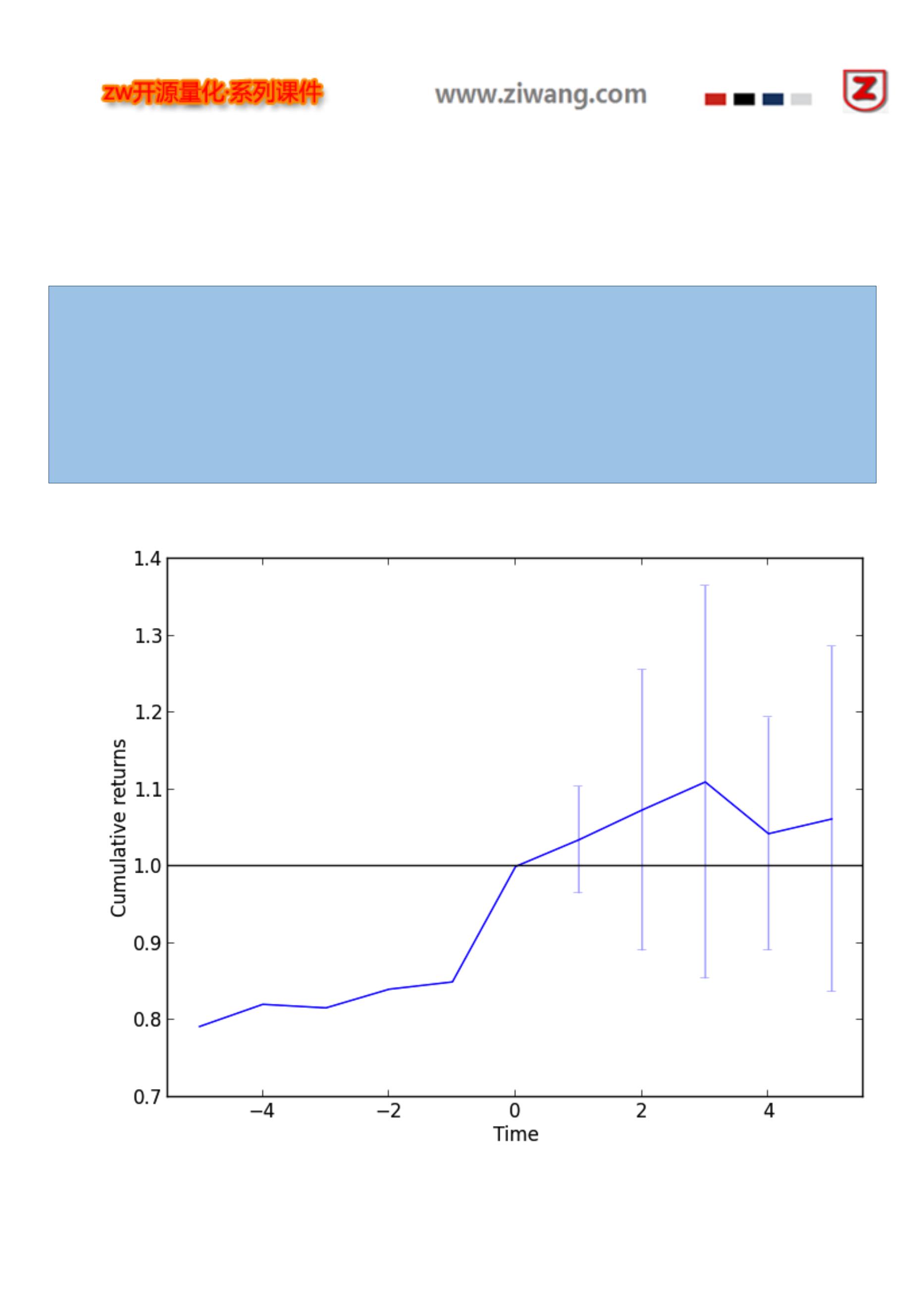
定义一个预设,作为“Buy-on-Gap 模式”事件的识别。
加载股票 bar 数据集。
运行分析。
绘制结果。
运行结果如下:
2013-09-20 23:30:45,340 yahoofinance [INFO] Creating data directory
2013-09-20 23:30:45,341 yahoofinance [INFO] Downloading AA 2008 to data/AA-2008-yahoofinance.csv
2013-09-20 23:30:46,092 yahoofinance [INFO] Downloading AES 2008 to data/AES-2008-yahoofinance.csv
2013-09-20 23:30:46,683 yahoofinance [INFO] Downloading AIG 2008 to data/AIG-2008-yahoofinance.csv
2013-09-20 23:30:47,260 yahoofinance [INFO] Downloading AA 2009 to data/AA-2009-yahoofinance.csv
2013-09-20 23:30:48,019 yahoofinance [INFO] Downloading AES 2009 to data/AES-2009-yahoofinance.csv
2013-09-20 23:30:48,761 yahoofinance [INFO] Downloading AIG 2009 to data/AIG-2009-yahoofinance.csv
14 events found
相关图表如下:
【注意】,累积收益与时间的关系。
83

(数据 API 文档,从略)
Xignite support
===============
The xignite package adds support for paper trading strategies using Xignite's live feeds via
the XigniteGlobalRealTime API (https://www.xignite.com/product/global-real-time-stock-quote-data/)
in conjunction with PyAlgoTrade backtesting capabilities.
xignite_ref
xignite – Xignite reference
Feeds
【类定义】
pyalgotrade.xignite.barfeed.LiveFeed(apiToken, identifiers, frequency, apiCallDelay=30, maxLen=1024)
基类 Bases: pyalgotrade.barfeed.BaseBarFeed
A real-time BarFeed that builds bars using XigniteGlobalRealTime API (https://www.xignite.com/product/global-real-
time-stock-quote-data/).
【参数】
apiToken (string.) – The API token to authenticate calls to Xignine APIs.
identifiers (list.) – A list with the fully qualified identifier for the securities including the exchange suffix.
frequency – The frequency of the bars. Must be greater than or equal to bar.Frequency.MINUTE and less than
bar.Frequency.DAY.
apiCallDelay (int.) – The delay in seconds between the bar’s close and the API call. This is necessary because the bar
may not be immediately available.
maxLen (int.) ,最大序列长度,pyalgotrade.dataseries.bards.BarDataSeries will hold. 当数据序列长度已满,再添
加新数值,一个相应数据包从队列头被丢弃。
【注意】
Valid exchange suffixes are:
ARCX: NYSE ARCA
CHIX: CHI-X EUROPE LIMITED
XASE: NYSE MKT EQUITIES
XNAS: NASDAQ
XNYS: NEW YORK STOCK EXCHANGE, INC
84

This goal of this example is to show how to put all the pieces together to paper trade a strategy using realtime feeds
supplied by Xignite (https://www.xignite.com/).
This example assumes that you’re already familiar with the basic concepts presented in the Tutorial section.
The key things to highlight are:
We’re using pyalgotrade.strategy.BaseStrategy instead of pyalgotrade.strategy.BacktestingStrategy as the base class.
This is not a backtest.
pyalgotrade.xignite.barfeed.LiveFeed is used to pull 5 minute bars directly from Xignite. In order to use this service you
need to sign up for the XigniteGlobalRealTime API (https://www.xignite.com/product/global-real-time-stock-quote-data/) to
get an API token.
As described in https://www.xignite.com/product/global-real-time-stock-quote-data/api/GetBar/, indentifiers are fully
qualified identifiers for the security as determined by the IdentifierType parameter. You must include the exchange suffix.
You can only paper trade while the market is open.
The 5 minute bars are requested 60 seconds after the 5 minute window closes because data may not be immediately
available.
85
from pyalgotrade import strategy

from pyalgotrade.bar import Frequency
from pyalgotrade.xignite import barfeed
from pyalgotrade.broker import backtesting
from pyalgotrade.technical import ma
class Strategy(strategy.BaseStrategy):
def __init__(self, feed, brk):
strategy.BaseStrategy.__init__(self, feed, brk)
self.__sma = {}
for instrument in feed.getRegisteredInstruments():
self.__sma[instrument] = ma.SMA(feed[instrument].getCloseDataSeries(), 5)
def onBars(self, bars):
for instrument in bars.getInstruments():
bar = bars[instrument]
self.info("%s: Open: %s High: %s Low: %s Close: %s Volume: %s SMA: %s" % (instrument,
bar.getOpen(), bar.getHigh(), bar.getLow(), bar.getClose(), bar.getVolume(), self.__sma[instrument][-1]))
def main():
# Replace apiToken with your own API token.
apiToken = "<YOUR API TOKEN HERE>"
# indentifiers are fully qualified identifiers for the security and must include the exchange suffix.
indentifiers = ["RIOl.CHIX", "HSBAl.CHIX"]
# apiCallDelay is necessary because the bar may not be immediately available.
apiCallDelay = 60
feed = barfeed.LiveFeed(apiToken, indentifiers, Frequency.MINUTE*5, apiCallDelay)
brk = backtesting.Broker(1000, feed)
myStrategy = Strategy(feed, brk)
myStrategy.run()
if __name__ == "__main__":
main()
结果输出如下:
86
2014-03-28 09:31:01,389 strategy [INFO] HSBAl.CHIX: Open: 6.093 High: 6.102 Low: 6.093 Close: 6.101 Volume:

45635.0 SMA: None
2014-03-28 09:31:01,390 strategy [INFO] RIOl.CHIX: Open: 33.08 High: 33.08 Low: 33.065 Close: 33.07 Volume:
2303.0 SMA: None
2014-03-28 09:36:01,494 strategy [INFO] HSBAl.CHIX: Open: 6.102 High: 6.102 Low: 6.099 Close: 6.099 Volume:
21043.0 SMA: None
2014-03-28 09:36:01,495 strategy [INFO] RIOl.CHIX: Open: 33.075 High: 33.09 Low: 33.055 Close: 33.055 Volume:
2909.0 SMA: None
2014-03-28 09:41:01,885 strategy [INFO] HSBAl.CHIX: Open: 6.101 High: 6.101 Low: 6.097 Close: 6.097 Volume:
29075.0 SMA: None
2014-03-28 09:41:01,886 strategy [INFO] RIOl.CHIX: Open: 33.04 High: 33.04 Low: 33.005 Close: 33.005 Volume:
895.0 SMA: None
2014-03-28 09:46:00,943 strategy [INFO] HSBAl.CHIX: Open: 6.098 High: 6.098 Low: 6.093 Close: 6.094 Volume:
17955.0 SMA: None
2014-03-28 09:46:00,943 strategy [INFO] RIOl.CHIX: Open: 33.005 High: 33.035 Low: 32.995 Close: 32.995 Volume:
4052.0 SMA: None
2014-03-28 09:51:01,604 strategy [INFO] HSBAl.CHIX: Open: 6.093 High: 6.099 Low: 6.092 Close: 6.097 Volume:
28046.0 SMA: 6.0976
2014-03-28 09:51:01,604 strategy [INFO] RIOl.CHIX: Open: 32.99 High: 33.025 Low: 32.985 Close: 32.99 Volume:
2823.0 SMA: 33.023
2014-03-28 09:56:01,511 strategy [INFO] HSBAl.CHIX: Open: 6.099 High: 6.1 Low: 6.096 Close: 6.098 Volume:
19713.0 SMA: 6.097
2014-03-28 09:56:01,511 strategy [INFO] RIOl.CHIX: Open: 32.98 High: 33.01 Low: 32.96 Close: 33.01 Volume:
1545.0 SMA: 33.011
.
.
.
When apiCallDelay is not long enough, or when there is no data at all, you may receive the following error message:
xignite [ERROR] No ticks available for Symbol:RIOl.CHIX from 3/28/2014 1:10:00 PM to 3/28/2014 1:11:00 PM.
87

(数据 API 文档,从略)
bitstamp
The bitstamp package adds support for paper trading and live trading Bitcoin strategies through Bitstamp
(https://www.bitstamp.net/).
Bitstamp support depends on:
* **ws4py** (https://github.com/Lawouach/WebSocket-for-Python)
* **tornado** (http://www.tornadoweb.org/en/stable/)
so be sure to have those installed before moving forward.
bitstamp_ref
WebSocket
This package has classes for the events emitted by Bitstamp’s streaming service. Check
https://www.bitstamp.net/websocket/ for more information.
【类定义】
pyalgotrade.bitstamp.wsclient.OrderBookUpdate(dateTime, eventDict)
基类 Bases: pyalgotrade.websocket.pusher.Event
An order book update event.
getAskPrices(),返回值:a list with the top 20 ask prices.
getAskVolumes(),返回值:a list with the top 20 ask volumes.
getBidPrices(),返回值:a list with the top 20 bid prices.
getBidVolumes(),返回值:a list with the top 20 bid volumes.
getDateTime(),返回值:the datetime.datetime when this event was received.
【类定义】
pyalgotrade.bitstamp.wsclient.Trade(dateTime, eventDict)
基类 Bases: pyalgotrade.websocket.pusher.Event
88

getAmount(),返回值:the trade amount.
getDateTime(),返回值:the datetime.datetime when this event was received.
getId(),返回值:the trade id.
getPrice(),返回值:the trade price.
LiveTradeFeed 数据源
【类定义】
pyalgotrade.bitstamp.barfeed.LiveTradeFeed(maxLen=1024)
基类 Bases: pyalgotrade.barfeed.BaseBarFeed
A real-time BarFeed that builds bars from live trades.
【参数】
maxLen (int.) ,最大序列长度,pyalgotrade.dataseries.bards.BarDataSeries will hold. 当数据序列长度已满,
再添加新数值,一个相应数据包从队列头被丢弃。
【注意】
that a Bar will be created for every trade, so open, high, low and close values will all be the same.
getOrderBookUpdateEvent(),返回值:the event that will be emitted as new trades are received from Bitstamp. To
subscribe to this event you need to pass in a callable object that receives one parameter:
A pyalgotrade.bitstamp.wsclient.OrderBookUpdate instance.
Brokers
【类定义】
pyalgotrade.bitstamp.broker.PaperTradingBroker(cash, barFeed, fee=0.0025)
基类 Bases: pyalgotrade.bitstamp.broker.BacktestingBroker
A Bitstamp paper trading broker.
【参数】
cash (int/float.) – The initial amount of cash.
barFeed (pyalgotrade.barfeed.BarFeed) – The bar feed that will provide the bars.
fee (float.) – The fee percentage for each order. Defaults to 0.5%.
【注意】
89
Only limit orders are supported.

Orders are automatically set as goodTillCanceled=True and allOrNone=False.
BUY_TO_COVER orders are mapped to BUY orders.
SELL_SHORT orders are mapped to SELL orders.
LiveBroker
【类定义】
pyalgotrade.bitstamp.broker.LiveBroker(clientId, key, secret)
基类 Bases: pyalgotrade.broker.Broker
A Bitstamp live broker.
【参数】
clientId (string.) – Client id.
key (string.) – API key.
secret (string.) – API secret.
【注意】
Only limit orders are supported.
Orders are automatically set as goodTillCanceled=True and allOrNone=False.
BUY_TO_COVER orders are mapped to BUY orders.
SELL_SHORT orders are mapped to SELL orders.
API access permissions should include:
Account balance
Open orders
Buy limit order
User transactions
Cancel order
Sell limit order
refreshAccountBalance()
Refreshes cash and BTC balance.
bitstamp_example
This goal of this simple SMA crossover example is to show how to put all the pieces together to paper trade a strategy
using realtime feeds supplied by Bitstamp (https://www.bitstamp.net/).
This example assumes that you’re already familiar with the basic concepts presented in the Tutorial section.
The key things to highlight are:
90
We’re using pyalgotrade.strategy.BaseStrategy instead of pyalgotrade.strategy.BacktestingStrategy as the base class.

This is not a backtest.
Trade events get notified via the call to onBars. No need to manually subscribe.
Order book update events are handled by manually subscribing to :
pyalgotrade.bitstamp.barfeed.LiveTradeFeed.getOrderBookUpdateEvent.
This is needed to be up to date with latest bid and ask prices.
91
from pyalgotrade.bitstamp import barfeed

from pyalgotrade.bitstamp import broker
from pyalgotrade import strategy
from pyalgotrade.technical import ma
from pyalgotrade.technical import cross
class Strategy(strategy.BaseStrategy):
def __init__(self, feed, brk):
strategy.BaseStrategy.__init__(self, feed, brk)
smaPeriod = 20
self.__instrument = "BTC"
self.__prices = feed[self.__instrument].getCloseDataSeries()
self.__sma = ma.SMA(self.__prices, smaPeriod)
self.__bid = None
self.__ask = None
self.__position = None
self.__posSize = 0.05
# Subscribe to order book update events to get bid/ask prices to trade.
feed.getOrderBookUpdateEvent().subscribe(self.__onOrderBookUpdate)
def __onOrderBookUpdate(self, orderBookUpdate):
bid = orderBookUpdate.getBidPrices()[0]
ask = orderBookUpdate.getAskPrices()[0]
if bid != self.__bid or ask != self.__ask:
self.__bid = bid
self.__ask = ask
self.info("Order book updated. Best bid: %s. Best ask: %s" % (self.__bid, self.__ask))
def onEnterOk(self, position):
self.info("Position opened at %s" % (position.getEntryOrder().getExecutionInfo().getPrice()))
def onEnterCanceled(self, position):
self.info("Position entry canceled")
self.__position = None
def onExitOk(self, position):
self.__position = None
self.info("Position closed at %s" % (position.getExitOrder().getExecutionInfo().getPrice()))
def onExitCanceled(self, position):
# If the exit was canceled, re-submit it.
self.__position.exitLimit(self.__bid)
def onBars(self, bars):
bar = bars[self.__instrument]
self.info("Price: %s. Volume: %s." % (bar.getClose(), bar.getVolume()))
# Wait until we get the current bid/ask prices.
if self.__ask is None:
return

93
2014-03-15 00:35:59,085 bitstamp [INFO] Initializing websocket client.

2014-03-15 00:35:59,452 bitstamp [INFO] Connection established.
2014-03-15 00:35:59,453 bitstamp [INFO] Initialization ok.
2014-03-15 00:36:30,726 strategy [INFO] Order book updated. Best bid: 629.6. Best ask: 630.0
2014-03-15 00:39:04,829 strategy [INFO] Order book updated. Best bid: 628.89. Best ask: 630.0
2014-03-15 00:44:18,845 strategy [INFO] Price: 630.0. Volume: 0.01.
2014-03-15 00:44:18,894 strategy [INFO] Order book updated. Best bid: 630.0. Best ask: 631.49
2014-03-15 00:44:29,719 strategy [INFO] Price: 630.0. Volume: 0.02.
2014-03-15 00:44:59,861 strategy [INFO] Price: 631.49. Volume: 0.03360823.
2014-03-15 00:45:37,425 strategy [INFO] Order book updated. Best bid: 630.0. Best ask: 631.6
2014-03-15 00:45:39,848 strategy [INFO] Price: 631.6. Volume: 3.35089782.
2014-03-15 00:45:39,918 strategy [INFO] Price: 632.24. Volume: 0.136.
2014-03-15 00:45:39,971 strategy [INFO] Price: 632.24. Volume: 0.138.
2014-03-15 00:45:40,057 strategy [INFO] Price: 632.25. Volume: 0.09076537.
2014-03-15 00:45:40,104 strategy [INFO] Price: 632.42. Volume: 0.74011681.
2014-03-15 00:45:40,205 strategy [INFO] Order book updated. Best bid: 630.0. Best ask: 632.42
2014-03-15 00:48:30,005 strategy [INFO] Price: 630.0. Volume: 4.97.
2014-03-15 00:48:30,039 strategy [INFO] Price: 629.6. Volume: 0.09.
2014-03-15 00:48:30,121 strategy [INFO] Price: 629.54. Volume: 0.09.
.
.
.
2014-03-15 00:48:33,053 strategy [INFO] Price: 625.55. Volume: 1.296299.
2014-03-15 00:48:33,164 strategy [INFO] Price: 625.52. Volume: 0.0924981.
2014-03-15 00:48:33,588 strategy [INFO] Price: 625.45. Volume: 13.46260589.
2014-03-15 00:48:33,635 strategy [INFO] Order book updated. Best bid: 629.26. Best ask: 632.42
2014-03-15 00:48:33,727 strategy [INFO] Price: 625.45. Volume: 1.75.
2014-03-15 00:48:34,261 strategy [INFO] Price: 625.48. Volume: 0.1.
2014-03-15 00:48:34,908 strategy [INFO] Order book updated. Best bid: 629.26. Best ask: 631.39
2014-03-15 00:48:36,203 strategy [INFO] Order book updated. Best bid: 629.26. Best ask: 632.42
.
.
.
2014-03-15 00:49:01,945 strategy [INFO] Order book updated. Best bid: 629.26. Best ask: 631.39
2014-03-15 00:49:34,743 strategy [INFO] Order book updated. Best bid: 629.26. Best ask: 631.28
2014-03-15 00:49:57,651 strategy [INFO] Price: 629.26. Volume: 0.66893865.
2014-03-15 00:49:57,651 strategy [INFO] Entry signal. Buy at 631.28
2014-03-15 00:50:09,934 strategy [INFO] Order book updated. Best bid: 629.26. Best ask: 631.39
2014-03-15 00:50:20,786 strategy [INFO] Order book updated. Best bid: 627.02. Best ask: 631.39
2014-03-15 00:50:25,658 strategy [INFO] Price: 631.39. Volume: 0.01.
2014-03-15 00:50:25,732 strategy [INFO] Price: 631.39. Volume: 0.01.
2014-03-15 00:50:25,791 strategy [INFO] Price: 631.93. Volume: 0.5.
2014-03-15 00:50:25,847 strategy [INFO] Price: 632.42. Volume: 0.25988319.
2014-03-15 00:50:25,900 strategy [INFO] Price: 632.42. Volume: 0.184.
2014-03-15 00:50:25,952 strategy [INFO] Price: 632.42. Volume: 0.184.
2014-03-15 00:50:26,000 strategy [INFO] Price: 632.42. Volume: 0.184.
2014-03-15 00:50:26,065 strategy [INFO] Price: 632.44. Volume: 0.184.
2014-03-15 00:50:26,139 strategy [INFO] Price: 632.97. Volume: 0.092.
2014-03-15 00:50:26,300 strategy [INFO] Order book updated. Best bid: 627.02. Best ask: 629.0
2014-03-15 00:50:26,398 strategy [INFO] Price: 633.1. Volume: 0.16211681.
2014-03-15 00:50:29,850 strategy [INFO] Position opened at 629.0
2014-03-15 00:50:29,850 strategy [INFO] Price: 629.0. Volume: 0.25152623.
2014-03-15 00:50:29,850 strategy [INFO] Exit signal. Sell at 627.02
In order to live trade this strategy you should use pyalgotrade.bitstamp.broker.LiveBroker instead of

pyalgotrade.bitstamp.broker.PaperTradingBroker.
【注意】
that if you try to live trade this strategy you will probably loose money. Before jumping to live trading, be sure to write
your own strategy, backtest and paper trade it thoroughly before risking real money.
bitcoin charts 比特币图表
The bitcoincharts package adds support for integrating with historical trade data supplied by
http://www.bitcoincharts.com/
for backtesting Bitcoin strategies.
Historical trade data in CSV format is described in
http://www.bitcoincharts.com/about/markets-api/, and files can be
downloaded from http://api.bitcoincharts.com/v1/csv/.
bitcoincharts_ref
Feeds
【类定义】
pyalgotrade.bitcoincharts.barfeed.CSVTradeFeed(timezone=None, maxLen=1024)
基类 Bases: pyalgotrade.barfeed.csvfeed.BarFeed
A BarFeed that builds bars from a Historic Trade Data CSV file as described in
http://www.bitcoincharts.com/about/markets-api/. Files can be downloaded from http://api.bitcoincharts.com/v1/csv/.
【参数】
timezone (A pytz timezone.) – An optional default timezone to use to localize bars. By default bars are loaded in UTC.
maxLen (int.) ,最大序列长度,pyalgotrade.dataseries.bards.BarDataSeries will hold. If not None, it must be greater
than 0. 当数据序列长度已满,再添加新数值,一个相应数据包从队列头被丢弃。
【注意】
A pyalgotrade.bar.Bar instance will be created for every trade, so open, high, low and close values will all be the same.
Files must be sorted with the unixtime column in ascending order.
addBarsFromCSV(path, instrument='BTC', timezone=None, fromDateTime=None, toDateTime=None)
Loads bars from a trades CSV formatted file.
95

path (string.) – The path to the file.
instrument (string.) – The instrument identifier.
timezone (A pytz timezone.) – An optional timezone to use to localize bars. By default bars are loaded in UTC.
fromDateTime (datetime.datetime.) – An optional datetime to use to filter bars to load. If supplied only those bars whose
datetime is greater than or equal to fromDateTime are loaded.
toDateTime (datetime.datetime.) – An optional datetime to use to filter bars to load. If supplied only those bars whose
datetime is lower than or equal to toDateTime are loaded.
【注意】
Every file that you load bars from must have trades in the same currency.
If fromDateTime or toDateTime are naive, they are treated as UTC.
bitcoincharts_example
Although it is absolutely possible to backtest a strategy with tick data as supplied by
http://www.bitcoincharts.com/about/markets-api/ using pyalgotrade.bitcoincharts.barfeed.CSVTradeFeed, you may want to
to backtest using summarized bars at a different frequency to make backtesting faster.
As of 12-Aug-2014, http://api.bitcoincharts.com/v1/csv/bitstampUSD.csv.gz has 4588830 events so we’ll transform a
portion of it into 30 minute bars for backtesting purposes with the following script:
from pyalgotrade.bitcoincharts import barfeed
from pyalgotrade.tools import resample
from pyalgotrade import bar
import datetime
def main():
barFeed = barfeed.CSVTradeFeed()
barFeed.addBarsFromCSV("bitstampUSD.csv", fromDateTime=datetime.datetime(2014, 1, 1))
resample.resample_to_csv(barFeed, bar.Frequency.MINUTE*30, "30min-bitstampUSD.csv")
if __name__ == "__main__":
main()
It will take some time to execute, so be patient. The resampled file should look like this:
96
Date Time,Open,High,Low,Close,Volume,Adj Close

2014-01-01 00:00:00,732.0,738.25,729.01,734.81,266.17955488,
2014-01-01 00:30:00,734.81,739.9,734.47,739.02,308.96802502,
2014-01-01 01:00:00,739.02,739.97,737.65,738.11,65.66924473,
2014-01-01 01:30:00,738.0,742.0,737.65,741.89,710.27165024,
2014-01-01 02:00:00,741.89,757.99,741.89,752.23,1085.13335011,
2014-01-01 02:30:00,752.23,755.0,747.0,747.2,272.03949342,
2014-01-01 04:00:00,744.98,748.02,744.98,747.19,104.65989075,
.
.
We can now take advantage of pyalgotrade.barfeed.csvfeed.GenericBarFeed to load the resampled file and backtest a
Bitcoin strategy. We’ll be using a VWAP momentum strategy for illustration purposes:
97

from pyalgotrade import strategy
from pyalgotrade import plotter
from pyalgotrade.technical import vwap
from pyalgotrade.barfeed import csvfeed
from pyalgotrade.bitstamp import broker
from pyalgotrade import broker as basebroker
class VWAPMomentum(strategy.BacktestingStrategy):
MIN_TRADE = 5
def __init__(self, feed, brk, instrument, vwapWindowSize, buyThreshold, sellThreshold):
strategy.BacktestingStrategy.__init__(self, feed, brk)
self.__instrument = instrument
self.__vwap = vwap.VWAP(feed[instrument], vwapWindowSize)
self.__buyThreshold = buyThreshold
self.__sellThreshold = sellThreshold
def _getActiveOrders(self):
orders = self.getBroker().getActiveOrders()
buy = filter(lambda o: o.isBuy(), orders)
sell = filter(lambda o: o.isSell(), orders)
return buy, sell
def _cancelOrders(self, orders):
brk = self.getBroker()
for o in orders:
self.info("Canceling order %s" % (o.getId()))
brk.cancelOrder(o)
def _buySignal(self, price):
buyOrders, sellOrders = self._getActiveOrders()
self._cancelOrders(sellOrders)
brk = self.getBroker()
cashAvail = brk.getCash() * 0.98
size = round(cashAvail / price, 3)
if len(buyOrders) == 0 and price*size > VWAPMomentum.MIN_TRADE:
self.info("Buy %s at %s" % (size, price))
try:
self.limitOrder(self.__instrument, price, size)
except Exception, e:
self.error("Failed to buy: %s" % (e))
def _sellSignal(self, price):
buyOrders, sellOrders = self._getActiveOrders()
self._cancelOrders(buyOrders)
brk = self.getBroker()
shares = brk.getShares(self.__instrument)
if len(sellOrders) == 0 and shares > 0:
self.info("Sell %s at %s" % (shares, price))
This is what the plot looks like:
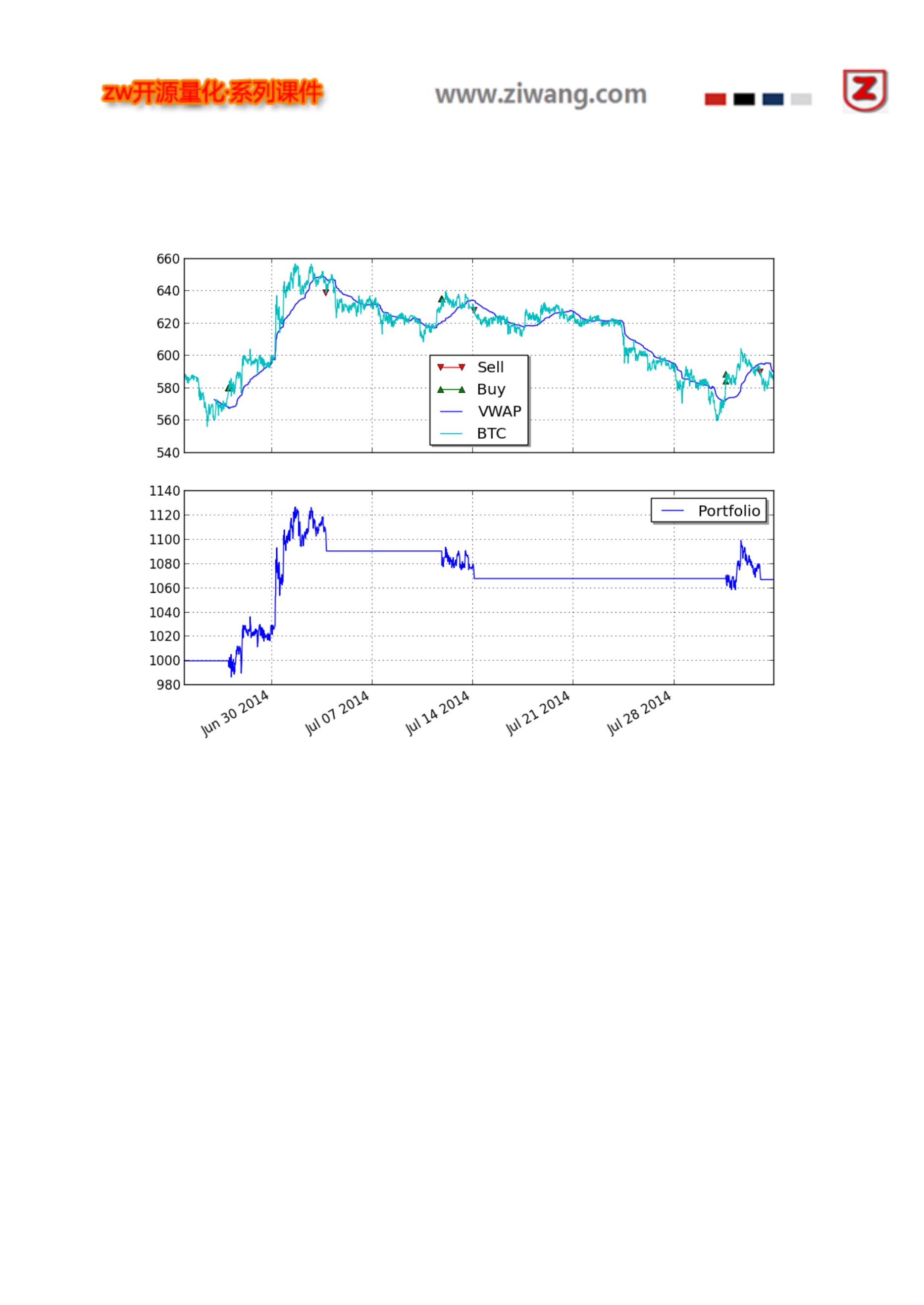
99

(数据 API 文档,从略)
Twitter support
===============
The twitter package adds support for receiving Twitter events in your strategy and incorporate
those in your trading decisions.
【注意】
that since this is a realtime feed, it only makes sense
in paper trading or real trading scenarios, but not in backtesting.
Twitter support depends on **tweepy** (https://github.com/tweepy/tweepy) so be sure
to have it installed before moving forward.
twitter_ref
Feed
【类定义】
pyalgotrade.twitter.feed.TwitterFeed(consumerKey, consumerSecret, accessToken, accessTokenSecret, track=[],
follow=[], languages=[])
基类 Bases: pyalgotrade.observer.Subject
Class responsible for connecting to Twitter’s public stream API and dispatching events. Check :
https://dev.twitter.com/docs/streaming-apis/streams/public for more information.
【参数】
consumerKey (string.) – Consumer key.
consumerSecret (string.) – Consumer secret.
accessToken (string.) – Access token.
accessTokenSecret (string.) – Access token secret.
track (list.) – A list of phrases which will be used to determine what Tweets will be delivered on the stream. A phrase
may be one or more terms separated by spaces, and a phrase will match if all of the terms in the phrase are present in the
Tweet, regardless of order and ignoring case.
follow (list.) – A list of user IDs, indicating the users whose Tweets should be delivered on the stream. Following
protected users is not supported.
languages (list.) – A list of language IDs a defined in http://tools.ietf.org/html/bcp47.
100

Go to http://dev.twitter.com and create an app. The consumer key and secret will be generated for you after that.
Create an access token under the “Your access token” section.
At least track or follow have to be set.
subscribe(callback)
Subscribe to Twitter events. The event handler will receive a dictionary with the data as defined in:
https://dev.twitter.com/docs/streaming-apis/messages#Public_stream_messages.
twitter_example
This goal of this simple example is to show you how to put all the pieces together to incorporate Twitter events in a
strategy. We will be using Bitstamp’s live feed since backtesting with Twitter is not supported so please take a look at the
Bitstamp Example section before moving forward.
In order to connect to Twitter’s API you’ll need:
Consumer key
Consumer secret
Access token
Access token secret
Go to http://dev.twitter.com and create an app. The consumer key and secret will be generated for you after that. Then
you’ll need to create an access token under the “Your access token” section.
The key things to highlight are:
We’re using pyalgotrade.strategy.BaseStrategy instead of pyalgotrade.strategy.BacktestingStrategy as the base class.
This is not a backtest.
The pyalgotrade.twitter.feed.TwitterFeed instance has to be included in the strategy event dispatch loop before running
the strategy.
101
from pyalgotrade import strategy

from pyalgotrade.bitstamp import barfeed
from pyalgotrade.bitstamp import broker
from pyalgotrade.twitter import feed as twitterfeed
class Strategy(strategy.BaseStrategy):
def __init__(self, feed, brk, twitterFeed):
strategy.BaseStrategy.__init__(self, feed, brk)
self.__instrument = "BTC"
# Subscribe to Twitter events.
twitterFeed.subscribe(self.__onTweet)
def __onTweet(self, data):
# Refer to https://dev.twitter.com/docs/streaming-apis/messages#Public_stream_messages for
# the information available in data.
try:
self.info("Twitter: %s" % (data["text"]))
except KeyError:
pass
def onBars(self, bars):
bar = bars[self.__instrument]
self.info("Price: %s. Volume: %s." % (bar.getClose(), bar.getVolume()))
def main():
# Go to http://dev.twitter.com and create an app.
# The consumer key and secret will be generated for you after that.
consumer_key = "<YOUR-CONSUMER-KEY-HERE>"
consumer_secret = "<YOUR-CONSUMER-SECRET-HERE>"
# After the step above, you will be redirected to your app's page.
# Create an access token under the the "Your access token" section
access_token = "<YOUR-ACCESS-TOKEN-HERE>"
access_token_secret = "<YOUR-ACCESS-TOKEN-SECRET-HERE>"
# Create a twitter feed to track BitCoin related events.
track = ["bitcoin", "btc", "mtgox", "bitstamp", "xapo"]
follow = []
languages = ["en"]
twitterFeed = twitterfeed.TwitterFeed(consumer_key, consumer_secret, access_token, access_token_secret, track,
follow, languages)
barFeed = barfeed.LiveTradeFeed()
brk = broker.PaperTradingBroker(1000, barFeed)
strat = Strategy(barFeed, brk, twitterFeed)
# It is VERY important to add twitterFeed to the event dispatch loop before running the strategy.
strat.getDispatcher().addSubject(twitterFeed)
strat.run()

103
2014-03-15 02:42:07,696 bitstamp [INFO] Initializing client.

2014-03-15 02:42:08,174 bitstamp [INFO] Connection established.
2014-03-15 02:42:08,175 bitstamp [INFO] Initialization ok.
2014-03-15 02:42:08,175 twitter [INFO] Initializing client.
2014-03-15 02:42:09,238 twitter [INFO] Connected.
2014-03-15 02:42:15,107 strategy [INFO] Twitter: Warren Buffett Urges Investors to ‘Stay Away’ from Bitcoin
http://t.co/WWRCr3rfob
2014-03-15 02:42:22,926 strategy [INFO] Twitter: FundingUnion Inc. Bitcoin MLM Social Build - The Currently in
BETA version - Join Today : http://t.co/bxcfoBV0I4 #Bitcoin #MLM #SocialMedia
2014-03-15 02:42:23,577 strategy [INFO] Twitter: #News Alleged Bitcoin creator denies he's the one
http://t.co/gmilO85smQ #DailyNews
2014-03-15 02:42:29,378 strategy [INFO] Twitter: RT @Tom_Cruis3: #News Alleged Bitcoin creator denies he's the
one http://t.co/gmilO85smQ #DailyNews
2014-03-15 02:42:38,012 strategy [INFO] Twitter: Need for speed dulu at BTC XXI
2014-03-15 02:42:40,162 strategy [INFO] Price: 632.97. Volume: 0.51896614.
2014-03-15 02:42:45,867 strategy [INFO] Twitter: Analysis of the leaked MTGOX database http://t.co/6ty8EupGh9 via
2014-03-15 02:42:46,761 strategy [INFO] Twitter: [ANN] After MtGox implosion, this is the first exchange to
implement transparent cold storage http://t.co/EyafH5jXsM #reddit #bitcoin
2014-03-15 02:42:46,825 strategy [INFO] Twitter: @abatalion @naval @cdixon you guys remember CentMail?
http://t.co/iihgCS4OwJ would be interesting with a BTC twist.
2014-03-15 02:42:47,285 strategy [INFO] Twitter: Help me convince my Dad to mine Bitcoins! http://t.co/fxboBooINu
#reddit #bitcoin
2014-03-15 02:42:47,492 strategy [INFO] Twitter: RT @VentureBeat: Warren Buffett: Bitcoin is a 'mirage'
http://t.co/B1FcvZKJQS by @xBarryLevine
2014-03-15 02:42:47,625 strategy [INFO] Twitter: I believe in bitcoin as not only a easy exchange of value but an 'anti
bank movement' with occupy wall street, environmentalists, cons...
2014-03-15 02:42:47,979 strategy [INFO] Twitter: Bitcoin protocol/algorithm is being managed by a bunch of people.
Isn't that a vulnerability? http://t.co/HJaCkgC6zT #reddit #bitcoin
2014-03-15 02:42:48,388 strategy [INFO] Twitter: Does anyone still think Dorian Nakomoto is Satoshi Nakamoto?
http://t.co/v2N8SEZzxC #reddit #bitcoin
2014-03-15 02:42:53,313 strategy [INFO] Twitter: Last sale price at #Bitstamp was $632.99 per #Bitcoin - Free SMS
price alerts from 10 exchanges at http://t.co/jsM3JqlvZd
2014-03-15 02:42:54,058 strategy [INFO] Twitter: Last sale price at #BTCe was $623.00 per #Bitcoin - Free SMS price
alerts from 10 exchanges at http://t.co/jsM3JqlvZd
2014-03-15 02:42:54,059 strategy [INFO] Twitter: Last sale price at #Coinbase was $632.99 per #Bitcoin - Free SMS
price alerts from 10 exchanges at http://t.co/jsM3JqlvZd
2014-03-15 02:42:57,148 strategy [INFO] Twitter: GET PAID WITH USD OR BITCOIN TO PROMOTE LINKS!!!...
http://t.co/HKANbuZQHM
2014-03-15 02:43:00,845 strategy [INFO] Twitter: We're back! Bitcoin expert Pete Watson explaining just how the
incredible #cryptocurrency works #bitcoin #HongKong http://t.co/CJpTA6RujJ
2014-03-15 02:43:28,001 strategy [INFO] Twitter: Bitcoin's COO Explains What #Bitcoin Is http://t.co/cQ1rVxYSUJ
via @YouTube
2014-03-15 02:43:31,888 strategy [INFO] Twitter: #BINARY-OPTIONS! and BITCOIN! Trade Area! With fantastic
profits of up to 1,000% per trade and even more. @ http://t.co/R9c9J4Q5VA
2014-03-15 02:43:42,148 strategy [INFO] Twitter: GET PAID WITH USD OR BITCOIN TO PROMOTE LINKS!!!...
http://t.co/bD6cacFKTs

pyalgotrade.talibext.indicator 模块,集成 TA-Lib 金融算法软件包,采用 Python 模式,封装接口 API。
大家可以直接调用 TA-Lib 函数,集成的 talib 使用的是 DataSeries、BarDataSeries 数据序列,而不是 numpy 数
组。
调用方法如下:
import numpy
import talib
data = numpy.random.random(100)
upper, middle, lower = talib.BBANDS(data, matype=talib.MA_T3)
在策略当中,使用 pyalgotrade.talibext.indicator 模块,可以这样操作:
def onBars(self, bars):
closeDs = self.getFeed().getDataSeries("orcl").getCloseDataSeries()
upper, middle, lower = pyalgotrade.talibext.indicator.BBANDS(closeDs, 100, matype=talib.MA_T3)
if upper != None:
print "%s" % upper[-1]
每个 talib 函数,接收一个或多个 dataseries 数据(大多数只有一个)。
在以上的示例中,我们从过去的收盘价格,计算布林带的区间参数。
如果参数数据是 DataSeries 格式,你可以直接调用,类似以上 demo。
,名称 ds ,那么你应该通过一个常规 pyalgotrade.dataseries.DataSeries 实例,就像一个 上面的例子所示。
If the parameter name is **ds**, then you should pass a regular :class:`pyalgotrade.dataseries.DataSeries` instance, like
the one
shown in the example above.
If the parameter name is **barDs**, then you should pass a :class:`pyalgotrade.dataseries.bards.BarDataSeries` instance,
like in the next
如果参数格式是:BarDataSeries,请查看以下例子:
105

barDs = self.getFeed().getDataSeries("orcl")
sar = indicator.SAR(barDs, 100)
if sar != None:
print "%s" % sar[-1]
以下是集成的 TA-Lib 函数:
(未翻译,请参见 http://ziwang.com/?p=326
zw 量化开源课件·《TA-LIB 函数大全·zw 中文注解版》)
pyalgotrade.talibext.indicator.AD(barDs, count)
Chaikin A/D Line
pyalgotrade.talibext.indicator.ADOSC(barDs, count, fastperiod=-2147483648, slowperiod=-2147483648)
Chaikin A/D Oscillator
pyalgotrade.talibext.indicator.ADX(barDs, count, timeperiod=-2147483648)
Average Directional Movement Index
pyalgotrade.talibext.indicator.ADXR(barDs, count, timeperiod=-2147483648)
Average Directional Movement Index Rating
pyalgotrade.talibext.indicator.APO(ds, count, fastperiod=-2147483648, slowperiod=-2147483648, matype=0)
Absolute Price Oscillator
pyalgotrade.talibext.indicator.AROON(barDs, count, timeperiod=-2147483648)
Aroon
pyalgotrade.talibext.indicator.AROONOSC(barDs, count, timeperiod=-2147483648)
Aroon Oscillator
pyalgotrade.talibext.indicator.ATR(barDs, count, timeperiod=-2147483648)
Average True Range
pyalgotrade.talibext.indicator.AVGPRICE(barDs, count)
Average Price
pyalgotrade.talibext.indicator.BBANDS(ds, count, timeperiod=-2147483648, nbdevup=-4e+37, nbdevdn=-4e+37,
matype=0)
Bollinger Bands
pyalgotrade.talibext.indicator.BETA(ds1, ds2, count, timeperiod=-2147483648)
Beta
106
pyalgotrade.talibext.indicator.BOP(barDs, count)

Balance Of Power
pyalgotrade.talibext.indicator.CCI(barDs, count, timeperiod=-2147483648)
Commodity Channel Index
pyalgotrade.talibext.indicator.CDL2CROWS(barDs, count)
Two Crows
pyalgotrade.talibext.indicator.CDL3BLACKCROWS(barDs, count)
Three Black Crows
pyalgotrade.talibext.indicator.CDL3INSIDE(barDs, count)
Three Inside Up/Down
pyalgotrade.talibext.indicator.CDL3LINESTRIKE(barDs, count)
Three-Line Strike
pyalgotrade.talibext.indicator.CDL3OUTSIDE(barDs, count)
Three Outside Up/Down
pyalgotrade.talibext.indicator.CDL3STARSINSOUTH(barDs, count)
Three Stars In The South
pyalgotrade.talibext.indicator.CDL3WHITESOLDIERS(barDs, count)
Three Advancing White Soldiers
pyalgotrade.talibext.indicator.CDLABANDONEDBABY(barDs, count, penetration=-4e+37)
Abandoned Baby
pyalgotrade.talibext.indicator.CDLADVANCEBLOCK(barDs, count)
Advance Block
pyalgotrade.talibext.indicator.CDLBELTHOLD(barDs, count)
Belt-hold
pyalgotrade.talibext.indicator.CDLBREAKAWAY(barDs, count)
Breakaway
pyalgotrade.talibext.indicator.CDLCLOSINGMARUBOZU(barDs, count)
Closing Marubozu
pyalgotrade.talibext.indicator.CDLCONCEALBABYSWALL(barDs, count)
Concealing Baby Swallow
107
pyalgotrade.talibext.indicator.CDLCOUNTERATTACK(barDs, count)

Counterattack
pyalgotrade.talibext.indicator.CDLDARKCLOUDCOVER(barDs, count, penetration=-4e+37)
Dark Cloud Cover
pyalgotrade.talibext.indicator.CDLDOJI(barDs, count)
Doji
pyalgotrade.talibext.indicator.CDLDOJISTAR(barDs, count)
Doji Star
pyalgotrade.talibext.indicator.CDLDRAGONFLYDOJI(barDs, count)
Dragonfly Doji
pyalgotrade.talibext.indicator.CDLENGULFING(barDs, count)
Engulfing Pattern
pyalgotrade.talibext.indicator.CDLEVENINGDOJISTAR(barDs, count, penetration=-4e+37)
Evening Doji Star
pyalgotrade.talibext.indicator.CDLEVENINGSTAR(barDs, count, penetration=-4e+37)
Evening Star
pyalgotrade.talibext.indicator.CDLGAPSIDESIDEWHITE(barDs, count)
Up/Down-gap side-by-side white lines
pyalgotrade.talibext.indicator.CDLGRAVESTONEDOJI(barDs, count)
Gravestone Doji
pyalgotrade.talibext.indicator.CDLHAMMER(barDs, count)
Hammer
pyalgotrade.talibext.indicator.CDLHANGINGMAN(barDs, count)
Hanging Man
pyalgotrade.talibext.indicator.CDLHARAMI(barDs, count)
Harami Pattern
pyalgotrade.talibext.indicator.CDLHARAMICROSS(barDs, count)
Harami Cross Pattern
pyalgotrade.talibext.indicator.CDLHIGHWAVE(barDs, count)
High-Wave Candle
108
pyalgotrade.talibext.indicator.CDLHIKKAKE(barDs, count)

Hikkake Pattern
pyalgotrade.talibext.indicator.CDLHIKKAKEMOD(barDs, count)
Modified Hikkake Pattern
pyalgotrade.talibext.indicator.CDLHOMINGPIGEON(barDs, count)
Homing Pigeon
pyalgotrade.talibext.indicator.CDLIDENTICAL3CROWS(barDs, count)
Identical Three Crows
pyalgotrade.talibext.indicator.CDLINNECK(barDs, count)
In-Neck Pattern
pyalgotrade.talibext.indicator.CDLINVERTEDHAMMER(barDs, count)
Inverted Hammer
pyalgotrade.talibext.indicator.CDLKICKING(barDs, count)
Kicking
pyalgotrade.talibext.indicator.CDLKICKINGBYLENGTH(barDs, count)
Kicking - bull/bear determined by the longer marubozu
pyalgotrade.talibext.indicator.CDLLADDERBOTTOM(barDs, count)
Ladder Bottom
pyalgotrade.talibext.indicator.CDLLONGLEGGEDDOJI(barDs, count)
Long Legged Doji
pyalgotrade.talibext.indicator.CDLLONGLINE(barDs, count)
Long Line Candle
pyalgotrade.talibext.indicator.CDLMARUBOZU(barDs, count)
Marubozu
pyalgotrade.talibext.indicator.CDLMATCHINGLOW(barDs, count)
Matching Low
pyalgotrade.talibext.indicator.CDLMATHOLD(barDs, count, penetration=-4e+37)
Mat Hold
pyalgotrade.talibext.indicator.CDLMORNINGDOJISTAR(barDs, count, penetration=-4e+37)
Morning Doji Star
109
pyalgotrade.talibext.indicator.CDLMORNINGSTAR(barDs, count, penetration=-4e+37)

Morning Star
pyalgotrade.talibext.indicator.CDLONNECK(barDs, count)
On-Neck Pattern
pyalgotrade.talibext.indicator.CDLPIERCING(barDs, count)
Piercing Pattern
pyalgotrade.talibext.indicator.CDLRICKSHAWMAN(barDs, count)
Rickshaw Man
pyalgotrade.talibext.indicator.CDLRISEFALL3METHODS(barDs, count)
Rising/Falling Three Methods
pyalgotrade.talibext.indicator.CDLSEPARATINGLINES(barDs, count)
Separating Lines
pyalgotrade.talibext.indicator.CDLSHOOTINGSTAR(barDs, count)
Shooting Star
pyalgotrade.talibext.indicator.CDLSHORTLINE(barDs, count)
Short Line Candle
pyalgotrade.talibext.indicator.CDLSPINNINGTOP(barDs, count)
Spinning Top
pyalgotrade.talibext.indicator.CDLSTALLEDPATTERN(barDs, count)
Stalled Pattern
pyalgotrade.talibext.indicator.CDLSTICKSANDWICH(barDs, count)
Stick Sandwich
pyalgotrade.talibext.indicator.CDLTAKURI(barDs, count)
Takuri (Dragonfly Doji with very long lower shadow)
pyalgotrade.talibext.indicator.CDLTASUKIGAP(barDs, count)
Tasuki Gap
pyalgotrade.talibext.indicator.CDLTHRUSTING(barDs, count)
Thrusting Pattern
pyalgotrade.talibext.indicator.CDLTRISTAR(barDs, count)
Tristar Pattern
110
pyalgotrade.talibext.indicator.CDLUNIQUE3RIVER(barDs, count)

Unique 3 River
pyalgotrade.talibext.indicator.CDLUPSIDEGAP2CROWS(barDs, count)
Upside Gap Two Crows
pyalgotrade.talibext.indicator.CDLXSIDEGAP3METHODS(barDs, count)
Upside/Downside Gap Three Methods
pyalgotrade.talibext.indicator.CMO(ds, count, timeperiod=-2147483648)
Chande Momentum Oscillator
pyalgotrade.talibext.indicator.CORREL(ds1, ds2, count, timeperiod=-2147483648)
Pearson’s Correlation Coefficient (r)
pyalgotrade.talibext.indicator.DEMA(ds, count, timeperiod=-2147483648)
Double Exponential Moving Average
pyalgotrade.talibext.indicator.DX(barDs, count, timeperiod=-2147483648)
Directional Movement Index
pyalgotrade.talibext.indicator.EMA(ds, count, timeperiod=-2147483648)
Exponential Moving Average
pyalgotrade.talibext.indicator.HT_DCPERIOD(ds, count)
Hilbert Transform - Dominant Cycle Period
pyalgotrade.talibext.indicator.HT_DCPHASE(ds, count)
Hilbert Transform - Dominant Cycle Phase
pyalgotrade.talibext.indicator.HT_PHASOR(ds, count)
Hilbert Transform - Phasor Components
pyalgotrade.talibext.indicator.HT_SINE(ds, count)
Hilbert Transform - SineWave
pyalgotrade.talibext.indicator.HT_TRENDLINE(ds, count)
Hilbert Transform - Instantaneous Trendline
pyalgotrade.talibext.indicator.HT_TRENDMODE(ds, count)
Hilbert Transform - Trend vs Cycle Mode
pyalgotrade.talibext.indicator.KAMA(ds, count, timeperiod=-2147483648)
Kaufman Adaptive Moving Average
111
pyalgotrade.talibext.indicator.LINEARREG(ds, count, timeperiod=-2147483648)

Linear Regression
pyalgotrade.talibext.indicator.LINEARREG_ANGLE(ds, count, timeperiod=-2147483648)
Linear Regression Angle
pyalgotrade.talibext.indicator.LINEARREG_INTERCEPT(ds, count, timeperiod=-2147483648)
Linear Regression Intercept
pyalgotrade.talibext.indicator.LINEARREG_SLOPE(ds, count, timeperiod=-2147483648)
Linear Regression Slope
pyalgotrade.talibext.indicator.MA(ds, count, timeperiod=-2147483648, matype=0)
All Moving Average
pyalgotrade.talibext.indicator.MACD(ds, count, fastperiod=-2147483648, slowperiod=-2147483648, signalperiod=-
2147483648)
Moving Average Convergence/Divergence
pyalgotrade.talibext.indicator.MACDEXT(ds, count, fastperiod=-2147483648, fastmatype=0, slowperiod=-2147483648,
slowmatype=0, signalperiod=-2147483648, signalmatype=0)
MACD with controllable MA type
pyalgotrade.talibext.indicator.MACDFIX(ds, count, signalperiod=-2147483648)
Moving Average Convergence/Divergence Fix 12/26
pyalgotrade.talibext.indicator.MAMA(ds, count, fastlimit=-4e+37, slowlimit=-4e+37)
MESAAdaptive Moving Average
pyalgotrade.talibext.indicator.MAX(ds, count, timeperiod=-2147483648)
Highest value over a specified period
pyalgotrade.talibext.indicator.MAXINDEX(ds, count, timeperiod=-2147483648)
Index of highest value over a specified period
pyalgotrade.talibext.indicator.MEDPRICE(barDs, count)
Median Price
pyalgotrade.talibext.indicator.MFI(barDs, count, timeperiod=-2147483648)
Money Flow Index
pyalgotrade.talibext.indicator.MIDPOINT(ds, count, timeperiod=-2147483648)
MidPoint over period
pyalgotrade.talibext.indicator.MIDPRICE(barDs, count, timeperiod=-2147483648)
112

pyalgotrade.talibext.indicator.MIN(ds, count, timeperiod=-2147483648)
Lowest value over a specified period
pyalgotrade.talibext.indicator.MININDEX(ds, count, timeperiod=-2147483648)
Index of lowest value over a specified period
pyalgotrade.talibext.indicator.MINMAX(ds, count, timeperiod=-2147483648)
Lowest and highest values over a specified period
pyalgotrade.talibext.indicator.MINMAXINDEX(ds, count, timeperiod=-2147483648)
Indexes of lowest and highest values over a specified period
pyalgotrade.talibext.indicator.MINUS_DI(barDs, count, timeperiod=-2147483648)
Minus Directional Indicator
pyalgotrade.talibext.indicator.MINUS_DM(barDs, count, timeperiod=-2147483648)
Minus Directional Movement
pyalgotrade.talibext.indicator.MOM(ds, count, timeperiod=-2147483648)
Momentum
pyalgotrade.talibext.indicator.NATR(barDs, count, timeperiod=-2147483648)
Normalized Average True Range
pyalgotrade.talibext.indicator.OBV(ds1, volumeDs, count)
On Balance Volume
pyalgotrade.talibext.indicator.PLUS_DI(barDs, count, timeperiod=-2147483648)
Plus Directional Indicator
pyalgotrade.talibext.indicator.PLUS_DM(barDs, count, timeperiod=-2147483648)
Plus Directional Movement
pyalgotrade.talibext.indicator.PPO(ds, count, fastperiod=-2147483648, slowperiod=-2147483648, matype=0)
Percentage Price Oscillator
pyalgotrade.talibext.indicator.ROC(ds, count, timeperiod=-2147483648)
Rate of change : ((price/prevPrice)-1)*100
pyalgotrade.talibext.indicator.ROCP(ds, count, timeperiod=-2147483648)
Rate of change Percentage: (price-prevPrice)/prevPrice
pyalgotrade.talibext.indicator.ROCR(ds, count, timeperiod=-2147483648)
113
Rate of change ratio: (price/prevPrice)

pyalgotrade.talibext.indicator.ROCR100(ds, count, timeperiod=-2147483648)
Rate of change ratio 100 scale: (price/prevPrice)*100
pyalgotrade.talibext.indicator.RSI(ds, count, timeperiod=-2147483648)
Relative Strength Index
pyalgotrade.talibext.indicator.SAR(barDs, count, acceleration=-4e+37, maximum=-4e+37)
Parabolic SAR
pyalgotrade.talibext.indicator.SAREXT(barDs, count, startvalue=-4e+37, offsetonreverse=-4e+37,
accelerationinitlong=-4e+37, accelerationlong=-4e+37, accelerationmaxlong=-4e+37, accelerationinitshort=-4e+37,
accelerationshort=-4e+37, accelerationmaxshort=-4e+37)
Parabolic SAR - Extended
pyalgotrade.talibext.indicator.SMA(ds, count, timeperiod=-2147483648)
Simple Moving Average
pyalgotrade.talibext.indicator.STDDEV(ds, count, timeperiod=-2147483648, nbdev=-4e+37)
Standard Deviation
pyalgotrade.talibext.indicator.STOCH(barDs, count, fastk_period=-2147483648, slowk_period=-2147483648,
slowk_matype=0, slowd_period=-2147483648, slowd_matype=0)
Stochastic
pyalgotrade.talibext.indicator.STOCHF(barDs, count, fastk_period=-2147483648, fastd_period=-2147483648,
fastd_matype=0)
Stochastic Fast
pyalgotrade.talibext.indicator.STOCHRSI(ds, count, timeperiod=-2147483648, fastk_period=-2147483648,
fastd_period=-2147483648, fastd_matype=0)
Stochastic Relative Strength Index
pyalgotrade.talibext.indicator.SUM(ds, count, timeperiod=-2147483648)
Summation
pyalgotrade.talibext.indicator.T3(ds, count, timeperiod=-2147483648, vfactor=-4e+37)
Triple Exponential Moving Average (T3)
pyalgotrade.talibext.indicator.TEMA(ds, count, timeperiod=-2147483648)
Triple Exponential Moving Average
pyalgotrade.talibext.indicator.TRANGE(barDs, count)
True Range
114
pyalgotrade.talibext.indicator.TRIMA(ds, count, timeperiod=-2147483648)

Triangular Moving Average
pyalgotrade.talibext.indicator.TRIX(ds, count, timeperiod=-2147483648)
1-day Rate-Of-Change (ROC) of a Triple Smooth EMA
pyalgotrade.talibext.indicator.TSF(ds, count, timeperiod=-2147483648)
Time Series Forecast
pyalgotrade.talibext.indicator.TYPPRICE(barDs, count)
Typical Price
pyalgotrade.talibext.indicator.ULTOSC(barDs, count, timeperiod1=-2147483648, timeperiod2=-2147483648,
timeperiod3=-2147483648)
Ultimate Oscillator
pyalgotrade.talibext.indicator.VAR(ds, count, timeperiod=-2147483648, nbdev=-4e+37)
Variance
pyalgotrade.talibext.indicator.WCLPRICE(barDs, count)
Weighted Close Price
pyalgotrade.talibext.indicator.WILLR(barDs, count, timeperiod=-2147483648)
Williams’ %R
pyalgotrade.talibext.indicator.WMA(ds, count, timeperiod=-2147483648)
Weighted Moving Average
115

当时我正在参加 2012“量化投资课程第一部”(Computational Investing Part I)。
我在其中的几组作业当中。使用了这套 PyAlgoTrade 软件。
作业 1
这个作业,需要选择 4 支股票,在 2011 年,投资总计 100000 美元(10w 美元),并计算以下数据:
最终组合价值值
年收益回报
平均每日收益率
日收益率方差
夏普比率
使用以下命令,下载所需数据:
python -c "from pyalgotrade.tools import yahoofinance; yahoofinance.download_daily_bars('aeti', 2011, 'aeti-2011-
yahoofinance.csv')"
python -c "from pyalgotrade.tools import yahoofinance; yahoofinance.download_daily_bars('egan', 2011, 'egan-2011-
yahoofinance.csv')"
python -c "from pyalgotrade.tools import yahoofinance; yahoofinance.download_daily_bars('glng', 2011, 'glng-2011-
yahoofinance.csv')"
python -c "from pyalgotrade.tools import yahoofinance; yahoofinance.download_daily_bars('simo', 2011, 'simo-2011-
yahoofinance.csv')"
相关程序,代码如下:
116
from pyalgotrade import strategy

from pyalgotrade.barfeed import yahoofeed
from pyalgotrade.stratanalyzer import returns
from pyalgotrade.stratanalyzer import sharpe
from pyalgotrade.utils import stats
class MyStrategy(strategy.BacktestingStrategy):
def __init__(self, feed):
strategy.BacktestingStrategy.__init__(self, feed, 1000000)
# We wan't to use adjusted close prices instead of close.
self.setUseAdjustedValues(True)
# Place the orders to get them processed on the first bar.
orders = {
"aeti": 297810,
"egan": 81266,
"glng": 11095,
"simo": 17293,
}
for instrument, quantity in orders.items():
self.marketOrder(instrument, quantity, onClose=True, allOrNone=True)
def onBars(self, bars):
pass
# Load the yahoo feed from CSV files.
feed = yahoofeed.Feed()
feed.addBarsFromCSV("aeti", "aeti-2011-yahoofinance.csv")
feed.addBarsFromCSV("egan", "egan-2011-yahoofinance.csv")
feed.addBarsFromCSV("glng", "glng-2011-yahoofinance.csv")
feed.addBarsFromCSV("simo", "simo-2011-yahoofinance.csv")
# Evaluate the strategy with the feed's bars.
myStrategy = MyStrategy(feed)
# Attach returns and sharpe ratio analyzers.
retAnalyzer = returns.Returns()
myStrategy.attachAnalyzer(retAnalyzer)
sharpeRatioAnalyzer = sharpe.SharpeRatio()
myStrategy.attachAnalyzer(sharpeRatioAnalyzer)
# Run the strategy
myStrategy.run()
# Print the results.
print "Final portfolio value: $%.2f" % myStrategy.getResult()
print "Anual return: %.2f %%" % (retAnalyzer.getCumulativeReturns()[-1] * 100)
print "Average daily return: %.2f %%" % (stats.mean(retAnalyzer.getReturns()) * 100)
print "Std. dev. daily return: %.4f" % (stats.stddev(retAnalyzer.getReturns()))
print "Sharpe ratio: %.2f" % (sharpeRatioAnalyzer.getSharpeRatio(0))

Final portfolio value: $1604979.11
Anual return: 60.50 %
Average daily return: 0.20 %
Std. dev. daily return: 0.0136
Sharpe ratio: 2.30
作业 3,4
For these assignments I had to build a market simulation tool that loads orders from a file, executes those, and prints the
results for each day.
对于这些作业,我不得不建立一个市场仿真工具,从文件加载命令,执行。
输出,每天的交易结果。
作业 3 的订单文件,类似如下:
2011,1,10,AAPL,Buy,1500,
2011,1,13,AAPL,Sell,1500,
2011,1,13,IBM,Buy,4000,
2011,1,26,GOOG,Buy,1000,
2011,2,2,XOM,Sell,4000,
2011,2,10,XOM,Buy,4000,
2011,3,3,GOOG,Sell,1000,
2011,3,3,IBM,Sell,2200,
2011,6,3,IBM,Sell,3300,
2011,5,3,IBM,Buy,1500,
2011,6,10,AAPL,Buy,1200,
2011,8,1,GOOG,Buy,55,
2011,8,1,GOOG,Sell,55,
2011,12,20,AAPL,Sell,1200,
下面是,一段模拟市场操作程序:
118

import datetime
import os
from pyalgotrade.barfeed import yahoofeed
from pyalgotrade.barfeed import csvfeed
from pyalgotrade import strategy
from pyalgotrade.utils import stats
from pyalgotrade.stratanalyzer import returns
from pyalgotrade.stratanalyzer import sharpe
class OrdersFile:
def __init__(self, ordersFile):
self.__orders = {}
self.__firstDate = None
self.__lastDate = None
self.__instruments = []
# Load orders from the file.
reader = csv.DictReader(open(ordersFile, "r"), fieldnames=["year", "month", "day", "symbol", "action",
"qty"])
for row in reader:
dateTime = datetime.datetime(int(row["year"]), int(row["month"]), int(row["day"]))
self.__orders.setdefault(dateTime, [])
order = (row["symbol"], row["action"], int(row["qty"]))
self.__orders[dateTime].append(order)
# As we process the file, store instruments, first date, and last date.
if row["symbol"] not in self.__instruments:
self.__instruments.append(row["symbol"])
if self.__firstDate is None:
self.__firstDate = dateTime
else:
self.__firstDate = min(self.__firstDate, dateTime)
if self.__lastDate is None:
self.__lastDate = dateTime
else:
self.__lastDate = max(self.__lastDate, dateTime)
def getFirstDate(self):
return self.__firstDate
def getLastDate(self):
return self.__lastDate
def getInstruments(self):
return self.__instruments
def getOrders(self, dateTime):
return self.__orders.get(dateTime, [])

First date 2011-01-10 00:00:00
Last date 2011-12-20 00:00:00
Symbols ['AAPL', 'IBM', 'GOOG', 'XOM']
2011-01-10 00:00:00: Portfolio value: $1000000.00
2011-01-11 00:00:00: Portfolio value: $998785.00
2011-01-12 00:00:00: Portfolio value: $1002940.00
2011-01-13 00:00:00: Portfolio value: $1004815.00
.
.
.
2011-12-15 00:00:00: Portfolio value: $1113532.00
2011-12-16 00:00:00: Portfolio value: $1116016.00
2011-12-19 00:00:00: Portfolio value: $1117444.00
2011-12-20 00:00:00: Portfolio value: $1133860.00
Final portfolio value: $1133860.00
Anual return: 13.39 %
Average daily return: 0.05 %
Std. dev. daily return: 0.0072
Sharpe ratio: 1.21
量化交易·策略示例
动量 Momentum
vwap 动量策略
sma 简单均线交叉策略
market_timing 交易时机策略
均值回归策略 Mean Reversion
statarb_erniechan
bbands 布林带策略
rsi2 策略
其他策略 Others
quandl 策略
label:策略
120

vwap 动量策略
本示例代码细节,参见网站:
https://www.quantopian.com/posts/momentum-trade
121
from pyalgotrade import strategy

from pyalgotrade import plotter
from pyalgotrade.tools import yahoofinance
from pyalgotrade.technical import vwap
from pyalgotrade.stratanalyzer import sharpe
class VWAPMomentum(strategy.BacktestingStrategy):
def __init__(self, feed, instrument, vwapWindowSize, threshold):
strategy.BacktestingStrategy.__init__(self, feed)
self.__instrument = instrument
self.__vwap = vwap.VWAP(feed[instrument], vwapWindowSize)
self.__threshold = threshold
def getVWAP(self):
return self.__vwap
def onBars(self, bars):
vwap = self.__vwap[-1]
if vwap is None:
return
shares = self.getBroker().getShares(self.__instrument)
price = bars[self.__instrument].getClose()
notional = shares * price
if price > vwap * (1 + self.__threshold) and notional < 1000000:
self.marketOrder(self.__instrument, 100)
elif price < vwap * (1 - self.__threshold) and notional > 0:
self.marketOrder(self.__instrument, -100)
def main(plot):
instrument = "aapl"
vwapWindowSize = 5
threshold = 0.01
# Download the bars.
feed = yahoofinance.build_feed([instrument], 2011, 2012, ".")
strat = VWAPMomentum(feed, instrument, vwapWindowSize, threshold)
sharpeRatioAnalyzer = sharpe.SharpeRatio()
strat.attachAnalyzer(sharpeRatioAnalyzer)
if plot:
plt = plotter.StrategyPlotter(strat, True, False, True)
plt.getInstrumentSubplot(instrument).addDataSeries("vwap", strat.getVWAP())
strat.run()
print "Sharpe ratio: %.2f" % sharpeRatioAnalyzer.getSharpeRatio(0.05)
if plot:
plt.plot()
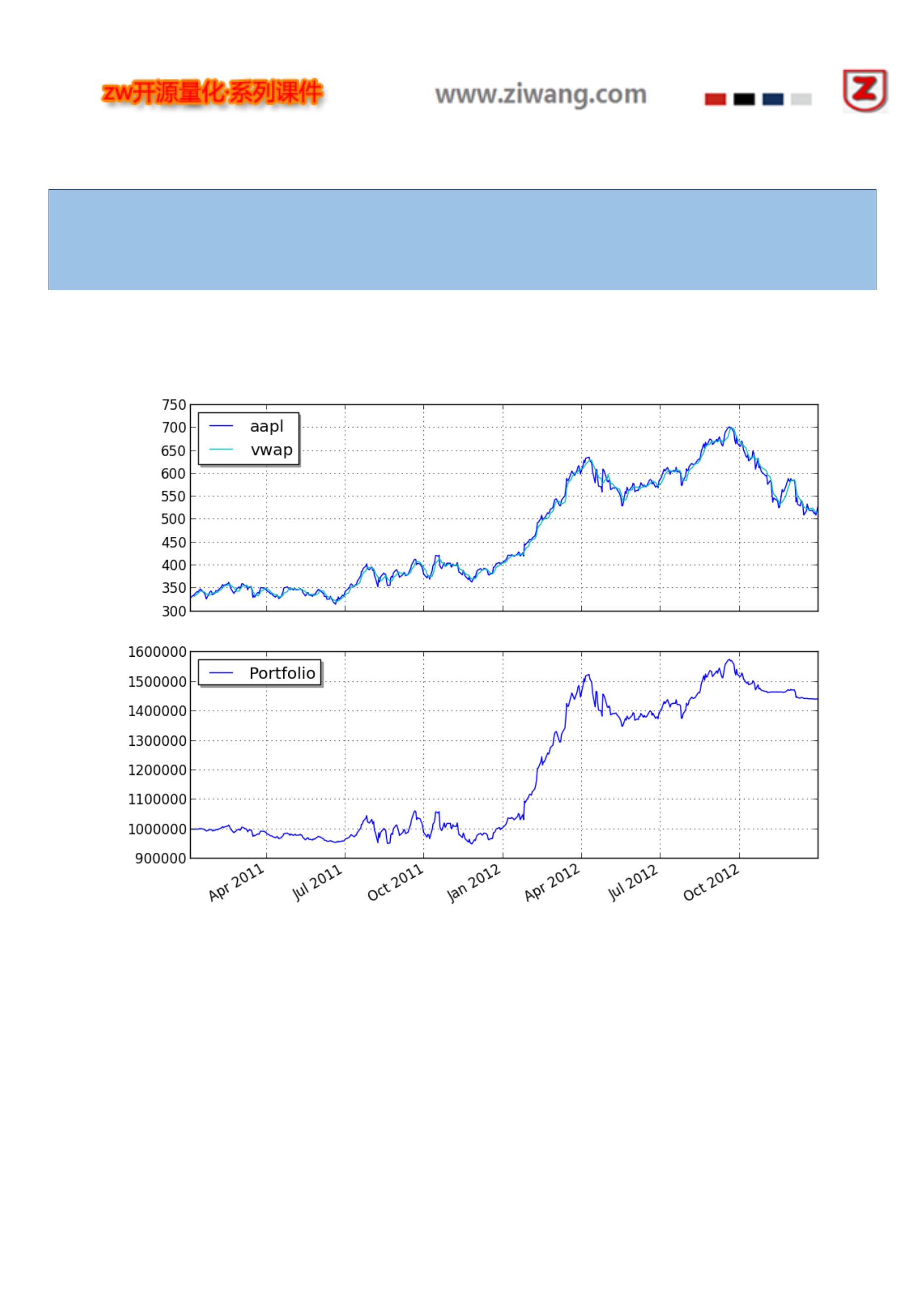
2013-09-21 00:01:23,813 yahoofinance [INFO] Creating data directory
2013-09-21 00:01:23,814 yahoofinance [INFO] Downloading aapl 2011 to data/aapl-2011-yahoofinance.csv
2013-09-21 00:01:25,275 yahoofinance [INFO] Downloading aapl 2012 to data/aapl-2012-yahoofinance.csv
Sharpe ratio: 0.89
以下是相关图表:
你可以调整不同的参数,重新运行测试。
123

124
from pyalgotrade import strategy

from pyalgotrade.technical import ma
from pyalgotrade.technical import cross
class SMACrossOver(strategy.BacktestingStrategy):
def __init__(self, feed, instrument, smaPeriod):
strategy.BacktestingStrategy.__init__(self, feed)
self.__instrument = instrument
self.__position = None
# We'll use adjusted close values instead of regular close values.
self.setUseAdjustedValues(True)
self.__prices = feed[instrument].getPriceDataSeries()
self.__sma = ma.SMA(self.__prices, smaPeriod)
def getSMA(self):
return self.__sma
def onEnterCanceled(self, position):
self.__position = None
def onExitOk(self, position):
self.__position = None
def onExitCanceled(self, position):
# If the exit was canceled, re-submit it.
self.__position.exitMarket()
def onBars(self, bars):
# If a position was not opened, check if we should enter a long position.
if self.__position is None:
if cross.cross_above(self.__prices, self.__sma) > 0:
shares = int(self.getBroker().getCash() * 0.9 / bars[self.__instrument].getPrice())
# Enter a buy market order. The order is good till canceled.
self.__position = self.enterLong(self.__instrument, shares, True)
# Check if we have to exit the position.
elif not self.__position.exitActive() and cross.cross_below(self.__prices, self.__sma) > 0:
self.__position.exitMarket()
and use the following code to execute the strategy:
import sma_crossover
from pyalgotrade import plotter
from pyalgotrade.tools import yahoofinance
from pyalgotrade.stratanalyzer import sharpe
def main(plot):
instrument = "aapl"
smaPeriod = 163
# Download the bars.
feed = yahoofinance.build_feed([instrument], 2011, 2012, ".")
strat = sma_crossover.SMACrossOver(feed, instrument, smaPeriod)
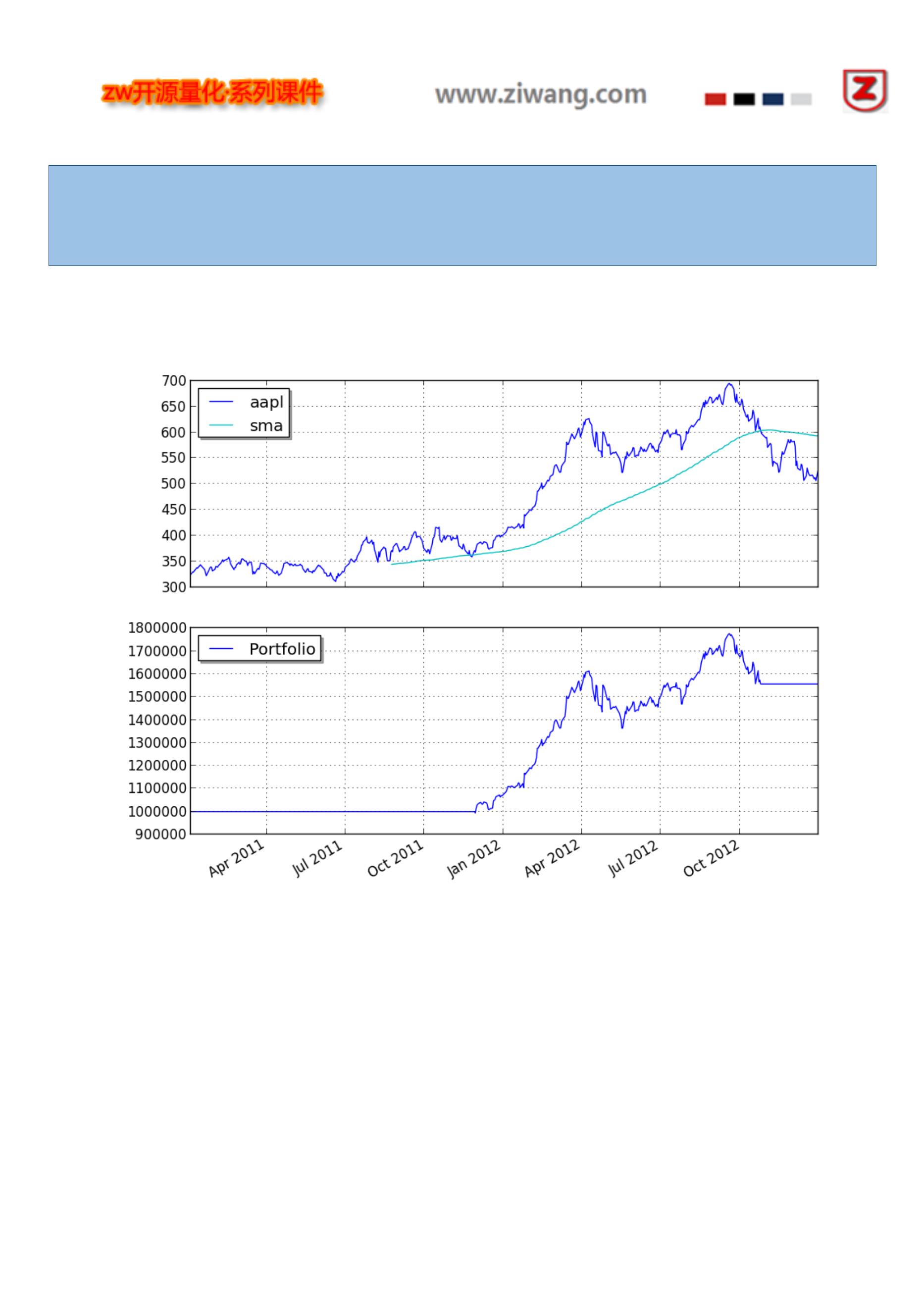
2013-09-21 00:01:23,813 yahoofinance [INFO] Creating data directory
2013-09-21 00:01:23,814 yahoofinance [INFO] Downloading aapl 2011 to data/aapl-2011-yahoofinance.csv
2013-09-21 00:01:25,275 yahoofinance [INFO] Downloading aapl 2012 to data/aapl-2012-yahoofinance.csv
Sharpe ratio: 1.12
以下是相关图表:
你可以调整不同的参数,重新运行测试。
market_timing 市场时机策略
本示例代码细节,参见网站:
http://mebfaber.com/timing-model/
http://papers.ssrn.com/sol3/papers.cfm?abstract_id=962461
126

127
from pyalgotrade import strategy

from pyalgotrade import plotter
from pyalgotrade.tools import yahoofinance
from pyalgotrade.technical import ma
from pyalgotrade.technical import cumret
from pyalgotrade.stratanalyzer import sharpe
from pyalgotrade.stratanalyzer import returns
class MarketTiming(strategy.BacktestingStrategy):
def __init__(self, feed, instrumentsByClass, initialCash):
strategy.BacktestingStrategy.__init__(self, feed, initialCash)
self.setUseAdjustedValues(True)
self.__instrumentsByClass = instrumentsByClass
self.__rebalanceMonth = None
self.__sharesToBuy = {}
# Initialize indicators for each instrument.
self.__sma = {}
for assetClass in instrumentsByClass:
for instrument in instrumentsByClass[assetClass]:
priceDS = feed[instrument].getPriceDataSeries()
self.__sma[instrument] = ma.SMA(priceDS, 200)
def _shouldRebalance(self, dateTime):
return dateTime.month != self.__rebalanceMonth
def _getRank(self, instrument):
# If the price is below the SMA, then this instrument doesn't rank at
# all.
smas = self.__sma[instrument]
price = self.getLastPrice(instrument)
if len(smas) == 0 or smas[-1] is None or price < smas[-1]:
return None
# Rank based on 20 day returns.
ret = None
lookBack = 20
priceDS = self.getFeed()[instrument].getPriceDataSeries()
if len(priceDS) >= lookBack and smas[-1] is not None and smas[-1*lookBack] is not None:
ret = (priceDS[-1] - priceDS[-1*lookBack]) / float(priceDS[-1*lookBack])
return ret
def _getTopByClass(self, assetClass):
# Find the instrument with the highest rank.
ret = None
highestRank = None
for instrument in self.__instrumentsByClass[assetClass]:
rank = self._getRank(instrument)
if rank is not None and (highestRank is None or rank > highestRank):
highestRank = rank
ret = instrument
return ret
def _getTop(self):

2014-05-25 22:36:59,740 yahoofinance [INFO] Creating data directory
2014-05-25 22:36:59,740 yahoofinance [INFO] Downloading SPY 2007 to data/SPY-2007-yahoofinance.csv
2014-05-25 22:37:06,332 yahoofinance [INFO] Downloading VTI 2007 to data/VTI-2007-yahoofinance.csv
2014-05-25 22:37:10,666 yahoofinance [INFO] Downloading DBC 2007 to data/DBC-2007-yahoofinance.csv
2014-05-25 22:37:13,102 yahoofinance [INFO] Downloading IEF 2007 to data/IEF-2007-yahoofinance.csv
2014-05-25 22:37:19,394 yahoofinance [INFO] Downloading VEU 2007 to data/VEU-2007-yahoofinance.csv
2014-05-25 22:37:27,378 yahoofinance [INFO] Downloading VNQ 2007 to data/VNQ-2007-yahoofinance.csv
2014-05-25 22:37:32,771 yahoofinance [INFO] Downloading SPY 2008 to data/SPY-2008-yahoofinance.csv
2014-05-25 22:37:38,326 yahoofinance [INFO] Downloading VTI 2008 to data/VTI-2008-yahoofinance.csv
2014-05-25 22:37:42,262 yahoofinance [INFO] Downloading DBC 2008 to data/DBC-2008-yahoofinance.csv
.
.
.
2013-12-02 00:00:00 strategy [INFO] Rebalancing
2013-12-02 00:00:00 strategy [INFO] Best for class US Stocks: VTI
2013-12-02 00:00:00 strategy [INFO] Best for class Commodities: None
2013-12-02 00:00:00 strategy [INFO] Best for class US 10 Year Government Bonds: None
2013-12-02 00:00:00 strategy [INFO] Best for class Foreign Stocks: VEU
2013-12-02 00:00:00 strategy [INFO] Best for class Real Estate: None
2013-12-02 00:00:00 strategy [INFO] Placing market order for -1 VTI shares
2013-12-02 00:00:00 strategy [INFO] Placing market order for -39 VNQ shares
Sharpe ratio: -0.06
Returns: 32.97 %
相关图表如下:
129
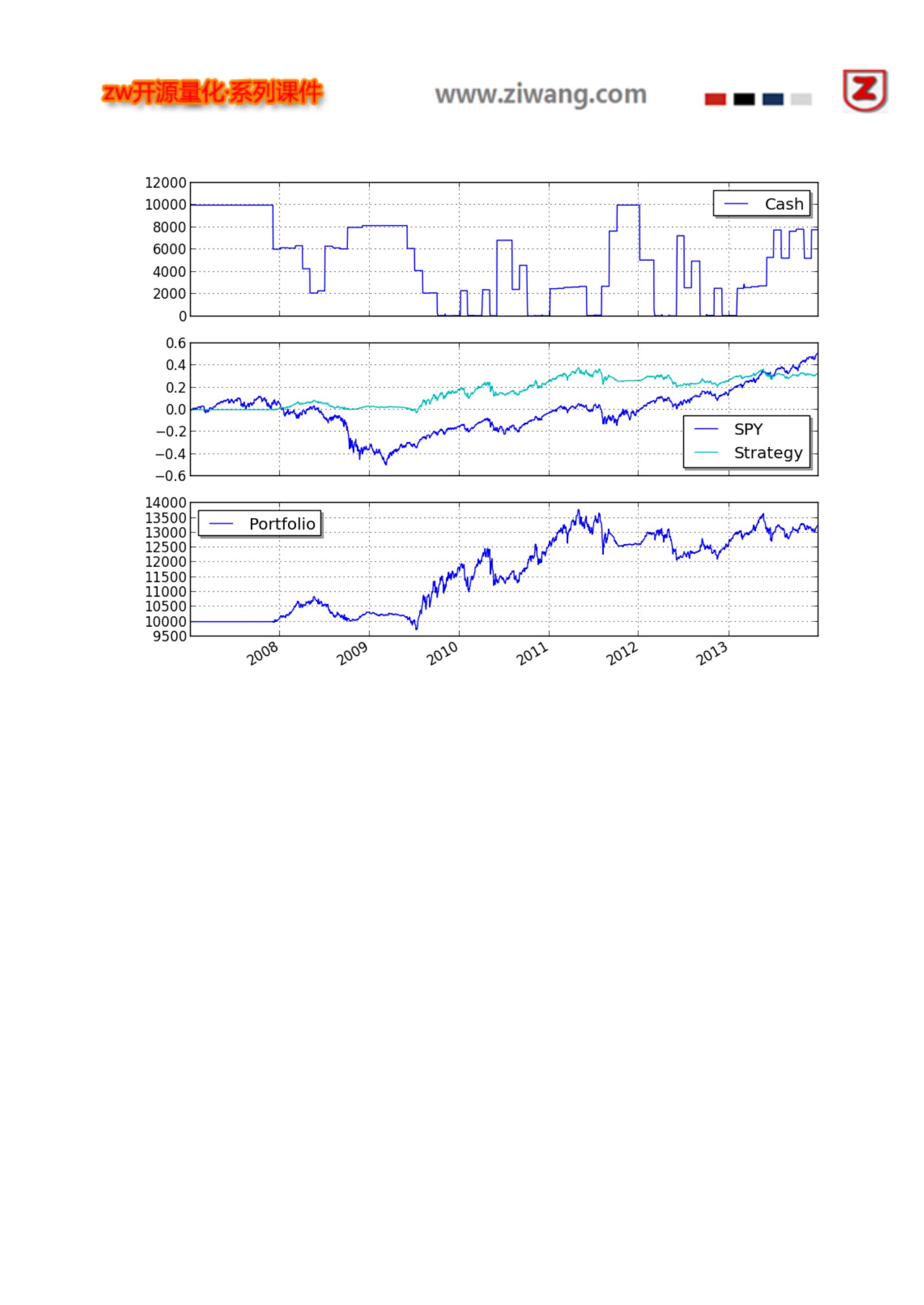
金矿策略
(Ernie Chan's Gold vs. Gold Miners)
本示例代码细节,参见网站:
http://epchan.blogspot.com.ar/2006/11/gold-vs-gold-miners-another-arbitrage.html
https://www.quantopian.com/posts/ernie-chans-gold-vs-gold-miners-stat-arb
130
from pyalgotrade import strategy

from pyalgotrade import dataseries
from pyalgotrade.dataseries import aligned
from pyalgotrade import plotter
from pyalgotrade.tools import yahoofinance
from pyalgotrade.stratanalyzer import sharpe
import numpy as np
import statsmodels.api as sm
def get_beta(values1, values2):
# http://statsmodels.sourceforge.net/stable/regression.html
model = sm.OLS(values1, values2)
results = model.fit()
return results.params[0]
class StatArbHelper:
def __init__(self, ds1, ds2, windowSize):
# We're going to use datetime aligned versions of the dataseries.
self.__ds1, self.__ds2 = aligned.datetime_aligned(ds1, ds2)
self.__windowSize = windowSize
self.__hedgeRatio = None
self.__spread = None
self.__spreadMean = None
self.__spreadStd = None
self.__zScore = None
def getSpread(self):
return self.__spread
def getSpreadMean(self):
return self.__spreadMean
def getSpreadStd(self):
return self.__spreadStd
def getZScore(self):
return self.__zScore
def getHedgeRatio(self):
return self.__hedgeRatio
def __updateHedgeRatio(self, values1, values2):
self.__hedgeRatio = get_beta(values1, values2)
def __updateSpreadMeanAndStd(self, values1, values2):
if self.__hedgeRatio is not None:
spread = values1 - values2 * self.__hedgeRatio
self.__spreadMean = spread.mean()
self.__spreadStd = spread.std(ddof=1)
def __updateSpread(self):
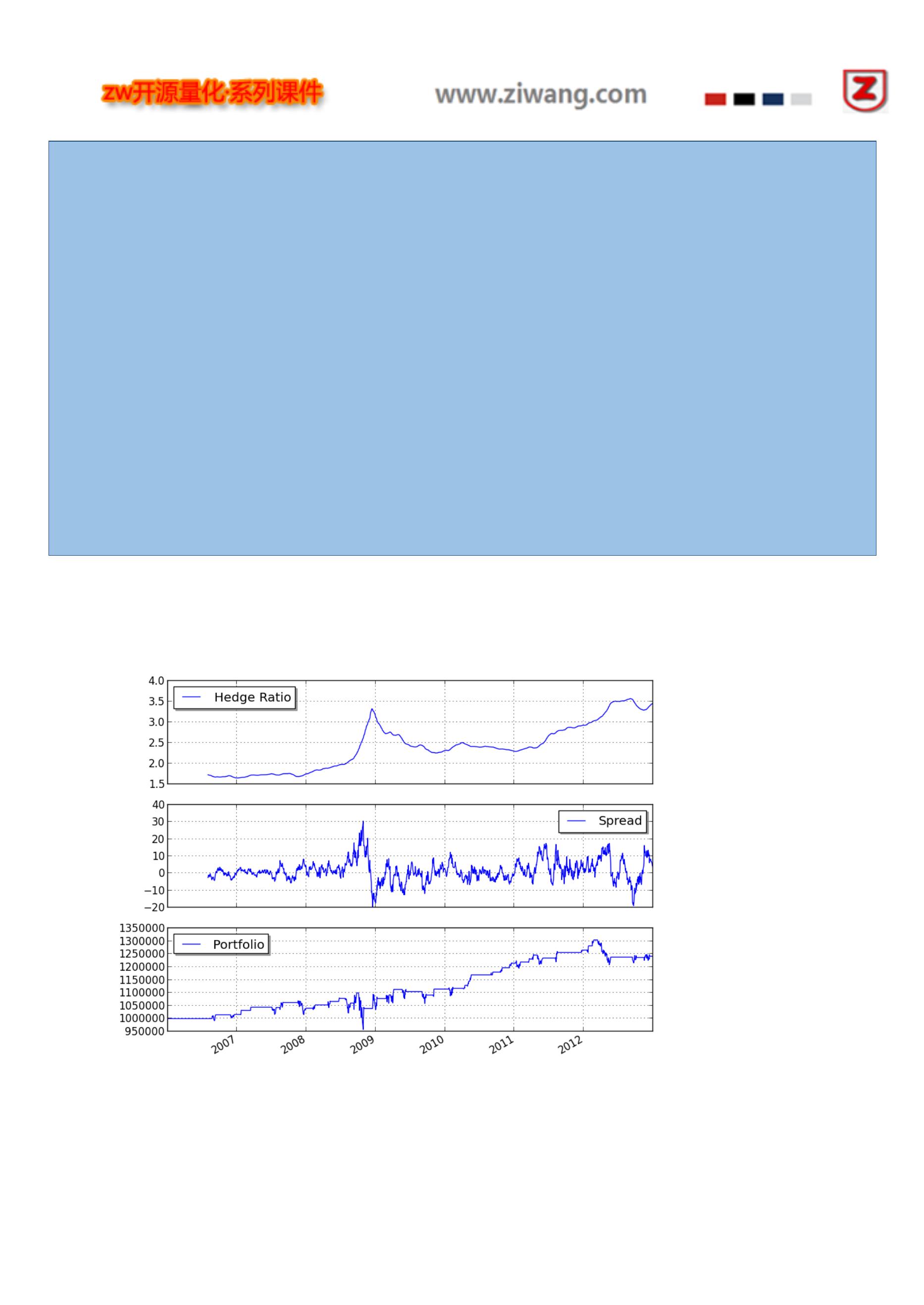
2013-09-21 00:02:35,136 yahoofinance [INFO] Creating data directory
2013-09-21 00:02:35,136 yahoofinance [INFO] Downloading gld 2006 to data/gld-2006-yahoofinance.csv
2013-09-21 00:02:35,899 yahoofinance [INFO] Downloading gdx 2006 to data/gdx-2006-yahoofinance.csv
2013-09-21 00:02:36,637 yahoofinance [INFO] Downloading gld 2007 to data/gld-2007-yahoofinance.csv
2013-09-21 00:02:37,265 yahoofinance [INFO] Downloading gdx 2007 to data/gdx-2007-yahoofinance.csv
2013-09-21 00:02:37,881 yahoofinance [INFO] Downloading gld 2008 to data/gld-2008-yahoofinance.csv
2013-09-21 00:02:38,462 yahoofinance [INFO] Downloading gdx 2008 to data/gdx-2008-yahoofinance.csv
2013-09-21 00:02:39,243 yahoofinance [INFO] Downloading gld 2009 to data/gld-2009-yahoofinance.csv
2013-09-21 00:02:39,996 yahoofinance [INFO] Downloading gdx 2009 to data/gdx-2009-yahoofinance.csv
2013-09-21 00:02:40,577 yahoofinance [INFO] Downloading gld 2010 to data/gld-2010-yahoofinance.csv
2013-09-21 00:02:42,630 yahoofinance [INFO] Downloading gdx 2010 to data/gdx-2010-yahoofinance.csv
2013-09-21 00:02:43,397 yahoofinance [INFO] Downloading gld 2011 to data/gld-2011-yahoofinance.csv
2013-09-21 00:02:44,153 yahoofinance [INFO] Downloading gdx 2011 to data/gdx-2011-yahoofinance.csv
2013-09-21 00:02:44,901 yahoofinance [INFO] Downloading gld 2012 to data/gld-2012-yahoofinance.csv
2013-09-21 00:02:45,965 yahoofinance [INFO] Downloading gdx 2012 to data/gdx-2012-yahoofinance.csv
Sharpe ratio: -0.20
相关图表如下:
你可以调整不同的参数,重新运行测试。
132

本示例代码细节,参见网站:
http://www.investopedia.com/articles/trading/07/bollinger.asp
133
from pyalgotrade import strategy

from pyalgotrade import plotter
from pyalgotrade.tools import yahoofinance
from pyalgotrade.technical import bollinger
from pyalgotrade.stratanalyzer import sharpe
class BBands(strategy.BacktestingStrategy):
def __init__(self, feed, instrument, bBandsPeriod):
strategy.BacktestingStrategy.__init__(self, feed)
self.__instrument = instrument
self.__bbands = bollinger.BollingerBands(feed[instrument].getCloseDataSeries(), bBandsPeriod, 2)
def getBollingerBands(self):
return self.__bbands
def onBars(self, bars):
lower = self.__bbands.getLowerBand()[-1]
upper = self.__bbands.getUpperBand()[-1]
if lower is None:
return
shares = self.getBroker().getShares(self.__instrument)
bar = bars[self.__instrument]
if shares == 0 and bar.getClose() < lower:
sharesToBuy = int(self.getBroker().getCash(False) / bar.getClose())
self.marketOrder(self.__instrument, sharesToBuy)
elif shares > 0 and bar.getClose() > upper:
self.marketOrder(self.__instrument, -1*shares)
def main(plot):
instrument = "yhoo"
bBandsPeriod = 40
# Download the bars.
feed = yahoofinance.build_feed([instrument], 2011, 2012, ".")
strat = BBands(feed, instrument, bBandsPeriod)
sharpeRatioAnalyzer = sharpe.SharpeRatio()
strat.attachAnalyzer(sharpeRatioAnalyzer)
if plot:
plt = plotter.StrategyPlotter(strat, True, True, True)
plt.getInstrumentSubplot(instrument).addDataSeries("upper", strat.getBollingerBands().getUpperBand())
plt.getInstrumentSubplot(instrument).addDataSeries("middle", strat.getBollingerBands().getMiddleBand())
plt.getInstrumentSubplot(instrument).addDataSeries("lower", strat.getBollingerBands().getLowerBand())
strat.run()
print "Sharpe ratio: %.2f" % sharpeRatioAnalyzer.getSharpeRatio(0.05)
if plot:
plt.plot()
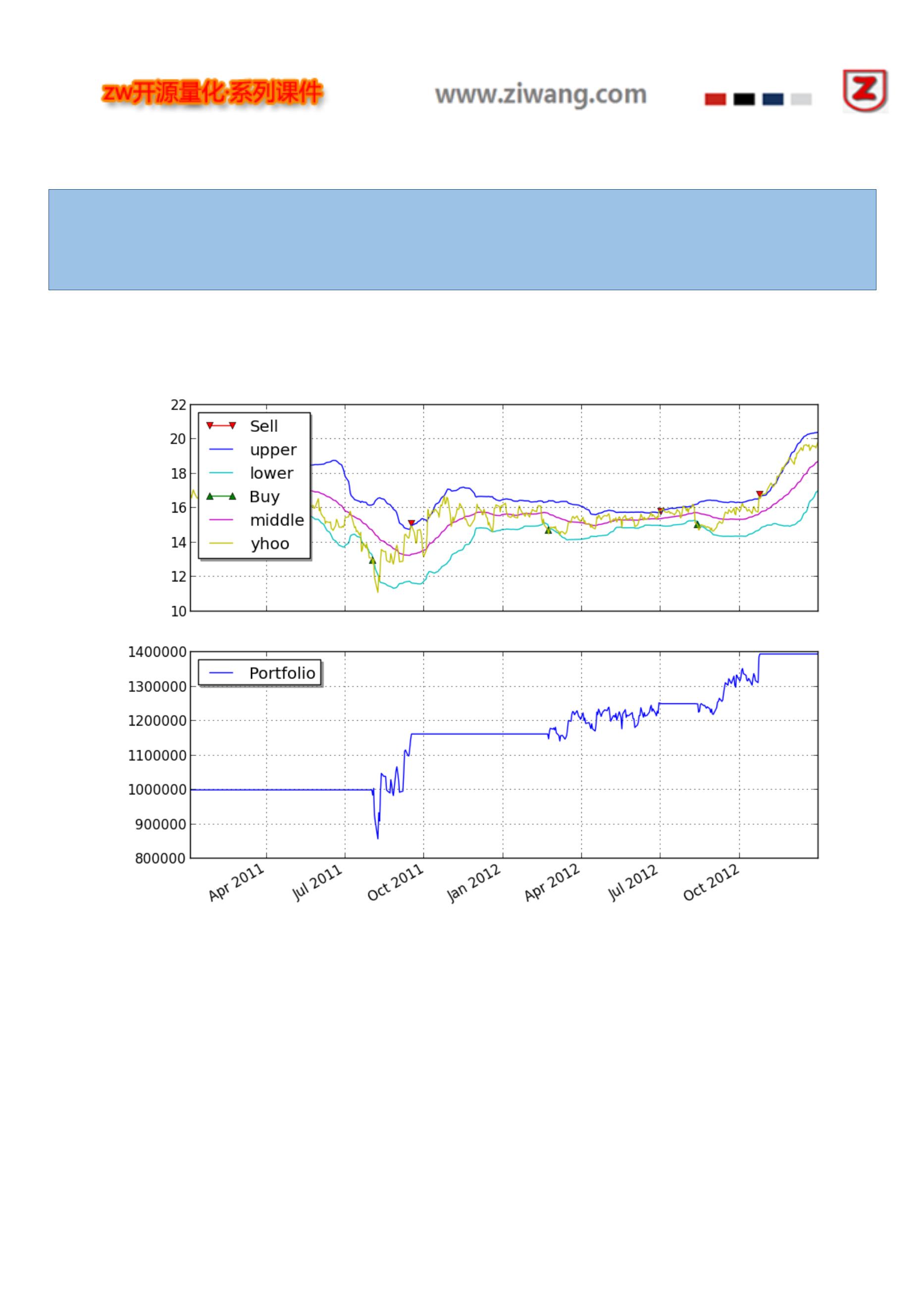
2013-09-21 00:06:07,740 yahoofinance [INFO] Creating data directory
2013-09-21 00:06:07,741 yahoofinance [INFO] Downloading yhoo 2011 to data/yhoo-2011-yahoofinance.csv
2013-09-21 00:06:09,621 yahoofinance [INFO] Downloading yhoo 2012 to data/yhoo-2012-yahoofinance.csv
Sharpe ratio: 0.71
相关图表如下
rsi2 策略
本示例代码细节,参见网站:
http://stockcharts.com/school/doku.php?id=chart_school:trading_strategies:rsi2
135

识别 SMA(简单移动平均线)趋势,称之为:entrySMA,范围在:150 和 250 之间。
一小段 SMA 出口点,称之为:exitSMA,范围在:5 和 15 之间。
一个 RSI 空头/多头位置,称之为:rsiPeriod,范围在:2 和 10 之间。
RSI 多头超卖阈值,称之为:overSoldThreshold,范围在:5 到 25 之间。
RSI 空头超买阈值,称之为:overBoughtThreshold,范围在:75 和 95 之间。
136
from pyalgotrade import strategy

from pyalgotrade.technical import ma
from pyalgotrade.technical import rsi
from pyalgotrade.technical import cross
class RSI2(strategy.BacktestingStrategy):
def __init__(self, feed, instrument, entrySMA, exitSMA, rsiPeriod, overBoughtThreshold, overSoldThreshold):
strategy.BacktestingStrategy.__init__(self, feed)
self.__instrument = instrument
# We'll use adjusted close values, if available, instead of regular close values.
if feed.barsHaveAdjClose():
self.setUseAdjustedValues(True)
self.__priceDS = feed[instrument].getPriceDataSeries()
self.__entrySMA = ma.SMA(self.__priceDS, entrySMA)
self.__exitSMA = ma.SMA(self.__priceDS, exitSMA)
self.__rsi = rsi.RSI(self.__priceDS, rsiPeriod)
self.__overBoughtThreshold = overBoughtThreshold
self.__overSoldThreshold = overSoldThreshold
self.__longPos = None
self.__shortPos = None
def getEntrySMA(self):
return self.__entrySMA
def getExitSMA(self):
return self.__exitSMA
def getRSI(self):
return self.__rsi
def onEnterCanceled(self, position):
if self.__longPos == position:
self.__longPos = None
elif self.__shortPos == position:
self.__shortPos = None
else:
assert(False)
def onExitOk(self, position):
if self.__longPos == position:
self.__longPos = None
elif self.__shortPos == position:
self.__shortPos = None
else:
assert(False)
def onExitCanceled(self, position):
# If the exit was canceled, re-submit it.
position.exitMarket()
def onBars(self, bars):
# Wait for enough bars to be available to calculate SMA and RSI.
if self.__exitSMA[-1] is None or self.__entrySMA[-1] is None or self.__rsi[-1] is None:

再编写以下程序,执行策略:
import rsi2
from pyalgotrade import plotter
from pyalgotrade.tools import yahoofinance
from pyalgotrade.stratanalyzer import sharpe
def main(plot):
instrument = "DIA"
entrySMA = 200
exitSMA = 5
rsiPeriod = 2
overBoughtThreshold = 90
overSoldThreshold = 10
# Download the bars.
feed = yahoofinance.build_feed([instrument], 2009, 2012, ".")
strat = rsi2.RSI2(feed, instrument, entrySMA, exitSMA, rsiPeriod, overBoughtThreshold, overSoldThreshold)
sharpeRatioAnalyzer = sharpe.SharpeRatio()
strat.attachAnalyzer(sharpeRatioAnalyzer)
if plot:
plt = plotter.StrategyPlotter(strat, True, False, True)
plt.getInstrumentSubplot(instrument).addDataSeries("Entry SMA", strat.getEntrySMA())
plt.getInstrumentSubplot(instrument).addDataSeries("Exit SMA", strat.getExitSMA())
plt.getOrCreateSubplot("rsi").addDataSeries("RSI", strat.getRSI())
plt.getOrCreateSubplot("rsi").addLine("Overbought", overBoughtThreshold)
plt.getOrCreateSubplot("rsi").addLine("Oversold", overSoldThreshold)
strat.run()
print "Sharpe ratio: %.2f" % sharpeRatioAnalyzer.getSharpeRatio(0.05)
if plot:
plt.plot()
if __name__ == "__main__":
main(True)
输出结果如下:
138
2014-05-03 13:49:35,354 yahoofinance [INFO] Downloading DIA 2009 to ./DIA-2009-yahoofinance.csv
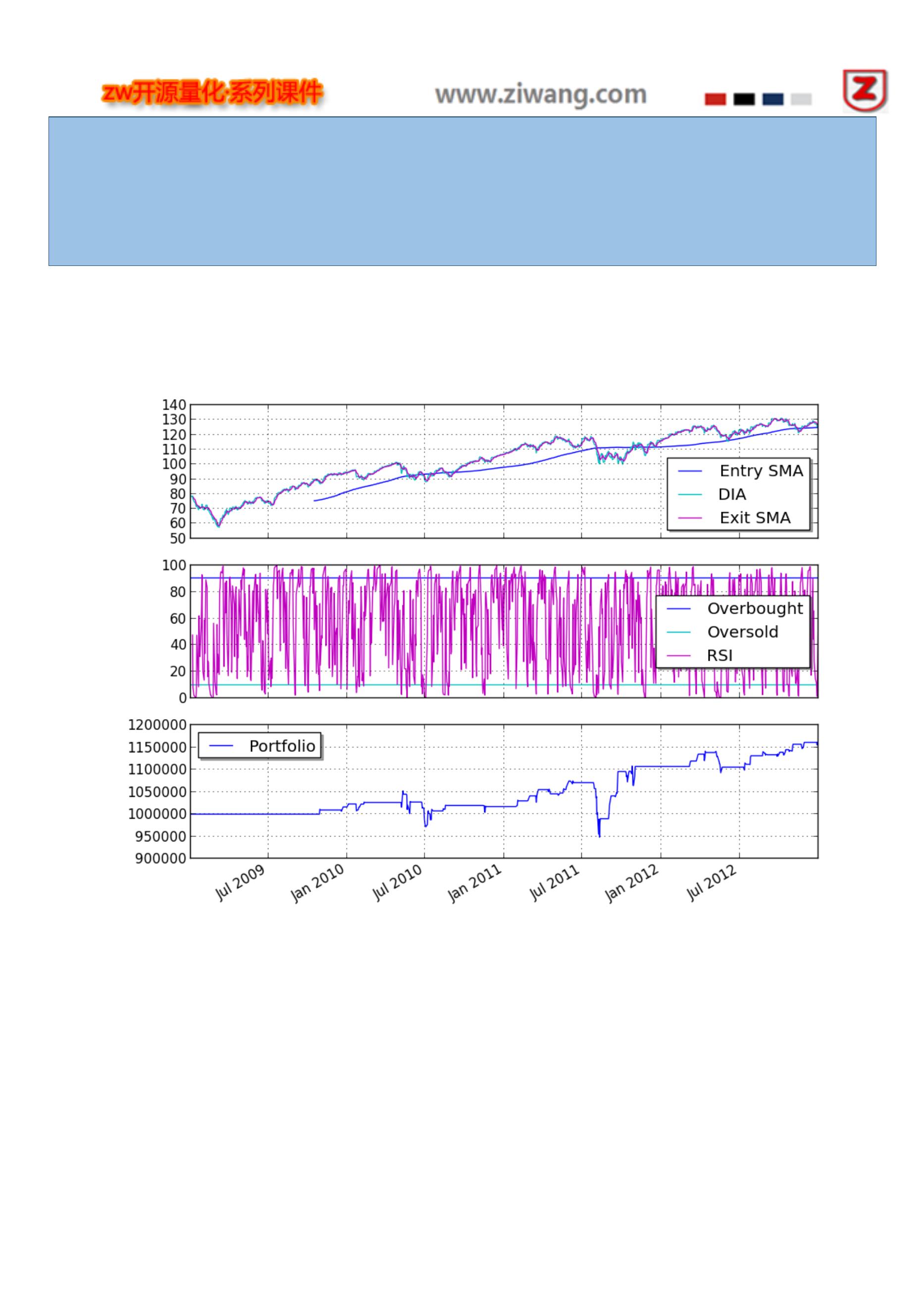
2014-05-03 13:49:36,388 yahoofinance [INFO] Downloading DIA 2010 to ./DIA-2010-yahoofinance.csv
2014-05-03 13:49:36,900 yahoofinance [INFO] Downloading DIA 2011 to ./DIA-2011-yahoofinance.csv
2014-05-03 13:49:37,457 yahoofinance [INFO] Downloading DIA 2012 to ./DIA-2012-yahoofinance.csv
Sharpe ratio: -0.11
相关图表如下:
你可以调整不同的参数,重新运行测试。
139

quandl 策略
这个例子的目的,展示如何使用 Quandl 策略。
使用以下 Quandl 下载的 CSV 数据:
http://www.quandl.com/OFDP-Open-Financial-Data-Project/GOLD_2-LBMA-Gold-Price-London-Fixings-P-M
140
from pyalgotrade import strategy

from pyalgotrade import plotter
from pyalgotrade.tools import quandl
from pyalgotrade.feed import csvfeed
import datetime
class MyStrategy(strategy.BacktestingStrategy):
def __init__(self, feed, quandlFeed, instrument):
strategy.BacktestingStrategy.__init__(self, feed)
self.setUseAdjustedValues(True)
self.__instrument = instrument
# It is VERY important to add the the extra feed to the event dispatch loop before
# running the strategy.
self.getDispatcher().addSubject(quandlFeed)
# Subscribe to events from the Quandl feed.
quandlFeed.getNewValuesEvent().subscribe(self.onQuandlData)
def onQuandlData(self, dateTime, values):
self.info(values)
def onBars(self, bars):
self.info(bars[self.__instrument].getAdjClose())
def main(plot):
instruments = ["GORO"]
# Download GORO bars using WIKI source code.
feed = quandl.build_feed("WIKI", instruments, 2006, 2012, ".")
# Load Quandl CSV downloaded from http://www.quandl.com/OFDP-Open-Financial-Data-Project/GOLD_2-
LBMA-Gold-Price-London-Fixings-P-M
quandlFeed = csvfeed.Feed("Date", "%Y-%m-%d")
quandlFeed.setDateRange(datetime.datetime(2006, 1, 1), datetime.datetime(2012, 12, 31))
quandlFeed.addValuesFromCSV("quandl_gold_2.csv")
myStrategy = MyStrategy(feed, quandlFeed, instruments[0])
if plot:
plt = plotter.StrategyPlotter(myStrategy, True, False, False)
plt.getOrCreateSubplot("quandl").addDataSeries("USD", quandlFeed["USD"])
plt.getOrCreateSubplot("quandl").addDataSeries("EUR", quandlFeed["EUR"])
plt.getOrCreateSubplot("quandl").addDataSeries("GBP", quandlFeed["GBP"])
myStrategy.run()
if plot:
plt.plot()
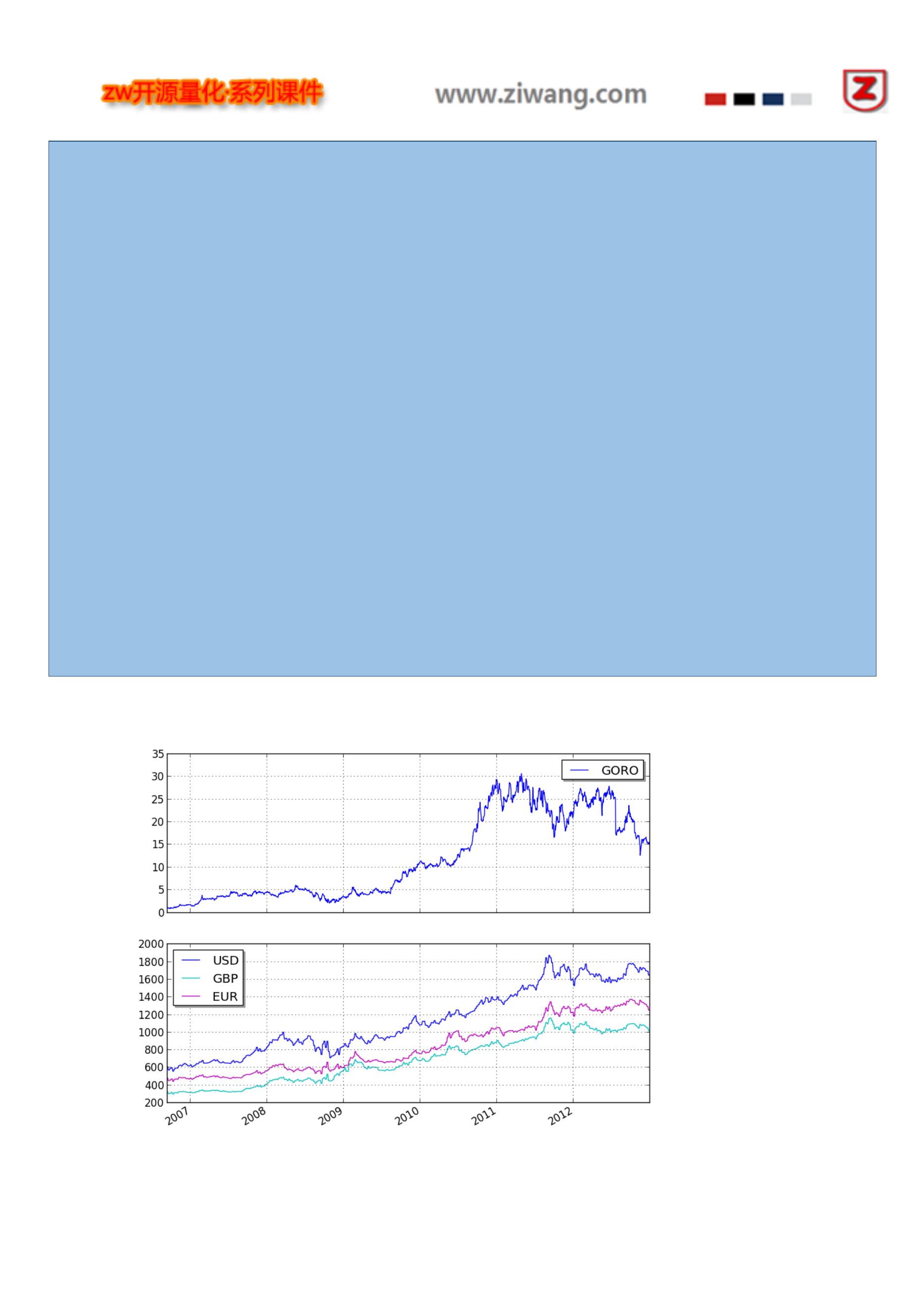
2006-01-01 00:00:00 strategy [INFO] {'USD': 513.0, 'GBP': 298.204, 'EUR': 433.533}
2006-01-08 00:00:00 strategy [INFO] {'USD': 535.25, 'GBP': 302.572, 'EUR': 440.173}
2006-01-15 00:00:00 strategy [INFO] {'USD': 548.25, 'GBP': 309.781, 'EUR': 454.489}
2006-01-22 00:00:00 strategy [INFO] {'USD': 567.25, 'GBP': 321.152, 'EUR': 468.802}
2006-01-29 00:00:00 strategy [INFO] {'USD': 561.75, 'GBP': 315.147, 'EUR': 460.526}
2006-02-05 00:00:00 strategy [INFO] {'USD': 569.0, 'GBP': 322.562, 'EUR': 474.167}
2006-02-12 00:00:00 strategy [INFO] {'USD': 557.0, 'GBP': 317.198, 'EUR': 463.78}
2006-02-19 00:00:00 strategy [INFO] {'USD': 551.7, 'GBP': 317.251, 'EUR': 463.224}
2006-02-26 00:00:00 strategy [INFO] {'USD': 554.15, 'GBP': 316.838, 'EUR': 465.555}
2006-03-05 00:00:00 strategy [INFO] {'USD': 565.0, 'GBP': 322.029, 'EUR': 469.854}
...
2012-12-19 00:00:00 strategy [INFO] 15.43
2012-12-20 00:00:00 strategy [INFO] 15.39
2012-12-21 00:00:00 strategy [INFO] 15.35
2012-12-23 00:00:00 strategy [INFO] {'USD': 1651.5, 'GBP': 1019.256, 'EUR': 1253.701}
2012-12-24 00:00:00 strategy [INFO] 15.2
2012-12-26 00:00:00 strategy [INFO] 15.56
2012-12-27 00:00:00 strategy [INFO] 15.24
2012-12-28 00:00:00 strategy [INFO] 15.09
2012-12-30 00:00:00 strategy [INFO] {'USD': 1657.5, 'GBP': 1027.206, 'EUR': 1253.024}
2012-12-31 00:00:00 strategy [INFO] 15.41
相关图表如下:
142
