



最近一段时间有好些项目都需要高精度的时钟做延迟分析, 虽然思科有自己的Exablaze系列支持70picosecond的精度,但是不支持100Gbps捕获和特殊的硬件实现用来测延迟并不划算,除非是券商高频交易。而基于网卡硬件时间戳的精度通常只有10ns,对于我们分析大概几百纳秒的延迟差显得精度有些不大够用。
于是就地取材,我们采用了基于Cisco Nexus93180YC-FX和Nexus 9336C-FX2的数据中心交换机,并利用ERSPAN-Type3的方式镜像采集流量,ERSPAN Type-3可以提供100ps为单位的高精度时间戳。ERSPAN报文格式如下
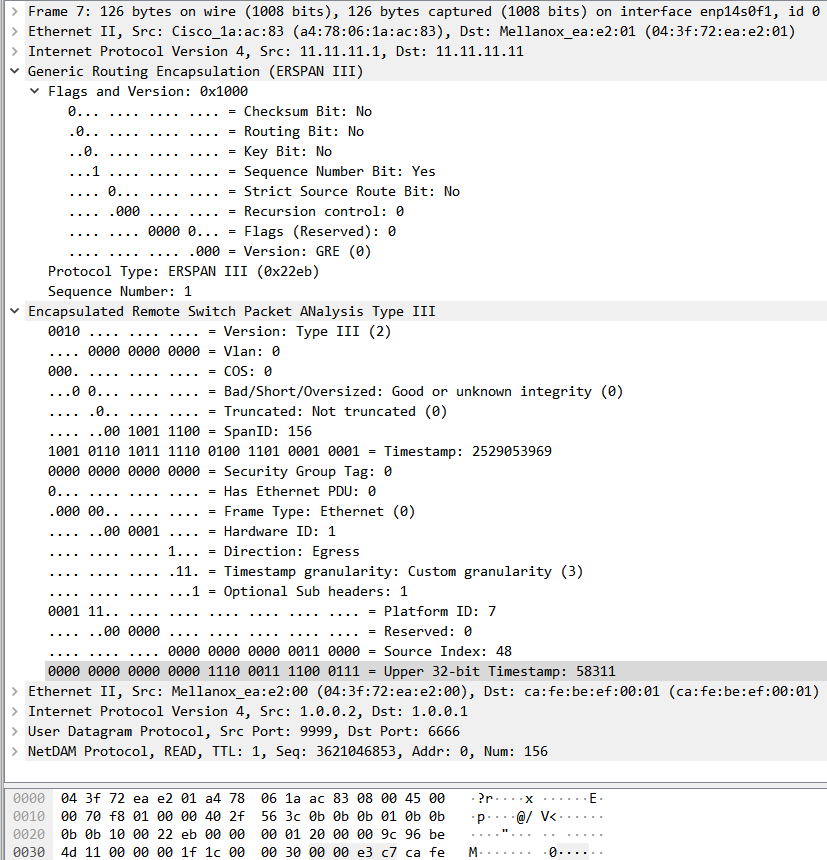
整个业务部署如下图所示:
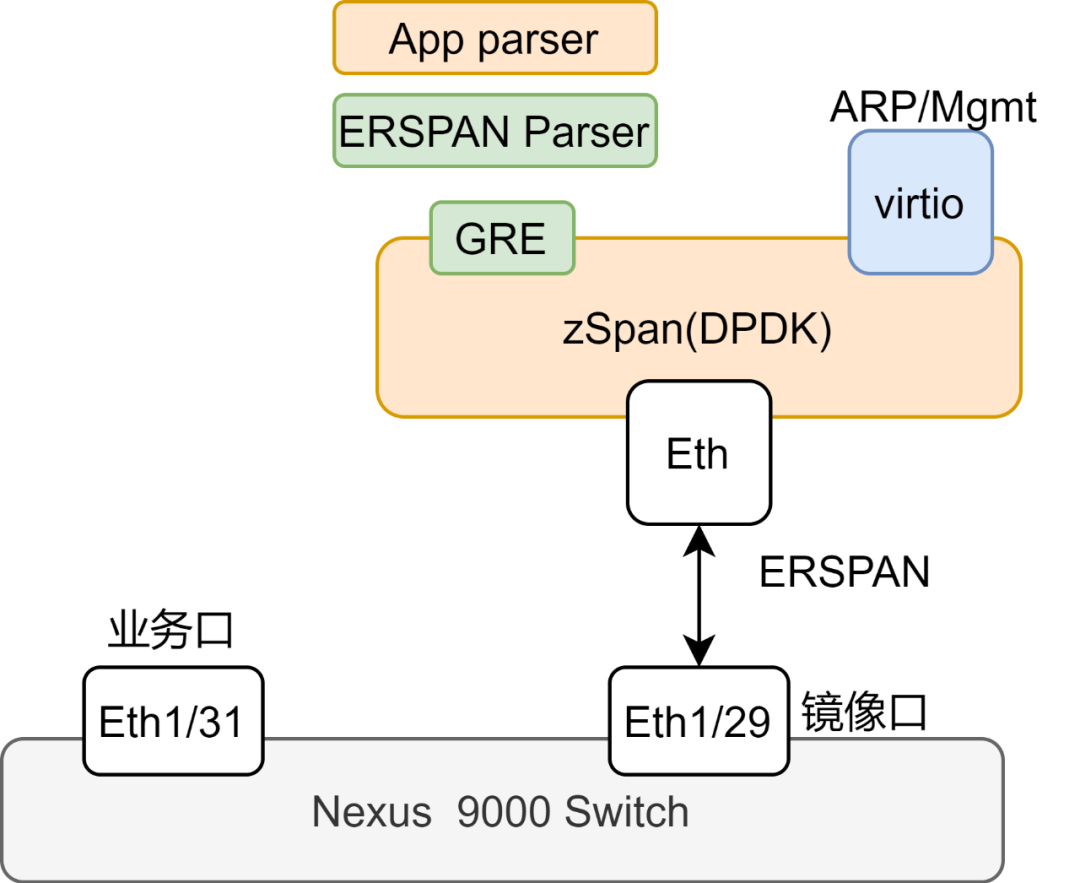
采集器zspan框架已经开源:
github.com/zartbot/zspan
Nexust9000 ERSPAN报文格式如下
GRE Header:

    0 1 2 3 4 5 6 7 8 9 0 1 2 3 4 5 6 7 8 9 0 1 2 3 4 5 6 7 8 9 0 1
    +-+-+-+-+-+-+-+-+-+-+-+-+-+-+-+-+-+-+-+-+-+-+-+-+-+-+-+-+-+-+-+-+
    |C|R|K|S|s|Recur|  Flags  | Ver |         Protocol Type         |
    +-+-+-+-+-+-+-+-+-+-+-+-+-+-+-+-+-+-+-+-+-+-+-+-+-+-+-+-+-+-+-+-+
    |                            Sequence                           |
    +-+-+-+-+-+-+-+-+-+-+-+-+-+-+-+-+-+-+-+-+-+-+-+-+-+-+-+-+-+-+-+-+

ERSPAN Type III header:

    0                   1                   2                   3
    0 1 2 3 4 5 6 7 8 9 0 1 2 3 4 5 6 7 8 9 0 1 2 3 4 5 6 7 8 9 0 1
   +-+-+-+-+-+-+-+-+-+-+-+-+-+-+-+-+-+-+-+-+-+-+-+-+-+-+-+-+-+-+-+-+
   |  Ver  |          VLAN         | COS |BSO|T|     Session ID    |
   +-+-+-+-+-+-+-+-+-+-+-+-+-+-+-+-+-+-+-+-+-+-+-+-+-+-+-+-+-+-+-+-+
   |                          Timestamp                            |
   +-+-+-+-+-+-+-+-+-+-+-+-+-+-+-+-+-+-+-+-+-+-+-+-+-+-+-+-+-+-+-+-+
   |             SGT               |P|    FT   |   Hw ID   |D|Gra|O|
   +-+-+-+-+-+-+-+-+-+-+-+-+-+-+-+-+-+-+-+-+-+-+-+-+-+-+-+-+-+-+-+-+

Optional Header:

    0                   1                   2                   3
    0 1 2 3 4 5 6 7 8 9 0 1 2 3 4 5 6 7 8 9 0 1 2 3 4 5 6 7 8 9 0 1
   +-+-+-+-+-+-+-+-+-+-+-+-+-+-+-+-+-+-+-+-+-+-+-+-+-+-+-+-+-+-+-+-+
   |0x7 or 0x0 |  Reserved |     Source-Index(SI)                  |
   +-+-+-+-+-+-+-+-+-+-+-+-+-+-+-+-+-+-+-+-+-+-+-+-+-+-+-+-+-+-+-+-+
   |                    Timestamp(MSB)                             |
   +-+-+-+-+-+-+-+-+-+-+-+-+-+-+-+-+-+-+-+-+-+-+-+-+-+-+-+-+-+-+-+-+
配置ERSPAN
SW-100G(config)# feature interface-vlan
SW-100G(config)# vlan 123
SW-100G(config-vlan)# name ERSPAN
SW-100G(config-vlan)# interface vlan 123

SW-100G(config)# interface vlan 123
SW-100G(config-if)# ip address 11.11.11.1 255.255.255.0
SW-100G(config-if)# no shut
SW-100G(config-if)# interface Eth1/29
SW-100G(config-if)# switchport
SW-100G(config-if)# switchport mode access
SW-100G(config-if)# switchport access vlan 123
SW-100G(config-if)# no shut

SW-100G(config)# monitor erspan origin ip-address 11.11.11.1 global

SW-100G(config)# monitor session 3 type erspan-source
SW-100G(config-erspan-src)#   vrf default
SW-100G(config-erspan-src)#   header-type 3
SW-100G(config-erspan-src)#   erspan-id 156
SW-100G(config-erspan-src)#   destination ip 11.11.11.11
SW-100G(config-erspan-src)#   ip ttl 64
SW-100G(config-erspan-src)#   source interface Ethernet1/31 both
SW-100G(config-erspan-src)#   mtu 1518
SW-100G(config-erspan-src)#   no shut
验证配置
SW-100G# show monitor session 3
   session 3
---------------
type              : erspan-source
version           : 3
state             : up
erspan-id         : 156
vrf-name          : default
acl-name          : acl-name not specified
ip-ttl            : 64
ip-dscp           : 0
header-type       : 3
mtu               : 1518
destination-ip    : 11.11.11.11
origin-ip         : 11.11.11.1 (global)
source intf       :
    rx            : Eth1/31
    tx            : Eth1/31
    both          : Eth1/31
source VLANs      :
    rx            :
    tx            :
    both          :
filter VLANs      : filter not specified
source fwd drops  :

marker-packet     : disabled
packet interval   : 100
packet sent       : 0
packet failed     : 0
egress-intf       : Eth1/29
source VSANs      :
    rx            :
主机上接收并处理镜像报文
 ./build/zspan -a 0000:0e:00.1 -- --addr 11.11.11.11 --netmask 255.255.255.0 --core_num 16


seq:    108 | vlan:     0 | sess-id:  156 | src_id:     48 | dir:  1 | timestamp: 143991653282609 |1.0.0.2 -> 1.0.0.1
seq:    104 | vlan:     0 | sess-id:  156 | src_id:    276 | dir:  0 | timestamp: 143991653289409 |1.0.0.1 -> 1.0.0.2
seq:    109 | vlan:     0 | sess-id:  156 | src_id:     48 | dir:  1 | timestamp: 143992660663409 |1.0.0.2 -> 1.0.0.1
seq:    105 | vlan:     0 | sess-id:  156 | src_id:    276 | dir:  0 | timestamp: 143992660671169 |1.0.0.1 -> 1.0.0.2
注意输出的单位是100ps,因此计算delta时记得除以10获得nanosecond的计量,例如上图最后两行
(143992660671169
- 143992660663409 ) /10
= 776 ns
这个延迟还不是实际的Wire-to-wire延迟,因为交换机自身收发包的PHY上RTT还有150多ns的延迟,您需要自己先做一个回环测试然后把它这部分overhead 去掉,结果就是618ns的延迟了,这也是我们测试下图的方法
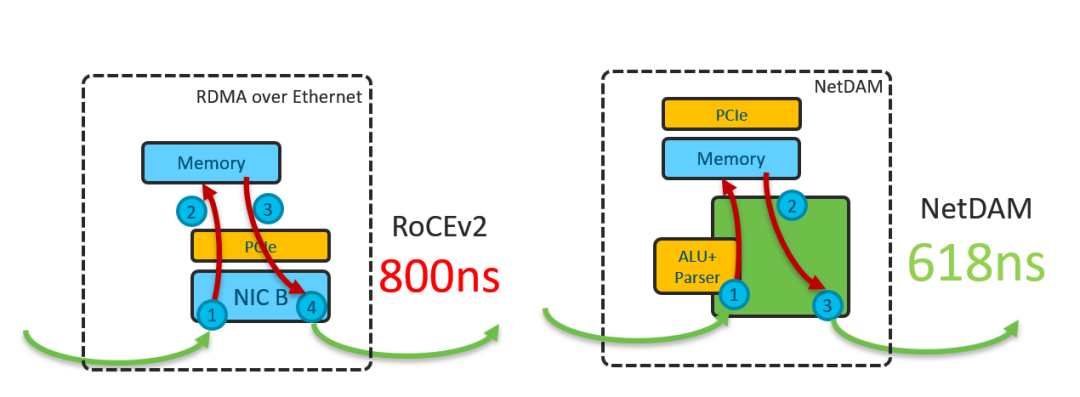
有同学需要100G的链路下进行高速延迟测试的可以采用这个方案,一个Nexus 9300交换机也很便宜,而且很多测试环境本来就有这样的100G交换机,其它公司的例如INT等方案,自己改io.c里面的解析函数就好了。
文章转载自zartbot,如果涉嫌侵权,请发送邮件至:contact@modb.pro进行举报,并提供相关证据,一经查实,墨天轮将立刻删除相关内容。
