




今天接到运维人员反馈最近表空间增长有点过快。按现有的数据增长,预计年底前就需要扩容存储。而从DBA的角度盲目进行硬件扩容是一种不负责任的的表现,我们要搞清究竟是什么导致数据增长的,解决问题根本所在。下面把整个过程分享给各位小伙伴,希望能帮助到您。
问题现象
从运维人员那得知表空间加了没有多久就用完了,客户方原本打算做预算将存储进行扩容。但本人觉得还是要对客户方负责,评估一下到底需不要增加硬件。先看一下表空间使用率,用户数据主要在USERS表空间,大概3700GB。
[root@rac01 ~]# su - oracle
[oracle@rac01 ~]$ sqlplus / as sysdba

SQL*Plus: Release 11.2.0.4.0 Production on Tue Jun 18 14:46:45 2024

Copyright (c) 1982, 2013, Oracle.  All rights reserved.


Connected to:
Oracle Database 11g Enterprise Edition Release 11.2.0.4.0 - 64bit Production
With the Partitioning, Real Application Clusters, Automatic Storage Management, OLAP,
Data Mining and Real Application Testing options

SQL> set linesize 200
col tablespace_name for a20
select df.tablespace_name,
                         count(*) files,
                         round(sum(df.bytes) / 1048576) size_mb,
                         round(sum(free.bytes) / 1048576, 2) free_mb,
                         100 - round(100.0 * sum(free.bytes) / sum(df.bytes), 2) pct_used,
                         round(100.0 * sum(free.bytes) / sum(df.bytes), 2) pct_free
        from dba_data_files df,
                         (select tablespace_name,
                                                         file_id,
                                                         sum(bytes) bytes,
                                                         max(bytes) maxbytes
                                        from dba_free_space
                                 group by tablespace_name, file_id) free
 where df.tablespace_name = free.tablespace_name(+)
         and df.file_id = free.file_id(+)
 group by df.tablespace_name
order by pct_used desc
/SQL> SQL>   2    3    4    5    6    7    8    9   10   11   12   13   14   15   16   17   18

TABLESPACE_NAME           FILES    SIZE_MB    FREE_MB   PCT_USED   PCT_FREE
-------------------- ---------- ---------- ---------- ---------- ----------
SYSTEM                        2      11850     137.63      98.84       1.16
USERS                       118    3854888      73229       98.1        1.9
SYSAUX                        2      44374    1593.38      96.41       3.59
UNDOTBS1                      1      30355    9554.31      68.52      31.48
UNDOTBS2                      1      28319   25664.06       9.38      90.62

SQL>
问题分析
通过dba_hist_tbspc_space_usage查询USERS表空间近期增量情况,发现每天平均在2G的数据增量。
SQL> set line 200
col ts_name for a30
col pct_used for a10
SELECT a.snap_id,
       c.tablespace_name ts_name,
       to_char(to_date(a.rtime, 'mm/dd/yyyy hh24:mi:ss'), 'yyyy-mm-dd hh24:mi') rtime,
       round(a.tablespace_size * c.block_size / 1024 / 1024, 2) ts_size_mb,
       round(a.tablespace_usedsize * c.block_size / 1024 / 1024, 2) ts_used_mb,
       round((a.tablespace_size - a.tablespace_usedsize) * c.block_size / 1024 / 1024,2) ts_free_mb,
           round(a.tablespace_usedsize * c.block_size / 1024 / 1024, 2) -
                lag(round(a.tablespace_usedsize * c.block_size / 1024 / 1024, 2),1)
                over(order by a.tablespace_id,to_date(a.rtime, 'mm/dd/yyyy hh24:mi:ss')) inc_mb,
       round(a.tablespace_usedsize / a.tablespace_size * 100, 2) || '%' pct_used
  FROM dba_hist_tbspc_space_usage a,
       (SELECT tablespace_id,
               substr(rtime, 1, 10) rtime,
               max(snap_id) snap_id
          FROM dba_hist_tbspc_space_usage nb
         group by tablespace_id, substr(rtime, 1, 10)) b,
         dba_tablespaces c,
SQL>          v$tablespace d
 where a.snap_id = b.snap_id
   and a.tablespace_id = b.tablespace_id
   and a.tablespace_id=d.TS#
   and d.NAME=c.tablespace_name
   and d.NAME = '&tbs_name'
   and to_date(a.rtime, 'mm/dd/yyyy hh24:mi:ss') >=sysdate-30
   order by a.tablespace_id,to_date(a.rtime, 'mm/dd/yyyy hh24:mi:ss') desc;

SQL> SQL>   2    3    4    5    6    7    8    9   10   11   12   13   14   15   16   17   18   19   20   21   22   23   24   25  Enter value for tbs_name: old  23:    and d.NAME = '&tbs_name'
new  23:    and d.NAME = ''

no rows selected

SQL> /
Enter value for tbs_name: USERS
old  23:    and d.NAME = '&tbs_name'
new  23:    and d.NAME = 'USERS'

   SNAP_ID TS_NAME                        RTIME            TS_SIZE_MB TS_USED_MB TS_FREE_MB     INC_MB PCT_USED
---------- ------------------------------ ---------------- ---------- ---------- ---------- ---------- ----------
     39581 USERS                          2024-06-18 23:45 3854887.86 3780090.17   74797.69    1913.81 98.06%
     39485 USERS                          2024-06-17 23:45 3854887.86 3778176.36    76711.5     1710.5 98.01%
     39389 USERS                          2024-06-16 23:45 3854887.86 3776465.86      78422        832 97.97%
     39293 USERS                          2024-06-15 23:45 3854887.86 3775633.86      79254    1255.19 97.94%
     39197 USERS                          2024-06-14 23:45 3854887.86 3774378.67   80509.19     2311.1 97.91%
     39101 USERS                          2024-06-13 23:45 3854887.86 3772067.57   82820.29       1705 97.85%
     39005 USERS                          2024-06-12 23:45 3854887.86 3770362.57   84525.29     971.31 97.80%
     38909 USERS                          2024-06-11 23:45 3854887.86 3769391.26    85496.6     1564.5 97.78%
     38813 USERS                          2024-06-10 23:45 3854887.86 3767826.76    87061.1    1322.75 97.74%
     38717 USERS                          2024-06-09 23:45 3854887.86 3766504.06    88383.8     1089.2 97.70%

10 rows selected.

SQL>
继续查是哪个对象增长那么块占用USERS表空间,通过dba_segments查出USERS占用空间前十的对象,发现总共3700Gb的库有一个LOB对象居然占用了1600Gb多的空间(大概1/2的空间)。这就很像https://asktom.oracle.com/ords/asktom.search?tag=reclaimreuse-lob-space类似情况,那么这个SYS_LOB0000262715C00018$$段就成为了严重怀疑对象,继续定位这个LOB字段是哪个表,通过dba_lobs找到是PRINT_YJD_SD,统计表里记录数大概在69万。
SQL> col segment_name for a40
SQL> with t as (select t.owner,t.segment_name,t.segment_type,t.tablespace_name,bytes/1024/1024/1024 GB from dba_segments t where t.tablespace_name='USERS' order by 5 desc) select * from t where rownum<=10;

OWNER                          SEGMENT_NAME                             SEGMENT_TYPE       TABLESPACE_NAME              GB
------------------------------ ---------------------------------------- ------------------ -------------------- ----------
CMSDYPT                        SYS_LOB0000262715C00018$$                LOBSEGMENT         USERS                1612.38773
GKSD6                          WMS_INOUT_LOT_HISTORY                    TABLE              USERS                 117.87793
SAVEFEGKSD6                    CMSFE_MSG_LOG_BAK                        TABLE              USERS                112.451172
GKSD6                          SCM_INOUT_LOT_HISTORY                    TABLE              USERS                106.714844
GKSD6                          PK_WMS_INOUT_LOT_HISTORY                 INDEX              USERS                57.2041016
GKSD6                          BPM_EVENTS_LOG                           TABLE              USERS                56.7021484
SAVEFEGKSD6                    SYS_LOB0000146929C00006$$                LOBSEGMENT         USERS                53.2021484
FRUSER                         SYS_LOB0000348753C00013$$                LOBSEGMENT         USERS                42.6552734
GKSD6                          PK_SCM_INOUT_LOT_HISTORY                 INDEX              USERS                39.8720703
GKSD6                          SCM_INOUT_HISTORY                        TABLE              USERS                39.2128906

10 rows selected.

SQL> col COLUMN_NAME for a40
SQL> set timing on
SQL> SELECT table_name, column_name, segment_name, a.bytes/1024/1024/1024 Gb FROM dba_segments a JOIN dba_lobs b USING (owner, segment_name) WHERE b.segment_name = 'SYS_LOB0000262715C00018$$';

TABLE_NAME                     COLUMN_NAME                              SEGMENT_NAME                                     GB
------------------------------ ---------------------------------------- ---------------------------------------- ----------
PRINT_YJD_SD                   BASE                                     SYS_LOB0000262715C00018$$                 1612.3877

Elapsed: 00:00:03.42
SQL> select count(1) from CMSDYPT.PRINT_YJD_SD;

  COUNT(1)
----------
    693385

Elapsed: 00:00:02.06
SQL> select sum(dbms_lob.getlength (BASE))/1024/1024/1024 GB from CMSDYPT.PRINT_YJD_SD;

        GB
----------
64.0668227

Elapsed: 00:00:10.09
SQL>
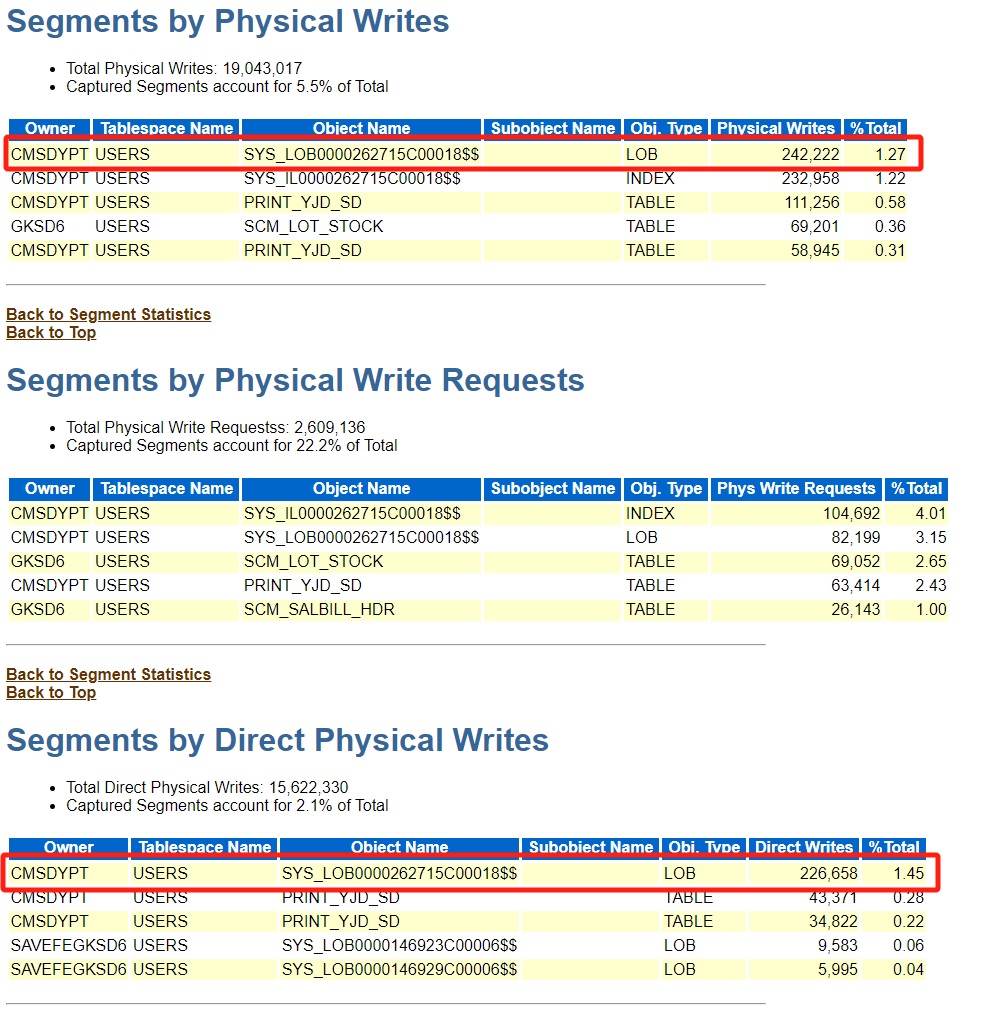
我们也可以在AWR报告中的Segments by Direct Physical Writes部分也能定位到有问题表和LOB字段
处理过程
和客户方沟通这个表的BASE字段占用空间问题,客户方表示停业务可以清理这个表。由于可以停机操作,我们就放心大胆删除了部分数据后,通过SHRINK SPACE方式释放LOB空间,但释放过程中发现时间过长,4个多小时选择取消操作,改用expdp-drop-impdp的方式,expdp后我们看到最终dmp文件大小在129Gb。然后我们drop,create重建PRINT_YJD_SD表,再创建一个HUIFU的用户作为临时恢复过度用,最后精简到2024年有效数据。表空间释放出1600GB空间正常了。
SQL> ALTER TABLE CMSDYPT.PRINT_YJD_SD MODIFY LOB (BASE) (SHRINK SPACE);
ALTER TABLE CMSDYPT.PRINT_YJD_SD MODIFY LOB (BASE) (SHRINK SPACE)
*
ERROR at line 1:
ORA-00028: your session has been killed
ORA-00028: your session has been killed


Elapsed: 04:43:24.89
SQL>
SQL> exit
Disconnected from Oracle Database 11g Enterprise Edition Release 11.2.0.4.0 - 64bit Production
With the Partitioning, Real Application Clusters, Automatic Storage Management, OLAP,
Data Mining and Real Application Testing options
[oracle@rac01 ~]$ expdp \'/ as sysdba\' directory=dmpdir dumpfile=20240619.dmp logfile=20240619.log tables=CMSDYPT.PRINT_YJD_SD

Export: Release 11.2.0.4.0 - Production on Wed Jun 19 14:07:24 2024

Copyright (c) 1982, 2011, Oracle and/or its affiliates.  All rights reserved.

Connected to: Oracle Database 11g Enterprise Edition Release 11.2.0.4.0 - 64bit Production
With the Partitioning, Real Application Clusters, Automatic Storage Management, OLAP,
Data Mining and Real Application Testing options
Starting "SYS"."SYS_EXPORT_TABLE_01":  "/******** AS SYSDBA" directory=dmpdir dumpfile=20240619.dmp logfile=20240619.log tables=CMSDYPT.PRINT_YJD_SD
Estimate in progress using BLOCKS method...
Processing object type TABLE_EXPORT/TABLE/TABLE_DATA
Total estimation using BLOCKS method: 1612. GB
Processing object type TABLE_EXPORT/TABLE/TABLE
Processing object type TABLE_EXPORT/TABLE/INDEX/INDEX
Processing object type TABLE_EXPORT/TABLE/INDEX/STATISTICS/INDEX_STATISTICS
Processing object type TABLE_EXPORT/TABLE/STATISTICS/TABLE_STATISTICS
. . exported "CMSDYPT"."PRINT_YJD_SD"                    128.2 GB  479394 rows
Master table "SYS"."SYS_EXPORT_TABLE_01" successfully loaded/unloaded
******************************************************************************
Dump file set for SYS.SYS_EXPORT_TABLE_01 is:
  /u01/app/ora11g/20240619.dmp
Job "SYS"."SYS_EXPORT_TABLE_01" successfully completed at Wed Jun 19 16:33:55 2024 elapsed 0 02:26:27

[oracle@rac01 ~]$ ll -h /u01/app/ora11g/20240619.dmp
-rw-r----- 1 oracle oinstall 129G 6月  19 16:33 /u01/app/ora11g/20240619.dmp
[oracle@rac01 ~]$ sqlplus CMSDYPT

SQL*Plus: Release 11.2.0.4.0 Production on Wed Jun 19 16:35:56 2024

Copyright (c) 1982, 2013, Oracle.  All rights reserved.

Enter password:

Connected to:
Oracle Database 11g Enterprise Edition Release 11.2.0.4.0 - 64bit Production
With the Partitioning, Real Application Clusters, Automatic Storage Management, OLAP,
Data Mining and Real Application Testing options

SQL> drop table PRINT_YJD_SD;

Table dropped.

SQL> create table PRINT_YJD_SD
(
  2    id         VARCHAR2(200),
  3    4    phid       VARCHAR2(200),
  spid       VARCHAR2(200),
  yjdh       VARCHAR2(255),
  hzid       VARCHAR2(200),
  wjlj       VARCHAR2(255),
  wjm        VARCHAR2(255),
  mark       VARCHAR2(255),
  pcdh       VARCHAR2(255),
  ddzh       VARCHAR2(255),
  khid       VARCHAR2(255),
  timestamps VARCHAR2(255),
  dycs       NUMBER default 0 not null,
  dybz       VARCHAR2(255) default 0 not null,
  5    6    7    hz         VARCHAR2(255),
  8    9    khbm       VARCHAR2(255),
  khmc       VARCHAR2(255),
  base       CLOB,
  ddid       VARCHAR2(30),
 10   11   12   13   14    ddzhid     VARCHAR2(50),
  bt         VARCHAR2(255),
 15   16    xh         VARCHAR2(255),
  printflag  VARCHAR2(255) default 0 not null,
  yjdid      VARCHAR2(50)
)
tablespace USERS
  pctfree 10
  initrans 1
 17   18    maxtrans 255
  storage
  (
    initial 64K
    next 1M
    minextents 1
    maxextents unlimited
  ); 19   20   21   22   23   24   25   26   27   28   29   30   31   32   33   34   35   36   37   38

Table created.

SQL> create index IDX_YJ_PCDH on PRINT_YJD_SD (PCDH, DDZH)
  tablespace USERS
  pctfree 10
  initrans 2
  maxtrans 255
  storage
  (
    initial 64K
    next 1M
    minextents 1
    maxextents unlimited
  );  2    3    4    5    6    7    8    9   10   11   12

Index created.

SQL> create user huifu identified by huifu default tablespace users;

User created.

SQL> grant dba to huifu;

Grant succeeded.

SQL> exit
Disconnected from Oracle Database 11g Enterprise Edition Release 11.2.0.4.0 - 64bit Production
With the Partitioning, Real Application Clusters, Automatic Storage Management, OLAP,
Data Mining and Real Application Testing options
[oracle@rac01 ~]$ impdp huifu/huifu directory=dmpdir dumpfile=20240619.dmp logfile=imp20240619.log full=y remap_schema=CMSDYPT:HUIFU

Import: Release 11.2.0.4.0 - Production on Wed Jun 19 16:39:34 2024

Copyright (c) 1982, 2011, Oracle and/or its affiliates.  All rights reserved.

Connected to: Oracle Database 11g Enterprise Edition Release 11.2.0.4.0 - 64bit Production
With the Partitioning, Real Application Clusters, Automatic Storage Management, OLAP,
Data Mining and Real Application Testing options
Master table "HUIFU"."SYS_IMPORT_FULL_01" successfully loaded/unloaded
Starting "HUIFU"."SYS_IMPORT_FULL_01":  huifu/******** directory=dmpdir dumpfile=20240619.dmp logfile=imp20240619.log full=y remap_schema=CMSDYPT:HUIFU
Processing object type TABLE_EXPORT/TABLE/TABLE
Processing object type TABLE_EXPORT/TABLE/TABLE_DATA
. . imported "HUIFU"."PRINT_YJD_SD"                      128.2 GB  479394 rows
Processing object type TABLE_EXPORT/TABLE/INDEX/INDEX
Processing object type TABLE_EXPORT/TABLE/INDEX/STATISTICS/INDEX_STATISTICS
Processing object type TABLE_EXPORT/TABLE/STATISTICS/TABLE_STATISTICS
Job "HUIFU"."SYS_IMPORT_FULL_01" successfully completed at Wed Jun 19 18:42:28 2024 elapsed 0 02:02:53

[oracle@rac01 ~]$ sqlplus CMSDYPT

SQL*Plus: Release 11.2.0.4.0 Production on Wed Jun 19 18:43:24 2024

Copyright (c) 1982, 2013, Oracle.  All rights reserved.

Enter password:

Connected to:
Oracle Database 11g Enterprise Edition Release 11.2.0.4.0 - 64bit Production
With the Partitioning, Real Application Clusters, Automatic Storage Management, OLAP,
Data Mining and Real Application Testing options

SQL> insert into PRINT_YJD_SD select * from huifu.PRINT_YJD_SD where wjlj like '%2024%';

116533 rows created.

SQL> commit;

Commit complete.

SQL> conn / as sysdba
Connected.
SQL> drop user huifu cascade;

User dropped.

SQL> set linesize 200
col tablespace_name for a20
select df.tablespace_name,
                         count(*) files,
                         round(sum(df.bytes) / 1048576) size_mb,
                         round(sum(free.bytes) / 1048576, 2) free_mb,
                         100 - round(100.0 * sum(free.bytes) / sum(df.bytes), 2) pct_used,
                         round(100.0 * sum(free.bytes) / sum(df.bytes), 2) pct_free
        from dba_data_files df,
                         (select tablespace_name,
                                                         file_id,
                                                         sum(bytes) bytes,
                                                         max(bytes) maxbytes
                                        from dba_free_space
                                 group by tablespace_name, file_id) free
 where df.tablespace_name = free.tablespace_name(+)
         and df.file_id = free.file_id(+)
 group by df.tablespace_name
order by pct_used desc
/SQL> SQL>   2    3    4    5    6    7    8    9   10   11   12   13   14   15   16   17   18

TABLESPACE_NAME           FILES    SIZE_MB    FREE_MB   PCT_USED   PCT_FREE
-------------------- ---------- ---------- ---------- ---------- ----------
SYSTEM                        2      11850        138      98.84       1.16
SYSAUX                        2      44374    1398.19      96.85       3.15
USERS                       118    3854888 1604830.44      58.37      41.63
UNDOTBS1                      1      30355   24383.25      19.67      80.33
UNDOTBS2                      1      28319   24739.06      12.64      87.36

SQL>
总结
表空间增长是DBA必须关注的,Oracle 11.2.0.4版本特别要注意对有BasicFiles LOB类型字段的表,频繁插入和删除DML操作的话,LOB空间一旦分配,就不会回收,除非表被删除或截断。如果要对LOB字段进行回收空间使用ALTER TABLE <table_name> MODIFY LOB (<column_name>) (SHRINK SPACE);
