



集群规划
181+182; 183+184; 185+186.
修改配置文件
采用复制表:
su - clickhouse
vim /clickhouse/etc/clickhouse-server/config.d/metrika.xml
<yandex>
<clickhouse_remote_servers>
<!--定义分片节点,这里我指定 3 个分片,每个分片有 2 个副本,181+182,183+184,185+186-->
<chxjcluster3s2r02>
<shard>
<weight>1</weight>
<internal_replication>true</internal_replication>
<replica>
<host>CK1</host>
<port>9000</port>
</replica>
<replica>
<host>CK2</host>
<port>9000</port>
</replica>
</shard>
<shard>
<weight>1</weight>
<internal_replication>true</internal_replication>
<replica>
<host>CK3</host>
<port>9000</port>
</replica>
<replica>
<host>CK4</host>
<port>9000</port>
</replica>
</shard>
<shard>
<weight>1</weight>
<internal_replication>true</internal_replication>
<replica>
<host>CK5</host>
<port>9000</port>
</replica>
<replica>
<host>CK6</host>
<port>9000</port>
</replica>
</shard>
</chxjcluster3s2r02>
</clickhouse_remote_servers>
<zookeeper-servers>
<node index="1">
<host>CK1</host>
<port>2181</port>
</node>
<node index="2">
<host>CK2</host>
<port>2181</port>
</node>
<node index="3">
<host>CK3</host>
<port>2181</port>
</node>
<node index="4">
<host>CK4</host>
<port>2181</port>
</node>
<node index="5">
<host>CK5</host>
<port>2181</port>
</node>
</zookeeper-servers>
<!--定义宏变量,后面需要用-->
<!-- 以下的配置根据节点的 IP/域名具体配置,配置文件中 macros 若省略,则建复制表时每个分片需指定 zookeeper 路径及副本名称,
          同 一 分 片 上 路 径 相 同 , 副 本 名 称 不 同 ;若 不 省 略 需每个 分 片 不 同 配置,{layer}-{shard}-{replica}-->
<macros>
<!-- <replica>CK1.2</replica> -->
<layer>02</layer>
<shard>01</shard>
<replica>chcluster3s2r02_01_01</replica>
</macros>
<!--不限制访问来源 ip 地址-->
<networks>
<ip>::/0</ip>
</networks>
<!--数据压缩方式,默认为 lz4-->
<clickhouse_compression>
<case>
<min_part_size>10000000000</min_part_size>
<min_part_size_ratio>0.01</min_part_size_ratio>
<method>lz4</method>
</case>
</clickhouse_compression>
</yandex>
sshpass -p "clickhouse" scp -o StrictHostKeychecking=no clickhouse/etc/clickhouse-server/config.d/metrika.xml xxx.xxx.3.182:/clickhouse/etc/clickhouse-server/config.d/
sshpass -p "clickhouse" scp -o StrictHostKeychecking=no /clickhouse/etc/clickhouse-server/config.d/metrika.xml xxx.xxx.3.183:/clickhouse/etc/clickhouse-server/config.d/
sshpass -p "clickhouse" scp -o StrictHostKeychecking=no /clickhouse/etc/clickhouse-server/config.d/metrika.xml xxx.xxx.3.184:/clickhouse/etc/clickhouse-server/config.d/
sshpass -p "clickhouse" scp -o StrictHostKeychecking=no /clickhouse/etc/clickhouse-server/config.d/metrika.xml xxx.xxx.3.185:/clickhouse/etc/clickhouse-server/config.d/
sshpass -p "clickhouse" scp -o StrictHostKeychecking=no /clickhouse/etc/clickhouse-server/config.d/metrika.xml xxx.xxx.3.186:/clickhouse/etc/clickhouse-server/config.d/
CK2:

<macros>
<!-- <replica>CK1.2</replica> -->
<layer>02</layer>
<shard>01</shard>
<replica>chcluster3s2r02_01_02</replica>
</macros>

CK3:
<macros>
<!-- <replica>CK3.4</replica> -->
<layer>02</layer>
<shard>02</shard>
<replica>chcluster3s2r02_02_01</replica>
</macros>
CK4:

<macros>
<!-- <replica>CK3.4</replica> -->
<layer>02</layer>
<shard>02</shard>
<replica>chcluster3s2r02_02_02</replica>
</macros>

CK5:
<macros>
<!-- <replica>CK5.6</replica> -->
<layer>02</layer>
<shard>03</shard>
<replica>chcluster3s2r02_03_01</replica>
</macros>

CK6:

<macros>
<!-- <replica>CK5.6</replica> -->
<layer>02</layer>
<shard>03</shard>
<replica>chcluster3s2r02_03_02</replica>
</macros>
click house集群验证与使用
su - clickhouse
ps -ef | grep clickhouse-server | grep config.xml | grep -v grep | awk '{print "kill -9 "$2}'|sh
ps -ef | grep clickhouse-server | grep config9200.xml | grep -v grep | awk '{print "kill -9 "$2}'|sh
/clickhouse/app/clickhouse.start
sleep 5
netstat -an|grep 9000
2023.10.10 21:01:02.369055 [ 16733 ] {} <Error> Application: Caught exception while loading metadata:
Code: 170, e.displayText() = DB::Exception: Requested cluster 'clickhouse_chcluster1' not found:
 while loading database `chtest` from path /clickhouse/data/metadata/chtest, Stack trace
  (when copying this message, always include the lines below)
clickhouse-client -h xxx.xxx.3.181 --port 9000 --user default --query "select * from system.clusters;"
clickhouse-client -h xxx.xxx.3.182 --port 9000 --user default --query "select * from system.clusters;"
clickhouse-client -h xxx.xxx.3.183 --port 9000 --user default --query "select * from system.clusters;"
clickhouse-client -h xxx.xxx.3.184 --port 9000 --user default --query "select * from system.clusters;"
clickhouse-client -h xxx.xxx.3.185 --port 9000 --user default --query "select * from system.clusters;"
clickhouse-client -h xxx.xxx.3.186 --port 9000 --user default --query "select * from system.clusters;"

┌─cluster──────────────────────────────────────┬─shard_num─┬─shard_weight─┬─replica_num─┬─host_name─┬─host_address──┬─port─┬─is_local─┬─user────┬─default_database─┬─errors_count─┬─estimated_recovery_time─┐
│ chxjcluster3s2r02                            │ 1 │ 1 │ 1 │ CK1       │ xxx.xxx.3.181 │ 9000 │ 1 │ default │ │ 0 │ 0 │
│ chxjcluster3s2r02                            │ 1 │ 1 │ 2 │ CK2       │ xxx.xxx.3.182 │ 9000 │ 0 │ default │ │ 0 │ 0 │
│ chxjcluster3s2r02                            │ 2 │ 1 │ 1 │ CK3       │ xxx.xxx.3.183 │ 9000 │ 0 │ default │ │ 0 │ 0 │
│ chxjcluster3s2r02                            │ 2 │ 1 │ 2 │ CK4       │ xxx.xxx.3.184 │ 9000 │ 0 │ default │ │ 0 │ 0 │
│ chxjcluster3s2r02                            │ 3 │ 1 │ 1 │ CK5       │ xxx.xxx.3.185 │ 9000 │ 0 │ default │ │ 0 │ 0 │
│ chxjcluster3s2r02                            │ 3 │ 1 │ 2 │ CK6       │ xxx.xxx.3.186 │ 9000 │ 0 │ default │ │ 0 │ 0 │
│ clickhouse_chcluster1                        │ 1 │ 1 │ 1 │ ck1       │ xxx.xxx.3.181 │ 9000 │ 1 │ default │ │ 0 │ 0 │
│ clickhouse_chcluster1                        │ 2 │ 1 │ 1 │ ck2       │ xxx.xxx.3.182 │ 9000 │ 0 │ default │ │ 0 │ 0 │
│ clickhouse_chcluster1                        │ 3 │ 1 │ 1 │ ck3       │ xxx.xxx.3.183 │ 9000 │ 0 │ default │ │ 0 │ 0 │
│ test_cluster_two_shards                      │ 1 │ 1 │ 1 │ 127.0.0.1 │ 127.0.0.1     │ 9000 │ 1 │ default │ │ 0 │ 0 │
│ test_cluster_two_shards                      │ 2 │ 1 │ 1 │ 127.0.0.2 │ 127.0.0.2     │ 9000 │ 0 │ default │ │ 0 │ 0 │
│ test_cluster_two_shards_internal_replication │ 1 │ 1 │ 1 │ 127.0.0.1 │ 127.0.0.1     │ 9000 │ 1 │ default │ │ 0 │ 0 │
│ test_cluster_two_shards_internal_replication │ 2 │ 1 │ 1 │ 127.0.0.2 │ 127.0.0.2     │ 9000 │ 0 │ default │ │ 0 │ 0 │
│ test_cluster_two_shards_localhost            │ 1 │ 1 │ 1 │ localhost │ ::1           │ 9000 │ 1 │ default │ │ 0 │ 0 │
│ test_cluster_two_shards_localhost            │ 2 │ 1 │ 1 │ localhost │ ::1           │ 9000 │ 1 │ default │ │ 0 │ 0 │
│ test_shard_localhost                         │ 1 │ 1 │ 1 │ localhost │ ::1           │ 9000 │ 1 │ default │ │ 0 │ 0 │
│ test_shard_localhost_secure                  │ 1 │ 1 │ 1 │ localhost │ ::1           │ 9440 │ 0 │ default │ │ 0 │ 0 │
│ test_unavailable_shard                       │ 1 │ 1 │ 1 │ localhost │ ::1           │ 9000 │ 1 │ default │ │ 0 │ 0 │
│ test_unavailable_shard                       │ 2 │ 1 │ 1 │ localhost │ ::1           │ 1 │ 0 │ default │ │ 0 │ 0 │
└──────────────────────────────────────────────┴───────────┴──────────────┴─────────────┴───────────┴───────────────┴──────┴──────────┴─────────┴──────────────────┴──────────────┴─────────────────────────┘
cklogin

SHOW DATABASES

Query id: c9edd1b4-c407-4c8c-9244-bdea6b3cdf18

┌─name───────────────────────────┐
│ _temporary_and_external_tables │
│ chtest │
│ chxjdb │
│ default                        │
│ system                         │
└────────────────────────────────┘


clickhouse-client -h xxx.xxx.1.81 --port 9000 --user default

drop database chxjdb on cluster chxjcluster3s2r02 ;
create database chxjdb on cluster chxjcluster3s2r02 ;
基于集群创建表,任意一台集群创建,其他的都可以生成。
use chxjdb
CREATE TABLE `ontime_local2` on cluster chxjcluster3s2r02 ( \
`Year` UInt16, \
`Quarter` UInt8, \
`Month` UInt8, \
`DayofMonth` UInt8, \
`DayOfWeek` UInt8, \
`FlightDate` Date, \
`UniqueCarrier` FixedString(7), \
`AirlineID` Int32, \
`Carrier` FixedString(2), \
`TailNum` String, \
`FlightNum` String, \
`OriginAirportID` Int32, \
`OriginAirportSeqID` Int32, \
`OriginCityMarketID` Int32, \
`Origin` FixedString(5), \
`OriginCityName` String, \
`OriginState` FixedString(2), \
`OriginStateFips` String, \
`OriginStateName` String, \
`OriginWac` Int32, \
`DestAirportID` Int32, \
`DestAirportSeqID` Int32, \
`DestCityMarketID` Int32, \
`Dest` FixedString(5), \
`DestCityName` String, \
`DestState` FixedString(2), \
`DestStateFips` String, \
`DestStateName` String, \
`DestWac` Int32, \
`CRSDepTime` Int32, \
`DepTime` Int32, \
`DepDelay` Int32, \
`DepDelayMinutes` Int32, \
`DepDel15` Int32, \
`DepartureDelayGroups` String, \
`DepTimeBlk` String, \
`TaxiOut` Int32, \
`WheelsOff` Int32, \
`WheelsOn` Int32, \
`TaxiIn` Int32, \
`CRSArrTime` Int32, \
`ArrTime` Int32, \
`ArrDelay` Int32, \
`ArrDelayMinutes` Int32, \
`ArrDel15` Int32, \
`ArrivalDelayGroups` Int32, \
`ArrTimeBlk` String, \
`Cancelled` UInt8, \
`CancellationCode` FixedString(1), \
`Diverted` UInt8, \
`CRSElapsedTime` Int32, \
`ActualElapsedTime` Int32, \
`AirTime` Int32, \
`Flights` Int32, \
`Distance` Int32, \
`DistanceGroup` UInt8, \
`CarrierDelay` Int32, \
`WeatherDelay` Int32, \
`NASDelay` Int32, \
`SecurityDelay` Int32, \
`LateAircraftDelay` Int32, \
`FirstDepTime` String, \
`TotalAddGTime` String, \
`LongestAddGTime` String, \
`DivAirportLandings` String, \
`DivReachedDest` String, \
`DivActualElapsedTime` String, \
`DivArrDelay` String, \
`DivDistance` String, \
`Div1Airport` String, \
`Div1AirportID` Int32, \
`Div1AirportSeqID` Int32, \
`Div1WheelsOn` String, \
`Div1TotalGTime` String, \
`Div1LongestGTime` String, \
`Div1WheelsOff` String, \
`Div1TailNum` String, \
`Div2Airport` String, \
`Div2AirportID` Int32, \
`Div2AirportSeqID` Int32, \
`Div2WheelsOn` String, \
`Div2TotalGTime` String, \
`Div2LongestGTime` String, \
`Div2WheelsOff` String, \
`Div2TailNum` String, \
`Div3Airport` String, \
`Div3AirportID` Int32, \
`Div3AirportSeqID` Int32, \
`Div3WheelsOn` String, \
`Div3TotalGTime` String, \
`Div3LongestGTime` String, \
`Div3WheelsOff` String, \
`Div3TailNum` String, \
`Div4Airport` String, \
`Div4AirportID` Int32, \
`Div4AirportSeqID` Int32, \
`Div4WheelsOn` String, \
`Div4TotalGTime` String, \
`Div4LongestGTime` String, \
`Div4WheelsOff` String, \
`Div4TailNum` String, \
`Div5Airport` String, \
`Div5AirportID` Int32, \
`Div5AirportSeqID` Int32, \
`Div5WheelsOn` String, \
`Div5TotalGTime` String, \
`Div5LongestGTime` String, \
`Div5WheelsOff` String, \
`Div5TailNum` String \
) ENGINE =ReplicatedReplacingMergeTree('/clickhouse/tables/{layer}-{shard}/ontime_local2','{replica}') \
PARTITION BY toYYYYMM(FlightDate) \
ORDER BY (Year, FlightDate) ;
┌─host─┬─port─┬─status─┬─error─┬─num_hosts_remaining─┬─num_hosts_active─┐
│ CK6 │ 9000 │ 0 │ │ 5 │ 0 │
│ CK5 │ 9000 │ 0 │ │ 4 │ 0 │
│ CK1 │ 9000 │ 0 │ │ 3 │ 0 │
│ CK3 │ 9000 │ 0 │ │ 2 │ 0 │
│ CK4 │ 9000 │ 0 │ │ 1 │ 0 │
└──────┴──────┴────────┴───────┴─────────────────────┴──────────────────┘
┌─host─┬─port─┬─status─┬─error─┬─num_hosts_remaining─┬─num_hosts_active─┐
│ CK2 │ 9000 │ 0 │ │ 0 │ 0 │
└──────┴──────┴────────┴───────┴─────────────────────┴──────────────────┘
ReplicatedReplacingMergeTree:复制合并树
'/clickhouse/tables/{layer}-{shard}/ontime_local2','{replica}':写到ZK中的路径,路径相同的就可以复制
create table ontime_all2 on cluster chxjcluster3s2r02 as chxjdb.ontime_local2 ENGINE=Distributed(chxjcluster3s2r02, chxjdb, ontime_local2, rand());
┌─host─┬─port─┬─status─┬─error─┬─num_hosts_remaining─┬─num_hosts_active─┐
│ CK6 │ 9000 │ 0 │ │ 5 │ 0 │
│ CK5 │ 9000 │ 0 │ │ 4 │ 0 │
│ CK3 │ 9000 │ 0 │ │ 3 │ 0 │
│ CK1 │ 9000 │ 0 │ │ 2 │ 0 │
│ CK4 │ 9000 │ 0 │ │ 1 │ 0 │
│ CK2 │ 9000 │ 0 │ │ 0 │ 0 │
└──────┴──────┴────────┴───────┴─────────────────────┴──────────────────┘
chcluster3s2r02, itpuxdb, ontime_local2, rand()
集群 数据库 表 随机分发
INSERT INTO ontime_all2 SELECT * FROM chtest.ontime;
CK1 :) select  * from system.zookeeper where path ='/clickhouse/tables'
SELECT *
FROM system.zookeeper
WHERE path = '/clickhouse/tables'
Query id: 3bc950d6-1ada-4761-8ac4-2a749d3ec2c4
┌─name──┬─value─┬───────czxid─┬───────mzxid─┬───────────────ctime─┬───────────────mtime─┬─version─┬─cversion─┬─aversion─┬─ephemeralOwner─┬─dataLength─┬─numChildren─┬───────pzxid─┬─path───────────────┐
│ 02-03 │ │ 12884902007 │ 12884902007 │ 2023-10-10 22:20:00 │ 2023-10-10 22:20:00 │ 0 │ 1 │ 0 │ 0 │ 0 │ 1 │ 12884902016 │ /clickhouse/tables │
│ 02-02 │ │ 12884902011 │ 12884902011 │ 2023-10-10 22:20:00 │ 2023-10-10 22:20:00 │ 0 │ 1 │ 0 │ 0 │ 0 │ 1 │ 12884902018 │ /clickhouse/tables │
│ 02-01 │ │ 12884902015 │ 12884902015 │ 2023-10-10 22:20:00 │ 2023-10-10 22:20:00 │ 0 │ 1 │ 0 │ 0 │ 0 │ 1 │ 12884902021 │ /clickhouse/tables │
└───────┴───────┴─────────────┴─────────────┴─────────────────────┴─────────────────────┴─────────┴──────────┴──────────┴────────────────┴────────────┴─────────────┴─────────────┴────────────────────┘
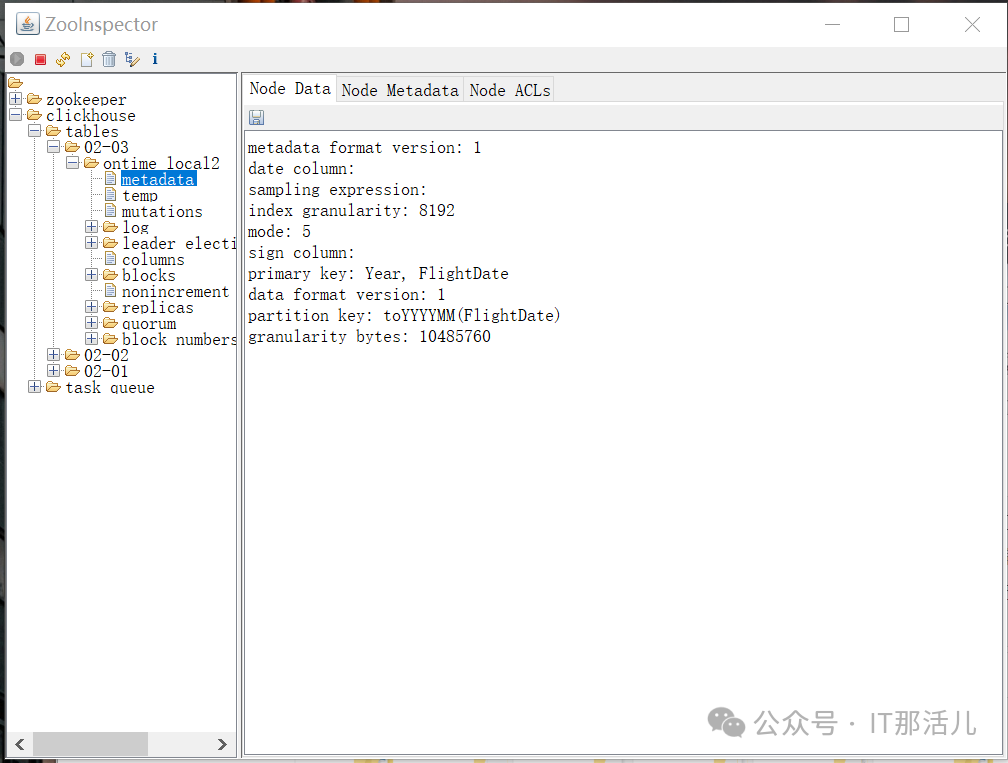
[zk: xxx.xxx.3.185:2181(CONNECTED) 0] ls /clickhouse/tables
[02-01, 02-02, 02-03]
[zk: xxx.xxx.3.185:2181(CONNECTED) 1]
select count(*) from ontime_all2
select count(*) from ontime_local2
select count(*) as a from ontime_all2 \
union all \
select count(*) as b from ontime_local2\
clickhouse-client -h xxx.xxx.3.181 -d fgedudb -u default --query "select count(*) from ontime_all2"
clickhouse-client -h xxx.xxx.3.182 -d fgedudb -u default --query "select count(*) from ontime_all2"
clickhouse-client -h xxx.xxx.3.183 -d fgedudb -u default --query "select count(*) from ontime_all2"
clickhouse-client -h xxx.xxx.3.184 -d fgedudb -u default --query "select count(*) from ontime_all2"
clickhouse-client -h xxx.xxx.3.185 -d fgedudb -u default --query "select count(*) from ontime_all2"
clickhouse-client -h xxx.xxx.3.186 -d fgedudb -u default --query "select count(*) from ontime_all2"
clickhouse-client -h xxx.xxx.3.181 -d fgedudb -u default --query "select count(*) from ontime_local2"
clickhouse-client -h xxx.xxx.3.182 -d fgedudb -u default --query "select count(*) from ontime_local2"
clickhouse-client -h xxx.xxx.3.183 -d fgedudb -u default --query "select count(*) from ontime_local2"
clickhouse-client -h xxx.xxx.3.184 -d fgedudb -u default --query "select count(*) from ontime_local2"
clickhouse-client -h xxx.xxx.3.185 -d fgedudb -u default --query "select count(*) from ontime_local2"
clickhouse-client -h xxx.xxx.3.186 -d fgedudb -u default --query "select count(*) from ontime_local2"
分布式执行 SQL。
SELECT min(Year), max(Year), Carrier, count(*) AS cnt, \
sum(ArrDelayMinutes>30) AS flights_delayed, \
round(sum(ArrDelayMinutes>30)/count(*),2) AS rate \
FROM ontime_all2 \
WHERE \
DayOfWeek NOT IN (6,7) AND OriginState NOT IN ('AK', 'HI', 'PR', 'VI') \
AND DestState NOT IN ('AK', 'HI', 'PR', 'VI') \
AND FlightDate < '2020-01-01' \
GROUP by Carrier \
HAVING cnt>100000 and max(Year)>1990 \
ORDER by rate DESC \
LIMIT 1000;
┌─min(Year)─┬─max(Year)─┬─Carrier─┬────cnt─┬─flights_delayed─┬─rate─┐
│ 2014 │ 2015 │ MQ │ 135700 │ 19922 │ 0.15 │
│ 2014 │ 2015 │ EV │ 254724 │ 33385 │ 0.13 │
│ 2014 │ 2015 │ OO │ 217231 │ 25531 │ 0.12 │
│ 2014 │ 2015 │ UA │ 180822 │ 20748 │ 0.11 │
│ 2014 │ 2015 │ WN │ 479174 │ 47019 │ 0.1 │
│ 2014 │ 2015 │ AA │ 251771 │ 24048 │ 0.1 │
│ 2014 │ 2015 │ DL │ 319429 │ 23849 │ 0.07 │
└───────────┴───────────┴─────────┴────────┴─────────────────┴──────┘
7 rows in set. Elapsed: 0.170 sec. Processed 3.00 million rows, 44.99 MB
(17.61 million rows/s., 264.16 MB/s.)
SELECT min(Year), max(Year), Carrier, count(*) AS cnt, \
sum(ArrDelayMinutes>30) AS flights_delayed, \
round(sum(ArrDelayMinutes>30)/count(*),2) AS rate \
FROM chtest.ontime \
WHERE \
DayOfWeek NOT IN (6,7) AND OriginState NOT IN ('AK', 'HI', 'PR', 'VI') \
AND DestState NOT IN ('AK', 'HI', 'PR', 'VI') \
AND FlightDate < '2020-01-01' \
GROUP by Carrier \
HAVING cnt>100000 and max(Year)>1990 \
ORDER by rate DESC \
LIMIT 1000;
┌─min(Year)─┬─max(Year)─┬─Carrier─┬────cnt─┬─flights_delayed─┬─rate─┐
│ 2014 │ 2015 │ MQ │ 135700 │ 19922 │ 0.15 │
│ 2014 │ 2015 │ EV │ 254724 │ 33385 │ 0.13 │
│ 2014 │ 2015 │ OO │ 217231 │ 25531 │ 0.12 │
│ 2014 │ 2015 │ UA │ 180822 │ 20748 │ 0.11 │
│ 2014 │ 2015 │ WN │ 479174 │ 47019 │ 0.1 │
│ 2014 │ 2015 │ AA │ 251771 │ 24048 │ 0.1 │
│ 2014 │ 2015 │ DL │ 319429 │ 23849 │ 0.07 │
└───────────┴───────────┴─────────┴────────┴─────────────────┴──────┘
7 rows in set. Elapsed: 0.130 sec. Processed 3.00 million rows, 44.32 MB
(23.10 million rows/s., 341.35 MB/s.)
验证ZK实现副本同步
use chxjdb
create table ch_local2 on cluster chxjcluster3s2r02 (id Int32,name String,create_date date) ENGINE = \
ReplicatedReplacingMergeTree('/clickhouse/tables/{layer}-{shard}/ch_local2','{replica}') \
PARTITION BY toYYYYMM(create_date) \
ORDER BY (create_date, intHash32(id)) ;
create table ch_all2 on cluster chxjcluster3s2r02
 (id Int32, name String,create_date date)ENGINE=Distributed(chxjcluster3s2r02, chxjdb, ch_local2, rand());
┌─host─┬─port─┬─status─┬─error─┬─num_hosts_remaining─┬─num_hosts_active─┐
│ CK6 │ 9000 │ 0 │ │ 5 │ 0 │
│ CK5 │ 9000 │ 0 │ │ 4 │ 0 │
│ CK3 │ 9000 │ 0 │ │ 3 │ 0 │
│ CK1 │ 9000 │ 0 │ │ 2 │ 0 │
│ CK4 │ 9000 │ 0 │ │ 1 │ 0 │
│ CK2 │ 9000 │ 0 │ │ 0 │ 0 │
└──────┴──────┴────────┴───────┴─────────────────────┴──────────────────┘
xxx.xxx.3.181:
insert into ch_local2 values(1,'A','2020-12-01');
insert into ch_local2 values(2,'B','2020-12-02');
insert into ch_local2 values(3,'C','2020-12-03');
insert into ch_local2 values(4,'Q','2020-12-04');
insert into ch_local2 values(5,'W','2020-12-05');
insert into ch_local2 values(6,'E','2020-12-06');
insert into ch_local2 values(7,'R','2020-12-07');
insert into ch_local2 values(8,'T','2020-12-08');
select count(*) from ch_local2;
select count(*) from ch_all2;
插入后
CK1,CK2本地,全局都是8条;CK3-CK6本地0条数据,全局8条数据
xxx.xxx.3.183:
insert into ch_local2 values(9,'A','2020-12-09');
insert into ch_local2 values(10,'S','2020-11-01');
insert into ch_local2 values(11,'D','2020-11-02');
insert into ch_local2 values(12,'F','2020-11-03');
insert into ch_local2 values(13,'G','2020-11-04');
insert into ch_local2 values(14,'H','2020-11-05');
insert into ch_local2 values(15,'J','2020-11-06');
insert into ch_local2 values(16,'K','2020-11-07');
xxx.xxx.3.185:
insert into ch_local2 values(17,'L','2020-11-08');
insert into ch_local2 values(18,'C','2020-11-09');
insert into ch_local2 values(19,'V','2020-10-01');
insert into ch_local2 values(20,'B','2020-10-02');
insert into ch_local2 values(21,'N','2020-10-03');
insert into ch_local2 values(22,'M','2020-10-04');
insert into ch_local2 values(23,'H','2020-10-05');
insert into ch_local2 values(24,'T','2020-10-06');
select count(*) from ch_local2;
select count(*) from ch_all2;
本地表负责接收数据; 分布式表用来查询数据。
本文作者:陈 浩(上海新炬中北团队)
本文来源:“IT那活儿”公众号

