



MySQL 9.0.0 创新版本已经可以下载了。不过rel notes尚未更新。
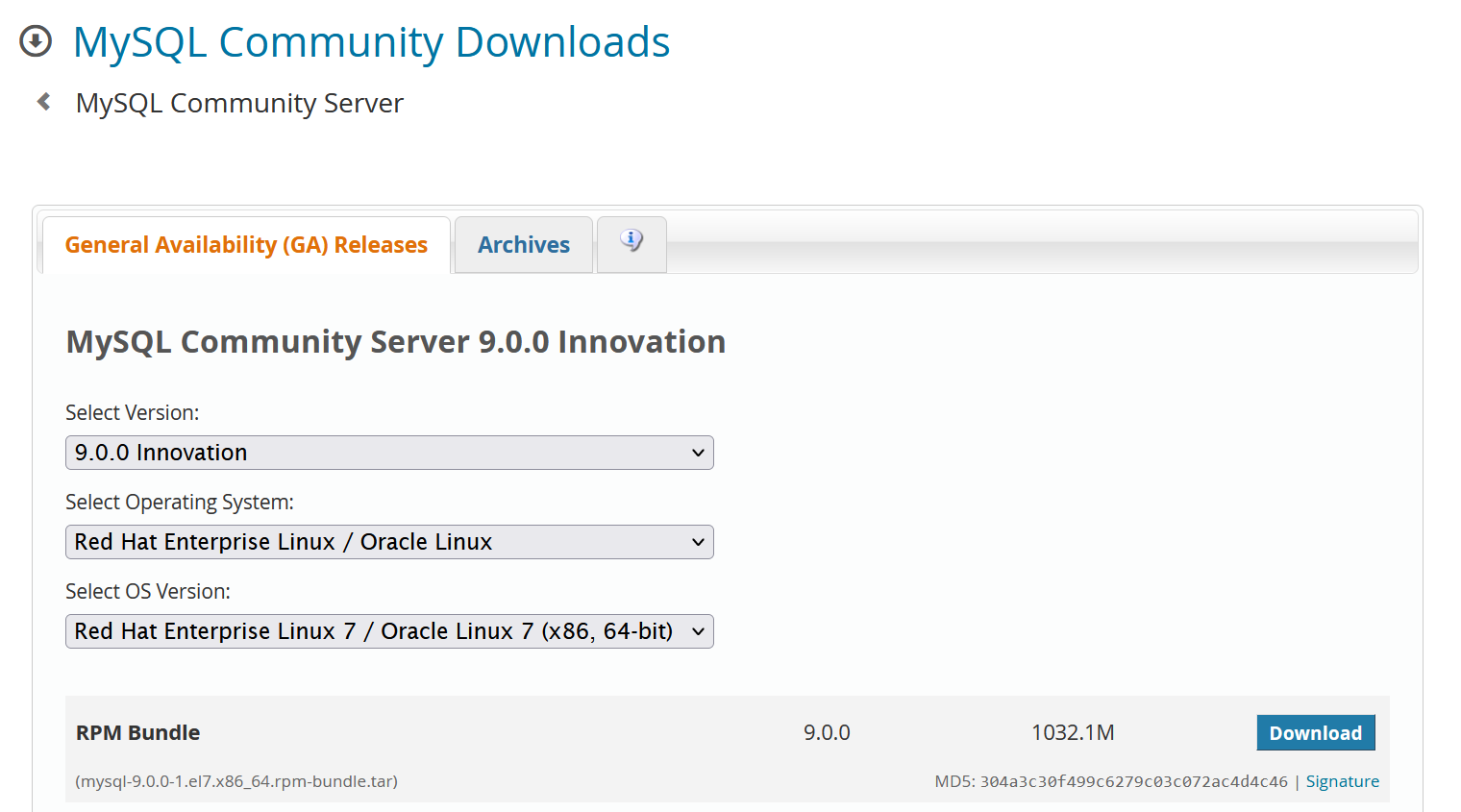
感兴趣的同学可以耍起来了。
下载解压后:
[root@centos7 ~]# ll mysql*
-rw-r--r--. 1 root root  1082245120 Jul  1 21:45 mysql-9.0.0-1.el7.x86_64.rpm-bundle.tar
-rw-r--r--. 1 7155 31415   15319952 Jun  9 22:19 mysql-community-client-9.0.0-1.el7.x86_64.rpm
-rw-r--r--. 1 7155 31415    3628244 Jun  9 22:20 mysql-community-client-plugins-9.0.0-1.el7.x86_64.rpm
-rw-r--r--. 1 7155 31415     709728 Jun  9 22:20 mysql-community-common-9.0.0-1.el7.x86_64.rpm
-rw-r--r--. 1 7155 31415  595193592 Jun  9 22:20 mysql-community-debuginfo-9.0.0-1.el7.x86_64.rpm
-rw-r--r--. 1 7155 31415    2023956 Jun  9 22:20 mysql-community-devel-9.0.0-1.el7.x86_64.rpm
-rw-r--r--. 1 7155 31415    4218992 Jun  9 22:20 mysql-community-embedded-compat-9.0.0-1.el7.x86_64.rpm
-rw-r--r--. 1 7155 31415    2346260 Jun  9 22:20 mysql-community-icu-data-files-9.0.0-1.el7.x86_64.rpm
-rw-r--r--. 1 7155 31415    1592152 Jun  9 22:20 mysql-community-libs-9.0.0-1.el7.x86_64.rpm
-rw-r--r--. 1 7155 31415     687200 Jun  9 22:20 mysql-community-libs-compat-9.0.0-1.el7.x86_64.rpm
-rw-r--r--. 1 7155 31415   63851536 Jun  9 22:21 mysql-community-server-9.0.0-1.el7.x86_64.rpm
-rw-r--r--. 1 7155 31415   26559052 Jun  9 22:21 mysql-community-server-debug-9.0.0-1.el7.x86_64.rpm
-rw-r--r--. 1 7155 31415  366102536 Jun  9 22:22 mysql-community-test-9.0.0-1.el7.x86_64.rpm
YUM安装:
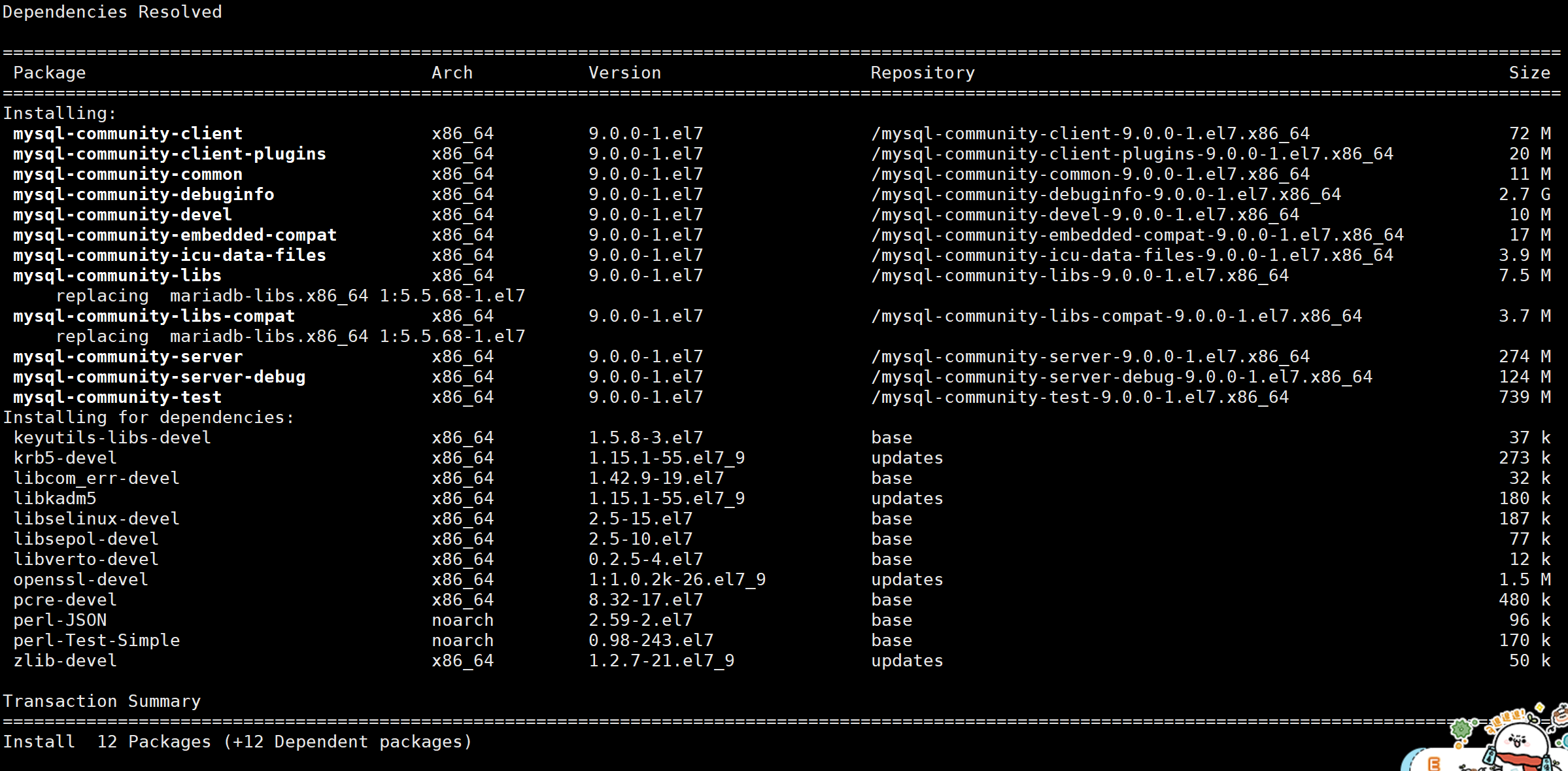
安装完成:
Installed:
  mysql-community-client.x86_64 0:9.0.0-1.el7                              mysql-community-client-plugins.x86_64 0:9.0.0-1.el7
  mysql-community-common.x86_64 0:9.0.0-1.el7                              mysql-community-debuginfo.x86_64 0:9.0.0-1.el7
  mysql-community-devel.x86_64 0:9.0.0-1.el7                               mysql-community-embedded-compat.x86_64 0:9.0.0-1.el7
  mysql-community-icu-data-files.x86_64 0:9.0.0-1.el7                      mysql-community-libs.x86_64 0:9.0.0-1.el7
  mysql-community-libs-compat.x86_64 0:9.0.0-1.el7                         mysql-community-server.x86_64 0:9.0.0-1.el7
  mysql-community-server-debug.x86_64 0:9.0.0-1.el7                        mysql-community-test.x86_64 0:9.0.0-1.el7

Dependency Installed:
  keyutils-libs-devel.x86_64 0:1.5.8-3.el7          krb5-devel.x86_64 0:1.15.1-55.el7_9             libcom_err-devel.x86_64 0:1.42.9-19.el7
  libkadm5.x86_64 0:1.15.1-55.el7_9                 libselinux-devel.x86_64 0:2.5-15.el7            libsepol-devel.x86_64 0:2.5-10.el7
  libverto-devel.x86_64 0:0.2.5-4.el7               openssl-devel.x86_64 1:1.0.2k-26.el7_9          pcre-devel.x86_64 0:8.32-17.el7
  perl-JSON.noarch 0:2.59-2.el7                     perl-Test-Simple.noarch 0:0.98-243.el7          zlib-devel.x86_64 0:1.2.7-21.el7_9

Replaced:
  mariadb-libs.x86_64 1:5.5.68-1.el7

Complete!
[root@centos7 ~]#
启动mysqld服务
[root@centos7 ~]# systemctl start mysqld
[root@centos7 ~]# systemctl status mysqld
● mysqld.service - MySQL Server
   Loaded: loaded (/usr/lib/systemd/system/mysqld.service; enabled; vendor preset: disabled)
   Active: active (running) since Mon 2024-07-01 22:00:35 CST; 18s ago
     Docs: man:mysqld(8)
           http://dev.mysql.com/doc/refman/en/using-systemd.html
  Process: 62400 ExecStartPre=/usr/bin/mysqld_pre_systemd (code=exited, status=0/SUCCESS)
 Main PID: 62477 (mysqld)
   Status: "Server is operational"
    Tasks: 35
   CGroup: /system.slice/mysqld.service
           └─62477 /usr/sbin/mysqld

Jul 01 22:00:22 centos7.shawnyan.cn systemd[1]: Starting MySQL Server...
Jul 01 22:00:35 centos7.shawnyan.cn systemd[1]: Started MySQL Server.
查看日志,获取初始密码:
[root@centos7 ~]# tailf /var/log/mysqld.log
2024-07-01T14:00:24.713911Z 0 [System] [MY-015017] [Server] MySQL Server Initialization - start.
2024-07-01T14:00:24.719696Z 0 [System] [MY-013169] [Server] /usr/sbin/mysqld (mysqld 9.0.0) initializing of server in progress as process 62435
2024-07-01T14:00:24.739529Z 1 [System] [MY-013576] [InnoDB] InnoDB initialization has started.
2024-07-01T14:00:25.676442Z 1 [System] [MY-013577] [InnoDB] InnoDB initialization has ended.
2024-07-01T14:00:27.780001Z 6 [Note] [MY-010454] [Server] A temporary password is generated for root@localhost: U*T-kvd/J5lp
2024-07-01T14:00:30.609639Z 0 [System] [MY-015018] [Server] MySQL Server Initialization - end.
2024-07-01T14:00:31.133904Z 0 [System] [MY-015015] [Server] MySQL Server - start.
2024-07-01T14:00:32.129157Z 0 [System] [MY-010116] [Server] /usr/sbin/mysqld (mysqld 9.0.0) starting as process 62477
2024-07-01T14:00:32.179505Z 1 [System] [MY-013576] [InnoDB] InnoDB initialization has started.
2024-07-01T14:00:34.216355Z 1 [System] [MY-013577] [InnoDB] InnoDB initialization has ended.
2024-07-01T14:00:35.236477Z 0 [Warning] [MY-010068] [Server] CA certificate ca.pem is self signed.
2024-07-01T14:00:35.236581Z 0 [System] [MY-013602] [Server] Channel mysql_main configured to support TLS. Encrypted connections are now supported for this channel.
2024-07-01T14:00:35.312522Z 0 [System] [MY-010931] [Server] /usr/sbin/mysqld: ready for connections. Version: '9.0.0'  socket: '/var/lib/mysql/mysql.sock'  port: 3306  MySQL Community Server - GPL.
2024-07-01T14:00:35.312550Z 0 [System] [MY-011323] [Server] X Plugin ready for connections. Bind-address: '::' port: 33060, socket: /var/run/mysqld/mysqlx.sock
连接数据库重置密码,再次连接,查看版本信息。
[root@centos7 ~]# mysql -uroot -p
Enter password:
Welcome to the MySQL monitor.  Commands end with ; or \g.
Your MySQL connection id is 9
Server version: 9.0.0 MySQL Community Server - GPL

Copyright (c) 2000, 2024, Oracle and/or its affiliates.

Oracle is a registered trademark of Oracle Corporation and/or its
affiliates. Other names may be trademarks of their respective
owners.

Type 'help;' or '\h' for help. Type '\c' to clear the current input statement.

mysql> \s
--------------
mysql  Ver 9.0.0 for Linux on x86_64 (MySQL Community Server - GPL)

Connection id:		9
Current database:
Current user:		root@localhost
SSL:			Not in use
Current pager:		stdout
Using outfile:		''
Using delimiter:	;
Server version:		9.0.0 MySQL Community Server - GPL
Protocol version:	10
Connection:		Localhost via UNIX socket
Server characterset:	utf8mb4
Db     characterset:	utf8mb4
Client characterset:	utf8mb4
Conn.  characterset:	utf8mb4
UNIX socket:		/var/lib/mysql/mysql.sock
Binary data as:		Hexadecimal
Uptime:			51 sec

Threads: 2  Questions: 10  Slow queries: 0  Opens: 130  Flush tables: 3  Open tables: 46  Queries per second avg: 0.196
--------------

mysql> select version();
+-----------+
| version() |
+-----------+
| 9.0.0     |
+-----------+
1 row in set (0.00 sec)
据陈臣大佬说,已经支持向量数据类型,测试一下果真。
mysql> create table tv (id int, v vector);
Query OK, 0 rows affected (0.01 sec)

mysql> show create table tv\G
*************************** 1. row ***************************
       Table: tv
Create Table: CREATE TABLE `tv` (
  `id` int DEFAULT NULL,
  `v` vector(2048) DEFAULT NULL
) ENGINE=InnoDB DEFAULT CHARSET=utf8mb4 COLLATE=utf8mb4_0900_ai_ci
1 row in set (0.00 sec)
接下来写入2条测试数据。
mysql> insert tv select 1,to_vector('[1,2]');
Query OK, 1 row affected (0.01 sec)
Records: 1  Duplicates: 0  Warnings: 0

mysql> insert tv select 2,to_vector('[2,3]');
Query OK, 1 row affected (0.00 sec)
Records: 1  Duplicates: 0  Warnings: 0
查看表数据,直接查看有些难懂,转换一下就好了。
mysql> table tv;
+------+--------------------+
| id   | v                  |
+------+--------------------+
|    1 | 0x0000803F00000040 |
|    2 | 0x0000004000004040 |
+------+--------------------+
2 rows in set (0.00 sec)

mysql> select id,from_vector(v) from tv;
+------+---------------------------+
| id   | from_vector(v)            |
+------+---------------------------+
|    1 | [1.00000e+00,2.00000e+00] |
|    2 | [2.00000e+00,3.00000e+00] |
+------+---------------------------+
2 rows in set (0.00 sec)
查看向量的维度,用到函数 VECTOR_DIM
mysql> insert tv select 3,to_vector('[1,2,3]');
Query OK, 1 row affected (0.00 sec)
Records: 1  Duplicates: 0  Warnings: 0

mysql> select id,VECTOR_DIM(v) from tv;
+------+---------------+
| id   | VECTOR_DIM(v) |
+------+---------------+
|    1 |             2 |
|    2 |             2 |
|    3 |             3 |
+------+---------------+
3 rows in set (0.00 sec)
OK, 先到这里,让我们一起等待9.0文档上线吧。
🌻 往期精彩 ▼
[Oracle]
[MySQL]
[TiDB]
[PG]
– / END / –
👉 这里可以找到我
如果这篇文章为你带来了灵感或启发,就请帮忙点『赞』or『在看』or『转发』吧,感谢!ღ( ´・ᴗ・` )~
最后修改时间:2024-07-02 10:06:47
「喜欢这篇文章,您的关注和赞赏是给作者最好的鼓励」
关注作者
【版权声明】本文为墨天轮用户原创内容,转载时必须标注文章的来源(墨天轮),文章链接,文章作者等基本信息,否则作者和墨天轮有权追究责任。如果您发现墨天轮中有涉嫌抄袭或者侵权的内容,欢迎发送邮件至:contact@modb.pro进行举报,并提供相关证据,一经查实,墨天轮将立刻删除相关内容。
