



MySQL 9.0.0 创新版发布
MySQL 9.0.0 创新版 在2024年7月1日发布了,让我们一睹为快吧!
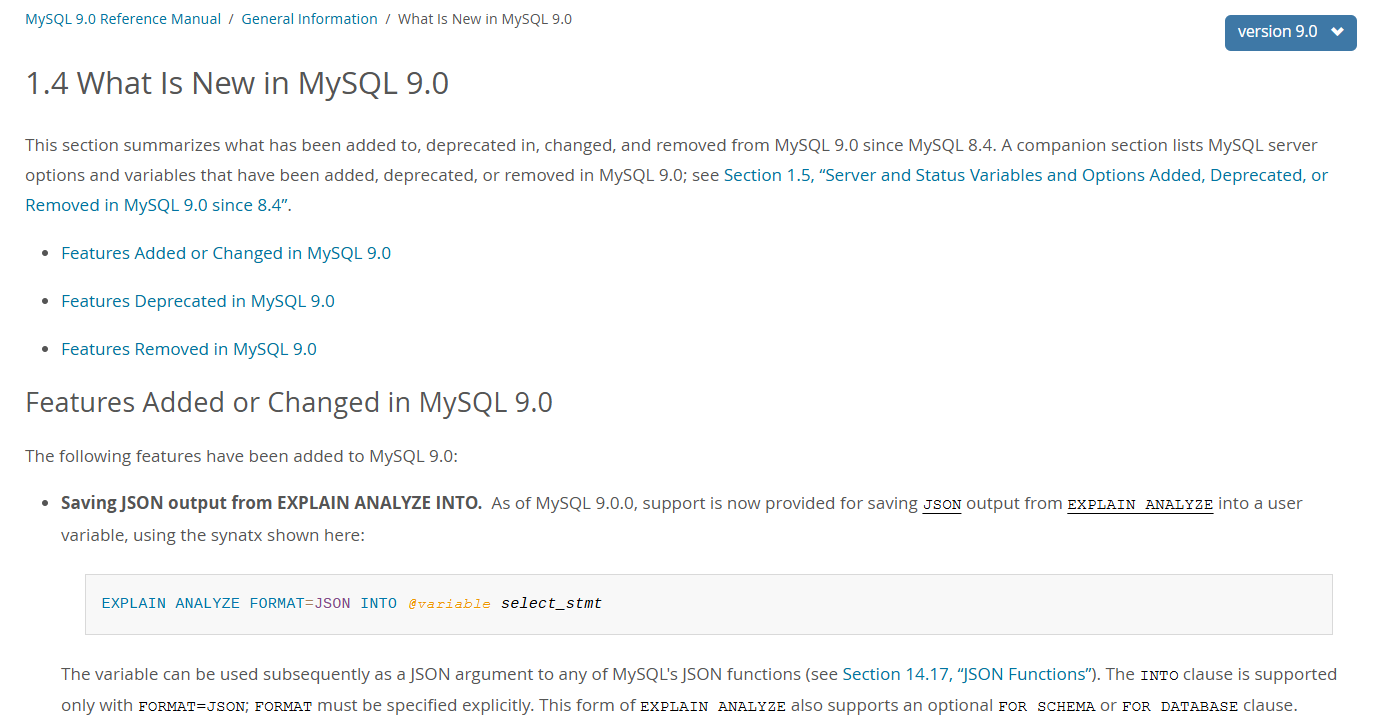
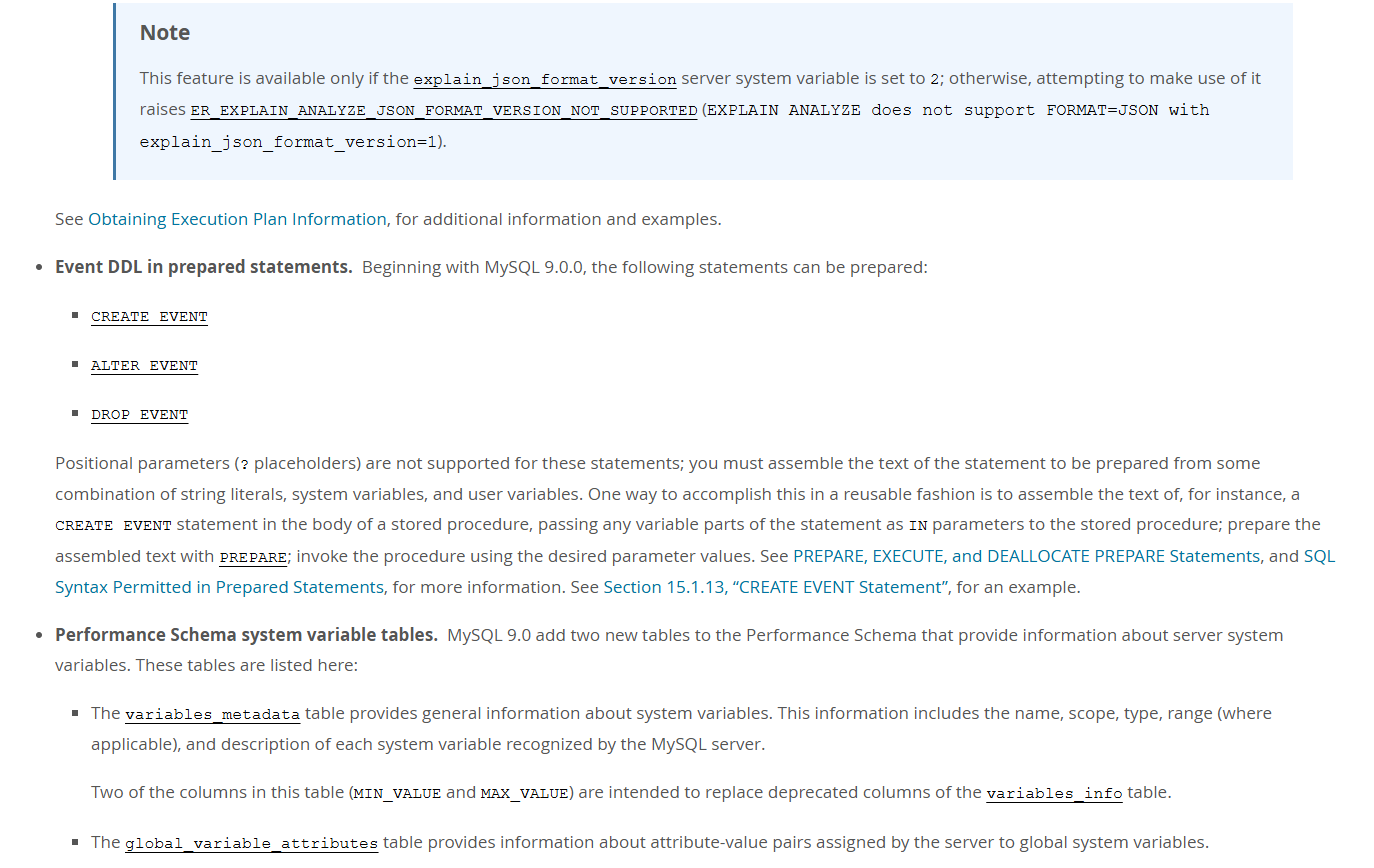
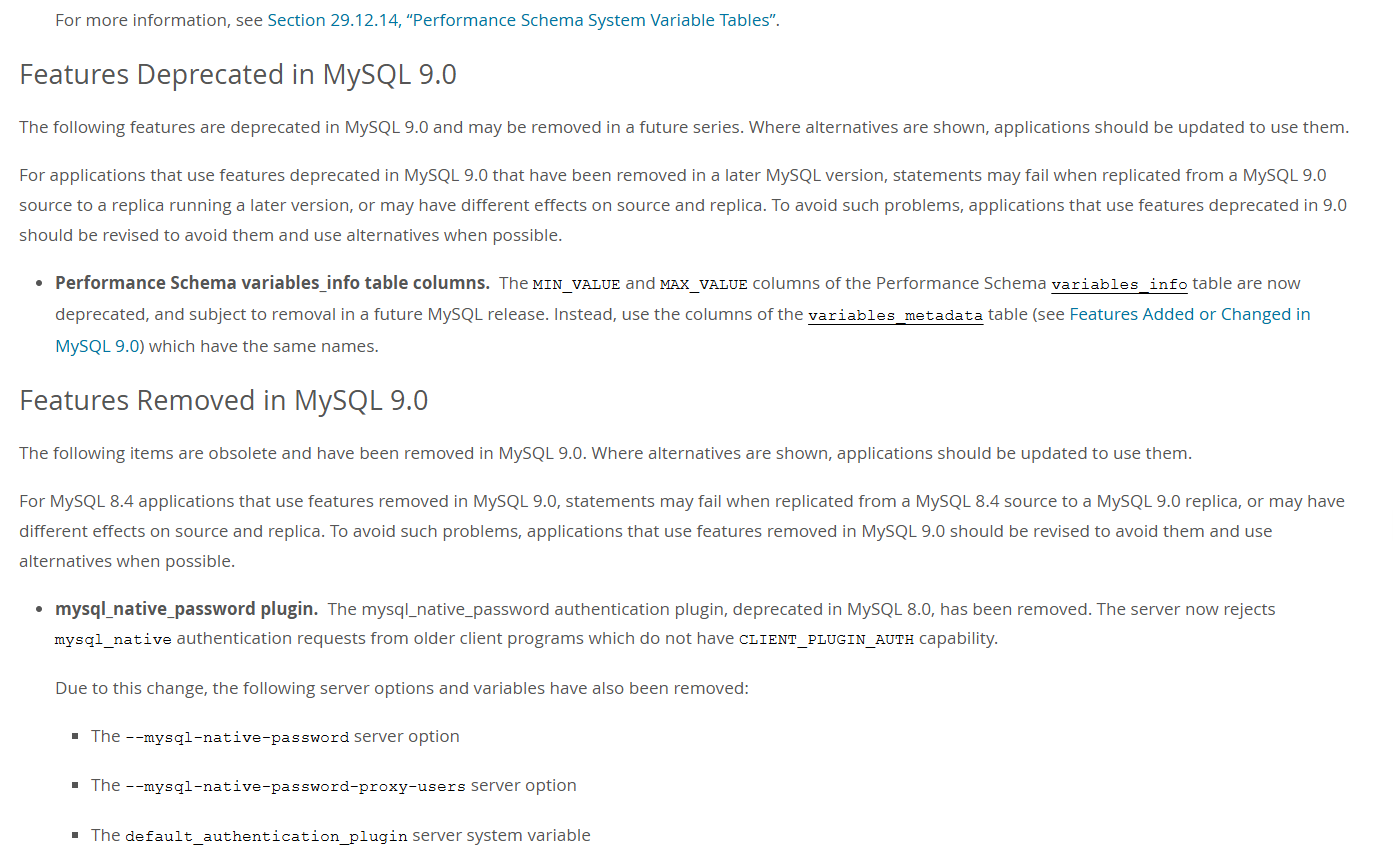
MySQL 9.0.0 创新版特性

MySQL 9.0.0 创新版下载
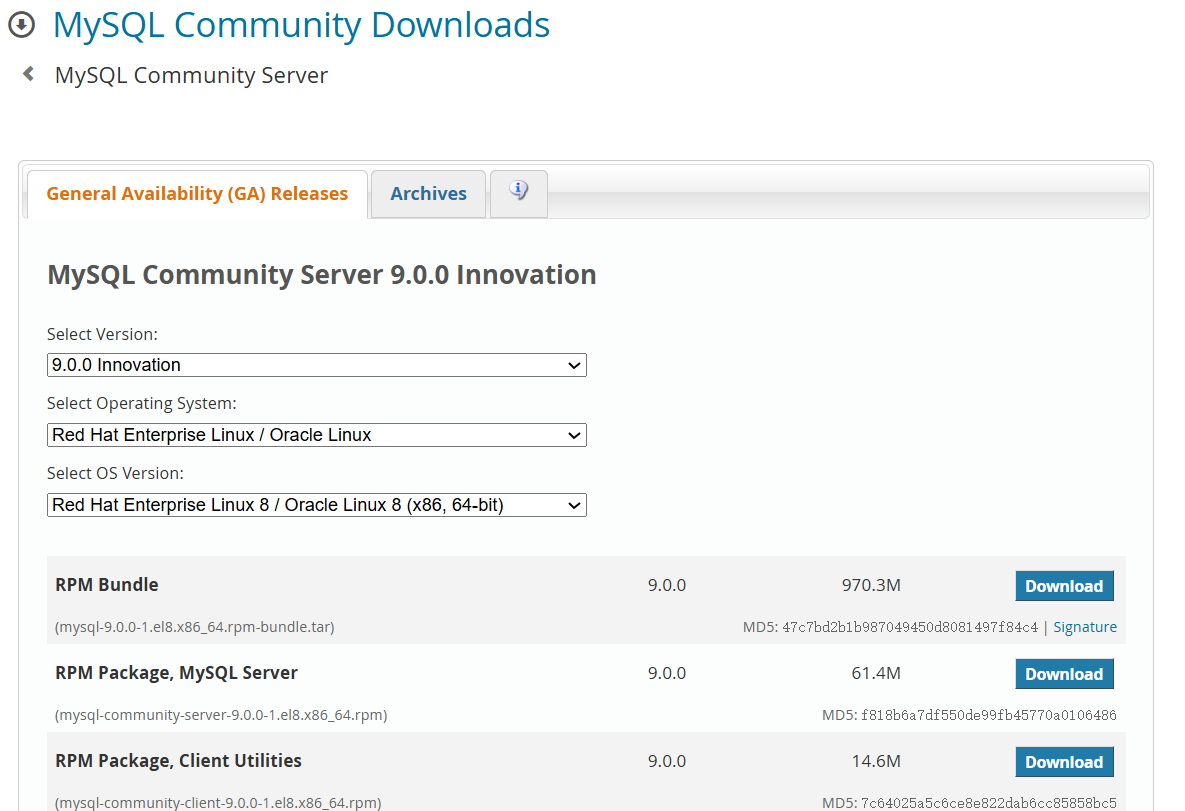
下载地址:https://dev.mysql.com/downloads/mysql/
安装包:mysql-9.0.0-1.el8.x86_64.rpm-bundle.tar
MySQL 9.0.0 安装使用
假设安装包已经上传到了/root目录
解压安装包
cd /root
[root@mysql91 ~]# tar -xvf mysql-9.0.0-1.el8.x86_64.rpm-bundle.tar -C /data

--查看解压后的文件
[root@mysql91 ~]# ls -l /data
total 993576
-rw-r--r--. 1 7155 31415  15320384 Jun  9 22:19 mysql-community-client-9.0.0-1.el8.x86_64.rpm
-rw-r--r--. 1 7155 31415  30001424 Jun  9 22:19 mysql-community-client-debuginfo-9.0.0-1.el8.x86_64.rpm
-rw-r--r--. 1 7155 31415   4880584 Jun  9 22:20 mysql-community-client-plugins-9.0.0-1.el8.x86_64.rpm
-rw-r--r--. 1 7155 31415   4888648 Jun  9 22:20 mysql-community-client-plugins-debuginfo-9.0.0-1.el8.x86_64.rpm
-rw-r--r--. 1 7155 31415    712356 Jun  9 22:20 mysql-community-common-9.0.0-1.el8.x86_64.rpm
-rw-r--r--. 1 7155 31415   7352120 Jun  9 22:20 mysql-community-debuginfo-9.0.0-1.el8.x86_64.rpm
-rw-r--r--. 1 7155 31415  21642048 Jun  9 22:20 mysql-community-debugsource-9.0.0-1.el8.x86_64.rpm
-rw-r--r--. 1 7155 31415   8642568 Jun  9 22:20 mysql-community-devel-9.0.0-1.el8.x86_64.rpm
-rw-r--r--. 1 7155 31415   2349128 Jun  9 22:20 mysql-community-icu-data-files-9.0.0-1.el8.x86_64.rpm
-rw-r--r--. 1 7155 31415   1596640 Jun  9 22:20 mysql-community-libs-9.0.0-1.el8.x86_64.rpm
-rw-r--r--. 1 7155 31415   1557620 Jun  9 22:20 mysql-community-libs-compat-9.0.0-1.el8.x86_64.rpm
-rw-r--r--. 1 7155 31415   2967292 Jun  9 22:20 mysql-community-libs-compat-debuginfo-9.0.0-1.el8.x86_64.rpm
-rw-r--r--. 1 7155 31415   2827892 Jun  9 22:21 mysql-community-libs-debuginfo-9.0.0-1.el8.x86_64.rpm
-rw-r--r--. 1 7155 31415  64420324 Jun  9 22:21 mysql-community-server-9.0.0-1.el8.x86_64.rpm
-rw-r--r--. 1 7155 31415  26719648 Jun  9 22:21 mysql-community-server-debug-9.0.0-1.el8.x86_64.rpm
-rw-r--r--. 1 7155 31415 168774072 Jun  9 22:21 mysql-community-server-debug-debuginfo-9.0.0-1.el8.x86_64.rpm
-rw-r--r--. 1 7155 31415 255354644 Jun  9 22:21 mysql-community-server-debuginfo-9.0.0-1.el8.x86_64.rpm
-rw-r--r--. 1 7155 31415 367125252 Jun  9 22:22 mysql-community-test-9.0.0-1.el8.x86_64.rpm
-rw-r--r--. 1 7155 31415  30250488 Jun  9 22:23 mysql-community-test-debuginfo-9.0.0-1.el8.x86_64.rpm
[root@mysql91 data]#
依次安装rpm包
[root@mysql91 data]# rpm -ivh mysql-community-client-plugins-9.0.0-1.el8.x86_64.rpm
[root@mysql91 data]# rpm -ivh mysql-community-common-9.0.0-1.el8.x86_64.rpm
[root@mysql91 data]# rpm -ivh mysql-community-libs-9.0.0-1.el8.x86_64.rpm
[root@mysql91 data]# rpm -ivh mysql-community-client-9.0.0-1.el8.x86_64.rpm
[root@mysql91 data]# rpm -ivh mysql-community-icu-data-files-9.0.0-1.el8.x86_64.rpm
[root@mysql91 data]# rpm -ivh mysql-community-server-9.0.0-1.el8.x86_64.rpm
启动MySQL SERVER数据库服务
[root@mysql91 data]# systemctl start mysqld
检查MySQL SERVER数据库版本
--查看缺省的root密码
[root@mysql91 etc]# grep -i 'temporary password' /var/log/mysqld.log
2024-07-02T13:32:50.187539Z 6 [Note] [MY-010454] [Server] A temporary password is generated for root@localhost: _Xe<gfykU0uI

--使用缺省的root密码登录数据库,第一次登录后需要修改root用户的密码
mysql> alter user 'root'@'localhost' identified by 'Wel%1234';
mysql> flush privileges;

--使用修改后的密码登录数据库
[root@mysql91 etc]# mysql -uroot -p
Enter password:
Welcome to the MySQL monitor.  Commands end with ; or \g.
Your MySQL connection id is 9
Server version: 9.0.0 MySQL Community Server - GPL

Copyright (c) 2000, 2024, Oracle and/or its affiliates.

Oracle is a registered trademark of Oracle Corporation and/or its
affiliates. Other names may be trademarks of their respective
owners.

Type 'help;' or '\h' for help. Type '\c' to clear the current input statement.

mysql> select version();
+-----------+
| version() |
+-----------+
| 9.0.0     |
+-----------+
1 row in set (0.00 sec)

mysql>
测试远程登录
--创建远程登录账号
mysql> create user root@'192.%' identified  by 'Wel%1234';
Query OK, 0 rows affected (0.01 sec)

mysql> grant all on *.* to root@'192.%' ;
Query OK, 0 rows affected (0.01 sec)

mysql> flush privileges;
Query OK, 0 rows affected (0.00 sec)

--远端登录测试
[root@mysql92 data]# mysql -h *.*.*.10 -uroot -p'Wel%1234'
mysql: [Warning] Using a password on the command line interface can be insecure.
Welcome to the MySQL monitor.  Commands end with ; or \g.
Your MySQL connection id is 11
Server version: 9.0.0 MySQL Community Server - GPL

Copyright (c) 2000, 2024, Oracle and/or its affiliates.

Oracle is a registered trademark of Oracle Corporation and/or its
affiliates. Other names may be trademarks of their respective
owners.

Type 'help;' or '\h' for help. Type '\c' to clear the current input statement.

mysql>
MySQL SERVER数据库服务启停&查看
[root@mysql91 data]#systemctl start mysqld
[root@mysql91 data]#systemctl stop  mysqld
[root@mysql91 data]#systemctl status mysqld
MySQL 9.0.0 创新版的向量使用
MySQL9.0.0支持向量特性,字段类型名称为vector,可以使用to_vector/string_to_vector/from_vector/vector_dim等函数操作向量数据。
创建向量数据库表
mysql> create database testdb;
Query OK, 1 row affected (0.02 sec)

mysql> use testdb;
Database changed
mysql> create table testvector(id int,image vector(200));
Query OK, 0 rows affected (0.02 sec)
创建了一个名为testvector的数据表,其中包含一个vector列用于存储图像的向量表示。
插入向量数据
mysql> insert into testvector(id,image) values(1,string_to_vector('[1,2]'));
Query OK, 1 row affected (0.02 sec)

mysql> insert into testvector(id,image) values(1,string_to_vector('[2,3]'));
Query OK, 1 row affected (0.00 sec)

mysql> insert into testvector(id,image) values(1,string_to_vector('[4,5]'));
Query OK, 1 row affected (0.01 sec)

mysql> insert into testvector(id,image) values(1,string_to_vector('[4,5,6]'));
Query OK, 1 row affected (0.00 sec)

mysql> insert into testvector(id,image) values(1,string_to_vector('[4,5,6,7,8]'));
Query OK, 1 row affected (0.00 sec)
查询向量数据
--select直接查看向量数据有点云里雾里
mysql> select * from testvector;
+------+--------------------------------------------+
| id   | image                                      |
+------+--------------------------------------------+
|    1 | 0x0000803F00000040                         |
|    1 | 0x0000004000004040                         |
|    1 | 0x000080400000A040                         |
|    1 | 0x000080400000A0400000C040                 |
|    1 | 0x000080400000A0400000C0400000E04000000041 |
+------+--------------------------------------------+
5 rows in set (0.00 sec)

--使用from_vector函数查看
mysql> select id,from_vector(image) from testvector;
+------+---------------------------------------------------------------+
| id   | from_vector(image)                                            |
+------+---------------------------------------------------------------+
|    1 | [1.00000e+00,2.00000e+00]                                     |
|    1 | [2.00000e+00,3.00000e+00]                                     |
|    1 | [4.00000e+00,5.00000e+00]                                     |
|    1 | [4.00000e+00,5.00000e+00,6.00000e+00]                         |
|    1 | [4.00000e+00,5.00000e+00,6.00000e+00,7.00000e+00,8.00000e+00] |
+------+---------------------------------------------------------------+
5 rows in set (0.01 sec)
查询向量数据的维度
--使用vector_dim查看向量数据的维度
mysql>  select id,vector_dim(image) from testvector;
+------+-------------------+
| id   | vector_dim(image) |
+------+-------------------+
|    1 |                 2 |
|    1 |                 2 |
|    1 |                 2 |
|    1 |                 3 |
|    1 |                 5 |
+------+-------------------+
5 rows in set (0.00 sec)
碰到的问题
--远端登录测试时,连接异常
[root@mysql92 data]# mysql -h *.*.*.10 -uroot -p'Wel%1234'
mysql: [Warning] Using a password on the command line interface can be insecure.
ERROR 2003 (HY000): Can't connect to MySQL server on '*.*.*.10:3306' (113)
--原因:数据库主机上有防火墙,关掉防火墙或者添加防火墙规则即可。
参考文档
https://dev.mysql.com/doc/refman/9.0/en/mysql-nutshell.html
最后修改时间:2024-07-04 18:38:01
「喜欢这篇文章,您的关注和赞赏是给作者最好的鼓励」
关注作者
【版权声明】本文为墨天轮用户原创内容,转载时必须标注文章的来源(墨天轮),文章链接,文章作者等基本信息,否则作者和墨天轮有权追究责任。如果您发现墨天轮中有涉嫌抄袭或者侵权的内容,欢迎发送邮件至:contact@modb.pro进行举报,并提供相关证据,一经查实,墨天轮将立刻删除相关内容。
