



此前,用户可以通过 Prometheus 数据源插件,设置连接到 GreptimeDB 来进行 PromQL 查询。
GrpetimeDB 支持了 80% 以上的 PromQL 语法。但是,由于 GreptimeDB 底层使用多值模型,而非 Prometheus 的单值模型,同时 GreptimeDB 支持了许多额外高级功能,使用 Grafana Prometheus 数据源插件连接 GreptimeDB 并不能释放 GreptimeDB 的所有潜能。
因此,我们基于 Prometheus 数据源插件,开发了 Grafana GreptimeDB 数据源插件。该插件原生支持 GreptimeDB 特有的功能,比如支持多值模型,以期更友好、全面地支持 GreptimeDB 相关功能。另外,和直接使用 Prometheus 数据源相比,它还解决了一些兼容性问题。
我们是基于 Grafana Prometheus 内置数据源插件[1] 修改的。Prometheus 数据源插件是集成在 Grafana 里的内置插件,并不是一个标准插件,不能独立运行。
为使 GreptimeDB 插件能作为标准插件运行,主要做了以下改动:
解决前端依赖缺失问题:通过 Webpack alias 解决依赖地址变动问题,并提炼部分代码,减少不必要的依赖;
实现 Go 相关的后台功能(插件内部并没有包含相关 Go 代码)。
可以选择以下两种方式任意一种安装 GreptimeDB 数据源插件:
1. 从 发布页面[2] 获取最新版本,解压文件到你的 Grafana 插件目录[3]:
下载地址形如下:
https://github.com/GreptimeTeam/greptimedb-grafana-datasource/releases/tag/v1.0.37
grafana cli --pluginUrl https://github.com/GreptimeTeam/greptimedb-grafana-datasource/releases/latest/download/info8fcc-greptimedb-datasource.zip plugins install info8fcc
2. 填写数据库名称,默认为 public。
3. 如果需要身份验证,选择 basic auth,并填写 GreptimeDB 的用户名和密码。
4. 点击 Save & Test 按钮测试连接。
克隆仓库并运行 Docker Compose 启动服务:
git clone https://github.com/GreptimeTeam/greptimedb-grafana-datasource.git
cd greptimedb-grafana-datasource/docker
docker compose up
2. 默认用户名和密码均为 admin
3. 在 Dashboards 页面可以看到 Node Exporter Full 的展示面板
🌟 如果 Dashboards 看不到 Node Export Full,请确认不要勾选 Starred 过滤器。
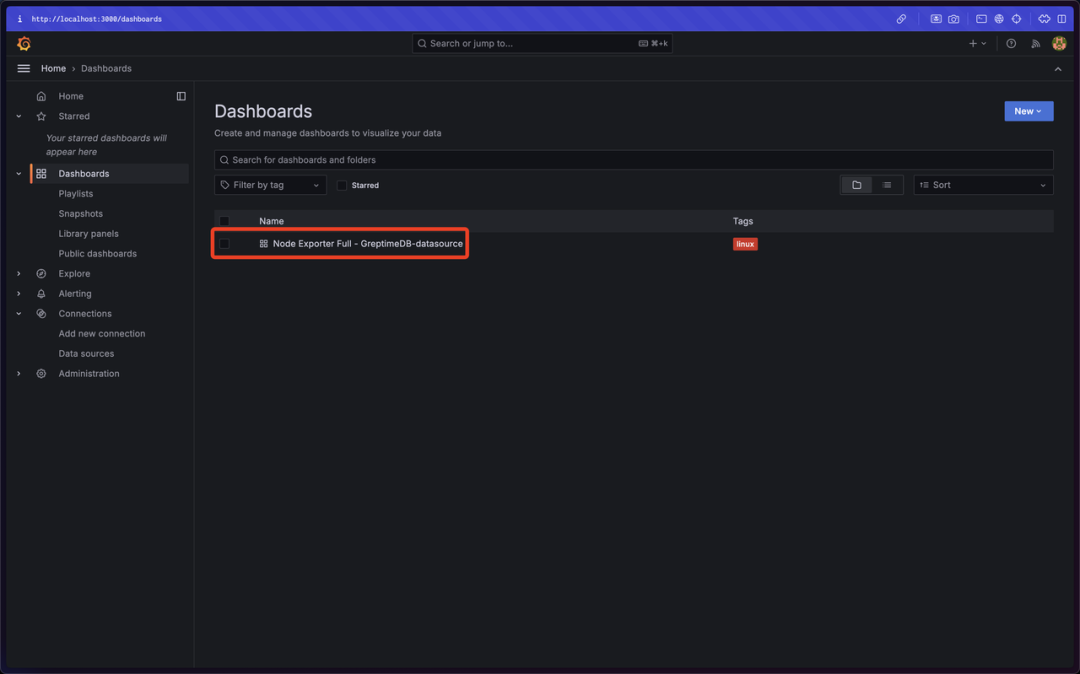
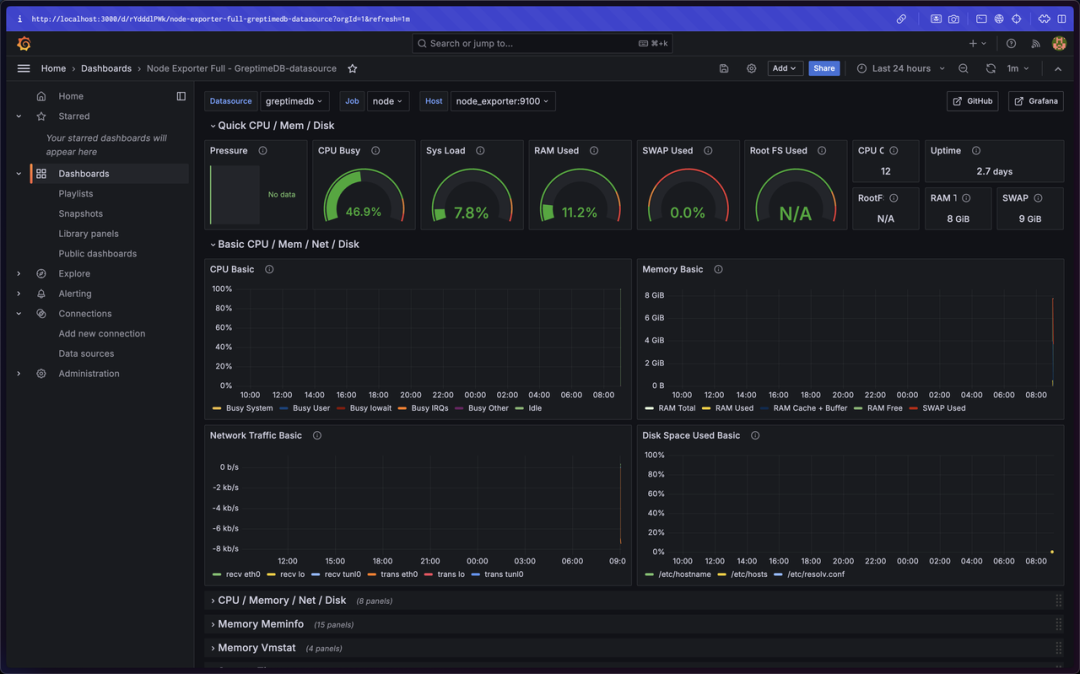
需要重点关注以下两个配置:
remote_write:
  - url: http://greptimedb:4000/v1/prometheus/write?db=public
grafana:
    image:grafana/grafana:latest
container_name:grafana_info8fcc
ports:
-3000:3000
environment:
-GF_INSTALL_PLUGINS=https://github.com/GreptimeTeam/greptimedb-grafana-datasource/releases/latest/download/info8fcc-greptimedb-datasource.zip;info8fcc//安装插件
volumes:
-../provisioning:/etc/grafana/provisioning//使用预制provision
networks:
- datasource-network
安装好 Prometheus 客户端,以及 Node Exporter 客户端,即可上传数据到 GreptimeCloud。
需要重点关注以下配置:
1. 配置 Prometheus remote write read
remote_write:
  -url:https://t3yzenagas4a.us-west-2.aws.greptime.cloud/v1/prometheus/write?db=lpw7na1gmw4gcool_debt-public
basic_auth:
username:NXOZb0pywez9y5LpGNFXvSAM
password:********

remote_read:
-url:https://t3yzenagas4a.us-west-2.aws.greptime.cloud/v1/prometheus/read?db=lpw7na1gmw4gcool_debt-public
basic_auth:
username:NXOZb0pywez9y5LpGNFXvSAM
password: ********
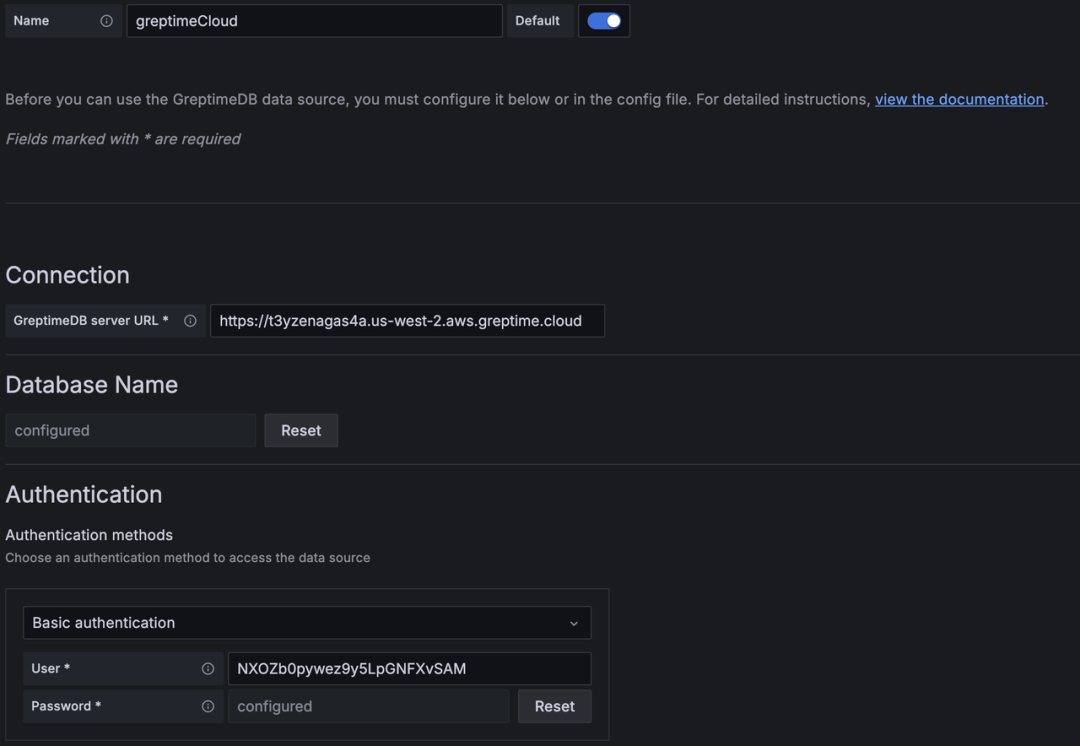
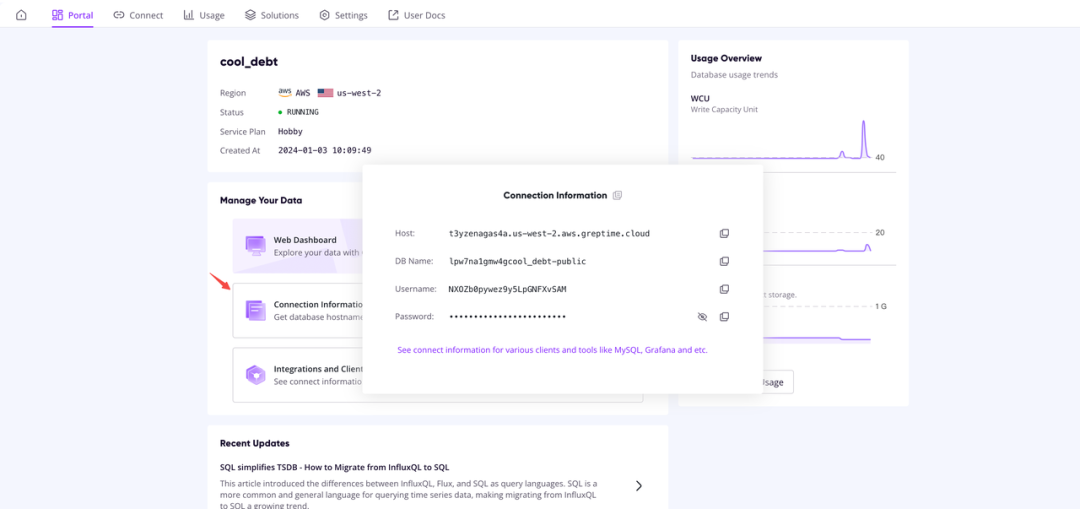
🌟 Host 对应 GreptimeDB server URL,需添加 https:// 前缀。
这样就可以通过 GreptimeDB 数据源插件查询 GreptimeCloud 上的数据了。
Reference:
[1] https://github.com/grafana/grafana/tree/v10.3.3/public/app/plugins/datasource/prometheus
[2] https://github.com/GreptimeTeam/greptimedb-grafana-datasource/releases/tag/v1.0.38
[3] https://grafana.com/docs/grafana/latest/setup-grafana/configure-grafana/#plugins
关于 Greptime
Greptime 格睿科技专注于为物联网(如智慧能源、智能汽车等)及可观测等产生大量时序数据的领域提供实时、高效的数据存储和分析服务,帮助客户挖掘数据的深层价值。目前主要有以下三款产品:
GreptimeDB 是一款用 Rust 语言编写的开源时序数据库,具有云原生、无限水平扩展、高性能和融合分析等特点,帮助企业实时读写、处理和分析时序数据的同时,降低长期存储的成本。我们提供 GreptimeDB 企业版,支持更多企业特性和定制化服务,如有需要欢迎联系我们:15310923206(同微信)。
边云一体方案专为更高效地解决物联网中边缘存储和计算问题而设计,解决了物联网企业数据呈几何倍数增长后的实际业务痛点。它通过将多模式边缘数据库与云端的GreptimeDB 企业版相结合,大幅降低了流量、计算和存储成本,同时提升了数据及时性和商业洞察力。
GreptimeCloud 是一款全托管的云上数据库即服务(DBaaS)解决方案,基于开源时序数据库 GreptimeDB 打造,能够高效支持可观测、物联网、金融等领域的应用。

Star us on GitHub Now:
https://github.com/GreptimeTeam/greptimedb
官网:https://greptime.cn/
文档:https://docs.greptime.cn/
Twitter: https://twitter.com/Greptime
Slack: https://greptime.com/slack
LinkedIn: https://www.linkedin.com/company/greptime/
往期精彩文章:



👇 点击下方阅读原文,立即体验 GreptimeDB!
