



本篇文章将讲解如何使用 Helm Chart 部署单机版 GreptimeDB,并将数据保存在AWS S3 以及阿里云 OSS 等对象存储上。


首先需要安装 Helm 工具,可以根据 安装文档[3] 中的说明进行安装。
在部署应用程序之前,需要将 greptime 仓库[4] 添加到 Helm 中,仓库包含了一系列可用的 Helm Charts。使用以下命令将 greptime 仓库添加到 Helm:
helm repo add greptime https://greptimeteam.github.io/helm-charts/
helm repo update
helm search repo greptime --devel -l
helm install greptimedb-standalone greptime/greptimedb-standalone -n default
要安装特定版本的 Chart,使用以下命令:
helm install greptimedb-standalone greptime/greptimedb-standalone -n default --version <chart-version>
kubectl get po
NAME                      READY   STATUS    RESTARTS   AGE
greptimedb-standalone-0   1/1     Running   0          15s
在之前的教程中,我们分享过如何运行 GreptimeDB 二进制,并将数据保存至 AWS S3 或阿里云 OSS 中(点击链接查看相关文章)。同样,我们也可以通过使用容器化方式部署 GreptimeDB 并将数据存储到云上,以获得更大弹性和可靠性。详细步骤如下:
helm upgrade greptimedb-standalone greptime/greptimedb-standalone -n default \
  --set env.GREPTIMEDB_STANDALONE__STORAGE__TYPE="S3" \
  --set env.GREPTIMEDB_STANDALONE__STORAGE__BUCKET="bucket-name" \
  --set env.GREPTIMEDB_STANDALONE__STORAGE__ROOT="/test-data" \
  --set env.GREPTIMEDB_STANDALONE__STORAGE__REGION="s3-region" \
  --set env.GREPTIMEDB_STANDALONE__STORAGE__ACCESS_KEY_ID="your-access-key-id" \
  --set env.GREPTIMEDB_STANDALONE__STORAGE__SECRET_ACCESS_KEY="your-secret-access-key"
GREPTIMEDB_STANDALONE__STORAGE__TYPE:指定存储类型为 S3
GREPTIMEDB_STANDALONE__STORAGE__BUCKET:S3 Bucket 名字 GREPTIMEDB_STANDALONE__STORAGE__ROOT:数据存储目录,这里设定为 /test-data GREPTIMEDB_STANDALONE__STORAGE__REGION:S3 的 Region GREPTIMEDB_STANDALONE__STORAGE__ACCESS_KEY_ID:访问S3的Access Key GREPTIMEDB_STANDALONE__STORAGE__SECRET_ACCESS_KEY:访问 S3 的 Secret Key
kubectl port-forward svc/greptimedb-standalone 4002:4002 > a.out &
可以使用 MySQL 协议连接 GreptimeDB:
mysql -h 127.0.0.1 -P 4002
执行建表语句,这里的表名为 s3_test_table:
CREATE TABLE s3_test_table (
  host STRING,
  idc STRING,
  cpu_util DOUBLE,
  memory_util DOUBLE,
  disk_util DOUBLE,
  ts TIMESTAMP DEFAULT CURRENT_TIMESTAMP,
  PRIMARY KEY(host, idc),
  TIME INDEX(ts)
);
INSERT INTO s3_test_table
VALUES
    ("host1", "idc_a", 11.8, 10.3, 10.3, 1667446797450),
    ("host1", "idc_a", 80.1, 70.3, 90.0, 1667446797550),
    ("host1", "idc_b", 50.0, 66.7, 40.6, 1667446797650),
    ("host1", "idc_b", 51.0, 66.5, 39.6, 1667446797750),
    ("host1", "idc_b", 52.0, 66.9, 70.6, 1667446797850),
    ("host1", "idc_b", 53.0, 63.0, 50.6, 1667446797950),
    ("host1", "idc_b", 78.0, 66.7, 20.6, 1667446798050),
    ("host1", "idc_b", 68.0, 63.9, 50.6, 1667446798150),
    ("host1", "idc_b", 90.0, 39.9, 60.6, 1667446798250);
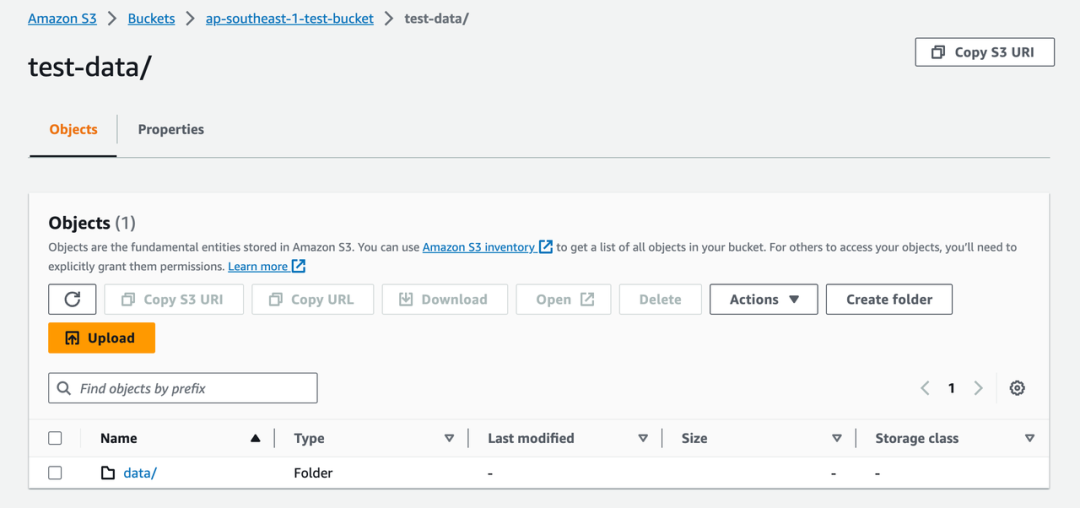
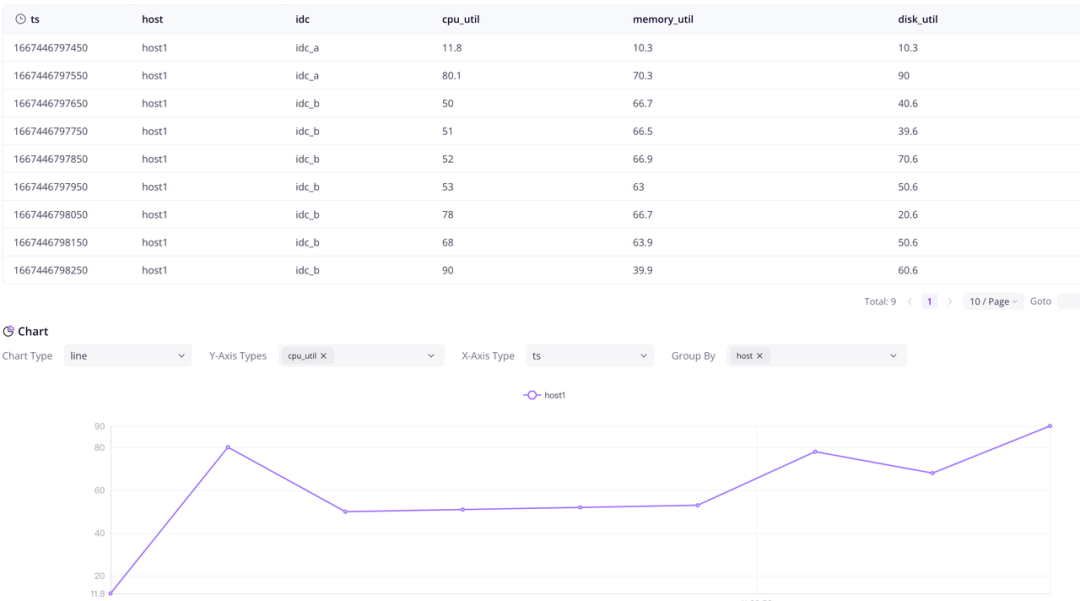
还可以通过 Dashboard[5] 访问 GreptimeDB:
Ikubectl port-forward svc/greptimedb-standalone 4000:4000 > a.out &
helm upgrade greptimedb-standalone greptime/greptimedb-standalone -n default \
  --set env.GREPTIMEDB_STANDALONE__STORAGE__TYPE="Oss" \
  --set env.GREPTIMEDB_STANDALONE__STORAGE__BUCKET="bucket-name" \
  --set env.GREPTIMEDB_STANDALONE__STORAGE__ROOT="/test-data" \
  --set env.GREPTIMEDB_STANDALONE__STORAGE__REGION="oss-region" \
  --set env.GREPTIMEDB_STANDALONE__STORAGE__ACCESS_KEY_ID="your-access-key-id" \
  --set env.GREPTIMEDB_STANDALONE__STORAGE__ACCESS_KEY_SECRET="your-access-key-secret" \
  --set env.GREPTIMEDB_STANDALONE__STORAGE__ENDPOINT="oss-endpoint"
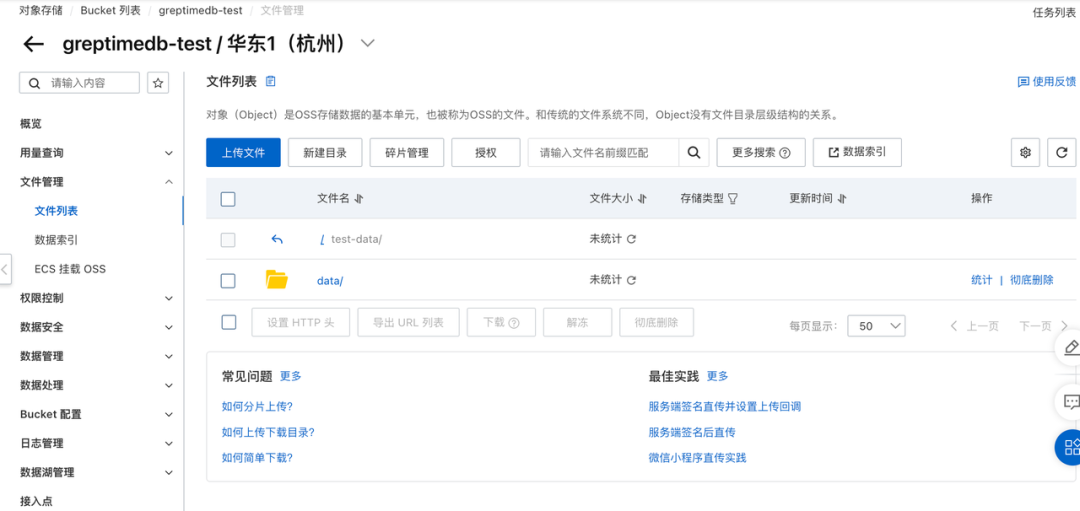
这里有一些参数,可以替换成你的 OSS 信息:
GREPTIMEDB_STANDALONE__STORAGE__TYPE:指定存储类型为 OSS
GREPTIMEDB_STANDALONE__STORAGE__BUCKET:OSS Bucket 名字
GREPTIMEDB_STANDALONE__STORAGE__ROOT:数据存储目录,这里设定为 /test-data
GREPTIMEDB_STANDALONE__STORAGE__REGION:OSS 的 Region
GREPTIMEDB_STANDALONE__STORAGE__ACCESS_KEY_ID:访问OSS的Access Key
GREPTIMEDB_STANDALONE__STORAGE__ACCESS_KEY_SECRET:访问 OSS 的 Secret Key
GREPTIMEDB_STANDALONE__STORAGE__ENDPOINT:访问 OSS 的 Endpoint
kubectl port-forward svc/greptimedb-standalone 4002:4002 > a.out &
通过 MySQL 协议连接 GreptimeDB:
mysql -h 127.0.0.1 -P 4002
CREATE TABLE oss_test_table (
  host STRING,
  idc STRING,
  cpu_util DOUBLE,
  memory_util DOUBLE,
  disk_util DOUBLE,
  ts TIMESTAMP DEFAULT CURRENT_TIMESTAMP,
  PRIMARY KEY(host, idc),
  TIME INDEX(ts)
);
INSERT INTO oss_test_table
VALUES
    ("host1", "idc_a", 11.8, 10.3, 10.3, 1667446797450),
    ("host1", "idc_a", 80.1, 70.3, 90.0, 1667446797550),
    ("host1", "idc_b", 50.0, 66.7, 40.6, 1667446797650),
    ("host1", "idc_b", 51.0, 66.5, 39.6, 1667446797750),
    ("host1", "idc_b", 52.0, 66.9, 70.6, 1667446797850),
    ("host1", "idc_b", 53.0, 63.0, 50.6, 1667446797950),
    ("host1", "idc_b", 78.0, 66.7, 20.6, 1667446798050),
    ("host1", "idc_b", 68.0, 63.9, 50.6, 1667446798150),
    ("host1", "idc_b", 90.0, 39.9, 60.6, 1667446798250);
mysql> select *from oss_test_table;
+-------+-------+----------+-------------+-----------+-------------------------+
| host  | idc   | cpu_util | memory_util | disk_util | ts                      |
+-------+-------+----------+-------------+-----------+-------------------------+
| host1 | idc_a |     11.8 |        10.3 |      10.3 | 2022-11-03 03:39:57.450 |
| host1 | idc_a |     80.1 |        70.3 |        90 | 2022-11-03 03:39:57.550 |
| host1 | idc_b |       50 |        66.7 |      40.6 | 2022-11-03 03:39:57.650 |
| host1 | idc_b |       51 |        66.5 |      39.6 | 2022-11-03 03:39:57.750 |
| host1 | idc_b |       52 |        66.9 |      70.6 | 2022-11-03 03:39:57.850 |
| host1 | idc_b |       53 |          63 |      50.6 | 2022-11-03 03:39:57.950 |
| host1 | idc_b |       78 |        66.7 |      20.6 | 2022-11-03 03:39:58.050 |
| host1 | idc_b |       68 |        63.9 |      50.6 | 2022-11-03 03:39:58.150 |
| host1 | idc_b |       90 |        39.9 |      60.6 | 2022-11-03 03:39:58.250 |
+-------+-------+----------+-------------+-----------+-------------------------+
9 rows in set (0.04 sec)
本文介绍了通过使用 Helm Chart 部署单机版 GreptimeDB,并配置数据存储在 AWS S3 或阿里云 OSS 的方法,在云原生时代下,此方法不仅提高了数据管理的弹性和可靠性,还简化了部署和管理过程。在下一篇文章中,我们将继续介绍如何用 Helm Chart 部署分布式 GreptimeDB,敬请期待。
如果你有任何疑问或建议,欢迎扫描下方小助手微信私聊我们~

关注 GreptimeDB,了解更多技术干货👇
关于 Greptime
Greptime 格睿科技于 2022 年创立,目前正在完善和打造时序数据库GreptimeDB,格睿云 GreptimeCloud 和可观测工具 GreptimeAI 这三款产品。
GreptimeDB 是一款用 Rust 语言编写的时序数据库,具有分布式、开源、云原生、兼容性强等特点,帮助企业实时读写、处理和分析时序数据的同时,降低长期存储的成本。
GreptimeCloud 基于开源的 GreptimeDB,为用户提供全托管的 DBaaS,能够与可观测性、物联网等领域结合的应用产品结合。利用云提供软件和服务,可以达到快速的自助开通和交付,标准化的运维支持,和更好的资源弹性。
GreptimeAI 是为 LLM 应用量身定制的可观测性解决方案,开发者可以通过该方案全面、深入地了解应用的成本、性能、流量和安全情况,在保证低成本和高性能的同时提供高效可靠的分析能力,同时保留了时序数据库的灵活性。
GreptimeCloud 已正式公测,欢迎关注公众号或官网了解最新动态!
官网:https://greptime.cn/
GitHub: https://github.com/GreptimeTeam/greptimedb
文档:https://docs.greptime.cn/
Twitter: https://twitter.com/Greptime
Slack: https://greptime.com/slack
LinkedIn: https://www.linkedin.com/company/greptime/
往期精彩文章:


GreptimeDB 提供 Enterprise 企业版服务,如有需要请联系 info@greptime.com 或添加小助手微信(微信号:greptime).
👇 点击下方阅读原文,立即体验 GreptimeDB!
