



install netbackup 7.7.3 for solaris10 sparc
下表是NBU 7.6版本对Solaris 操作系统的安装要求
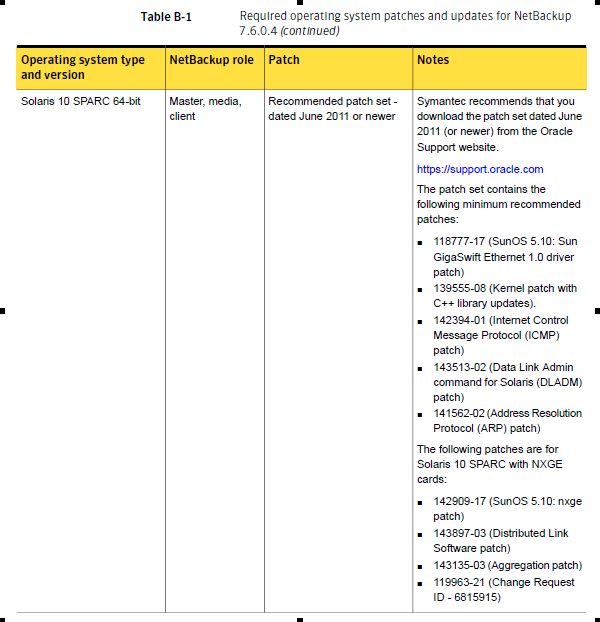
检查补丁包是否已安装:
showrev -p | grep 118777
119963-31补丁安装
bash-3.2# unzip 119963-31.zip
Archive:  119963-31.zip
   creating: 119963-31/
  inflating: 119963-31/LEGAL_LICENSE.TXT
  inflating: 119963-31/README.119963-31
   creating: 119963-31/SUNWlibC/
   creating: 119963-31/SUNWlibC/install/
  inflating: 119963-31/SUNWlibC/install/patch_postinstall
  inflating: 119963-31/SUNWlibC/install/postinstall
  inflating: 119963-31/SUNWlibC/install/copyright
  inflating: 119963-31/SUNWlibC/install/preinstall
  inflating: 119963-31/SUNWlibC/install/patch_checkinstall
  inflating: 119963-31/SUNWlibC/install/i.none
  ......
bash-3.2# patchadd 119963-31
Validating patches...
Loading patches installed on the system...
Done!
Loading patches requested to install.
Done!
Checking patches that you specified for installation.
Done!
Approved patches will be installed in this order:
119963-31
Checking installed patches...
Installing patch packages...
Patch 119963-31 has been successfully installed.
See /var/sadm/patch/119963-31/log for details
Patch packages installed:
  SUNWlibC
开始安装netbackup软件
安装过程:
bash-3.2# cd NetBackup_7.7.3_Solaris_Sparc64/
bash-3.2# ls
Doc         LICENSE     VSM_README  install     solaris
bash-3.2# ./install


Symantec Installation Script
Copyright 1993 - 2016 Symantec Corporation, All Rights Reserved.


        Installing NetBackup Server Software


Please review the SYMANTEC SOFTWARE LICENSE AGREEMENT located on
the installation media before proceeding.  The agreement includes
details on the NetBackup Product Improvement Program.

For NetBackup installation and upgrade information specific to your
platform and to find out if your installed EEBs or hot fixes are
contained in this release, check out the Symantec Operations Readiness
Tools (SORT) Installation and Upgrade Checklist and Hot fix and EEB
Release Auditor, respectively, at https://sort.veritas.com/netbackup.

ATTENTION!  To help ensure a successful upgrade to NetBackup 7.7.3,
please visit the NetBackup 7.x Upgrade Portal:
https://www.veritas.com/support/en_US/article.TECH74584.

Do you wish to continue? [y,n] (y)
Starting NetBackup Deduplication installer
testing: /tmp/pdde_pkg_dir_5383
NetBackup Deduplication preinstall check passed

Is this host the master server? [y,n] (y) n

Checking for required system conditions...

ok nbdb_maintenance_space: no NBDB maintenance required on new install: skipping
ok remote_emm: NetBackup is not installed: skipping
ok be_nb_same_host: inapplicable on solaris: skipping
ok unsupported_platform: Passed checks for unsupported platforms.
ok nbdb_ntfs_dir_symlink: inapplicable on solaris: skipping

Checking for recommended system conditions...

ok ulimit_nofiles: nofiles ulimit 10000 is high enough.
ok hotfix_auditor: NetBackup is not installed or there is no hotfix or EEB data present. Skipping HF/EEB Auditor check.
ok wsl_account: Inapplicable for non - Master Server: skipping
not ok semaphore_limits: unable to determine semaphore limits:
  Symantec recommends that a project named "NetBackup" be created for
  NetBackup server processes, and semaphore limits be set on that
  project.

  Performance of NetBackup Master and Media Servers can be affected
  adversely if the system is configured with low semaphore limits.  This
  test checks whether the current semaphore limits are set as
  recommended.  See https://www.veritas.com/support/en_US/article.TECH203066 for
  details.

WARNING: One or more non-critical preinstall checks have failed.

The NetBackup and Media Manager software is built for use on SOLARIS hardware.
Do you want to install NetBackup and Media Manager files? [y,n] (y)

NetBackup and Media Manager are normally installed in /opt/openv.
Is it OK to install in /opt/openv? [y,n] (y)
Creating link from /opt/openv to /usr/openv.

Saving server binaries for SOLARIS.

Reading NetBackup files from /data/software/NetBackup_7.7.3_Solaris_Sparc64/solaris/anb

Checking for pre-existing SYMCnetbp package.
Installing SYMCnetbp package.
Installation of SYMCnetbp was successful.
More details regarding SYMCnetbp can be found in file
/tmp/install_netbppkg_trace.5750 on bimsd.

x openv/netbackup/client/Solaris, 0 bytes, 0 tape blocks
x openv/netbackup/client/Solaris/Solaris10, 0 bytes, 0 tape blocks
x openv/netbackup/client/Solaris/Solaris10/nbj.conf, 664 bytes, 2 tape blocks
x openv/netbackup/client/Solaris/Solaris10/pddeagent.tar.gz, 28273755 bytes, 55223 tape blocks
x openv/netbackup/client/Solaris/Solaris10/pdinstall, 33968 bytes, 67 tape blocks
x openv/netbackup/client/Solaris/Solaris10/nbcheck, 13703801 bytes, 26766 tape blocks
x openv/netbackup/client/Solaris/Solaris10/client_config, 101070 bytes, 198 tape blocks
x openv/netbackup/client/Solaris/Solaris10/cp_to_client, 90314 bytes, 177 tape blocks
x openv/netbackup/client/Solaris/Solaris10/extract_java, 24752 bytes, 49 tape blocks
x openv/netbackup/client/Solaris/Solaris10/nb_init_cfg, 16648 bytes, 33 tape blocks
x openv/netbackup/client/Solaris/Solaris10/install_client, 36571 bytes, 72 tape blocks
x openv/netbackup/client/Solaris/Solaris10/sftp_to_client symbolic link to install_client
x openv/netbackup/client/Solaris/Solaris10/installpbx, 65515 bytes, 128 tape blocks
x openv/netbackup/client/Solaris/Solaris10/ssh_to_client symbolic link to install_client
x openv/netbackup/client/Solaris/Solaris10/ftp_to_client symbolic link to install_client
x openv/netbackup/client/Solaris/Solaris10/PBX.tar.gz, 9736609 bytes, 19017 tape blocks
x openv/netbackup/client/Solaris/Solaris10/version, 26 bytes, 1 tape blocks
x openv/netbackup/client/Solaris/Solaris10/client_bin.tar.gz, 134164752 bytes, 262041 tape blocks
x openv/netbackup/client/Solaris/Solaris10/.sizes_client_bin, 7 bytes, 1 tape blocks
x openv/netbackup/client/Solaris/Solaris10/.sizes, 15 bytes, 1 tape blocks
x openv/netbackup/client/Solaris/Solaris10/NB-Java.tar.gz, 404513058 bytes, 790065 tape blocks
x openv/netbackup/client/Solaris/Solaris10/.sizes_NB-Java, 7 bytes, 1 tape blocks
x openv/netbackup/client/Solaris/Solaris10/JRE.tar.gz, 53113914 bytes, 103739 tape blocks
x openv/netbackup/client/Solaris/Solaris10/.sizes_JRE, 7 bytes, 1 tape blocks
x openv/netbackup/client/Solaris/Solaris_x86_10_64, 0 bytes, 0 tape blocks
x openv/netbackup/client/Solaris/Solaris_x86_10_64/nbj.conf, 664 bytes, 2 tape blocks
x openv/netbackup/client/Solaris/Solaris_x86_10_64/pddeagent.tar.gz, 58492503 bytes, 114244 tape blocks
x openv/netbackup/client/Solaris/Solaris_x86_10_64/pdinstall, 33968 bytes, 67 tape blocks
x openv/netbackup/client/Solaris/Solaris_x86_10_64/nbcheck, 13118756 bytes, 25623 tape blocks
x openv/netbackup/client/Solaris/Solaris_x86_10_64/cp_to_client, 90314 bytes, 177 tape blocks
x openv/netbackup/client/Solaris/Solaris_x86_10_64/extract_java, 24752 bytes, 49 tape blocks
x openv/netbackup/client/Solaris/Solaris_x86_10_64/client_config, 101070 bytes, 198 tape blocks
x openv/netbackup/client/Solaris/Solaris_x86_10_64/nb_init_cfg, 16648 bytes, 33 tape blocks
x openv/netbackup/client/Solaris/Solaris_x86_10_64/install_client, 36571 bytes, 72 tape blocks
x openv/netbackup/client/Solaris/Solaris_x86_10_64/ftp_to_client symbolic link to install_client
x openv/netbackup/client/Solaris/Solaris_x86_10_64/sftp_to_client symbolic link to install_client
x openv/netbackup/client/Solaris/Solaris_x86_10_64/installpbx, 65515 bytes, 128 tape blocks
x openv/netbackup/client/Solaris/Solaris_x86_10_64/PBX.tar.gz, 9333629 bytes, 18230 tape blocks
x openv/netbackup/client/Solaris/Solaris_x86_10_64/ssh_to_client symbolic link to install_client
x openv/netbackup/client/Solaris/Solaris_x86_10_64/version, 34 bytes, 1 tape blocks
x openv/netbackup/client/Solaris/Solaris_x86_10_64/client_bin.tar.gz, 116780606 bytes, 228088 tape blocks
x openv/netbackup/client/Solaris/Solaris_x86_10_64/.sizes_client_bin, 7 bytes, 1 tape blocks
x openv/netbackup/client/Solaris/Solaris_x86_10_64/.sizes, 15 bytes, 1 tape blocks
x openv/netbackup/client/Solaris/Solaris_x86_10_64/NB-Java.tar.gz, 404513875 bytes, 790067 tape blocks
x openv/netbackup/client/Solaris/Solaris_x86_10_64/.sizes_NB-Java, 7 bytes, 1 tape blocks
x openv/netbackup/client/Solaris/Solaris_x86_10_64/JRE.tar.gz, 50749465 bytes, 99121 tape blocks
x openv/netbackup/client/Solaris/Solaris_x86_10_64/.sizes_JRE, 7 bytes, 1 tape blocks

Copying Solaris10 Client Binaries

Installing PBX...
Please wait while installation is in progress...
Installation completed Successfully
Installation log located here: /var/tmp/installpbx-6226-062424091501.log


Unpacking SYMCnbclt package.
Checking for pre-existing SYMCnbclt package.
Installing SYMCnbclt package.
Installation of SYMCnbclt was successful.
More details regarding SYMCnbclt can be found in file
/tmp/install_cltpkg_trace.6211 on bimsd.

Terminating NetBackup and/or Media Manager processes.

Installing NB-Java.

Unpacking SYMCnbjava package.
Checking for pre-existing SYMCnbjava package.
Installing SYMCnbjava package.
Installation of SYMCnbjava was successful.
More details regarding SYMCnbjava can be found in file
/tmp/install_javapkg_trace.7462 on bimsd.

Unpacking SYMCnbjre package.
Checking for pre-existing SYMCnbjre package.
Installing SYMCnbjre package.
Installation of SYMCnbjre was successful.
More details regarding SYMCnbjre can be found in file
/tmp/install_jrepkg_trace.7462 on bimsd.
+ /bin/cp ./nbj.conf /usr/openv/java

Directory /usr/openv/logs does not exist.
No log files to migrate.

Send a SIGHUP to (x)inetd so the (x)inetd.conf file will be reread.
Starting NetBackup Deduplication installer
testing: /tmp/pdde_pkg_dir_7686
Checking for SYMCpddes package...
Checking for SYMCpddea package...
Installing NetBackup Deduplication agent package (/opt/openv/netbackup/client/Solaris/Solaris10/pddeagent.tar.gz)...
Extracting package SYMCpddea in /tmp/pdde_pkg_dir_7686.
   Package SYMCpddea extracted to /tmp/pdde_pkg_dir_7686.
Installing package SYMCpddea.
   Package SYMCpddea installed.
Installing NetBackup Deduplication server package (/usr/openv/pddeserver.tar.gz)...
Extracting package SYMCpddes in /tmp/pdde_pkg_dir_7686.
   Package SYMCpddes extracted to /tmp/pdde_pkg_dir_7686.
Installing package SYMCpddes.
   Package SYMCpddes installed.
Running NetBackup Deduplication upgrade script (server mode)...
NetBackup Deduplication install finished successfully.
Version now installed: 9.0300.0016.0512
Full NetBackup Deduplication installation log saved to: /var/log/puredisk/2024-06-24_09:16-pdde-install.log


The following automatic startup and shutdown scripts (respectively)
have been installed.  They will cause the NetBackup daemons to be
automatically shut down and restarted each time the system boots.

/etc/rc2.d/S77netbackup
/etc/rc0.d/K01netbackup
/etc/rc1.d/K01netbackup


Processed 22 files out of 22.

Installation of Java LiveUpdate agent succeeded.  Refer to file
/tmp/JLU-Log/JavaLiveUpdate-Install.log on bimsd
for installation details.


Checking LiveUpdate registration for the following products: NB CLT
This may take a few minutes.

Product NB is installed and will be registered.
Product CLT_Solaris-X64 is installed and will be registered.

Updating LiveUpdate registration now...this may take some time.


Done executing NB.inst.

If you ran NB.inst instead of <cdrom_path>/install, you must
run /usr/openv/netbackup/bin/install_bp to initiate NetBackup.
Running /usr/openv/netbackup/bin/install_bp


A NetBackup Server or Enterprise Server license key is needed
for installation to continue.

Enter license key: OEX3-3RR6-KJ32-6P3P-3N6P-PPP3-RP3P-PPPP-36PP-P
OEX3-3RR6-KJ32-6P3P-3N6P-PPP3-RP3P-PPPP-36PP-P:
        NetBackup Enterprise Server features enabled:
            Flexible Disk Option
            OpenStorage Disk Option
This is not a NetBackup Base product license key and was NOT accepted.
Re-enter it after the NetBackup Base product license key!

A NetBackup Server or Enterprise Server license key is needed
for installation to continue.

Enter license key: OEXD-DR3I-RWCC-4PRO-PNCU-NLGO-6L6P-P3OP-C8IE-C

OEXD-DR3I-RWCC-4PRO-PNCU-NLGO-6L6P-P3OP-C8IE-C:
        NetBackup Enterprise Server Base product with the following features enabled:
            SAN Client
            Bare Metal Restore
            Encryption
            Open File Backup
            Robotic Library Sharing Support
            Remote Media Server Support
            Microsoft RSM Robotic Libraries
            ADIC DAS/SDLC Robotic Libraries
            IBM ATL Robotic Libraries
            Fujitsu LMF Robotic Libraries
            StorageTek ACS Robotic Libraries
            Snapshot Client
            Inline Tape Copy
            Library Based Tape Drives
            Additional Drives/Robotics
            DataStore
            Encryption (Legacy DES 56-bit)
            Encryption (Legacy DES 40-bit)
            Shared Storage Option
            Additional clients
        has been registered.


All additional keys should be added at this time.
Do you want to add additional license keys now? [y,n] (y)


        License Key Utility
        -------------------

        A) Add a License Key
        D) Delete a License Key
        F) List Active License Keys
        L) List Registered License Keys
        H) Help
        q) Quit License Key Utility


Enter a letter: a

Enter license key: OEX3-3RR6-KJ32-6P3P-3N6P-PPP3-RP3P-PPPP-36PP-P
NetBackup Enterprise Server is the active NetBackup.

OEX3-3RR6-KJ32-6P3P-3N6P-PPP3-RP3P-PPPP-36PP-P:
        NetBackup Enterprise Server features enabled:
            Flexible Disk Option
            OpenStorage Disk Option
        has been registered.

Installing NetBackup Enterprise Server version: 7.7.3


If this machine will be using a different network interface than the
default (bimsd), the name of the preferred interface should be used
as the configured server name.  If this machine will be part of a
cluster, the virtual name should be used as the configured server name.

Would you like to use "bimsd" as the configured
NetBackup server name of this machine? [y,n] (y)


What is the fully qualified name of the master server? wlan

Checking network connections.
bp.conf: IP_ADDRESS_FAMILY = AF_INET: default value, no update needed


        Copied files to /kernel/drv/sparcv9.

Doing add_drv of the sg driver
Creating /dev/sg.
Added entry in /etc/devlink.tab file.
Made links in /dev/sg


Machine bimsd is a media server, and it is not the EMMSERVER.
Converting STREAMS files.  This may take a few minutes.

STREAMS files conversion is complete.


Successfully updated the session cache parameters.
Starting the NetBackup Authentication daemon.
Starting the NetBackup network daemon.
Starting the NetBackup client daemon.
Starting the NetBackup SAN Client Fibre Transport daemon.
Starting the NetBackup Discovery Framework.
Creating /usr/openv/tmp/sqlany

Installed SQL Anywhere Version 16.0.0.2207
Installation completed successfully

This is not a EMM and Master server, exiting

Starting the NetBackup Event Manager.

Starting the NetBackup Deduplication Manager.
Starting the NetBackup Deduplication Engine.
Starting the NetBackup compatibility daemon.
Starting the Media Manager device daemon processes.

Starting the NetBackup Remote Monitoring Management System.
Starting the NetBackup Key Management daemon.
Starting the NetBackup Service Layer.
Starting the NetBackup CloudStore Service Container.
Starting the NetBackup Service Monitor.
Starting the NetBackup Bare Metal Restore Boot Server daemon.


NetBackup server installation complete.


File /usr/openv/tmp/install_trace.5340 contains a trace of this install.
That file can be deleted after you are sure the install was successful.
You have new mail in /var/mail/root
检查进程是否正确:
bash-3.2# ./bpps -a
NB Processes
------------
    root 10102     1   0 09:27:20 ?           0:00 /usr/openv/netbackup/bin/vnetd -standalone
    root 10331     1   0 09:27:42 ?           0:00 /usr/openv/netbackup/bin/nbsl
    root 10107     1   0 09:27:20 ?           0:00 /usr/openv/netbackup/bin/bpcd -standalone
    root 10126     1   0 09:27:21 ?           0:02 /usr/openv/netbackup/bin/nbdisco
    root 10303     1   0 09:27:37 ?           0:00 /usr/openv/netbackup/bin/nbrmms
    root 10369     1   0 09:27:42 ?           0:00 /usr/openv/netbackup/bin/nbsvcmon


MM Processes
------------
    root 10278     1   0 09:27:34 ?           0:00 /usr/openv/volmgr/bin/ltid
    root 10285     1   0 09:27:34 ?           0:00 vmd
    root 10322 10278   0 09:27:40 ?           0:00 avrd
    root 10311 10278   0 09:27:38 ?           0:00 tldd
solaris系统配置带库驱动
1. Determine if an sg driver is loaded by using the following command:
/usr/sbin/modinfo | grep sg
168 7bbd8fb8   1718  97   1  sysmsg (System message redirection (fan)
272 7bff8000   3760 344   1  sg (SCSA Generic Revision: 3.7a)
273 7aea0000   2200  49   1  msgsys (System V message facility)
273 7aea0000   2200  49   1  msgsys (32-bit System V message facilit)
2. Remove the existing driver:
cd /usr/openv/volmgr/bin/driver
bash-3.2#  /usr/bin/rm -f /kernel/drv/sg.conf
bash-3.2# /usr/openv/volmgr/bin/driver/sg.install

        Copied files to /kernel/drv/sparcv9.

Doing add_drv of the sg driver
Removing old /dev/sg entries.
Editing /etc/devlink.tab...
Copying original /etc/devlink.tab to /etc/devlink.tab.06-24-24-09:34:29.
Added entry in /etc/devlink.tab file.
Made links in /dev/sg

Install SG Driver
To install the driver run the following command:
bash-3.2# /usr/openv/volmgr/bin/sg.build all -mt 32 -ml 16
The file ./st.conf should be appended to /kernel/drv/st.conf.
A reboot may be necessary to create any new device files.
Created file ./sg.conf.
Created file ./sg.links.
######################################################################################################################################
Once the driver has been installed, it is not necessary to reboot the system or run the sg.install command during or after each system boot.
Configuring SG and ST Drivers
This procedure contains instructions for configuring the sg driver for SCSI targets 0 thru 6 and 8 thru 15 for fast or wide adapter cards.
In this procedure, you execute sg.build to add these targets to the st.conf, sg.conf and sg.links files. Adjust the -mt and -ml parameters to create the range of targets and LUNs required by your configuration.
To configure drivers
Execute the sg.build script to add target IDs 0-6, 8-15, and LUNs 0-1 to the following files:
/usr/openv/volmgr/bin/driver/st.conf
/usr/openv/volmgr/bin/driver/sg.conf
/usr/openv/volmgr/bin/driver/sg.links
/usr/openv/volmgr/bin/sg.build all -mt 15 -ml 1
The -mt 15 parameter specifies themaximum target ID that is in use on any SCSI bus (or bound to a fibre channel device).The -ml 1 parameter specifies the maximum target LUN that is in use on any SCSI bus (or by a fibre channel device).
The file /usr/openv/volmgr/bin/driver/st.conf is used to replace the following seven entries in the /kernel/drv/st.conf file:
name=”st” class=”scsi” target=0 lun=0;
name=”st” class=”scsi” target=1 lun=0;
name=”st” class=”scsi” target=2 lun=0;
name=”st” class=”scsi” target=3 lun=0;
name=”st” class=”scsi” target=4 lun=0;
name=”st” class=”scsi” target=5 lun=0;
name=”st” class=”scsi” target=6 lun=0;
Edit the /kernel/drv/st.conf file.
Place a # in column one of each line of the seven default entries.
The temporary file ./st.conf contains the entries that you need to insert into /kernel/drv/st.conf.
######################################################################################################################################
编辑/kernel/drv/st.conf
vi /kernel/drv/st.conf
注释掉以下行:
name="st" class="scsi" target=0 lun=0;
name="st" class="scsi" target=1 lun=0;
name="st" class="scsi" target=2 lun=0;
name="st" class="scsi" target=3 lun=0;
name="st" class="scsi" target=4 lun=0;
name="st" class="scsi" target=5 lun=0;
name="st" class="scsi" target=6 lun=0;
添加/usr/openv/volmgr/bin/driver/st.conf中内容到/kernel/drv/st.conf替换注释的内容。

重启设备使用reboot -- -r参数
Reboot the system with the reconfigure option (boot -r or reboot — -r).
Verify that the system created device nodes for all the tape devices using the following command: ls -l /dev/rmt/*cbn
注意检查/etc/devlink.tab,/kernel/drv/st.conf,/kernel/drv/sg.conf文件是否正确。
检查带库是否识别成功
bash-3.2# scan
************************************************************
*********************** SDT_TAPE    ************************
*********************** SDT_CHANGER ************************
************************************************************
------------------------------------------------------------
Device Name  : "/dev/sg/c0tw100000068d1e6d40l0"
Passthru Name: "/dev/sg/c0tw100000068d1e6d40l0"
Volume Header: ""
Port: -1; Bus: -1; Target: -1; LUN: -1
Inquiry    : "IBM     03584L32        1.00"
Vendor ID  : "IBM     "
Product ID : "03584L32        "
Product Rev: "1.00"
Serial Number: "SG31157000"
WWN          : ""
WWN Id Type  : 0
Device Identifier: "IBM     03584L32        SG31157000"
Device Type    : SDT_CHANGER
NetBackup Robot Type: 8
Removable      : Yes
Device Supports: SCSI-3
Number of Drives : 8
Number of Slots  : 100
Number of Media Access Ports: 10
Drive 1 Serial Number      : "SG31157001"
Drive 2 Serial Number      : "SG31157002"
Drive 3 Serial Number      : "SG31157003"
Drive 4 Serial Number      : "SG31157004"
Drive 5 Serial Number      : "SG31157005"
Drive 6 Serial Number      : "SG31157006"
Drive 7 Serial Number      : "SG31157007"
Drive 8 Serial Number      : "SG31157008"
Flags : 0x0
Reason: 0x0
------------------------------------------------------------
Device Name  : "/dev/rmt/7cbn"
Passthru Name: "/dev/sg/c0tw100000068d1e6d40l1"
Volume Header: ""
Port: -1; Bus: -1; Target: -1; LUN: -1
Inquiry    : "IBM     ULTRIUM-TD3     57GA"
Vendor ID  : "IBM     "
Product ID : "ULTRIUM-TD3     "
Product Rev: "57GA"
Serial Number: "SG31157001"
WWN          : ""
WWN Id Type  : 0
Device Identifier: "IBM     ULTRIUM-TD3     SG31157001"
Device Type    : SDT_TAPE
NetBackup Drive Type: 16
Removable      : Yes
Device Supports: SCSI-3
Flags : 0x0
Reason: 0x0
------------------------------------------------------------
Device Name  : "/dev/sg/c0tw100000068d1e6ac0l0"
Passthru Name: "/dev/sg/c0tw100000068d1e6ac0l0"
Volume Header: ""
Port: -1; Bus: -1; Target: -1; LUN: -1
Inquiry    : "IBM     03584L52        1.00"
Vendor ID  : "IBM     "
Product ID : "03584L52        "
Product Rev: "1.00"
Serial Number: "SG31147000"
WWN          : ""
WWN Id Type  : 0
Device Identifier: "IBM     03584L52        SG31147000"
Device Type    : SDT_CHANGER
NetBackup Robot Type: 8
Removable      : Yes
Device Supports: SCSI-3
Number of Drives : 8
Number of Slots  : 120
Number of Media Access Ports: 10
Drive 1 Serial Number      : "SG31147001"
Drive 2 Serial Number      : "SG31147002"
Drive 3 Serial Number      : "SG31147003"
Drive 4 Serial Number      : "SG31147004"
Drive 5 Serial Number      : "SG31147005"
Drive 6 Serial Number      : "SG31147006"
Drive 7 Serial Number      : "SG31147007"
Drive 8 Serial Number      : "SG31147008"
Flags : 0x0
Reason: 0x0
------------------------------------------------------------
Device Name  : "/dev/rmt/15cbn"
Passthru Name: "/dev/sg/c0tw100000068d1e6ac0l1"
Volume Header: ""
Port: -1; Bus: -1; Target: -1; LUN: -1
Inquiry    : "IBM     ULTRIUM-TD4     27GA"
Vendor ID  : "IBM     "
Product ID : "ULTRIUM-TD4     "
Product Rev: "27GA"
Serial Number: "SG31147001"
WWN          : ""
WWN Id Type  : 0
Device Identifier: "IBM     ULTRIUM-TD4     SG31147001"
Device Type    : SDT_TAPE
NetBackup Drive Type: 3
Removable      : Yes
Device Supports: SCSI-3
Flags : 0x0
Reason: 0x0
------------------------------------------------------------
Device Name  : "/dev/rmt/6cbn"
Passthru Name: "/dev/sg/c0tw100000068d1e6d40l2"
Volume Header: ""
Port: -1; Bus: -1; Target: -1; LUN: -1
Inquiry    : "IBM     ULTRIUM-TD3     57GA"
Vendor ID  : "IBM     "
Product ID : "ULTRIUM-TD3     "
Product Rev: "57GA"
Serial Number: "SG31157002"
WWN          : ""
WWN Id Type  : 0
Device Identifier: "IBM     ULTRIUM-TD3     SG31157002"
Device Type    : SDT_TAPE
NetBackup Drive Type: 16
Removable      : Yes
Device Supports: SCSI-3
Flags : 0x0
Reason: 0x0
------------------------------------------------------------
Device Name  : "/dev/rmt/5cbn"
Passthru Name: "/dev/sg/c0tw100000068d1e6d40l3"
Volume Header: ""
Port: -1; Bus: -1; Target: -1; LUN: -1
Inquiry    : "IBM     ULTRIUM-TD3     57GA"
Vendor ID  : "IBM     "
Product ID : "ULTRIUM-TD3     "
Product Rev: "57GA"
Serial Number: "SG31157003"
WWN          : ""
WWN Id Type  : 0
Device Identifier: "IBM     ULTRIUM-TD3     SG31157003"
Device Type    : SDT_TAPE
NetBackup Drive Type: 16
Removable      : Yes
Device Supports: SCSI-3
Flags : 0x0
Reason: 0x0
------------------------------------------------------------
Device Name  : "/dev/rmt/4cbn"
Passthru Name: "/dev/sg/c0tw100000068d1e6d40l4"
Volume Header: ""
Port: -1; Bus: -1; Target: -1; LUN: -1
Inquiry    : "IBM     ULTRIUM-TD3     57GA"
Vendor ID  : "IBM     "
Product ID : "ULTRIUM-TD3     "
Product Rev: "57GA"
Serial Number: "SG31157004"
WWN          : ""
WWN Id Type  : 0
Device Identifier: "IBM     ULTRIUM-TD3     SG31157004"
Device Type    : SDT_TAPE
NetBackup Drive Type: 16
Removable      : Yes
Device Supports: SCSI-3
Flags : 0x0
Reason: 0x0
------------------------------------------------------------
Device Name  : "/dev/rmt/3cbn"
Passthru Name: "/dev/sg/c0tw100000068d1e6d40l5"
Volume Header: ""
Port: -1; Bus: -1; Target: -1; LUN: -1
Inquiry    : "IBM     ULTRIUM-TD3     57GA"
Vendor ID  : "IBM     "
Product ID : "ULTRIUM-TD3     "
Product Rev: "57GA"
Serial Number: "SG31157005"
WWN          : ""
WWN Id Type  : 0
Device Identifier: "IBM     ULTRIUM-TD3     SG31157005"
Device Type    : SDT_TAPE
NetBackup Drive Type: 16
Removable      : Yes
Device Supports: SCSI-3
Flags : 0x0
Reason: 0x0
------------------------------------------------------------
Device Name  : "/dev/rmt/2cbn"
Passthru Name: "/dev/sg/c0tw100000068d1e6d40l6"
Volume Header: ""
Port: -1; Bus: -1; Target: -1; LUN: -1
Inquiry    : "IBM     ULTRIUM-TD3     57GA"
Vendor ID  : "IBM     "
Product ID : "ULTRIUM-TD3     "
Product Rev: "57GA"
Serial Number: "SG31157006"
WWN          : ""
WWN Id Type  : 0
Device Identifier: "IBM     ULTRIUM-TD3     SG31157006"
Device Type    : SDT_TAPE
NetBackup Drive Type: 16
Removable      : Yes
Device Supports: SCSI-3
Flags : 0x0
Reason: 0x0
------------------------------------------------------------
Device Name  : "/dev/rmt/1cbn"
Passthru Name: "/dev/sg/c0tw100000068d1e6d40l7"
Volume Header: ""
Port: -1; Bus: -1; Target: -1; LUN: -1
Inquiry    : "IBM     ULTRIUM-TD3     57GA"
Vendor ID  : "IBM     "
Product ID : "ULTRIUM-TD3     "
Product Rev: "57GA"
Serial Number: "SG31157007"
WWN          : ""
WWN Id Type  : 0
Device Identifier: "IBM     ULTRIUM-TD3     SG31157007"
Device Type    : SDT_TAPE
NetBackup Drive Type: 16
Removable      : Yes
Device Supports: SCSI-3
Flags : 0x0
Reason: 0x0
------------------------------------------------------------
Device Name  : "/dev/rmt/0cbn"
Passthru Name: "/dev/sg/c0tw100000068d1e6d40l8"
Volume Header: ""
Port: -1; Bus: -1; Target: -1; LUN: -1
Inquiry    : "IBM     ULTRIUM-TD3     57GA"
Vendor ID  : "IBM     "
Product ID : "ULTRIUM-TD3     "
Product Rev: "57GA"
Serial Number: "SG31157008"
WWN          : ""
WWN Id Type  : 0
Device Identifier: "IBM     ULTRIUM-TD3     SG31157008"
Device Type    : SDT_TAPE
NetBackup Drive Type: 16
Removable      : Yes
Device Supports: SCSI-3
Flags : 0x0
Reason: 0x0
------------------------------------------------------------
Device Name  : "/dev/rmt/14cbn"
Passthru Name: "/dev/sg/c0tw100000068d1e6ac0l2"
Volume Header: ""
Port: -1; Bus: -1; Target: -1; LUN: -1
Inquiry    : "IBM     ULTRIUM-TD4     27GA"
Vendor ID  : "IBM     "
Product ID : "ULTRIUM-TD4     "
Product Rev: "27GA"
Serial Number: "SG31147002"
WWN          : ""
WWN Id Type  : 0
Device Identifier: "IBM     ULTRIUM-TD4     SG31147002"
Device Type    : SDT_TAPE
NetBackup Drive Type: 3
Removable      : Yes
Device Supports: SCSI-3
Flags : 0x0
Reason: 0x0
------------------------------------------------------------
Device Name  : "/dev/rmt/13cbn"
Passthru Name: "/dev/sg/c0tw100000068d1e6ac0l3"
Volume Header: ""
Port: -1; Bus: -1; Target: -1; LUN: -1
Inquiry    : "IBM     ULTRIUM-TD4     27GA"
Vendor ID  : "IBM     "
Product ID : "ULTRIUM-TD4     "
Product Rev: "27GA"
Serial Number: "SG31147003"
WWN          : ""
WWN Id Type  : 0
Device Identifier: "IBM     ULTRIUM-TD4     SG31147003"
Device Type    : SDT_TAPE
NetBackup Drive Type: 3
Removable      : Yes
Device Supports: SCSI-3
Flags : 0x0
Reason: 0x0
------------------------------------------------------------
Device Name  : "/dev/rmt/12cbn"
Passthru Name: "/dev/sg/c0tw100000068d1e6ac0l4"
Volume Header: ""
Port: -1; Bus: -1; Target: -1; LUN: -1
Inquiry    : "IBM     ULTRIUM-TD4     27GA"
Vendor ID  : "IBM     "
Product ID : "ULTRIUM-TD4     "
Product Rev: "27GA"
Serial Number: "SG31147004"
WWN          : ""
WWN Id Type  : 0
Device Identifier: "IBM     ULTRIUM-TD4     SG31147004"
Device Type    : SDT_TAPE
NetBackup Drive Type: 3
Removable      : Yes
Device Supports: SCSI-3
Flags : 0x0
Reason: 0x0
------------------------------------------------------------
Device Name  : "/dev/rmt/11cbn"
Passthru Name: "/dev/sg/c0tw100000068d1e6ac0l5"
Volume Header: ""
Port: -1; Bus: -1; Target: -1; LUN: -1
Inquiry    : "IBM     ULTRIUM-TD4     27GA"
Vendor ID  : "IBM     "
Product ID : "ULTRIUM-TD4     "
Product Rev: "27GA"
Serial Number: "SG31147005"
WWN          : ""
WWN Id Type  : 0
Device Identifier: "IBM     ULTRIUM-TD4     SG31147005"
Device Type    : SDT_TAPE
NetBackup Drive Type: 3
Removable      : Yes
Device Supports: SCSI-3
Flags : 0x0
Reason: 0x0
------------------------------------------------------------
Device Name  : "/dev/rmt/10cbn"
Passthru Name: "/dev/sg/c0tw100000068d1e6ac0l6"
Volume Header: ""
Port: -1; Bus: -1; Target: -1; LUN: -1
Inquiry    : "IBM     ULTRIUM-TD4     27GA"
Vendor ID  : "IBM     "
Product ID : "ULTRIUM-TD4     "
Product Rev: "27GA"
Serial Number: "SG31147006"
WWN          : ""
WWN Id Type  : 0
Device Identifier: "IBM     ULTRIUM-TD4     SG31147006"
Device Type    : SDT_TAPE
NetBackup Drive Type: 3
Removable      : Yes
Device Supports: SCSI-3
Flags : 0x0
Reason: 0x0
------------------------------------------------------------
Device Name  : "/dev/rmt/9cbn"
Passthru Name: "/dev/sg/c0tw100000068d1e6ac0l7"
Volume Header: ""
Port: -1; Bus: -1; Target: -1; LUN: -1
Inquiry    : "IBM     ULTRIUM-TD4     27GA"
Vendor ID  : "IBM     "
Product ID : "ULTRIUM-TD4     "
Product Rev: "27GA"
Serial Number: "SG31147007"
WWN          : ""
WWN Id Type  : 0
Device Identifier: "IBM     ULTRIUM-TD4     SG31147007"
Device Type    : SDT_TAPE
NetBackup Drive Type: 3
Removable      : Yes
Device Supports: SCSI-3
Flags : 0x0
Reason: 0x0
------------------------------------------------------------
Device Name  : "/dev/rmt/8cbn"
Passthru Name: "/dev/sg/c0tw100000068d1e6ac0l8"
Volume Header: ""
Port: -1; Bus: -1; Target: -1; LUN: -1
Inquiry    : "IBM     ULTRIUM-TD4     27GA"
Vendor ID  : "IBM     "
Product ID : "ULTRIUM-TD4     "
Product Rev: "27GA"
Serial Number: "SG31147008"
WWN          : ""
WWN Id Type  : 0
Device Identifier: "IBM     ULTRIUM-TD4     SG31147008"
Device Type    : SDT_TAPE
NetBackup Drive Type: 3
Removable      : Yes
Device Supports: SCSI-3
Flags : 0x0
Reason: 0x0
bash-3.2# ssgscan
bash: ssgscan: command not found
bash-3.2# sgscan
/dev/sg/c0tw100000068d1e6ac0l0: Changer: "IBM     03584L52"
/dev/sg/c0tw100000068d1e6ac0l1: Tape (/dev/rmt/15): "IBM     ULTRIUM-TD4"
/dev/sg/c0tw100000068d1e6ac0l2: Tape (/dev/rmt/14): "IBM     ULTRIUM-TD4"
/dev/sg/c0tw100000068d1e6ac0l3: Tape (/dev/rmt/13): "IBM     ULTRIUM-TD4"
/dev/sg/c0tw100000068d1e6ac0l4: Tape (/dev/rmt/12): "IBM     ULTRIUM-TD4"
/dev/sg/c0tw100000068d1e6ac0l5: Tape (/dev/rmt/11): "IBM     ULTRIUM-TD4"
/dev/sg/c0tw100000068d1e6ac0l6: Tape (/dev/rmt/10): "IBM     ULTRIUM-TD4"
/dev/sg/c0tw100000068d1e6ac0l7: Tape (/dev/rmt/9): "IBM     ULTRIUM-TD4"
/dev/sg/c0tw100000068d1e6ac0l8: Tape (/dev/rmt/8): "IBM     ULTRIUM-TD4"
/dev/sg/c0tw100000068d1e6d40l0: Changer: "IBM     03584L32"
/dev/sg/c0tw100000068d1e6d40l1: Tape (/dev/rmt/7): "IBM     ULTRIUM-TD3"
/dev/sg/c0tw100000068d1e6d40l2: Tape (/dev/rmt/6): "IBM     ULTRIUM-TD3"
/dev/sg/c0tw100000068d1e6d40l3: Tape (/dev/rmt/5): "IBM     ULTRIUM-TD3"
/dev/sg/c0tw100000068d1e6d40l4: Tape (/dev/rmt/4): "IBM     ULTRIUM-TD3"
/dev/sg/c0tw100000068d1e6d40l5: Tape (/dev/rmt/3): "IBM     ULTRIUM-TD3"
/dev/sg/c0tw100000068d1e6d40l6: Tape (/dev/rmt/2): "IBM     ULTRIUM-TD3"
/dev/sg/c0tw100000068d1e6d40l7: Tape (/dev/rmt/1): "IBM     ULTRIUM-TD3"
/dev/sg/c0tw100000068d1e6d40l8: Tape (/dev/rmt/0): "IBM     ULTRIUM-TD3"
刷新下media server状态,由offline变为online
bash-3.2# nbemmcmd -updatehost -machinename bimsd -machinetype media -machinestateop set_tape_active -masterserver wlan
NBEMMCMD, Version: 7.7.3
Command completed successfully.
最后修改时间:2024-07-04 13:31:59
「喜欢这篇文章,您的关注和赞赏是给作者最好的鼓励」
关注作者
【版权声明】本文为墨天轮用户原创内容,转载时必须标注文章的来源(墨天轮),文章链接,文章作者等基本信息,否则作者和墨天轮有权追究责任。如果您发现墨天轮中有涉嫌抄袭或者侵权的内容,欢迎发送邮件至:contact@modb.pro进行举报,并提供相关证据,一经查实,墨天轮将立刻删除相关内容。
