



导读


登录 TiDB Cloud 并创建 cluster
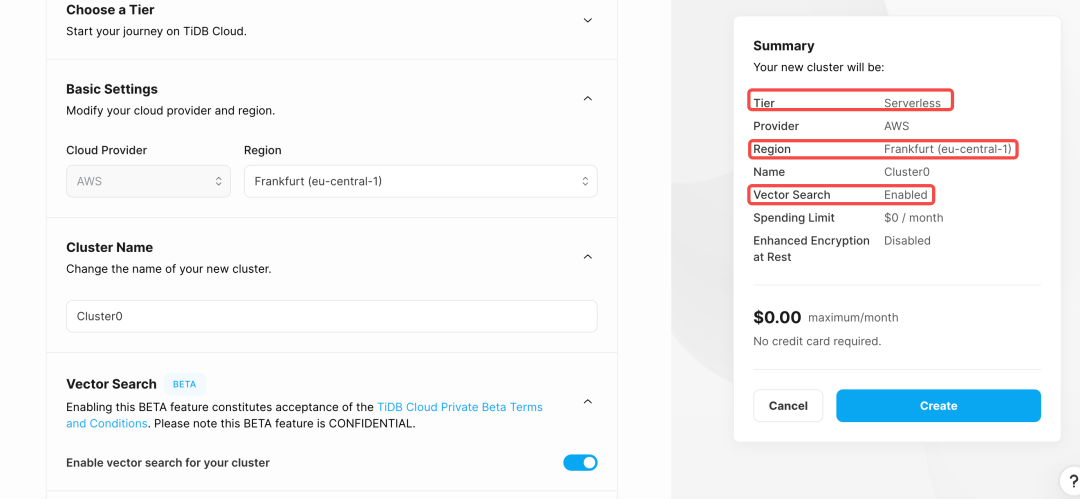
选择 Serverless并设置 Region 为 Frankfurt (eu-central-1)
开启 Vector Search 并设置集群名
创建集群
create schema dify;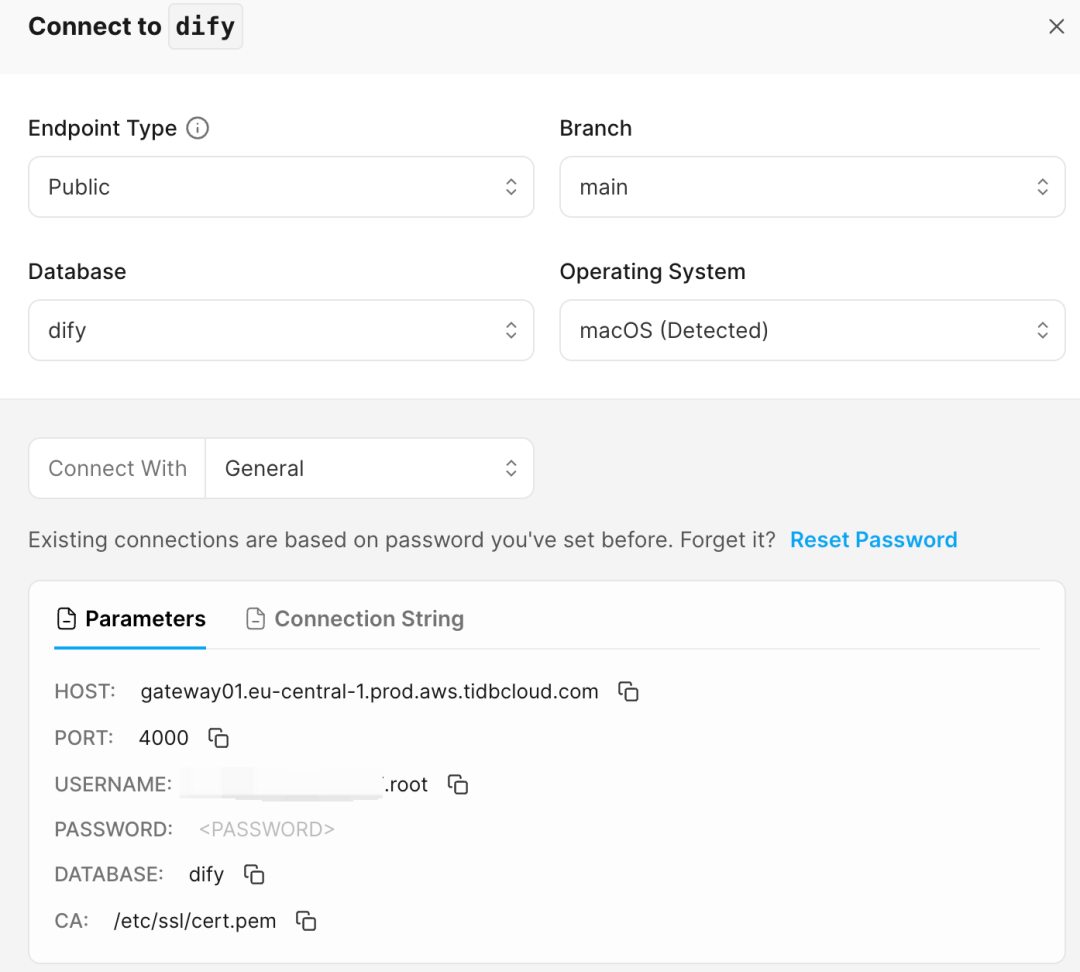
# 将 VECTOR_STORE 修改为 tidb_vector,文件中的默认值是 weaviate
VECTOR_STORE: tidb_vector

# 将以下配置改为保存好的连接 TiDB 配置
TIDB_VECTOR_HOST: xxx.eu-central-1.prod.aws.tidbcloud.com
TIDB_VECTOR_PORT: 4000
TIDB_VECTOR_USER: xxx.root
TIDB_VECTOR_PASSWORD: xxxxxx
TIDB_VECTOR_DATABASE: difydocker compose up -d

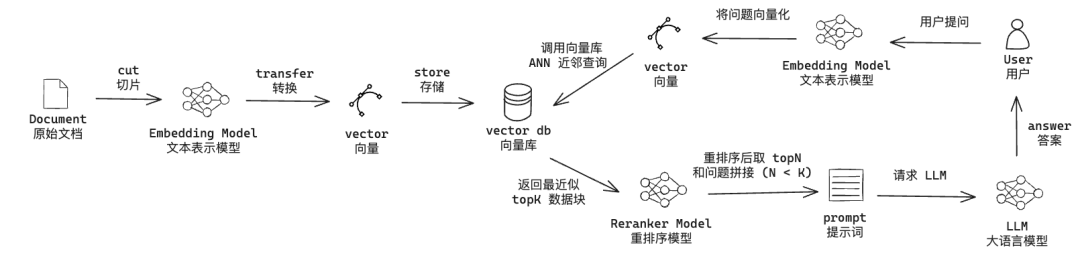
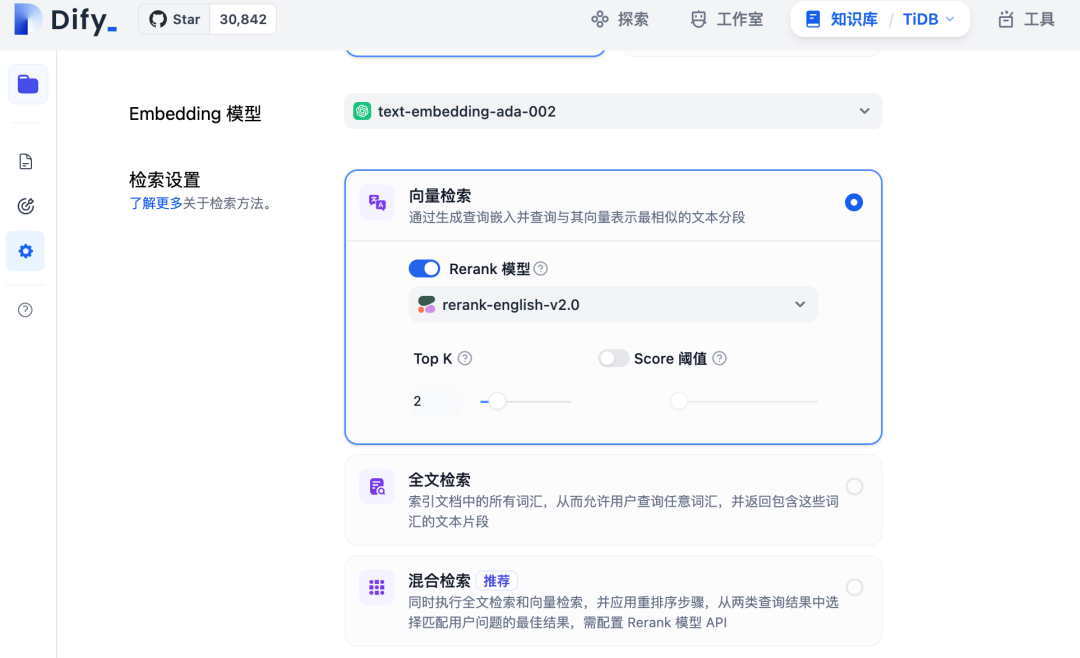
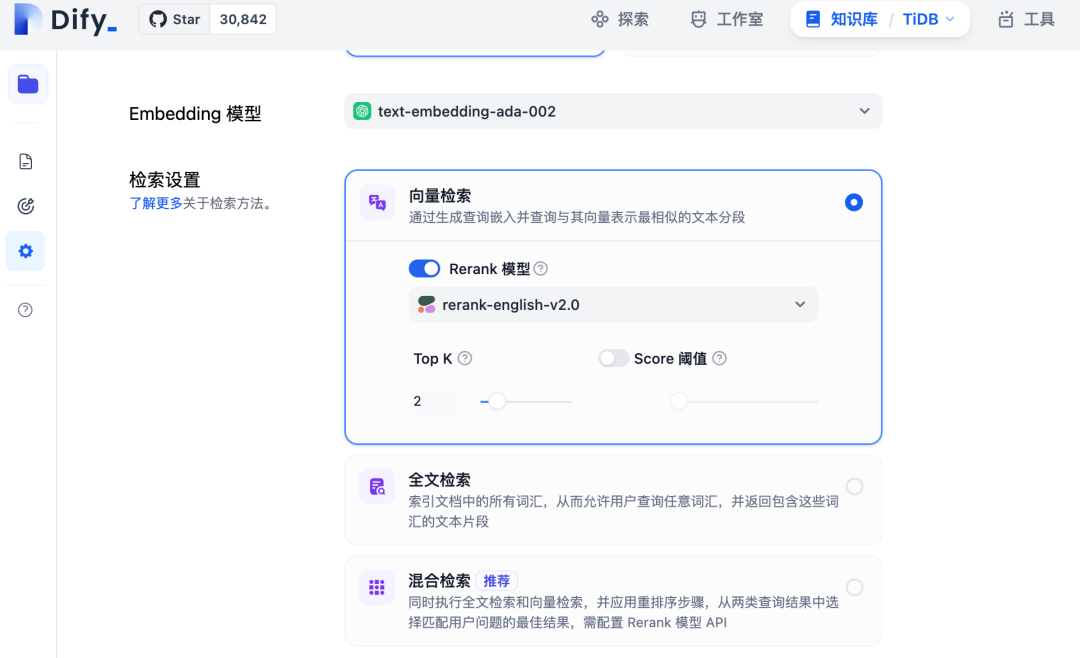
向量检索:基于 ANN 查询的检索,Reranker 模型为可选
全文检索:基于 BM25 检索,Reranker 模型为可选(目前 TiDB Vector 类型未支持)
混合(向量+全文):ANN + BM25 检索,Reranker 模型为必选
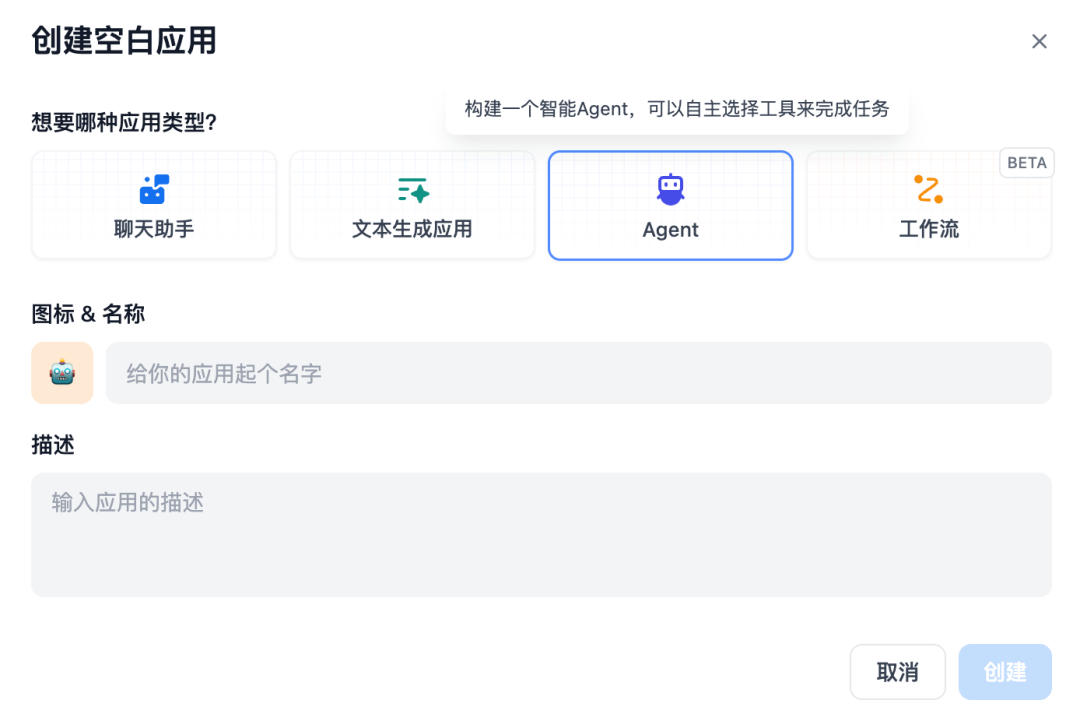
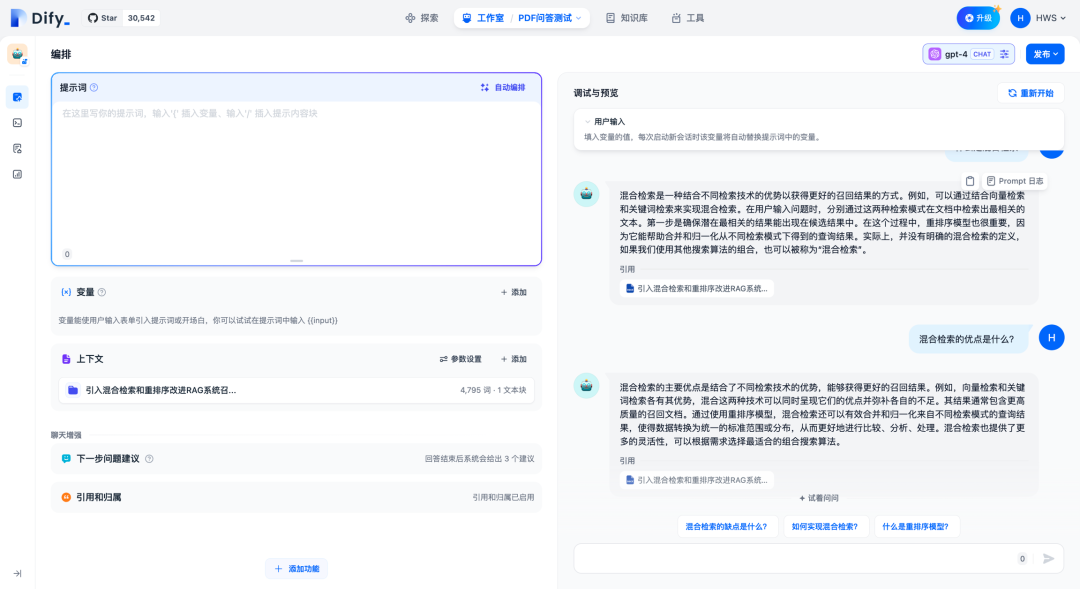

CREATE TABLE IF NOT EXISTS ${collection_name} (
      # id: 这里的id是在 Dify 中生成 uuid
id CHAR(36) PRIMARY KEY,

# text: 分片后的文本内容
      text TEXT NOT NULL,

      # meta: 元数据,记录数据集id、文档id、知识库id等,用于条件查询
      meta JSON NOT NULL,

      # vector: 分片向量,需要设置向量维度
      vector VECTOR<FLOAT>(${dimension}) NOT NULL COMMENT "hnsw(distance=${distance_func})",

      create_time DATETIME DEFAULT CURRENT_TIMESTAMP,
      update_time DATETIME DEFAULT CURRENT_TIMESTAMP ON UPDATE CURRENT_TIMESTAMP
);
${dimension} 表示向量的维度,这个取决于选择的 Embedding 模型。
${distance_func} 表示用户设置的距离度量方法,目前支持的值有cosine 和 l2 ,目前仅支持cosine。
SELECT meta, text FROM (
SELECT meta, text, ${tidb_func}(vector, "${query_vector}")  as distance
FROM ${collection_name}
ORDER BY distance
LIMIT ${top_k}
) t WHERE distance < ${distance};
${query_vector} 表示查询向量,即用户问题向量化后的结果
${tidb_func} 表示 TiDB Vector 中支持的向量距离度量防范,目前支持的方法有 Vec_Cosine_Distance 和 Vec_l2_Distance
${top_k} 表示结果 TopK 的具体个数
${distance} 表示向量库中的节点离查询节点的距离,Dify 知识库可以设置距离/分数阈值

[2]LangChain: https://python.langchain.com/v0.1/docs/integrations/vectorstores/tidb_vector/
[3]LlamaIndex: https://docs.llamaindex.ai/en/stable/examples/vector_stores/TiDBVector/
[4]TiDB Cloud: https://www.notion.so/TiDB-Vector-Dify-AI-Agent-06b03cc8eaff434fa3064d3a320f3440?pvs=21
[5]官方文档: https://github.com/langgenius/dify/blob/main/README_CN.md
[6]weaviate: https://weaviate.io/
[7]GIthub Release: https://github.com/langgenius/dify/releases
[8]这里: https://docs.dify.ai/v/zh-hans/getting-started/install-self-hosted/docker-compose
[9]开源代码库:https://github.com/langgenius/dify/blob/main/docker/docker-compose.yaml
[10]通义千问: https://help.aliyun.com/zh/dashscope/developer-reference/generic-text-vector/?spm=a2c4g.11186623.0.0.2b31696bUwAwpF
[11]MINIMAX: https://platform.minimaxi.com/document/guides/Embeddings
[12]JINA: https://help.aliyun.com/zh/dashscope/developer-reference/generic-text-vector/?spm=a2c4g.11186623.0.0.2b31696bUwAwpF
[13]JINA: https://jina.ai/reranker
[14]Cohere: https://docs.cohere.com/docs/rerank-2
[15]官方文档: https://docs.dify.ai/v/zh-hans/guides/knowledge-base/integrate_knowledge_within_application
[16]文档: Vector Search Indexes in TiDB: https://docs.google.com/document/d/15eAO0xrvEd6_tTxW_zEko4CECwnnSwQg8GGrqK1Caiw/edit
[17]Dify 中文文档: https://docs.dify.ai/v/zh-hans
[18]LangChain - TiDB Vector 文档: https://python.langchain.com/v0.1/docs/integrations/vectorstores/tidb_vector/
[19]LlamaIndex - TiDB Vector Store 文档: https://docs.llamaindex.ai/en/stable/examples/vector_stores/TiDBVector/
[20]tidb-vector-python 源码: https://github.com/pingcap/tidb-vector-python
[21]Dify 源码: https://github.com/langgenius/dify
[22]langchain - tidb_vector 源码: https://github.com/langchain-ai/langchain/blob/master/libs/community/langchain_community/vectorstores/tidb_vector.py
[23]llama-index-vector-stores-tidbvector 源码: https://github.com/run-llama/llama_index/tree/main/llama-index-integrations/vector_stores/llama-index-vector-stores-tidbvector
「喜欢这篇文章,您的关注和赞赏是给作者最好的鼓励」
关注作者
【版权声明】本文为墨天轮用户原创内容,转载时必须标注文章的来源(墨天轮),文章链接,文章作者等基本信息,否则作者和墨天轮有权追究责任。如果您发现墨天轮中有涉嫌抄袭或者侵权的内容,欢迎发送邮件至:contact@modb.pro进行举报,并提供相关证据,一经查实,墨天轮将立刻删除相关内容。
