



一、filebeat概述
Filebeat是一个轻量型日志采集器,它是Elasticsearch stack里面的一员。这款工具是使用Golang实现的,本质上是一个代理程序,可以安装在各个节点上,根据配置读取对应位置的日志,并上报到相应的地方去。它可以方便地与kibana集成,启动filebeat后,可以直接在kibana中观看对日志文件进行detail的过程。
二、filebeat的安装与配置
采用rpm方式进行安装
curl -L -O https://artifacts.elastic.co/downloads/beats/filebeat/filebeat-7.0.1-x86_64.rpm
rpm -vi filebeat-7.0.1-x86_64.rpm
配置
vim etc/filebeat/filebeat.yml
分为input和output配置
filebeat.inputs:- type: logenabled: truepaths:- var/log/nginx/io.logfields:type: www_accessfields_under_root: truesetup.template.settings:index.number_of_shards: 1output.redis:hosts: ["127.0.0.1:6379"]key: "nginx"keys:- key: "%{[type]}"processors:- add_host_metadata: ~- add_cloud_metadata: ~
三、启动与报错处理
启动:systemctl start filebeat
[root@ELK-Master bin]# systemctl restart filebeat[root@ELK-Master bin]# systemctl status filebeat● filebeat.service - Filebeat sends log files to Logstash or directly to Elasticsearch.Loaded: loaded (/usr/lib/systemd/system/filebeat.service; disabled; vendor preset: disabled)Active: failed (Result: exit-code) since Tue 2023-11-07 10:56:54 CST; 4s agoDocs: https://www.elastic.co/products/beats/filebeatProcess: 9170 ExecStart=/usr/share/filebeat/bin/filebeat $BEAT_LOG_OPTS $BEAT_CONFIG_OPTS $BEAT_PATH_OPT>Main PID: 9170 (code=exited, status=1/FAILURE)11月 07 10:56:54 ELK-Master systemd[1]: filebeat.service: Service RestartSec=100ms expired, scheduling res>11月 07 10:56:54 ELK-Master systemd[1]: filebeat.service: Scheduled restart job, restart counter is at 5.11月 07 10:56:54 ELK-Master systemd[1]: Stopped Filebeat sends log files to Logstash or directly to Elasti>11月 07 10:56:54 ELK-Master systemd[1]: filebeat.service: Start request repeated too quickly.11月 07 10:56:54 ELK-Master systemd[1]: filebeat.service: Failed with result 'exit-code'.11月 07 10:56:54 ELK-Master systemd[1]: Failed to start Filebeat sends log files to Logstash or directly t>
报错排查:
运行filebeat test config
命令来验证配置文件是否存在语法错误。
[root@ELK-Master bin]# filebeat test configExiting: error unpacking config data: more than one namespace configured accessing 'output' (source:'/etc/filebeat/filebeat.yml')
原因:存在俩个output输出,修改配置文件,进行注释。
[root@ELK-Master bin]# filebeat test config
Config OK
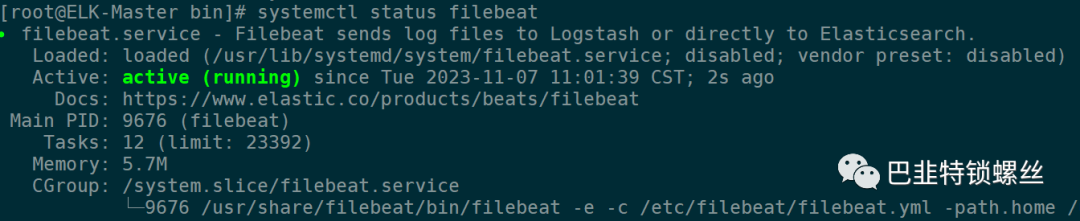
[root@ELK-Master bin]# vim /etc/filebeat/filebeat.yml[root@ELK-Master bin]# filebeat test configConfig OK[root@ELK-Master bin]# systemctl restart filebeat[root@ELK-Master bin]# systemctl status filebeat● filebeat.service - Filebeat sends log files to Logstash or directly to Elasticsearch.Loaded: loaded (/usr/lib/systemd/system/filebeat.service; disabled; vendor preset: disabled)Active: active (running) since Tue 2023-11-07 11:01:39 CST; 2s agoDocs: https://www.elastic.co/products/beats/filebeatMain PID: 9676 (filebeat)Tasks: 12 (limit: 23392)Memory: 5.7MCGroup: /system.slice/filebeat.service└─9676 /usr/share/filebeat/bin/filebeat -e -c /etc/filebeat/filebeat.yml -path.home /usr/share/>

文章转载自巴韭特锁螺丝,如果涉嫌侵权,请发送邮件至:contact@modb.pro进行举报,并提供相关证据,一经查实,墨天轮将立刻删除相关内容。
