



阿里云epel8源配置
1)安装epel配置包dnf install -y https://mirrors.aliyun.com/epel/epel-release-latest-8.noarch.rpm2)替换为阿里云的地址sed -i 's|^#baseurl=https://download.example/pub|baseurl=https://mirrors.aliyun.com|' etc/yum.repos.d/epel*sed -i 's|^metalink|#metalink|' etc/yum.repos.d/epel*3)清除缓存dnf clean all4) 建立缓存dnf makecache
龙蜥AnolisOS8无法检索出epel的软件
dnf list all没有看到epel网络源的软件包
解决方法需要启用epel源
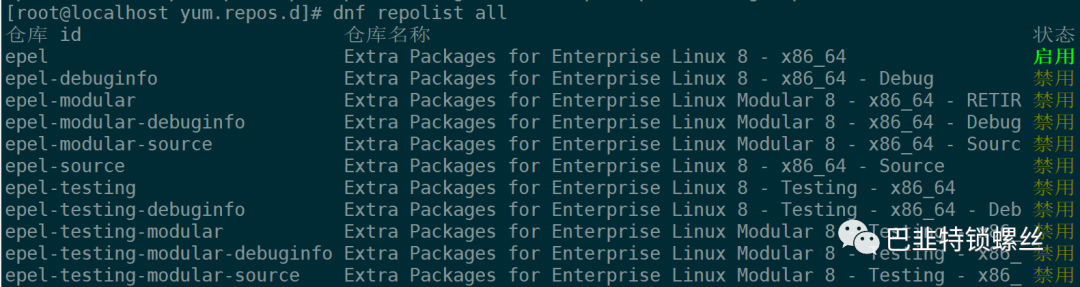
dnf repolist all #列出所有的存储库Repository epel is listed more than once in the configuration仓库 id 仓库名称 状态AppStream AnolisOS-8 - AppStream 启用BaseOS AnolisOS-8 - BaseOS 启用DDE AnolisOS-8 - DDE 禁用Plus AnolisOS-8 - Plus 禁用PowerTools AnolisOS-8 - PowerTools 启用epel epel 禁用dnf config-manager --set-enable epel #启用epel源dnf repolist epel #查看epel源的状态Repository epel is listed more than once in the configuration仓库 id 仓库名称 状态epel epel 启用

版权声明:本文内容来自CSDN:养了一只皮卡丘,遵循CC 4.0 BY-SA版权协议上原文接及本声明。本作品采用知识共享署名-非商业性使用-禁止演绎 2.5 中国大陆许可协议进行可。原文链接:https://blog.csdn.net/hyhxy0206/article/details/128202935如有涉及到侵权,请联系,将立即予以删除处理。在此特别鸣谢原作者的创作。此篇文章的所有版权归原作者所有,与本公众号无关,商业转载建议请联系原作者,非商业转载请注明出处。
文章转载自巴韭特锁螺丝,如果涉嫌侵权,请发送邮件至:contact@modb.pro进行举报,并提供相关证据,一经查实,墨天轮将立刻删除相关内容。
