



一、需求背景
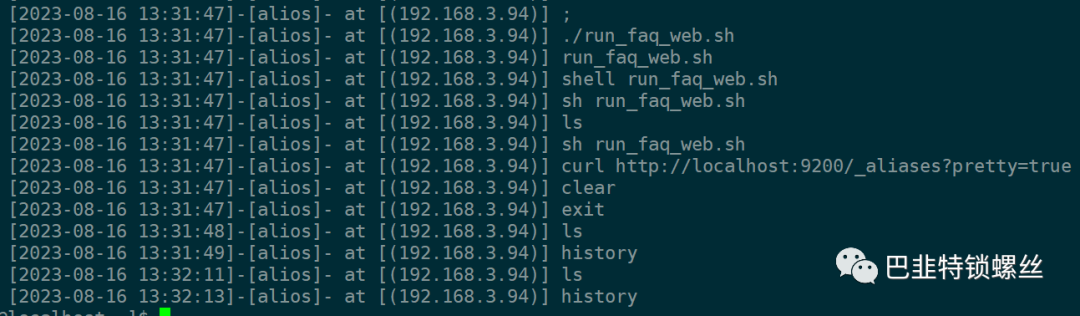
默认情况下history输入命令如下:
992 ls993 cd ..994 cd conf/995 ls996 vim application-core.yml997 vim application.yml998 su root999 history
不能看出什么时间执行、也不能知道执行的IP地址是多少。
二、加入时间和执行IP地址【全局生效、针对所有用户】
vim etc/profilesource /etc/profile
在/etc/profile 末尾加入以下内容:
if [ `who am i| awk '{print $NF}'|awk -F'(' '{print NF}'` -eq 2 ];thenunset HISTTIMEFORMATexport HISTTIMEFORMAT="[%F %T]-[`whoami`]- at [`who am i| awk '{print $NF}'`] "elseunset HISTTIMEFORMATexport HISTTIMEFORMAT="[%F %T]-[`whoami`]- at [`hostname`] "fi
三、history其他优化
不同的终端可以通过上翻可查询到命令
vim etc/bashrc在末尾添加:
# Avoid duplicatesexport HISTCONTROL=ignoredups:erasedups# When the shell exits, append to the history file instead of overwriting itshopt -s histappend# After each command, append to the history file and reread itexport PROMPT_COMMAND="$PROMPT_COMMAND:+$PROMPT_COMMAND$\\nhistory -a; history -c; history -r"
使其生效:
source /etc/bashrc调整大小,增加到10000条
vim /etc/bashrc
末尾添加
export HISTSIZE=10000
刷新一下
source /etc/bashrc
[alios@XAYL home2]$ history1 2024-02-01 08:40:10 127.0.0.1:alios history2 2024-02-01 08:40:13 127.0.0.1:alios ls3 2024-02-01 08:40:17 127.0.0.1:alios cd /home2/4 2024-02-01 08:40:18 127.0.0.1:alios ls5 2024-02-01 08:40:23 127.0.0.1:alios history

文章转载自巴韭特锁螺丝,如果涉嫌侵权,请发送邮件至:contact@modb.pro进行举报,并提供相关证据,一经查实,墨天轮将立刻删除相关内容。
