一、问题背景
访问HTTPS协议的 api
报错
PKIX path building failed: sun.security.provider.certpath.SunCertPathBuilder
和
Certificate for <xxx.xxx.xxx.xxx> doesn’t match any of the subject alternative names: []
二、问题解决
解决SpringBoot jar包在Linux-centos系统提示PKIX path building failed: sun.security.provider.certpath.SunCertPathBuilderException错误
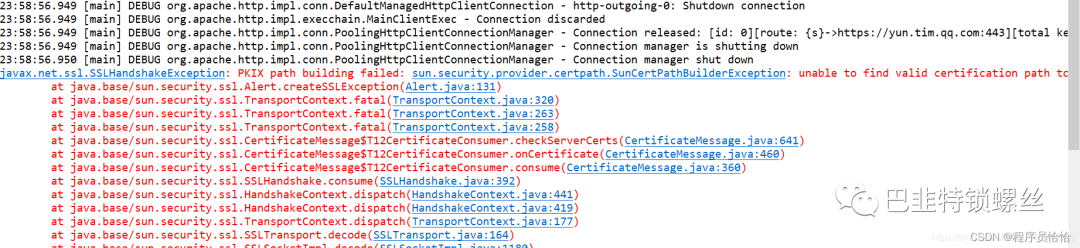
错误原因:这是由于java对SSL证书不信任造成的。
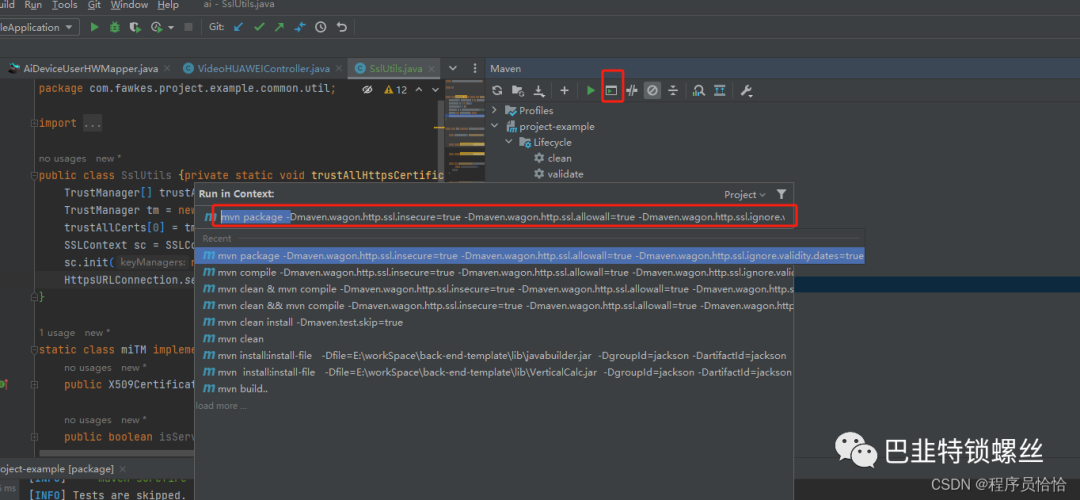
在maven打包的时候去掉证书验证
在maven命令行窗口输入以下命令打包
mvn package -Dmaven.wagon.http.ssl.insecure=true -Dmaven.wagon.http.ssl.allowall=true -Dmaven.wagon.http.ssl.ignore.validity.dates=true
项目场景:
访问HTTPS协议的 api
报错
PKIX path building failed: sun.security.provider.certpath.SunCertPathBuilder
和
Certificate for <xxx.xxx.xxx.xxx> doesn’t match any of the subject alternative names: []
问题一
使用Java访问https协议的api报错
PKIX path building failed: sun.security.provider.certpath.SunCertPathBuilder.
原因分析:
需要配置SSL证书或者绕开ssl
解决方案:
使用浏览器访问一下api路径,然后点击左边框下载证书
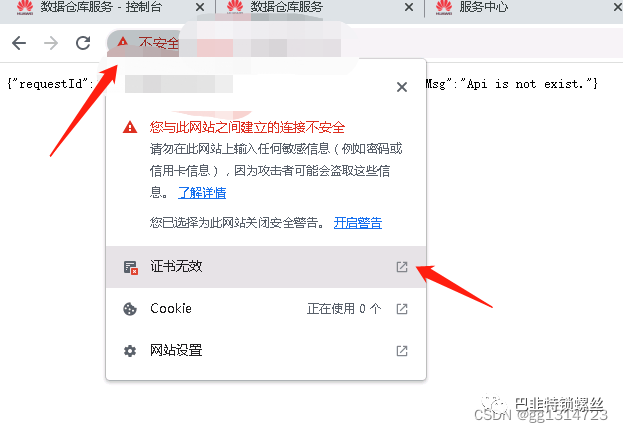
将证书导出
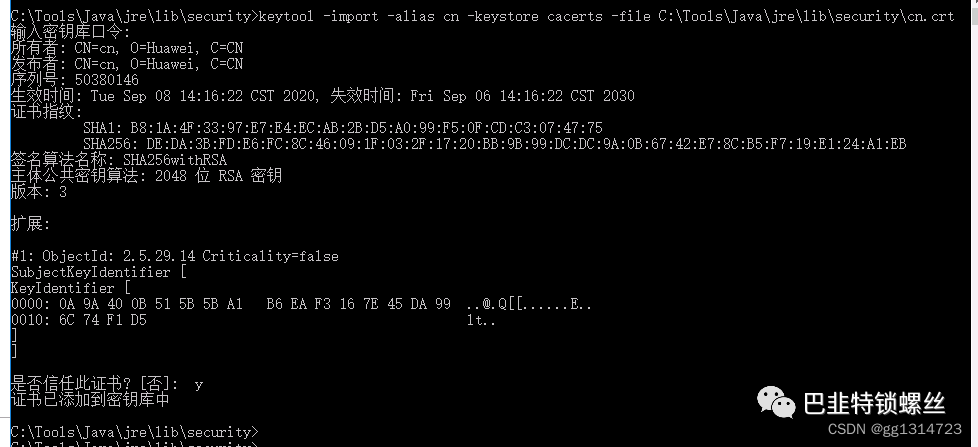
进入jdk home path下的的lib下的secruity目录,导入证书
cd C:\Tools\Java\jre\lib\security

keytool -import -alias cn -keystore cacerts -file C:\Tools\Java\jre\lib\security\cn.crt
输入默认密码导入证书
changeit
y
如图所示:
问题二
导入证书后报错:
Certificate for <xxx.xxx.xxx.xxx> doesn’t match any of the subject alternative names: []
javax.net.ssl.SSLPeerUnverifiedException: Certificate for <xxx.xxx.xxx.xxx> doesn't match any of the subject alternative names: []
	at org.apache.http.conn.ssl.SSLConnectionSocketFactory.verifyHostname(SSLConnectionSocketFactory.java:507)
	at org.apache.http.conn.ssl.SSLConnectionSocketFactory.createLayeredSocket(SSLConnectionSocketFactory.java:437)
	at org.apache.http.conn.ssl.SSLConnectionSocketFactory.connectSocket(SSLConnectionSocketFactory.java:384)
	at org.apache.http.impl.conn.DefaultHttpClientConnectionOperator.connect(DefaultHttpClientConnectionOperator.java:142)
	at org.apache.http.impl.conn.PoolingHttpClientConnectionManager.connect(PoolingHttpClientConnectionManager.java:376)
	at org.apache.http.impl.execchain.MainClientExec.establishRoute(MainClientExec.java:393)
	at org.apache.http.impl.execchain.MainClientExec.execute(MainClientExec.java:236)
	at org.apache.http.impl.execchain.ProtocolExec.execute(ProtocolExec.java:186)
	at org.apache.http.impl.execchain.RetryExec.execute(RetryExec.java:89)
	at org.apache.http.impl.execchain.RedirectExec.execute(RedirectExec.java:110)
	at org.apache.http.impl.client.InternalHttpClient.doExecute(InternalHttpClient.java:185)
	at org.apache.http.impl.client.CloseableHttpClient.execute(CloseableHttpClient.java:83)
	at org.apache.http.impl.client.CloseableHttpClient.execute(CloseableHttpClient.java:108)
	at com.apig.sdk.demo.Main.main(Main.java:61)
解决方案:
修改添加如下代码:
            SSLConnectionSocketFactory scsf = new SSLConnectionSocketFactory(
                           SSLContexts.custom().loadTrustMaterial(null, new TrustSelfSignedStrategy()).build(),
                                 NoopHostnameVerifier.INSTANCE);
            client = HttpClients.custom().setSSLSocketFactory(scsf).build();
三、问题小结
1、去除SSL证书验证;
2、将SSL证书加入信任;
3、购买SSL证书。
版权声明:本文内容来自CSDN:gg1314723,遵循CC 4.0 BY-SA版权协议上原文接及本声明。
本作品采用知识共享署名-非商业性使用-禁止演绎 2.5 中国大陆许可协议进行可。
原文链接:
https://blog.csdn.net/gg1314723/article/details/129723352
https://blog.csdn.net/qq_41594380/article/details/134259665
如有涉及到侵权,请联系,将立即予以删除处理。
在此特别鸣谢原作者的创作。
此篇文章的所有版权归原作者所有,与本公众号无关,商业转载建议请联系原作者,非商业转载请注明出处。




