



一、故障现象
在vim编辑文本时,无法执行右击鼠标进行黏贴,需要对其进行解决。
查看版本:
root@test:~# lscpu架构: x86_64CPU 运行模式:32-bit, 64-bitAddress sizes: 45 bits physical, 48 bits virtual字节序: Little EndianCPU: 4在线 CPU 列表:0-3厂商 ID:GenuineIntelBIOS Vendor ID: GenuineIntel型号名称: 11th Gen Intel(R) Core(TM) i5-1135G7 @ 2.40GHzBIOS Model name: 11th Gen Intel(R) Core(TM) i5-1135G7 @ 2.40GHz CPU @ 2.4GHzBIOS CPU family: 2CPU 系列:6型号: 140每个核的线程数: 1每个座的核数: 2座: 2步进: 1BogoMIPS: 4838.40标记: fpu vme de pse tsc msr pae mce cx8 apic sep mtrr pge mca cmov pat pse36 clflush mmx fxsr sse sse2 ss ht syscall nx pdpe1gb rdtscp lm constant_tsc arch_perfmon rep_good nopl xtopology tsc_reliable nonstop_tsc cpuid tsc_known_freq pni pclmulqdq ssse3 fma cx16 pcid sse4_1 sse4_2 x2apic movbe popcnt tsc_deadline_timer aes xsave avx f16c rdrand hypervisor lahf_lm abm 3dnowprefetch cpuid_fault invpcid_single ssbd ibrs ibpb stibp ibrs_enhanced fsgsbase tsc_adjust bmi1 avx2 smep bmi2erms invpcid avx512f avx512dq rdseed adx smap avx512ifma clflushopt clwb avx512cd sha_ni avx512bw avx512vl xsaveopt xsavec xgetbv1 xsaves arat avx512vbmi umip pku ospke avx512_vbmi2 gfni vaesvpclmulqdq avx512_vnni avx512_bitalg avx512_vpopcntdq rdpid movdiri movdir64b fsrm avx512_vp2intersect md_clear flush_l1d arch_capabilitiesVirtualization features:超管理器厂商: VMware虚拟化类型: 完全Caches (sum of all):L1d: 192 KiB (4 instances)L1i: 128 KiB (4 instances)L2: 5 MiB (4 instances)L3: 16 MiB (2 instances)NUMA:NUMA 节点:1NUMA 节点0 CPU:0-3Vulnerabilities:Itlb multihit: KVM: Mitigation: VMX unsupportedL1tf: Not affectedMds: Not affectedMeltdown: Not affectedMmio stale data: Not affectedRetbleed: Not affectedSpec store bypass: Mitigation; Speculative Store Bypass disabled via prctlSpectre v1: Mitigation; usercopy/swapgs barriers and __user pointer sanitizationSpectre v2: Mitigation; Enhanced IBRS, IBPB conditional, RSB filling, PBRSB-eIBRS SW sequenceSrbds: Not affectedTsx async abort: Not affected
root@test:~# cat etc/os-releaseNAME="openKylin"FULL_NAME="openKylin"VERSION="1.0 (yangtze)"VERSION_US="1.0 (yangtze)"ID=openkylinPRETTY_NAME="openKylin 1.0"VERSION_ID="1.0"HOME_URL="https://www.openkylin.top/"VERSION_CODENAME=yangtzePRODUCT_FEATURES=3
root@test:~# uname -r6.1.0-3-generic
二、临时性解决
用vim时,鼠标右键不能粘贴而是进入了visual模式,解决方法:
按esc
之后输入:set mouse-=a
三、永久性解决
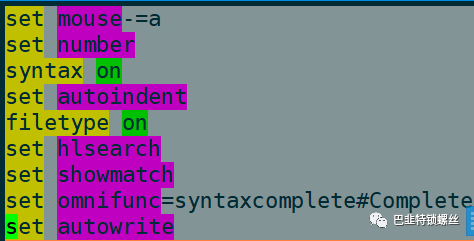
vim ~/.vimrc
加入set mouse-=a参数即可
set mouse-=aset numbersyntax onset autoindentfiletype onset hlsearchset showmatchset omnifunc=syntaxcomplete#Completeset autowrite
文章转载自巴韭特锁螺丝,如果涉嫌侵权,请发送邮件至:contact@modb.pro进行举报,并提供相关证据,一经查实,墨天轮将立刻删除相关内容。
