



这是我第二次遇到SecureCRT SSH连接Linux系统报出了Key exchange failed/No compatible hostkey和No compatible key exchange method这种错误了,就是无法连接。用同样版本的工具,第一次是连接腾讯云上的CentOS 7.9的时候报的,在不更换SecureCRT客户端的版本和配置的情况下,之前是已经解决过一次了。这一次是SecureCRT客户端连接Ubuntu 22.04操作系统。

网上说到的有两种解决方法,或者说是三种解决方法。
第一种:更换SecureCRT客户端配置
就是类似勾选以下密钥交换方式
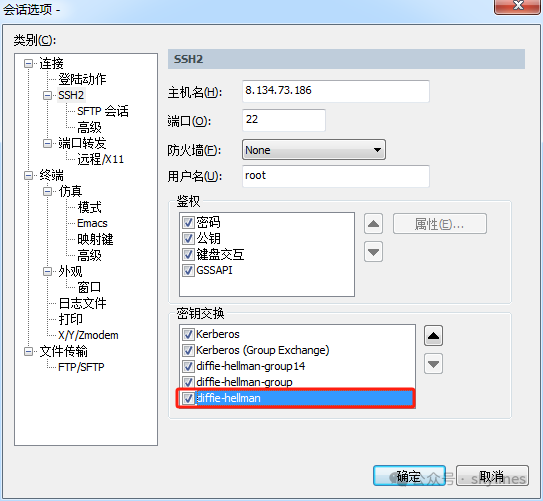
第二种:更换更换SecureCRT客户端到更高的版本
我一般不考虑这种解决方法。
第三种:修改系统/etc/ssh/sshd_config配置

这种操作是比较简单,容易见效的,比第一种更奏效,因为第一种不一定能够解决。
--第一次报错内容Key exchange failed.No compatible key exchange method. The server supports these methods: curve25519-sha256,curve25519-sha256@libssh.org,ecdh-sha2-nistp256,ecdh-sha2-nistp384,ecdh-sha2-nistp521,sntrup761x25519-sha512@openssh.com,diffie-hellman-group-exchange-sha256,diffie-hellman-group16-sha512,diffie-hellman-group18-sha512,diffie-hellman-group14-sha256,kex-strict-s-v00@openssh.comNo compatible hostkey. The server supports these methods: rsa-sha2-512,rsa-sha2-256,ecdsa-sha2-nistp256,ssh-ed25519--第二次报错内容Key exchange failed.No compatible hostkey. The server supports these methods: rsa-sha2-512,rsa-sha2-256,ecdsa-sha2-nistp256,ssh-ed25519
上面是解决过程中,遇到了两种报错内容,明显看出来,第二次报错内容,是少了一个报错原因。所以,针对这样的报错,就直接从sshd的配置入手,如下:
vi /etc/ssh/sshd_config#加入下面的文本HostKeyAlgorithms=+ssh-rsa,ssh-dssKexAlgorithms curve25519-sha256@libssh.org,ecdh-sha2-nistp256,ecdh-sha2-nistp384,ecdh-sha2-nistp521,diffie-hellman-group-exchange-sha256,diffie-hellman-group14-sha1,diffie-hellman-group-exchange-sha1,diffie-hellman-group1-sha1#重启sshsystemctl restart sshd.service
就这样,问题就解决了。
用SecureCRT客户端再次连接,就成功连接到系统了。
文章转载自skylines,如果涉嫌侵权,请发送邮件至:contact@modb.pro进行举报,并提供相关证据,一经查实,墨天轮将立刻删除相关内容。
