

暂无图片
暂无图片
暂无图片
暂无图片
暂无图片

PostgreSQL一主两备 ETCD+PATRONI+KEEPLIVED 集群高可用安装部署实践

skylines 2023-05-25
140

在我的三台腾讯云服务器到期被回收之前,我利用剩余的时间,进行了PostgreSQL一主两备 ETCD+PATRONI+KEEPLIVED 集群高可用安装部署实践的测试。
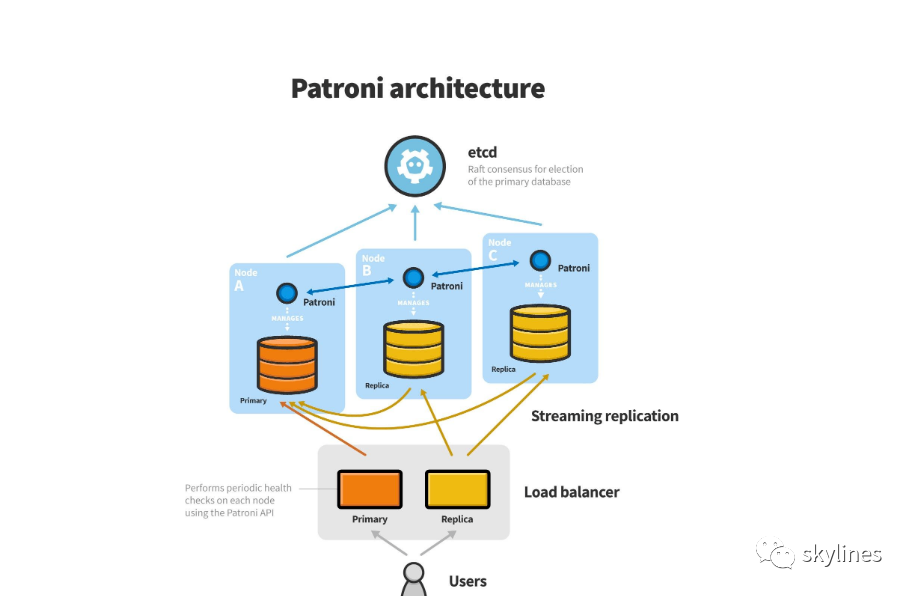

####安装PostgreSQL一主两备集群并安装基本软件

##安装PostgreSQL一主两备集群

PostgreSQL一主两备集群在《postgresql 15.2一主一备集群数据库安装与配置实践》的基础上(可参考配置步骤与方法),补充添加了一个节点,并完成了一主两备的PostgreSQL集群。
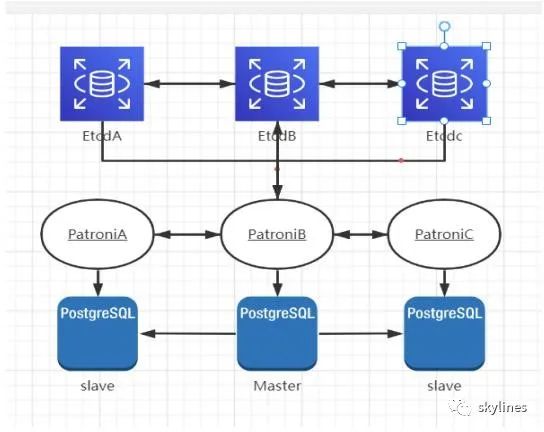
##安装基本软件

    yum -y install vim lrzsz bash-completion

    ##安装并设置NTP

      yum -y install chrony


      ####安装部署ETCD集群

        yum -y install etcd

        ##所有节点创建ETCD配置文件

        ##primary

          cat > etc/etcd/etcd.conf << EOF


          ETCD_NAME=etcd1
          ETCD_DATA_DIR="/var/lib/etcd/etcd1"
          ETCD_LISTEN_PEER_URLS="http://172.16.0.16:2380"
          ETCD_LISTEN_CLIENT_URLS="http://127.0.0.1:2379,http://172.16.0.16:2379"
          ETCD_INITIAL_ADVERTISE_PEER_URLS="http://172.16.0.16:2380"
          ETCD_INITIAL_CLUSTER="etcd1=http://172.16.0.16:2380,etcd2=http://172.16.0.11:2380,etcd3=http://172.16.0.13:2380"
          ETCD_INITIAL_CLUSTER_STATE="new"
          ETCD_INITIAL_CLUSTER_TOKEN="etcd-cluster"
          ETCD_ADVERTISE_CLIENT_URLS="http://172.16.0.16:2379"
          EOF


          ##standby1

            cat > etc/etcd/etcd.conf << EOF
            ETCD_NAME=etcd2
            ETCD_DATA_DIR="/var/lib/etcd/etcd2"
            ETCD_LISTEN_PEER_URLS="http://172.16.0.11:2380"
            ETCD_LISTEN_CLIENT_URLS="http://127.0.0.1:2379,http://172.16.0.11:2379"
            ETCD_INITIAL_ADVERTISE_PEER_URLS="http://172.16.0.11:2380"
            ETCD_INITIAL_CLUSTER="etcd1=http://172.16.0.16:2380,etcd2=http://172.16.0.11:2380,etcd3=http://172.16.0.13:2380"
            ETCD_INITIAL_CLUSTER_STATE="new"
            ETCD_INITIAL_CLUSTER_TOKEN="etcd-cluster"
            ETCD_ADVERTISE_CLIENT_URLS="http://172.16.0.11:2379"
            EOF


            ##standby2

              cat > etc/etcd/etcd.conf << EOF
              ETCD_NAME=etcd3
              ETCD_DATA_DIR="/var/lib/etcd/etcd3"
              ETCD_LISTEN_PEER_URLS="http://172.16.0.13:2380"
              ETCD_LISTEN_CLIENT_URLS="http://127.0.0.1:2379,http://172.16.0.13:2379"
              ETCD_INITIAL_ADVERTISE_PEER_URLS="http://172.16.0.13:2380"
              ETCD_INITIAL_CLUSTER="etcd1=http://172.16.0.16:2380,etcd2=http://172.16.0.11:2380,etcd3=http://172.16.0.13:2380"
              ETCD_INITIAL_CLUSTER_STATE="new"
              ETCD_INITIAL_CLUSTER_TOKEN="etcd-cluster"
              ETCD_ADVERTISE_CLIENT_URLS="http://172.16.0.13:2379"
              EOF


              ##启动并查看etcd

                systemctl start etcd
                systemctl enable etcd
                systemctl status etcd


                  [root@mytest01 ~]# systemctl status etcd
                  ● etcd.service - Etcd Server
                  Loaded: loaded (/usr/lib/systemd/system/etcd.service; enabled; vendor preset: disabled)
                  Active: active (running) since Wed 2023-05-24 17:00:12 CST; 1min 5s ago
                  Main PID: 1056 (etcd)
                  Tasks: 10
                  Memory: 22.1M
                  CGroup: system.slice/etcd.service
                  └─1056 usr/bin/etcd --name=etcd1 --data-dir=/var/lib/etcd/etcd1 --listen-client-urls=http://127.0.0.1:2379,http://172.16.0.16:2379
                  May 24 17:00:21 mytest01 etcd[1056]: peer c2d1bf26a6345972 became active
                  May 24 17:00:21 mytest01 etcd[1056]: established a TCP streaming connection with peer c2d1bf26a6345972 (stream Message writer)
                  May 24 17:00:21 mytest01 etcd[1056]: established a TCP streaming connection with peer c2d1bf26a6345972 (stream MsgApp v2 writer)
                  May 24 17:00:21 mytest01 etcd[1056]: established a TCP streaming connection with peer c2d1bf26a6345972 (stream MsgApp v2 reader)
                  May 24 17:00:21 mytest01 etcd[1056]: established a TCP streaming connection with peer c2d1bf26a6345972 (stream Message reader)
                  May 24 17:00:21 mytest01 etcd[1056]: health check for peer c2d1bf26a6345972 could not connect: dial tcp 172.16.0.13:2380: connect: connection refused (prober "ROUND_TRIPPER_RAFT_MESSAGE")
                  May 24 17:00:21 mytest01 etcd[1056]: health check for peer c2d1bf26a6345972 could not connect: dial tcp 172.16.0.13:2380: connect: connection refused (prober "ROUND_TRIPPER_SNAPSHOT")
                  May 24 17:00:24 mytest01 etcd[1056]: updating the cluster version from 3.0 to 3.3
                  May 24 17:00:24 mytest01 etcd[1056]: updated the cluster version from 3.0 to 3.3
                  May 24 17:00:24 mytest01 etcd[1056]: enabled capabilities for version 3.3


                  ##任意节点查看ETCD状态与ETCD成员

                    [root@mytest01 ~]# etcdctl cluster-health
                    member b63449756a2d37cb is healthy: got healthy result from http://172.16.0.16:2379
                    member c2d1bf26a6345972 is healthy: got healthy result from http://172.16.0.13:2379
                    member d759000053f00fda is healthy: got healthy result from http://172.16.0.11:2379
                    cluster is healthy


                    [root@mytest01 ~]# etcdctl member list
                    b63449756a2d37cb: name=etcd1 peerURLs=http://172.16.0.16:2380 clientURLs=http://172.16.0.16:2379 isLeader=true
                    c2d1bf26a6345972: name=etcd3 peerURLs=http://172.16.0.13:2380 clientURLs=http://172.16.0.13:2379 isLeader=false
                    d759000053f00fda: name=etcd2 peerURLs=http://172.16.0.11:2380 clientURLs=http://172.16.0.11:2379 isLeader=false


                    ####安装部署Patroni集群

                    ##安装Python 3

                      yum install -y python3


                      ##安装pip

                        curl https://bootstrap.pypa.io/pip/3.6/get-pip.py -o get-pip.py
                        python3 get-pip.py


                        ##安装Patroni

                          pip install psycopg2-binary -i https://pypi.tuna.tsinghua.edu.cn/simple
                          pip install patroni[etcd,consul] -i https://pypi.tuna.tsinghua.edu.cn/simple
                          --执行这两个命令


                            [root@mytest01 ~]# pip install psycopg2-binary -i https://pypi.tuna.tsinghua.edu.cn/simple


                            Looking in indexes: https://pypi.tuna.tsinghua.edu.cn/simple
                            Collecting psycopg2-binary
                            Downloading https://pypi.tuna.tsinghua.edu.cn/packages/98/3e/05ab0922422c91ca0ecb5939a100f8dc2b5d15f5978433beadc87c5329bf/psycopg2-binary-2.9.6.tar.gz (384 kB)
                            |████████████████████████████████| 384 kB 645 kB/s
                            Preparing metadata (setup.py) ... error
                            ERROR: Command errored out with exit status 1:
                            command: usr/bin/python3 -c 'import io, os, sys, setuptools, tokenize; sys.argv[0] = '"'"'/tmp/pip-install-vgxx43vh/psycopg2-binary_f2648c9aa1314098a2d79739eb351251/setup.py'"'"'; __file__='"'"'/tmp/pip-install-vgxx43vh/psycopg2-binary_f2648c9aa1314098a2d79739eb351251/setup.py'"'"';f = getattr(tokenize, '"'"'open'"'"', open)(__file__) if os.path.exists(__file__) else io.StringIO('"'"'from setuptools import setup; setup()'"'"');code = f.read().replace('"'"'\r\n'"'"', '"'"'\n'"'"');f.close();exec(compile(code, __file__, '"'"'exec'"'"'))' egg_info --egg-base tmp/pip-pip-egg-info-g9orpck_
                            cwd: tmp/pip-install-vgxx43vh/psycopg2-binary_f2648c9aa1314098a2d79739eb351251/
                            Complete output (23 lines):
                            running egg_info
                            creating tmp/pip-pip-egg-info-g9orpck_/psycopg2_binary.egg-info
                            writing tmp/pip-pip-egg-info-g9orpck_/psycopg2_binary.egg-info/PKG-INFO
                            writing dependency_links to tmp/pip-pip-egg-info-g9orpck_/psycopg2_binary.egg-info/dependency_links.txt
                            writing top-level names to tmp/pip-pip-egg-info-g9orpck_/psycopg2_binary.egg-info/top_level.txt
                            writing manifest file '/tmp/pip-pip-egg-info-g9orpck_/psycopg2_binary.egg-info/SOURCES.txt'

                            Error: pg_config executable not found.

                            pg_config is required to build psycopg2 from source. Please add the directory
                            containing pg_config to the $PATH or specify the full executable path with the
                            option:

                            python setup.py build_ext --pg-config path/to/pg_config build ...

                            or with the pg_config option in 'setup.cfg'.

                            If you prefer to avoid building psycopg2 from source, please install the PyPI
                            'psycopg2-binary' package instead.

                            For further information please check the 'doc/src/install.rst' file (also at
                            <https://www.psycopg.org/docs/install.html>).

                            ----------------------------------------
                            WARNING: Discarding https://pypi.tuna.tsinghua.edu.cn/packages/98/3e/05ab0922422c91ca0ecb5939a100f8dc2b5d15f5978433beadc87c5329bf/psycopg2-binary-2.9.6.tar.gz#sha256=1f64dcfb8f6e0c014c7f55e51c9759f024f70ea572fbdef123f85318c297947c (from https://pypi.tuna.tsinghua.edu.cn/simple/psycopg2-binary/) (requires-python:>=3.6). Command errored out with exit status 1: python setup.py egg_info Check the logs for full command output.
                            Downloading https://pypi.tuna.tsinghua.edu.cn/packages/92/a6/3b2ec55ce18f53ff04168ebbe959222ff79a3f6f48d907e4260afc750e9e/psycopg2_binary-2.9.5-cp36-cp36m-manylinux_2_17_x86_64.manylinux2014_x86_64.whl (3.0 MB)
                            |████████████████████████████████| 3.0 MB 740 kB/s
                            Installing collected packages: psycopg2-binary
                            Successfully installed psycopg2-binary-2.9.5
                            WARNING: Running pip as the 'root' user can result in broken permissions and conflicting behaviour with the system package manager. It is recommended to use a virtual environment instead: https://pip.pypa.io/warnings/venv
                            [root@mytest01 ~]#


                            [root@mytest01 ~]# pip install patroni[etcd,consul] -i https://pypi.tuna.tsinghua.edu.cn/simple
                            Looking in indexes: https://pypi.tuna.tsinghua.edu.cn/simple
                            Collecting patroni[consul,etcd]
                            Downloading https://pypi.tuna.tsinghua.edu.cn/packages/ae/97/48920cc96f68cd52d6b1a4fcf7d2585d914ec2d06df8f16acbdc16893fa1/patroni-3.0.2-py3-none-any.whl (216 kB)
                            |████████████████████████████████| 216 kB 523 kB/s
                            Collecting ydiff>=1.2.0
                            Downloading https://pypi.tuna.tsinghua.edu.cn/packages/1e/ed/e25e1f4fffbdfd0446f1c45504759e54676da0cde5a844d201181583fce4/ydiff-1.2.tar.gz (42 kB)
                            |████████████████████████████████| 42 kB 2.5 MB/s
                            Preparing metadata (setup.py) ... done
                            Collecting click>=4.1
                            Downloading https://pypi.tuna.tsinghua.edu.cn/packages/4a/a8/0b2ced25639fb20cc1c9784de90a8c25f9504a7f18cd8b5397bd61696d7d/click-8.0.4-py3-none-any.whl (97 kB)
                            |████████████████████████████████| 97 kB 368 kB/s
                            Collecting PyYAML
                            Downloading https://pypi.tuna.tsinghua.edu.cn/packages/b3/85/79b9e5b4e8d3c0ac657f4e8617713cca8408f6cdc65d2ee6554217cedff1/PyYAML-6.0-cp36-cp36m-manylinux_2_5_x86_64.manylinux1_x86_64.manylinux_2_12_x86_64.manylinux2010_x86_64.whl (603 kB)
                            |████████████████████████████████| 603 kB 186 kB/s
                            Collecting psutil>=2.0.0
                            Downloading https://pypi.tuna.tsinghua.edu.cn/packages/af/4d/389441079ecef400e2551a3933224885a7bde6b8a4810091d628cdd75afe/psutil-5.9.5-cp36-abi3-manylinux_2_12_x86_64.manylinux2010_x86_64.manylinux_2_17_x86_64.manylinux2014_x86_64.whl (282 kB)
                            |████████████████████████████████| 282 kB 334 kB/s
                            Collecting prettytable>=0.7
                            Downloading https://pypi.tuna.tsinghua.edu.cn/packages/9e/6d/40a24eaa03ea4418129708fd3f0f17eda73d568f16d4d4fd412566168b4c/prettytable-2.5.0-py3-none-any.whl (24 kB)
                            Collecting urllib3!=1.21,>=1.19.1
                            Downloading https://pypi.tuna.tsinghua.edu.cn/packages/7b/f5/890a0baca17a61c1f92f72b81d3c31523c99bec609e60c292ea55b387ae8/urllib3-1.26.15-py2.py3-none-any.whl (140 kB)
                            |████████████████████████████████| 140 kB 211 kB/s
                            Collecting python-dateutil
                            Downloading https://pypi.tuna.tsinghua.edu.cn/packages/36/7a/87837f39d0296e723bb9b62bbb257d0355c7f6128853c78955f57342a56d/python_dateutil-2.8.2-py2.py3-none-any.whl (247 kB)
                            |████████████████████████████████| 247 kB 139 kB/s
                            Collecting python-etcd<0.5,>=0.4.3
                            Downloading https://pypi.tuna.tsinghua.edu.cn/packages/a1/da/616a4d073642da5dd432e5289b7c1cb0963cc5dde23d1ecb8d726821ab41/python-etcd-0.4.5.tar.gz (37 kB)
                            Preparing metadata (setup.py) ... done
                            Collecting python-consul>=0.7.1
                            Downloading https://pypi.tuna.tsinghua.edu.cn/packages/3f/d0/59bc5f1c6c4d4b498c41d8ce7052ee9e9d68be19e16038a55252018a6c4d/python_consul-1.1.0-py2.py3-none-any.whl (24 kB)
                            Collecting importlib-metadata
                            Downloading https://pypi.tuna.tsinghua.edu.cn/packages/a0/a1/b153a0a4caf7a7e3f15c2cd56c7702e2cf3d89b1b359d1f1c5e59d68f4ce/importlib_metadata-4.8.3-py3-none-any.whl (17 kB)
                            Collecting wcwidth
                            Downloading https://pypi.tuna.tsinghua.edu.cn/packages/20/f4/c0584a25144ce20bfcf1aecd041768b8c762c1eb0aa77502a3f0baa83f11/wcwidth-0.2.6-py2.py3-none-any.whl (29 kB)
                            Collecting six>=1.4
                            Downloading https://pypi.tuna.tsinghua.edu.cn/packages/d9/5a/e7c31adbe875f2abbb91bd84cf2dc52d792b5a01506781dbcf25c91daf11/six-1.16.0-py2.py3-none-any.whl (11 kB)
                            Collecting requests>=2.0
                            Downloading https://pypi.tuna.tsinghua.edu.cn/packages/2d/61/08076519c80041bc0ffa1a8af0cbd3bf3e2b62af10435d269a9d0f40564d/requests-2.27.1-py2.py3-none-any.whl (63 kB)
                            |████████████████████████████████| 63 kB 181 kB/s
                            Collecting dnspython>=1.13.0
                            Downloading https://pypi.tuna.tsinghua.edu.cn/packages/9b/ed/28fb14146c7033ba0e89decd92a4fa16b0b69b84471e2deab3cc4337cc35/dnspython-2.2.1-py3-none-any.whl (269 kB)
                            |████████████████████████████████| 269 kB 113 kB/s
                            Collecting certifi>=2017.4.17
                            Downloading https://pypi.tuna.tsinghua.edu.cn/packages/9d/19/59961b522e6757f0c9097e4493fa906031b95b3ebe9360b2c3083561a6b4/certifi-2023.5.7-py3-none-any.whl (156 kB)
                            |████████████████████████████████| 156 kB 108 kB/s
                            Collecting idna<4,>=2.5
                            Downloading https://pypi.tuna.tsinghua.edu.cn/packages/fc/34/3030de6f1370931b9dbb4dad48f6ab1015ab1d32447850b9fc94e60097be/idna-3.4-py3-none-any.whl (61 kB)
                            |████████████████████████████████| 61 kB 84 kB/s
                            Collecting charset-normalizer~=2.0.0
                            Downloading https://pypi.tuna.tsinghua.edu.cn/packages/06/b3/24afc8868eba069a7f03650ac750a778862dc34941a4bebeb58706715726/charset_normalizer-2.0.12-py3-none-any.whl (39 kB)
                            Collecting typing-extensions>=3.6.4
                            Downloading https://pypi.tuna.tsinghua.edu.cn/packages/45/6b/44f7f8f1e110027cf88956b59f2fad776cca7e1704396d043f89effd3a0e/typing_extensions-4.1.1-py3-none-any.whl (26 kB)
                            Collecting zipp>=0.5
                            Downloading https://pypi.tuna.tsinghua.edu.cn/packages/bd/df/d4a4974a3e3957fd1c1fa3082366d7fff6e428ddb55f074bf64876f8e8ad/zipp-3.6.0-py3-none-any.whl (5.3 kB)
                            Building wheels for collected packages: python-etcd, ydiff
                            Building wheel for python-etcd (setup.py) ... done
                            Created wheel for python-etcd: filename=python_etcd-0.4.5-py3-none-any.whl size=38501 sha256=7612349adae28bb11e14ddddc6817832b7ded153a30c3a4cbcdcec679ea8894f
                            Stored in directory: root/.cache/pip/wheels/d4/8d/85/9f39a924f2f2bd2a07439a908c904428ffacdf010bd7c4bbb6
                            Building wheel for ydiff (setup.py) ... done
                            Created wheel for ydiff: filename=ydiff-1.2-py3-none-any.whl size=16633 sha256=418c601cbbb5d3f2cf01ee057f9c3742663aab7a8ce7f7f2fc2d031073570479
                            Stored in directory: root/.cache/pip/wheels/8a/a3/6d/5f34d9d5281240f24b8a5c4530d422582099fcdddd2ff10339
                            Successfully built python-etcd ydiff
                            Installing collected packages: zipp, typing-extensions, wcwidth, urllib3, six, importlib-metadata, idna, charset-normalizer, certifi, ydiff, requests, PyYAML, python-dateutil, psutil, prettytable, dnspython, click, python-etcd, python-consul, patroni
                            Successfully installed PyYAML-6.0 certifi-2023.5.7 charset-normalizer-2.0.12 click-8.0.4 dnspython-2.2.1 idna-3.4 importlib-metadata-4.8.3 patroni-3.0.2 prettytable-2.5.0 psutil-5.9.5 python-consul-1.1.0 python-dateutil-2.8.2 python-etcd-0.4.5 requests-2.27.1 six-1.16.0 typing-extensions-4.1.1 urllib3-1.26.15 wcwidth-0.2.6 ydiff-1.2 zipp-3.6.0
                            WARNING: Running pip as the 'root' user can result in broken permissions and conflicting behaviour with the system package manager. It is recommended to use a virtual environment instead: https://pip.pypa.io/warnings/venv
                            [root@mytest01 ~]#


                            ##验证Patroni是否安装成功

                              patroni --version
                              patroni 3.0.2
                              [root@mytest01 ~]#


                              ##在所有节点上创建Patroni配置文件

                                SELECT * FROM pg_create_physical_replication_slot('pgstandby3');
                                --补充创建槽位pgstandby3

                                ##primary

                                  mkdir -p usr/patroni/conf
                                  cat > usr/patroni/conf/patroni_postgresql.yml << EOF
                                  scope: pgsql15
                                  namespace: /pgsql/
                                  name: pgstandby3
                                  restapi:
                                  listen: 172.16.0.16:8008
                                  connect_address: 172.16.0.16:8008
                                  etcd:
                                  host: 172.16.0.16:2379
                                  bootstrap:
                                  dcs:
                                  ttl: 30
                                  loop_wait: 10
                                  retry_timeout: 10
                                  maximum_lag_on_failover: 1048576
                                  master_start_timeout: 300
                                  synchronous_mode: false
                                  postgresql:
                                  use_pg_rewind: true
                                  use_slots: true
                                  parameters:
                                  listen_addresses: "0.0.0.0"
                                  port: 5002
                                  wal_level: logical
                                  hot_standby: "on"
                                  wal_keep_segments: 1000
                                  max_wal_senders: 10
                                  max_replication_slots: 10
                                  wal_log_hints: "on"
                                  postgresql:
                                  listen: 0.0.0.0:5002
                                  connect_address: 172.16.0.16:5002
                                  data_dir: /var/lib/pgsql/15/data
                                  bin_dir: /usr/pgsql-15/bin
                                  authentication:
                                  replication:
                                  username: replica
                                  password: replica520A
                                  superuser:
                                  username: postgres
                                  password: Abcdfact@5500
                                  tags:
                                  nofailover: false
                                  noloadbalance: false
                                  clonefrom: false
                                  nosync: false
                                  EOF


                                  ##standby1

                                    mkdir -p usr/patroni/conf
                                    cat > usr/patroni/conf/patroni_postgresql.yml << EOF
                                    scope: pgsql15
                                    namespace: /pgsql/
                                    name: pgstandby1
                                    restapi:
                                    listen: 172.16.0.11:8008
                                    connect_address: 172.16.0.11:8008
                                    etcd:
                                    host: 172.16.0.11:2379
                                    bootstrap:
                                    dcs:
                                    ttl: 30
                                    loop_wait: 10
                                    retry_timeout: 10
                                    maximum_lag_on_failover: 1048576
                                    master_start_timeout: 300
                                    synchronous_mode: false
                                    postgresql:
                                    use_pg_rewind: true
                                    use_slots: true
                                    parameters:
                                    listen_addresses: "0.0.0.0"
                                    port: 5002
                                    wal_level: logical
                                    hot_standby: "on"
                                    wal_keep_segments: 1000
                                    max_wal_senders: 10
                                    max_replication_slots: 10
                                    wal_log_hints: "on"
                                    postgresql:
                                    listen: 0.0.0.0:5002
                                    connect_address: 172.16.0.11:5002
                                    data_dir: /var/lib/pgsql/15/data
                                    bin_dir: /usr/pgsql-15/bin
                                    authentication:
                                    replication:
                                    username: replica
                                    password: replica520A
                                    superuser:
                                    username: postgres
                                    password: Abcdfact@5500
                                    tags:
                                    nofailover: false
                                    noloadbalance: false
                                    clonefrom: false
                                    nosync: false
                                    EOF


                                    ##standby2

                                      mkdir -p usr/patroni/conf
                                      cat > usr/patroni/conf/patroni_postgresql.yml << EOF
                                      scope: pgsql15
                                      namespace: /pgsql/
                                      name: pgstandby2
                                      restapi:
                                      listen: 172.16.0.13:8008
                                      connect_address: 172.16.0.13:8008
                                      etcd:
                                      host: 172.16.0.13:2379
                                      bootstrap:
                                      dcs:
                                      ttl: 30
                                      loop_wait: 10
                                      retry_timeout: 10
                                      maximum_lag_on_failover: 1048576
                                      master_start_timeout: 300
                                      synchronous_mode: false
                                      postgresql:
                                      use_pg_rewind: true
                                      use_slots: true
                                      parameters:
                                      listen_addresses: "0.0.0.0"
                                      port: 5002
                                      wal_level: logical
                                      hot_standby: "on"
                                      wal_keep_segments: 1000
                                      max_wal_senders: 10
                                      max_replication_slots: 10
                                      wal_log_hints: "on"
                                      postgresql:
                                      listen: 0.0.0.0:5002
                                      connect_address: 172.16.0.13:5002
                                      data_dir: /var/lib/pgsql/15/data
                                      bin_dir: /usr/pgsql-15/bin
                                      authentication:
                                      replication:
                                      username: replica
                                      password: replica520A
                                      superuser:
                                      username: postgres
                                      password: Abcdfact@5500
                                      tags:
                                      nofailover: false
                                      noloadbalance: false
                                      clonefrom: false
                                      nosync: false
                                      EOF


                                      ##在所有节点上配置systemd管理Patroni

                                        vim usr/lib/systemd/system/patroni.service
                                        [Unit]
                                        Description=patroni - a high-availability PostgreSQL
                                        Documentation=https://patroni.readthedocs.io/en/latest/index.html
                                        After=syslog.target network.target etcd.target
                                        Wants=network-online.target


                                        [Service]
                                        Type=simple
                                        User=postgres
                                        Group=postgres
                                        PermissionsStartOnly=true
                                        ExecStart=/usr/local/bin/patroni usr/patroni/conf/patroni_postgresql.yml
                                        ExecReload=/bin/kill -HUP $MAINPID
                                        LimitNOFILE=65536
                                        KillMode=process
                                        KillSignal=SIGINT
                                        Restart=on-abnormal
                                        RestartSec=30s
                                        TimeoutSec=0


                                        [Install]
                                        WantedBy=multi-user.target


                                        ##在所有节点上启动Patroni,并设置自启动

                                          systemctl start patroni
                                          systemctl enable patroni
                                          Created symlink from etc/systemd/system/multi-user.target.wants/patroni.service to usr/lib/systemd/system/patroni.service.
                                          systemctl status patroni
                                          [root@mytest01 ~]# systemctl status patroni
                                          ● patroni.service - patroni - a high-availability PostgreSQL
                                          Loaded: loaded (/usr/lib/systemd/system/patroni.service; enabled; vendor preset: disabled)
                                          Active: active (running) since Wed 2023-05-24 23:47:43 CST; 48s ago
                                          Docs: https://patroni.readthedocs.io/en/latest/index.html
                                          Main PID: 18323 (patroni)
                                          Tasks: 2
                                          Memory: 21.5M
                                          CGroup: system.slice/patroni.service
                                          └─18323 usr/bin/python3 usr/local/bin/patroni usr/patroni/conf/patroni_postgresql.yml


                                          May 24 23:48:09 mytest01 patroni[18323]: 2023-05-24 23:48:09,039 ERROR: Failed to get list of machines from http://172.16.0.16:2379/v2: MaxRetryError("HTTPConnectionPool(host='172.16.0.16', port=2379): Max retries exceeded with url...
                                          May 24 23:48:09 mytest01 patroni[18323]: 2023-05-24 23:48:09,039 INFO: waiting on etcd
                                          May 24 23:48:15 mytest01 patroni[18323]: 2023-05-24 23:48:15,714 WARNING: Retrying (Retry(total=1, connect=None, read=None, redirect=0, status=None)) after connection broken by 'ConnectTimeoutError(<urllib3.connection.HTTPConnection ...
                                          May 24 23:48:17 mytest01 patroni[18323]: 2023-05-24 23:48:17,383 WARNING: Retrying (Retry(total=0, connect=None, read=None, redirect=0, status=None)) after connection broken by 'ConnectTimeoutError(<urllib3.connection.HTTPConnection ...
                                          May 24 23:48:19 mytest01 patroni[18323]: 2023-05-24 23:48:19,051 ERROR: Failed to get list of machines from http://172.16.0.16:2379/v2: MaxRetryError("HTTPConnectionPool(host='172.16.0.16', port=2379): Max retries exceeded with url...
                                          May 24 23:48:19 mytest01 patroni[18323]: 2023-05-24 23:48:19,051 INFO: waiting on etcd
                                          May 24 23:48:25 mytest01 patroni[18323]: 2023-05-24 23:48:25,724 WARNING: Retrying (Retry(total=1, connect=None, read=None, redirect=0, status=None)) after connection broken by 'ConnectTimeoutError(<urllib3.connection.HTTPConnection ...
                                          May 24 23:48:27 mytest01 patroni[18323]: 2023-05-24 23:48:27,392 WARNING: Retrying (Retry(total=0, connect=None, read=None, redirect=0, status=None)) after connection broken by 'ConnectTimeoutError(<urllib3.connection.HTTPConnection ...
                                          May 24 23:48:29 mytest01 patroni[18323]: 2023-05-24 23:48:29,061 ERROR: Failed to get list of machines from http://172.16.0.16:2379/v2: MaxRetryError("HTTPConnectionPool(host='172.16.0.16', port=2379): Max retries exceeded with url...
                                          May 24 23:48:29 mytest01 patroni[18323]: 2023-05-24 23:48:29,062 INFO: waiting on etcd
                                          Hint: Some lines were ellipsized, use -l to show in full.


                                          ##查看Patroni集群状态

                                            patronictl -c usr/patroni/conf/patroni_postgresql.yml list
                                            [root@mytest01 ~]# patronictl -c usr/patroni/conf/patroni_postgresql.yml list
                                            + Cluster: pgsql15 -------------+---------+---------+----+-----------+
                                            | Member | Host | Role | State | TL | Lag in MB |
                                            +------------+------------------+---------+---------+----+-----------+
                                            | pgstandby1 | 172.16.0.11:5002 | Replica | running | 1 | 0 |
                                            | pgstandby2 | 172.16.0.13:5002 | Replica | running |1 |        0 |
                                            | pgstandby3 | 172.16.0.16:5002 | Leader | running | 1 | |
                                            +------------+------------------+---------+---------+----+-----------+


                                            ##在任意节点上查看ETCD信息

                                              etcdctl ls pgsql/pgsql15
                                              etcdctl get pgsql/pgsql15/members/pgstandby1
                                              etcdctl get pgsql/pgsql15/members/pgstandby2
                                              etcdctl get pgsql/pgsql15/members/pgstandby3
                                              --可执行这几个命令
                                                [root@mytest02 ~]# etcdctl ls pgsql/pgsql15
                                                /pgsql/pgsql15/members
                                                /pgsql/pgsql15/initialize
                                                /pgsql/pgsql15/leader
                                                /pgsql/pgsql15/config
                                                /pgsql/pgsql15/status
                                                [root@mytest02 ~]#
                                                [root@mytest02 ~]#
                                                [root@mytest02 ~]# etcdctl get pgsql/pgsql15/members/pgstandby1
                                                {"conn_url":"postgres://172.16.0.11:5002/postgres","api_url":"http://172.16.0.11:8008/patroni","state":"running","role":"replica","version":"3.0.2","xlog_location":201326920,"timeline":1}
                                                [root@mytest02 ~]#


                                                ####三个节点安装部署Keepalived

                                                ##所有节点安装keepalived

                                                  yum -y install keepalived


                                                  ##添加keepalived配置文件

                                                  ##primary

                                                    cat > etc/keepalived/keepalived.conf << EOF
                                                    global_defs {
                                                    router_id LVS_DEVEL
                                                    }


                                                    vrrp_script check_haproxy {
                                                    script "/etc/keepalived/check_haproxy.sh"
                                                    interval 2
                                                    weight 5
                                                    fall 3
                                                    rise 5
                                                    timeout 2
                                                    }


                                                    vrrp_instance VI_1 {
                                                    state Master
                                                    interface eth0
                                                    virtual_router_id 80
                                                    priority 100
                                                    advert_int 1
                                                    authentication {
                                                    auth_type PASS
                                                    auth_pass 111111
                                                    }
                                                    virtual_ipaddress {
                                                    172.16.0.220/24
                                                    }
                                                    track_script {
                                                    check_haproxy
                                                    }
                                                    }
                                                    EOF


                                                    ##standby1

                                                      cat > etc/keepalived/keepalived.conf << EOF
                                                      global_defs {
                                                      router_id LVS_DEVEL
                                                      }


                                                      vrrp_script check_haproxy {
                                                      script "/etc/keepalived/check_haproxy.sh"
                                                      interval 2
                                                      weight 5
                                                      fall 3
                                                      rise 5
                                                      timeout 2
                                                      }


                                                      vrrp_instance VI_1 {
                                                      state Slave
                                                      interface eth0
                                                      virtual_router_id 80
                                                      priority 50
                                                      advert_int 1
                                                      authentication {
                                                      auth_type PASS
                                                      auth_pass 111111
                                                      }
                                                      virtual_ipaddress {
                                                      172.16.0.220/24
                                                      }
                                                      track_script {
                                                      check_haproxy
                                                      }
                                                      }
                                                      EOF


                                                      ##standby2

                                                        cat > etc/keepalived/keepalived.conf << EOF
                                                        global_defs {
                                                        router_id LVS_DEVEL
                                                        }


                                                        vrrp_script check_haproxy {
                                                        script "/etc/keepalived/check_haproxy.sh"
                                                        interval 2
                                                        weight 5
                                                        fall 3
                                                        rise 5
                                                        timeout 2
                                                        }


                                                        vrrp_instance VI_1 {
                                                        state Slave
                                                        interface eth0
                                                        virtual_router_id 80
                                                        priority 30
                                                        advert_int 1
                                                        authentication {
                                                        auth_type PASS
                                                        auth_pass 111111
                                                        }
                                                        virtual_ipaddress {
                                                        172.16.0.220/24
                                                        }
                                                        track_script {
                                                        check_haproxy
                                                        }
                                                        }
                                                        EOF


                                                        ##所有节点部署监测脚本

                                                          vim /etc/keepalived/check_haproxy.sh
                                                          #!/bin/bash
                                                          count=`ps aux | grep -v grep | grep haproxy | wc -l`
                                                          if [ $count -eq 0 ]; then
                                                          exit 1
                                                          else
                                                          exit 0
                                                          fi


                                                          ##所有节点启动并查看keeplived

                                                            systemctl start keepalived
                                                            systemctl enable keepalived
                                                            systemctl status keepalived
                                                            --可执行以上三个命令,停keepalived服务可执行systemctl stop keepalived


                                                              [root@mytest01 ~]# systemctl status keepalived
                                                              ● keepalived.service - LVS and VRRP High Availability Monitor
                                                              Loaded: loaded (/usr/lib/systemd/system/keepalived.service; enabled; vendor preset: disabled)
                                                              Active: active (running) since Thu 2023-05-25 09:38:16 CST; 44s ago
                                                              Main PID: 22228 (keepalived)
                                                              Tasks: 3
                                                              Memory: 1.9M
                                                              CGroup: /system.slice/keepalived.service
                                                              ├─22228 /usr/sbin/keepalived -D
                                                              ├─22229 /usr/sbin/keepalived -D
                                                              └─22230 /usr/sbin/keepalived -D


                                                              May 25 09:38:20 mytest01 Keepalived_vrrp[22230]: Sending gratuitous ARP on eth0 for 172.16.0.220
                                                              May 25 09:38:20 mytest01 Keepalived_vrrp[22230]: Sending gratuitous ARP on eth0 for 172.16.0.220
                                                              May 25 09:38:20 mytest01 Keepalived_vrrp[22230]: Sending gratuitous ARP on eth0 for 172.16.0.220
                                                              May 25 09:38:20 mytest01 Keepalived_vrrp[22230]: Sending gratuitous ARP on eth0 for 172.16.0.220
                                                              May 25 09:38:25 mytest01 Keepalived_vrrp[22230]: Sending gratuitous ARP on eth0 for 172.16.0.220
                                                              May 25 09:38:25 mytest01 Keepalived_vrrp[22230]: VRRP_Instance(VI_1) Sending/queueing gratuitous ARPs on eth0 for 172.16.0.220
                                                              May 25 09:38:25 mytest01 Keepalived_vrrp[22230]: Sending gratuitous ARP on eth0 for 172.16.0.220
                                                              May 25 09:38:25 mytest01 Keepalived_vrrp[22230]: Sending gratuitous ARP on eth0 for 172.16.0.220
                                                              May 25 09:38:25 mytest01 Keepalived_vrrp[22230]: Sending gratuitous ARP on eth0 for 172.16.0.220
                                                              May 25 09:38:25 mytest01 Keepalived_vrrp[22230]: Sending gratuitous ARP on eth0 for 172.16.0.220
                                                              [root@mytest01 ~]#
                                                              [root@mytest01 ~]#


                                                              ##主库查看VIP挂载情况

                                                                [root@mytest01 ~]# ip a
                                                                1: lo: <LOOPBACK,UP,LOWER_UP> mtu 65536 qdisc noqueue state UNKNOWN group default qlen 1000
                                                                link/loopback 00:00:00:00:00:00 brd 00:00:00:00:00:00
                                                                inet 127.0.0.1/8 scope host lo
                                                                valid_lft forever preferred_lft forever
                                                                inet6 ::1/128 scope host
                                                                valid_lft forever preferred_lft forever
                                                                2: eth0: <BROADCAST,MULTICAST,UP,LOWER_UP> mtu 1500 qdisc mq state UP group default qlen 1000
                                                                link/ether 52:54:00:b6:46:c8 brd ff:ff:ff:ff:ff:ff
                                                                inet 172.16.0.16/20 brd 172.16.15.255 scope global eth0
                                                                valid_lft forever preferred_lft forever
                                                                inet 172.16.0.220/24 scope global eth0
                                                                valid_lft forever preferred_lft forever
                                                                inet6 fe80::5054:ff:feb6:46c8/64 scope link
                                                                valid_lft forever preferred_lft forever
                                                                3: docker0: <NO-CARRIER,BROADCAST,MULTICAST,UP> mtu 1500 qdisc noqueue state DOWN group default
                                                                link/ether 02:42:ba:5d:77:7c brd ff:ff:ff:ff:ff:ff
                                                                inet 172.17.0.1/16 brd 172.17.255.255 scope global docker0
                                                                valid_lft forever preferred_lft forever
                                                                [root@mytest01 ~]#
                                                                --可看到VIP 172.16.0.220已经挂载成功。


                                                                ####在所有节点安装部署HAProxy

                                                                ##三个节点安装HAProxy

                                                                  yum -y install haproxy


                                                                  ##在所有节点上创建HAProxy配置文件


                                                                    cat > /etc/haproxy/haproxy.cfg << EOF


                                                                    global
                                                                    log 127.0.0.1 local2
                                                                    chroot /var/lib/haproxy
                                                                    pidfile /var/run/haproxy.pid
                                                                    maxconn 4000
                                                                    user haproxy
                                                                    group haproxy
                                                                    daemon
                                                                    stats socket /var/lib/haproxy/stats


                                                                    defaults
                                                                    mode tcp
                                                                    log global
                                                                    option tcplog
                                                                    option dontlognull
                                                                    option redispatch
                                                                    retries 3
                                                                    timeout queue 1m
                                                                    timeout connect 10s
                                                                    timeout client 1m
                                                                    timeout server 1m
                                                                    timeout check 10s
                                                                    maxconn 3000


                                                                    listen status
                                                                    bind *:1080
                                                                    mode http
                                                                    log global
                                                                    stats enable
                                                                    stats refresh 30s
                                                                    stats uri /
                                                                    stats realm Private lands
                                                                    stats auth admin:admin


                                                                    listen master
                                                                    bind *:5000
                                                                    mode tcp
                                                                    option tcplog
                                                                    balance roundrobin
                                                                    option httpchk OPTIONS /master
                                                                    http-check expect status 200
                                                                    default-server inter 3s fall 3 rise 2 on-marked-down shutdown-sessions
                                                                    server pgsql1 172.16.0.16:5002 maxconn 1000 check port 8008 inter 5000 rise 2 fall 2
                                                                    server pgsql2 172.16.0.11:5002 maxconn 1000 check port 8008 inter 5000 rise 2 fall 2
                                                                    server pgsql3 172.16.0.13:5002 maxconn 1000 check port 8008 inter 5000 rise 2 fall 2


                                                                    listen replicas
                                                                    bind *:5001
                                                                    mode tcp
                                                                    option tcplog
                                                                    balance roundrobin
                                                                    option httpchk OPTIONS /replica
                                                                    http-check expect status 200
                                                                    default-server inter 3s fall 3 rise 2 on-marked-down shutdown-sessions
                                                                    server pgsql1 172.16.0.16:5002 maxconn 1000 check port 8008 inter 5000 rise 2 fall 2
                                                                    server pgsql2 172.16.0.11:5002 maxconn 1000 check port 8008 inter 5000 rise 2 fall 2
                                                                    server pgsql3 172.16.0.13:5002 maxconn 1000 check port 8008 inter 5000 rise 2 fall 2
                                                                    EOF


                                                                    ##启动HAProxy,并设置自启动

                                                                      systemctl start haproxy
                                                                      systemctl enable haproxy
                                                                      systemctl status haproxy
                                                                      --可执行以上三个命令


                                                                        [root@mytest01 ~]# systemctl start haproxy
                                                                        [root@mytest01 ~]# systemctl enable haproxy
                                                                        Created symlink from /etc/systemd/system/multi-user.target.wants/haproxy.service to /usr/lib/systemd/system/haproxy.service.
                                                                        [root@mytest01 ~]# systemctl status haproxy
                                                                        ● haproxy.service - HAProxy Load Balancer
                                                                        Loaded: loaded (/usr/lib/systemd/system/haproxy.service; enabled; vendor preset: disabled)
                                                                        Active: active (running) since Thu 2023-05-25 09:49:17 CST; 35s ago
                                                                        Main PID: 26476 (haproxy-systemd)
                                                                        Tasks: 3
                                                                        Memory: 1.9M
                                                                        CGroup: /system.slice/haproxy.service
                                                                        ├─26476 /usr/sbin/haproxy-systemd-wrapper -f /etc/haproxy/haproxy.cfg -p /run/haproxy.pid
                                                                        ├─26477 /usr/sbin/haproxy -f /etc/haproxy/haproxy.cfg -p /run/haproxy.pid -Ds
                                                                        └─26478 /usr/sbin/haproxy -f /etc/haproxy/haproxy.cfg -p /run/haproxy.pid -Ds


                                                                        May 25 09:49:17 mytest01 systemd[1]: Started HAProxy Load Balancer.
                                                                        May 25 09:49:17 mytest01 haproxy-systemd-wrapper[26476]: haproxy-systemd-wrapper: executing /usr/sbin/haproxy -f /etc/haproxy/haproxy.cfg -p /run/haproxy.pid -Ds
                                                                        [root@mytest01 ~]#


                                                                        ####测试验证并模拟故障切换

                                                                        ##查看Patroni集群状态

                                                                          [root@mytest01 ~]# patronictl -c /usr/patroni/conf/patroni_postgresql.yml list
                                                                          + Cluster: pgsql15 -------------+---------+---------+----+-----------+
                                                                          | Member | Host | Role | State | TL | Lag in MB |
                                                                          +------------+------------------+---------+---------+----+-----------+
                                                                          | pgstandby1 | 172.16.0.11:5002 | Replica | running | 1 | 0 |
                                                                          | pgstandby2 | 172.16.0.13:5002 | Replica | running | 1 | 0 |
                                                                          | pgstandby3 | 172.16.0.16:5002 | Leader | running | 1 | |
                                                                          +------------+------------------+---------+---------+----+-----------+
                                                                          [root@mytest01 ~]#


                                                                          ##使用VIP在主库使用5000端口登录数据库

                                                                            [root@mytest01 ~]#  psql -U postgres -h 172.16.0.220 -p 5000
                                                                            psql (15.2)
                                                                            Type "help" for help.
                                                                            postgres=#
                                                                            --可登录成功


                                                                            ##尝试创建测试表并写入测试数据

                                                                              CREATE TABLE tb (
                                                                              id int NOT NULL,
                                                                              name varchar(255) NULL,
                                                                              PRIMARY KEY (id)
                                                                              );


                                                                              INSERT INTO tb (id,name) VALUES (1,'PostgreSQL');
                                                                              INSERT INTO tb (id,name) VALUES (2,'MySQL');


                                                                              postgres=#
                                                                              postgres=# \dt
                                                                              List of relations
                                                                              Schema | Name | Type | Owner
                                                                              --------+------+-------+----------
                                                                              public | t1 | table | postgres
                                                                              public | t2 | table | postgres
                                                                              public | tb | table | postgres
                                                                              (3 rows)


                                                                              postgres=# select * from tb;
                                                                              id | name
                                                                              ----+------------
                                                                              1 | PostgreSQL
                                                                              2 | MySQL
                                                                              (2 rows)


                                                                              postgres=#


                                                                              ##尝试写入一条记录
                                                                              INSERT INTO tb (id,name) VALUES (3,'Oracle');


                                                                              postgres=# INSERT INTO tb (id,name) VALUES (3,'Oracle');
                                                                              server closed the connection unexpectedly
                                                                              This probably means the server terminated abnormally
                                                                              before or while processing the request.
                                                                              The connection to the server was lost. Attempting reset: Succeeded.
                                                                              postgres=#
                                                                              --由于网络不稳定,导致连接中断异常


                                                                              ##再次尝试写入一条记录
                                                                              INSERT INTO tb (id,name) VALUES (4,'SQLServer');
                                                                              --写入成功。


                                                                              ##尝试模拟主库故障,再次查看Patroni集群状态

                                                                                [root@mytest01 ~]# patronictl -c /usr/patroni/conf/patroni_postgresql.yml list
                                                                                + Cluster: pgsql15 -------------+---------+---------+----+-----------+-----------------+
                                                                                | Member | Host | Role | State | TL | Lag in MB | Pending restart |
                                                                                +------------+------------------+---------+---------+----+-----------+-----------------+
                                                                                | pgstandby1 | 172.16.0.11:5002 | Replica | running | 1 | 0 | |
                                                                                | pgstandby2 | 172.16.0.13:5002 | Replica | running | 1 | 0 | |
                                                                                | pgstandby3 | 172.16.0.16:5002 | Leader | running | 2 | | * |
                                                                                +------------+------------------+---------+---------+----+-----------+-----------------+

                                                                                --模拟主库故障,故障自动转移测试不是很理想。

                                                                                因为腾讯云部在华南区的服务器暂时没有开通VIP(高可用虚拟IP的服务与功能)。

                                                                                文章转载自skylines,如果涉嫌侵权,请发送邮件至:contact@modb.pro进行举报,并提供相关证据,一经查实,墨天轮将立刻删除相关内容。

                                                                                评论