




前言
最近,熊大安排工作时,让新来的小强,找时间总结一下PostgreSQL数据库当中各种各样的连接方式,并分析其中的特点。小强私下问小芳以及小玲子,同是新来的同事,为何不把这个事情安排给她们,难道不是女士优先吗?小玲子笑道:“吃亏是福啊,何况这也不是什么特别难做的事。” 于是小强就把这把这件事情应承下来。
连接无非是建立客户端到服务器端的联系,环境不同,连接方式肯定也不太相同,上边需要的是把各种各样的情况总结汇总一下,以便于拿来就可以使用。
分析
1、命令行客户端
这里指的就是psql命令行了。
情形1:不带参数的psql
[08:33:07-postgres@centos1:/var/lib/pgsql]$ psql
psql (14.10)
Type "help" for help.

postgres=# \c
You are now connected to database "postgres" as user "postgres".
postgres=# \conninfo
You are connected to database "postgres" as user "postgres" via socket in "/var/run/postgresql" at port "5555".
这里不一定要任何参数时,通过命令\conninfo,可以看到,它连接的是本机,通过unixsocket: /var/run/postgresql,使用的是默认端口:5555 (由环境变量:PGPORT定义)
postgres=# \! echo $PGPORT
5555
实际上,它就相当于是下边的命令行:
psql -h /var/run/postgresql -p 5555 -U postgres -d postgres
-h后边可以是完整的主机名,使用的就是TCP socket,如果是Unix Socke目录,则使用Unix套接字,用于本机直连。
情形2:在psql中连接其它数据库
\c[onnect] {[DBNAME|- USER|- HOST|- PORT|-] | conninfo}

mydb=> \c mydb mydb 127.0.0.1 5555
Password for user mydb:
You are now connected to database "mydb" as user "mydb" on host "127.0.0.1" at port "5555".
依次填写数据库名、用户、主机、端口信息,即可完成连接。如果是默认值,使用 "-"略过。
mydb=> \c - postgres - -
Password for user postgres:
You are now connected to database "mydb" as user "postgres".
mydb=#
这表示 ,数据库不变,还是mydb, 然后主机我只用然还是127.0.0.1, 端口依然是5555
mydb=# \conninfo
You are connected to database "mydb" as user "postgres" on host "127.0.0.1" at port "5555".
也可以使用
另一种方式:(用host=, port=, user=的方式来指定)
[16:19:51-postgres@centos1:/var/lib/pgsql]$ psql "host=localhost port=5555 user=mydb"
Password for user mydb:
psql (14.10)
Type "help" for help.

mydb=>
而免于输入密码的方式,可以使用.pgpass文件里头指定密码。
还有一种连接串的方式:类似于JDBC URL的方式:postgresql://mydb@192.168.0.6:5555/mydb
[16:45:21-postgres@centos1:/var/lib/pgsql]$ psql postgresql://mydb@192.168.0.6:5555/mydb
Password for user mydb:
psql (14.10)
Type "help" for help.

mydb=>
情形3:双向认证连接方式
sslmode=verify-ca (双向), 这个参数的值的指定是重点
psql -U testcert "host=192.168.0.10 dbname=mydb port=5555 user=testcert sslmode=verify-ca"

[08:26:48-postgres@ubuntu-linux:/var/lib/postgresql/.postgresql]$ psql "host=192.168.0.10 dbname=mydb port=5555 user=testcert sslmode=verify-ca"
psql (14.5 (Ubuntu 14.5-0ubuntu0.22.04.1))
SSL connection (protocol: TLSv1.2, cipher: ECDHE-RSA-AES256-GCM-SHA384, bits: 256, compression: off)
Type "help" for help.

mydb=>
// 这里头:-U testcert, 应该就是证书中的common name.

或者:
[postgres@ubuntu-linux:/var/lib/postgresql]$ psql postgresql://testcert@192.168.0.10:5555/mydb?sslmode=verify-ca
psql (14.5 (Ubuntu 14.5-0ubuntu0.22.04.1))
SSL connection (protocol: TLSv1.2, cipher: ECDHE-RSA-AES256-GCM-SHA384, bits: 256, compression: off)
Type "help" for help.

postgres@ubuntu-linux:/var/lib/postgresql]$ psql postgresql://test:test123@192.168.0.10:5555/mydb?sslmode=verify-ca
psql: error: connection to server at "192.168.0.10", port 5555 failed: FATAL:  certificate authentication failed for user "test"
// 这个是说test用户是不能用cert进行认证的。
2、pgAdmin
简单的连接,都很直观,不用赘述。这里就介绍带证书的连接方式:(再具体的内容可以参考文本的第一篇文章: PostgreSQL中配置单双向SSL连接详解)
填写注册server的信息:
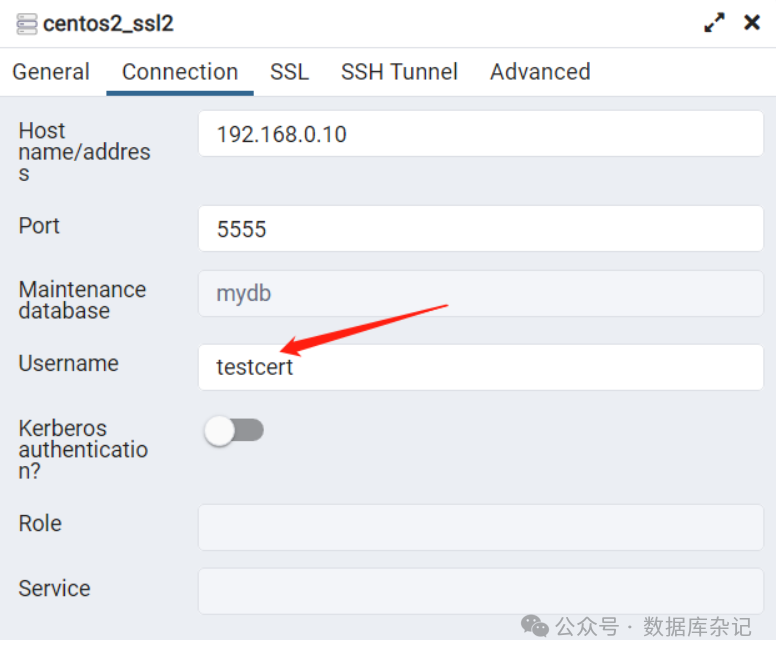
我们会发现,这里不需要填写密码信息。
然后看看SSL这一步:
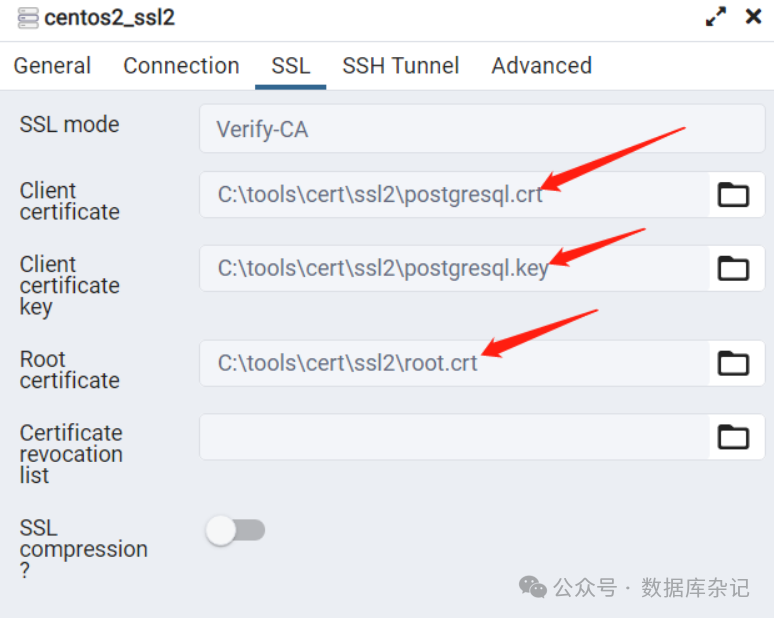
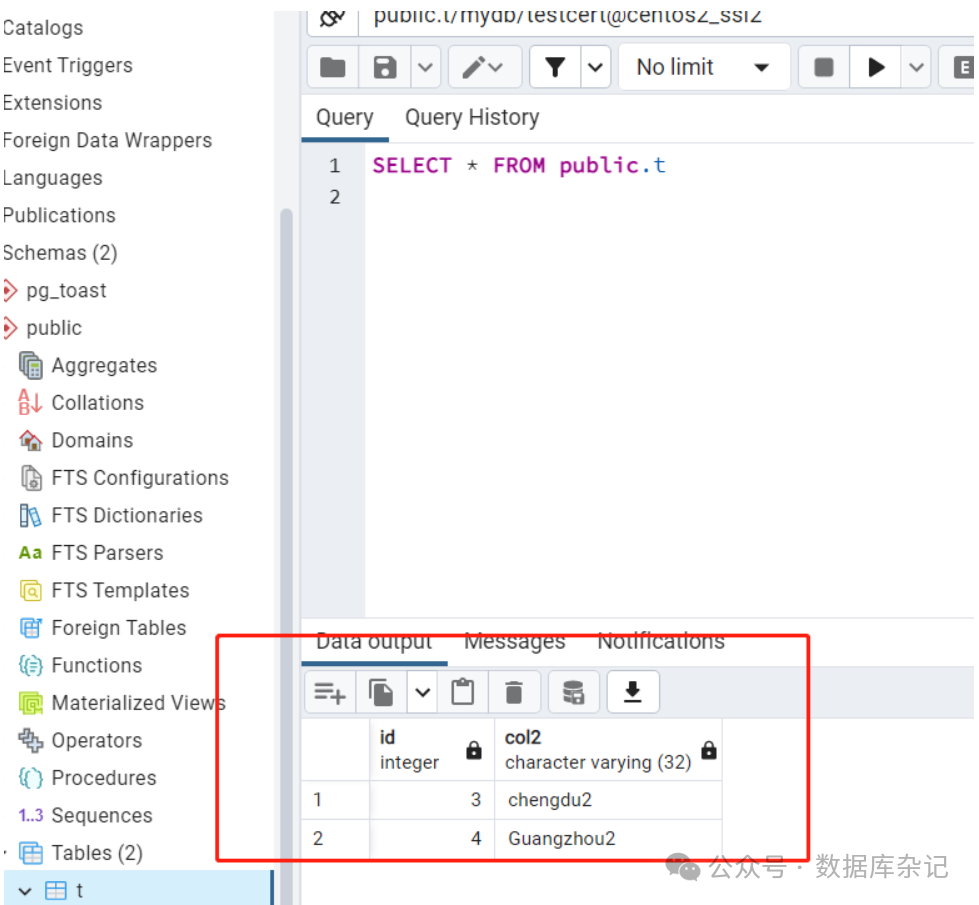
于是,很简单的就能连接到数据库。注意上边的root.crt是由server.crt复制而成。
3、DBEaver
同样是介绍 带证书的连接方式:
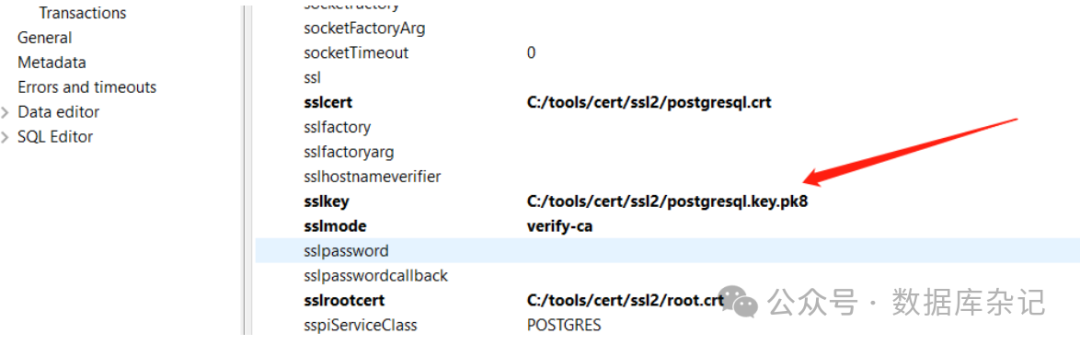
如果我们照抄pgAdmin,可能会失败,如:
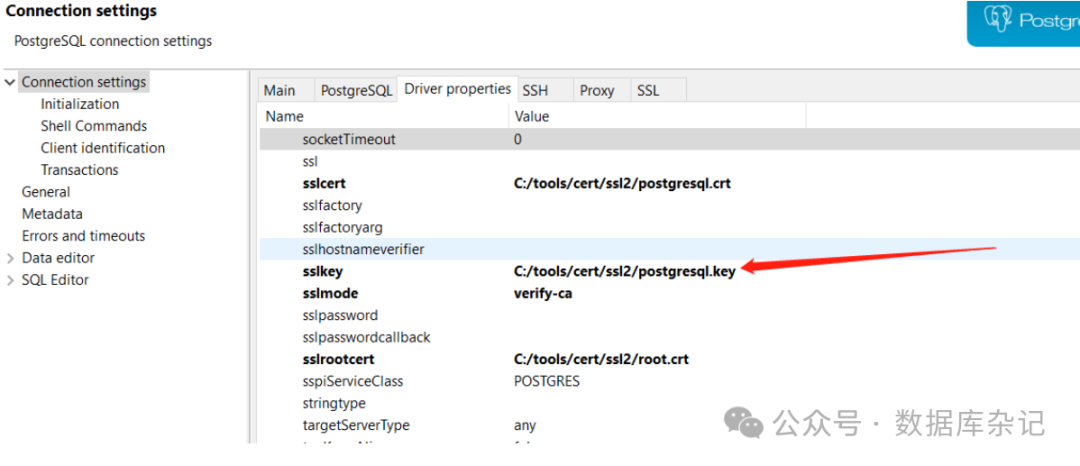
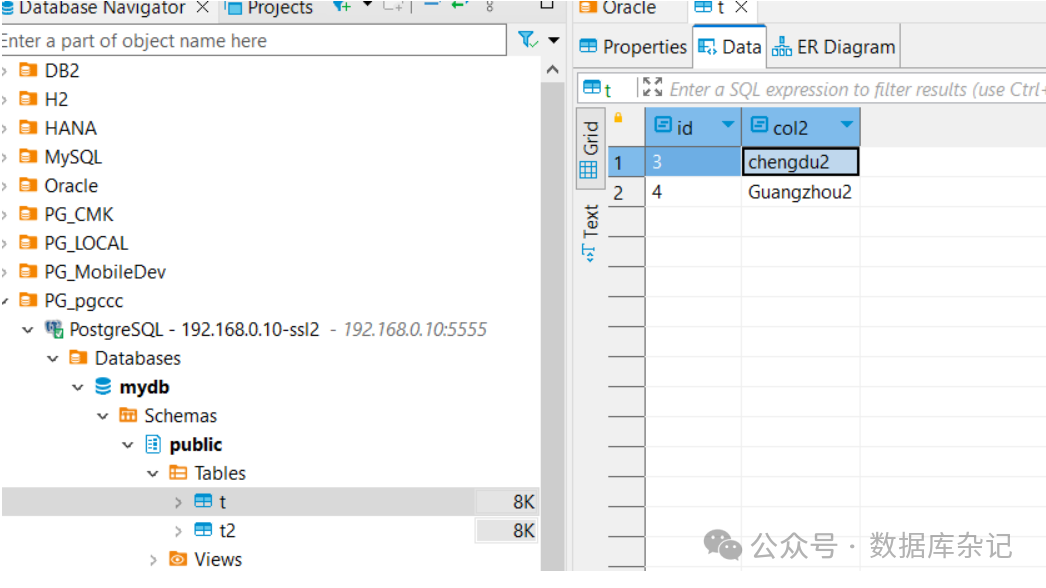
将上边的路径改一下,改成postgresql.key.pk8,连接就成功了。
4、标准接口客户端
这里主要就是指Java的JDBC连接。有什么值得注意的地方吗?主要是双向证书的连接方式:
可以仿照DBEaver 里头的连接属性来搞。我们不妨试一下,代码也非常简洁:
package com.demo.db;

import java.sql.Connection;
import java.sql.DriverManager;
import java.sql.ResultSet;
import java.sql.SQLException;
import java.sql.Statement;
import java.util.Properties;

public class PostgreSQLSSL2Demo {
    public static void main(String[] args) {
        String url = "jdbc:postgresql://192.168.0.10:5555/mydb";
        Properties info = new Properties();
        info.put("user", "testcert");
        info.put("sslcert", "C:/tools/cert/ssl2/postgresql.crt");
        info.put("sslkey", "C:/tools/cert/ssl2/postgresql.key.pk8");
        info.put("sslmode", "verify-ca");
        info.put("sslrootcert", "C:/tools/cert/ssl2/root.crt");
        try (Connection conn = DriverManager.getConnection(url, info)) {
            try (Statement stmt = conn.createStatement(); ResultSet rset = stmt.executeQuery("select version()")) {
                if (rset.next()) {
                    System.out.println("res: " + rset.getString(1));
                }
            }
        } catch (SQLException ex) {
            ex.printStackTrace();
        }
    }
}
上边的代码也就是连接成功以后,简单的输出一下version()
res: PostgreSQL 14.8 on x86_64-pc-linux-gnu, compiled by gcc (GCC) 4.8.5 20150623 (Red Hat 4.8.5-44), 64-bit
单向SSL可能的连接串的设置,大概如下:
tsslfactony=org.postgresg..ssl.NonValidatingFactory
jdbc.postgresal://hostname:port/databasename?ssl=true&sslfactony=org.postgresg.ssl.NonValidatingFactory
jdbc.postgresal://hostname:port/databasename?ssl=true&sslmode=requre
小结一下:
要对pem/crt格式的客户端证书的私钥postgresql.key进行转换,转成pkcs8格式的postgresql.key.pk8,这样java程序中的"sslkey"参数能认定这种格式的文件
properties中指用户名,用的是属性"user",而不是"username",否则你指错了,它会取当前的操作系统 的user当username。
总体来说,把DBEaver中的相应参数拿过来用,还是挺方便的。
我是【Sean】, 欢迎大家长按关注并加星公众号:数据库杂记。为你提供及时更新。发送消息1或2或3或4, 分别都有好资源相送。

往期导读和参考:
1. PostgreSQL中配置单双向SSL连接详解
2. 提升PSQL使用技巧:PostgreSQL中PSQL使用技巧汇集(1)
3. 提升PSQL使用技巧:PostgreSQL中PSQL使用技巧汇集(2)
4. PostgreSQL SQL的基础使用及技巧
5. PostgreSQL开发技术基础:过程与函数
