
1、前言介绍
我记得以前丑国有一个电视剧,就叫“时间线”什么的,里边的内容大致是一个女警经常会穿越到未来某一时刻,在那里会碰到他的丈夫,但是未来和现在两个时间线很少能交汇到一起。一旦发生重叠,将会出现各种莫名其妙的“事件”。
“时间线”(Timeline)是PG里一个比较有特色的概念,在备份恢复方面的文档里面时有出现。但针对这个概念的详细解释却不多,也让人不太好理解。
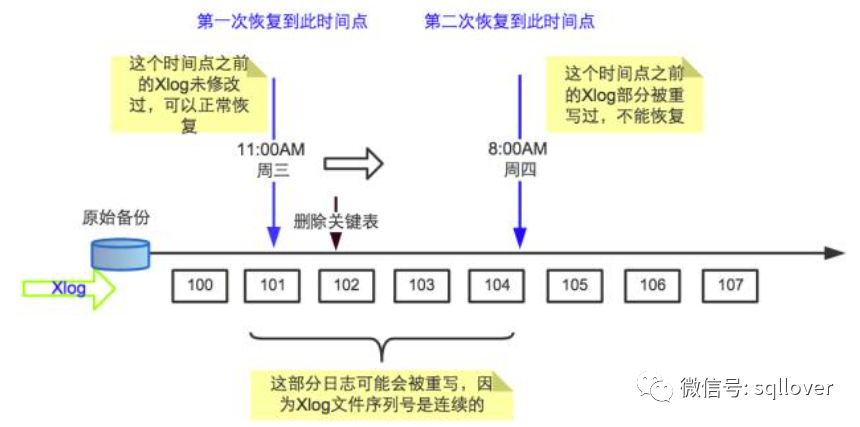
这样,每当归档文件或WAL文件经过replay,系统恢复以后,会创建一个新的时间线来区别新生成的WAL记录。而WAL文件名也是由时间线和日志序列号组成。其部分源码看起来是这样:
#define XLogFileName(fname, tli, log, seg)  \
    snprintf(fname, XLOG_DATA_FNAME_LEN + 1, "%08X%08X%08X", tli, log, seg
我们可以看看大致的history文件的内容:
[06:45:16-postgres@centos1:/var/lib/pgsql/14/data/pg_wal]$ ls
000000020000000000000019  00000002000000000000001B  00000002000000000000001D  archive_status
00000002000000000000001A  00000002000000000000001C  00000002.history
[06:45:16-postgres@centos1:/var/lib/pgsql/14/data/pg_wal]$ cat 00000002.history
1       0/9000000       no recovery target specified
[06:45:26-postgres@centos1:/var/lib/pgsql/14/data/pg_wal]$ ls /pgccc/archive/data
00000002000000000000001D  00000002.history
[06:45:44-postgres@centos1:/var/lib/pgsql/14/data/pg_wal]$  cat /pgccc/archive/data/00000002.history
1       0/1D007698      at restore point "pgccc"
这里,它会给你一个日志文件序列号以及一个恢复点。
2、实验验证
这里,我们想做一到两个基本的PITR,这样就会生成两个或以上的时间线,接着,看能不能恢复到旧的时间线上的某一个点。
2.1、源实例配置:
port = 5555
listen_addresses = '0.0.0.0'
log_filename = 'postgresql-%Y-%m-%d.log'
archive_mode = on
archive_command = 'cp %p /pgccc/archive/d5555/%f'
pg_hba.conf:
local   all             all                                     trust
host    all             all             127.0.0.1/32            scram-sha-256
host    all             all             samenet                 scram-sha-256
host    all             all             ::1/128                 trust
local   replication     all                                     trust
host    replication     all             127.0.0.1/32            trust
host    replication     all             samenet                 scram-sha-256
host    replication     all             ::1/128                 trust
目标机器:192.168.0.10,这里避免输入密码,可以提前配置好.pgpass密码文件~/.pgpass,内容如下:
localhost:*:postgres:postgres:password
192.168.0.6:*:*:postgres:password
chmod 0600 ~/.pgpass
2.2、后台运行增量备份
nohup pg_receivewal -h 192.168.0.6 -p 5555 -Upostgres -Dreceive &
[08:13:35-postgres@centos2:/var/lib/pgsql/14/backups/receive]$ ls -lrt
total 16388
-rw------- 1 postgres postgres       41 Mar 18 08:13 00000002.history
-rw------- 1 postgres postgres 16777216 Mar 18 08:13 00000002000000000000001C.partial
我们能看到它现在接收过来的都是timeline:00000002
2.3、做一个基础备份
[08:15:46-postgres@centos2:/var/lib/pgsql/14/backups]$ pg_basebackup -Fp -P -v -Xs -h 192.168.0.6  -U postgres -D bak
pg_basebackup: initiating base backup, waiting for checkpoint to complete
pg_basebackup: checkpoint completed
pg_basebackup: write-ahead log start point: 0/1D000028 on timeline 2
pg_basebackup: starting background WAL receiver
pg_basebackup: created temporary replication slot "pg_basebackup_3219"
45412/45412 kB (100%), 1/1 tablespace
pg_basebackup: write-ahead log end point: 0/1D000100
pg_basebackup: waiting for background process to finish streaming ...
pg_basebackup: syncing data to disk ...
pg_basebackup: renaming backup_manifest.tmp to backup_manifest
pg_basebackup: base backup completed
在这里别忘了,在备份目录,添加一个信号文件:recovery.signal,用于PITR恢复使用。为了方便实验,可以将这个目录bak复制多次,以备后用。
2.4、源库上做一些CUD操作
mydb=# insert into t values(1);
INSERT 0 1
mydb=# insert into t values(2), (3), (4), (5);
INSERT 0 4
mydb=# select pg_current_xact_id(), pg_current_wal_lsn(),pg_switch_wal(); checkpoint; select now();
 pg_current_xact_id | pg_current_wal_lsn | pg_switch_wal
--------------------+--------------------+---------------
               1165 | 0/1E0048C8         | 0/1E0048E0
(1 row)

CHECKPOINT
              now
-------------------------------
 2023-03-18 08:31:57.032515+08
(1 row)

mydb=# begin;
BEGIN
mydb=*# insert into t values(6);
INSERT 0 1
mydb=*# select pg_current_xact_id(), pg_current_wal_lsn(),pg_switch_wal(); checkpoint; select now();
 pg_current_xact_id | pg_current_wal_lsn | pg_switch_wal
--------------------+--------------------+---------------
               1166 | 0/1F000170         | 0/1F0002B0
(1 row)

CHECKPOINT
             now
------------------------------
 2023-03-18 08:32:18.35316+08
(1 row)

mydb=*# insert into t values(7);
INSERT 0 1
mydb=*# select pg_current_xact_id(), pg_current_wal_lsn(),pg_switch_wal(); checkpoint; select now();
 pg_current_xact_id | pg_current_wal_lsn | pg_switch_wal
--------------------+--------------------+---------------
               1166 | 0/20000260         | 0/20000278
(1 row)

CHECKPOINT
             now
------------------------------
 2023-03-18 08:32:18.35316+08
(1 row)

mydb=*# commit;
COMMIT
mydb=# begin;
BEGIN
mydb=*# select pg_current_xact_id(), pg_current_wal_lsn(),pg_switch_wal(); checkpoint; select now();
 pg_current_xact_id | pg_current_wal_lsn | pg_switch_wal
--------------------+--------------------+---------------
               1167 | 0/21000138         | 0/21000150
(1 row)

CHECKPOINT
              now
-------------------------------
 2023-03-18 08:32:54.397348+08
我们记录了三批操作,对应的xid分别为1165, 1166, 1167。然后我们看看PITR恢复的效果。
2.5、第一次恢复
我想恢复一个比较晚一点儿的事务点,比如1166,那样恢复完以后,时间线要变更。
修改bak备库上的配置文件:postgresql.conf,添加内容:
表示要恢复到1165这个事务的恢复点,同时要指定恢复命令,拷贝对应的wal log。
recovery_target_xid = '1165'
restore_command='cp /var/lib/pgsql/14/backups/receive/%f %p'
启动备库并验证t表的数据,符合预期:
[08:42:44-postgres@centos2:/var/lib/pgsql/14/backups]$ pg_ctl start -D bak/
waiting for server to start....2023-03-18 08:42:50.961 CST [3308] LOG:  redirecting log output to logging collector process
2023-03-18 08:42:50.961 CST [3308] HINT:  Future log output will appear in directory "log".
 done
server started
[08:42:51-postgres@centos2:/var/lib/pgsql/14/backups]$ psql
psql (14.5)
Type "help" for help.

postgres=# \c mydb
You are now connected to database "mydb" as user "postgres".
mydb=# select * from t;
 id
----
  1
  2
  3
  4
  5
(5 rows)
再来看看相关WAL日志的时间线信息:一直沿着时间线00000002上走,因为现在还没有promote,所以它还是只读的。
[08:45:09-postgres@centos2:/var/lib/pgsql/14/backups/bak/pg_wal]$ cat 00000002.history
1       0/9000000       no recovery target specified
[08:45:13-postgres@centos2:/var/lib/pgsql/14/backups/bak/pg_wal]$ fg
psql    (wd: ~/14/backups)

mydb=# insert into t values(11);
ERROR:  cannot execute INSERT in a read-only transaction
执行一次promote,改变时间线:
mydb=# select pg_promote();
 pg_promote
------------
 t
(1 row)
观察一下时间线:
[08:50:53-postgres@centos2:/var/lib/pgsql/14/backups/bak/pg_wal]$ ls
00000002000000000000001D  00000002000000000000001F  00000003000000000000001F  archive_status
00000002000000000000001E  00000002.history          00000003.history
发现时间线真的变了。变成00000003了。后边的操作基本上就与上一个时间
线00000002无关了。再操作一次,又有新的事务id了。
mydb=# insert into t values(11);
INSERT 0 1
mydb=# select pg_current_xact_id(), pg_current_wal_lsn(),pg_switch_wal(); checkpoint; select now();
 pg_current_xact_id | pg_current_wal_lsn | pg_switch_wal
--------------------+--------------------+---------------
               1167 | 0/1F000328         | 0/1F000340
(1 row)

CHECKPOINT
              now
-------------------------------
 2023-03-18 08:53:28.744336+08
(1 row)
事务id: 1167居然被覆盖了。
设想,我们如果突然想回到的不是1165,我们想回到事务id对应为1166或
1167的时间线00000002上边,是否可能?
2.6 尝试恢复到老的时间线
修改bak目标库的配置文件,设置新的恢复点:
recovery_target_xid = '1166'
recovery_target_timeline = '00000002'
然后因为前边的promote, signal文件会自动删除,需要重建一个recovery.
signal。
启动实例,失败:
2023-03-18 08:58:32.601 CST [3541] LOG:  restored log file "00000002.history" from archive
2023-03-18 08:58:32.601 CST [3541] LOG:  starting point-in-time recovery to XID 1166
2023-03-18 08:58:32.608 CST [3541] LOG:  restored log file "00000002.history" from archive
2023-03-18 08:58:32.725 CST [3541] LOG:  restored log file "000000020000000000000021" from archive
2023-03-18 08:58:32.752 CST [3541] LOG:  invalid resource manager ID in primary checkpoint record
2023-03-18 08:58:32.752 CST [3541] PANIC:  could not locate a valid checkpoint record
2023-03-18 08:58:35.235 CST [3539] LOG:  startup process (PID 3541) was terminated by signal 6: Aborted
2023-03-18 08:58:35.235 CST [3539] LOG:  aborting startup due to startup process failure
2023-03-18 08:58:35.245 CST [3539] LOG:  database system is shut down
因为它已经从基础备份恢复了一次,时间线也发生改变,并且覆盖了两个时间
线交叉的区域。
要想恢复到timeline: 00000002的某一个恢复点,只能用备份出来的bak的
另一个备份目录bak1进行实验,经过试验,那种方法是可行的。用它可以恢
复到前边指定的任意一个恢复点。
END
总结来说,如果想变更恢复点,如果是一直往后的某个恢复点,只要不promote,是一直可以做下去的。但是如果要进行恢复变更,恢复到更早一些的时间点,或者你提前promote了,再想恢复,只能寻找基础备份的另一个副本,在那个基础上指定recovery_target_timeline和其它的恢复点,如recovery_target_xid,这样是可以做得到的。
这意味着,增长备份可以共享一份。基础备份最好每次弄一个副本来进行验证。否则一旦验证完了,再想重复利用,就容易出现上边的问题了。