




tag: PostgreSQL
1.前言
默认安装,PG是不支持中文拼音和笔画排序的。
1postgres=# select * from pg_settings where name ~ 'collate';
2    name    | setting | unit |    category    |            short_desc             | extra_desc | context  | vartype |  source  | min_val
3 | max_val | enumvals | boot_val | reset_val | sourcefile | sourceline | pending_restart
4------------+---------+------+----------------+-----------------------------------+------------+----------+---------+----------+--------
5-+---------+----------+----------+-----------+------------+------------+-----------------
6 lc_collate | C       |      | Preset Options | Shows the collation order locale. |            | internal | string  | override |
7 |         |          | C        | C         |            |            | f
8(1 row)
看看示例:
 1postgres=# create table t(id int, col2 varchar(32));
 2CREATE TABLE
 3postgres=# insert into t values(1, '东城'), (2, '西城'), (3, '石景山'), (4, '海淀'), (5, '朝阳');
 4INSERT 0 5
 5postgres=# select * from t order by col2;
 6 id |  col2
 7----+--------
 8  1 | 东城
 9  5 | 朝阳
10  4 | 海淀
11  3 | 石景山
12  2 | 西城
13(5 rows)
这是collate=C的排序结果。
2.实现与实践
支持中文排序,需要配置依赖 --with-icu.这就需要提交安装依赖包:libicu-devel libicu
1)、编译安装:
1wget https://ftp.postgresql.org/pub/source/v15.2/postgresql-15.2.tar.gz
2
3sudo su -c "yum install libicu-devel libicu libxml2-devel libxslt-devel"
4
5./configure --prefix=/usr/pgsql-15-icu --with-icu --with-libxml --with-libxslt --with-openssl
6
7make -j 4 world-bin
8sudo su -c "make install-world-bin"
2)、环境变量配置
env15.sh
1export PGROOT=/usr/pgsql-15-icu
2export PGHOME=/var/lib/pgsql/15
3export PGPORT=5432
4export PGDATA=$PGHOME/data
5export PATH=$PGROOT/bin:$PATH
6export LD_LIBRARY_PATH=$PGROOT/lib:$LD_LIBRARY_PATH
1source env15.sh
3)、初始化db如下:
1initdb -D $PGDATA -U postgres -E UTF8 --lc-collate=C --lc-ctype=en_US.UTF8 --locale-provider=icu --icu-locale=C
4)、启动db进行验证
 1postgres=# select collname,pg_encoding_to_char(collencoding),colliculocale from
 2pg_collation  where collname ~ 'zh';
 3     collname     | pg_encoding_to_char | colliculocale
 4------------------+---------------------+---------------
 5 zh_CN            | EUC_CN              |
 6 zh_CN.gb2312     | EUC_CN              |
 7 zh_CN.utf8       | UTF8                |
 8 zh_HK.utf8       | UTF8                |
 9 zh_SG            | EUC_CN              |
10 zh_SG.gb2312     | EUC_CN              |
11 zh_SG.utf8       | UTF8                |
12 zh_TW.euctw      | EUC_TW              |
13 zh_TW.utf8       | UTF8                |
14 zh_CN            | UTF8                |
15 zh_HK            | UTF8                |
16 zh_SG            | UTF8                |
17 zh_TW            | EUC_TW              |
18 zh_TW            | UTF8                |
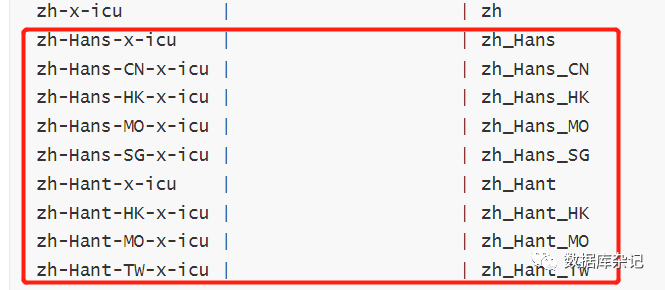
19 zh-x-icu         |                     | zh
20 zh-Hans-x-icu    |                     | zh_Hans
21 zh-Hans-CN-x-icu |                     | zh_Hans_CN
22 zh-Hans-HK-x-icu |                     | zh_Hans_HK
23 zh-Hans-MO-x-icu |                     | zh_Hans_MO
24 zh-Hans-SG-x-icu |                     | zh_Hans_SG
25 zh-Hant-x-icu    |                     | zh_Hant
26 zh-Hant-HK-x-icu |                     | zh_Hant_HK
27 zh-Hant-MO-x-icu |                     | zh_Hant_MO
28 zh-Hant-TW-x-icu |                     | zh_Hant_TW
29(24 rows)
30
31postgres=# \l
32                                               List of databases
33   Name    |  Owner   | Encoding | Collate |   Ctype    | ICU Locale | Locale Provider |   Access privileges
34-----------+----------+----------+---------+------------+------------+-----------------+-----------------------
35 postgres  | postgres | UTF8     | C       | en_US.UTF8 | C          | icu             |
36 template0 | postgres | UTF8     | C       | en_US.UTF8 | C          | icu             | =c/postgres          +
37           |          |          |         |            |            |                 | postgres=CTc/postgres
38 template1 | postgres | UTF8     | C       | en_US.UTF8 | C          | icu             | =c/postgres          +
39           |          |          |         |            |            |                 | postgres=CTc/postgres
40(3 rows)
建表及数据:
 1postgres=# create table t(id int, col2 varchar(32));
 2CREATE TABLE
 3postgres=# insert into t values(1, '东城'), (2, '西城'), (3, '石景山'), (4, '海淀'), (5, '朝阳');
 4INSERT 0 5
 5postgres=# select * from t order by col2;
 6 id |  col2
 7----+--------
 8  1 | 东城
 9  5 | 朝阳
10  4 | 海淀
11  3 | 石景山
12  2 | 西城
13(5 rows)
重新排序:
按拼音:(collate "zh-x-icu")
1postgres=# select * from t order by col2 collate "zh-x-icu";
2 id |  col2
3----+--------
4  5 | 朝阳
5  1 | 东城
6  4 | 海淀
7  3 | 石景山
8  2 | 西城
9(5 rows)
按拼音:collate "zh-Hans-x-icu"
1postgres=# select * from t order by col2 collate "zh-Hans-x-icu";
2 id |  col2
3----+--------
4  5 | 朝阳
5  1 | 东城
6  4 | 海淀
7  3 | 石景山
8  2 | 西城
9(5 rows)
按笔画:collate "zh-Hant-x-icu";
1postgres=# select * from t order by col2 collate "zh-Hant-x-icu";
2 id |  col2
3----+--------
4  1 | 东城
5  3 | 石景山
6  2 | 西城
7  4 | 海淀
8  5 | 朝阳
9(5 rows)
提示:
zh, 按拼音排序
zh-Hant, 繁体, 按存储文字的笔画数排序
zh-Hans, 简体, 按拼音排序
注意上边这一块结果就好:
参考:
[1] https://github.com/digoal/blog/
[2] https://www.postgresql.org/docs/current/collation.html:
https://www.postgresql.org/docs/current/collation.html
文章转载自数据库杂记,如果涉嫌侵权,请发送邮件至:contact@modb.pro进行举报,并提供相关证据,一经查实,墨天轮将立刻删除相关内容。
