



本文将介绍YashanDB数据库的实例启停方式。数据库安装过程中将实例自动切换成OPEN阶段,并创建名为yashandb的数据库。
执行如下SQL命令查看当前实例状态及数据库名称:
SELECT status FROM V$INSTANCE;

STATUS
-----------------
OPEN

SELECT database_name FROM V$DATABASE;

DATABASE_NAME
----------------------------------------------------------------
yashandb
执行如下命令关闭YashanDB服务:
$ yasboot cluster stop -c yashandb
 type | uuid             | name             | hostid | index    | status  | return_code | progress | cost
----------------------------------------------------------------------------------------------------------
 task | 3b62bda48bad7fd1 | StopYasdbCluster | -      | yashandb | SUCCESS | 0           | 100      | 1
------+------------------+------------------+--------+----------+---------+-------------+----------+------
task completed, status: SUCCESS
执行如下命令开启YashanDB服务,同时会将实例切换至OPEN阶段:
$ yasboot cluster start -c yashandb
 type | uuid             | name             | hostid | index    | status  | return_code | progress | cost
----------------------------------------------------------------------------------------------------------
 task | 3b62bda48bad7fd1 | StopYasdbCluster | -      | yashandb | SUCCESS | 0           | 100      | 1
------+------------------+------------------+--------+----------+---------+-------------+----------+------
task completed, status: SUCCESS
执行如下命令重启YashanDB数据库,并将实例启动至OPEN阶段:
$ yasboot cluster restart -c yashandb
 type | uuid             | name                | hostid | index    | status  | return_code | progress | cost
-------------------------------------------------------------------------------------------------------------
 task | 78d6449df62594b5 | ReStartYasdbCluster | -      | yashandb | SUCCESS | 0           | 100      | 3
------+------------------+---------------------+--------+----------+---------+-------------+----------+------
task completed, status: SUCCESS
执行如下命令重启YashanDB数据库,并将实例启动至MOUNT阶段:
$ yasboot cluster restart -c yashandb -m mount
 type | uuid             | name                | hostid | index    | status  | return_code | progress | cost
-------------------------------------------------------------------------------------------------------------
 task | 78d6449df62594b5 | ReStartYasdbCluster | -      | yashandb | SUCCESS | 0           | 100      | 3
------+------------------+---------------------+--------+----------+---------+-------------+----------+------
task completed, status: SUCCESS
Note:
如需进行正常的数据库操作,请将实例切换至OPEN阶段。
参考:
当服务器由于各种原因发生重启时,需执行如下命令手动启动进程:
$ yasboot process yasom start -c yashandb
$ yasboot process yasagent start -c yashandb
## 待yasom和yasagent进程启动后,才能启动数据库
$ yasboot cluster start -c yashandb
#1 查看数据库状态
有时候我们拿到一台服务器不知道数据库是否启动运行,我们可以通过以下命令进行查看:
[yashan@localhost ~]$ ps -ef | grep yasdb

上面表示数据库没有运行,执行下面语句启动数据库:
[yashan@localhost ~]$ yasdb open &

#2 查看数据库实例
在安装了YashanDB数据库后,可以通过下命令查看集群名称:
[yashan@localhost ~]$ ps -ef | grep yasdb

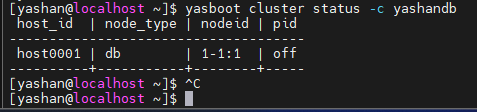
再通过下面命令查看运行状态:
[yashan@localhost ~]$ yasboot cluster status -c yashandb
#3 启动数据库实例
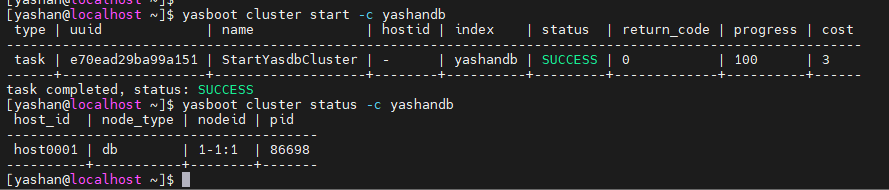
通过下面命令启动实例:
[yashan@localhost ~]$ yasboot cluster start -c yashandb
#4 关闭数据库实例
[yashan@localhost ~]$ yasboot cluster stop -c yashandb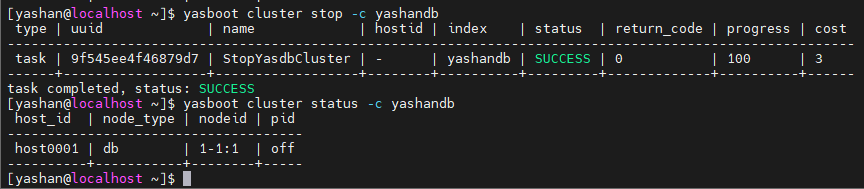
#5 重启数据库实例
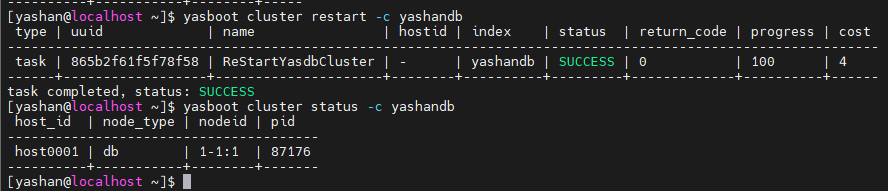
[yashan@localhost ~]$ yasboot cluster restart -c yashandb
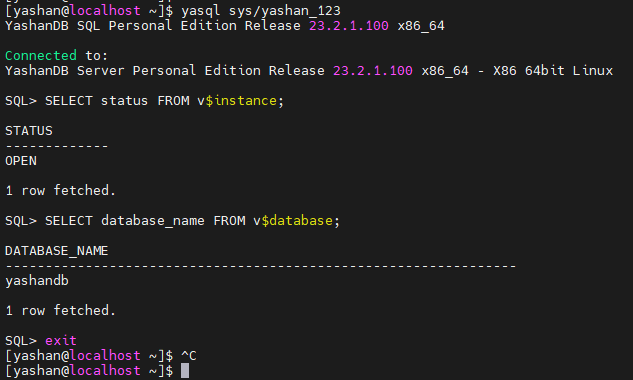
#6 查看数据库实例
[yashan@localhost ~]$ yasql sys/yashan_123
YashanDB SQL Personal Edition Release 23.2.1.100 x86_64

Connected to:
YashanDB Server Personal Edition Release 23.2.1.100 x86_64 - X86 64bit Linux

SQL> SELECT status FROM v$instance;

STATUS
-------------
OPEN

1 row fetched.

SQL> SELECT database_name FROM v$database;

DATABASE_NAME
----------------------------------------------------------------
yashandb

1 row fetched.

SQL> exit
[yashan@localhost ~]$
#7 关闭数据库实例
[yashan@localhost ~]$ yasql sys/yashan_123
YashanDB SQL Personal Edition Release 23.2.1.100 x86_64

Connected to:
YashanDB Server Personal Edition Release 23.2.1.100 x86_64 - X86 64bit Linux

SQL> shutdown immediate;

Succeed.

SQL> exit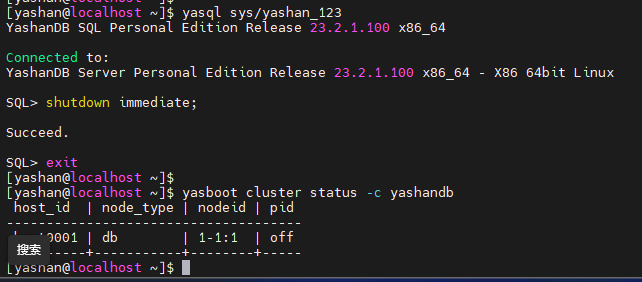
#8 环境变量
本章将展示数据库安装后的环境变量信息,具体以安装生成值为准。
如下为使用永久生效方法配置的环境变量信息:
export YASDB_HOME=/data/yashan/yasdb_home/yashandb/23.2.1.100
export PATH=${YASDB_HOME}/bin:$PATH
export LD_LIBRARY_PATH=${YASDB_HOME}/lib:$LD_LIBRARY_PATH
if command -v rlwrap >/dev/null 2>&1; then
  alias yasql="rlwrap yasql"
fi

export YASDB_DATA=/data/yashan/yasdb_data/db-1-1
YASDB_HOME
YASDB_HOME环境变量所指向路径为YashanDB的HOME目录,包含产品相关程序文件。
$YASDB_HOME/bin
$YASDB_HOME/bin目录包含YashanDB配套工具,将其加入PATH系统路径使其可以直接运行。
LD_LIBRARY_PATH
LD_LIBRARY_PATH环境变量所指向路径为YashanDB的LIB目录,包含产品运行所需库文件。
YASDB_DATA
YASDB_DATA环境变量所指向路径为YashanDB的DATA目录,包含产品相关数据文件。
