



大家好, 今天聊聊 Flink CDC 对于 PG 16版本 standby logical decoding 的支持问题.
去年年底由于公司要大规模采用Postgres 数据库最为去O的主要方案,之前OLTP的核心数据库ORACLE 都是通过物化视图日志MV log来采集数据增量变化同步到大数据平台的。
大数据部门的同学想测试如果核心交易数据库是PG的话,该如何同步增量数据到大数据平台。 PG CDC 增量同步方案大数据同学采用Flink CDC 的接入方式。
DBA 考虑到 大数据平台上千张表同时抽取数据的问题,果断选择PG 16提供给大数据同学测试, 因为从PG16版本开始支持 standby logical decoding.
关于PG 16 支持 standby logical decoding 的详细信息,可以参考: https://www.modb.pro/db/1734486777904832512
测试环境给大数据同学搭建好了之后, 大数据同学反馈CDC 同步数据报错:(发生在半年前,2024年的2月份)
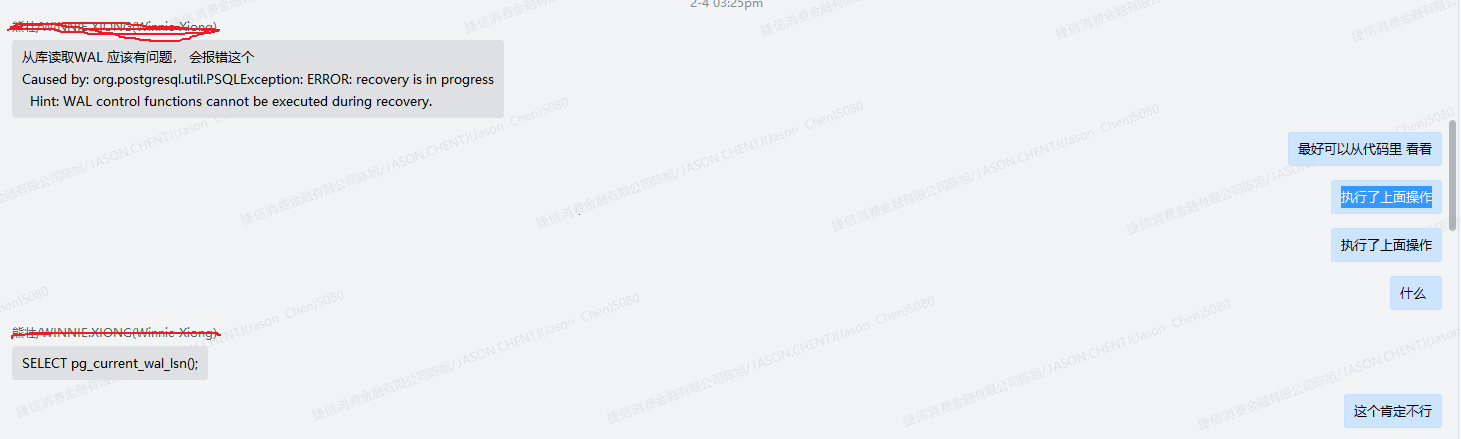
我们可以看到从库执行:
postgres@postgres:5001 >SELECT pg_current_wal_lsn();
ERROR:  recovery is in progress
HINT:  WAL control functions cannot be executed during recovery.
最终也从大数据开发同学那里得到了确认:
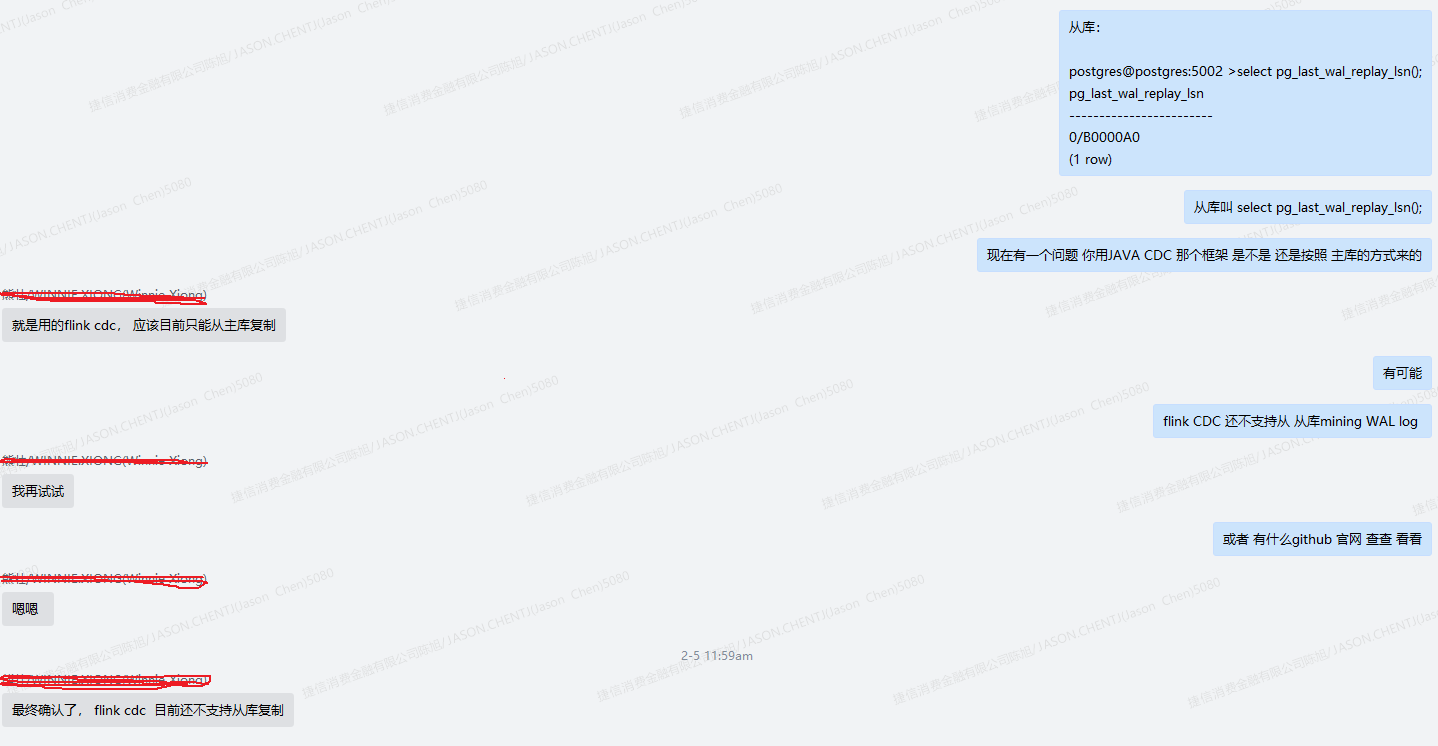
过了一段时间,几个月后,开发同学告诉我已经新版本的flink CDC 已经支持了standby 上 logical decoding了:
在github 上说已经merge了 Debezium 的 1.9.8 的代码
关于Debezium和 FlinkCDC 的关系:
Debezium 是一个分布式平台,用于捕获和存储数据库变化,而 FlinkCDC 是一个基于 Debezium 的流处理组件,用于捕获数据库变化并将其转换为 Flink 可处理的流数据。
https://github.com/ververica/flink-cdc-connectors/pull/3034
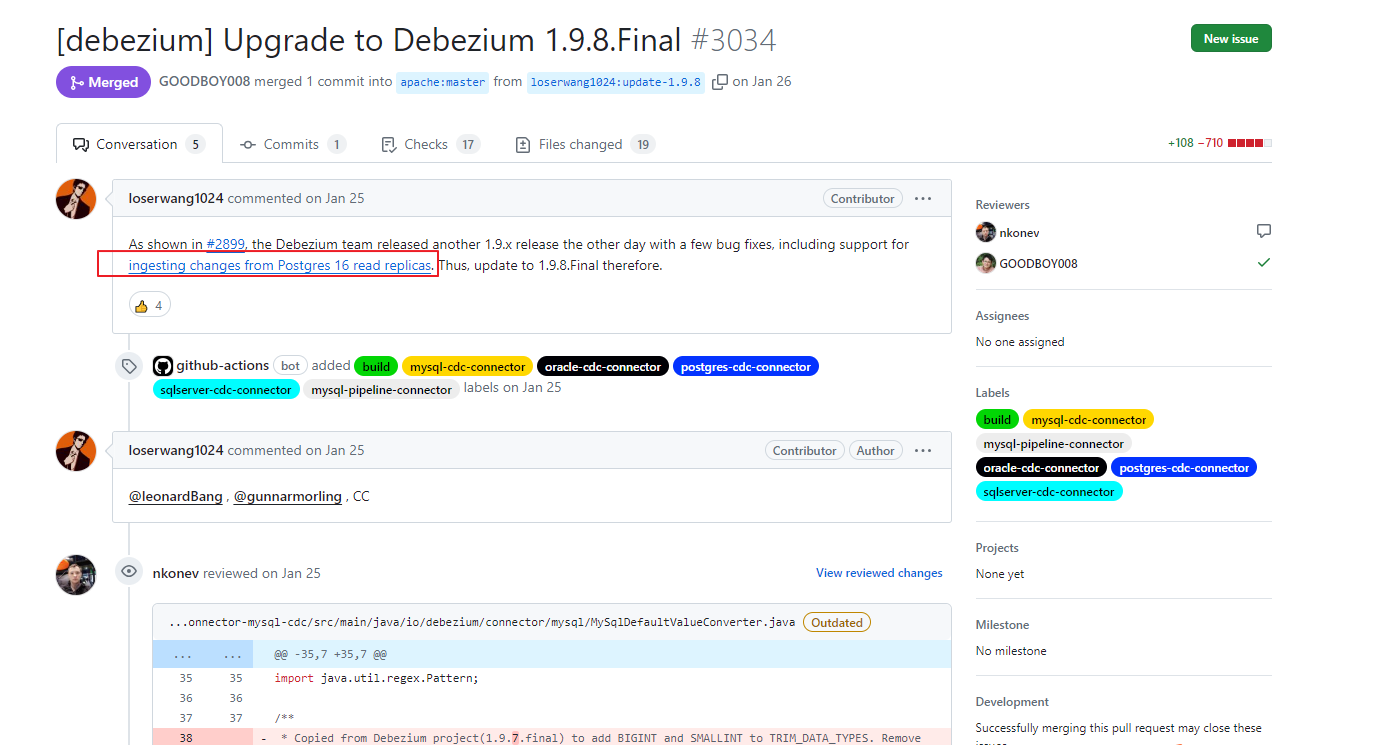
我们从的层面上也看到了,多了主从角色的判断:
select (case pg_is_in_recovery() when ‘t’ then pg_last_wal_receive_lsn() else pg_current_wal_lsn() end) AS pg_current_wal_lsn

我们来看一下flink CDC的底层依赖 Debezium 关于这个缺陷的修复PR:
https://issues.redhat.com/browse/DBZ-7181
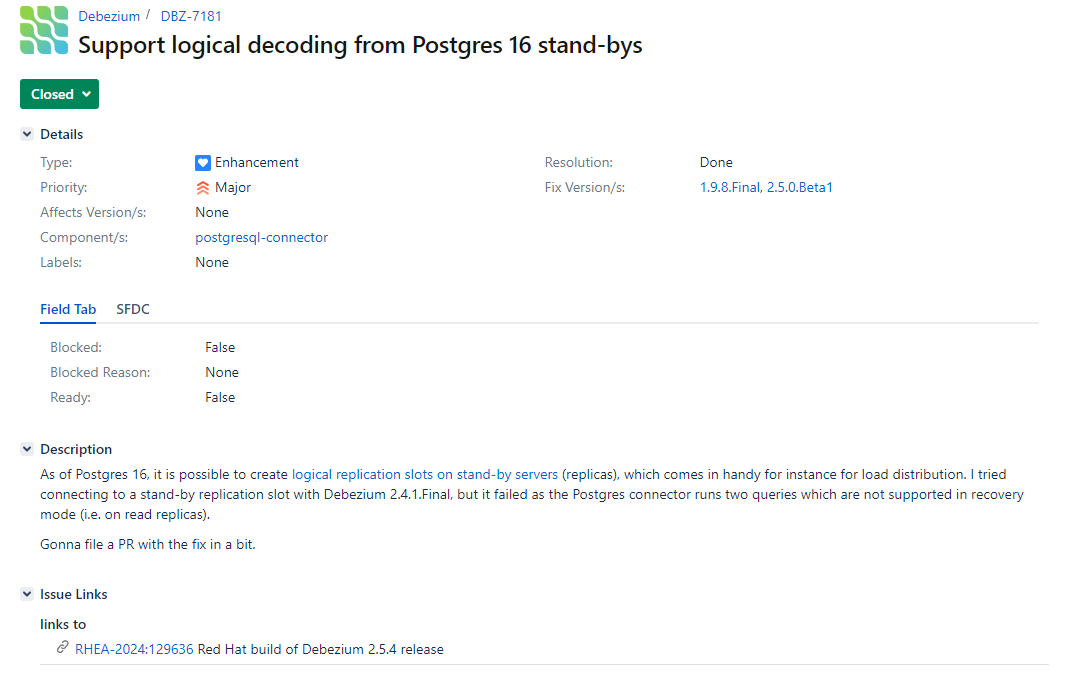
在得到了官方确认之后,我们来测试一下 flink CDC 3.1.0 + PG 16.2的CDC 数据增量捕获:
第一步,数据源PG端需要执行命令:
(1)更改wal的日志方式
wal_level = logical
(2)创建账号
postgres=# create role app_bigdata password '******'  login;
CREATE ROLE
postgres=# alter role app_bigdata replication;
ALTER ROLE
postgres=# grant connect on database cappcore to app_bigdata;
grant usage on schema capp_lm to app_bigdata;
(3)需要的读写权限,只读不行
grant select,insert,update,delete on all tables in schema capp_lm to app_bigdata;
(4)发布表
-- 设置发布为true
update pg_publication set puballtables=true where pubname is not null;
-- 把所有表进行发布
CREATE PUBLICATION dbz_publication FOR ALL TABLES;
第二步编写测试代码
可以从官网获得测试代码: https://nightlies.apache.org/flink/flink-cdc-docs-release-3.1/zh/docs/connectors/flink-sources/postgres-cdc/
在项目的maven 文件中添加JAR包
<dependency>
   <groupId>org.apache.flink</groupId>
   <artifactId>flink-connector-postgres-cdc</artifactId>
   <version>3.1.1</version>
</dependency>
另外还需要添加基础依赖包: flink-streaming-java,flink-java,org.apache.flink 均为1.18.0版本
<dependency>
    <groupId>org.apache.flink</groupId>
    <artifactId>flink-streaming-java</artifactId>
    <version>1.18.0</version>
   <scope>compile</scope>
</dependency>
<!-- https://mvnrepository.com/artifact/org.apache.flink/flink-java -->
<dependency>
    <groupId>org.apache.flink</groupId>
    <artifactId>flink-java</artifactId>
    <version>1.18.0</version>
    <scope>compile</scope>
</dependency>
<!-- https://mvnrepository.com/artifact/org.apache.flink/flink-clients -->
<dependency>
    <groupId>org.apache.flink</groupId>
    <artifactId>flink-clients</artifactId>
    <version>1.18.0</version>
    <scope>compile</scope>
</dependency>
我们粘贴官网实例代码,连接到standby database上进行wal logical decoding
package com.homecredit.demo.flink;


import org.apache.flink.streaming.api.environment.StreamExecutionEnvironment;
import org.apache.flink.streaming.api.functions.source.SourceFunction;
import org.apache.flink.cdc.debezium.JsonDebeziumDeserializationSchema;
import org.apache.flink.cdc.connectors.postgres.PostgreSQLSource;


public class PostgreSQLSourceExample {
    public static void main(String[] args) throws Exception {
        SourceFunction<String> sourceFunction = PostgreSQLSource.<String>builder()
                .hostname("xx.xx.xxx.xx")
                .port(5433)
                .database("db_plumc") // monitor postgres database
                .schemaList("app_plumc")  // monitor inventory schema
                .tableList("app_plumc.products") // monitor products table
                .username("app_eds_cdc")
                .password("app_eds_cdc")
                .decodingPluginName("pgoutput")
                .deserializer(new JsonDebeziumDeserializationSchema())
                .slotName("standbyslot")// converts SourceRecord to JSON String
                .build();


        StreamExecutionEnvironment env = StreamExecutionEnvironment.getExecutionEnvironment();


        env
                .addSource(sourceFunction)
                .print().setParallelism(1); // use parallelism 1 for sink to keep message ordering


        env.execute();
    }
}
这里我们decodingPluginName 选择的是 pgoutput, flinkCDC 支持的 plugins 有
The name of the Postgres logical decoding plug-in installed on the server. Supported values are decoderbufs, wal2json, wal2json_rds, wal2json_streaming, wal2json_rds_streaming and pgoutput.
我们来测试运行一下程序:
我们看到程序已经获得了合法的复制槽,最后定位到的LSN的位置和XMIN的值
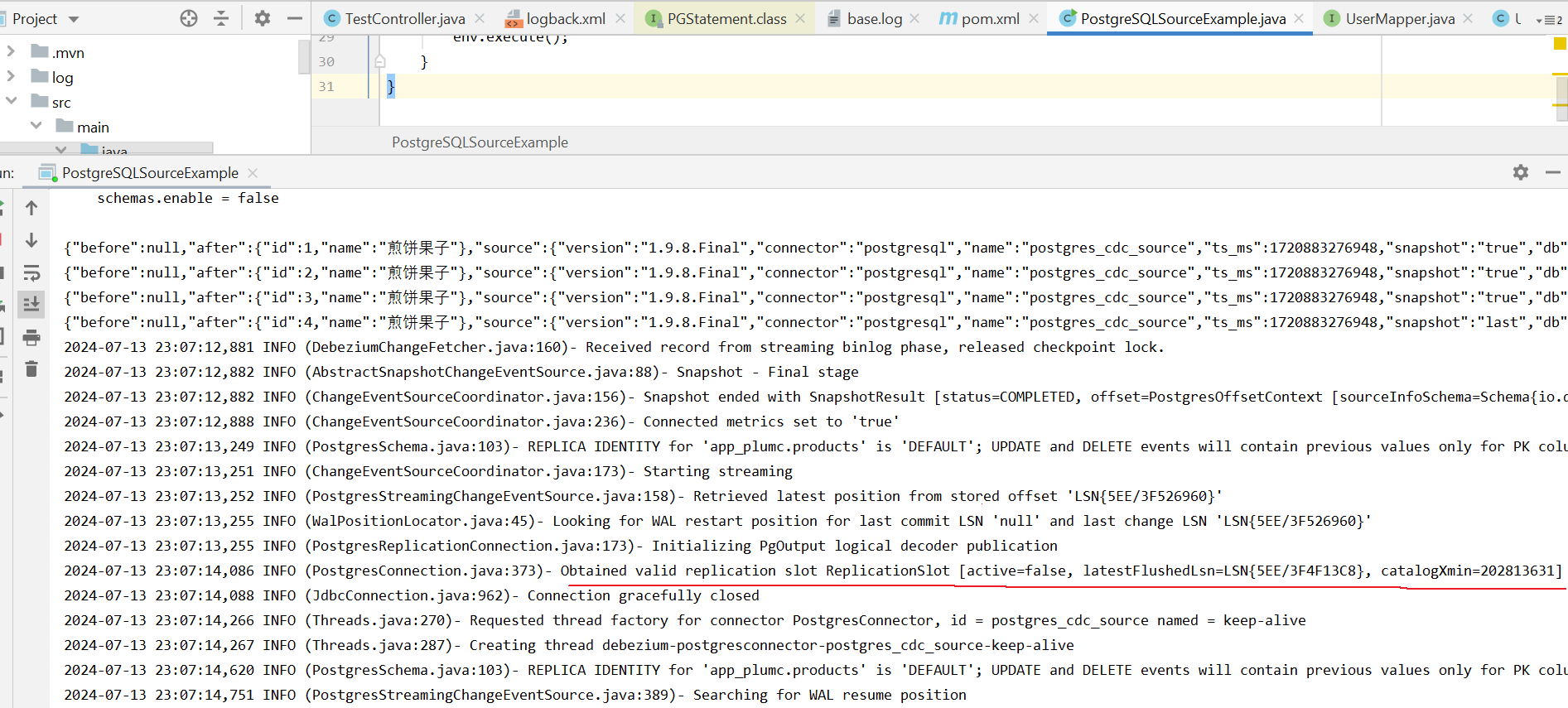
我们登陆standby 数据库,观察一下逻辑复制槽:
我们可以看到 restart_lsn和 confirmed_flush_lsn 一直再向前移动
confirmed_flush_lsn:表示逻辑复制槽已经同步到位置
restart_lsn: 表示logical decoding 需要保留最老的WAL位置,如果你设置了参数 max_slot_wal_keep_size 为复制槽保留的WAL LOG保留的大小,restart_lsn会保持这段日志大小的位置
postgres=# select slot_name,plugin,slot_type,active,active_pid,catalog_xmin,restart_lsn,confirmed_flush_lsn from pg_replication_slots where active = 't';
  slot_name  |  plugin  | slot_type | active | active_pid | catalog_xmin | restart_lsn  | confirmed
_flush_lsn
-------------+----------+-----------+--------+------------+--------------+--------------+----------
-----------
standbyslot | pgoutput | logical   | t      |      99938 |    202813803 | 5EE/3F526B10 | 5EE/3F526B10
(1 row)

postgres=# select slot_name,plugin,slot_type,active,active_pid,catalog_xmin,restart_lsn,confirmed_flush_lsn from pg_replication_slots where active = 't';
  slot_name  |  plugin  | slot_type | active | active_pid | catalog_xmin | restart_lsn  | confirmed
_flush_lsn
-------------+----------+-----------+--------+------------+--------------+--------------+----------
-----------
standbyslot | pgoutput | logical   | t      |      99938 |    202813829 | 5EE/3F528460 | 5EE/3F528648
(1 row)
我们尝试一下日常的增删改的基本操作:
db_plumc=> delete from app_plumc.products;
DELETE 4
db_plumc=> insert into app_plumc.products select 1,'煎饼果子';
INSERT 0 1
db_plumc=> update app_plumc.products set name = '嘎巴菜' where id = 1;
UPDATE 1
观察我们的程序日志:op类型 d:删除,c:插入,u:更新
从standby database上我们可以正常捕获到数据变化。
{"before":{"id":1,"name":null},"after":null,"source":{"version":"1.9.8.Final","connector":"postgresql","name":"postgres_cdc_source","ts_ms":1720884733494,"snapshot":"false","db":"db_plumc","sequence":"[\"6520822846600\",\"6520822883440\"]","schema":"app_plumc","table":"products","txId":202814044,"lsn":6520822883440,"xmin":null},"op":"d","ts_ms":1720884606247,"transaction":null}
{"before":{"id":2,"name":null},"after":null,"source":{"version":"1.9.8.Final","connector":"postgresql","name":"postgres_cdc_source","ts_ms":1720884733494,"snapshot":"false","db":"db_plumc","sequence":"[\"6520822846600\",\"6520822883504\"]","schema":"app_plumc","table":"products","txId":202814044,"lsn":6520822883504,"xmin":null},"op":"d","ts_ms":1720884606248,"transaction":null}
{"before":{"id":3,"name":null},"after":null,"source":{"version":"1.9.8.Final","connector":"postgresql","name":"postgres_cdc_source","ts_ms":1720884733494,"snapshot":"false","db":"db_plumc","sequence":"[\"6520822846600\",\"6520822883568\"]","schema":"app_plumc","table":"products","txId":202814044,"lsn":6520822883568,"xmin":null},"op":"d","ts_ms":1720884606249,"transaction":null}
{"before":{"id":4,"name":null},"after":null,"source":{"version":"1.9.8.Final","connector":"postgresql","name":"postgres_cdc_source","ts_ms":1720884733494,"snapshot":"false","db":"db_plumc","sequence":"[\"6520822846600\",\"6520822883632\"]","schema":"app_plumc","table":"products","txId":202814044,"lsn":6520822883632,"xmin":null},"op":"d","ts_ms":1720884606249,"transaction":null}
{"before":null,"after":{"id":1,"name":"煎饼果子"},"source":{"version":"1.9.8.Final","connector":"postgresql","name":"postgres_cdc_source","ts_ms":1720884797407,"snapshot":"false","db":"db_plumc","sequence":"[\"6520822883744\",\"6520822920024\"]","schema":"app_plumc","table":"products","txId":202814057,"lsn":6520822920024,"xmin":null},"op":"c","ts_ms":1720884669748,"transaction":null}
{"before":null,"after":{"id":1,"name":"嘎巴菜"},"source":{"version":"1.9.8.Final","connector":"postgresql","name":"postgres_cdc_source","ts_ms":1720884851712,"snapshot":"false","db":"db_plumc","sequence":"[\"6520822920344\",\"6520822922232\"]","schema":"app_plumc","table":"products","txId":202814067,"lsn":6520822922232,"xmin":null},"op":"u","ts_ms":1720884724201,"transaction":null}
熟悉CDC的小伙伴可能有个疑问, flink CDC 可不可以指定WAL LOG LSN 具体位置或者指定的timestamp 开始 logical decoding ?
官网文档上只提供了2种模式: “initial” and “latest-offset”
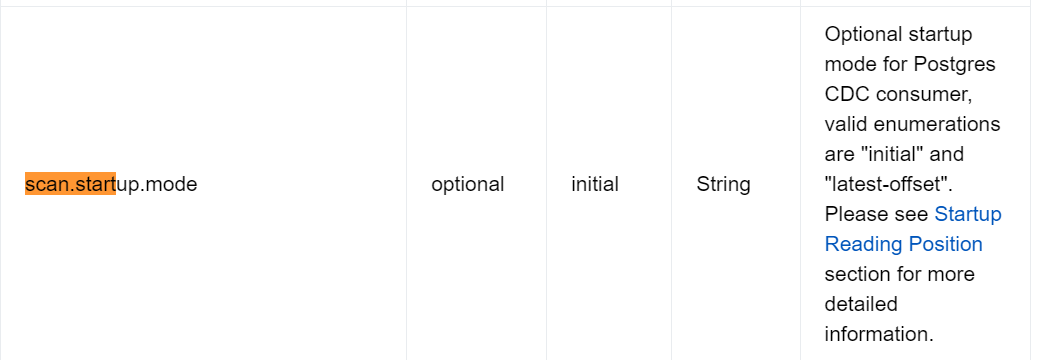
DBA可以通过手动后设置 pg_replication_origin_advance 逻辑复制槽的LSN的起始点位置:
pg_replication_origin_advance ( node_name text, lsn pg_lsn ) → void
Sets replication progress for the given node to the given location. This is primarily useful for setting up the initial location, or setting a new location after configuration changes and similar. Be aware that careless use of this function can lead to inconsistently replicated data.
官方对于这个函数的解释是给定复制点的位置,主要的用途是初始化同步或者由于配置变化设定的一个新的起点的位置。 需要注意的是这个设置会导致数据的不一致性。
举例现在有一个场景想跳过一部分数据的同步:
当前standby 上的LSN 是 5EE/5D18E6E0
postgres=# select pg_last_wal_receive_lsn();
pg_last_wal_receive_lsn
-------------------------
5EE/5D18E6E0
(1 row)
现在关闭复制槽的程序: standbyslot 的 active 是f
postgres=# select slot_name,plugin,slot_type,active,active_pid,catalog_xmin,restart_lsn,confirmed_flush_lsn from pg_replication_slots;
  slot_name  |  plugin  | slot_type | active | active_pid | catalog_xmin | restart_lsn  | confirmed_flush_lsn
-------------+----------+-----------+--------+------------+--------------+--------------+---------------------
standbyslot | pgoutput | logical   | f      |            |    202813953 | 5EE/3F530430 | 5EE/3F530430
(1 rows)
表中现有的数据:
db_plumc=> select * from app_plumc.products;
id |  name
----+--------
  1 | 嘎巴菜
(1 row)
现在主库插入一些模拟数据:
db_plumc=> insert into app_plumc.products select 2,'北京卤煮';
INSERT 0 1
db_plumc=> insert into app_plumc.products select 3,'上海生煎包';
INSERT 0 1
目前的情况是 这2条记录我是不想同步的, 我可以手动设置逻辑槽消费offset的位置:
我们登录到从库:查询当前的LSN的位置
db_plumc=> select pg_last_wal_receive_lsn();
pg_last_wal_receive_lsn
-------------------------
5EE/5D1B13F8
(1 row)
手动设置逻辑槽消费offset:
db_plumc=# select pg_replication_origin_advance('standbyslot','5EE/5D1B13F8');
ERROR:  cannot manipulate replication origins during recovery
目前看是不支持 standby 数据库上, 设置逻辑复制槽的offset的位置, 在官网上提交一个BUG也很快得到了回复:
自从在commit 5aa2350426c4 中引入replication origins 以来,没人关注这个。或许需要某个PG developer研究一下把这个限制去掉

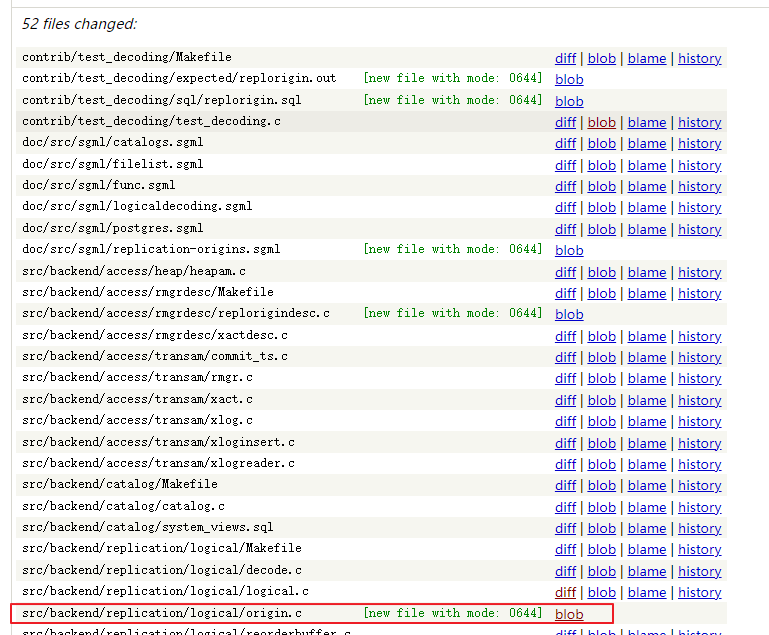
我们来看一下这个patch : https://git.postgresql.org/gitweb/?p=postgresql.git;a=commit;h=5aa235042
源码文件定位到: src/backend/replication/logical/origin.c 这个文件是在这个patch 里面新加入的
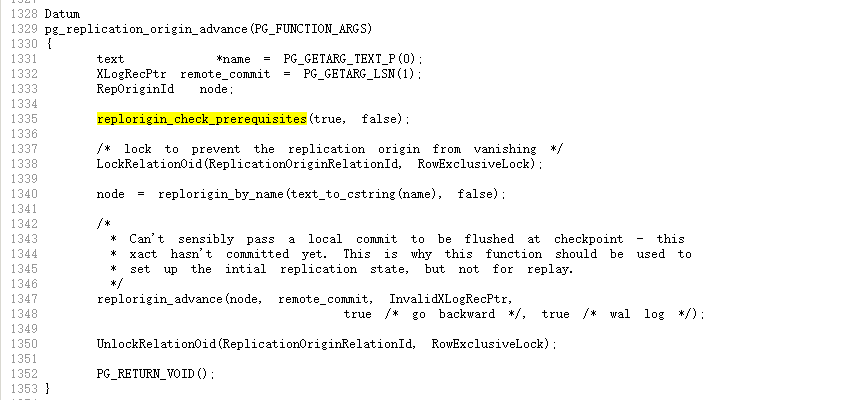
这个错误来自函数: replorigin_check_prerequisites
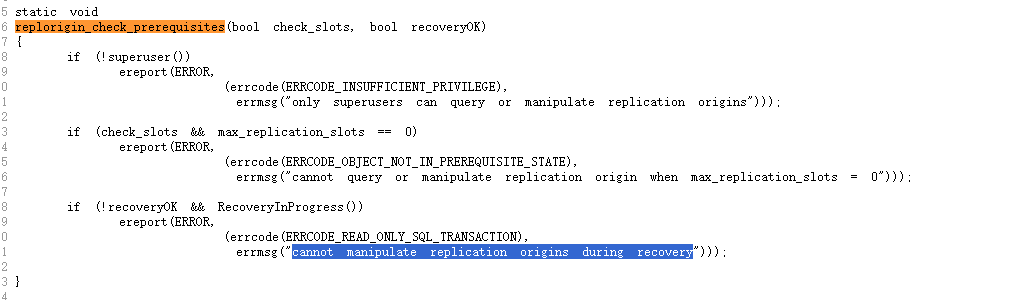
这个函数replorigin_check_prerequisites 类似于预先检查数据库实例的状态,在执行函数 pg_replication_origin_advance 会被调用
这个地方添加一个判断对于 database role的判断。 代码角度 对于 database role的逻辑判断 添加到 函数replorigin_check_prerequisites 内部更好一些。
最后我们总结一下:
1) Flink CDC for posgres 从版本 3.1版本开始 支持了PG16 standby logical decoding
2) 目前PG16的standby database 上暂时不支持手动指定WAL解析位置的函数pg_replication_origin_advance
已提交bug# 18540
Have a fun 🙂 !
