



,一、检查是否安装SSL模块
nginx -V #没有弹出--with-http_ssl_module相关信息则表示不支持https
[root@host-192-168-66-18 ~]# usr/local/nginx/sbin/nginx -Vnginx version: nginx/1.24.0built by gcc 7.3.0 (GCC)configure arguments: --prefix=/usr/local/nginx
二、原有配置加载https模块
1、安装SSL依赖环境
yum install openssl openssl-devel
2、切换到源码解压目录
cd usr/local/nginx/nginx-1.24.0
重新编译:
./configure --prefix=/usr/local/nginx --conf-path=/usr/local/nginx/conf/nginx.conf --pid-path=/usr/local/nginx/conf/nginx.pid --lock-path=/usr/local/nginx/lock/nginx.lock./configure --prefix=/usr/local/nginx --conf-path=/usr/local/nginx/conf/nginx.conf --pid-path=/usr/local/nginx/conf/nginx.pid --lock-path=/usr/local/nginx/lock/nginx.lock --with-http_ssl_module
3、执行make
此处不要执行make install ,否则会覆盖安装。
4、覆盖nginx执行文件
cp usr/local/nginx/sbin/nginx usr/local/nginx/sbin/nginx.bak
5、再次查看是否加载成功,弹出SSL信息则加载成功
/usr/local/nginx/sbin/nginx -V
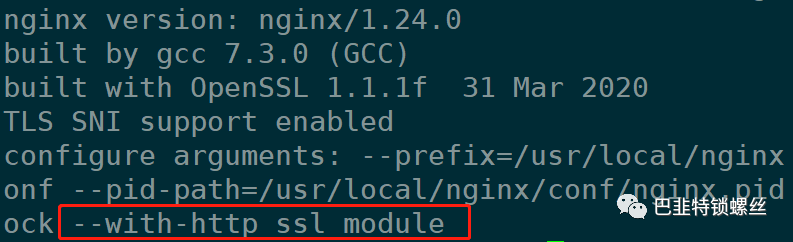
[root@host-192-168-66-18 sbin]# usr/local/nginx/sbin/nginx -Vnginx version: nginx/1.24.0built by gcc 7.3.0 (GCC)built with OpenSSL 1.1.1f 31 Mar 2020TLS SNI support enabledconfigure arguments: --prefix=/usr/local/nginx --conf-path=/usr/local/nginx/conf/nginx.conf --pid-path=/usr/local/nginx/conf/nginx.pid --lock-path=/usr/local/nginx/lock/nginx.lock --with-http_ssl_module
三、配置https
1、生成ssl证书(略)
2、查看nginx配置文件(未使用https)
server {listen 80;client_max_body_size 600M;fastcgi_buffers 8 4K;fastcgi_buffer_size 4K;client_body_buffer_size 1024k;root data/zhdj/frontends/dist;location {try_files $uri $uri/ index.html;index index.html;}location ^~ api/ {# proxy_pass http://sw-chatbot.tumorcompass.com;proxy_set_header Host "sw-chatbot.tumorcompass.com";proxy_set_header X-Real-IP $remote_addr;proxy_set_header X-Forwarded-For $proxy_add_x_forwarded_for;}location ^~ oauth2/ {proxy_pass http://183.67.4.66:8868;}location ^~ yinling/ {default_type application/json;add_header Content-Type 'application/json; charset=utf-8';if ($request_method = 'OPTIONS') {add_header Access-Control-Allow-Origin *;add_header Access-Control-Allow-Methods GET,POST,PUT,DELETE,OPTIONS;add_header Access-Control-Allow-Headers X-Requested-With,Content-Type,Authorization;return 204;}if ($request_method != 'OPTIONS') {add_header Access-Control-Allow-Origin *;add_header Access-Control-Allow-Headers X-Requested-With,Content-Type,Authorization;add_header Access-Control-Allow-Methods GET,POST,PUT,DELETE,OPTIONS;proxy_pass http://119.29.146.251:9500;}proxy_set_header X-Forwarded-For $proxy_add_x_forwarded_for;proxy_set_header X-Forwarded-Proto $scheme;proxy_set_header X-Forwarded-Port $server_port;proxy_set_header Host "ptbd-admin.erp12580.com";proxy_connect_timeout 1200s;proxy_send_timeout 1200s;proxy_read_timeout 1200s;}location @router {rewrite ^.*$ index.html last;}error_page 500 502 503 504 50x.html;location = 50x.html {root html;}}
3、加入Https配置文件内容:
server {listen 443 ssl;client_max_body_size 600M;fastcgi_buffers 8 4K;fastcgi_buffer_size 4K;client_body_buffer_size 1024k;root /data/zhdj/frontends/dist;ssl_certificate /data/nginx/ssl/zhdj.crt;ssl_certificate_key /data/nginx/ssl/zhdj.key;location / {try_files $uri $uri/ /index.html;index index.html;}# 其他 location 配置...location ^~ /api/ {proxy_pass http://sw-chatbot.tumorcompass.com;proxy_set_header Host "sw-chatbot.tumorcompass.com";proxy_set_header X-Real-IP $remote_addr;proxy_set_header X-Forwarded-For $proxy_add_x_forwarded_for;}location ^~ /oauth2/ {proxy_pass http://183.67.4.66:8868;}location ^~ /yinling/ {default_type application/json;add_header Content-Type 'application/json; charset=utf-8';if ($request_method = 'OPTIONS') {add_header Access-Control-Allow-Origin *;add_header Access-Control-Allow-Methods GET,POST,PUT,DELETE,OPTIONS;add_header Access-Control-Allow-Headers X-Requested-With,Content-Type,Authorization;return 204;}if ($request_method != 'OPTIONS') {add_header Access-Control-Allow-Origin *;add_header Access-Control-Allow-Headers X-Requested-With,Content-Type,Authorization;add_header Access-Control-Allow-Methods GET,POST,PUT,DELETE,OPTIONS;proxy_pass http://119.29.146.251:9500;}proxy_set_header X-Forwarded-For $proxy_add_x_forwarded_for;proxy_set_header X-Forwarded-Proto $scheme;proxy_set_header X-Forwarded-Port $server_port;proxy_set_header Host "ptbd-admin.erp12580.com";proxy_connect_timeout 1200s;proxy_send_timeout 1200s;proxy_read_timeout 1200s;}location @router {rewrite ^.*$ /index.html last;}error_page 500 502 503 504 /50x.html;location = /50x.html {root html;}}
此时,实现了
http://192.168.3.200和https://192.168.3.200地址的共存访问。
四、将80端口的http流量全部转发到https
新建nginx配置文件:
server {listen 80;server_name 127.0.0.1;rewrite ^(.*)$ https://192.168.3.200/login permanent;}
实现了80端口过来的所有流量,转发到https://192.168.3.200/login

文章转载自巴韭特锁螺丝,如果涉嫌侵权,请发送邮件至:contact@modb.pro进行举报,并提供相关证据,一经查实,墨天轮将立刻删除相关内容。
