



mhvtl虚拟磁带库的安装与应用
官方网站:http://mhvtl.nimsa.us
软件下载点在http://sites.google.com/site/linuxvtl2/
操作系统:
[root@mhvtl ~]# cat /etc/centos-release
CentOS Linux release 7.6.1810 (Core)
1.1.安装mhvtl
step 1.创建vtl用户:
[root@mhvtl ~]# useradd vtl
[root@mhvtl ~]# passwd vtl
[root@mhvtl ~]# mkdir /opt/mhvtl
[root@mhvtl ~]# mkdir /etc/mhvtl
[root@mhvtl ~]# chown -Rf vtl:vtl /opt/mhvtl
[root@mhvtl ~]# chown -Rf vtl:vtl /etc/mhvtl
step 2.Preparing the system
Upgrade current packages and kernel to the latest version
yum upgrade
step 3.Install required packages
Install CentOS Development Tools for GCC, make, Perl, etc.:
yum groupinstall "Development Tools"
Install additional required packages; kernel-devel, LZO, wget:
yum install kernel-devel lzo wget
step 4.Install option packages
Common tape/SCSI utilities:
yum install mtx lsscsi sg3_utils
step 5.Download to temp location
wget http://www.mhvtl.com/downloads/mhvtl-utils-1.5-4.x86_64.rpm
wget http://www.mhvtl.com/downloads/mhvtl-utils-1.5-4.src.rpm
step 6.Install RPM packages
rpm -Uvh mhvtl-utils-1.5-4.x86_64.rpm mhvtl-utils-1.5-4.src.rpm
安装过程中报错:
[root@mhvtl ~]# rpm -Uvh mhvtl-utils-1.5-4.x86_64.rpm mhvtl-utils-1.5-4.src.rpm
Preparing... ################################# [100%]
package mhvtl-utils-1.5-4.x86_64 is already installed
Updating / installing...
1:mhvtl-utils-1.5-4 ################################# [100%]
warning: user markh does not exist - using root
[root@mhvtl ~]#
(1)创建 markh 用户
[root@mhvtl ~]# useradd -s /sbin/nologin markh (2)安装 mhvtl-utils-1.5-4.src.rpm 包[root@mhvtl ~]# rpm -ivh mhvtl-utils-1.5-4.src.rpm
Updating / installing...
1:mhvtl-utils-1.5-4 ################################# [100%]
[root@mhvtl ~]#
step 7.Build kernel module
cd /root/rpmbuild/SOURCES/
tar xvfz mhvtl-2016-03-10.tgz
cd mhvtl-1.5/kernel/
make
make install
编译出现错误:
Great tutorial. Am trying out this and am having issues with buling Kernal Module
The command “make” and “Make Install” gives errors as below:
make: *** /lib/modules/3.10.0-514.10.2.el7.x86_64/build: No such file or directory. Stop.
make: *** [default] Error 2
[root@vultr kernel]# make install
install -o root -g root -m 644 mhvtl.ko /lib/modules/`uname -r`/kernel/drivers/scsi/; \
depmod -a; \
if [ -f “/etc/modprobe.d/unsupported-modules” ]; then \
sed -i ‘s/^allow_unsupported_modules 0/allow_unsupported_modules 1/’ /etc/modprobe.d/unsupported-modules; \
fi
install: cannot stat ‘mhvtl.ko’: No such file or directory
使用源码进行编译:
Create a directory where you are going to store the source code.
$ mkdir mhvtl
Initialize the directory as a git repository
$ git init
Pull the source code (it’s only a few hundred k)
$ git pull https://github.com/markh794/mhvtl.git
From time to time, check for any updates and synchronize from github.
$ git pull https://github.com/markh794/mhvtl.git
step 8.Start the mhVTL
[root@mhvtl mhvtl]# systemctl daemon-reload
[root@mhvtl mhvtl]# systemctl enable mhvtl.target
[root@mhvtl mhvtl]# systemctl start mhvtl.target
[root@mhvtl mhvtl]# systemctl status mhvtl.target
如果没有配置文件,会生成默认的配置。用lsscsi –g查看:
[root@mhvtl conf]# lsscsi -g
[0:0:0:0] disk VMware, VMware Virtual S 1.0 /dev/sda /dev/sg0
[2:0:0:0] cd/dvd NECVMWar VMware IDE CDR10 1.00 /dev/sr0 /dev/sg1
[3:0:0:0] mediumx STK L700 0106 /dev/sch0 /dev/sg5
[3:0:1:0] tape IBM ULT3580-TD5 0106 /dev/st2 /dev/sg10
[3:0:2:0] tape IBM ULT3580-TD5 0106 /dev/st7 /dev/sg9
[3:0:3:0] tape IBM ULT3580-TD4 0106 /dev/st0 /dev/sg2
[3:0:4:0] tape IBM ULT3580-TD4 0106 /dev/st6 /dev/sg11
[3:0:8:0] mediumx STK L80 0106 /dev/sch1 /dev/sg7
[3:0:9:0] tape STK T10000B 0106 /dev/st1 /dev/sg3
[3:0:10:0] tape STK T10000B 0106 /dev/st3 /dev/sg4
[3:0:11:0] tape STK T10000B 0106 /dev/st4 /dev/sg6
[3:0:12:0] tape STK T10000B 0106 /dev/st5 /dev/sg8
[root@mhvtl conf]#
①mediumx 为机械臂,tape 为磁带。
磁带库的磁盘所存放的位置每一个目录就是一盘磁带。
[root@localhost kernel]# cd /opt/mhvtl/
[root@localhost mhvtl]# ls
CLN101L4 E01005L4 E01012L4 E01019L4 F01035L5 G03003TA G03010TA G03017TA G03024TA 3014TA G03021TA G03028TA G03035TA
[root@localhost mhvtl]# cd CLN101L4
[root@localhost CLN101L4]# ls
data indx meta
②磁带信息
data 为数据文件
meta 为设备描述文件
indx 为索引文件
③操作命名
lsscsi - 查看SCSI设备信息
mtx - 操作带库机械臂
mt-st - 操作带库的驱动
1.2.配置mhvtl
停止mhvtl后,为了便于其他的备份软件使用,编辑修改mhvtl配置文件,主要包括device.conf,mhvtl.conf, library_contents.xx ,如下:
1.device.conf
[root@mhvtl mhvtl]# cat device.conf
VERSION: 5
# VPD page format:
# <page #> <Length> <x> <x+1>... <x+n>
# NAA format is an 8 hex byte value seperated by ':'
# Note: NAA is part of inquiry VPD 0x83
#
# Each 'record' is separated by one (or more) blank lines.
# Each 'record' starts at column 1
# Serial num max len is 10.
# Compression: factor X enabled 0|1
# Where X is zlib compression factor 1 = Fastest compression
# 9 = Best compression
# enabled 0 == off, 1 == on
#
# fifo: /var/tmp/mhvtl
# If enabled, data must be read from fifo, otherwise daemon will block
# trying to write.
# e.g. cat /var/tmp/mhvtl (in another terminal)
Library: 10 CHANNEL: 00 TARGET: 00 LUN: 00
# 10是带库的标识,带库的配置则在相应的library_contents.10文件中指定
Vendor identification: STK
Product identification: L700
Unit serial number: XYZZY_A
NAA: 10:22:33:44:ab:00:00:00
Home directory: /opt/mhvtl
PERSIST: False
Backoff: 400
# fifo: /var/tmp/mhvtl
# 以下定义各个驱动器
Drive: 11 CHANNEL: 00 TARGET: 01 LUN: 00
Library ID: 10 Slot: 01
Vendor identification: IBM
Product identification: ULT3580-TD5
Unit serial number: XYZZY_A1
NAA: 10:22:33:44:ab:00:01:00
Compression: factor 1 enabled 1
Compression type: lzo
Backoff: 400
# fifo: /var/tmp/mhvtl
Drive: 12 CHANNEL: 00 TARGET: 02 LUN: 00
Library ID: 10 Slot: 02
Vendor identification: IBM
Product identification: ULT3580-TD5
Unit serial number: XYZZY_A2
NAA: 10:22:33:44:ab:00:02:00
Compression: factor 1 enabled 1
Compression type: lzo
Backoff: 400
# fifo: /var/tmp/mhvtl
Drive: 13 CHANNEL: 00 TARGET: 03 LUN: 00
Library ID: 10 Slot: 03
Vendor identification: IBM
Product identification: ULT3580-TD4
Unit serial number: XYZZY_A3
NAA: 10:22:33:44:ab:00:03:00
Compression: factor 1 enabled 1
Compression type: lzo
Backoff: 400
# fifo: /var/tmp/mhvtl
Drive: 14 CHANNEL: 00 TARGET: 04 LUN: 00
Library ID: 10 Slot: 04
Vendor identification: IBM
Product identification: ULT3580-TD4
Unit serial number: XYZZY_A4
NAA: 10:22:33:44:ab:00:04:00
Compression: factor 1 enabled 1
Compression type: lzo
Backoff: 400
# fifo: /var/tmp/mhvtl
Library: 30 CHANNEL: 00 TARGET: 08 LUN: 00
Vendor identification: STK
Product identification: L80
Unit serial number: XYZZY_B
NAA: 30:22:33:44:ab:00:08:00
Home directory: /opt/mhvtl
PERSIST: False
Backoff: 400
# fifo: /var/tmp/mhvtl
Drive: 31 CHANNEL: 00 TARGET: 09 LUN: 00
Library ID: 30 Slot: 01
Vendor identification: STK
Product identification: T10000B
Unit serial number: XYZZY_B1
NAA: 30:22:33:44:ab:00:09:00
Compression: factor 1 enabled 1
Compression type: lzo
Backoff: 400
# fifo: /var/tmp/mhvtl
Drive: 32 CHANNEL: 00 TARGET: 10 LUN: 00
Library ID: 30 Slot: 02
Vendor identification: STK
Product identification: T10000B
Unit serial number: XYZZY_B2
NAA: 30:22:33:44:ab:00:10:00
Compression: factor 1 enabled 1
Compression type: lzo
Backoff: 400
# fifo: /var/tmp/mhvtl
Drive: 33 CHANNEL: 00 TARGET: 11 LUN: 00
Library ID: 30 Slot: 03
Vendor identification: STK
Product identification: T10000B
Unit serial number: XYZZY_B3
NAA: 30:22:33:44:ab:00:11:00
Compression: factor 1 enabled 1
Compression type: lzo
Backoff: 400
# fifo: /var/tmp/mhvtl
Drive: 34 CHANNEL: 00 TARGET: 12 LUN: 00
Library ID: 30 Slot: 04
Vendor identification: STK
Product identification: T10000B
Unit serial number: XYZZY_B4
NAA: 30:22:33:44:ab:00:12:00
Compression: factor 1 enabled 1
Compression type: lzo
Backoff: 400
# fifo: /var/tmp/mhvtl
# 中指定磁带,驱动器等的数量/磁带类型/驱动器
2.library_contents.10
[root@mhvtl mhvtl]# cat library_contents.10
VERSION: 2
Drive 1:
Drive 2:
Drive 3:
Drive 4:
Picker 1:
MAP 1:
MAP 2:
MAP 3:
MAP 4:
# Slot 1 - ?, no gaps
# Slot N: [barcode]
# [barcode]
# a barcode is comprised of three fields: [Leading] [identifier] [Trailing]
# Leading "CLN" -- cleaning tape
# Leading "W" -- WORM tape
# Leading "NOBAR" -- will appear to have no barcode
# If the barcode is at least 8 character long, then the last two characters are Trailing
# Trailing "S3" - SDLT600
# Trailing "X4" - AIT-4
# Trailing "L1" - LTO 1, "L2" - LTO 2, "L3" - LTO 3, "L4" - LTO 4, "L5" - LTO 5
# Trailing "LT" - LTO 3 WORM, "LU" - LTO 4 WORM, "LV" - LTO 5 WORM
# Trailing "L6" - LTO 6, "LW" - LTO 6 WORM
# Trailing "TA" - T10000+
# Trailing "TZ" - 9840A, "TY" - 9840B, "TX" - 9840C, "TW" - 9840D
# Trailing "TV" - 9940A, "TU" - 9940B
# Trailing "JA" - 3592+
# Trailing "JB" - 3592E05+
# Trailing "JC" - 3592E06+
# Trailing "JK" - 3592E07+
# Trailing "JW" - WORM 3592+
# Trailing "JX" - WORM 3592E05+ & 3592E06
# Trailing "JY" - WORM 3592E07+
# Trailing "D7" - DLT7000 media (DLT IV)
#
Slot 1: E01001L4
Slot 2: E01002L4
Slot 3: E01003L4
Slot 4: E01004L4
Slot 5: E01005L4
Slot 6: E01006L4
Slot 7: E01007L4
Slot 8: E01008L4
Slot 9: E01009L4
Slot 10: E01010L4
Slot 11: E01011L4
Slot 12: E01012L4
Slot 13: E01013L4
Slot 14: E01014L4
Slot 15: E01015L4
Slot 16: E01016L4
Slot 17: E01017L4
Slot 18: E01018L4
Slot 19: E01019L4
Slot 20: E01020L4
Slot 21:
Slot 22: CLN101L4
Slot 23: CLN102L5
Slot 24:
Slot 25:
Slot 26:
Slot 27:
Slot 28:
Slot 29:
Slot 30: F01030L5
Slot 31: F01031L5
Slot 32: F01032L5
Slot 33: F01033L5
Slot 34: F01034L5
Slot 35: F01035L5
Slot 36: F01036L5
Slot 37: F01037L5
Slot 38: F01038L5
Slot 39: F01039L5
[root@mhvtl mhvtl]#
3.mhvtl.conf配置文件:
[root@mhvtl mhvtl]# cat mhvtl.conf
# mhvtl.conf
#
# Home directory for tape emulation files
MHVTL_HOME_PATH=/opt/mhvtl
# Default media capacity (500 M)
CAPACITY=500
# Set default verbosity [0|1|2|3]
VERBOSE=1
# Set kernel module debuging [0|1]
VTL_DEBUG=0
# vtltape and vtllibrary debugging [Blank or -d]
#DAEMON_DEBUG=-d
[root@mhvtl mhvtl]#
1.3.应用:
查看机械手状态:
[root@mhvtl mhvtl]# mtx -f /dev/sg7 status
Storage Changer /dev/sg7:4 Drives, 44 Slots ( 4 Import/Export )
Data Transfer Element 0:Empty
Data Transfer Element 1:Empty
Data Transfer Element 2:Empty
Data Transfer Element 3:Empty
Storage Element 1:Full :VolumeTag=G03001TA
Storage Element 2:Full :VolumeTag=G03002TA
Storage Element 3:Full :VolumeTag=G03003TA
Storage Element 4:Full :VolumeTag=G03004TA
Storage Element 5:Full :VolumeTag=G03005TA
Storage Element 6:Full :VolumeTag=G03006TA
Storage Element 7:Full :VolumeTag=G03007TA
Storage Element 8:Full :VolumeTag=G03008TA
Storage Element 9:Full :VolumeTag=G03009TA
Storage Element 10:Full :VolumeTag=G03010TA
Storage Element 11:Full :VolumeTag=G03011TA
Storage Element 12:Full :VolumeTag=G03012TA
Storage Element 13:Full :VolumeTag=G03013TA
Storage Element 14:Full :VolumeTag=G03014TA
Storage Element 15:Full :VolumeTag=G03015TA
Storage Element 16:Full :VolumeTag=G03016TA
Storage Element 17:Full :VolumeTag=G03017TA
Storage Element 18:Full :VolumeTag=G03018TA
Storage Element 19:Full :VolumeTag=G03019TA
Storage Element 20:Full :VolumeTag=G03020TA
Storage Element 21:Full :VolumeTag=G03021TA
Storage Element 22:Full :VolumeTag=G03022TA
Storage Element 23:Full :VolumeTag=G03023TA
Storage Element 24:Full :VolumeTag=G03024TA
Storage Element 25:Full :VolumeTag=G03025TA
Storage Element 26:Full :VolumeTag=G03026TA
Storage Element 27:Full :VolumeTag=G03027TA
Storage Element 28:Full :VolumeTag=G03028TA
Storage Element 29:Full :VolumeTag=G03029TA
Storage Element 30:Full :VolumeTag=G03030TA
Storage Element 31:Full :VolumeTag=G03031TA
Storage Element 32:Full :VolumeTag=G03032TA
Storage Element 33:Full :VolumeTag=G03033TA
Storage Element 34:Full :VolumeTag=G03034TA
Storage Element 35:Full :VolumeTag=G03035TA
Storage Element 36:Full :VolumeTag=G03036TA
Storage Element 37:Full :VolumeTag=G03037TA
Storage Element 38:Full :VolumeTag=G03038TA
Storage Element 39:Full :VolumeTag=G03039TA
Storage Element 40:Full :VolumeTag=CLN303TA
Storage Element 41 IMPORT/EXPORT:Empty
Storage Element 42 IMPORT/EXPORT:Empty
Storage Element 43 IMPORT/EXPORT:Empty
Storage Element 44 IMPORT/EXPORT:Empty
[root@mhvtl mhvtl]#
注意:4个磁带机;多个存储磁带。
将StorageElement 位置上的磁带设备放置到Data Transfer Element 的磁带机中
将StorageElement 1 位置上的磁带设备放置到Data Transfer Element 0 的磁带机中
[root@localhost ~]# mtx -f /dev/sg13 load 10
将磁带从1号槽位装入driver 0:
查看磁带状态:
[root@mhvtl mhvtl]# mt -f /dev/st0 status
SCSI 2 tape drive:
File number=-1, block number=-1, partition=0.
Tape block size 0 bytes. Density code 0x0 (default).
Soft error count since last status=0
General status bits on (50000):
DR_OPEN IM_REP_EN
[root@mhvtl mhvtl]#
使用tar命令测试下,能否写入文件:
写入成功了,测试是否能读取呢:
读取成功,接下来测试倒带:
卸载磁带:
卸载成功。
1.4. 配置iscsi
yum -y install scsi-target-utils
[root@mhvtl opt]# systemctl enable tgtd
[root@mhvtl opt]# systemctl start tgtd
[root@mhvtl opt]# systemctl status tgtd
yum installphp lsscsi mtx mt-st git sysstat sg3_utilsstep 2.配置apache 权限
配置sudo:允许您的Web服务器用户ID以root身份在本地运行命令,方法是在 /etc/sudoers 中添加以下命令:
apache ALL=(ALL) NOPASSWD: ALL
在 /etc/sudoers 中注释掉“Defaults requiretty”行:
# Defaults requiretty
Disable selinux: set in /etc/selinux/config:
SELINUX=disabled
在此阶段建议重新启动以提交所有更改。
step 3.Installing the mhVTL-GUI
Create a directory for mhvtl-gui files:
[root@mhvtl mhvtl]# mkdir -p /var/www/html/mhvtl
[root@mhvtl mhvtl]# cd /var/www/html/mhvtl
[root@mhvtl mhvtl]# git init
Initialized empty Git repository in /var/www/html/mhvtl/.git/
[root@mhvtl mhvtl]# git pull https://github.com/markh794/mhvtl-gui.git
remote: Enumerating objects: 2446, done.
remote: Total 2446 (delta 0), reused 0 (delta 0), pack-reused 2446
Receiving objects: 100% (2446/2446), 1017.24 KiB | 337.00 KiB/s, done.
Resolving deltas: 100% (1565/1565), done.
From https://github.com/markh794/mhvtl-gui
* branch HEAD -> FETCH_HEAD
[root@mhvtl mhvtl]# ls
favicon.ico go.php html index.php LICENSE login.php mhvtl.cfg.db README scripts version
[root@mhvtl mhvtl]# systemctl status httpd
step 4.Starting the GUI
Confirm both the mhVTL and iSCSI (tgtd) are started:
systemctl start mhvtl systemctl start tgtd
systemctl status httpd
systemctl enable httpd
systemctl start httpd
May 07 04:07:54 mhvtl httpd[19892]: AH00558: httpd: Could not reliably determine the server's fully qualified domain name, using fe80::821c:85f1:8154:a8bb. Set the 'ServerName' directive globally to suppress this message
编辑httpd.conf文件,搜索"#ServerName",添加ServerName localhost:80
再重新启动apache 即可
现在,您可以通过Web浏览器访问mhVTL-GUI(例如http://192.168.31.141/mhvtl/)。 默认密码是mhvtl。
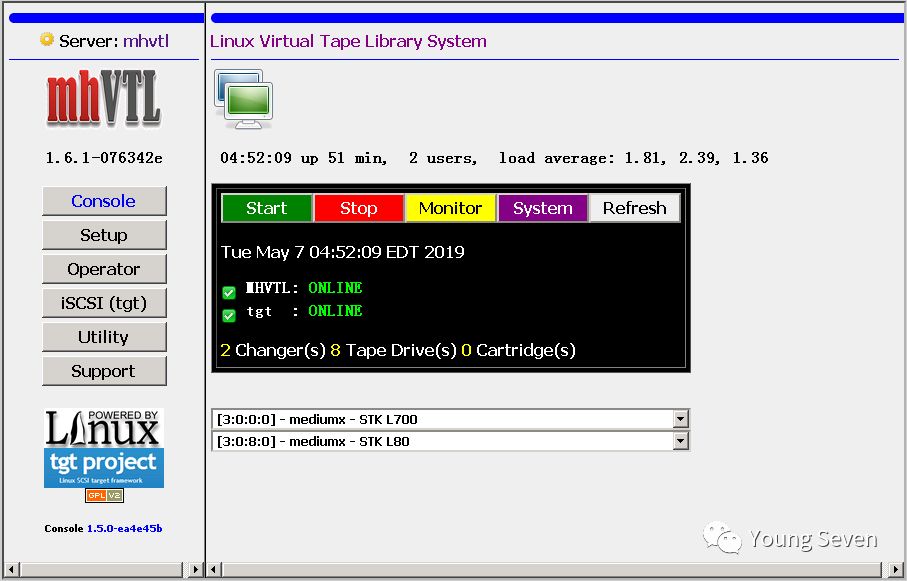
您可以从Setup-> Add - > Standard中的一组预设配置VTL。
您可以从iSCSI(tgt)配置iSCSI目标。使用快速启动进行默认设置。
从Web GUI更改iSCSI配置后,检查tgtd服务是否正在运行
