



1.安装路径一定一定不能是/home,不管是安装包路径还是tool路径,还是$OM_CTL等等

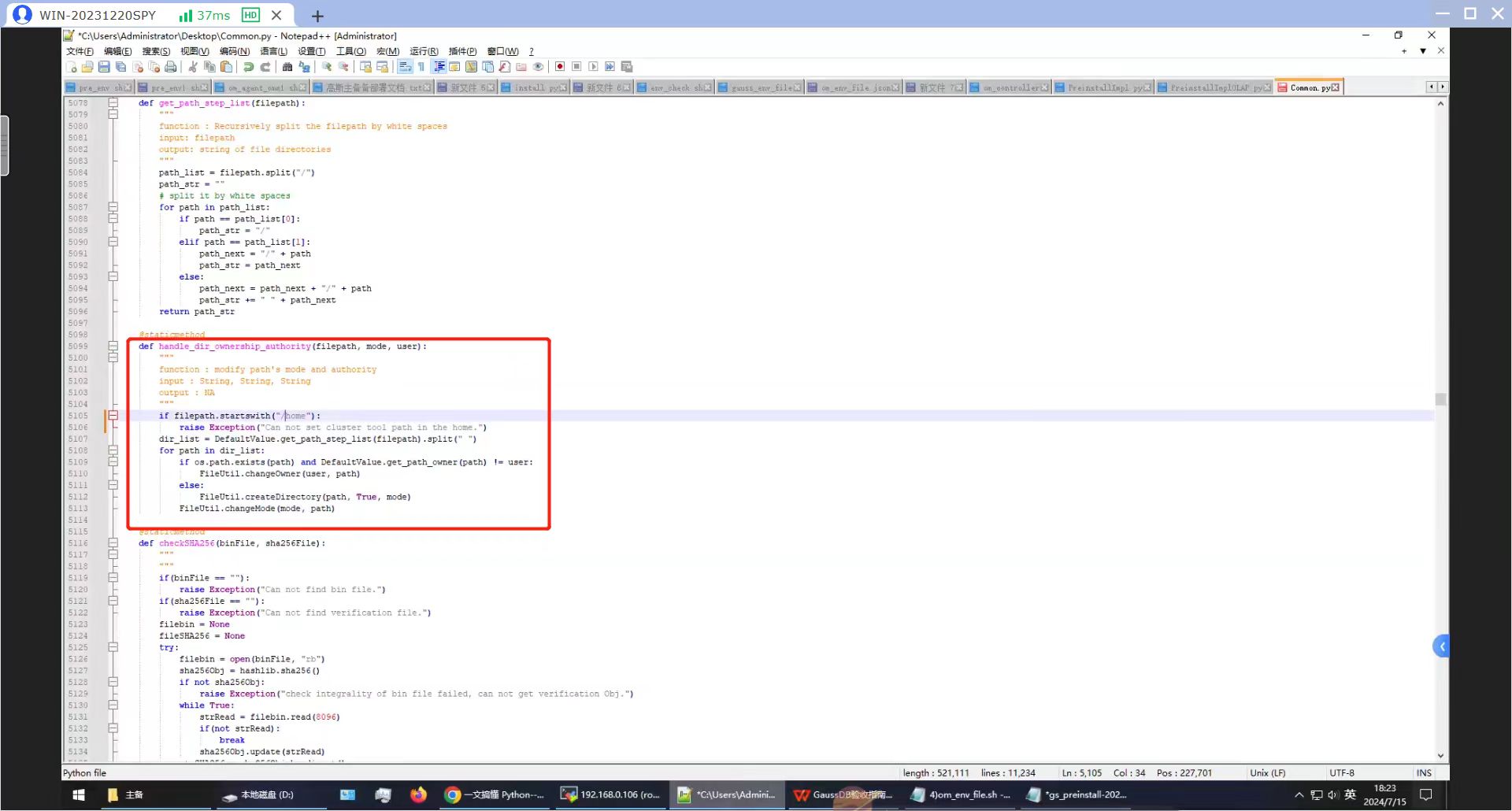
2.高斯指定python版本为3.7以上,但实际上在预安装时会直接调用python而不是python3,这是在部署文档里没有提到的。执行预安装命令echo $pre_install_config | python3 $OM_CTL,即使已经指定使用python3,高斯还是会使用python命令去执行某些操作。可能是python3再调用python,这个操作是高斯的一些脚本里写死的。
本人遇到的情况是:Kylin Linux Advanced Server release Host V10 (Kivity)无内置python,在预安装时报错Failed to do decompress package.还有一个报错是某临时文件找不到。通过查看adaptor_log下的om_adaptor.log,可以找到更详细的报错信息:
[2024-07-22 07:40:29,702][INFO][om_adaptor][9D1A2DD247BA11EF8E94000C299852C9][om_agent_service_proxy.py][om_agent_service_proxy][_send_request][74][request url is: http://192.168.229.101:30050/v1/om/agent/mgr/cluster/pre_install]
[2024-07-22 07:40:29,703][INFO][om_adaptor][9D1AAB9047BA11EF8E94000C299852C9][agent_version_mgr.py][agent_version_mgr][function_can_use][178][agent version that has been obtained is:c20001]
[2024-07-22 07:40:29,704][INFO][om_adaptor][9D1AAB9047BA11EF8E94000C299852C9][agent_version_mgr.py][agent_version_mgr][function_can_use][185][no func filter list]
[2024-07-22 07:40:30,037][INFO][om_adaptor][9D1AAB9047BA11EF8E94000C299852C9][om_agent_service_proxy.py][om_agent_service_proxy][_send_request][83][[192.168.229.101] Request result: {'message': 'Failed to do decompress package. Error is env: ‘python’: No such file or directory\n.', 'progress': -1, 'result': '', 'statusCode': 'GAUSS-61101'}]
[2024-07-22 07:40:30,037][ERROR][om_adaptor][9D1AAB9047BA11EF8E94000C299852C9][base_action_handler.py][base_action_handler][wrapper][41][Failed to do [send pre install request to om agent]]
[2024-07-22 07:40:30,038][ERROR][om_adaptor][9D1AAB9047BA11EF8E94000C299852C9][common_filter.py][common_filter][func_wrapper][121][Failed to do decompress package. Error is env: ‘python’: No such file or directory .]
[2024-07-22 07:40:30,043][ERROR][om_adaptor][9D1AAB9047BA11EF8E94000C299852C9][common_filter.py][common_filter][func_wrapper][124][##pre_install## end abnormally with message:Traceback (most recent call last): File "/gauss/cluster1/adaptor/gs_base/common_filter.py", line 116, in func_wrapper result = func(*args, **kwargs) File "/gauss/cluster1/adaptor/gs_base/common_filter.py", line 308, in hotpatch_func_wraper results = func(*args, **kwargs) File "/gauss/cluster1/adaptor/impl/pre_install_adapter.py", line 64, in pre_install kwargs.get('logger')).handle(pre_install_params) File "/gauss/cluster1/adaptor/impl/pre_install_adapter.py", line 103, in handle action=action, enable_gns=pre_install
这时候去检查python是否安装,执行python显示未找到命令,yum -y install python,就能解决这个问题。也可以把python3链接到python,这个的话有时间再去验证。
3.在进行安装时遇到报错:
[omm1@kylingauss1 ~]$ time echo $install_config | python3 $OM_CTL
{"retcode": 1, "detailmsg": "Fail to install, Error: The ips of the cluster user to be updated cannot be empty in the installation action"}
之前安装过一套,也遇到这个问题,但是忘记报错原因和解决办法了。目前还没解决。
下一期出物理备份工具Roach踩过的坑
