



微软研究的新方法GraphRAG使用LLM基于输入语料库创建知识图谱。该图谱与社区摘要和图谱机器学习输出一起在查询时用于增强提示。GraphRAG在回答上述两类问题时显示出显著的改进,展示了比以前应用于私有数据集的方法更高的智能的掌握能力。
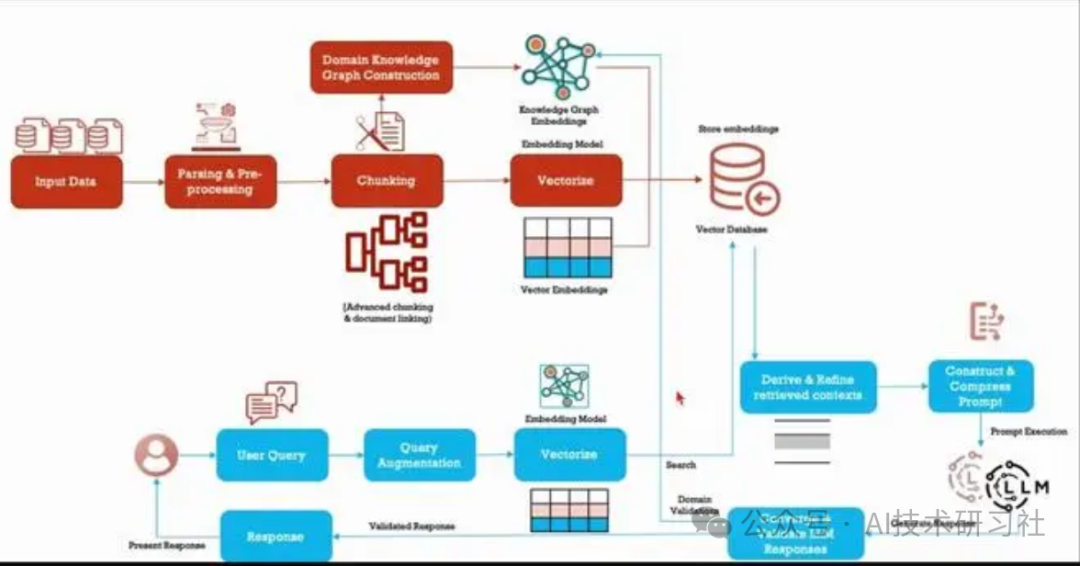
本地搜索示例
本地搜索方法通过将 AI 提取的知识图谱中的相关数据与原始文档的文本块相结合来生成答案。这种方法适用于需要了解文档中提到的特定实体的问题(例如,洋甘菊的治疗特性是什么?)
引入相关库
import osimport pandas as pdimport tiktokenfrom graphrag.query.context_builder.entity_extraction import EntityVectorStoreKeyfrom graphrag.query.indexer_adapters import (read_indexer_covariates,read_indexer_entities,read_indexer_relationships,read_indexer_reports,read_indexer_text_units,)from graphrag.query.input.loaders.dfs import (store_entity_semantic_embeddings,)from graphrag.query.llm.oai.chat_openai import ChatOpenAIfrom graphrag.query.llm.oai.embedding import OpenAIEmbeddingfrom graphrag.query.llm.oai.typing import OpenaiApiTypefrom graphrag.query.question_gen.local_gen import LocalQuestionGenfrom graphrag.query.structured_search.local_search.mixed_context import (LocalSearchMixedContext,)from graphrag.query.structured_search.local_search.search import LocalSearchfrom graphrag.vector_stores.lancedb import LanceDBVectorStore
将数据加载到Dataframe中。
INPUT_DIR = "./inputs/operation dulce"LANCEDB_URI = f"{INPUT_DIR}/lancedb"COMMUNITY_REPORT_TABLE = "create_final_community_reports"ENTITY_TABLE = "create_final_nodes"ENTITY_EMBEDDING_TABLE = "create_final_entities"RELATIONSHIP_TABLE = "create_final_relationships"COVARIATE_TABLE = "create_final_covariates"TEXT_UNIT_TABLE = "create_final_text_units"COMMUNITY_LEVEL = 2
读取实体
entity_df = pd.read_parquet(f"{INPUT_DIR}/{ENTITY_TABLE}.parquet")entity_embedding_df = pd.read_parquet(f"{INPUT_DIR}/{ENTITY_EMBEDDING_TABLE}.parquet")entities = read_indexer_entities(entity_df, entity_embedding_df, COMMUNITY_LEVEL)# load description embeddings to an in-memory lancedb vectorstore# to connect to a remote db, specify url and port values.description_embedding_store = LanceDBVectorStore(collection_name="entity_description_embeddings",)description_embedding_store.connect(db_uri=LANCEDB_URI)entity_description_embeddings = store_entity_semantic_embeddings(entities=entities, vectorstore=description_embedding_store)print(f"Entity count: {len(entity_df)}")entity_df.head()
阅读关系
relationship_df = pd.read_parquet(f"{INPUT_DIR}/{RELATIONSHIP_TABLE}.parquet")relationships = read_indexer_relationships(relationship_df)print(f"Relationship count: {len(relationship_df)}")relationship_df.head()
covariate_df = pd.read_parquet(f"{INPUT_DIR}/{COVARIATE_TABLE}.parquet")claims = read_indexer_covariates(covariate_df)print(f"Claim records: {len(claims)}")covariates = {"claims": claims}
阅读社区报告
report_df = pd.read_parquet(f"{INPUT_DIR}/{COMMUNITY_REPORT_TABLE}.parquet")reports = read_indexer_reports(report_df, entity_df, COMMUNITY_LEVEL)print(f"Report records: {len(report_df)}")report_df.head()
读取文本单位
text_unit_df = pd.read_parquet(f"{INPUT_DIR}/{TEXT_UNIT_TABLE}.parquet")text_units = read_indexer_text_units(text_unit_df)print(f"Text unit records: {len(text_unit_df)}")text_unit_df.head()
api_key = os.environ["GRAPHRAG_API_KEY"]llm_model = os.environ["GRAPHRAG_LLM_MODEL"]embedding_model = os.environ["GRAPHRAG_EMBEDDING_MODEL"]llm = ChatOpenAI(api_key=api_key,model=llm_model,api_type=OpenaiApiType.OpenAI, # OpenaiApiType.OpenAI or OpenaiApiType.AzureOpenAImax_retries=20,)token_encoder = tiktoken.get_encoding("cl100k_base")text_embedder = OpenAIEmbedding(api_key=api_key,api_base=None,api_type=OpenaiApiType.OpenAI,model=embedding_model,deployment_name=embedding_model,max_retries=20,)
创建本地搜索上下文生成器
context_builder = LocalSearchMixedContext(community_reports=reports,text_units=text_units,entities=entities,relationships=relationships,covariates=covariates,entity_text_embeddings=description_embedding_store,embedding_vectorstore_key=EntityVectorStoreKey.ID, # if the vectorstore uses entity title as ids, set this to EntityVectorStoreKey.TITLEtext_embedder=text_embedder,token_encoder=token_encoder,)
创建本地搜索引擎
# text_unit_prop: proportion of context window dedicated to related text units# community_prop: proportion of context window dedicated to community reports.# The remaining proportion is dedicated to entities and relationships. Sum of text_unit_prop and community_prop should be <= 1# conversation_history_max_turns: maximum number of turns to include in the conversation history.# conversation_history_user_turns_only: if True, only include user queries in the conversation history.# top_k_mapped_entities: number of related entities to retrieve from the entity description embedding store.# top_k_relationships: control the number of out-of-network relationships to pull into the context window.# include_entity_rank: if True, include the entity rank in the entity table in the context window. Default entity rank = node degree.# include_relationship_weight: if True, include the relationship weight in the context window.# include_community_rank: if True, include the community rank in the context window.# return_candidate_context: if True, return a set of dataframes containing all candidate entity/relationship/covariate records that# could be relevant. Note that not all of these records will be included in the context window. The "in_context" column in these# dataframes indicates whether the record is included in the context window.# max_tokens: maximum number of tokens to use for the context window.local_context_params = {"text_unit_prop": 0.5,"community_prop": 0.1,"conversation_history_max_turns": 5,"conversation_history_user_turns_only": True,"top_k_mapped_entities": 10,"top_k_relationships": 10,"include_entity_rank": True,"include_relationship_weight": True,"include_community_rank": False,"return_candidate_context": False,"embedding_vectorstore_key": EntityVectorStoreKey.ID, # set this to EntityVectorStoreKey.TITLE if the vectorstore uses entity title as ids"max_tokens": 12_000, # change this based on the token limit you have on your model (if you are using a model with 8k limit, a good setting could be 5000)}llm_params = {"max_tokens": 2_000, # change this based on the token limit you have on your model (if you are using a model with 8k limit, a good setting could be 1000=1500)"temperature": 0.0,}search_engine = LocalSearch(llm=llm,context_builder=context_builder,token_encoder=token_encoder,llm_params=llm_params,context_builder_params=local_context_params,response_type="multiple paragraphs", # free form text describing the response type and format, can be anything, e.g. prioritized list, single paragraph, multiple paragraphs, multiple-page report)
对示例查询运行本地搜索
result = await search_engine.asearch("Tell me about Agent Mercer")print(result.response)
question = "Tell me about Dr. Jordan Hayes"result = await search_engine.asearch(question)print(result.response)
检查用于生成响应的上下文数据
result.context_data["entities"].head()
result.context_data["relationships"].head()
result.context_data["reports"].head()
result.context_data["sources"].head()
if "claims" in result.context_data:print(result.context_data["claims"].head())
问题生成,此函数获取用户查询列表并生成下一个候选问题。
question_generator = LocalQuestionGen(llm=llm,context_builder=context_builder,token_encoder=token_encoder,llm_params=llm_params,context_builder_params=local_context_params,)
question_history = ["Tell me about Agent Mercer","What happens in Dulce military base?",]candidate_questions = await question_generator.agenerate(question_history=question_history, context_data=None, question_count=5)print(candidate_questions.response)
上述案例代码展示了微软研究的新方法GraphRAG的实现,通过利用大语言模型(LLM)基于输入语料库创建知识图谱,并在查询时结合社区摘要和图谱机器学习输出来增强提示。该方法在回答复杂问题时显示出显著的改进。
如果你只是想简单尝试,请使用下面的案例代码:
# 安装 GraphRAGpip install graphrag
# 运行索引器,设置一个数据项目和一些初始配置# 准备一个示例数据集mkdir -p ./ragtest/input
# 获取查尔斯·狄更斯的《圣诞颂歌》数据curl https://www.gutenberg.org/cache/epub/24022/pg24022.txt > ./ragtest/input/book.txt
# 初始化您的工作区,首先运行命令graphrag.index --initpython -m graphrag.index --init --root ./ragtest
# 这将在目录中创建两个文件:.env和。settings.yaml./ragtest# .env包含运行 GraphRAG 管道所需的环境变量。如果检查文件,您将看到已定义的单个环境变量。# GRAPHRAG_API_KEY=<API_KEY>这是 OpenAI API 或 Azure OpenAI 端点的 API 密钥。您可以将其替换为您自己的 API 密钥。# settings.yaml包含管道的设置。您可以修改此文件以更改管道的设置。
# 这里提供了两种方式,以下以 Azure OpenAI 用户应在 settings.yaml 文件中设置以下变量为例type: azure_openai_chat # Or azure_openai_embedding for embeddingsapi_base: https://<instance>.openai.azure.comapi_version: 2024-02-15-preview # You can customize this for other versionsdeployment_name: <azure_model_deployment_name>
# 运行索引管道python -m graphrag.index --root ./ragtest
# 运行查询引擎,有两种方式:# 全局搜索提出高级问题的示例:python -m graphrag.query \--root ./ragtest \--method global \"What are the top themes in this story?"
# 本地搜索询问有关特定角色的更具体问题的示例:python -m graphrag.query \--root ./ragtest \--method local \"Who is Scrooge, and what are his main relationships?"
文章转载自AI技术研习社,如果涉嫌侵权,请发送邮件至:contact@modb.pro进行举报,并提供相关证据,一经查实,墨天轮将立刻删除相关内容。
