




一、什么是Soda Core?
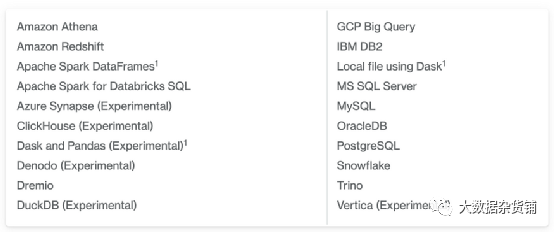
使用Soda Core扫描多种数据源。
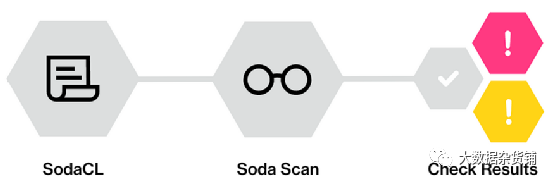
2、SodaCL
3、Soda Check
4、Soda Scan
二、使用 Soda Core 的端到端数据可靠性项目
数据库和 Soda 核心配置
在这个项目中,我将使用我本地的Postgres数据库作为主要数据源来连接和扫描。为了让 Soda Core连接到 Postgres 数据库,我必须安装相关的 Python 包。
pip install soda-core-postgres
如果您的本地计算机上没有 Postgres 数据库,您可以从此链接安装它。另外,对于示例数据库,我将使用DVD Rental 数据库。示例数据库有下表;
lactor — 存储演员的数据,包括名字和姓氏。 lfilm — 存储电影数据,例如标题、发行年份、长度、评级等。 lfilm_actor — 存储电影和演员之间的关系。 lcategory — 存储电影的类别数据。 lfilm_category — 存储电影和类别之间的关系。 lstore — 包含商店数据,包括经理人员和地址。 linventory — 存储库存数据。 lrental — 存储租赁数据。 lpayment — 存储客户的付款。 lstaff — 存储员工数据。 lcustomer — 存储客户数据。 laddress — 存储员工和客户的地址数据 lcity — 存储城市名称。 lcountry — 存储国家/地区名称。
data_source dvdrental:type: postgresconnection:host: localhostport: '5432'username: postgrespassword: ${POSTGRES_PASSWORD}database: dvd-rentalschema: public
示例1:检查 Soda Core 配置
下面的代码将通过应用相关的 configuration.yml 和 checks.yml 文件来运行 DVD Rental 数据源的扫描。一开始,我将把 checks.yml 文件保留为空以查看输出。
soda scan -d dvdrental -c configuration.yml checks.yml

示例 2:表空性检查
在这个例子中,我们将为我们的“actor”表添加一个检查来评估它的空性。为了添加检查,我们需要开始编辑checks.yml文件。下面我们编写第一个检查 SodaCL;
checks for actor:- row_count > 0
由于我们在文件中添加了 check 语句,因此我们需要向 scan 命令传递一个参数来读取 checks.yml 文件。在我们的终端上,我们执行以下命令来应用检查;
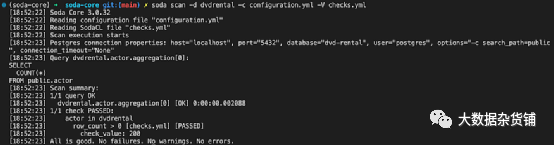
soda scan -d dvdrental -c configuration.yml checks.yml

如上所示,我们的检查已成功通过。但是Soda如何转换用SodaCL编写的check语句呢?如果我们想查看 Soda 生成的 SQL 查询,我们需要在扫描中添加“-V”参数。
soda scan -d dvdrental -c configuration.yml -V checks.yml
示例 3:按列检查
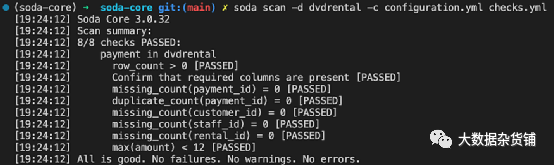
# Checks for basic validationschecks for payment:# table empytiness check- row_count > 0# missing row check on the primary and foreign key columns- missing_count(payment_id) = 0- missing_count(customer_id) = 0- missing_count(staff_id) = 0- missing_count(rental_id) = 0# duplicate row check on the primary key column- duplicate_count(payment_id) = 0# max amount check- max(amount) < 12- schema:name: Confirm that required columns are presentfail:when required column missing:[payment_id, customer_id, staff_id, rental_id]
示例 4:背景调查
Soda 可以使用引用检查来验证同一数据源中的数据集之间的列内容是否匹配。另外,我将演示在同一个 check.yml 文件中,我们可以一次检查多个表。
# Checks for basic validationschecks for customer:# table empytiness check- row_count > 0checks for payment:# all customers in the payment table should exist in the customer table- values in (customer_id) must exist in customer (customer_id)

示例 5:交叉检查
在 Soda,我们可以使用交叉检查来比较相同或不同数据源内的数据集之间的行数。当我们想要检查 ETL 管道是否意外删除表中的行时,此功能非常方便。
# Checks for basic validationschecks for payment:# Check row count between datasets in different data sources- row_count same as payment_raw

示例 6:新鲜度检查
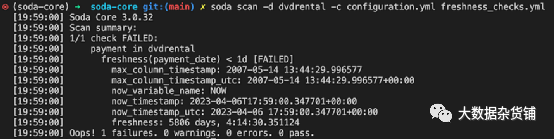
# freshness checkchecks for payment:# checking whether the payment_date is not older than 1 day- freshness(payment_date) < 1d
示例 7:用户定义的检查
# Checks for user-defined checkschecks for payment:- avg_amount >= 10:avg_amount query: |select avg(amount)from paymentwhere cast(payment_date as date) between '2007-02-15' and '2007-02-18'

示例8:同时检查多次
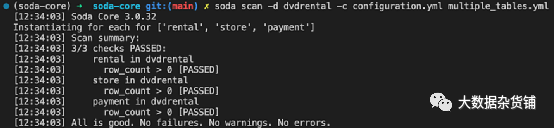
for each dataset T:datasets:- payment- rental- storechecks:- row_count > 0
示例 9:使用 Python 进行编程扫描
Soda Python 库支持编程检查,我们不需要一直使用 CLI。下面我创建了一个 Python 脚本来读取配置并检查文件并执行它们。为了得到错误,我将使用 freshness.yml 文件。
from soda.scan import Scan # importing the Soda libraryscan = Scan() # loading the functionscan.set_data_source_name("dvdrental") # initialising the datasource name# Loading the configuration filescan.add_configuration_yaml_file(file_path="~/configuration.yml")# Adding scan date variable to label the scan datescan.add_variables({"date": "2023-04-11"})# Loading the check yaml filescan.add_sodacl_yaml_file("freshness_checks.yml")# Executing the scanscan.execute()# Setting logs to verbose modescan.set_verbose(True)# Inspect the scan resultscan.get_scan_results()

结论
Soda Core 的简单性令人惊叹!该工具支持用简单的类似英语的命令来编写数据验证步骤。对专用Python库的支持、与编排工具的集成以及与十多个最常见数据源的数据源连接,使其成为开源数据可靠性的最佳解决方案之一。
原文作者:Seckin Dinc
