



一、OpenGauss介绍
openGauss是一个高性能、高安全、高可用、高智能的企业级开源关系数据库。它由华为推出,并在2020年6月30日正式开源。openGauss深度融合了华为在数据库领域多年的研发经验,结合企业级场景需求,持续构建竞争力特性,旨在通过开源的方式推动数据库技术的发展与创新。
二、环境初始化
2.1、软硬件环境要求
介绍openGauss的软硬件环境要求。建议部署openGauss的各服务器具有等价的软硬件配置。
- 表 1 硬件环境要求
介绍openGauss的软硬件环境要求。建议部署openGauss的各服务器具有等价的软硬件配置。
表1 列出了openGauss服务器应具备的最低硬件要求。在实际产品中,硬件配置的规划需考虑数据规模及所期望的数据库响应速度。请根据实际情况进行规划。
| 题目 | 配置描述 |
|---|---|
| 内存 | 功能调试建议32GB以上。性能测试和商业部署时,单实例部署建议128GB以上。复杂的查询对内存的需求量比较高,在高并发场景下,可能出现内存不足。此时建议使用大内存的机器,或使用负载管理限制系统的并发。 |
| CPU | 功能调试最小1×8核,2.0GHz。性能测试和商业部署时,建议1×16核,2.0GHz。CPU超线程和非超线程两种模式都支持。 说明:个人开发者最低配置2核4G,推荐配置4核8G。目前,openGauss仅支持ARM服务器和基于x86_64通用PC服务器的CPU。 |
| 硬盘 | 用于安装openGauss的硬盘需最少满足如下要求:至少1GB用于安装openGauss的应用程序。每个主机需大约300MB用于元数据存储。预留70%以上的磁盘剩余空间用于数据存储。建议系统盘配置为RAID1,数据盘配置为RAID5,且规划4组RAID5数据盘用于安装openGauss。有关RAID的配置方法在本手册中不做介绍。请参考硬件厂家的手册或互联网上的方法进行配置,其中Disk Cache Policy一项需要设置为Disabled,否则机器异常掉电后有数据丢失的风险。openGauss支持使用SSD盘作为数据库的主存储设备,支持SAS接口和NVME协议的SSD盘,以RAID的方式部署使用。 |
| 网络要求 | 300兆以上以太网。建议网卡设置为双网卡冗余bond。有关网卡冗余bond的配置方法在本手册中不做介绍。请参考硬件厂商的手册或互联网上的方法进行配置。 |
- 表 2 软件环境要求
| 软件类型 | 配置描述 |
|---|---|
| Linux操作系统 | ARM:openEuler 20.03LTS(推荐采用此操作系统) openEuler 22.03LTS 麒麟V10 Asianux 7.5 x86:openEuler 20.03LTS openEuler 22.03LTS CentOS 7.6 Asianux 7.6 说明:1、当前安装包只能在英文操作系统上安装使用;2、OM工具已经支持对基于openEuler/Centos等商业操作系统的安装使用,具体配置信息可以查看OM中的osid.conf文件。 |
| Linux操作系统 | 剩余inode个数 > 15亿(推荐) |
| 工具 | bzip2 |
| Python | 支持Python3.6+ |
- 表 3 软件依赖要求
| 所需软件 | 建议版本 |
|---|---|
| libaio-devel | 建议版本:0.3.109-13 |
| readline-devel | 建议版本:7.0-13 |
| libnsl(openEuler+x86环境中) | 建议版本:2.28-36 |
openGauss的软件依赖要求如表3 所示。
建议使用上述操作系统安装光盘或者源中,下列依赖软件的默认安装包,若不存在下列软件,可参看软件对应的建议版本。
2.2、检查环境
操作系统版本:
[root@Node1 ~]#
[root@Node1 ~]# cat /etc/redhat-release
CentOS Linux release 7.9.2009 (Core)
[root@Node1 ~]#
CPU核数:
[root@Node1 ~]# cat /proc/cpuinfo | grep "physical id" | uniq | wc -l
4
[root@Node1 ~]#
内存大小:
[root@Node1 ~]# free -h
              total        used        free      shared  buff/cache   available
Mem:           7.6G        1.8G        3.6G        304M        2.3G        5.3G
Swap:          4.0G          0B        4.0G
[root@Node1 ~]#
2.3、环境规划
| 类型 | 名称 |
|---|---|
| 主机名称 | Node1 |
| 主机IP | 192.168.1.102 |
| 操作系统版本 | CentOS 7.9 |
| openGauss版本 | openGauss_6.0.0-RC1 极简版 |
| 部署方式 | 一主一备 |
2.4、关闭防火墙
[root@Node1 ~]#
[root@Node1 ~]# systemctl disable firewalld.service
viceRemoved symlink /etc/systemd/system/multi-user.target.wants/firewalld.service.
Removed symlink /etc/systemd/system/dbus-org.fedoraproject.FirewallD1.service.
[root@Node1 ~]# systemctl stop firewalld.service
[root@Node1 ~]#
- 说明:目前仅支持在防火墙关闭的状态下进行安装。
2.5、安装依赖
yum install bzip2 libaio-devel readline-devel wget
2.6、检查Python版本
[root@Node1 ~]# python --version
Python 2.7.5
[root@Node1 ~]#
[root@Node1 ~]# python3 --version
-bash: python3: command not found
[root@Node1 ~]#
- 说明:本例未安装Python3,需安装Python3.
- 代码如下:
yum install python3
2.7、关闭SELINUX
[root@Node1 ~]# sed -i  "s/SELINUX=enforcing/SELINUX=disabled/"  /etc/selinux/config
[root@Node1 ~]#
2.8、关闭RemoveIPC
- 说明:在各数据库节点上,关闭RemoveIPC。CentOS操作系统默认为关闭,可以跳过该步骤。
[root@Node1 ~]#
[root@Node1 ~]# cat>>/etc/systemd/logind.conf<<EOF
> RemoveIPC=no
> EOF
[root@Node1 ~]#

[root@Node1 ~]#
[root@Node1 ~]# cat>>/usr/lib/systemd/system/systemd-logind.service<<EOF
> RemoveIPC=no
> EOF
[root@Node1 ~]#
2.9、检查服务器主机时间
[root@Node1 ~]# date
Tue Aug 20 14:57:50 CST 2024
[root@Node1 ~]#
- 说明:如果当前时间与本地时间不一致,需修改。
2.10、以上设置完毕,需重启主机。
三、openGauss部署
3.1、新建管理用户
groupadd gauss -g 4000
useradd gauss -g 4000 -u 4000
echo "gauss"|passwd --stdin gauss
3.2、创建安装目录
- 目录规划:
| 名称 | 用途 |
|---|---|
| openGauss | 数据库安装的主目录 |
| install | 安装包上传目录 |
- 代码如下:
mkdir /openGauss  /install
chmod 755 -R /openGauss  /install
chown -R gauss:gauss /openGauss  /install
3.3、配置sudo,使用root账户
sed -i.bak '100agauss ALL=(ALL) NOPASSWD:ALL' /etc/sudoers
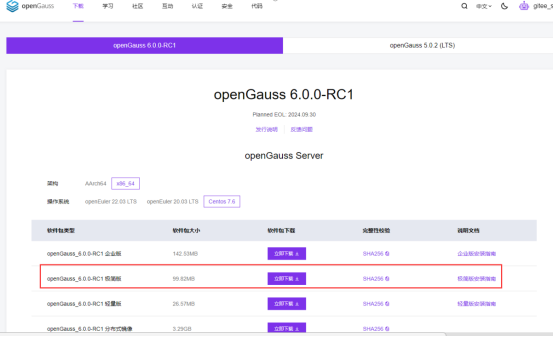
3.4、安装包下载
官网地址:https://opengauss.org/zh/download/
- 说明:
1、根据操作系统,下载对应安装包;
2、下载方式:在线下载,离线下载;
3、切换gauss用户;
4、本案例下载极简版部署。
代码如下:
[gauss@Node1 root]$ cd /install/
[gauss@Node1 install]$
[gauss@Node1 install]$ wget https://opengauss.obs.cn-south-1.myhuaweiclo       ud.com/6.0.0-RC1/x86/openGauss-6.0.0-RC1-CentOS-64bit.tar.bz2
--2024-08-20 13:54:00--  https://opengauss.obs.cn-south-1.myhuaweicloud.       com/6.0.0-RC1/x86/openGauss-6.0.0-RC1-CentOS-64bit.tar.bz2
Resolving opengauss.obs.cn-south-1.myhuaweicloud.com (opengauss.obs.cn-s       outh-1.myhuaweicloud.com)... 122.9.127.163, 122.9.127.162
Connecting to opengauss.obs.cn-south-1.myhuaweicloud.com (opengauss.obs.       cn-south-1.myhuaweicloud.com)|122.9.127.163|:443... connected.
HTTP request sent, awaiting response... 200 OK
Length: 104672194 (100M) [application/x-bzip2]
Saving to: ‘openGauss-6.0.0-RC1-CentOS-64bit.tar.bz2’

100%[==============================>] 104,672,194 8.51MB/s   in 9.2s

2024-08-20 13:54:10 (10.9 MB/s) - ‘openGauss-6.0.0-RC1-CentOS-64bit.tar.       bz2’ saved [104672194/104672194]

[gauss@Node1 install]$
3.5、解压安装包
[gauss@Node1 install]$
[gauss@Node1 install]$ tar -jxf openGauss-6.0.0-RC1-CentOS-64bit.tar.bz2        -C /openGauss/
[gauss@Node1 install]$
3.6、切换目录进行部署
[gauss@Node1 install]$ cd /openGauss/
[gauss@Node1 openGauss]$ cd simpleInstall/
[gauss@Node1 simpleInstall]$
[gauss@Node1 simpleInstall]$ sh install.sh  -w openGauss@123456  --multinode
[step 1]: check parameter
[step 2]: check install env and os setting
[step 3]: change_gausshome_owner
[step 4]: set environment variables

/home/gauss/.bashrc: line 16: ulimit: open files: cannot modify limit: O       peration not permitted
[init primary datanode.]
The files belonging to this database system will be owned by user "gauss       ".
This user must also own the server process.

The database cluster will be initialized with locale "en_US.UTF-8".
The default text search configuration will be set to "english".

creating directory /openGauss/data/master ... ok
creating subdirectories ... in ordinary occasionok
creating configuration files ... ok
selecting default max_connections ... 100
selecting default shared_buffers ... 1024MB
Begin init undo subsystem meta.
[INIT UNDO] Init undo subsystem meta successfully.
creating template1 database in /openGauss/data/master/base/1 ... The cor       e dump path is an invalid directory
2024-08-20 13:55:55.470 [unknown] [unknown] localhost 140346655447680 0[       0:0#0]  [BACKEND] WARNING:  macAddr is 12/688892526, sysidentifier is 79       6943/2859399661, randomNum is 737278445
ok
initializing pg_authid ... ok
setting password ... ok
initializing dependencies ... ok
loading PL/pgSQL server-side language ... ok
creating system views ... ok
creating performance views ... ok
loading system objects' descriptions ... ok
creating collations ... ok
creating conversions ... ok
creating dictionaries ... ok
setting privileges on built-in objects ... ok
initialize global configure for bucketmap length ... ok
creating information schema ... ok
loading foreign-data wrapper for distfs access ... ok
loading foreign-data wrapper for log access ... ok
loading hstore extension ... ok
loading foreign-data wrapper for MOT access ... ok
loading security plugin ... ok
update system tables ... ok
creating snapshots catalog ... ok
vacuuming database template1 ... ok
copying template1 to template0 ... ok
copying template1 to postgres ... ok
freezing database template0 ... ok
freezing database template1 ... ok
freezing database postgres ... ok

WARNING: enabling "trust" authentication for local connections
You can change this by editing pg_hba.conf or using the option -A, or
--auth-local and --auth-host, the next time you run gs_initdb.

Success. You can now start the database server of single node using:

    gaussdb -D /openGauss/data/master --single_node
or
    gs_ctl start -D /openGauss/data/master -Z single_node -l logfile

[init slave datanode.]
The files belonging to this database system will be owned by user "gauss       ".
This user must also own the server process.

The database cluster will be initialized with locale "en_US.UTF-8".
The default text search configuration will be set to "english".

creating directory /openGauss/data/slave ... ok
creating subdirectories ... in ordinary occasionok
creating configuration files ... ok
selecting default max_connections ... 100
selecting default shared_buffers ... 1024MB
Begin init undo subsystem meta.
[INIT UNDO] Init undo subsystem meta successfully.
creating template1 database in /openGauss/data/slave/base/1 ... The core        dump path is an invalid directory
2024-08-20 13:56:03.793 [unknown] [unknown] localhost 140199348247168 0[       0:0#0]  [BACKEND] WARNING:  macAddr is 12/688892526, sysidentifier is 79       6943/2859336233, randomNum is 899088937
ok
initializing pg_authid ... ok
setting password ... ok
initializing dependencies ... ok
loading PL/pgSQL server-side language ... ok
creating system views ... ok
creating performance views ... ok
loading system objects' descriptions ... ok
creating collations ... ok
creating conversions ... ok
creating dictionaries ... ok
setting privileges on built-in objects ... ok
initialize global configure for bucketmap length ... ok
creating information schema ... ok
loading foreign-data wrapper for distfs access ... ok
loading foreign-data wrapper for log access ... ok
loading hstore extension ... ok
loading foreign-data wrapper for MOT access ... ok
loading security plugin ... ok
update system tables ... ok
creating snapshots catalog ... ok
vacuuming database template1 ... ok
copying template1 to template0 ... ok
copying template1 to postgres ... ok
freezing database template0 ... ok
freezing database template1 ... ok
freezing database postgres ... ok

WARNING: enabling "trust" authentication for local connections
You can change this by editing pg_hba.conf or using the option -A, or
--auth-local and --auth-host, the next time you run gs_initdb.

Success. You can now start the database server of single node using:

    gaussdb -D /openGauss/data/slave --single_node
or
    gs_ctl start -D /openGauss/data/slave -Z single_node -l logfile

[config datanode.]
remote_read_mode = non_authentication
host    all             all             192.168.4.102/32            trust
[start primary datanode.]
[2024-08-20 13:56:11.493][2546][][gs_ctl]: gs_ctl started,datadir is /openGauss/data/master
[2024-08-20 13:56:11.518][2546][][gs_ctl]: waiting for server to start...
.0 LOG:  [Alarm Module]can not read GAUSS_WARNING_TYPE env.

0 LOG:  [Alarm Module]Host Name: Node1

0 LOG:  [Alarm Module]Host IP: Node1. Copy hostname directly in case of taking 10s to use 'gethostbyname' when /etc/hosts does not contain <HOST IP>

0 LOG:  [Alarm Module]Cluster Name: dbCluster

0 LOG:  [Alarm Module]Invalid data in AlarmItem file! Read alarm English name failed! line: 57

0 WARNING:  failed to open feature control file, please check whether it exists: FileName=gaussdb.version, Errno=2, Errmessage=No such file or directory.
0 WARNING:  failed to parse feature control file: gaussdb.version.
0 WARNING:  Failed to load the product control file, so gaussdb cannot distinguish product version.
The core dump path is an invalid directory
2024-08-20 13:56:11.571 [unknown] [unknown] localhost 140202426878592 0[0:0#0]  0 [BACKEND] LOG:  when starting as multi_standby mode, we couldn't support data replicaton.
2024-08-20 13:56:11.571 [unknown] [unknown] localhost 140202426878592 0[0:0#0]  0 [BACKEND] LOG:  base_page_saved_interval is 400, ori is 400.
gaussdb.state does not exist, and skipt setting since it is optional.2024-08-20 13:56:11.578 [unknown] [unknown] localhost 140202426878592 0[0:0#0]  0 [BACKEND] LOG:  [Alarm Module]can not read GAUSS_WARNING_TYPE env.

2024-08-20 13:56:11.578 [unknown] [unknown] localhost 140202426878592 0[0:0#0]  0 [BACKEND] LOG:  [Alarm Module]Host Name: Node1

2024-08-20 13:56:11.578 [unknown] [unknown] localhost 140202426878592 0[0:0#0]  0 [BACKEND] LOG:  [Alarm Module]Host IP: Node1. Copy hostname directly in case of taking 10s to use 'gethostbyname' when /etc/hosts does not contain <HOST IP>

2024-08-20 13:56:11.578 [unknown] [unknown] localhost 140202426878592 0[0:0#0]  0 [BACKEND] LOG:  [Alarm Module]Cluster Name: dbCluster

2024-08-20 13:56:11.578 [unknown] [unknown] localhost 140202426878592 0[0:0#0]  0 [BACKEND] LOG:  [Alarm Module]Invalid data in AlarmItem file! Read alarm English name failed! line: 57

2024-08-20 13:56:11.579 [unknown] [unknown] localhost 140202426878592 0[0:0#0]  0 [BACKEND] LOG:  loaded library "security_plugin"
2024-08-20 13:56:11.582 [unknown] [unknown] localhost 140202426878592 0[0:0#0]  0 [BACKEND] WARNING:  could not create any HA TCP/IP sockets
2024-08-20 13:56:11.583 [unknown] [unknown] localhost 140202426878592 0[0:0#0]  0 [BACKEND] LOG:  InitNuma numaNodeNum: 1 numa_distribute_mode: none inheritThreadPool: 0.
2024-08-20 13:56:11.583 [unknown] [unknown] localhost 140202426878592 0[0:0#0]  0 [BACKEND] LOG:  reserved memory for backend threads is: 220 MB
2024-08-20 13:56:11.583 [unknown] [unknown] localhost 140202426878592 0[0:0#0]  0 [BACKEND] LOG:  reserved memory for WAL buffers is: 128 MB
2024-08-20 13:56:11.583 [unknown] [unknown] localhost 140202426878592 0[0:0#0]  0 [BACKEND] LOG:  Set max backend reserve memory is: 348 MB, max dynamic memory is: 8141 MB
2024-08-20 13:56:11.583 [unknown] [unknown] localhost 140202426878592 0[0:0#0]  0 [BACKEND] LOG:  shared memory 3286 Mbytes, memory context 8489 Mbytes, max process memory 12288 Mbytes
2024-08-20 13:56:11.609 [unknown] [unknown] localhost 140202426878592 0[0:0#0]  0 [CACHE] LOG:  set data cache  size(402653184)
2024-08-20 13:56:11.630 [unknown] [unknown] localhost 140202426878592 0[0:0#0]  0 [SEGMENT_PAGE] LOG:  Segment-page constants: DF_MAP_SIZE: 8156, DF_MAP_BIT_CNT: 65248, DF_MAP_GROUP_EXTENTS: 4175872, IPBLOCK_SIZE: 8168, EXTENTS_PER_IPBLOCK: 1021, IPBLOCK_GROUP_SIZE: 4090, BMT_HEADER_LEVEL0_TOTAL_PAGES: 8323072, BktMapEntryNumberPerBlock: 2038, BktMapBlockNumber: 25, BktBitMaxMapCnt: 512
2024-08-20 13:56:11.652 [unknown] [unknown] localhost 140202426878592 0[0:0#0]  0 [BACKEND] LOG:  gaussdb: fsync file "/openGauss/data/master/gaussdb.state.temp" success
2024-08-20 13:56:11.652 [unknown] [unknown] localhost 140202426878592 0[0:0#0]  0 [BACKEND] LOG:  create gaussdb state file success: db state(STARTING_STATE), server mode(Primary), connection index(1)
2024-08-20 13:56:11.676 [unknown] [unknown] localhost 140202426878592 0[0:0#0]  0 [BACKEND] LOG:  max_safe_fds = 974, usable_fds = 1000, already_open = 16
The core dump path is an invalid directory
2024-08-20 13:56:11.678 [unknown] [unknown] localhost 140202426878592 0[0:0#0]  0 [BACKEND] LOG:  user configure file is not found, it will be created.
2024-08-20 13:56:11.685 [unknown] [unknown] localhost 140202426878592 0[0:0#0]  0 [BACKEND] LOG:  the configure file /openGauss/etc/gscgroup_gauss.cfg doesn't exist or the size of configure file has changed. Please create it by root user!
2024-08-20 13:56:11.685 [unknown] [unknown] localhost 140202426878592 0[0:0#0]  0 [BACKEND] LOG:  Failed to parse cgroup config file.
2024-08-20 13:56:11.766 [unknown] [unknown] localhost 140202426878592 0[0:0#0]  0 [EXECUTOR] WARNING:  Failed to obtain environment value $GAUSSLOG!
2024-08-20 13:56:11.766 [unknown] [unknown] localhost 140202426878592 0[0:0#0]  0 [EXECUTOR] DETAIL:  N/A
2024-08-20 13:56:11.766 [unknown] [unknown] localhost 140202426878592 0[0:0#0]  0 [EXECUTOR] CAUSE:  Incorrect environment value.
2024-08-20 13:56:11.766 [unknown] [unknown] localhost 140202426878592 0[0:0#0]  0 [EXECUTOR] ACTION:  Please refer to backend log for more details.
2024-08-20 13:56:11.777 [unknown] [unknown] localhost 140202426878592 0[0:0#0]  0 [EXECUTOR] WARNING:  Failed to obtain environment value $GAUSSLOG!
2024-08-20 13:56:11.777 [unknown] [unknown] localhost 140202426878592 0[0:0#0]  0 [EXECUTOR] DETAIL:  N/A
2024-08-20 13:56:11.777 [unknown] [unknown] localhost 140202426878592 0[0:0#0]  0 [EXECUTOR] CAUSE:  Incorrect environment value.
2024-08-20 13:56:11.777 [unknown] [unknown] localhost 140202426878592 0[0:0#0]  0 [EXECUTOR] ACTION:  Please refer to backend log for more details.
2024-08-20 13:56:11.778 [unknown] [unknown] localhost 140202426878592 0[0:0#0]  0 [EXECUTOR] WARNING:  Failed to obtain environment value $GAUSSLOG!
2024-08-20 13:56:11.778 [unknown] [unknown] localhost 140202426878592 0[0:0#0]  0 [EXECUTOR] DETAIL:  N/A
2024-08-20 13:56:11.778 [unknown] [unknown] localhost 140202426878592 0[0:0#0]  0 [EXECUTOR] CAUSE:  Incorrect environment value.
2024-08-20 13:56:11.778 [unknown] [unknown] localhost 140202426878592 0[0:0#0]  0 [EXECUTOR] ACTION:  Please refer to backend log for more details.

[2024-08-20 13:56:12.826][2546][][gs_ctl]:  done
[2024-08-20 13:56:12.826][2546][][gs_ctl]: server started (/openGauss/data/master)
[build and start slave datanode.]
[2024-08-20 13:56:12.834][2618][][gs_ctl]: gs_ctl full build ,datadir is /openGauss/data/slave
[2024-08-20 13:56:12.834][2618][][gs_ctl]: fopen build pid file "/openGauss/data/slave/gs_build.pid" success
[2024-08-20 13:56:12.834][2618][][gs_ctl]: fprintf build pid file "/openGauss/data/slave/gs_build.pid" success
[2024-08-20 13:56:12.834][2618][][gs_ctl]: fsync build pid file "/openGauss/data/slave/gs_build.pid" success
[2024-08-20 13:56:12.834][2618][][gs_ctl]: stop failed, killing gaussdb by force ...
[2024-08-20 13:56:12.834][2618][][gs_ctl]: command [ps c -eo pid,euid,cmd | grep gaussdb | grep -v grep | awk '{if($2 == curuid && $1!="-n") print "/proc/"$1"/cwd"}' curuid=`id -u`| xargs ls -l | awk '{if ($NF=="/openGauss/data/slave")  print $(NF-2)}' | awk -F/ '{print $3 }' | xargs kill -9 >/dev/null 2>&1 ] path: [/openGauss/data/slave]
[2024-08-20 13:56:12.852][2618][][gs_ctl]: server stopped
[2024-08-20 13:56:12.852][2618][][gs_ctl]: current workdir is (/openGauss/simpleInstall).
[2024-08-20 13:56:12.852][2618][][gs_ctl]: set gaussdb state file when full build build:db state(BUILDING_STATE), server mode(STANDBY_MODE), build mode(FULL_BUILD).
[2024-08-20 13:56:12.853][2618][datanode2][gs_ctl]: Get repl_auth_mode is  and repl_uuid is
[2024-08-20 13:56:12.856][2618][datanode2][gs_ctl]: build try host(192.168.4.102) port(5433) success
[2024-08-20 13:56:12.856][2618][datanode2][gs_ctl]: connected to server success, build started.
[2024-08-20 13:56:12.878][2618][datanode2][gs_ctl]: clear old target dir success
[2024-08-20 13:56:12.878][2618][datanode2][gs_ctl]: create build tag file success
[2024-08-20 13:56:12.878][2618][datanode2][gs_ctl]: create build tag file again success
[2024-08-20 13:56:12.878][2618][datanode2][gs_ctl]: get system identifier success
[2024-08-20 13:56:12.881][2618][datanode2][gs_ctl]: create backup label success
INFO:  The starting position of the xlog copy of the full build is: 0/248C468. The slot minimum LSN is: 0/0. The disaster slot minimum LSN is: 0/0. The logical slot minimum LSN is: 0/0.
[2024-08-20 13:56:13.040][2618][datanode2][gs_ctl]: xlog start point: 0/248C468
[2024-08-20 13:56:13.040][2618][datanode2][gs_ctl]: begin build tablespace list
[2024-08-20 13:56:13.040][2618][datanode2][gs_ctl]: finish build tablespace list
[2024-08-20 13:56:13.040][2618][datanode2][gs_ctl]: begin get xlog by xlogstream
[2024-08-20 13:56:13.040][2618][datanode2][gs_ctl]: starting background WAL receiver
[2024-08-20 13:56:13.040][2618][datanode2][gs_ctl]: starting walreceiver
[2024-08-20 13:56:13.040][2618][datanode2][gs_ctl]: begin receive tar files
Begin Receiving files
[2024-08-20 13:56:13.085][2618][datanode2][gs_ctl]: build try host(192.168.4.102) port(5433) success
[2024-08-20 13:56:13.085][2618][datanode2][gs_ctl]: check identify system success
[2024-08-20 13:56:13.086][2618][datanode2][gs_ctl]: send START_REPLICATION 0/2000000 success
Progress: [                                                  ] 0% (663/113998KBProgress: [==================================================] 100% (114012/114012KB). (1/1)tablespaces. Receive files
Finish Receiving files
[2024-08-20 13:56:13.617][2618][datanode2][gs_ctl]: xlog end point: 0/3000058
[2024-08-20 13:56:13.617][2618][datanode2][gs_ctl]: fetching MOT checkpoint
gs_ctl: no mot checkpoint exists
[2024-08-20 13:56:13.617][2618][datanode2][gs_ctl]: waiting for background process to finish streaming...
[2024-08-20 13:56:18.185][2618][datanode2][gs_ctl]: starting fsync all files come from source.
[2024-08-20 13:56:18.438][2618][datanode2][gs_ctl]: finish fsync all files.
[2024-08-20 13:56:18.439][2618][datanode2][gs_ctl]: build dummy dw file success
[2024-08-20 13:56:18.439][2618][datanode2][gs_ctl]: rename build status file success
[2024-08-20 13:56:18.440][2618][datanode2][gs_ctl]: full build build completed(/openGauss/data/slave).
[2024-08-20 13:56:18.466][2618][datanode2][gs_ctl]: waiting for server to start...
.0 LOG:  [Alarm Module]can not read GAUSS_WARNING_TYPE env.

0 LOG:  [Alarm Module]Host Name: Node1

0 LOG:  [Alarm Module]Host IP: Node1. Copy hostname directly in case of taking 10s to use 'gethostbyname' when /etc/hosts does not contain <HOST IP>

0 LOG:  [Alarm Module]Cluster Name: dbCluster

0 LOG:  [Alarm Module]Invalid data in AlarmItem file! Read alarm English name failed! line: 57

0 WARNING:  failed to open feature control file, please check whether it exists: FileName=gaussdb.version, Errno=2, Errmessage=No such file or directory.
0 WARNING:  failed to parse feature control file: gaussdb.version.
0 WARNING:  Failed to load the product control file, so gaussdb cannot distinguish product version.
The core dump path is an invalid directory
2024-08-20 13:56:18.528 [unknown] [unknown] localhost 140340261218944 0[0:0#0]  0 [BACKEND] LOG:  when starting as multi_standby mode, we couldn't support data replicaton.
2024-08-20 13:56:18.528 [unknown] [unknown] localhost 140340261218944 0[0:0#0]  0 [BACKEND] LOG:  base_page_saved_interval is 400, ori is 400.
2024-08-20 13:56:18.532 [unknown] [unknown] localhost 140340261218944 0[0:0#0]  0 [BACKEND] LOG:  [Alarm Module]can not read GAUSS_WARNING_TYPE env.

2024-08-20 13:56:18.532 [unknown] [unknown] localhost 140340261218944 0[0:0#0]  0 [BACKEND] LOG:  [Alarm Module]Host Name: Node1

2024-08-20 13:56:18.532 [unknown] [unknown] localhost 140340261218944 0[0:0#0]  0 [BACKEND] LOG:  [Alarm Module]Host IP: Node1. Copy hostname directly in case of taking 10s to use 'gethostbyname' when /etc/hosts does not contain <HOST IP>

2024-08-20 13:56:18.532 [unknown] [unknown] localhost 140340261218944 0[0:0#0]  0 [BACKEND] LOG:  [Alarm Module]Cluster Name: dbCluster

2024-08-20 13:56:18.532 [unknown] [unknown] localhost 140340261218944 0[0:0#0]  0 [BACKEND] LOG:  [Alarm Module]Invalid data in AlarmItem file! Read alarm English name failed! line: 57

2024-08-20 13:56:18.534 [unknown] [unknown] localhost 140340261218944 0[0:0#0]  0 [BACKEND] LOG:  loaded library "security_plugin"
2024-08-20 13:56:18.535 [unknown] [unknown] localhost 140340261218944 0[0:0#0]  0 [BACKEND] WARNING:  could not create any HA TCP/IP sockets
2024-08-20 13:56:18.536 [unknown] [unknown] localhost 140340261218944 0[0:0#0]  0 [BACKEND] LOG:  InitNuma numaNodeNum: 1 numa_distribute_mode: none inheritThreadPool: 0.
2024-08-20 13:56:18.536 [unknown] [unknown] localhost 140340261218944 0[0:0#0]  0 [BACKEND] LOG:  reserved memory for backend threads is: 220 MB
2024-08-20 13:56:18.536 [unknown] [unknown] localhost 140340261218944 0[0:0#0]  0 [BACKEND] LOG:  reserved memory for WAL buffers is: 128 MB
2024-08-20 13:56:18.536 [unknown] [unknown] localhost 140340261218944 0[0:0#0]  0 [BACKEND] LOG:  Set max backend reserve memory is: 348 MB, max dynamic memory is: 8141 MB
2024-08-20 13:56:18.536 [unknown] [unknown] localhost 140340261218944 0[0:0#0]  0 [BACKEND] LOG:  shared memory 3286 Mbytes, memory context 8489 Mbytes, max process memory 12288 Mbytes
2024-08-20 13:56:18.572 [unknown] [unknown] localhost 140340261218944 0[0:0#0]  0 [CACHE] LOG:  set data cache  size(402653184)
2024-08-20 13:56:18.689 [unknown] [unknown] localhost 140340261218944 0[0:0#0]  0 [SEGMENT_PAGE] LOG:  Segment-page constants: DF_MAP_SIZE: 8156, DF_MAP_BIT_CNT: 65248, DF_MAP_GROUP_EXTENTS: 4175872, IPBLOCK_SIZE: 8168, EXTENTS_PER_IPBLOCK: 1021, IPBLOCK_GROUP_SIZE: 4090, BMT_HEADER_LEVEL0_TOTAL_PAGES: 8323072, BktMapEntryNumberPerBlock: 2038, BktMapBlockNumber: 25, BktBitMaxMapCnt: 512
2024-08-20 13:56:18.868 [unknown] [unknown] localhost 140340261218944 0[0:0#0]  0 [BACKEND] LOG:  gaussdb: fsync file "/openGauss/data/slave/gaussdb.state.temp" success
2024-08-20 13:56:18.869 [unknown] [unknown] localhost 140340261218944 0[0:0#0]  0 [BACKEND] LOG:  create gaussdb state file success: db state(STARTING_STATE), server mode(Standby), connection index(1)
2024-08-20 13:56:18.894 [unknown] [unknown] localhost 140340261218944 0[0:0#0]  0 [BACKEND] LOG:  max_safe_fds = 972, usable_fds = 1000, already_open = 18
The core dump path is an invalid directory
2024-08-20 13:56:18.907 [unknown] [unknown] localhost 140340261218944 0[0:0#0]  0 [BACKEND] LOG:  the configure file /openGauss/etc/gscgroup_gauss.cfg doesn't exist or the size of configure file has changed. Please create it by root user!
2024-08-20 13:56:18.907 [unknown] [unknown] localhost 140340261218944 0[0:0#0]  0 [BACKEND] LOG:  Failed to parse cgroup config file.
2024-08-20 13:56:19.022 [unknown] [unknown] localhost 140340261218944 0[0:0#0]  0 [EXECUTOR] WARNING:  Failed to obtain environment value $GAUSSLOG!
2024-08-20 13:56:19.022 [unknown] [unknown] localhost 140340261218944 0[0:0#0]  0 [EXECUTOR] DETAIL:  N/A
2024-08-20 13:56:19.022 [unknown] [unknown] localhost 140340261218944 0[0:0#0]  0 [EXECUTOR] CAUSE:  Incorrect environment value.
2024-08-20 13:56:19.022 [unknown] [unknown] localhost 140340261218944 0[0:0#0]  0 [EXECUTOR] ACTION:  Please refer to backend log for more details.
2024-08-20 13:56:19.038 [unknown] [unknown] localhost 140340261218944 0[0:0#0]  0 [EXECUTOR] WARNING:  Failed to obtain environment value $GAUSSLOG!
2024-08-20 13:56:19.038 [unknown] [unknown] localhost 140340261218944 0[0:0#0]  0 [EXECUTOR] DETAIL:  N/A
2024-08-20 13:56:19.038 [unknown] [unknown] localhost 140340261218944 0[0:0#0]  0 [EXECUTOR] CAUSE:  Incorrect environment value.
2024-08-20 13:56:19.038 [unknown] [unknown] localhost 140340261218944 0[0:0#0]  0 [EXECUTOR] ACTION:  Please refer to backend log for more details.
2024-08-20 13:56:19.038 [unknown] [unknown] localhost 140340261218944 0[0:0#0]  0 [EXECUTOR] WARNING:  Failed to obtain environment value $GAUSSLOG!
2024-08-20 13:56:19.038 [unknown] [unknown] localhost 140340261218944 0[0:0#0]  0 [EXECUTOR] DETAIL:  N/A
2024-08-20 13:56:19.038 [unknown] [unknown] localhost 140340261218944 0[0:0#0]  0 [EXECUTOR] CAUSE:  Incorrect environment value.
2024-08-20 13:56:19.038 [unknown] [unknown] localhost 140340261218944 0[0:0#0]  0 [EXECUTOR] ACTION:  Please refer to backend log for more details.

[2024-08-20 13:56:19.973][2618][datanode2][gs_ctl]:  done
[2024-08-20 13:56:19.973][2618][datanode2][gs_ctl]: server started (/openGauss/data/slave)
[2024-08-20 13:56:19.973][2618][datanode2][gs_ctl]: fopen build pid file "/openGauss/data/slave/gs_build.pid" success
[2024-08-20 13:56:19.973][2618][datanode2][gs_ctl]: fprintf build pid file "/openGauss/data/slave/gs_build.pid" success
[2024-08-20 13:56:19.975][2618][datanode2][gs_ctl]: fsync build pid file "/openGauss/data/slave/gs_build.pid" success
import sql file
Would you like to create a demo database (yes/no)? yes
Load demoDB [school,finance] success.
[complete successfully]: You can start or stop the database server using:
    primary: gs_ctl start|stop|restart -D $GAUSSHOME/data/master -M primary
    standby: gs_ctl start|stop|restart -D $GAUSSHOME/data/slave -M standby

[gauss@Node1 simpleInstall]$
3.7、检查主备服务运行情况
[gauss@Node1 simpleInstall]$
[gauss@Node1 simpleInstall]$ gs_ctl status -D $GAUSSHOME/data/master -M primary
[2024-08-20 14:10:20.207][19101][][gs_ctl]: gs_ctl status,datadir is /openGauss/data/master
gs_ctl: server is running (PID: 2549)
/openGauss/bin/gaussdb "-D" "/openGauss/data/master" "-M" "primary"
[gauss@Node1 simpleInstall]$

[gauss@Node1 ~]$ gs_ctl status -D $GAUSSHOME/data/slave -M standby
[2024-08-20 164:11:39.329][27741][][gs_ctl]: gs_ctl status,datadir is /openGauss/data/slave
gs_ctl: server is running (PID: 2640)
/openGauss/bin/gaussdb "-D" "/openGauss/data/slave" "-M" "standby"
[gauss@Node1 ~]$
3.8、登录主备数据库
[gauss@Node1 ~]$
[gauss@Node1 ~]$ gsql -Ugauss -dpostgres -p 5432 -r
gsql ((openGauss 6.0.0-RC1 build ed7f8e37) compiled at 2024-03-31 11:59:31 commit 0 last mr  )
Non-SSL connection (SSL connection is recommended when requiring high-security)
Type "help" for help.

openGauss=# \q
[gauss@Node1 ~]$
[gauss@Node1 ~]$ gsql -Ugauss -dpostgres -p 5632 -r
gsql ((openGauss 6.0.0-RC1 build ed7f8e37) compiled at 2024-03-31 11:59:31 commit 0 last mr  )
Non-SSL connection (SSL connection is recommended when requiring high-security)
Type "help" for help.

openGauss=#
openGauss=# \q
[gauss@Node1 ~]$
四、部署问题
4.1、bash: gs_ctl: command not found
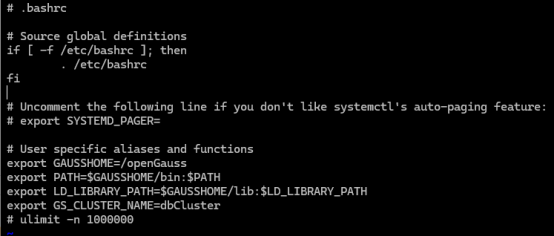
- 说明:在安装openGauss的时候,脚本会在.bashrc文件中自动添加
ulimit -n 1000000
在注释掉该配置后,切换用户就正常了。
- 错误代码如下:
[gauss@Node1 simpleInstall]$
[gauss@Node1 simpleInstall]$ gs_ctl status -D $GAUSSHOME/data/master -M primary
bash: gs_ctl: command not found
[gauss@Node1 simpleInstall]$
[gauss@Node1 simpleInstall]$
- 修改如下:
vi /home/gauss/.bashrc
- 使修改生效:
source /home/gauss/.bashrc
五、总结
openGauss数据库正在积极集成智能化技术,以提升数据库的性能和运维效率。以下是openGauss智能化的一些关键特点:
- AI4DB:这是openGauss的一项功能,包括参数智能调优与诊断、慢SQL发现、索引推荐、时序预测、异常检测等,旨在提供便捷的运维操作和性能提升,实现自调优、自监控、自诊断等功能。
- DB4AI:openGauss兼容MADlib生态,支持70+算法,并在性能上相比MADlib on PostgreSQL有数倍提升。它新增了XGBoost、prophet、GBDT等高级算法套件,并提供了统一SQL到机器学习的技术栈,实现从数据管理到模型训练的SQL语句“一键驱动”。此外,DB4AI提供了fenced UDF能力和数据库原生DB4AI库内算法能力,包括库内执行计划、库内算子及SQL语法。
- ABO优化器:也称为智能优化器,利用轻量级机器学习进行查询计划优化。它提供了智能基数估计和自适应计划选择两个功能,通过库内贝叶斯网络算法和查询选择率线性扩张实现执行效率的提升。
openGauss的智能化功能不仅提高了数据库的性能和管理效率,还通过数据库原生的AI计算引擎、模型管理、AI算子、AI原生执行计划等能力,为用户提供了普惠AI技术67。这些智能化特性的集成使得openGauss在数据库市场中具有较强的竞争力,并能够更好地支持企业的数字化转型。
还在等什么,赶快行动,学习openGauss吧!!!
最后修改时间:2024-08-21 10:03:39
「喜欢这篇文章,您的关注和赞赏是给作者最好的鼓励」
关注作者
【版权声明】本文为墨天轮用户原创内容,转载时必须标注文章的来源(墨天轮),文章链接,文章作者等基本信息,否则作者和墨天轮有权追究责任。如果您发现墨天轮中有涉嫌抄袭或者侵权的内容,欢迎发送邮件至:contact@modb.pro进行举报,并提供相关证据,一经查实,墨天轮将立刻删除相关内容。
