



1 环境描述
os:
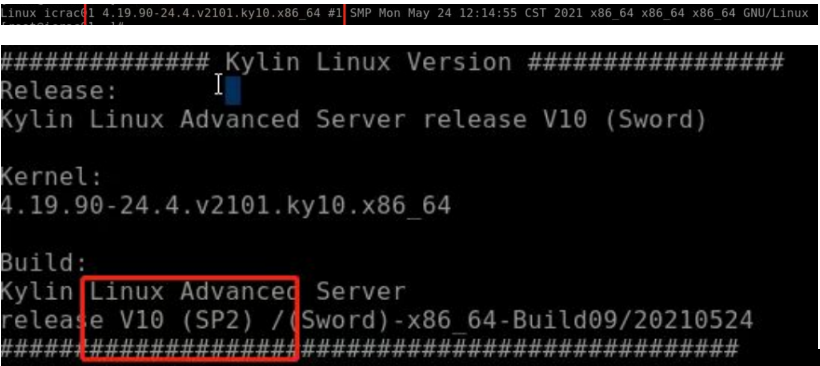
db: Oracle Rac 11.2.0.4.
2. 平台缩容后,集群无法启动
2024年8月16日,按照上级部门的指示,维护方做了如下的缩容:
CPU: 80c --> 60c
内存: 256g -->192g
3. 查询集群的相关报错信息

关键报错信息:unable to escalate to real time
从上面的ocssd日志中可以看到ocssd进程启动时无法得到较高的优先级,无法启动到real time。
4. 排除是不是缩容导致的
让维护方将上述资源还原回去,发现故障一样,说明故障和缩容无关。
5.排除安全软件titanagent的可能性
由于之前遇到过titanagent.service会导致集群无法启动的故障,禁用掉titanagent.service后,问题依然存在。
6. 故障的最终解决
最终解决思路来自以下2个案例,对其中的命令做了一点改动,扩大搜索目录:
https://support.hpe.com/hpesc/public/docDisplay?docId=emr_na-a00069245en_us
https://blog.itpub.net/23825935/viewspace-2917179/
查询文章提及的两个数值,分别是101和/user.slice,说明系统已经开启了CPU Accounting。
[root@xxx02 ~]# find /sys -name cpu.rt_runtime_us|wc -l
101
[root@xxx02 ~]# grep cpuacct /proc/$$/cgroup
3:cpu,cpuacct:/user.slice
我们相信,应该是某些软件因为设置了CPU相关的设置,隐式打开了CPU accounting,使用以下修改后的命令进行搜索:
[root@xxx02 ~]# find /etc /usr/lib/systemd -type f | xargs grep -e CPUAccounting -e CPUWeight -e StartupCPUWeight -e CPUShares -e StartupCPUShares -e CPUQuota |grep -v -e :# -e "^Binary file"
find返回如下3个文件:
/etc/systemd/system.control/collection_agent.service.d/50-CPUQuota.conf:CPUQuota=400%
匹配到二进制文件 /usr/lib/systemd/libsystemd-shared-243.so
匹配到二进制文件 /usr/lib/systemd/systemd
查看/etc/systemd/system.control/collection_agent.service.d/50-CPUQuota.conf配置文件:
CPUQuota=400% --此配置开启了CPUAccounting
RAC CSSD进程无法启动到real time模式,而RAC CSSD无法启动是因为系统中collection_agent这个服务开启了CPUAccounting导致。当CPUAccounting参数enabled时,将不能创建real-time进程。
经过咨询,collection_agent为近期部署数据库审计的agent。
将此collection_agent服务禁用后,重启系统后,集群可以正常启动。
systemctl list-unit-files|grep collection_agent
--禁用collection_agent服务
systemctl disable collection_agent
systemctl list-unit-files|grep collection_agent
systemctl status collection_agent
systemctl stop collection_agent
--以下为实操过程:
[root@xxx02 ~]# systemctl list-unit-files|grep collection_agent
collection_agent.service enabled
[root@xxx02 ~]# systemctl disable collection_agent
Removed /etc/systemd/system/multi-user.target.wants/collection_agent.service.
[root@xxx02 ~]# systemctl list-unit-files|grep collection_agent
collection_agent.service disabled
[root@xxx02 ~]#
[root@xxx02 ~]# systemctl status collection_agent
● collection_agent.service - collection agent service
Loaded: loaded (/usr/lib/systemd/system/collection_agent.service; disabled; vendor preset: disabled)
Drop-In: /etc/systemd/system.control/collection_agent.service.d
└─50-CPUQuota.conf, 50-MemoryHigh.conf, 50-MemoryMax.conf
Active: active (running) since Fri 2024-08-16 11:23:44 CST; 10h ago
Main PID: 2697 (collection_agen)
Tasks: 11
Memory: 40.5M (high: 12.5G max: 12.5G)
CGroup: /system.slice/collection_agent.service
└─2697 /usr/local/collection_agent/bin/collection_agent
8月 16 11:23:44 xxx02 systemd[1]: Starting collection agent service...
8月 16 11:23:44 xxx02 startup.sh[2683]: SCRIPT_RELATIVE_DIR=/usr/local/collection_agent/script
8月 16 11:23:44 xxx02 startup.sh[2683]: BASE_PATH=/usr/local/collection_agent
8月 16 11:23:44 xxx02 systemd[1]: Started collection agent service.
8月 16 11:23:44 xxx02 startup.sh[2683]: Found config file, config path: /usr/local/collection_agent/etc/config.yaml, /usr/local/collection_agent/etc/config.yaml
[root@xxx02 ~]#
[root@xxx02 ~]# systemctl stop collection_agent
[root@xxx02 ~]#
[root@xxx02 ~]# systemctl status collection_agent
● collection_agent.service - collection agent service
Loaded: loaded (/usr/lib/systemd/system/collection_agent.service; disabled; vendor preset: disabled)
Drop-In: /etc/systemd/system.control/collection_agent.service.d
└─50-CPUQuota.conf, 50-MemoryHigh.conf, 50-MemoryMax.conf
Active: inactive (dead)
8月 16 11:23:44 xxx02 systemd[1]: Starting collection agent service...
8月 16 11:23:44 xxx02 startup.sh[2683]: SCRIPT_RELATIVE_DIR=/usr/local/collection_agent/script
8月 16 11:23:44 xxx02 startup.sh[2683]: BASE_PATH=/usr/local/collection_agent
8月 16 11:23:44 xxx02 systemd[1]: Started collection agent service.
8月 16 11:23:44 xxx02 startup.sh[2683]: Found config file, config path: /usr/local/collection_agent/etc/config.yaml, /usr/local/collection_agent/etc/config.yaml
8月 16 22:16:26 xxx02 systemd[1]: Stopping collection agent service...
8月 16 22:16:26 xxx02 systemd[1]: collection_agent.service: Succeeded.
8月 16 22:16:26 xxx02 systemd[1]: Stopped collection agent service.
[root@xxx02 ~]# sync
[root@xxx02 ~]# reboot
重启系统后:
[root@xxx02 ~]# find /sys -name cpu.rt_runtime_us|wc -l
1
[root@xxx02 ~]# grep cpuacct /proc/$$/cgroup
12:cpu,cpuacct:/
crsctl start crs
[root@xxx02 ~]#
[grid@xxx02 ~]$ crsctl status res -t
--------------------------------------------------------------------------------
NAME TARGET STATE SERVER STATE_DETAILS
--------------------------------------------------------------------------------
Local Resources
--------------------------------------------------------------------------------
ora.DGCRS.dg
ONLINE ONLINE xxx01
ONLINE ONLINE xxx02
ora.DGSYS.dg
ONLINE ONLINE xxx01
ONLINE ONLINE xxx02
ora.DG_ARCH.dg
ONLINE ONLINE xxx01
ONLINE ONLINE xxx02
ora.DG_DATA.dg
ONLINE ONLINE xxx01
ONLINE ONLINE xxx02
ora.DG_MOB.dg
ONLINE ONLINE xxx01
ONLINE ONLINE xxx02
ora.LISTENER.lsnr
ONLINE ONLINE xxx01
ONLINE ONLINE xxx02
ora.asm
ONLINE ONLINE xxx01 Started
ONLINE ONLINE xxx02 Started
ora.gsd
OFFLINE OFFLINE xxx01
OFFLINE OFFLINE xxx02
ora.net1.network
ONLINE ONLINE xxx01
ONLINE ONLINE xxx02
ora.ons
ONLINE ONLINE xxx01
ONLINE ONLINE xxx02
--------------------------------------------------------------------------------
Cluster Resources
--------------------------------------------------------------------------------
ora.LISTENER_SCAN1.lsnr
1 ONLINE ONLINE xxx01
ora.cvu
1 ONLINE ONLINE xxx01
ora.icdb.db
1 ONLINE ONLINE xxx01 Open
2 ONLINE ONLINE xxx02 Open
ora.xxx01.vip
1 ONLINE ONLINE xxx01
ora.xxx02.vip
1 ONLINE ONLINE xxx02
ora.oc4j
1 ONLINE ONLINE xxx01
ora.scan1.vip
1 ONLINE ONLINE xxx01
