



问题描述
服务器卡顿的厉害,xshell工具不能访问,联系服务器管理员后,其对服务器进行了重启,恢复访问后查看集群状态显示状态异常,出现了CN服务异常告警,查询集群状态, CN组件状态为Deleted。
详情如下:
--查看集群状态
[omm@node01 ~]$ cm_ctl query -Cvipd
[  CMServer State   ]

node             node_ip         instance                                state
--------------------------------------------------------------------------------
1  192.168.30.51 192.168.30.51   1    /gaussdb/cluster/data/cm/cm_server Primary
2  192.168.30.52 192.168.30.52   2    /gaussdb/cluster/data/cm/cm_server Standby
3  192.168.30.53 192.168.30.53   3    /gaussdb/cluster/data/cm/cm_server Standby

[    ETCD State     ]

node             node_ip         instance                        state
------------------------------------------------------------------------------
1  192.168.30.51 192.168.30.51   7001 /gaussdb/cluster/data/etcd StateFollower
2  192.168.30.52 192.168.30.52   7002 /gaussdb/cluster/data/etcd StateFollower
3  192.168.30.53 192.168.30.53   7003 /gaussdb/cluster/data/etcd StateLeader

[   Cluster State   ]

cluster_state   : Degraded  降级
redistributing  : No
balanced        : No
current_az      : AZ_ALL

[ Coordinator State ]

node             node_ip         instance                             state
----------------------------------------------------------------------
1  192.168.30.51 192.168.30.51   5001 8000   /gaussdb/cluster/data/cn Deleted
2  192.168.30.52 192.168.30.52   5002 8000   /gaussdb/cluster/data/cn Normal
3  192.168.30.53 192.168.30.53   5003 8000   /gaussdb/cluster/data/cn Deleted

[ Central Coordinator State ]

node             node_ip         instance                      state
----------------------------------------------------------------------
2  192.168.30.52 192.168.30.52   5002 /gaussdb/cluster/data/cn Normal

[     GTM State     ]

node             node_ip         instance                       state                    sync_state
-------------------------------------------------------------------------------------------------------
1  192.168.30.51 192.168.30.51   1001 /gaussdb/cluster/data/gtm P Primary Connection ok  Sync
2  192.168.30.52 192.168.30.52   1002 /gaussdb/cluster/data/gtm S Standby Connection ok  Sync
3  192.168.30.53 192.168.30.53   1003 /gaussdb/cluster/data/gtm S Standby Connection ok  Sync

[  Datanode State   ]

node             node_ip         instance                                     state            | node             node_ip         instance                                     state            | node             node_ip         instancestate
---------------------------------------------------------------------------------------------------------------------------------------------------------------------------------------------------------------------------------------------------------------------------------------------------
1  192.168.30.51 192.168.30.51   6001 33100  /gaussdb/cluster/data/dn/dn_6001 P Primary Normal | 2  192.168.30.52 192.168.30.52   6002 33100  /gaussdb/cluster/data/dn/dn_6002 S Standby Normal | 3  192.168.30.53 192.168.30.53   6003 33100  /gaussdb/cluster/data/dn/dn_6003S Standby Normal
2  192.168.30.52 192.168.30.52   6004 33120  /gaussdb/cluster/data/dn/dn_6004 P Standby Normal | 1  192.168.30.51 192.168.30.51   6005 33120  /gaussdb/cluster/data/dn/dn_6005 S Primary Normal | 3  192.168.30.53 192.168.30.53   6006 33120  /gaussdb/cluster/data/dn/dn_6006S Standby Normal
3  192.168.30.53 192.168.30.53   6007 33140  /gaussdb/cluster/data/dn/dn_6007 P Primary Normal | 2  192.168.30.52 192.168.30.52   6008 33140  /gaussdb/cluster/data/dn/dn_6008 S Standby Normal | 1  192.168.30.51 192.168.30.51   6009 33140  /gaussdb/cluster/data/dn/dn_6009S Standby Normal
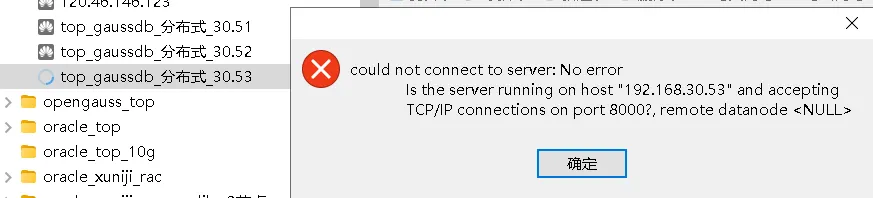
连接工具也只能访问30.52节点,访问30.51和30.53节点提示如下报错:
问题原因
可能原因有以下:
1、 虚拟机重启,断网等故障导致CN被剔除。
2、 CN与主DN断连导致CN被剔除。
3、 CN组件Down导致CN被剔除。
4、 CN组件频繁重启导致CN被剔除。
5、 CN组件被主动剔除。
分析过程
build相关日志路径:$GAUSSLOG/bin/gs_ctl
cm_agent日志路径:$GAUSSLOG/cm
实例日志路径:$GAUSSLOG/gs_log/dn_xx
cn日志路径:$GAUSSLOG/gs_log/cn_5001
系统日志(仅root用户):/var/log/message
查看磁盘空间
df -h 查看磁盘空间,3个节点磁盘空间剩余还有不少。
查询集群状态
登录任一节点,切换到数据库用户,查询集群状态 ,集群状态变成了Cluster State:Degraded,30.51和30.53节点上的CN节点被剔除,状态变成了Deleted。
su - omm
cm_ctl query -Cvipd
输出如下:
[  CMServer State   ]

node             node_ip         instance                                state
--------------------------------------------------------------------------------
1  192.168.30.51 192.168.30.51   1    /gaussdb/cluster/data/cm/cm_server Primary
2  192.168.30.52 192.168.30.52   2    /gaussdb/cluster/data/cm/cm_server Standby
3  192.168.30.53 192.168.30.53   3    /gaussdb/cluster/data/cm/cm_server Standby
......
[   Cluster State   ]

cluster_state   : Degraded
redistributing  : No
balanced        : No
current_az      : AZ_ALL

[ Coordinator State ]

node             node_ip         instance                             state
----------------------------------------------------------------------
1  192.168.30.51 192.168.30.51   5001 8000   /gaussdb/cluster/data/cn Deleted
2  192.168.30.52 192.168.30.52   5002 8000   /gaussdb/cluster/data/cn Normal
3  192.168.30.53 192.168.30.53   5003 8000   /gaussdb/cluster/data/cn Deleted
......
查看主节点的cm_server日志
登录到CMS主节点查集群状态获取主节点信息
任一个节点登录到CMS主节点(显示节点30.51的实例状态是Primary),查看cm_server日志。 CMS主节点,可通过查询集群状态获取 。
su - omm
cm_ctl query -Cv
输出如下:
[omm@node01 ~]$ cm_ctl query -Cv
[  CMServer State   ]

node             instance state
---------------------------------
1  192.168.30.51 1        Primary  --显示节点30.51的实例状态是Primary
2  192.168.30.52 2        Standby
3  192.168.30.53 3        Standby
......
查看主节点的cm_server日志
打开对应时间点的cm_server-***.log日志,如对应时间点的日志已被压缩,则查看对应的cm_server-****.log.gz日志。
su - omm
cd $GAUSSLOG/cm/cm_server
vi cm_server-2024-08-26_100433-current.log
输出如下:
2024-08-26 11:32:58.134 tid=24745 Monitor ASYN LOG: instance(5001) heartbeat timeout, heartbeat:6191, threshold:6
2024-08-26 11:32:58.134 tid=24745 Monitor ASYN LOG: instance(5003) heartbeat timeout, heartbeat:6191, threshold:6
2024-08-26 11:32:58.143 tid=24759 AGENT_WORKER ASYN LOG: instance(node =1 instanceid =5001) is not in normal status(db_state=18 status=5)
2024-08-26 11:32:58.567 tid=24758 AGENT_WORKER ASYN LOG: instance(node =3 instanceid =5003) is not in normal status(db_state=18 status=5)
2024-08-26 11:32:58.577 tid=24770 STORAGE ASYN LOG: [ReadOnlyActRecordInitState] instance 5001 in the initial state, disk_usage:8, read_only:0, read_only_threshold:85
2024-08-26 11:32:59.144 tid=24759 AGENT_WORKER ASYN LOG: instance(node =1 instanceid =5001) is not in normal status(db_state=18 status=5)
2024-08-26 11:32:59.568 tid=24758 AGENT_WORKER ASYN LOG: instance(node =3 instanceid =5003) is not in normal status(db_state=18 status=5)
2024-08-26 11:33:00.144 tid=24759 AGENT_WORKER ASYN LOG: instance(node =1 instanceid =5001) is not in normal status(db_state=18 status=5)
2024-08-26 11:33:00.569 tid=24758 AGENT_WORKER ASYN LOG: instance(node =3 instanceid =5003) is not in normal status(db_state=18 status=5)
2024-08-26 11:33:01.146 tid=24759 AGENT_WORKER ASYN LOG: instance(node =1 instanceid =5001) is not in normal status(db_state=18 status=5)
2024-08-26 11:33:01.571 tid=24758 AGENT_WORKER ASYN LOG: instance(node =3 instanceid =5003) is not in normal status(db_state=18 status=5)
2024-08-26 11:33:02.146 tid=24759 AGENT_WORKER ASYN LOG: instance(node =1 instanceid =5001) is not in normal status(db_state=18 status=5)
2024-08-26 11:33:02.570 tid=24758 AGENT_WORKER ASYN LOG: instance(node =3 instanceid =5003) is not in normal status(db_state=18 status=5)
场景1:cm_server日志中搜索有关键词cn_down_to_delete=1
在cm_server日志中搜索有关键词cn_down_to_delete=1:
● 如对应时间点存在该信息,则原因为CN组件Down 导致,参考CN状态Down排查详细原因。
● 确认故障节点是否发生断网。
● 确认故障节点操作系统是否发生过重启。
● 故障处理后执行节点修复加回被剔除的CN。
● 如不涉及继续场景2。
场景2:cm_server日志中搜索有关键词isCnDnDisconnected=1
在cm_server日志中搜索有关键词: isCnDnDisconnected=1:
● 如对应时间点存在该信息,则原因为CN组件与主DN断链导致,此时需要排查CN与主DN之间的网络,待网络恢复后,执行节点修复加回被剔除的CN。
● 如不涉及继续场景3。
场景3:cm_server日志中搜索有关键词cmd_disable_cn=1
在cm_server日志中搜索有关键词: cmd_disable_cn=1:
● 如对应时间点存在该信息,则原因为CN组件被主动剔除,确认剔除原因后,后执行节点修复加回被剔除的CN。
● 如不涉及继续场景4。
场景4:cm_server日志中搜索有关键词cnReadonly=1
在cm_server日志中搜索有关键词: cnReadonly=1:
● 如对应时间点存在该信息,则原因为CN组件readonly 导致,参考CN状态为readonly排查详细原因。
● 如不涉及继续场景5。
场景5:cm_server日志中搜索有关键词cn instance restarts within ten minutes is more
than
在cm_server日志中搜索有关键词” cn instance restarts within ten minutes is more than”:
● 如对应时间点存在此信息,则原因为CN组件频繁重启导致,出现此种情况,参考
CN 启动失败进一步定位,故障处理后执行节点修复加回被剔除的CN。
● 如不涉及继续场景6
场景6:联系华为工程师提供技术支持
若以上均不涉及,则联系华为工程师提供技术支持
本文档属于场景6的情况。
解决办法
修复CN
分别在已剔除的CN节点上操作,修复过程会有些漫长,大概5分钟左右
--192.168.30.51上执行
gs_replace -t config  -h 192.168.30.51  #修复CN组件
gs_replace -t start  -h 192.168.30.51  #启动CN组件


--192.168.30.53上执行
gs_replace -t config  -h 192.168.30.53  #修复CN组件
gs_replace -t start  -h 192.168.30.53  #启动CN组件
以192.168.30.51为例,输出如下:
--修复CN
[omm@node01 cn_5001]$ gs_replace -t config  -h 192.168.30.51
Start checking bin files on node:['192.168.30.51']
checked bin files on node:[192.168.30.51], output:Success
Check the etcd health.
ETCD normal count:3
Check the number of abnormal ETCD is completed.
Fixing ETCD instances.
Fixing all the CMAgents instances.
There are [0] CMAgents need to be repaired in cluster.
There are [0] GNS need to be repaired in cluster.
Update resource control config file: Not found resource config file on this node.
Check stop resume file failed.
Fresh cluster status successfully.
Checking replace condition.
Check the etcd health.
ETCD normal count:3
Check the number of abnormal ETCD is completed.
Successfully checked replace condition.
Waiting for promote peer instances.
.
Successfully upgraded standby instances.
Scp obs server key file to warmstandby node.
Generate server key file succeed.
Configuring replacement instances.
Successfully configured replacement instances.
Deleting abnormal CN from pgxc_node on the normal CN.
No abnormal CN needs to be deleted.
Unlocking cluster.
Successfully unlocked cluster.
Locking cluster.
Successfully locked cluster.
Incremental building CN from the Normal CN.
Successfully incremental built CN from the Normal CN.
Creating deleted CN on the normal CN.
No CN needs to be created.
Setting the SCTP.
Successfully set the SCTP.
Start to update_cn_status_to_normal_on_etcd.
Successfully update_cn_status_to_normal_on_etcd.
Unlocking cluster.
Successfully unlocked cluster.
Configuration succeeded.
Successfully do action: config.

--启动CN组件
[omm@node01 cn_5001]$ gs_replace -t start  -h 192.168.30.51
Starting.
======================================================================

Successfully started instance process. Waiting to become Normal.
======================================================================

======================================================================
Start succeeded on all nodes.
Start succeeded.
Successfully do action: start.
查集群状态
查集群状态,集群状态已经由degraded变成了Noraml,CN组件状态也由Deleted变成了Noraml,任一个节点操作即可。
cm_ctl query -Cvipd输出如下:
[omm@node01 ~]$ cm_ctl query -Cvipd
[  CMServer State   ]

node             node_ip         instance                                state
--------------------------------------------------------------------------------
1  192.168.30.51 192.168.30.51   1    /gaussdb/cluster/data/cm/cm_server Primary
2  192.168.30.52 192.168.30.52   2    /gaussdb/cluster/data/cm/cm_server Standby
3  192.168.30.53 192.168.30.53   3    /gaussdb/cluster/data/cm/cm_server Standby

[    ETCD State     ]

node             node_ip         instance                        state
------------------------------------------------------------------------------
1  192.168.30.51 192.168.30.51   7001 /gaussdb/cluster/data/etcd StateFollower
2  192.168.30.52 192.168.30.52   7002 /gaussdb/cluster/data/etcd StateFollower
3  192.168.30.53 192.168.30.53   7003 /gaussdb/cluster/data/etcd StateLeader

[   Cluster State   ]

cluster_state   : Normal
redistributing  : No
balanced        : No
current_az      : AZ_ALL

[ Coordinator State ]

node             node_ip         instance                             state
----------------------------------------------------------------------
1  192.168.30.51 192.168.30.51   5001 8000   /gaussdb/cluster/data/cn Normal
2  192.168.30.52 192.168.30.52   5002 8000   /gaussdb/cluster/data/cn Normal
3  192.168.30.53 192.168.30.53   5003 8000   /gaussdb/cluster/data/cn Normal

[ Central Coordinator State ]

node             node_ip         instance                      state
----------------------------------------------------------------------
2  192.168.30.52 192.168.30.52   5002 /gaussdb/cluster/data/cn Normal

[     GTM State     ]

node             node_ip         instance                       state                    sync_state
-------------------------------------------------------------------------------------------------------
1  192.168.30.51 192.168.30.51   1001 /gaussdb/cluster/data/gtm P Primary Connection ok  Sync
2  192.168.30.52 192.168.30.52   1002 /gaussdb/cluster/data/gtm S Standby Connection ok  Sync
3  192.168.30.53 192.168.30.53   1003 /gaussdb/cluster/data/gtm S Standby Connection ok  Sync

[  Datanode State   ]

node             node_ip         instance                                     state            | node             node_ip         instance                                     state            | node             node_ip         instancestate
---------------------------------------------------------------------------------------------------------------------------------------------------------------------------------------------------------------------------------------------------------------------------------------------------
1  192.168.30.51 192.168.30.51   6001 33100  /gaussdb/cluster/data/dn/dn_6001 P Primary Normal | 2  192.168.30.52 192.168.30.52   6002 33100  /gaussdb/cluster/data/dn/dn_6002 S Standby Normal | 3  192.168.30.53 192.168.30.53   6003 33100  /gaussdb/cluster/data/dn/dn_6003S Standby Normal
2  192.168.30.52 192.168.30.52   6004 33120  /gaussdb/cluster/data/dn/dn_6004 P Standby Normal | 1  192.168.30.51 192.168.30.51   6005 33120  /gaussdb/cluster/data/dn/dn_6005 S Primary Normal | 3  192.168.30.53 192.168.30.53   6006 33120  /gaussdb/cluster/data/dn/dn_6006S Standby Normal
3  192.168.30.53 192.168.30.53   6007 33140  /gaussdb/cluster/data/dn/dn_6007 P Primary Normal | 2  192.168.30.52 192.168.30.52   6008 33140  /gaussdb/cluster/data/dn/dn_6008 S Standby Normal | 1  192.168.30.51 192.168.30.51   6009 33140  /gaussdb/cluster/data/dn/dn_6009S Standby Normal
[omm@node01 ~]$