



简介
集群介绍
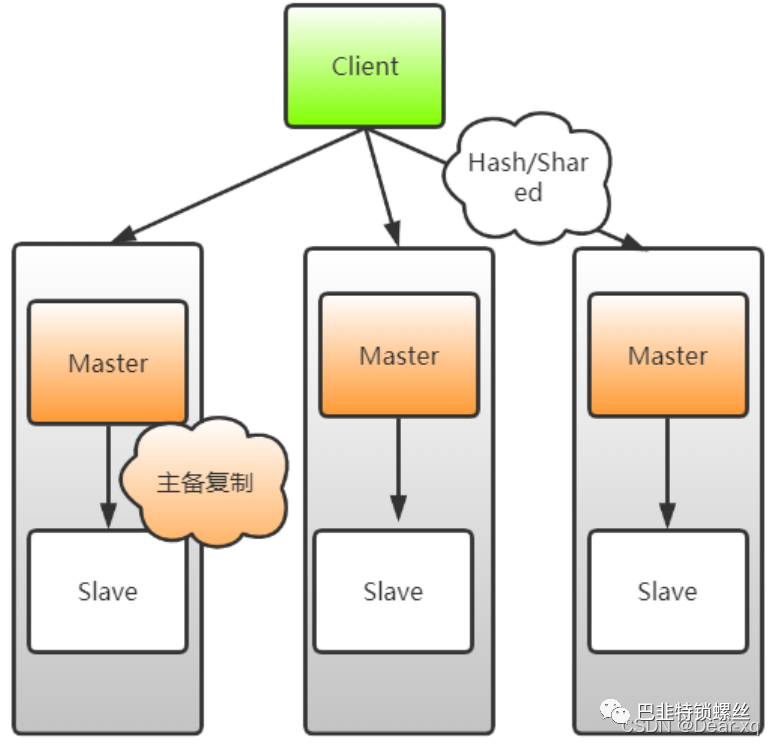
Redis集群架构
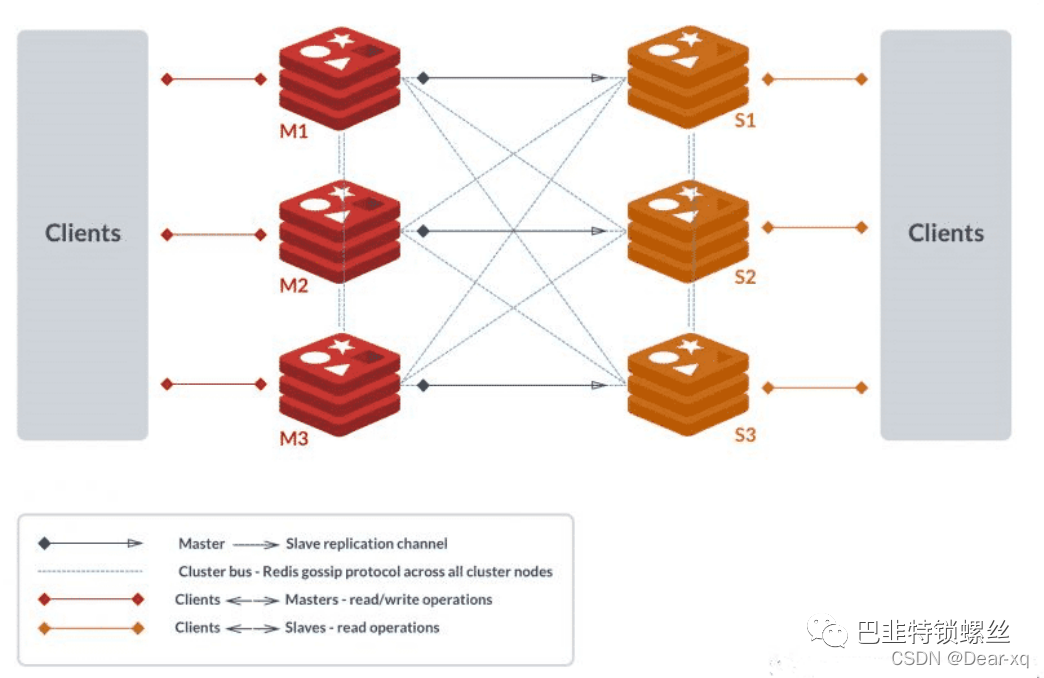
Note that the minimal cluster that works as expected requires to contain at least three master nodes.
主从模式
优点
缺点
数据分区方式
常用分区算法
范围分区
节点取余分区
一致性哈希分区
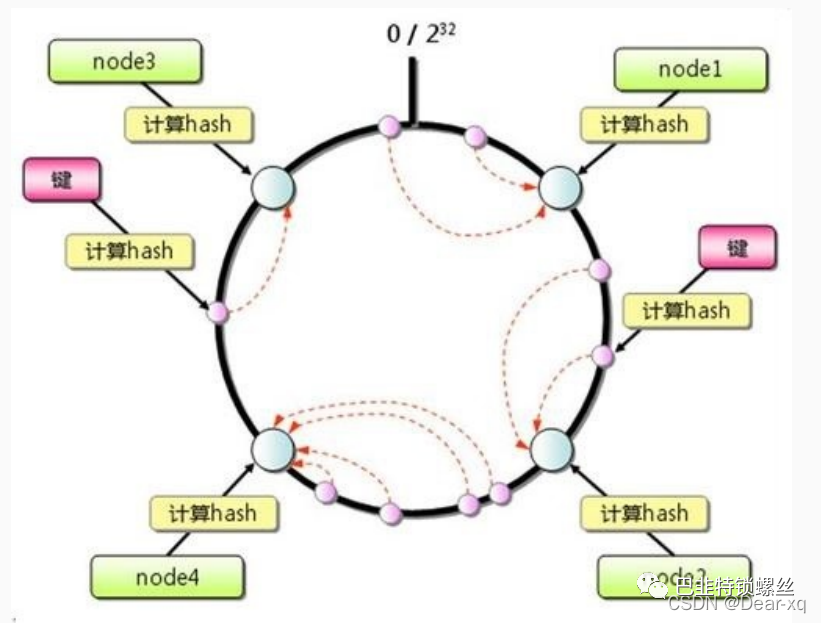
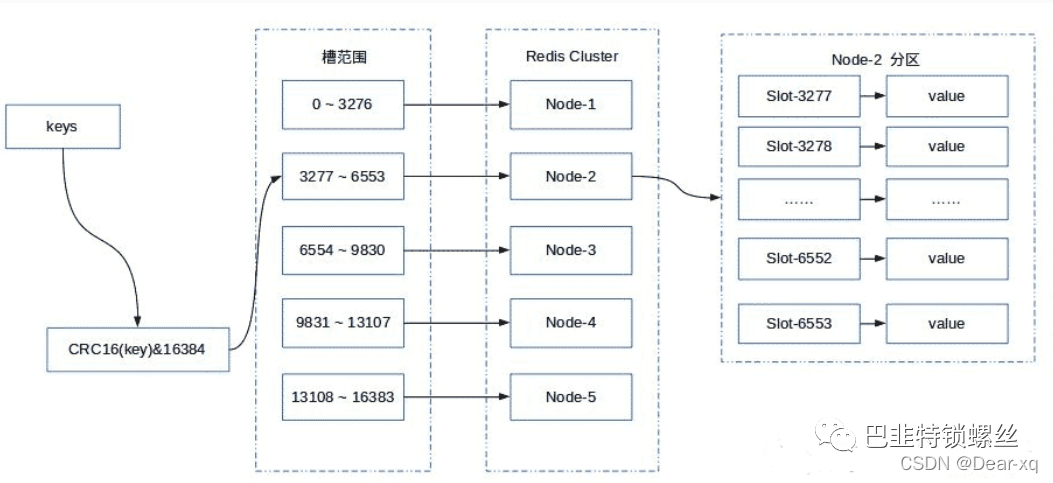
虚拟槽分区
集群环境搭建
节点准备
| IP | Redis节点 |
|---|---|
| 192.168.10.101 | 6371,6372 |
| 192.168.10.102 | 6373,6374 |
| 192.168.10.103 | 6375,6376 |
创建目录
mkdir -p /usr/local/redis/cluster/conf /usr/local/redis/cluster/data /usr/local/redis/cluster/log
编写配置文件
# 放行访问IP限制bind 0.0.0.0# 端口port 6371# 后台启动daemonize yes# 日志存储目录及日志文件名logfile "/usr/local/redis/cluster/log/redis-6371.log"# rdb数据文件名dbfilename dump-6371.rdb# aof模式开启和aof数据文件名appendonly yesappendfilename "appendonly-6371.aof"# rdb数据文件和aof数据文件的存储目录dir /usr/local/redis/cluster/data# 设置密码requirepass 123456# 从节点访问主节点密码(必须与 requirepass 一致)masterauth 123456# 是否开启集群模式,默认 nocluster-enabled yes# 集群节点信息文件,会保存在 dir 配置对应目录下cluster-config-file nodes-6371.conf# 集群节点连接超时时间cluster-node-timeout 15000# 集群节点 IPcluster-announce-ip 192.168.10.101# 集群节点映射端口cluster-announce-port 6371# 集群节点总线端口cluster-announce-bus-port 16371
创建 Redis Cluster 集群
启动 6 个 Redis 节点
/usr/local/redis/bin/redis-server usr/local/redis/cluster/conf/redis-6371.conf/usr/local/redis/bin/redis-server usr/local/redis/cluster/conf/redis-6372.conf/usr/local/redis/bin/redis-server usr/local/redis/cluster/conf/redis-6373.conf/usr/local/redis/bin/redis-server usr/local/redis/cluster/conf/redis-6374.conf/usr/local/redis/bin/redis-server usr/local/redis/cluster/conf/redis-6375.conf/usr/local/redis/bin/redis-server usr/local/redis/cluster/conf/redis-6376.conf
创建集群
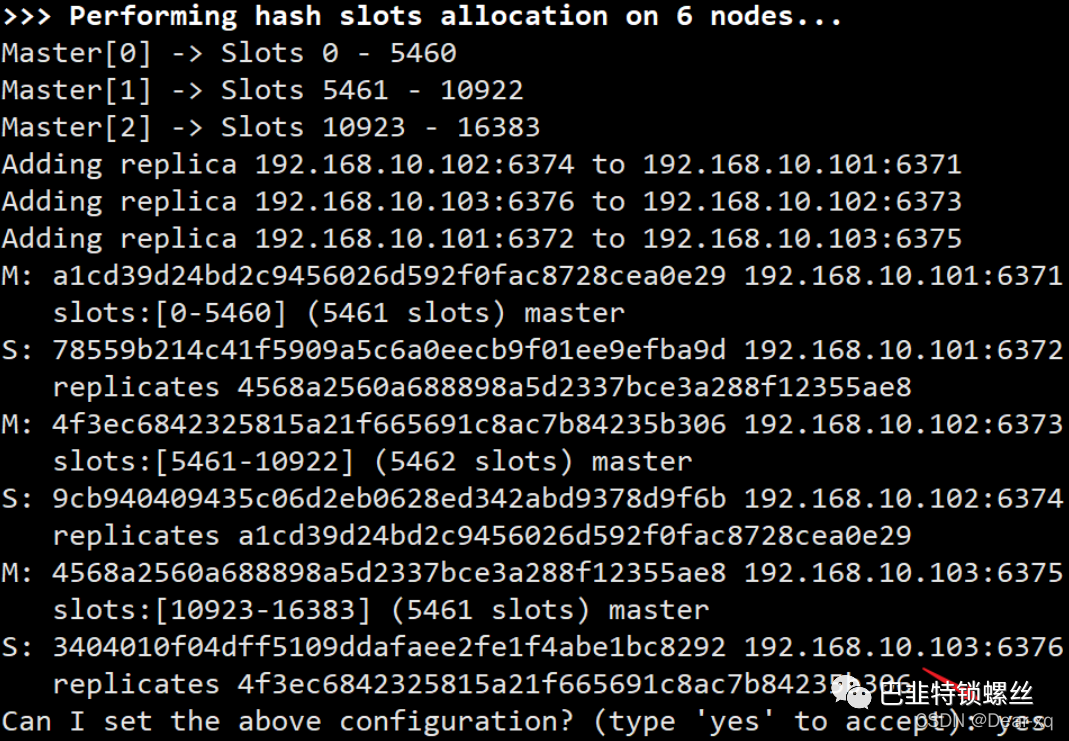
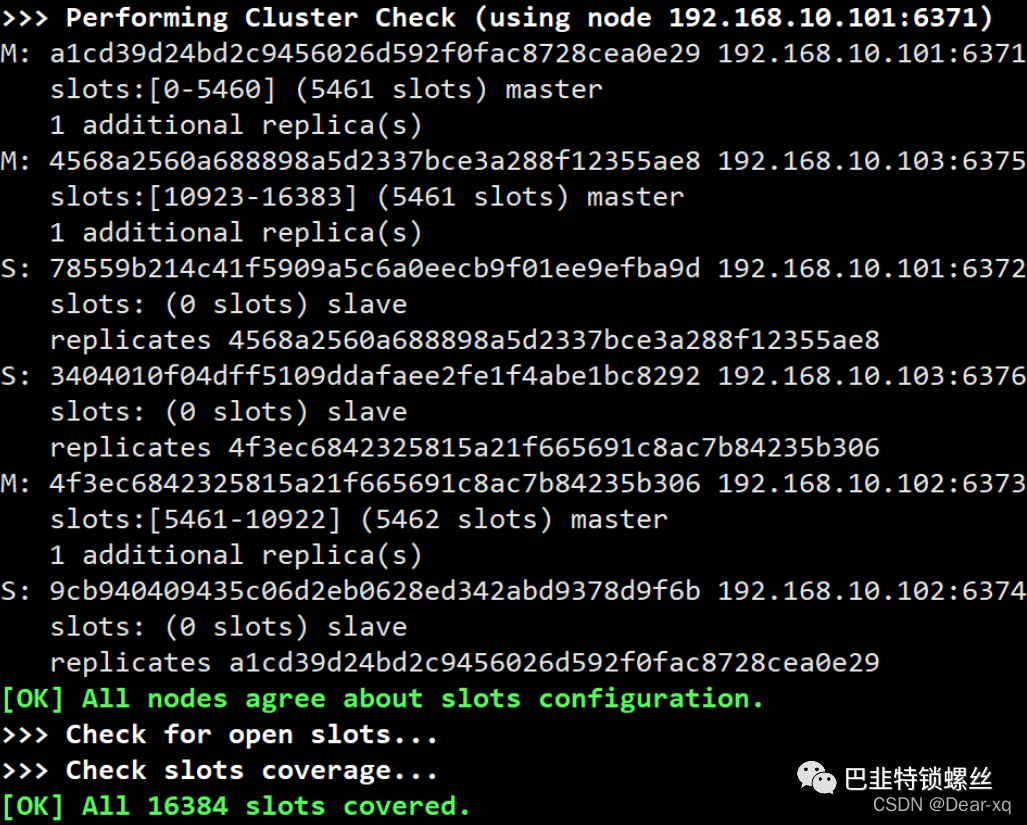
检查集群状态
/usr/local/redis/bin/redis-cli -a 123456 --cluster check 192.168.10.101:6371
# 主节点信息192.168.10.101:6371 (a1cd39d2...) -> 0 keys | 5461 slots | 1 slaves.192.168.10.103:6375 (4568a256...) -> 0 keys | 5461 slots | 1 slaves.192.168.10.102:6373 (4f3ec684...) -> 0 keys | 5462 slots | 1 slaves.# 主节点有多少 Key[OK] 0 keys in 3 masters.# 每个槽的平均分配情况0.00 keys per slot on average.# 集群状态检查操作由 192.168.10.101:6371 节点执行>>> Performing Cluster Check (using node 192.168.10.101:6371)# 主节点信息以及附加的从节点个数M: a1cd39d24bd2c9456026d592f0fac8728cea0e29 192.168.10.101:6371slots:[0-5460] (5461 slots) master1 additional replica(s)M: 4568a2560a688898a5d2337bce3a288f12355ae8 192.168.10.103:6375slots:[10923-16383] (5461 slots) master1 additional replica(s)# 从节点信息以及复制的主节点 IDS: 78559b214c41f5909a5c6a0eecb9f01ee9efba9d 192.168.10.101:6372slots: (0 slots) slavereplicates 4568a2560a688898a5d2337bce3a288f12355ae8S: 3404010f04dff5109ddafaee2fe1f4abe1bc8292 192.168.10.103:6376slots: (0 slots) slavereplicates 4f3ec6842325815a21f665691c8ac7b84235b306M: 4f3ec6842325815a21f665691c8ac7b84235b306 192.168.10.102:6373slots:[5461-10922] (5462 slots) master1 additional replica(s)S: 9cb940409435c06d2eb0628ed342abd9378d9f6b 192.168.10.102:6374slots: (0 slots) slavereplicates a1cd39d24bd2c9456026d592f0fac8728cea0e29# 所有节点都同意槽的配置情况[OK] All nodes agree about slots configuration.>>> Check for open slots...>>> Check slots coverage...# 所有 16384 个槽都包括在内[OK] All 16384 slots covered.
主节点日志
1178:C # oO0OoO0OoO0Oo Redis is starting oO0OoO0OoO0Oo1178:C # Redis version=6.0.9, bits=64, commit=00000000, modified=0, pid=1178,just started1178:C # Configuration loaded1178:M * Increased maximum number of open files to 10032 (it wasoriginally set to 1024).# 未找到集群环境配置,当前节点 ID 为 a1cd39d24bd2c9456026d592f0fac8728cea0e291178:M * No cluster configuration found, I'm a1cd39d24bd2c9456026d592f0fac8728cea0e29# 集群模式启动,端口为 63711178:M * Running mode=cluster, port=6371.# 以下警告是关于 Linux 服务器的内存等相关问题,由于是虚拟机环境导致这可忽略1178:M # WARNING: The TCP backlog setting of 511 cannot be enforced because proc/sys/net/core/somaxconn is set to the lower value of 128.# 服务器初始化1178:M # Server initialized1178:M # WARNING overcommit_memory is set to 0! Background save may fail under low memory condition. To fix this issue add 'vm.overcommit_memory = 1' to etc/sysctl.conf and then reboot or run the command 'sysctl vm.overcommit_memory=1' for this to take effect.1178:M # WARNING you have Transparent Huge Pages (THP) support enabled in your kernel. This will create latency and memory usage issues with Redis. To fix this issue run the command 'echo madvise> /sys/kernel/mm/transparent_hugepage/enabled' as root, and add it to your etc/rc.local in order to retain the setting after a reboot. Redis must be restarted after THP is disabled (set to 'madvise' or 'never').# 准备就绪,接受客户端连接1178:M * Ready to accept connections# 配置中写入纪元时间1178:M # configEpoch set to 1 via CLUSTER SET-CONFIG-EPOCH# 192.168.10.102:6374 从节点发起 SYNC 请求1178:M * Replica 192.168.10.102:6374 asks for synchronization# 拒绝部分重同步1178:M * Partial resynchronization not accepted: Replication ID mismatch (Replica asked for 'c5c1eab8eeba0ec77023aba4d375c600648bde8c', my replication IDs are '10d98a2bae9316fc6a3c385ba85f1188826e1a84' and 0000000000000000000000000000000000000000')# 创建 repl_backlog ⽂件及⽣成 master_replid1178:M * Replication backlog created, my new replication IDs are'f1eb26435119a6c47c9b9abda86d6067d9110c04' and '0000000000000000000000000000000000000000'# 通过 BGSAVE 指令将数据写入磁盘(RBD操作)1178:M * Starting BGSAVE for SYNC with target: disk# 开启一个子守护进程执行写入1178:M * Background saving started by pid 1195# 数据已写入磁盘1195:C * DB saved on disk# 有 4MB 数据已写入磁盘1195:C * RDB: 4 MB of memory used by copy-on-write# 保存结束1178:M * Background saving terminated with success# 从节点同步数据结束1178:M * Synchronization with replica 192.168.10.102:6374 succeeded# 集群环境状态 OK1178:M # Cluster state changed: ok
从节点日志
1187:C # oO0OoO0OoO0Oo Redis is starting oO0OoO0OoO0Oo1187:C # Redis version=6.0.9, bits=64, commit=00000000, modified=0,pid=1187, just started1187:C # Configuration loaded1187:M * Increased maximum number of open files to 10032 (it wasge/enabled' as root, and add it to your etc/rc.local in order to retain the setting after a reboot. Redis must be restarted after THP is disabled (set to 'madvise' or 'never').# 准备就绪,接受客户端连接1187:M * Ready to accept connections# 配置中写入纪元时间1187:M # configEpoch set to 4 via CLUSTER SET-CONFIG-EPOCH# 变为副本前的准备工作1187:S * Before turning into a replica, using my own master parameters to synthesize a cached master: I may be able to synchronizewith the new master with just a partial transfer.# 集群环境状态 OK1187:S # Cluster state changed: ok# 连接主节点 192.168.10.101:63711187:S * Connecting to MASTER 192.168.10.101:6371# 主从同步开始1187:S * MASTER <-> REPLICA sync started# 触发 SYNC 的非阻塞连接事件1187:S * Non blocking connect for SYNC fired the event.# 主节点回复:PING,同步可以继续1187:S * Master replied to PING, replication can continue...# 尝试部分重同步(主节点日志中可以看到已被拒绝)1187:S * Trying a partial resynchronization (request c5c1eab8eeba0ec77023aba4d375c600648bde8c:1).# 全量复制主节点1187:S * Full resync from master: f1eb26435119a6c47c9b9abda86d6067d9110c04:0# 抛弃之前缓存的主节点状态1187:S * Discarding previously cached master state.# 主从复制:从主节点接收 175 个字节存储到磁盘1187:S * MASTER <-> REPLICA sync: receiving 175 bytes from master to disk# 主从复制:刷新旧数据1187:S * MASTER <-> REPLICA sync: Flushing old data# 主从复制:将数据加载到内存1187:S * MASTER <-> REPLICA sync: Loading DB in memory# 加载 RDB1187:S * Loading RDB produced by version 6.0.91187:S * RDB age 0 seconds1187:S * RDB memory usage when created 2.52 Mb# 主从复制:顺利完成1187:S * MASTER <-> REPLICA sync: Finished with success# 后台开启进程执行 AOF 写入1187:S * Background append only file rewriting started by pid 11941187:S * AOF rewrite child asks to stop sending diffs.1194:C * Parent agreed to stop sending diffs. Finalizing AOF...1194:C * Concatenating 0.00 MB of AOF diff received from parent.1194:C * SYNC append only file rewrite performed# 4 MB数据被写入 AOF 文件1194:C * AOF rewrite: 4 MB of memory used by copy-on-write# 后台 AOF 进程成功终止1187:S * Background AOF rewrite terminated with success1187:S * Residual parent diff successfully flushed to the rewritten AOF (0.00 MB)# 后台 AOF 重写顺利完成1187:S * Background AOF rewrite finished successfully
查看集群信息
# 查看集群信息192.168.10.103:6376> cluster info
# 集群状态cluster_state:ok# 集群槽分配总数cluster_slots_assigned:16384# 集群槽成功分配总数cluster_slots_ok:16384# 集群槽可能失效总数cluster_slots_pfail:0# 集群槽已经失效总数cluster_slots_fail:0# 集群中 Redis 节点数量cluster_known_nodes:6# 集群中设置的分片个数 3 主 3 从cluster_size:3# 集群中的currentEpoch总是一致的,currentEpoch越高,代表节点的配置或者操作越新# 集群中最大的那个 node 的 epochcluster_current_epoch:6# 当前节点的 config epoch,每个主节点都不同,一直递增, 其表示某节点最后一次变成主节点或获取新 slot 所有权的逻辑时间cluster_my_epoch:3cluster_stats_messages_ping_sent:71cluster_stats_messages_pong_sent:76cluster_stats_messages_meet_sent:1cluster_stats_messages_sent:150cluster_stats_messages_ping_received:76cluster_stats_messages_pong_received:72cluster_stats_messages_received:150
查看节点信息
# 查看集群结点信息,该信息也保存在 nodes-*.conf 配置⽂件中192.168.10.103:6376> cluster nodes
# 节点ID | IP:PORT | 节点的⻆色(master,slave,myself)以及状态(pfail,fail),如果节点是一个从节点的话,那么跟在其之后的将是主节点的ID | 集群最近一次向节点发送 PING 命令之后,过了多长时间还没接到回复 | 节点最近一次返回 PONG 回复的时间 | 节点的配置纪元(config epoch) | 本节点的⽹络连接情况 | 主节点目前包含的槽4f3ec6842325815a21f665691c8ac7b84235b306 192.168.10.102:6373@16373 master - 0 1606821938050 3 connected 5461-109223404010f04dff5109ddafaee2fe1f4abe1bc8292 192.168.10.103:6376@16376 myself,slave 4f3ec6842325815a21f665691c8ac7b84235b306 0 1606821935000 3 connected9cb940409435c06d2eb0628ed342abd9378d9f6b 192.168.10.102:6374@16374 slave a1cd39d24bd2c9456026d592f0fac8728cea0e29 0 1606821935000 1 connected78559b214c41f5909a5c6a0eecb9f01ee9efba9d 192.168.10.101:6372@16372 slave 4568a2560a688898a5d2337bce3a288f12355ae8 0 1606821936033 5 connected4568a2560a688898a5d2337bce3a288f12355ae8 192.168.10.103:6375@16375 master - 0 1606821936000 5 connected 10923-16383a1cd39d24bd2c9456026d592f0fac8728cea0e29 192.168.10.101:6371@16371 master - 0 1606821937042 1 connected 0-5460
集群环境测试
192.168.10.101:6371> set username zhangsan-> Redirected to slot [14315] located at 192.168.10.103:6375OK192.168.10.103:6375> set age 18-> Redirected to slot [741] located at 192.168.10.101:6371OK192.168.10.101:6371> set address shOK192.168.10.101:6371> get username-> Redirected to slot [14315] located at 192.168.10.103:6375"zhangsan"192.168.10.103:6375> get address-> Redirected to slot [3680] located at 192.168.10.101:6371"sh"192.168.10.101:6371> get age"18"
从节点只读模式
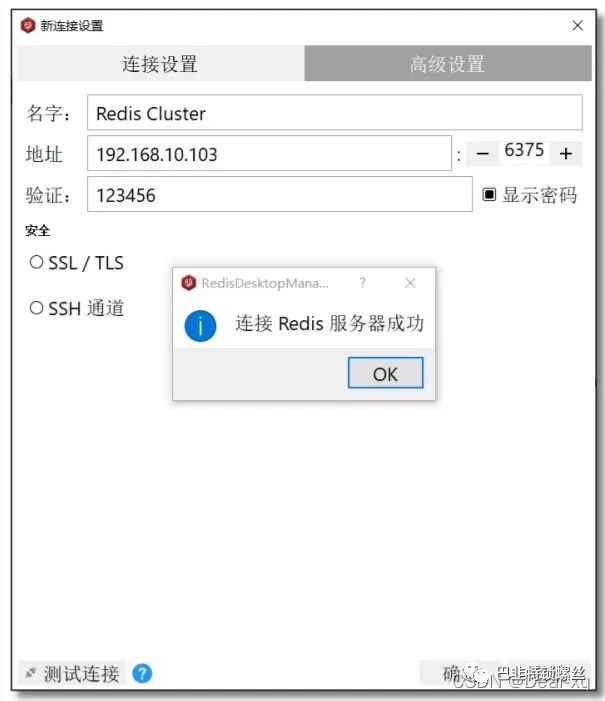
客户端连接
性能测试
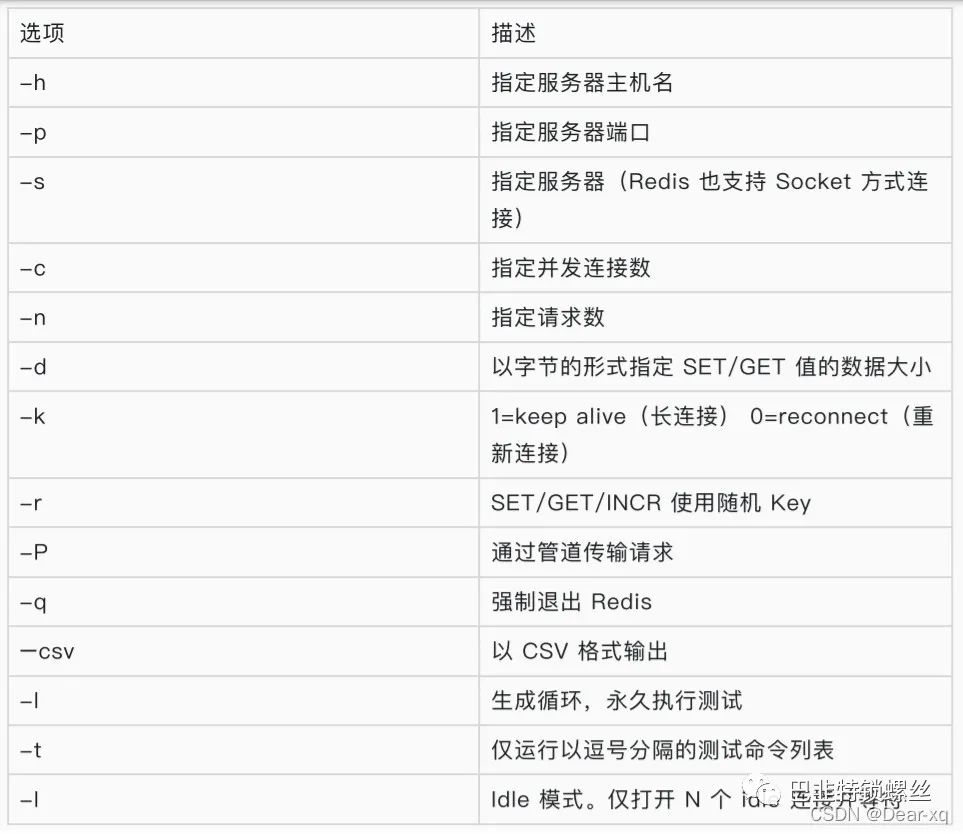
redis-benchmark 命令
单机测试
# 随机 set/get 1000000 条命令,在 1000 并发下执⾏bin/redis-benchmark -a 123456 -h 192.168.10.101 -p 6379 -t set,get -r 1000000 -n 1000000 -c 1000
====== GET ======# 1000000 次 GET 请求在 14.91 秒内完成1000000 requests completed in 14.43 seconds# 1000 并发1000 parallel clients# 每个操作数据量是 3 个字节3 bytes payload# 连接方式 keep alive 长连接keep alive: 1# Redis 是否开启了 RBD 和 AOFhost configuration "save":host configuration "appendonly": yesmulti-thread: no0.00% <= 5 milliseconds0.16% <= 6 milliseconds # 0.16% 的命令执时时间大于 6 毫秒7.73% <= 7 milliseconds19.99% <= 8 milliseconds...99.98% <= 17 milliseconds99.99% <= 18 milliseconds100.00% <= 18 milliseconds69319.29 requests per second # Redis 每秒可以处理 69319.29 次 GET请求
集群测试
结果分析
====== SET ======# 1000000 次 SET 请求在 16.61 秒内完成1000000 requests completed in 16.61 seconds# 1000 并发1000 parallel clients# 每个操作数据量是 3 个字节3 bytes payload# 连接方式 keep alive 长连接keep alive: 1# Redis 是否开启了 RBD 和 AOFhost configuration "save":host configuration "appendonly": yesmulti-thread: no0.00% <= 5 milliseconds0.01% <= 6 milliseconds # 0.01% 的命令执行时间大于 6 毫秒...99.99% <= 52 milliseconds100.00% <= 53 milliseconds100.00% <= 53 milliseconds60204.70 requests per second # Redis 每秒可以处理 60204.70 次 SET请求
====== GET ======# 1000000 次 GET 请求在 14.91 秒内完成1000000 requests completed in 14.91 seconds# 1000 并发1000 parallel clients# 每个操作数据量是 3 个字节3 bytes payload# 连接⽅式 keep alive ⻓连接keep alive: 1# Redis 是否开启了 RBD 和 AOFhost configuration "save":host configuration "appendonly": yesmulti-thread: no0.00% <= 4 milliseconds0.00% <= 5 milliseconds0.03% <= 6 milliseconds # 0.03% 的命令执⾏时间⼩于 6 毫秒...99.99% <= 33 milliseconds100.00% <= 33 milliseconds67055.59 requests per second # Redis 每秒可以处理 67055.59 次 GET请求
集群原理
哈希槽
16384个slots(槽位)
槽位定位算法
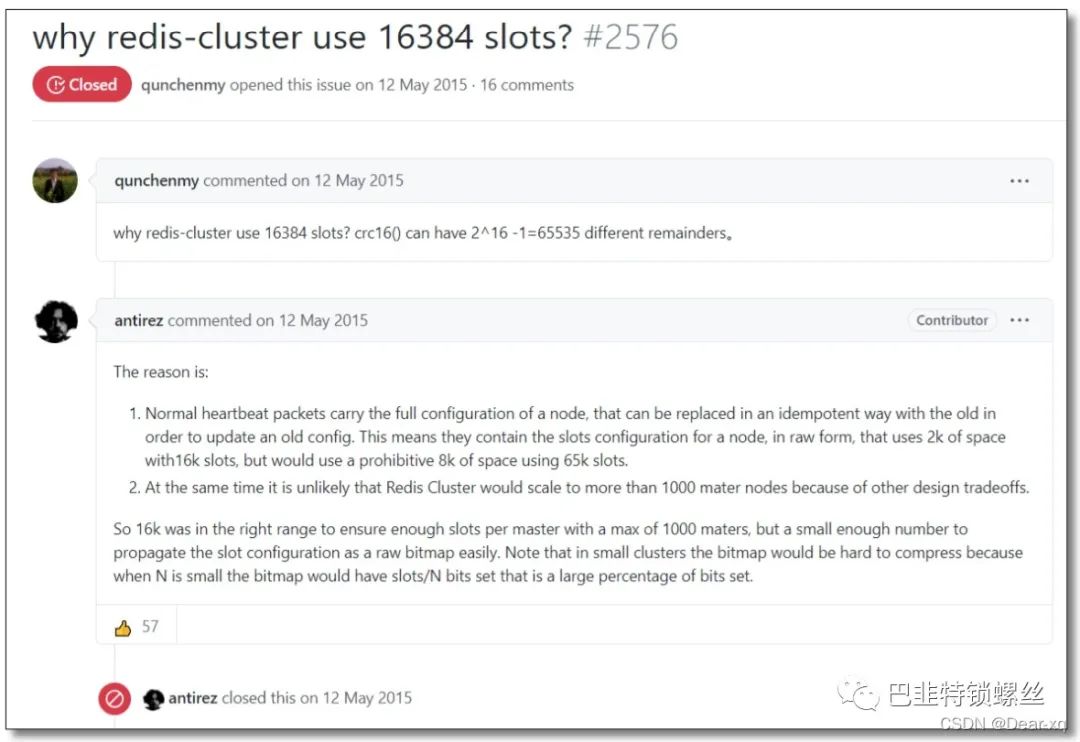
为什么是 16384 个槽
https://github.com/redis/redis/issues/2576

版权声明:本文内容始发于CSDN:Dear-xq,遵循CC 4.0 BY-SA版权协议,转载请附上原文出处链接及本声明。本作品采用知识共享署名-非商业性使用-禁止演绎 2.5 中国大陆许可协议进行许可。始发链接:https://blog.csdn.net/weixin_41753567/article/details/124110380在此特别鸣谢原作者的创作。此篇文章的所有版权归原作者所有,商业转载建议请联系原作者,非商业转载请注明出处。
文章转载自巴韭特锁螺丝,如果涉嫌侵权,请发送邮件至:contact@modb.pro进行举报,并提供相关证据,一经查实,墨天轮将立刻删除相关内容。
