



背景:
我们最近想用一个现有proxy接管一个现有的ob集群,但是因为ocp是从2.x升级到4.2的,中间升级了多次,可能造成了ocp的密码箱对于proxyro@sys密码的丢失,所以无法直接纳管。
所以我就想聊聊这个问题,也记录下过程。
分析:
首先在ob4.x前是有默认密码的。如下(需要的同学自取)
root@proxysys 默认密码 是P@Almy16
proxyro@sys 默认密码是 3u^0kCdpE
那如果是自己设置然后忘了怎么办,首先我们要了解下这两个账户分别是什么。
proxyro (Proxy Read Only) 账号是 OceanBase 集群 sys 租户下的一个只读用户,拥有 OceanBase 数据库下所有虚拟表和视图的只读权限。通过 OCP Web 界面创建的每个业务 OceanBase 集群都会自动在 sys 租户下创建一个 proxyro 用户,通过 OCP Web 界面执行业务 OceanBase 集群的运维操作以及通过 OBProxy 连接到 OceanBase 集群的 sys 租户或普通租户时,均会使用到 proxyro 用户。
root@proxysys 是 ODP 的管理员账号
这两个账号有各自的功能,首先proxyro是proxy连接集群需要使用到的,也是我上文问题中需要用的,如果忘记这个密码,可以用root@sys#clustername账号登录sys租户修改proxyro用户的密码,后台改密码的话一定要去更新proxy的observer_sys_password参数和ocp的密码箱,如果ocp的密码箱没有丢失的话,尽量从前台sys租户下的用户管理处白屏修改proxyro密码,他会级联去修改其他的参数。
如果忘记了root@proxysys的密码其实关系不大,第一,proxy重建的代价不大,业务窗口期就可以做,记得参数保留好。第二我们仍然可以用root@sys#clustername账号通过2883然后修改proxy的observer_sys_password参数或者通过重置obproxy_sys_password参数来修改密码。
为了测试下该密码修改的影响,我做了下面的实验。
测试过程:
我们先看下测试前通过root@proxysys、proxyro@sys 和业务租户登录都正常
c5-observer-cs-02:~ # mysql -h168.2.21.22 -P2883 -uroot@proxysys -p'Zzry332#1'
Welcome to the MariaDB monitor.  Commands end with ; or \g.
Your MySQL connection id is 1192
Server version: 5.6.25

Copyright (c) 2000, 2016, Oracle, MariaDB Corporation Ab and others.

Type 'help;' or '\h' for help. Type '\c' to clear the current input statement.

MySQL [(none)]> exit
Bye
c5-observer-cs-02:~ # mysql -h168.2.21.22 -P2881 -uproxyro@sys -p'3u^0kCdpE'
Welcome to the MariaDB monitor.  Commands end with ; or \g.
Your MySQL connection id is 3221551774
Server version: 5.7.25 OceanBase 3.2.3.3 (r110050012023112210-e4cbe51fd3adb2aa998b8a82a443d261ddc260b3) (Built Nov 22 2023 11:04:21)

Copyright (c) 2000, 2016, Oracle, MariaDB Corporation Ab and others.

Type 'help;' or '\h' for help. Type '\c' to clear the current input statement.

MySQL [(none)]> exit
Bye
c5-observer-cs-02:~ # obclient -h168.2.21.22 -P2883 -uSYS@oracle#OB_TEST1 -p'Zzry332#1'
Welcome to the OceanBase.  Commands end with ; or \g.
Your OceanBase connection id is 1244
Server version: OceanBase 3.2.3.3 (r110050012023112210-e4cbe51fd3adb2aa998b8a82a443d261ddc260b3) (Built Nov 22 2023 11:04:21)

Copyright (c) 2000, 2018, OceanBase and/or its affiliates. All rights reserved.

Type 'help;' or '\h' for help. Type '\c' to clear the current input statement.

obclient [SYS]> exit
Bye
那么我们修改下proxyro的密码后再测试下连接。
c5-observer-cs-02:~ # mysql -h168.2.21.22  -P2883 -uroot@sys#OB_TEST1 -p'Zzry332#1'  -c -A
Welcome to the MariaDB monitor.  Commands end with ; or \g.
Your MySQL connection id is 1422
Server version: 5.6.25 OceanBase 3.2.3.3 (r110050012023112210-e4cbe51fd3adb2aa998b8a82a443d261ddc260b3) (Built Nov 22 2023 11:04:21)

Copyright (c) 2000, 2016, Oracle, MariaDB Corporation Ab and others.

Type 'help;' or '\h' for help. Type '\c' to clear the current input statement.

MySQL [(none)]> alter user proxyro@'%' identified by 'Zzry332#1';
Query OK, 0 rows affected (0.04 sec)

MySQL [(none)]> exit
Bye
c5-observer-cs-02:~ # mysql -h168.2.21.22 -P2881 -uproxyro@sys -p'Zzry332#1'
Welcome to the MariaDB monitor.  Commands end with ; or \g.
Your MySQL connection id is 3221557664
Server version: 5.7.25 OceanBase 3.2.3.3 (r110050012023112210-e4cbe51fd3adb2aa998b8a82a443d261ddc260b3) (Built Nov 22 2023 11:04:21)

Copyright (c) 2000, 2016, Oracle, MariaDB Corporation Ab and others.

Type 'help;' or '\h' for help. Type '\c' to clear the current input statement.

MySQL [(none)]> exit
Bye
c5-observer-cs-02:~ # obclient -h168.2.21.22 -P2883 -uSYS@oracle#OB_TEST1 -p'Zzry332#1'
Welcome to the OceanBase.  Commands end with ; or \g.
Your OceanBase connection id is 1435
Server version: OceanBase 3.2.3.3 (r110050012023112210-e4cbe51fd3adb2aa998b8a82a443d261ddc260b3) (Built Nov 22 2023 11:04:21)

Copyright (c) 2000, 2018, OceanBase and/or its affiliates. All rights reserved.

Type 'help;' or '\h' for help. Type '\c' to clear the current input statement.

obclient [SYS]> exit
Bye
可以看到还是可以正常通过proxy连接数据库的。
我们再重启下proxy。
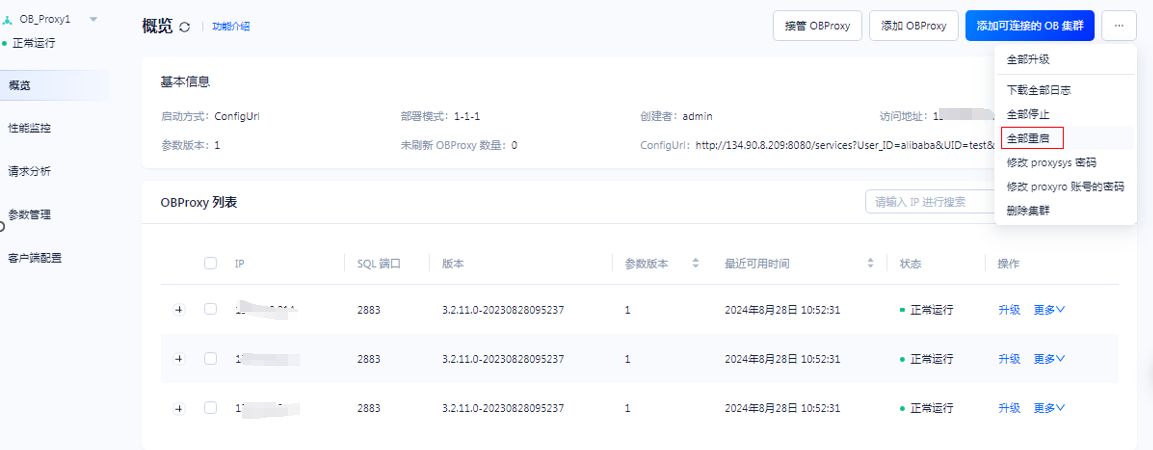
重启完后再通过proxy连接数据库就报错了。
c5-observer-cs-02:~ # obclient -h168.2.21.22  -P2883 -uSYS@oracle#OB_TEST1 -p'Zzry332#1'
ERROR 2013 (HY000): Lost connection to MySQL server at 'reading authorization packet', system error: 11
c5-observer-cs-02:~ #
那我们修改下proxy的observer_sys_password参数。(observer_sys_password和observer_sys_password1有一个是正确密码就可以)
c5-observer-cs-02:~ # mysql -h168.2.21.22 -P2883 -uroot@proxysys -p'Zzry332#1'
Welcome to the MariaDB monitor.  Commands end with ; or \g.
Your MySQL connection id is 283
Server version: 5.6.25

Copyright (c) 2000, 2016, Oracle, MariaDB Corporation Ab and others.

Type 'help;' or '\h' for help. Type '\c' to clear the current input statement.

MySQL [(none)]> show proxyconfig like '%password%'
    -> ;
+---------------------------------+------------------------------------------+--------------------------------+-------------+---------------+
| name                            | value                                    | info                           | need_reboot | visible_level |
+---------------------------------+------------------------------------------+--------------------------------+-------------+---------------+
| observer_sys_password1          | ee0e5138c912aed80b683c05303684be347ce81d | password for observer sys user | false       | SYS           |
| observer_sys_password           | ee0e5138c912aed80b683c05303684be347ce81d | password for observer sys user | false       | SYS           |
| obproxy_sys_password            | 5b5b18b0f24996458bbcfd60575e0252bc0552bc | password for obproxy sys user  | false       | SYS           |
| inspector_password              | de6d44e0bb589f8044f6dde47d870569c31dbcec | password for inspector user    | false       | SYS           |
| json_config_meta_table_password | ***                                      | meta table password            | true        | virtual       |
+---------------------------------+------------------------------------------+--------------------------------+-------------+---------------+
5 rows in set (0.00 sec)

MySQL [(none)]> alter proxyconfig set observer_sys_password='Zzry332#1';
Query OK, 0 rows affected (0.02 sec)

MySQL [(none)]> exit
Bye
c5-observer-cs-02:~ # obclient -h168.2.21.22 -P2883 -uSYS@oracle#OB_TEST1 -p'Zzry332#1'
Welcome to the OceanBase.  Commands end with ; or \g.
Your OceanBase connection id is 290
Server version: OceanBase 3.2.3.3 (r110050012023112210-e4cbe51fd3adb2aa998b8a82a443d261ddc260b3) (Built Nov 22 2023 11:04:21)

Copyright (c) 2000, 2018, OceanBase and/or its affiliates. All rights reserved.

Type 'help;' or '\h' for help. Type '\c' to clear the current input statement.

obclient [SYS]> exit
Bye
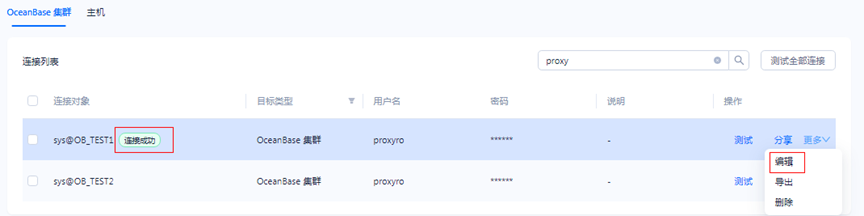
可以看到又可以登录了。记得修改完配置之后也要去更新下ocp的密码箱。

结论:
如果需要修改proxyro的密码,正常是不影响连接数据库的,但是proxy重启的话,会重新识别proxyro进行与数据库的连接,可以同步也修改掉proxy参数和ocp的密码箱,还是建议通过ocp白屏去修改。
还有这个变更还是最好在业务窗口期进行,避免没必要的影响。
最后记录个测试中的小问题,重启proxy在启动任务时报错,权限问题。新建集群时路径检测失败,让检查ocpagent状态,确认都没问题。最终原因为admin用户密码过期。
行之所向,莫问远方。
