



我们于6月份发布了全新的羲和(Halo)16版本(RP1)。其中一个重大变化是引入了多模式的概念。
引入多模式是我们在深入了解、分析客户实际需求后做出的重要的产品决策。一般而言,一家中等规模及以上的企业里通常有数百至数千个数据库实例,并且是多种类型的数据库共存的。其中,又尤以Oracle、MySQL、PostgreSQL占绝大多数。而这其中,真正存在大数据量、高并发需求的其实并不多。“二八”法则在这里也完全适用。这也就意味着企业需要花费很多的成本和精力去应对很多“不重要”,但又无法置之不理的问题。而多模式就是其中能很好的去应对这种场景的技术手段。
多模式可以将多种类型的、多个数据库实例整合为一个数据库实例或集群,从而帮助用户降低硬件、软件成本和管理成本。
Halo 16多模式数据库,支持建立Oracle、MySQL、PostgreSQL等多种驱动协议接口同时监听,来接收各种模式终端APP的连接,Halo 16多模式数据库自动适配模式(Oracle、MySQL、PostgreSQL等)引擎。在一个实例中可以开启多个兼容引擎模式,共同运行而不相互影响。模式与接口的配比,可以一对多,也可以多对多,扩展非常方便。
多模式架构如下图
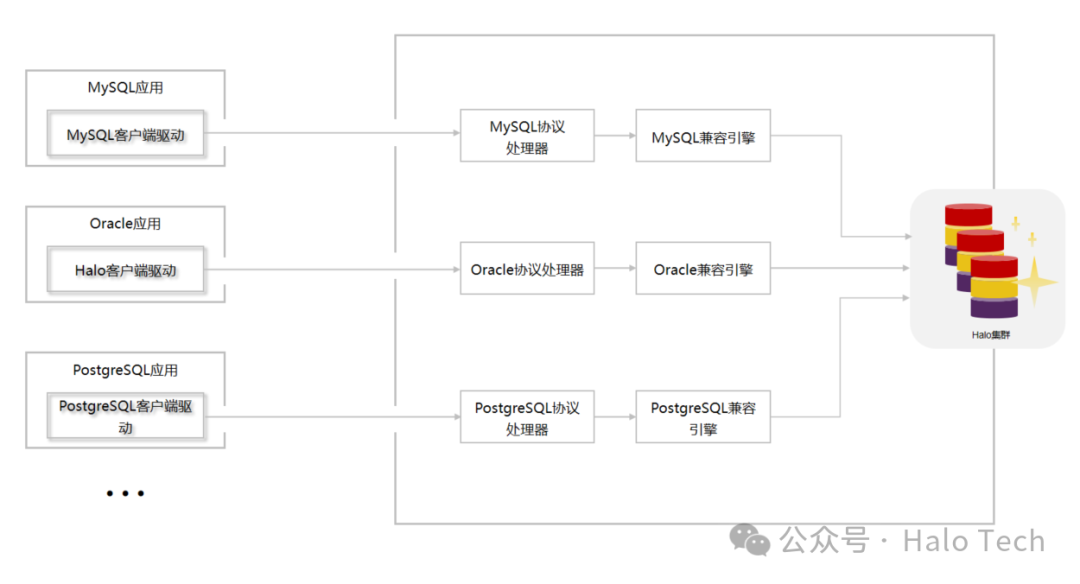 Halo 16多模式数据库,由配置参数cluster_net_services进行控制,默认配置字符串为''。cluster_net_services可以添加多个模式接口,但端口号不允许重复,否者启动时会配置校验报错。修改cluster_net_services的值后,必须重启才能生效。 cluster_net_services支持模式与接口一对一,多对多的配置方式。
1、新添加一种模式的数据库配置格式为"IP:PORT:MODE"。
postgresql.conf配置:
listen_addresses ='*'port = 5432database_compat_mode = 'postgresql'
现在要新添加一个端口为1521的oracle模式接口,cluster_net_services可以进行以下设置:
cluster_net_services = '*:1521:oracle'# 或者cluster_net_services = ':1521:oracle'#其中IP不填写,默认为listen_addresses的值
重启后提示信息如下:
[guanhongchao@guanhongchao-dev halo_16]$ pg_ctl startwaiting for server to start....2024-08-12 00:46:53.549 CST [1877260] LOG: starting 羲和(Halo) 1.0.16.3 (20240625) on x86_64-pc-linux-gnu, compiled by gcc (GCC) 8.5.0 20210514 (Red Hat 8.5.0-22), 64-bit2024-08-12 00:46:53.550 CST [1877260] LOG: listening on IPv4 address "0.0.0.0", port 54322024-08-12 00:46:53.550 CST [1877260] LOG: listening on IPv6 address "::", port 54322024-08-12 00:46:53.568 CST [1877260] LOG: listening on Unix socket "/var/run/halo/.s.PGSQL.5432"2024-08-12 00:46:53.585 CST [1877260] LOG: listening on IPv4 address "0.0.0.0", port 15212024-08-12 00:46:53.585 CST [1877260] LOG: listening on IPv6 address "::", port 15212024-08-12 00:46:53.601 CST [1877260] LOG: listening on Unix socket "/var/run/halo/.s.PGSQL.1521"2024-08-12 00:46:53.618 CST [1877260] LOG: listening on IPv4 address "0.0.0.0", port 90012024-08-12 00:46:53.618 CST [1877260] LOG: listening on IPv6 address "::", port 90012024-08-12 00:46:53.635 CST [1877260] LOG: listening on Unix socket "/var/run/halo/.s.PGSQL.9001"2024-08-12 00:46:53.679 CST [1877263] LOG: database system was shut down at 2024-08-12 00:46:50 CST2024-08-12 00:46:53.705 CST [1877260] LOG: database system is ready to accept connectionsdoneserver started[guanhongchao@guanhongchao-dev halo_16]$ psql -p 5432psql (1.0.16.3 (20240625))Type "help" for help.halo0root=# show database_compat_mode;database_compat_mode----------------------postgresql(1 row)halo0root=# \q[guanhongchao@guanhongchao-dev halo_16]$ psql -p 1521 -d oracledbpsql (1.0.16.3 (20240625))Type "help" for help.oracledb=# show database_compat_mode;database_compat_mode----------------------oracle(1 row)oracledb=#
2、新添加多种模式数据库格式配置为
"IP:PORT:MODE, IP:PORT:MODE, IP:PORT:MODE"
与上postgresql.conf配置一样,cluster_net_services新添加
5433的postgresql模式接口;
1521,1522的两个oracle模式接口;
3307的mysql模式接口。
则cluster_net_services可以进行以下设置
cluster_net_services = ':5433:postgresql,:1521:oracle,:1522:oracle,:3307:mysql'
重启后提示信息如下:
[guanhongchao@guanhongchao-dev halo_16]$ pg_ctl startwaiting for server to start....2024-08-12 01:04:57.258 CST [1877439] LOG: starting 羲和(Halo) 1.0.16.3 (20240625) on x86_64-pc-linux-gnu, compiled by gcc (GCC) 8.5.0 20210514 (Red Hat 8.5.0-22), 64-bit2024-08-12 01:04:57.258 CST [1877439] LOG: listening on IPv4 address "0.0.0.0", port 54322024-08-12 01:04:57.258 CST [1877439] LOG: listening on IPv6 address "::", port 54322024-08-12 01:04:57.278 CST [1877439] LOG: listening on Unix socket "/var/run/halo/.s.PGSQL.5432"2024-08-12 01:04:57.295 CST [1877439] LOG: listening on IPv4 address "0.0.0.0", port 54332024-08-12 01:04:57.295 CST [1877439] LOG: listening on IPv6 address "::", port 54332024-08-12 01:04:57.312 CST [1877439] LOG: listening on Unix socket "/var/run/halo/.s.PGSQL.5433"2024-08-12 01:04:57.337 CST [1877439] LOG: listening on IPv4 address "0.0.0.0", port 15212024-08-12 01:04:57.337 CST [1877439] LOG: listening on IPv6 address "::", port 15212024-08-12 01:04:57.362 CST [1877439] LOG: listening on IPv4 address "0.0.0.0", port 15222024-08-12 01:04:57.362 CST [1877439] LOG: listening on IPv6 address "::", port 15222024-08-12 01:04:57.362 CST [1877439] LOG: listening on Unix socket "/var/run/halo/.s.PGSQL.1521"2024-08-12 01:04:57.378 CST [1877439] LOG: listening on Unix socket "/var/run/halo/.s.PGSQL.1522"2024-08-12 01:04:57.395 CST [1877439] LOG: listening on IPv4 address "0.0.0.0", port 33072024-08-12 01:04:57.395 CST [1877439] LOG: listening on IPv6 address "::", port 33072024-08-12 01:04:57.412 CST [1877439] LOG: listening on Unix socket "/var/run/halo/.s.PGSQL.3307"2024-08-12 01:04:57.428 CST [1877439] LOG: listening on IPv4 address "0.0.0.0", port 90012024-08-12 01:04:57.428 CST [1877439] LOG: listening on IPv6 address "::", port 90012024-08-12 01:04:57.445 CST [1877439] LOG: listening on Unix socket "/var/run/halo/.s.PGSQL.9001"2024-08-12 01:04:57.489 CST [1877442] LOG: database system was shut down at 2024-08-12 01:04:54 CST2024-08-12 01:04:57.515 CST [1877439] LOG: database system is ready to accept connectionsdoneserver started[guanhongchao@guanhongchao-dev halo_16]$ psql -p 5432psql (1.0.16.3 (20240625))Type "help" for help.halo0root=# show cluster_net_services ;cluster_net_services--------------------------------------------------------:5433:postgresql,:1521:oracle,:1522:oracle,:3307:mysql(1 row)
Halo 16多模式数据库不仅兼容以前版本的功能,原来postgresql.conf就有的三个参数listen_addresses、port、database_compat_mode可以创建一个模式接口,我们简称为原始模式接口。cluster_net_services还增加了兼容配置的小功能。
cluster_net_services含有配置'::oracle'相当于'listen_addresses:port:oracle',这样就会与原始模式接口发生冲突,为了避免这种情况发生,我们系统默认cluster_net_services 配置优先级最高,启动时会自动替换原始模式接口为oracle模式,并显示相应的warning提醒。
启动后提示信息如下:
[guanhongchao@guanhongchao-dev halo_16]$ pg_ctl startwaiting for server to start....2024-08-12 01:08:03.380 CST [1877481] LOG: starting 羲和(Halo) 1.0.16.3 (20240625) on x86_64-pc-linux-gnu, compiled by gcc (GCC) 8.5.0 20210514 (Red Hat 8.5.0-22), 64-bit2024-08-12 01:08:03.381 CST [1877481] LOG: listening on IPv4 address "0.0.0.0", port 54322024-08-12 01:08:03.381 CST [1877481] LOG: listening on IPv6 address "::", port 54322024-08-12 01:08:03.393 CST [1877481] LOG: listening on Unix socket "/var/run/halo/.s.PGSQL.5432"2024-08-12 01:08:03.401 CST [1877481] WARNING: The database_compat_mode configuration parameter has been overwritten.2024-08-12 01:08:03.401 CST [1877481] LOG: listening on IPv4 address "0.0.0.0", port 90012024-08-12 01:08:03.401 CST [1877481] LOG: listening on IPv6 address "::", port 90012024-08-12 01:08:03.409 CST [1877481] LOG: listening on Unix socket "/var/run/halo/.s.PGSQL.9001"2024-08-12 01:08:03.436 CST [1877484] LOG: database system was shut down at 2024-08-12 01:08:00 CST2024-08-12 01:08:03.453 CST [1877481] LOG: database system is ready to accept connectionsdoneserver started[guanhongchao@guanhongchao-dev halo_16]$ psql -p 5432psql (1.0.16.3 (20240625))Type "help" for help.halo0root=# show cluster_net_services ;cluster_net_services----------------------::oracle(1 row)
cluster_net_services 里含有配置':3307:postgresql',代表listen_addresses:3307:postgresql,如果halo 14版second_port配置参数默认是3307,这样就会发生冲突,为了避免这种情况发生,我们系统默认cluster_net_services 配置优先级最高,启动时会替换second_port模式为postgresql,并相应的warning提醒。
启动后提示信息如下:
[guanhongchao@guanhongchao-dev halo_16]$ pg_ctl startwaiting for server to start....2024-08-12 01:14:25.492 CST [1877535] LOG: starting 羲和(Halo) 1.0.16.3 (20240625) on x86_64-pc-linux-gnu, compiled by gcc (GCC) 8.5.0 20210514 (Red Hat 8.5.0-22), 64-bit2024-08-12 01:14:25.493 CST [1877535] LOG: listening on IPv4 address "0.0.0.0", port 54322024-08-12 01:14:25.493 CST [1877535] LOG: listening on IPv6 address "::", port 54322024-08-12 01:14:25.510 CST [1877535] LOG: listening on Unix socket "/var/run/halo/.s.PGSQL.5432"2024-08-12 01:14:25.526 CST [1877535] WARNING: The second_port configuration parameter has been overwritten.2024-08-12 01:14:25.527 CST [1877535] LOG: listening on IPv4 address "0.0.0.0", port 33072024-08-12 01:14:25.527 CST [1877535] LOG: listening on IPv6 address "::", port 33072024-08-12 01:14:25.543 CST [1877535] LOG: listening on Unix socket "/var/run/halo/.s.PGSQL.3307"2024-08-12 01:14:25.560 CST [1877535] LOG: listening on IPv4 address "0.0.0.0", port 90012024-08-12 01:14:25.560 CST [1877535] LOG: listening on IPv6 address "::", port 90012024-08-12 01:14:25.576 CST [1877535] LOG: listening on Unix socket "/var/run/halo/.s.PGSQL.9001"2024-08-12 01:14:25.612 CST [1877538] LOG: database system was shut down at 2024-08-12 01:13:07 CST2024-08-12 01:14:25.637 CST [1877535] LOG: database system is ready to accept connectionsdoneserver started[guanhongchao@guanhongchao-dev halo_16]$ psql -p 3307psql (1.0.16.3 (20240625))Type "help" for help.halo0root=# show cluster_net_services ;cluster_net_services----------------------:3307:postgresql(1 row)
为了方便DBA对Halo 16多模式数据库的统一维护管理。原始模式接口可以进行session级的模式引擎切换功能,DBA不需要再申请各种模式对应的网段IP与端口号进行访问操作,同时也不会影响原来的数据通信通道。具体操作示例如下:
[guanhongchao@guanhongchao-dev halo_16]$ pg_ctl startwaiting for server to start....2024-08-12 01:27:26.485 CST [1877744] LOG: starting 羲和(Halo) 1.0.16.3 (20240625) on x86_64-pc-linux-gnu, compiled by gcc (GCC) 8.5.0 20210514 (Red Hat 8.5.0-22), 64-bit2024-08-12 01:27:26.485 CST [1877744] LOG: listening on IPv4 address "0.0.0.0", port 54322024-08-12 01:27:26.486 CST [1877744] LOG: listening on IPv6 address "::", port 54322024-08-12 01:27:26.497 CST [1877744] LOG: listening on Unix socket "/var/run/halo/.s.PGSQL.5432"2024-08-12 01:27:26.513 CST [1877744] LOG: listening on IPv4 address "0.0.0.0", port 15212024-08-12 01:27:26.513 CST [1877744] LOG: listening on IPv6 address "::", port 15212024-08-12 01:27:26.530 CST [1877744] LOG: listening on Unix socket "/var/run/halo/.s.PGSQL.1521"2024-08-12 01:27:26.546 CST [1877744] LOG: listening on IPv4 address "0.0.0.0", port 90012024-08-12 01:27:26.547 CST [1877744] LOG: listening on IPv6 address "::", port 90012024-08-12 01:27:26.563 CST [1877744] LOG: listening on Unix socket "/var/run/halo/.s.PGSQL.9001"2024-08-12 01:27:26.607 CST [1877747] LOG: database system was shut down at 2024-08-12 01:27:22 CST2024-08-12 01:27:26.632 CST [1877744] LOG: database system is ready to accept connectionsdoneserver started[guanhongchao@guanhongchao-dev halo_16]$ psql -p 5432psql (1.0.16.3 (20240625))Type "help" for help.halo0root=# \c oracledb;You are now connected to database "oracledb" as user "guanhongchao".oracledb=# show database_compat_mode ;database_compat_mode----------------------postgresql(1 row)oracledb=# set database_compat_mode = 'oracle';SEToracledb=# select * from employees where rownum <=2;empno | ename | mgr | sal | deptno-------+-------+------+-----+--------7369 | SMITH | 7902 | 800 | 207900 | JAMES | 7698 | 950 | 30(2 rows)
为了方便监控与配置管理,Halo 16多模式数据库还引入独立的监控与配置管理模式接口,它由admin_addresses,admin_port两个配置参数控制,伴随着数据库的启动而打开。
admin_addresses 模式监听地址为地址字符串,默认为空值,取listen_addresses的地址。
admin_port 模式监听端口为整型,默认端口为9001。
[guanhongchao@guanhongchao-dev halo_16]$ psql -p 9001psql (1.0.16.3 (20240625))Type "help" for help.halo0root=# show database_compat_mode ;database_compat_mode----------------------postgresql(1 row)
Halo 16多模式数据库一直秉承以客户需求为中心,“从客户中来,到客户中去”,现已完成深度兼容Oracle,MySQL,PostgreSQL模式数据库。未来,Halo 16多模式数据库希望可以和更多客户伙伴并肩而行,不断扩展模式接口协议库与模式引擎库,让用户用得更加舒心,用得更加放心的企业级数据库。
