



人大金仓此前已更改为了电科金仓,开启了新的篇章
金仓数据库管理系统 KingbaseES(KES) 是面向全行业、全客户关键应用的企业级大型通用数据库管理系统,适用于联机事务处理、查询密集型数据仓库、要求苛刻的互联网应用等场景,提供全部应用开发及系统管理功能,提供性能增强特性,可支持主备集群、读写分离集群、多活共享存储集群等全集群架构,具有高性能、高安全、高可用、易使用、易管理、易维护的特点,支持所有国内外主流CPU、操作系统与云平台部署。
1. 环境配置
| 操作系统 | 配置 | 数据盘 | 系统盘 |
|---|---|---|---|
| Centos 7.8 | 4H16G | 100G | 大于8G |
当然官方要求是没有那么搞定这么高的
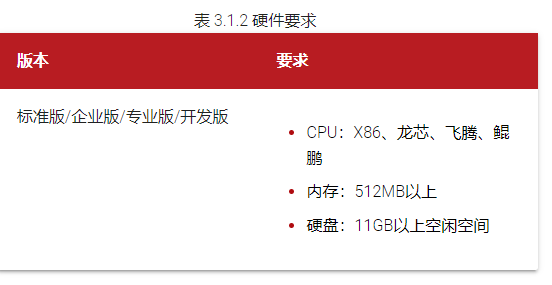
嗯~ 官方很贴心,连查看版本内存磁盘都一步指导到位
cat /etc/*release
free -m
df -hl
2. 下载数据库安装包
下载地址 :https://www.kingbase.com.cn/xzzx/index.htm
安装包2.3G,下载用时1分钟,具体看当前网速
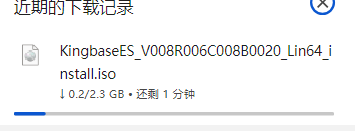
验证安装包
# 查看MD5值
md5sum KingbaseES_V008R006C008B0020_Lin64_install.iso

# 查看SHA1值
sha1sum KingbaseES_V008R006C008B0020_Lin64_install.iso

3. 前置准备工作
3.1 内核参数配置
cat /etc/sysctl.conf
fs.aio-max-nr= 1048576
fs.file-max= 6815744
kernel.shmall= 2097152
kernel.shmmax= 4294967295
kernel.shmmni= 4096
kernel.sem= 250 32000 100 128
net.ipv4.ip_local_port_range= 9000 65500
net.core.rmem_default= 262144
net.core.rmem_max= 4194304
net.core.wmem_default= 262144
net.core.wmem_max= 1048576
配置完成后,立即生效和查看命令(当然可以的话,重启系统也是没问题的)
/sbin/sysctl -p
/sbin/sysctl -a
3.2 资源限制配置
cat /etc/security/limits.conf
# *表示所有用户,可只设置root和kingbase用户
* soft nofile 65536
# 注意:设置nofile的hard limit不能大于/proc/sys/fs/nr_open,否则注销后将无法正常登录
* hard nofile 65535
* soft nproc 65536
* hard nproc 65535
# unlimited表示无限制
* soft core unlimited
* hard core unlimited
立即生效
# 重新登录或运行命令
sysctl -p
3.3 用户及目录配置
# 新建安装金仓的用户
useradd -m kingbase
passwd kingbase

#新建用于安装和存放数据的目录
mkdir -p /data/Kingbase{kdb,data}

# 创建用于挂载的目录
mkdir kbinstall

# 变更属组(很重要)
cd /data/
chown -R kingbase:kingbase Kingbase
chown -R kingbase:kingbase kbinstall
chown -R kingbase:kingbase KingbaseES_V008R006C008B0020_Lin64_install.iso
3.4 挂载安装包(root挂载)
cd /data/
mount KingbaseES_V008R006C008B0020_Lin64_install.iso ./kbinstall
4. 静默安装
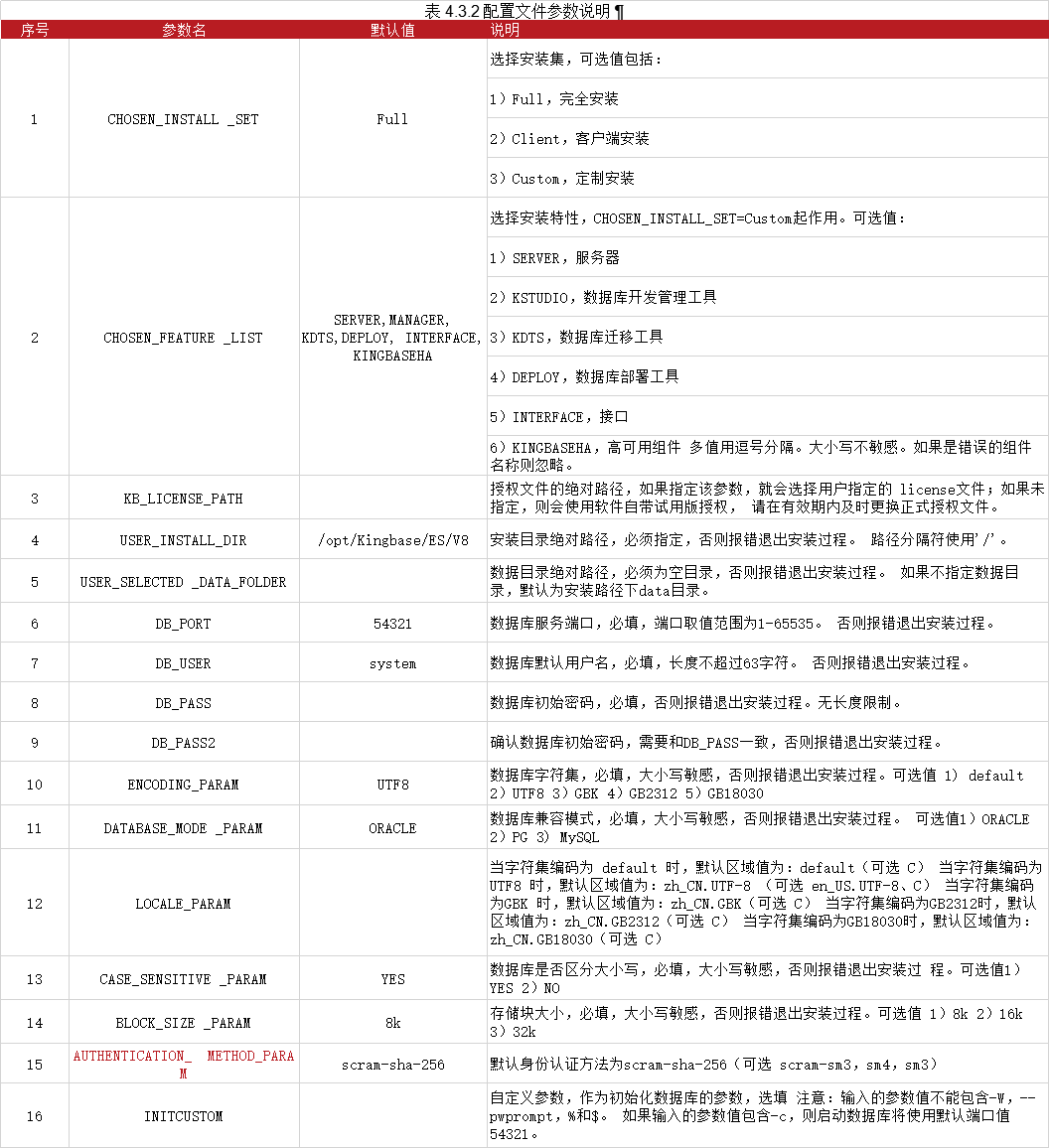
4.1 配置文件说明【直接上官方的】
4.2 切换用户后复制配置文件
su - kingbase
cp /data/kbinstall/setup/silent.cfg  /data/Kingbase/
4.3 编辑静默安装的配置文件:
PS:注意此次为挂载目录,只读,需要先复制出来进行更改,或者更改完成后另存为新文件
cat /data/Kingbase/kbs/silent.cfg |grep -v “^#” |grep -v “^$”
KB_LICENSE_PATH=
CHOSEN_INSTALL_SET=Full
CHOSEN_FEATURE_LIST=SERVER,KSTUDIO,KDTS,INTERFACE,DEPLOY,KINGBASEHA
USER_INSTALL_DIR=/data/Kingbase/kbs
USER_SELECTED_DATA_FOLDER=/data/Kingbase/data
DB_PORT=54321
DB_USER=system
DB_PASS=kbdb#134
DB_PASS2=kbdb#134
ENCODING_PARAM=UTF8
LOCALE_PARAM=zh_CN.UTF-8
INITCUSTOM=
DATABASE_MODE_PARAM=ORACLE
CASE_SENSITIVE_PARAM=YES
BLOCK_SIZE_PARAM=8k
AUTHENTICATION_METHOD_PARAM=scram-sha-256
4.4 安装数据库
cd /data/kbinstall
./setup.sh -i silent -f /data/Kingbase/silent.cfg
历时2分钟左右,安装完成,虽然有个报错,不知道有啥影响

5. 执行 root.sh 注册系统服务(按需,当前跳过)
如果想注册数据库服务为系统服务,您可以在安装并初始化数据库成功后,执行root.sh脚本来注册并启动数据库服务,具体步骤如下:
打开新终端;
切换到root用户;
运行${安装目录}/install/script/root.sh 。
6. 启停数据库
如果想启动或停止数据库服务,进入${安装目录}/Server/bin目录执行如下命令:
# 启动服务
# sys_ctl -w start -D ${Data文件目录} -l "${Data文件目录}/sys_log/startup.log"

cd /data/Kingbase/kbs/Server/bin
./sys_ctl -w start -D /data/Kingbase/kdb -l /data/Kingbase/kdb/sys_log/startup.log

# 停止服务模板
# sys_ctl stop -m fast -w -D ${Data文件目录}

7. 问题攻破
7.1 安装提示 /home/kingbase 磁盘空间不足
PS: 当我剩余7.5G的时候,提示需要736738,能怎么办,腾呗,比较系统盘不好加
./setup.sh: line 171: fc-cache: command not found
Now launch installer...
WARNING: /tmp does not have enough disk space! Attempting to use /home/kingbase for install base and tmp dir.

WARNING! The amount of /home/kingbase disk space required to perform this installation is greater than what is available. Please free up at least 736738 kilobytes in /home/kingbase and attempt this installation again.

Complete.
查看目录下确实生成了临时文件

腾完空间到8.1G,再次报错磁盘空间不足,需要1589058 ~~~
./setup.sh: line 171: fc-cache: command not found
Now launch installer...
WARNING: /tmp does not have enough disk space! Attempting to use /home/kingbase for install base and tmp dir.

WARNING! The amount of /home/kingbase disk space required to perform this installation is greater than what is available. Please free up at least 1589058 kilobytes in /home/kingbase and attempt this installation again.

Complete.

解决办法:
删除 /home/kingbase 及 /tmp 目录下的临时文件,再次安装,剩余的8.1G 够用了
7.2 配置文件不存在报错
./setup.sh: line 171: fc-cache: command not found
Now launch installer...
Error! - Valid properties/response file not specified in command line and not found in default directory
Command Line Arguments contain illegal values.

Usage: install [-f <path_to_installer_properties_file> | -options]
            (to execute the installer)

Where options include:
    -?      Show this help text
    -h      Show this help text
    -help   Show this help text
    --help  Show this help text
    -i [gui | console | silent]
            Specify the user interface mode for the installer
    -D<name>=<value>
            Specify installer properties
    -r <path_to_generate_response_file>
            Generates response file.
JVM heap size options are only applicable to Installers
    -jvmxms <size>
            Specify JVM initial heap size.
    -jvmxmx <size>
            Specify JVM maximum heap size.
The options field may also include the following in case of uninstaller
if it is enabled for Maintenance Mode
    -add <feature_name_1> [<feature_name_2 ...]
            Add Specified Features
    -remove <feature_name_1> [<feature_name_2 ...]
            Remove Specified Features
    -repair
            Repair Installation
    -uninstall
            Uninstall

Notes:
    1. The path to the installer properties file may be either absolute,
       or relative to the directory in which the installer resides.
    2. If an installer properties file is specified and exists, all other
       command line options will be ignored.
    3. If a properties file named either 'installer.properties' or
       <NameOfInstaller>.properties resides in the same directory as the
       installer, it will automatically be used, overriding all other command
       line options, unless the '-f' option is used to point to another valid
       properties file.
    4. If an installer properties file is specified but does not exist, the
       default properties file, if present, will be used.  Otherwise, any
       supplied command line options will be used, or if no additional
       options were specified, the installer will be run using the default
       settings.
Complete.
解决办法:确实,搞错了目录,重新输入正确目录
7.3 安装连接测试,有没有可能没有安装成功呢?

**解决办法:数据库未启动导致吗,启动数据库 **
8. 若需卸载数据库【谨慎操作,参考】
若安装错误,需要重装,可以先进行卸载
cd /data/Kingbase/kbs
sh Uninstaller -i silent
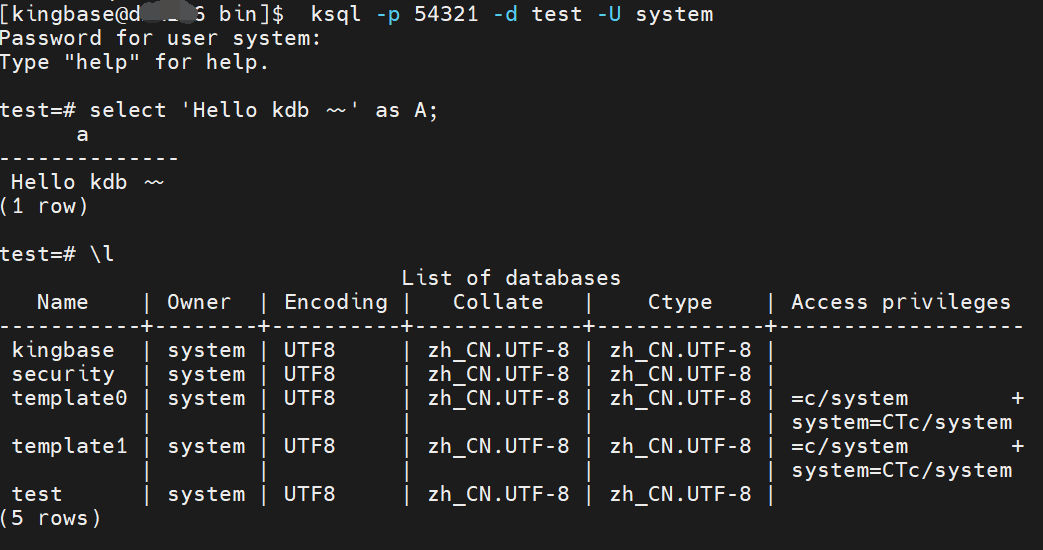
9. Hello kdb (验证你最强)

# ksql连接
 ksql -p 54321 -d test -U system
参考文档:
安装包聚集地:
https://www.kingbase.com.cn/xzzx/index.htm
静默安装:
https://bbs.kingbase.com.cn/docHtml?recId=d3b047761988fde0084a665fc7151c47&url=aHR0cHM6Ly9iYnMua2luZ2Jhc2UuY29tLmNuL2tpbmdiYXNlLWRvYy92OC9pbnN0YWxsLXVwZGF0YS9pbnN0YWxsLWxpbnV4L2luZGV4Lmh0bWw
ksql使用参考:
https://bbs.kingbase.com.cn/docHtml?recId=d3b047761988fde0084a665fc7151c47&url=aHR0cHM6Ly9iYnMua2luZ2Jhc2UuY29tLmNuL2tpbmdiYXNlLWRvYy92OC9pbnN0YWxsLXVwZGF0YS9pbnN0YWxsLWxpbnV4L2luZGV4Lmh0bWw
