



如何使用 Postgres、pgvector 扩展、Ollama 和 Llama 3 大型语言模型构建本地检索增强生成应用程序。

带有 pgvector 扩展的 PostgreSQL 允许将表用作向量的存储,每个向量都保存为一行。它还允许添加任意数量的元数据列。在企业应用程序中,这种存储矢量和表格数据的混合功能为开发人员提供了纯向量数据库中不具备的灵活性。
虽然纯向量数据库可以调整以获得极高的性能,但 pgvector 可能不是。但是,对于中型检索增强生成 (RAG) 应用程序(通常涉及大约 100K 文档),pgvector 的性能绰绰有余。如果您正在为小组或小型部门构建知识管理应用程序,那么这样的架构是一种简单的入门方法。(对于更小的单用户应用程序,您可以将 SQLite 与 sqlite-vss 扩展一起使用。
正如许多开发人员已经意识到的那样,“仅使用 Postgres”通常是一个很好的策略。当您的需求增长时,您可能希望换入更大、性能更高的矢量数据库。在那之前,Postgres 将完成这项工作并允许我们快速构建我们的应用程序。
查看检索增强生成
在深入研究之前,您可能会发现回顾我之前关于构建 RAG 应用程序的两篇文章会很有帮助:
在第一篇文章中,我们使用 Python、LangChain 和 OpenAI 聊天模型构建了一个简单的“你好世界”RAG 应用程序。我们使用 OpenAI 嵌入 API 生成嵌入,将这些嵌入保存在本地向量存储 (FAISS) 中,然后向 OpenAI 聊天模型询问两个问题,这些问题涉及一个检索到的文件。
为了刷新我们对 RAG 中工作流的记忆,步骤如下:
- 我们对文本文档进行了分块,并将一组块提交给 OpenAI 的嵌入 API。
- 我们得到了一组带有块的浮点编码的向量 — 每个块一个浮点向量。这些是文档的嵌入内容。
- 我们使用 Faiss 来存储这些编码的块或嵌入,并对它们进行相似性搜索。
- 我们创建了一个查询,并使用它来对 embeddings 存储进行相似性搜索,从而返回那些可能包含用于回答查询的有用上下文的块。
- 我们通过 OpenAI 的聊天界面向 OpenAI 提交了查询和上下文的组合。
- 我们收到了 OpenAI 的回复,它根据我们 chunk 中的相关信息回答了我们的问题。
在第二篇文章中,我们做了一个类似的练习,但在本地运行所有内容,这样就不会有信息离开本地。这是我们在企业中实用且相关地使用 RAG 的第一步。我们将 OpenAI 的嵌入 API 替换为本地运行的嵌入生成器,该生成器来自一个名为 Sentence Transformers 的库。我们使用带有 sqlite-vss 扩展名的 SQLite 作为我们的本地矢量数据库。我们使用 Ollama 在本地运行 Llama 2 大型语言模型。
现在我们将更深入地了解向量数据库,到目前为止,它一直是一个神秘的黑匣子。通过使用 Postgres 作为向量存储的基础,我们可以使用熟悉的工具来查看并检查向量数据库中到底存储了什么。通过使用熟悉的主力 Postgres,我们将尝试揭开向量数据库的一些神秘面纱。
RAG 与 Postgres 分为两部分
在本次探索中,我们将分两部分进行编码。首先,我们将多个 Wikipedia 条目的文本提取到单个向量数据库中。其次,我们将使用 Postgres 和 SQL 对该文本进行相似性搜索,然后使用结果查询由 Ollama 运行的本地大型语言模型。
要创建知识库,我们需要将多种文档导入矢量数据库的方法。为此,我们可以使用来自 LangChain 或 LlamaIndex 等库的加载器和解析器。对于特别大或特别复杂的 PDF 文档,我们可能需要专门用于 PDF 的库。Java 和 Python 中提供了几个这样的库。请注意,对于带有嵌入图像或表格的 PDF,您可能需要结合使用多种技术,尤其是通过 Tesseract 的 OCR,以提取隐藏在这些图像和表格中的数据。
让我们仔细看看我们的两个部分。代码有详细的文档记录,因此我们将首先概述每个部分中的步骤,然后呈现代码。
第 1 部分:在 Postgres 中创建向量数据库
在第 1 部分中,我们在 Postgres 中创建了一个向量数据库,并使用来自一组矢量化 HTML 页面的数据填充它。步骤:
- 我们安装了名为 pgvector 的 Postgres 扩展,它使表能够具有 vector 类型的列,其中 vector 是一组浮点数。在这个例子中,我们使用一个 768 维的向量,即一个长度为 768 的向量。
- 我们创建一个表格,用于保存知识库的文章 — 每篇文章的文本、文章的标题以及文章文本的向量嵌入。我们将表格命名为
articles,并将列命名为title、text和embedding。 - 我们提取四个 Wikipedia URL 中的内容,并为每个 URL 分隔标题和内容。
- 我们清理每篇文章的正文,将文本分成 500 个字符的块,并使用嵌入模型从每个块创建一个 768 维的向量。向量是文本块含义的数字表示形式(浮点数)。
- 我们将标题、正文中的一个块以及该块的嵌入向量保存在数据库的一行中。对于每篇文章,有多少块就有多少个 vector。
- 我们在第 2 部分中为用于相似性搜索的向量列编制索引。
import psycopg2
from sentence_transformers import SentenceTransformer
import requests
from bs4 import BeautifulSoup
import re
import ollama

# Your connection params here

MY_DB_HOST = 'localhost'
MY_DB_PORT = 5432
MY_DB_NAME = 'nitin'
MY_DB_USER = 'nitin'
MY_DB_PASSWORD = ''

# Set up the database connection

conn = psycopg2.connect(
    host=MY_DB_HOST,
    port=MY_DB_PORT,
    dbname=MY_DB_NAME,
    user=MY_DB_USER,
    password=MY_DB_PASSWORD
)
cur = conn.cursor()

# Create the articles table with the pgvector extension

# If the pgvector extension is not installed on your machine it will need to be installed.
# See https://github.com/pgvector/pgvector or cloud instances with pgvector installed.
# First create the pgvector extension, then a table with a 768 dim vector column for embeddings.
# Note that the title and full text of the article is also saved with the embedding.
# This allows vector similarity search on the embedding column, returning matched text
# along with matched embeddings depending on what is needed.
# After this SQL command is executed we will have
#   a) a pgvector extension installed if it did not already exist
#   b) an empty table with a column of type vector along with two columns,
# one to save the title of the article and one to save a chunk of text.

# Postgres does not put a limit on the number of dimensions in pgvector embeddings.
# It is worth experimenting with larger lengths but note they need to match the length of embeddings
# created by the model you use. Embeddings of ~1k, 2k, or more dimensions are common among embeddings APIs.

cur.execute('''
    CREATE EXTENSION IF NOT EXISTS vector;
    DROP TABLE IF EXISTS articles;
	CREATE TABLE articles (
    	id SERIAL PRIMARY KEY,
    	title TEXT,
    	text TEXT,
    	embedding VECTOR(768)
	);
''')
conn.commit()

# Below are the sources of content for creating embeddings to be inserted in our demo vector db.
# Feel free to add your own links but note that different sources other than Wikipedia may
# have different junk characters and may require different pre-processing.
# As a start try other Wikipedia pages, then expand to other sources.

urls= [
'https://en.wikipedia.org/wiki/Pentax_K-x',
'https://en.wikipedia.org/wiki/2008_Tour_de_France',
'https://en.wikipedia.org/wiki/Onalaska,_Texas',
'https://en.wikipedia.org/wiki/List_of_extinct_dog_breeds'
]

# Fetch the HTML at a given link and extract only the text, separating title and content.
# We will use this text to extract content from Wikipedia articles to answer queries.

def extract_title_and_content(url):
    try:
        response = requests.get(url)
        if response.status_code == 200: # success
            # Create a BeautifulSoup object to parse the HTML content
            soup = BeautifulSoup(response.content, 'html.parser')
            # Extract the title of the page
            title = soup.title.string.strip() if soup.title else ""
            # Extract the text content from the page
            content = soup.get_text(separator=' ')
            return {"title": title, "text": content}
        else:
            print(f"Failed to retrieve content from {url}. Status code: {response.status_code}")
            return None
    except requests.exceptions.RequestException as e:
        print(f"Error occurred while retrieving content from {url}: {str(e)}")
        return None

# Create the embedding model

# This is the model we use to generate embeddings, i.e. to encode text chunks into numeric vectors of floats.
# Sentence Transformers (sbert.net) is a collection of transformer models designed for creating embeddings
# from sentences. These are trained on data sets used for different applications. We use one tuned for Q&A,
# hence the 'qa' in the name. There are other embedding models, some tuned for speed, some for breadth, etc.
# The site sbert.net is worth studying for picking the right model for other uses. It's also worth looking
# at the embedding models of providers like OpenAI, Cohere, etc. to learn the differences, but note that
# the use of an online model involves a potential loss of privacy.

embedding_model = SentenceTransformer('multi-qa-mpnet-base-dot-v1')

articles = []
embeddings = []

# Extract title,content from each URL and store it in the list.
for url in urls:
    article = extract_title_and_content(url)
    if article:
        articles.append(article)

for article in articles:
    raw_text = article["text"]
    # Pre-processing: Replace large chunks of white space with a space, eliminate junk characters.
    # This will vary with each source and will need custom cleanup.
    text = re.sub(r'\s+', ' ', raw_text)
    text = text.replace("]", "").replace("[", "")

    # chunk into 500 character chunks, this is a typical size, could be lower if total size of article is small.
    chunks = [text[i:i + 500] for i in range(0, len(text), 500)]
    for chunk in chunks:
        # This is where we invoke our model to generate a list of floats.
        # The embedding model returns a numpy ndarray of floats.
        # Psycopg coerces the list into a vector for insertion.
        embedding = embedding_model.encode([chunk])[0].tolist()
        cur.execute('''
            INSERT INTO articles (title, text, embedding)
            VALUES (%s, %s, %s); ''', (article["title"], chunk, embedding)
        )
        embeddings.append(embedding)

conn.commit()

# Create an index

# pgvector allows different indexes for similarity search.
# See the docs in the README at https://github.com/pgvector/pgvector for detailed explanations.
# Here we use 'hnsw' which is an index that assumes a Hierarchical Network Small Worlds model.
# HNSW is a pattern seen in network models of language. Hence this is one of the indexes
# that is expected to work well for language embeddings. For this small demo it will probably not
# make much of a difference which index you use, and the others are also worth trying.
# The parameters provided in the 'USING' clause are 'embedding vector_cosine_ops'
# The first, 'embedding' in this case, needs to match the name of the column which holds embeddings.
# The second, 'vector_cosine_ops', is the operation used for similarity search i.e. cosine similarity.
# The same README doc on GitHub gives other choices but for most common uses it makes little difference
# hence cosine similarity is used as our default.

cur.execute('''
    CREATE INDEX ON articles USING hnsw (embedding vector_cosine_ops);
''')

conn.commit()
cur.close()
conn.close()

# End of file
第 2 部分:从向量数据库中检索上下文并查询 LLM
在第 2 部分中,我们提出了一个知识库的自然语言问题,使用相似性搜索来查找上下文,并使用 LLM(在本例中为 Meta 的 Llama 3)在提供的上下文中生成问题的答案。步骤:
- 我们使用用于对从 Wikipedia 页面中提取的文本块进行编码的相同嵌入模型,将自然语言查询编码为向量。
- 我们使用 SQL 查询对这个向量执行相似性搜索。相似性,或者更确切地说是余弦相似性,是一种在我们的数据库中查找最接近向量查询的向量的方法。一旦我们找到最近的向量,我们就可以使用它们来检索与每个向量一起保存的相应文本。这就是我们对 LLM。
- 我们将此上下文附加到自然语言查询文本中,明确告诉 LLM,提供的文本将作为回答查询的上下文。
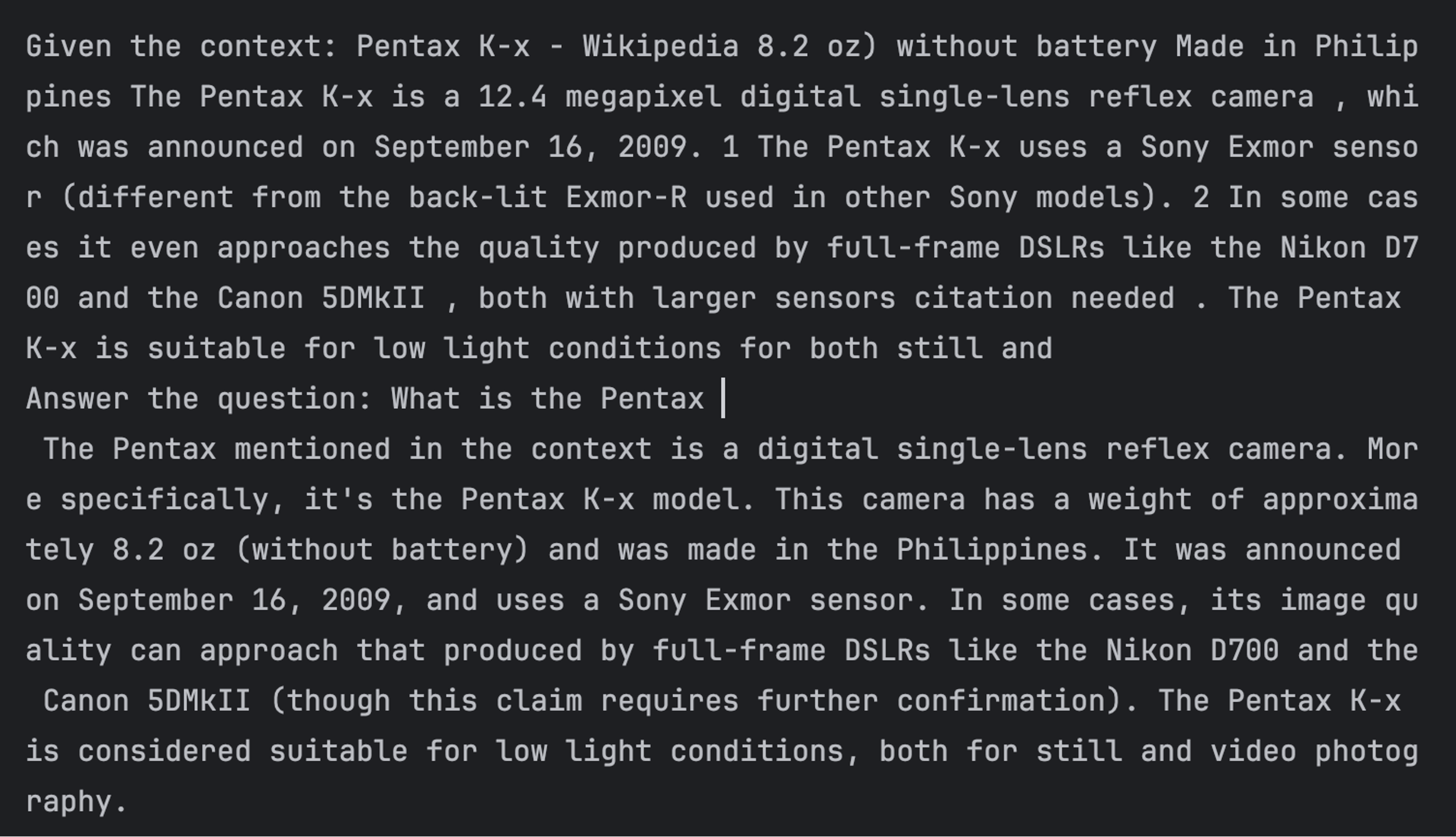
- 我们使用 Ollama 的编程包装器将自然语言查询和上下文文本传递给 LLM 的请求 API 并获取响应。我们提交了三个查询,并在每个查询的上下文中收到答案。第一个查询的示例屏幕截图如下所示。
import psycopg2
import ollama
import re
from sentence_transformers import SentenceTransformer

# Your connection params and credentials here

MY_DB_HOST = 'localhost'
MY_DB_PORT = 5432
MY_DB_NAME = 'nitin'
MY_DB_USER = 'nitin'
MY_DB_PASSWORD = ''

# Note that this model needs to be the same as the model used to create the embeddings in the articles table.

embedding_model = SentenceTransformer('multi-qa-mpnet-base-dot-v1')

# Below are some low-level functions to clean up the text returned from our Wikipedia URLs.
# It may be necessary to develop small custom functions like these to handle the vagaries of each of your sources.
# At this time there is no 'one size fits all' tool that does the cleanup in a single call for all sources.
# The 'special_print' function is a utility for printing chunked text on the console.

def chunk_string(s, chunk_size):
    chunks = [s[i:i+chunk_size] for i in range(0, len(s),chunk_size)]
    return '\n'.join(chunks)

def clean_text(text):
    text = re.sub(r'\s+', ' ', text)
    return text.replace("[", "").replace("]", "")

def special_print(text, width=80):
    print(chunk_string(clean_text(text), width))
    return


def query_ollama(query, context):

    # Note: The model can be changed to suit your available resources.
    # Models smaller than 8b may have less satisfactory performance.

    response = ollama.chat(model='llama3:8b', messages=[
      {
        'role': 'user',
        'content': context + query,
      },
    ])
    response_content = response['message']['content']

    special_print(context + "\n")
    special_print(query + "\n")
    special_print(response_content + "\n")
    return response_content

# Create sample queries

# Set up the database connection

conn = psycopg2.connect(
    host=MY_DB_HOST,
    port=MY_DB_PORT,
    dbname=MY_DB_NAME,
    user=MY_DB_USER,
    password=MY_DB_PASSWORD
)
cur = conn.cursor()

# There are 3 queries each focused on one of the 4 pages we ingested.
# One is deliberately left out to make sure that the extra page does not create hallucinations.
# Feel free to add or remove queries.

queries = [
    "What is the Pentax",
    "In what state in the USA is Onalaska",
    "Is the Doberman Pinscher extinct?"
]

# Perform similarity search for each query

for query in queries:

    # Here we do the crucial step of encoding a query using the same embedding model
    # as used in populating the vector db.

    query_embedding = embedding_model.encode([query])[0].tolist()

    # Here we fetch the title and article text for the top match using cosine similarity search.
    # We pass in the embedding of the query text to be matched.
    # The query embedding will be matched by similarity search to the closest embedding in our vector db.
    # the  operator is the cosine similarity search.
    # We are asking for the top three matches ordered by similarity.
    # We will pick the top one; we could just as easily have asked for the top one via 'LIMIT 1'.

    cur.execute('''
    	SELECT title, text
    	FROM articles
    	ORDER BY embedding  CAST(%s as vector)
    	LIMIT 3;
	''', (query_embedding,))
    result = cur.fetchone()

    if result:
        article_title = result[0]
        relevant_text = result[1]

        #special_print(f"Query: {query}")
        #special_print(f"Relevant text: {relevant_text}")
        #special_print(f"Article title: {article_title}")
        print("------------------------------------------\n")

        # Format the query to the LLM giving explicit instructions to use our search result as context.
        query_ollama("Answer the question: " + query + "\n", "Given the context: " + "\n" + article_title + "\n" + relevant_text + "\n")
    else:
        print(f"Query: {query}")
        print("No relevant text found.")
        print("---")

# Close the database connection

cur.close()
conn.close()

# End of file
请注意,这与我们在前面的文章中采用的方法相同,只是我们使用了带有向量扩展的 Postgres。这使我们能够依赖熟悉的 SQL 概念,但使用一个额外的运算符 (<==>),并通过已安装的 pgvector 扩展来扩展我们的 RDBMS 知识以包含向量数据。因此,我们可以透明地看到 RAG 调查过程的每一步都发生了什么。
这里我们没有使用 LangChain 检索链、OpenAI 嵌入 API 或 OpenAI 聊天模型,所有这些都是黑匣子。在这里,我们可以检查数据库表的内容,我们可以看到执行相似性搜索的 SQL 的语法,我们可以看到搜索返回的内容,以及如何将其用作上下文以将查询传递给 LLM。甚至我们发送到 LLM也是可修改的。
如果我们将它与我们在第一篇文章中逐步介绍的本地 RAG 实现进行比较,该技术更加透明,并且现在的步骤更加精细。
作者 Nitin Borwankar
特约撰稿人
