



Whoami:5年+金融、政府、医疗领域工作经验的DBACertificate:OCP、PCP、YCPSkill:Oracle、Mysql、PostgreSQL、国产数据库Platform:CSDN、墨天伦、公众号(呆呆的私房菜)
上周末参加了崖山数据库举办的中级认证考试,今天就发证啦~
那么今天就来分享一下崖山数据库关于运维方面常用的脚本吧~

## 据库启停##由于服务都是通过yasboot工具管理 ,所以必须先启动om和agent服务。yasboot process yasagent start -c yashandbyasboot process yasagent status -c yashandbyasboot process yasom start -c yashandbyasboot process yasom status -c yashandb## 查看状态yasql sys/yashan#2023@127.0.0.1:1688 -c "select database_name from v\$database;"yasql sys/yashan#2023@127.0.0.1:1688 -c "select status from v\$instance;"yasboot cluster status -c yashandb##启动数据库yasboot cluster start -c yashandb -m nomountyasboot cluster start -c yashandb -m mountyasboot cluster start -c yashandb数据库启动的三个状态: nomount --> mount --> opennomount 可通过 alter database mount; alter database open;的方式推进启动进度。##关闭数据库yasboot cluster stop -c yashandb##重启数据库yasboot cluster restart -c yashandb-- 表空间大小查询select id,dt.tablespace_name,max_size 1024 1024 max_size_mb,total_bytes 1024 1024 total_size_mb,ts_used_size_mb,status,contents,logging,allocation_type,block_size,segment_space_management,encryptedfrom dba_tablespaces dtleft join (select tablespace_name,sum(bytes) 1024 1024 ts_used_size_mbfrom dba_segments dgroup by d.tablespace_name) egon dt.tablespace_name = eg.tablespace_name;-- 临时表空间信息SELECT FILE_ID,FILE_NAME,STATUS,BYTES 1024 1024 SIZE_MB,AUTOEXTENSIBLE,TABLESPACE_NAME,MAXBYTES 1024 1024 MAXSIZE_MB,INCREMENT_BYFROM DBA_TEMP_FILES;-- 日志文件信息select thread#,name,block_size,block_count,used_blocks,sequence#,statusfrom v$logfile;-- 用户信息select username,user_id,password,account_status,lock_date,expiry_date,default_tablespace,created,authentication_type,last_login,password_change_date,database_maintained,profilefrom dba_users;-- 密码过期可通过加密密文修改:alter user xx identified by values "S:39435DAFBF9608EF2430B7AFD1169B7A949D96D9397C2070F39DAB47D70FCB126A1BC1E5A63BD60F8A70" default tablespace users;-- 所有用户角色select grantee,granted_role privilege,'role_privs' privilege_type,case admin_optionwhen 'y' then'yes'else'no'end admin_optionfrom dba_role_privsunionselect grantee, privilege, 'sys_privs' privilege_type, admin_optionfrom dba_sys_privsunionselect grantee,privilege || ' on ' || owner || '.' || table_name privilege,'table_privs' privilege_type,grantablefrom dba_tab_privs twhere t.grantee in(select usernamefrom all_users awhere a.username not in ('sys', 'sysdba', 'syssso', 'sysauditor'))order by grantee, privilege_type, privilege;-- 查看参数select * from v$parameter;show parameter xx;-- 统计对象情况select d.owner, d.object_type, count(*) cntfrom dba_objects dwhere d.owner not in ('sys', 'sysdba', 'syssso', 'ctisys', 'sysauditor')group by d.owner, d.object_type;-- 查看推荐参数exec DBMS_PARAM.OPTIMIZE();select dbms_param.show_recommend() as recommend_settings from dual;-- 查看归档情况select database_id, database_name, log_mode, block_size, restore_time from v$database;-- 查看每小时归档情况select left(first_time, 10) day,sum(decode(substr(first_time, 12, 2), '00', 1, 0)) h00,sum(decode(substr(first_time, 12, 2), '01', 1, 0)) h01,sum(decode(substr(first_time, 12, 2), '02', 1, 0)) h02,sum(decode(substr(first_time, 12, 2), '03', 1, 0)) h03,sum(decode(substr(first_time, 12, 2), '04', 1, 0)) h04,sum(decode(substr(first_time, 12, 2), '05', 1, 0)) h05,sum(decode(substr(first_time, 12, 2), '06', 1, 0)) h06,sum(decode(substr(first_time, 12, 2), '07', 1, 0)) h07,sum(decode(substr(first_time, 12, 2), '08', 1, 0)) h08,sum(decode(substr(first_time, 12, 2), '09', 1, 0)) h09,sum(decode(substr(first_time, 12, 2), '10', 1, 0)) h10,sum(decode(substr(first_time, 12, 2), '11', 1, 0)) h11,sum(decode(substr(first_time, 12, 2), '12', 1, 0)) h12,sum(decode(substr(first_time, 12, 2), '13', 1, 0)) h13,sum(decode(substr(first_time, 12, 2), '14', 1, 0)) h14,sum(decode(substr(first_time, 12, 2), '15', 1, 0)) h15,sum(decode(substr(first_time, 12, 2), '16', 1, 0)) h16,sum(decode(substr(first_time, 12, 2), '17', 1, 0)) h17,sum(decode(substr(first_time, 12, 2), '18', 1, 0)) h18,sum(decode(substr(first_time, 12, 2), '19', 1, 0)) h19,sum(decode(substr(first_time, 12, 2), '20', 1, 0)) h20,sum(decode(substr(first_time, 12, 2), '21', 1, 0)) h21,sum(decode(substr(first_time, 12, 2), '22', 1, 0)) h22,sum(decode(substr(first_time, 12, 2), '23', 1, 0)) h23,count(*) totalfrom v$archived_logwhere first_time>=(sysdate-7)group by left(first_time, 10)order by left(first_time, 10) desc;-- 会话情况select count(*) cnt,a.ip_address,a.cli_program,a.cli_hostname,a.cli_osuser,a.username,a.statusfrom v$session agroup by a.ip_address,a.cli_program,a.cli_hostname,a.cli_osuser,a.username,a.statusorder by count(*) desc;-- 查看错误日志select * from (select incident_id, session_id, error_number, error_argument, error_comments from v$diag_incident) where rownum<=100;-- 查看awr信息select dbid, snap_interval, retention, most_recent_snap_id, most_recent_snap_time, status_flag from sys.wrm$_wr_control;-- 查看慢sqlselect *from (select sa.SQL_TEXT,sa.SQL_FULLTEXT,sa.EXECUTIONS "执行次数",round(sa.ELAPSED_TIME 1000000, 2) "总执行时间",round(sa.ELAPSED_TIME 1000000 sa.EXECUTIONS, 2) "平均执行时间",sa.COMMAND_TYPE,sa.PARSING_USER_ID "用户ID",u.username "用户名",sa.HASH_VALUEfrom v$sqlarea saleft join all_users uon sa.PARSING_USER_ID = u.user_idwhere sa.EXECUTIONS > 0order by (sa.ELAPSED_TIME sa.EXECUTIONS) desc)where rownum <= 5;-- 查看事务隔离级别select * from v$transaction;-- 等待事件select * from (select * from v$system_event order by total_waits desc) where rownum<=20;-- 查看TX锁对象(被阻塞的会话)select inst_id, sid, serial#, username, sql_id, lockwait, wait_event, ip_address from gv$session where wait_event is not null;select sql_id, sql_text from gv$sqltext where sql_id = '';-- 查看锁源select * from v$lock; --拿取sidselect sql_text from "V_$SQLTEXT" a join "V_$SESSION" b on a.HASH_VALUE = b.SQL_HASH_VALUE AND b.sid = xx;select l.lmode,o.owner,o.object_name,o.object_type,s.sid,s.serial#,s.sql_id,st.sql_text,p.THREAD_IDfrom v$locked_object l,dba_objects o,v_$session s,v$process p,v$sqltext,v_$sqltext stwhere l.object_id = o.object_idand l.session_id = s.sidand s.paddr = p.THREAD_ADDRand st.hash_value = s.sql_hash_valueorder by o.object_id;-- 查看前5系统等待事件select * from gv$session_wait where wait_event is not null;select * from (select * from gv$system_event order by AVERAGE_WAIT_FG desc) where rownum <=5;select * from (select * from gv$system_wait_class order by time_waited desc ) where rownum <= 5;
1. SQL命令备份恢复
##1. 数据库全备mkdir -p home/yashan/backup/yasql as sysdbabackup database full format '/home/yashan/backup/full_20211209191000' tag 'yashan_fullbak_20231129' parallelism 3;##2. 数据库0级备份和1级备份backup database incremental level 0 format '/home/yashan/backup/base_0_20231129';backup database incremental level 1 format '/home/yashan/backup/incr_1_20231129';##3. 数据库恢复yasboot cluster stop -c yashandbyasboot cluster start -c yashandb -m nomount##注:恢复之前,要先清空数据目录restore database from '/home/yashan/backup/base_0_20231129' parallelism 3;recover database; --恢复到最新--restore database until time to_date('2023-11-29 11:50:50','yyyy-mm-dd hh24:mi:ss'); --恢复到指定时间点alter database open <resetlogs>;
2. yasrman备份恢复
##1. 创建catalogyasrman sys/sys@127.0.0.1:1688 -c 'create catalog' -D home/yashan/catalogyasrman sys/sys@127.0.0.1:1688 -c 'show all' -D home/yashan/catalog## 2. 数据库全备yasrman sys/yashan#2023@127.0.0.1:1688 -c "backup database full format '/home/yashan/backup/full_001' tag 'full_backup' parallelism 3" -D /home/yashan/catalog##不指定存放路径的话,默认备份存放路径:$YASDB_DATA/backup##3. 数据库0级备份和1级备份## 0级备份yasrman sys/yashan#2023@127.0.0.1:1688 -c "backup database incremental level 0 format '/home/yashan/backup/full_001' tag 'full_backup' parallelism 3" -D /home/yashan/catalogyasrman sys/yashan#2023@127.0.0.1:1688 -c "backup database incremental level 1 format '/home/yashan/backup/full_001' tag 'full_backup' parallelism 3" -D /home/yashan/catalog## 1级备份##4. 查看备份集yasrman sys/yashan#2023@127.0.0.1:1688 -c "list backup" -D /home/yashan/catalog##4. 删除备份集##(物理)yasrman sys/yashan#2023@127.0.0.1:1688 -c "delete backupset tag 'full_backup1'" -D /home/yashan/catalog
3. 备份策略示例
每周日全备1次,周一到周六增备1次
cat /home/yashan/script/yashan_backup.sh#!/bin/bash############################################## Scipt is uesd to set backup level 0 policy.# Author: Rae# Date: 2023/11/29# Version: 1.0############################################## Set enviroment parametersource ~/.bash_profileexport DATE=`date +%Y%m%d-%H%M%S`export CURRENT_DATE=`date +%A`BAK_PATH="/home/yashan/backup"CATALOG_PATH="/home/yashan/catalog"BAK_LOG="/home/yashan/backup/yashan_backup.log"USERNAME="sys"PASSWORD="yashan#2023"IP="127.0.0.1"PORT=1688PARALLELISM=4# Create necessary directoryif [ ! -d ${BAK_PATH} ];thenmkdir -p ${BAK_PATH}fiif [ ! -d ${CATALOG_PATH} ];thenmkdir -p ${CATALOG_PATH}yasrman ${USERNAME}/${PASSWORD}@127.0.0.1:1688 -c 'create catalog' -D ${CATALOG_PATH}echo "`date +%Y%m%d-%H%M%S` | [Info] | Success create yashan catalog !" >> ${BAK_LOG}fiif [ ${CURRENT_DATE} == "Sunday" ];thenecho "`date +%Y%m%d-%H%M%S` | [Info] | Begin backup databaseincremental level 0 !" >> ${BAK_LOG}yasrman ${USERNAME}/${PASSWORD}@${IP}:${PORT} -c "backup database incremental level 0 format '${BAK_PATH}/level0_${DATE}' tag 'level0_${DATE}'" -D ${CATALOG_PATH}echo "`date +%Y%m%d-%H%M%S` | [Info] | Success backup databaseincremental level 0 !" >> ${BAK_LOG}elseprevious_sunday=`date -d "last Sunday" +%Y%m%d`result=`yasrman ${USERNAME}/${PASSWORD}@${IP}:${PORT} -c "list backup" -D ${CATALOG_PATH} | grep "tag" | grep "level0" | grep ${previous_sunday} | wc -l`if [[ ${result} == 1 ]];thenecho "`date +%Y%m%d-%H%M%S` | [Info] | Begin backup databaseincremental level 1 !" >> ${BAK_LOG}yasrman ${USERNAME}/${PASSWORD}@${IP}:${PORT} -c "backup database incremental level 1 format '${BAK_PATH}/level0_${DATE}' tag 'level1_${DATE}'" -D ${CATALOG_PATH}echo "`date +%Y%m%d-%H%M%S` | [Info] | Success backup databaseincremental level 1 !" >> ${BAK_LOG}elseecho "`date +%Y%m%d-%H%M%S` | [Info] | Begin backup databaseincremental level 0 !" >> ${BAK_LOG}yasrman ${USERNAME}/${PASSWORD}@${IP}:${PORT} -c "backup database incremental level 0 format '${BAK_PATH}/level0_${DATE}' tag 'level0_${DATE}'" -D ${CATALOG_PATH}echo "`date +%Y%m%d-%H%M%S` | [Info] | Success backup databaseincremental level 0 !" >> ${BAK_LOG}fifi#配置定时任务crontab -l0 1 * * * /home/yashan/script/yashan_backup.sh
1. AWR报告
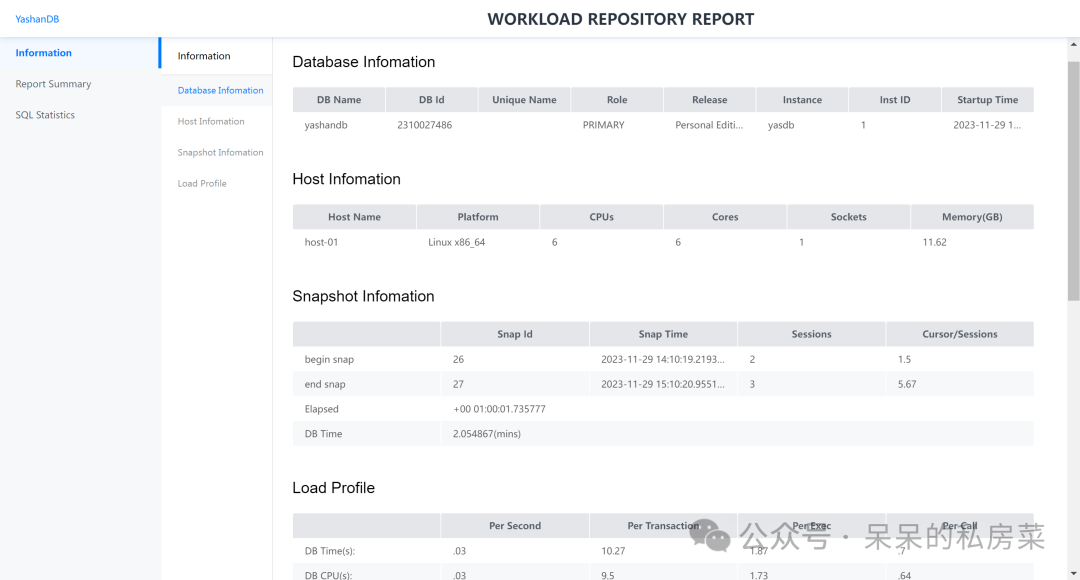
select dbid, instance_number, snap_id, begin_interval_time from WRM$_SNAPSHOT;set serveroutput onexec dbms_awr.awr_report(dbid,instance_number,start_snap_id,stop_snap_id);手工创建快照:exec dbms_awr.create_snapshot();
主要记录了数据库基本信息、数据库负载情况以及SQL执行情况。
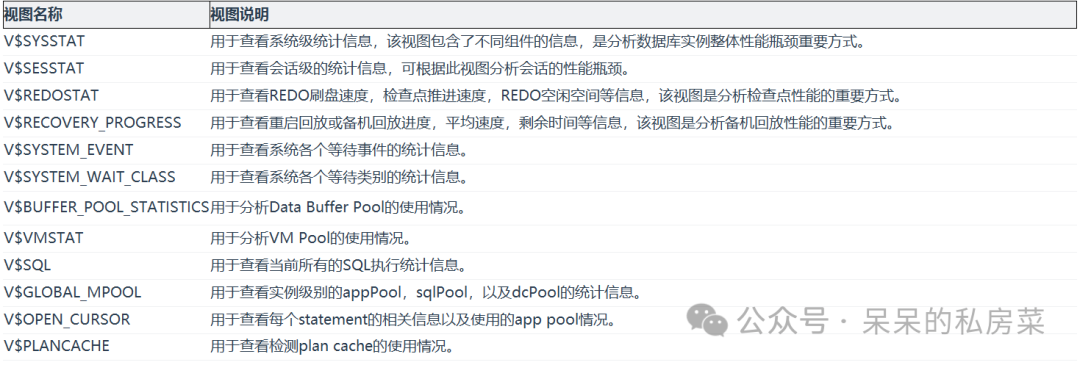
2. 性能视图
3. 执行计划
方式1:explain select * from a, b where a.id = b.id;方式2:alter session set statistic_level = all;set autotrace on;select * from a, b where a.id = b.id;
4. 统计信息
判断列统计信息准确性(最大值,最小值判断):select max(id), min(id) from t1;select high_value, low_value from dba_tab_col_statistics where table_name = 'T1' and column_name = 'ID';查看统计信息是否失效:select owner, table_name, num_rows, avg_space, chain_cnt, sample_size, last_analyzed, global_stats, stale_stats from dba_tab_statistics where table_name = 'T1';统计信息收集:ANALYZE TABLE t1 PARTITION NULL INDEX_CASCADE true METHOD_OPTION 'FOR ALL COLUMNS' GRANULARITY 'AUTO' PARALLEL_DEGREE 1;
5. hint调优
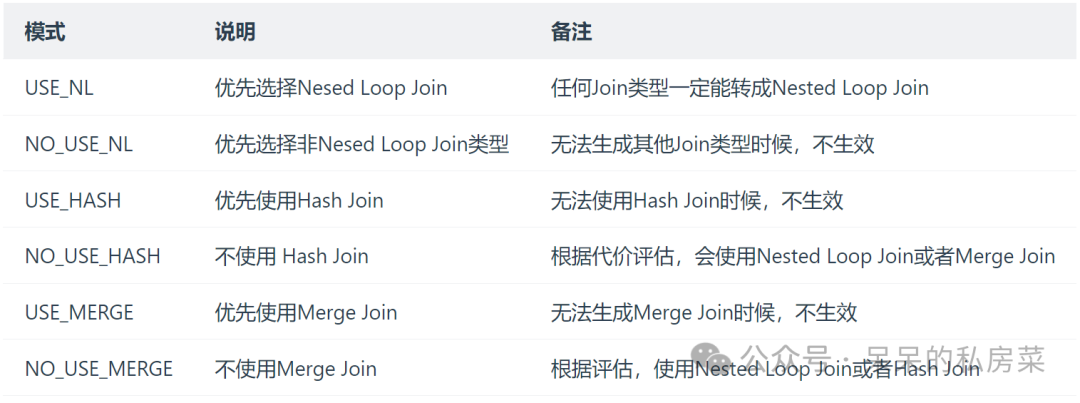
改变join的hint
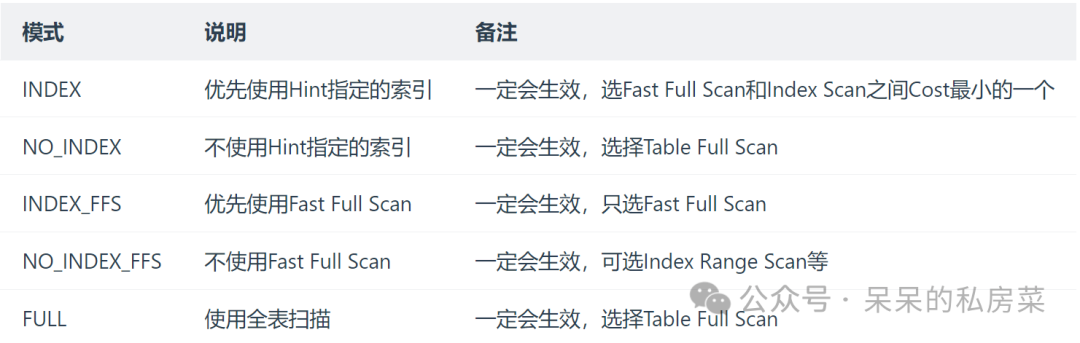
改变访问路径的hint
选择率的hint
explain select * from t1, t2, t3 where t1.c1 = t2.c1 selectivity 0.0001 and t2.c1 = t3.c1;
绑定执行计划outline
-- 对给定的SQL创建OUTLINE。CREATE OUTLINE ol_a FOR CATEGORY ctgy_ab ONSELECT /*+ FULL(a) */ a.area_nameFROM area aWHERE a.area_no LIKE '01';-- 对给定的源outline 进行复制,且归属到默认的DEFAULT类别CREATE OUTLINE ol_a1 FROM ol_a;
1. 崖山数据库大部分视图与Oracle一致,运维学习成本较低,具备Oracle经验的工程师可以快速轻松上手;
2. 针对数据库历史运行情况和状态的数据库视图较少,遇性能问题或回溯历史事件时分析存在难度;
3. 部分功能的运维体验感有待提升,如awr无法直接导出,亦无类似oracle的addm等功能;
4. 数据库国产化路上依然任重道远,还需要在实践中不断去优化,在保证数据库稳定性的同时,不断去扩展产品功能,优化产品性能,提高用户体验,锤炼出一款真正“好用”、“耐用“的产品。
本文内容就到这啦,阅读完本篇,相信你对崖山数据库的日常运维知识有了一定的认识了吧!我们下篇再见!
文章转载自呆呆的私房菜,如果涉嫌侵权,请发送邮件至:contact@modb.pro进行举报,并提供相关证据,一经查实,墨天轮将立刻删除相关内容。
